Data Preprocessing
Data Cleaning
Handling Missing Values
In real-world datasets like AllElectronics, tuples often lack recorded values for attributes such as Customer Income. Missing data can lead to biased results or algorithm failure.
Ignore the Tuple:
Best used when the class label is missing.
Drawback: Highly ineffective if the missing rate is high; wastes other useful information in the same row.
Manual Filling:
Human intervention to find the correct value.
Drawback: Scalability. Impossible for Big Data.
Global Constant:
Replace all blanks with a label like
"Unknown"or-1.Drawback: The algorithm may wrongly cluster all "Unknowns" as a meaningful group.
Measure of Central Tendency (Global):
Use the Mean for symmetric (Normal) distributions.
Use the Median for skewed (offset) distributions.
Class-Based Central Tendency:
Instead of a global average, use the average of the specific group the tuple belongs to (e.g., mean income of "High Risk" customers only).
Most Probable Value (Predictive):
Use Regression or Decision Trees to guess the value based on other attributes.
Note: This is the most popular strategy as it uses all available information.
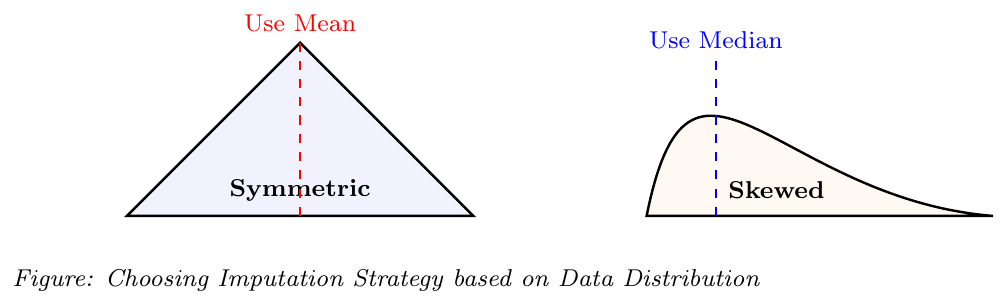
Suppose you have a missing income for a customer who is a "Software Engineer".
Global Mean: 56,000 (Uses everyone from interns to CEOs).
Class-based Mean: 95,000 (Uses only the mean of other "Software Engineers").
Regression: 98,500 (Predicts value based on Education, Age, and Location).
Sometimes a NULL is intentional.
Not Applicable: A "Driver's License" field left blank by someone without a license.
Business Process: Fields to be filled in a later stage of a workflow.
Pro-Tip: Good database design with specific "Null Rules" is better than any post-capture cleaning!
Noisy Data: Binning, Regression, and Clustering
Noise is a random error or variance in a measured variable. While outliers can sometimes be valid extreme data points, noise is typically incorrect data that needs "smoothing" to reveal the underlying pattern.
1. Binning (Local Smoothing)
Binning methods smooth sorted data by consulting its neighborhood (the values around it).
Step 1: Sort the data.
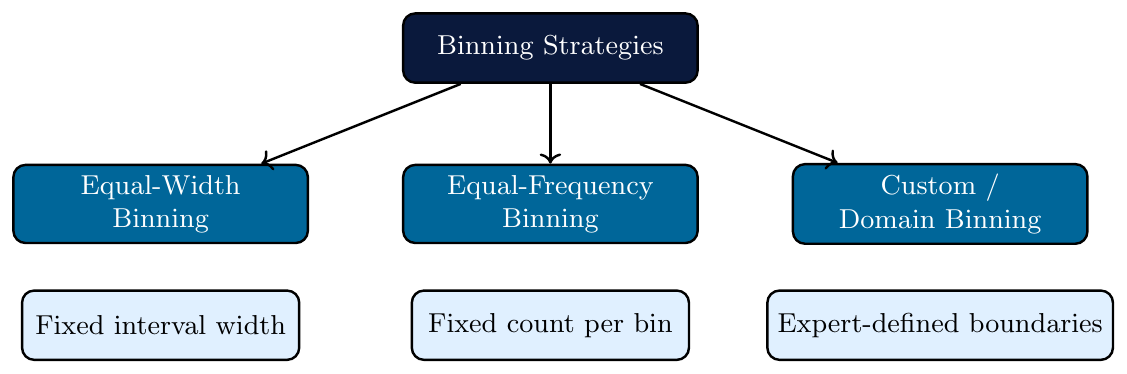
Step 2: Partition into bins (Equal-frequency or Equal-width).
Step 3: Apply smoothing logic (Means, Medians, or Boundaries).
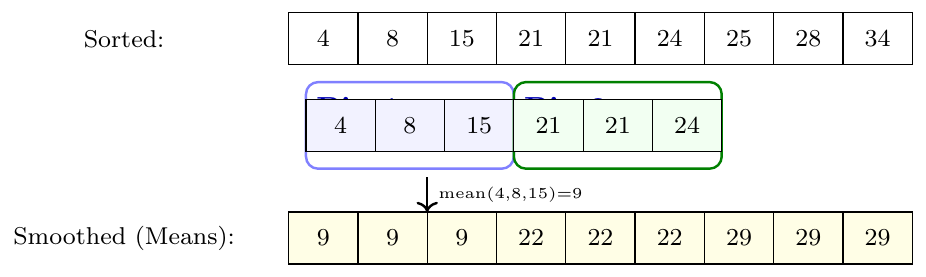
In Bin 1: [4, 8, 15], the boundaries are 4 and 15.
8 is closer to 4 than to 15.
Resulting Bin: [4, 4, 15].
2. Regression & Outlier Analysis
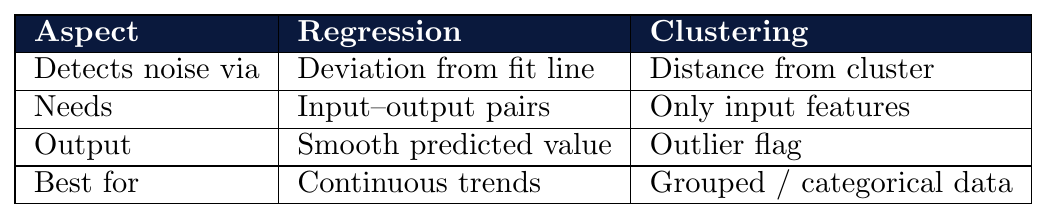
Fit a mathematical function to the data — points that deviate far from the function are noise.
Linear Regression: fits a straight line $\hat{y} = \beta_0 + \beta_1 x$
Noisy points are smoothed — replaced by their predicted value on the line
The line captures the true trend; scatter around it is treated as noise
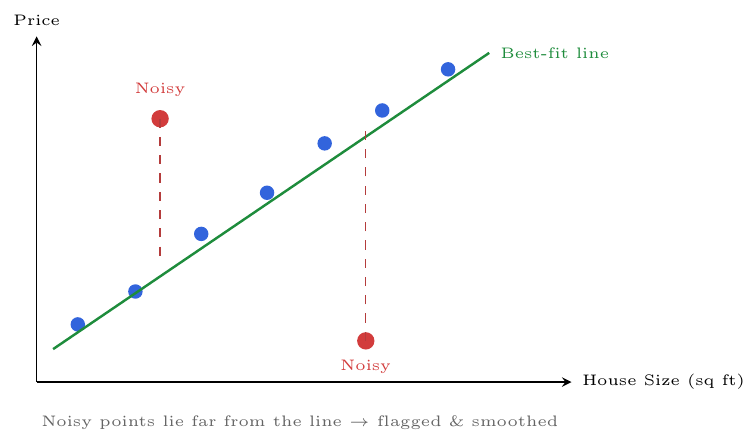
A teacher records study hours and exam scores for 30 students.
One student studied 2 hours but scored 95 (unusually high — maybe copied).
Another studied 8 hours but scored 20 (unusually low — maybe sick).
Regression fits a line: $\text{Score} = 40 + 6 \times \text{Hours}$
Both students deviate far from the line $\rightarrow$ flagged as noisy records
Options: smooth them to their predicted value, or remove them entirely
Group data into clusters — points that do not belong to any cluster are outliers (noise).
Similar records form tight clusters
Points far from all cluster centres $\rightarrow$ flagged as anomalies
No mathematical model needed — purely distance-based
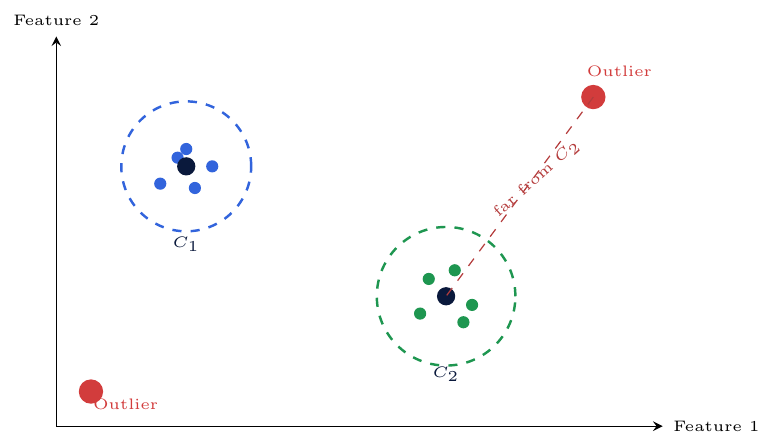
A bank has 1 million transaction records.
Clustering groups them into normal spending clusters:
Groceries cluster, Rent cluster, Entertainment clusterA transaction of $50,000 at 3 AM falls far outside every cluster
$\Rightarrow$ Flagged as an outlier — potential fraud or data entry error
Key insight: No rule was written manually — the data itself revealed what is “unusual.”
Data Reduction
Large-scale datasets can take an enormous amount of time to process. Data Reduction techniques obtain a reduced representation of the data set that is much smaller in volume, yet yields the same (or almost the same) analytical results.
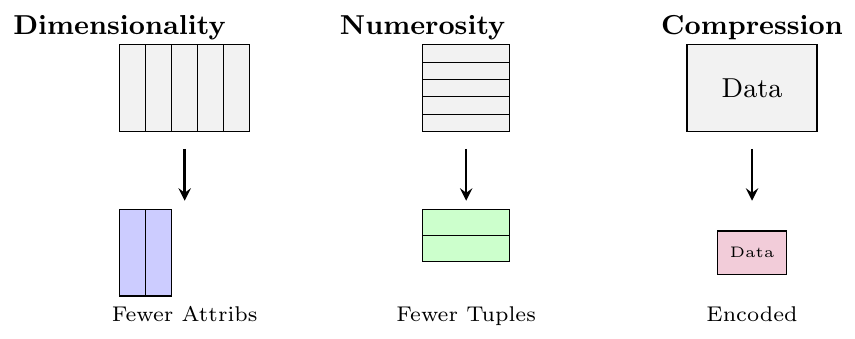
Dimensionality Reduction: Removing irrelevant or redundant attributes (e.g., Wavelet transforms, PCA, Feature subset selection).
Numerosity Reduction: Replacing the original data with smaller forms of data representation.
Parametric: Storing only model parameters (e.g., Regression).
Non-parametric: Storing reduced samples (e.g., Histograms, Clustering, Sampling).
Data Compression: Applying transformations (lossy or lossless) to reduce the file size.
Dimensionality Reduction
Dimensionality reduction is the process of reducing the number of random variables, attributes, or features under consideration in a dataset. This is typically achieved through two primary approaches:
Principal Components Analysis (PCA): A linear method that transforms or projects the original data onto a smaller space, preserving as much variance as possible.
Attribute Subset Selection: A method that identifies and removes irrelevant, weakly relevant, or redundant attributes or dimensions from the dataset.
Principal Component Analysis
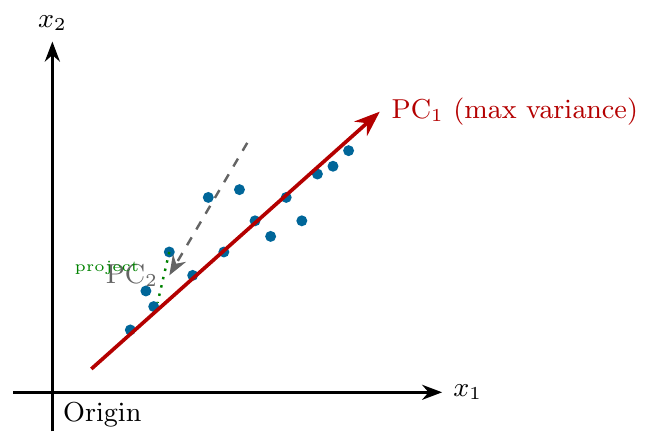
Finds a lower-dimensional representation that captures maximum variance.
Computes principal components — orthogonal directions of maximum variance
Projects data onto the top $k$ components, discarding the rest
Original $n$ dimensions reduced to $k \ll n$ dimensions
Information loss is controlled by choosing $k$ such that retained variance is high (e.g., 95%)
A student dataset has 10 attributes:
Math, Physics, Chemistry, Biology, History, Geography, English, CS, Economics, PE
PCA applied $\rightarrow$ finds that the first 2 principal components explain 88% of total variance
Data projected from 10 dimensions $\rightarrow$ 2 dimensions
PC$_1$ may represent “Science aptitude”; PC$_2$ may represent “Humanities aptitude”
Remaining 8 components discarded — small information loss, major storage gain
Clustering and classification now run on 2 features instead of 10
Feature Subset Selection
Attribute subset selection reduces the dataset by retaining only the relevant attributes and removing redundant or irrelevant ones.
Also called feature selection
Irrelevant attributes: no useful information for the mining task
Redundant attributes: information already present in another attribute
Goal: find the minimum set of attributes that best represents the data
Reduces dimensionality — fewer attributes to process
Speeds up learning algorithms — less computation
Improves model accuracy — removes noise from irrelevant features
Avoids the curse of dimensionality — too many features degrade performance
Produces simpler, more interpretable models
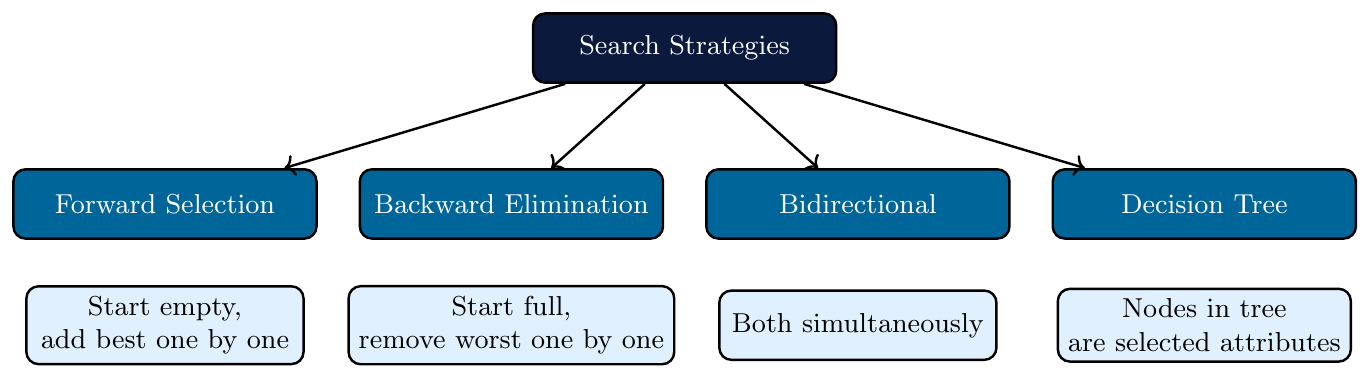
Begin with an empty set of attributes
At each step, add the attribute that most improves model performance
Stop when adding more attributes no longer improves performance significantly
Efficient when the number of relevant attributes is small
Dataset has attributes: {Age, Income, ZipCode, Gender, Purchase_History, WebClicks}
Task: Predict whether a customer will buy.
Step 1: Test each alone $\rightarrow$
Purchase_Historygives best accuracy $\rightarrow$ selectedStep 2: Add one more $\rightarrow$
Incomeimproves accuracy $\rightarrow$ selectedStep 3:
Ageadds marginal gain $\rightarrow$ selectedStep 4:
ZipCode,Gender,WebClicksadd no improvement $\rightarrow$ stoppedFinal subset: {
Purchase_History, Income, Age}
Begin with the full set of attributes
At each step, remove the attribute whose removal least affects performance
Stop when removing any remaining attribute causes a significant drop
Better when most attributes are relevant
Same dataset: {Age, Income, ZipCode, Gender, Purchase_History, WebClicks}
Step 1: Remove
ZipCode$\rightarrow$ accuracy unchanged $\rightarrow$ eliminatedStep 2: Remove
Gender$\rightarrow$ accuracy unchanged $\rightarrow$ eliminatedStep 3: Remove
WebClicks$\rightarrow$ slight drop, but acceptable $\rightarrow$ eliminatedStep 4: Removing any of {
Age, Income, Purchase_History} causes significant drop $\rightarrow$ stopFinal subset: {
Age, Income, Purchase_History} — same result as forward selection
A decision tree can be used to identify relevant attributes:
Build a decision tree on the training data
Attributes that appear as nodes in the tree are selected
Attributes not used in any split are considered irrelevant
Efficient — no separate search process needed
Dataset attributes: Age, Income, ZipCode, Gender, Purchase_History, WebClicks
Target: Will the customer buy? (Yes / No)
After building the decision tree on training data:
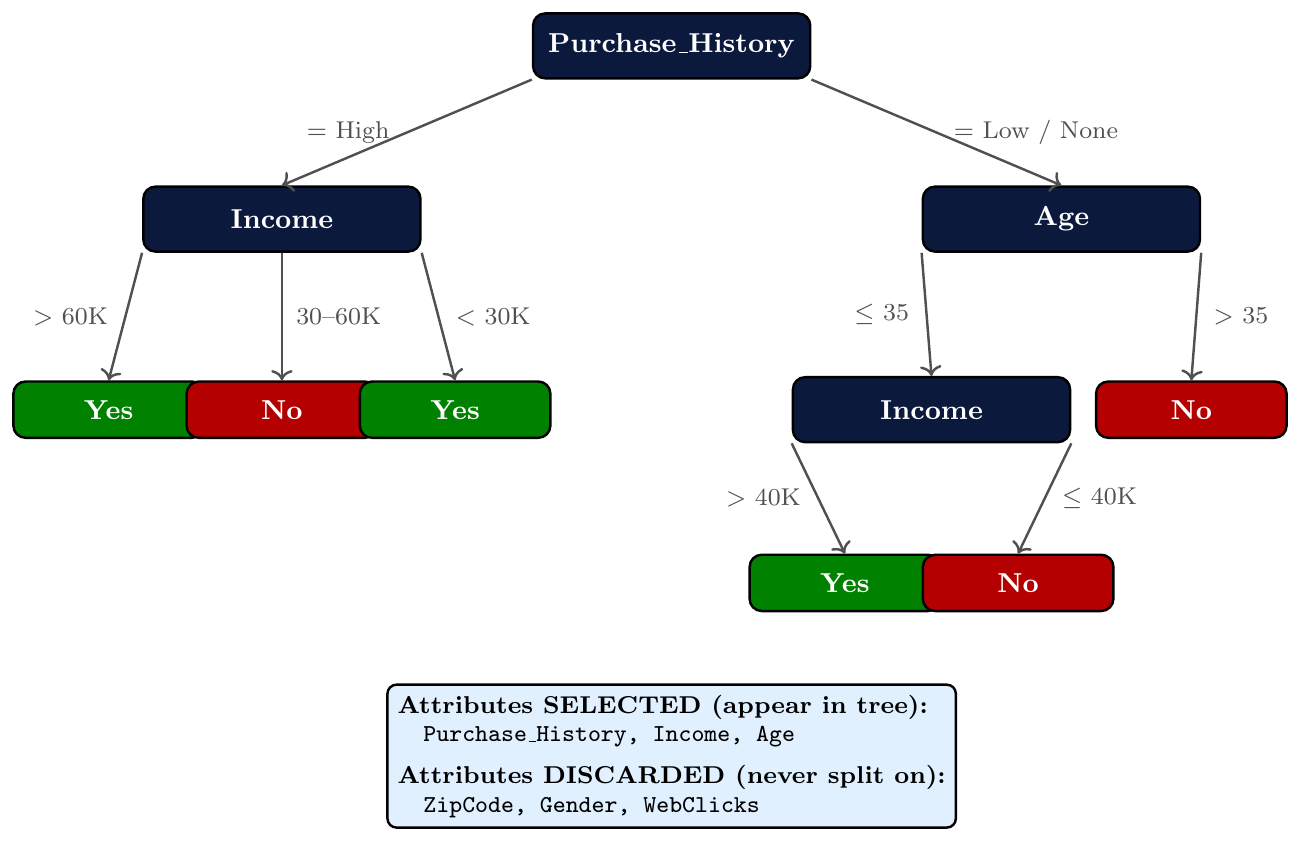
Root split:
Purchase_History— most informative attribute; splits data most cleanlyLevel 1:
Income(left branch) andAge(right branch) — next most relevantLevel 2:
Incomeappears again underAge— still relevant in that contextFinal selected subset: {
Purchase_History, Income, Age} — 3 of 6 attributesZipCode,Gender,WebClickswere never chosen for any split — discarded as irrelevant
Criteria used to evaluate which attributes to keep or discard:
Information Gain — reduction in entropy after splitting on an attribute
Gain Ratio — normalizes information gain to avoid bias toward many-valued attributes
Gini Index — measures impurity of a split
Correlation — removes attributes highly correlated with others (redundancy)
Numerosity Reduction
Sampling
Sampling is a numerosity reduction technique. It allows us to represent a massive dataset using a much smaller random subset.
If the sample is representative, patterns found in the small set hold true for the entire population
Key assumption: the distribution of the sample $\approx$ distribution of the population
Goal: minimize data processed while maximizing accuracy of results
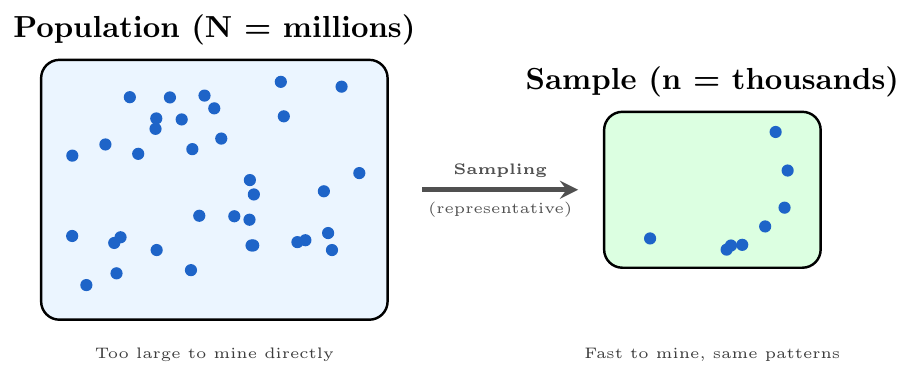
A sample is representative if it has approximately the same property (distribution) as the original population
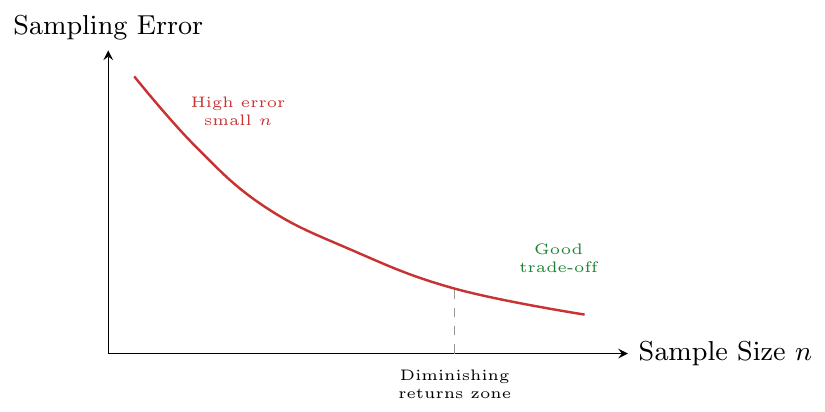
Sample size matters: larger $n$ $\Rightarrow$ lower sampling error, but higher cost
Randomness matters: without it, the sample becomes biased
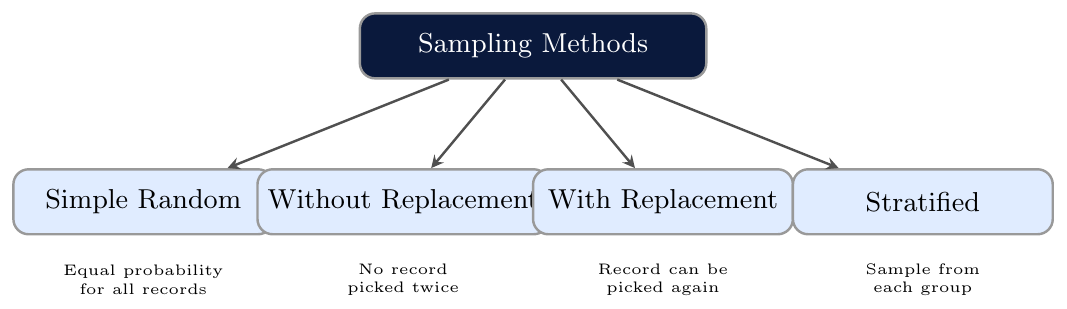
Every record in the dataset has an equal and independent probability of being selected. \[ P(\text{any record selected}) = \frac{n}{N} \] where $n$ = sample size, $N$ = population size.
Simplest and most unbiased method
Works best when population is homogeneous (similar records)
May miss rare subgroups in heterogeneous data
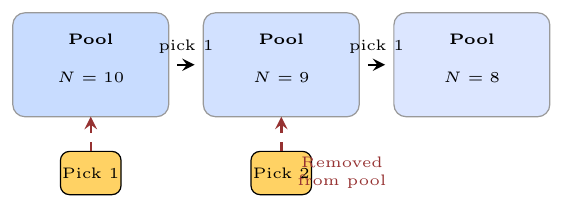
Once a record is selected, it is removed from the pool — it cannot be selected again.
Each draw changes the pool size: $N \to N-1 \to N-2 \dots$
Probability of selection increases slightly each round
More commonly used in practice — avoids redundancy
Every selected record is unique
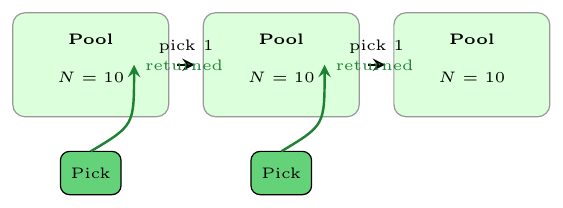
After a record is selected, it is put back into the pool — it may be selected again.
Pool size stays constant at $N$ every draw
Same record can appear multiple times in the sample
Used in bootstrapping — a powerful statistical technique
Probability of any record = $\frac{1}{N}$ always
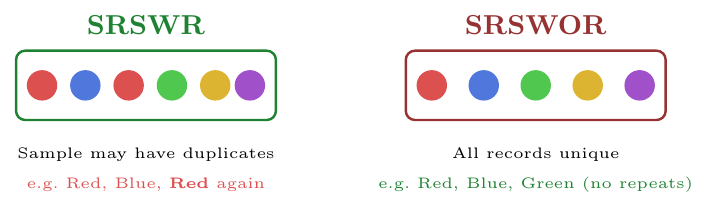
Imagine a bag with 10 coloured balls. You want to pick 3.
SRSWR: Pick a Red ball $\to$ record it $\to$ put it back.
Next turn, the same Red ball can be picked again. Bag always has 10 balls.SRSWOR: Pick a Red ball $\to$ keep it out.
Now only 9 balls remain. That Red ball is gone forever from the pool.
The population is first divided into non-overlapping groups (strata), then a random sample is drawn from each stratum.
Ensures all subgroups are proportionally represented
Reduces risk of missing rare but important subgroups
Two variants:
Proportional: sample size from each stratum $\propto$ stratum size
Equal: same number drawn from every stratum (regardless of size)
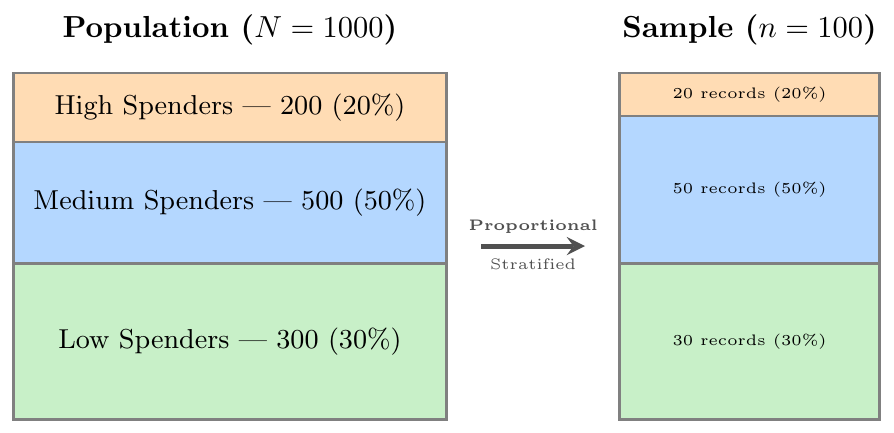
A university has 1,000 students across three streams:
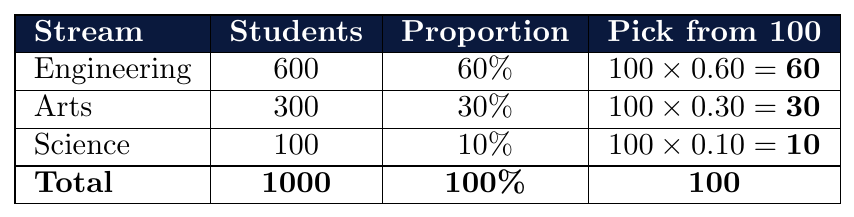
Result: The 100-student sample looks exactly like the full university — same proportions, smaller size.

Sampling error = difference between sample statistic and true population value
Two sources of error:
Bias — sample is not random; some records are systematically favoured
Variance — sample size too small; results fluctuate a lot
Both reduce as sampling is done more carefully and with larger $n$
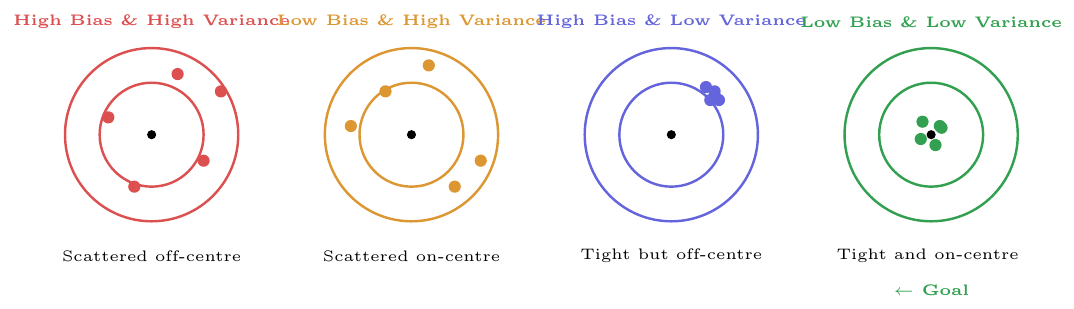
You want to know if a giant pot of soup needs more salt. You taste 5 spoonfuls.
Scenario A — Good Sample (Stirred):
Stir the pot thoroughly first, then take spoons from different depths and sides.
$\Rightarrow$ The 5 spoonfuls represent the whole pot accurately.Scenario B — Biased Sample (Unstirred):
Take all 5 spoons from the top where salt has settled.
$\Rightarrow$ You conclude the soup is too salty — but the bottom is bland.
This is sampling bias.Scenario C — Too Small a Sample:
Taste only 1 spoon from a 100-litre pot.
$\Rightarrow$ High variance — one spoon may not be representative at all.
Lesson: A good sample must be both random (stirred) and large enough (5+ spoons).

Clustering & Regression
Instead of storing all $N$ records, replace each cluster of similar records with just its centroid (center point).
Data is grouped into clusters of similar objects
Only the cluster representatives (centroids) are stored — not the raw data
Massive reduction: $N$ records $\rightarrow$ $k$ centroids ($k \ll N$)
Works well when data has natural groupings
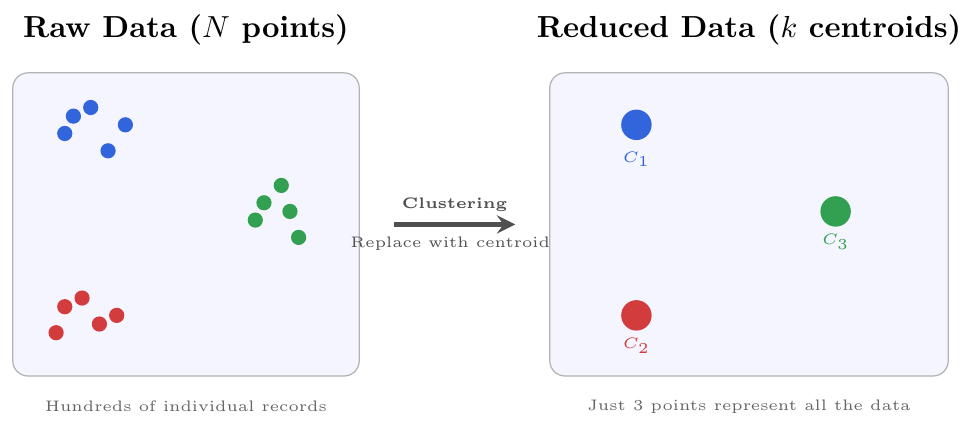
A dataset has the location (lat, long) of 10,000 houses in a city.
Clustering groups them into 5 city zones (North, South, East, West, Centre)
Each zone is represented by its centroid — the average location
Analysis now runs on 5 points instead of 10,000
Patterns like “crime is high in the East zone” are still discoverable
Trade-off: Fine-grained detail within a zone is lost — only the zone-level pattern survives.
Regression fits a mathematical model to the data — then the model replaces the data.
Linear Regression: fits a straight line $y = \beta_0 + \beta_1 x$
Store only 2 parameters ($\beta_0$, $\beta_1$) instead of $N$ data points
Multiple Regression: multiple predictors $\Rightarrow$ store $p+1$ parameters
Any future $y$ value is estimated from the model — raw data no longer needed
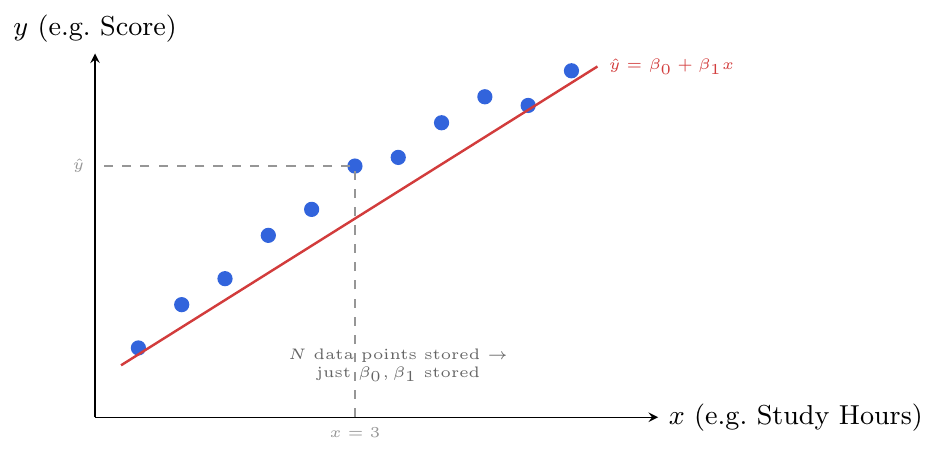
A dataset has 50,000 house sale records with (area $\to$ price).
Fit a regression: $\text{Price} = 5000 + 3200 \times \text{Area (sq ft)}$
Now store just two numbers: $\beta_0 = 5000$,\ $\beta_1 = 3200$
For any new house: plug in area, get predicted price instantly
50,000 rows replaced by one equation
Trade-off: Works only if the relationship is truly linear — nonlinear patterns need more complex models.

Data Compression
Data compression reduces the size of data by encoding it in fewer bits without losing (or with controlled loss of) information.
Reduces storage space and transmission cost
Two major types: Lossless and Lossy
In data mining, compression is a key dimensionality reduction strategy
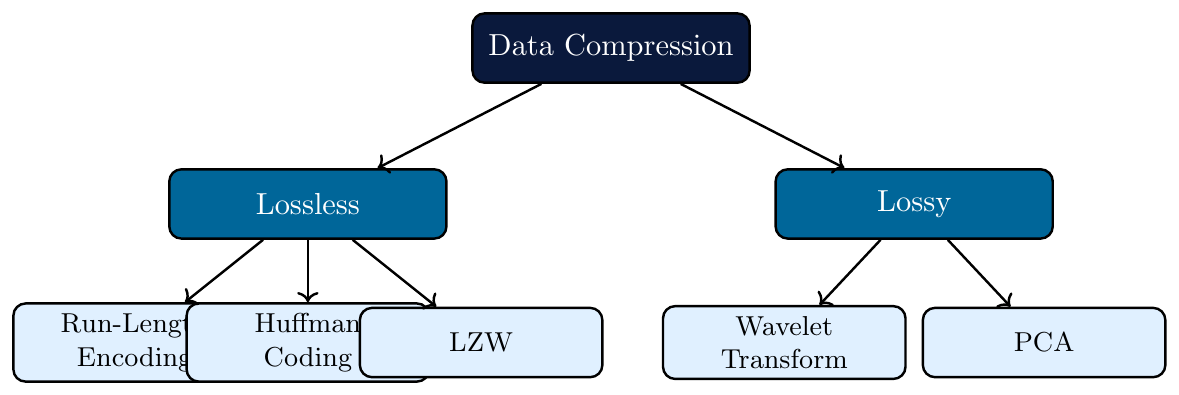
Lossless Compression
Lossless compression reduces data size such that the original data can be reconstructed exactly.
No information is discarded — decompressed output $\equiv$ original input bit-for-bit.
Exploits statistical redundancy: repeated symbols, predictable patterns, skewed frequencies.
Theoretical lower bound: Shannon entropy $H = -\sum_i p_i \log_2 p_i$ bits/symbol.
Applications: text files, source code, database columns, lossless image formats (PNG), archiving.
Run-Length Encoding (RLE)
RLE replaces consecutive runs of the same symbol with a (count, symbol) pair.
Encoding rule: scan left to right; emit $(\text{count}, \text{symbol})$ for each maximal run.
Decoding rule: for each pair $(\text{count}, \text{symbol})$, repeat symbol count times.
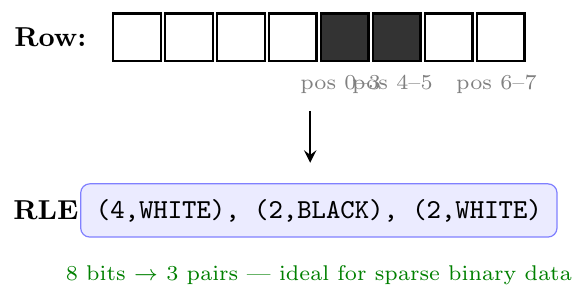
Best case: long uniform runs (binary bitmaps, fax images, sparse columns).
Worst case: alternating symbols — output larger than input (e.g.\
ABAB$\to$1A1B1A1B).Complexity: $O(n)$ encode and decode.
Diagram 1 — RLE Encoding Pipeline
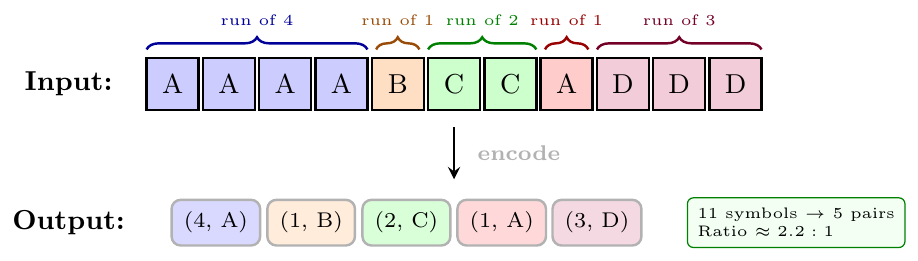
Diagram 2 — RLE on Binary Bitmap (Fax / Sparse Column)
Scenario: A column Gender with values M/F sorted by gender.
Raw bitmap for M: 1 1 1 1 1 0 0 0 0 0 0 0 (5 M's then 7 F's)
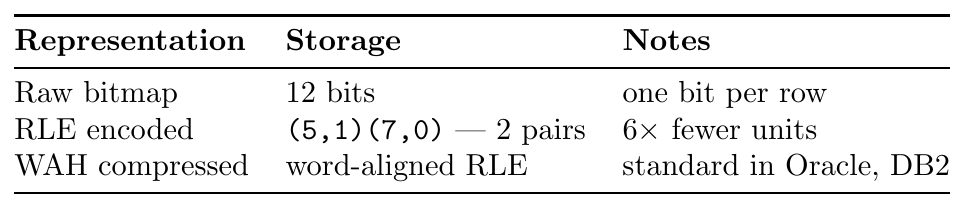
Decode: (5,1) $\to$ 11111, (7,0) $\to$ 0000000 — original bitmap restored exactly.
Input: A B A B A B A B (8 symbols)
RLE output: (1,A)(1,B)(1,A)(1,B)(1,A)(1,B)(1,A)(1,B) — 16 units
Observation: Output is twice the size of input.
Mitigation: Use a literal run escape: sequences of run-length 1 are grouped as a raw literal block instead of individual (1,x) pairs — used in PackBits (Apple) and PCX formats.
Scenario: FACT_SALES sorted by store_key. Store 1 has 50\,000 rows, store 2 has 30\,000 rows.
-- Raw column (80,000 integers):
1,1,1,...,1,  2,2,2,...,2
-- RLE encoded (2 pairs):
(50000, 1), (30000, 2)
Compression ratio: $80\,000 \div 2 = 40\,000\times$ reduction for this column.
Bonus: Aggregate queries (COUNT(*) WHERE store_key = 1) answered directly from the RLE pairs without decompressing.
Compressed stream: (3,X)(1,Y)(4,Z)(2,X)
Step-by-step decode:
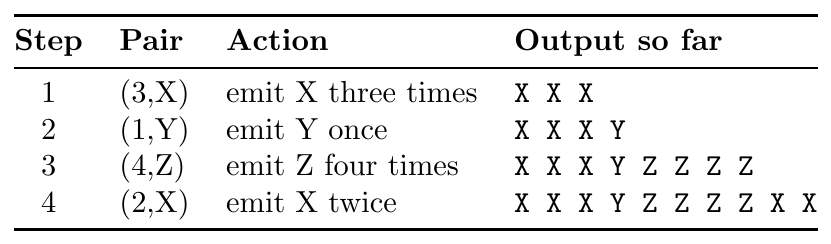
Restored string: XXXYZZZZZXX — identical to original.
Huffman Coding
Huffman Coding is an optimal prefix-free variable-length code where:
Frequent symbols receive shorter codewords.
Rare symbols receive longer codewords.
Prefix-free property: no codeword is a prefix of another — enables unambiguous decoding.
Optimality: produces the shortest possible average code length for a given symbol probability distribution (proven optimal among all prefix-free codes).
Average code length: $\bar{L} = \sum_i p_i \ell_i \;\geq\; H$ (Shannon entropy lower bound).
Input: symbol frequency table. Output: binary tree defining the code.
Create a leaf node for each symbol; insert into a min-priority queue keyed by frequency.
While queue size $> 1$:
Extract two nodes with minimum frequency $f_1$, $f_2$.
Create an internal node with frequency $f_1 + f_2$; left child $= f_1$, right child $= f_2$.
Insert internal node back into queue.
Remaining node is the root.
Assign 0 to every left edge, 1 to every right edge.
Codeword for symbol $s$ = path of bits from root to leaf $s$.
Complexity: $O(n \log n)$ using a heap.
Diagram 3 — Huffman Tree Construction
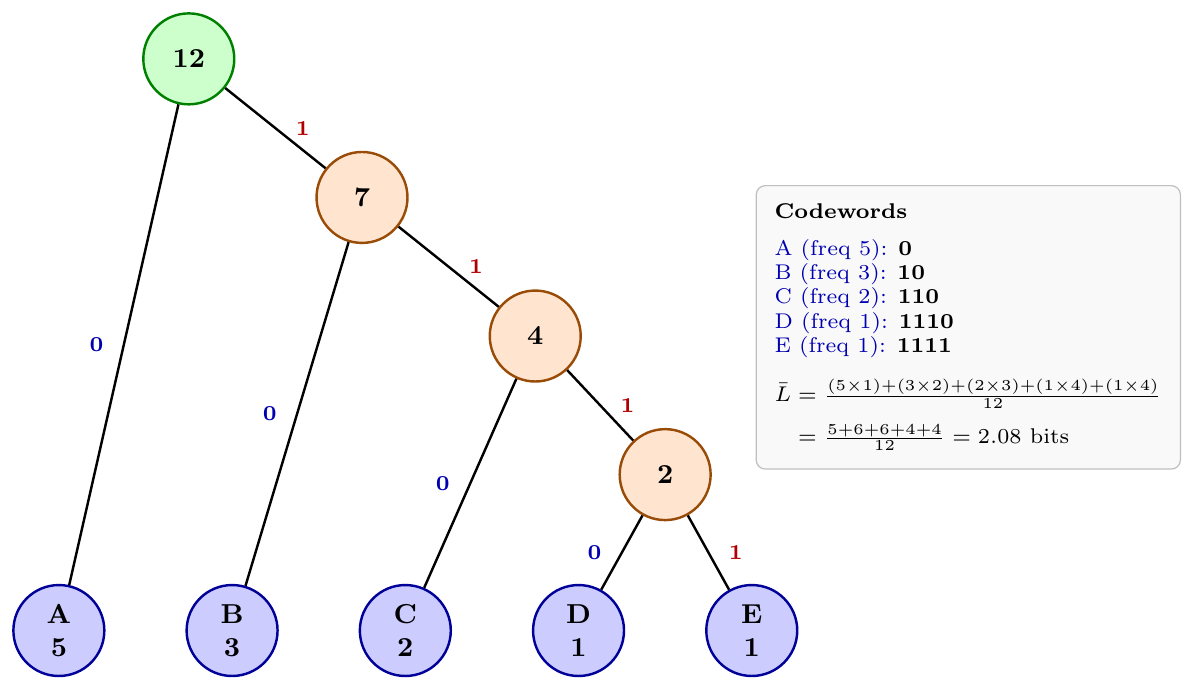
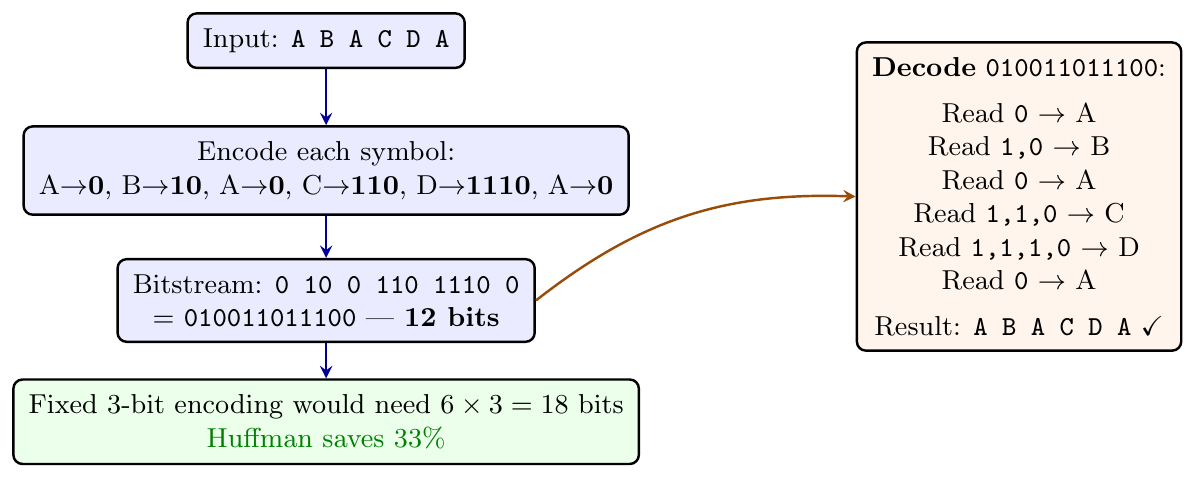
Diagram 4 — Encode and Decode Pipeline
Approximate English letter frequencies (top 5):
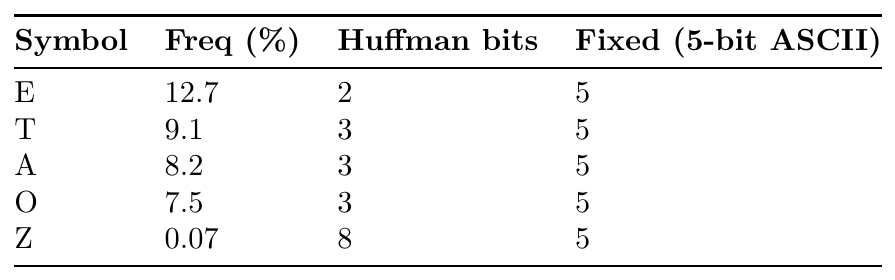
Effect: Common letters cost 2–3 bits; rare letters cost 7–8 bits. Weighted average $\approx 4.2$ bits vs.\ 5-bit fixed — $\sim$16% compression on English text.
Problem: Huffman tree must be transmitted with the compressed data — expensive.
Canonical Huffman: Fix codewords by two rules only:
Shorter codes have numerically smaller values.
Codes of the same length are consecutive integers.
Transmit only: the list of codeword lengths per symbol (e.g.\ [1,2,3,4,4] for A,B,C,D,E).
Decoder reconstructs canonical codewords from lengths alone — no tree storage needed.
Used in: ZIP, gzip, PNG, HTTP/2 HPACK header compression.
Scenario: Compress a data stream where symbol frequencies are unknown in advance.
Algorithm (FGK / Vitter):
Both encoder and decoder maintain identical Huffman trees, updated after every symbol.
New symbols are emitted with an escape code + raw bits; tree restructured immediately.
No separate frequency pre-scan or tree transmission required.
Trade-off: Slightly worse compression than static Huffman (tree adapts with delay); enables single-pass streaming compression.
Input: Single symbol A with probability $p_A = 1.0$ (only one symbol exists).
Huffman output: codeword 0 (1 bit).
Shannon entropy: $H = -1 \cdot \log_2 1 = 0$ bits/symbol.
Observation: Huffman must assign at least 1 bit — cannot reach the 0-bit theoretical limit.
Solution: Arithmetic coding can approach entropy arbitrarily closely, even for skewed distributions — at the cost of higher computational complexity.
LZW (Lempel--Ziv--Welch)
LZW is a dictionary-based lossless algorithm that:
Builds a dictionary (string table) on the fly during encoding — no pre-scan needed.
Replaces recurring substrings with integer codes (shorter than the substrings).
Decoder reconstructs the same dictionary independently — dictionary need not be transmitted.
Dictionary initialised with all single-symbol entries (e.g.\ codes 0–255 for ASCII).
Complexity: $O(n)$ encode and decode.
Used in: GIF images, TIFF (optional), PDF (FlateDecode predecessor), Unix
compress.
Initialise: dictionary $\leftarrow$ {each single symbol $\to$ code}.
Set: $w \leftarrow \varepsilon$ (empty string).
For each symbol $c$ in input:
If $w + c$ is in dictionary: set $w \leftarrow w + c$ (extend current match).
Else:
Output code for $w$.
Add $w + c$ to dictionary with next available code.
Set $w \leftarrow c$.
End: output code for $w$.
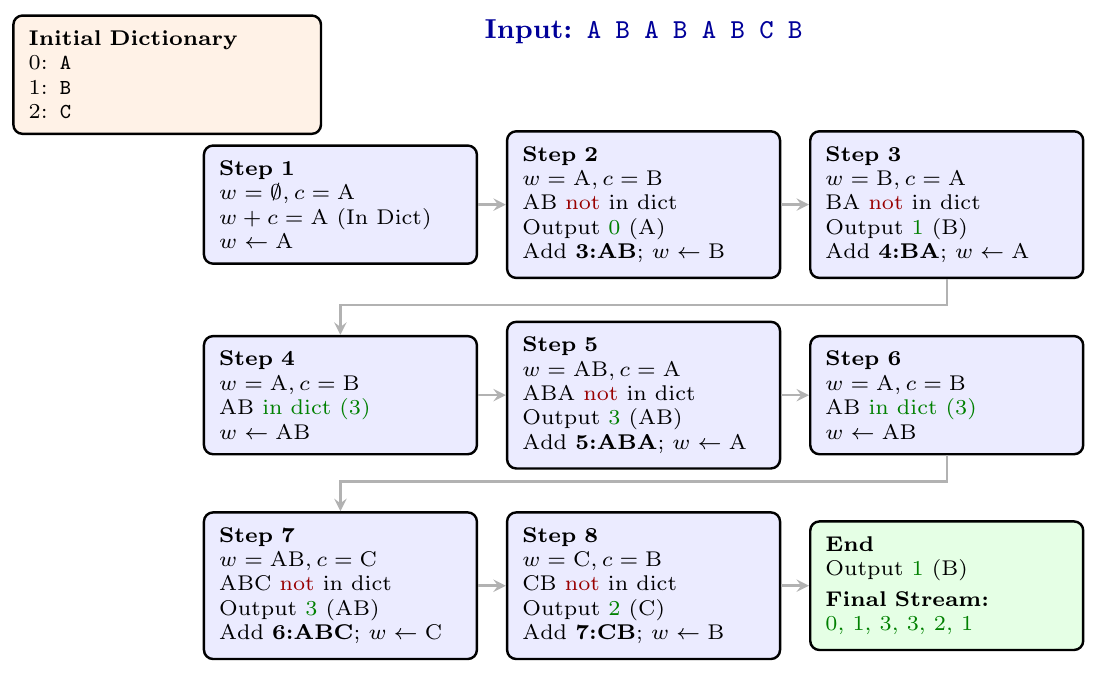
Diagram 5 — LZW Encoding Trace
Input String:
BABAABAAA
Initial Dictionary:
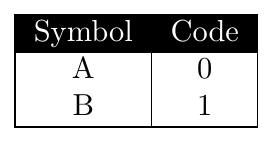
LZW Encoding Trace:
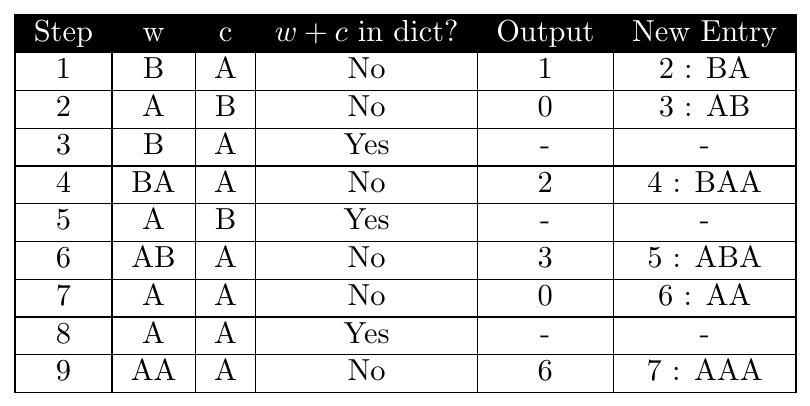
Final Output Code Stream:
\[
\boxed{1,\;0,\;2,\;3,\;0,\;6}
\]
Final Dictionary:
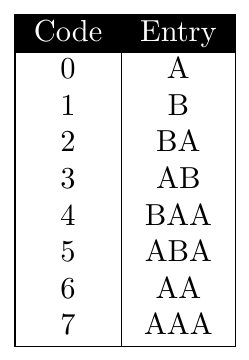
Input String:
ABABABCB
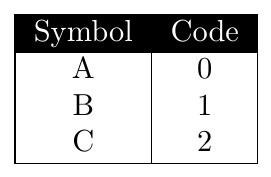
Initial Dictionary:
LZW Encoding Trace:
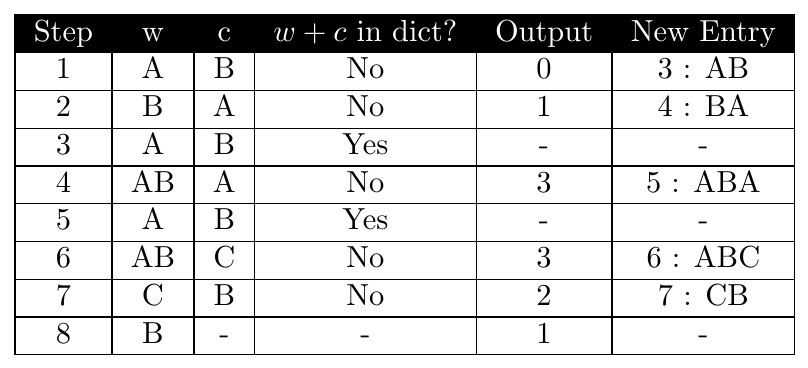
Final Output Code Stream:
\[
\boxed{0,\;1,\;3,\;3,\;2,\;1}
\]
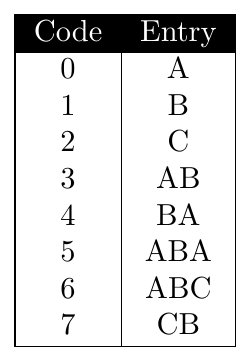
Final Dictionary:
Input: AAABBBCCDDDDAA (14 symbols, alphabet {A,B,C,D})

Insight:
RLE wins on long uniform runs.
Huffman wins when frequencies are skewed but runs are short.
LZW wins on long files with recurring substrings (not just characters).
Real compressors (gzip, bzip2) chain multiple methods.
Lossy Compression
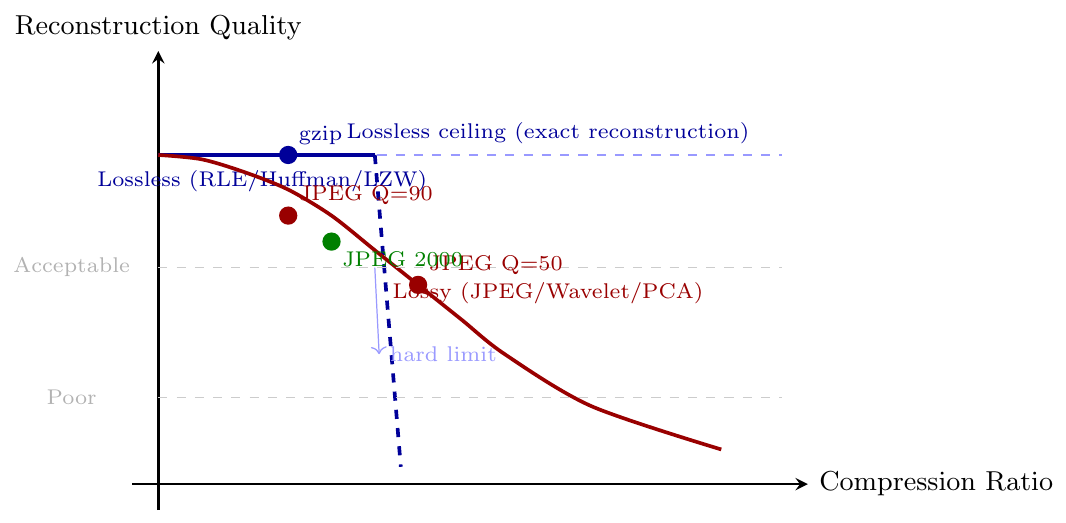
Lossy compression permanently discards perceptually insignificant information to achieve much higher compression ratios than lossless methods allow.
Irreversible: decompressed output $\neq$ original; reconstruction error is accepted.
Governed by: a quality / distortion parameter — higher compression = more loss.
Core principle: exploit perceptual redundancy — the human eye/ear is insensitive to fine high-frequency detail or subtle colour differences.
Applications: images (JPEG), audio (MP3, AAC), video (H.264, H.265), scientific data cubes.
Error metrics: PSNR (Peak Signal-to-Noise Ratio), SSIM (Structural Similarity Index).
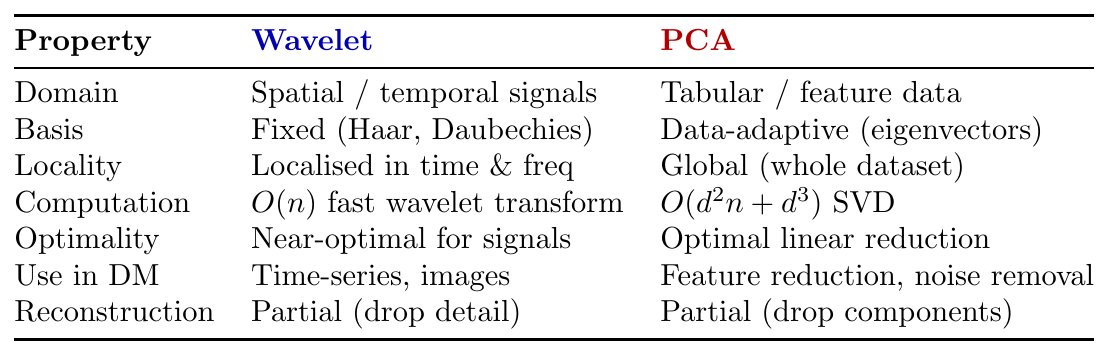
Decomposes a signal into approximation (low-frequency) and detail (high-frequency) components at multiple resolution levels.
Key idea: most energy concentrates in low-frequency coefficients; high-frequency coefficients are small and can be quantised or zeroed with minimal perceptual loss.
Steps:
Apply wavelet transform (e.g.\ Haar, Daubechies) $\to$ coefficient array.
Quantise: round small coefficients to zero (lossy step).
Entropy-code the sparse coefficient array (lossless step).
Used in: JPEG 2000, FBI fingerprint database, EEG/seismic signal compression.
Advantage over JPEG (DCT): no block boundary artefacts; better at low bit-rates.
Projects high-dimensional data onto a lower-dimensional subspace defined by the directions of maximum variance (principal components).
Steps:
Centre data: subtract mean from each dimension.
Compute covariance matrix $\Sigma$.
Compute eigenvectors (principal components) and eigenvalues of $\Sigma$.
Project data onto top-$k$ eigenvectors (largest eigenvalues).
Lossy: information in the dropped $(d-k)$ dimensions is permanently lost.
Lossless special case: $k = d$ — no compression, full reconstruction.
Applications: dimensionality reduction, feature extraction, face recognition (Eigenfaces), noise removal, data cube aggregation.
Diagram — PCA: 2-D to 1-D Projection
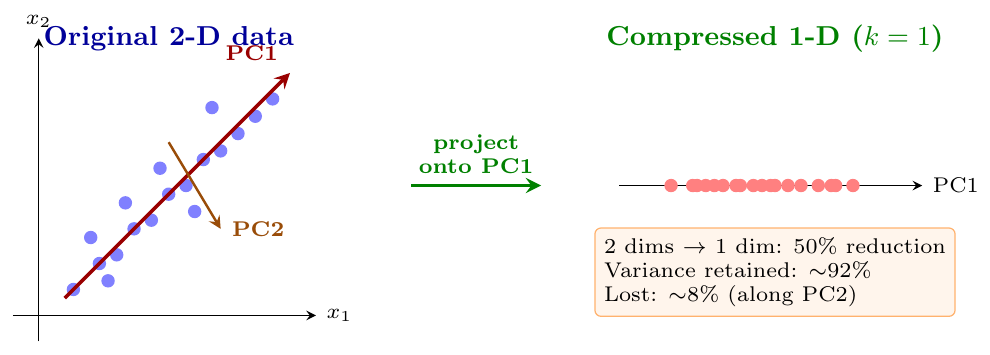
Diagram — Quality vs.\ Compression Ratio Trade-off
Data Transformation
Data Transformation by Normalization
Normalization transforms numeric attribute values into a specified range or distribution to remove scale bias.
Different attributes have different units and ranges
Example:Age$\in [0, 100]$,Salary$\in [10000, 500000]$Distance-based algorithms (KNN, K-Means, SVM) are biased toward higher-range attributes
Normalization ensures equal contribution from all attributes
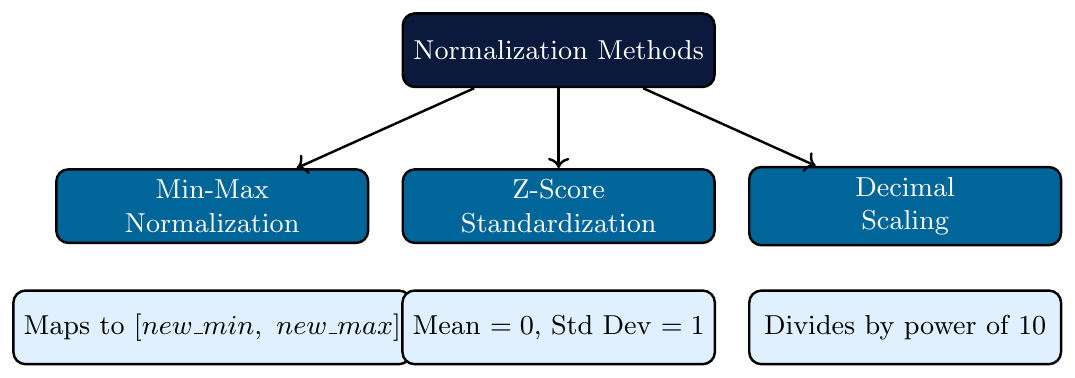
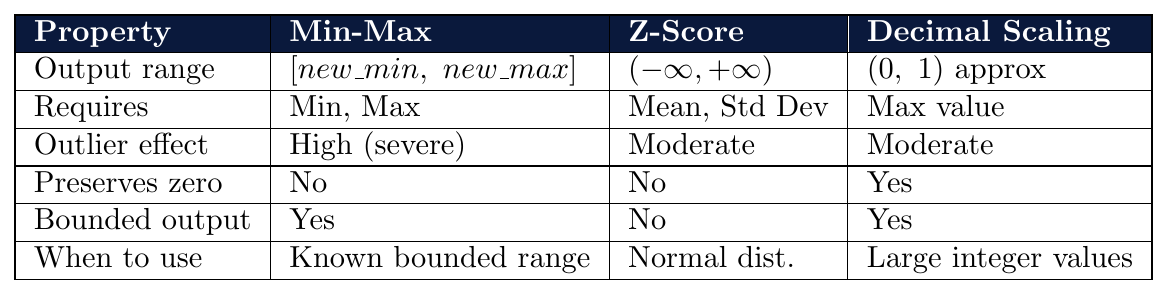
Three standard methods: Min-Max, Z-Score, Decimal Scaling
Min-Max Normalization
Maps original values linearly to a target range $[new\_min,\ new\_max]$: \[ v' = \frac{v - \min_A}{\max_A - \min_A} \times (new\_max - new\_min) + new\_min \]
Most common target range: $[0,\ 1]$
Preserves relationships between original values exactly
Sensitive to outliers — one extreme value compresses all others
If a future value falls outside $[\min_A, \max_A]$, result is outside $[0, 1]$
When $new\_min = 0$ and $new\_max = 1$, the formula simplifies to: \[ v' = \frac{v - \min_A}{\max_A - \min_A} \]
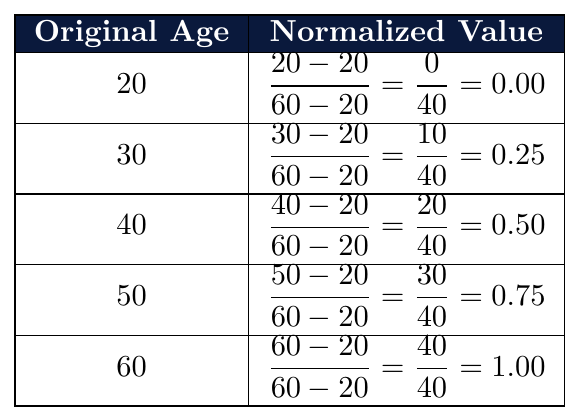
Attribute: Age with values {20, 30, 40, 50, 60}
$\min_A = 20$, $\max_A = 60$
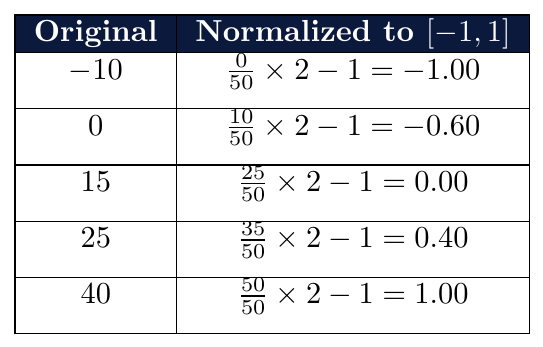
Attribute: Temperature values: {$-10$, 0, 15, 25, 40}
$\min_A = -10$, $\max_A = 40$, $new\_min = -1$, $new\_max = 1$
Formula:
\[
v' = \frac{v - (-10)}{40 - (-10)} \times (1 - (-1)) + (-1) = \frac{v + 10}{50} \times 2 - 1
\]
The income attribute has $\min = 10{,}000$ and $\max = 90{,}000$.
Using min-max normalization to $[0, 1]$, the value $v = 40{,}000$ maps to:
\[
v' = \frac{40000 - 10000}{90000 - 10000} = \frac{30000}{80000} = 0.375
\]
If a new value of $95{,}000$ arrives, the mapped value would be:
\[
v' = \frac{95000 - 10000}{80000} = \frac{85000}{80000} = 1.0625 > 1
\]
This falls outside $[0,1]$ — showing min-max normalization does not handle out-of-range values well.
Attribute: Salary (thousands) {20, 25, 30, 35, 200}
$\min = 20$, $\max = 200$
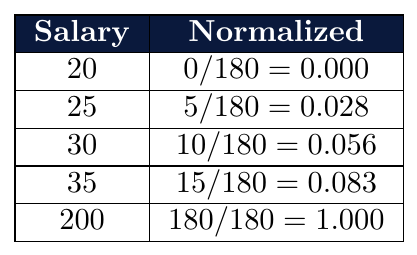
Values 20–35 are all compressed into $[0,\ 0.083]$ due to the outlier 200.
This illustrates the major weakness of min-max normalization.
Z-Score Normalization (Standardization)
Transforms values so the resulting attribute has mean = 0 and standard deviation = 1:
\[
v' = \frac{v - \bar{A}}{\sigma_A}
\]
where $\bar{A}$ = mean of attribute $A$, $\sigma_A$ = standard deviation of $A$
Output is not bounded — values can go negative or exceed 1
Robust to outliers compared to min-max
Preferred when distribution is approximately normal
Required when algorithm assumes zero mean, unit variance (e.g., PCA, SVM)
When working with a sample (not full population), replace $\sigma_A$ with sample std dev $s_A$: \[ v' = \frac{v - \bar{A}}{s_A}, \qquad s_A = \sqrt{\frac{\sum_{i=1}^{N}(x_i - \bar{x})^2}{N-1}} \] In data mining, population std dev ($N$ in denominator) is typically used when the full dataset is available.
Attribute: Marks {50, 60, 70, 80, 90}
\[
\bar{A} = \frac{50+60+70+80+90}{5} = 70
\]
\[
\sigma_A = \sqrt{\frac{(50-70)^2+(60-70)^2+(70-70)^2+(80-70)^2+(90-70)^2}{5}}
= \sqrt{\frac{400+100+0+100+400}{5}} = \sqrt{200} \approx 14.14
\]
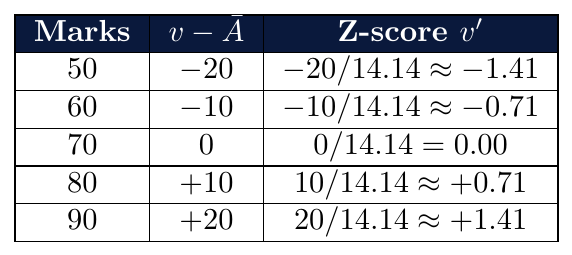
Mean of normalized values $= 0$, Std Dev $= 1$ (verified)
An attribute Weight_kg has $\bar{A} = 65$ kg and $\sigma_A = 10$ kg.
(a) Normalize $v = 80$ kg:
\[
v' = \frac{80 - 65}{10} = \frac{15}{10} = 1.5
\]
(b) Normalize $v = 45$ kg:
\[
v' = \frac{45 - 65}{10} = \frac{-20}{10} = -2.0
\]
(c) What original value maps to $v' = 0.5$?
\[
0.5 = \frac{v - 65}{10} \implies v = 65 + 5 = 70 \text{ kg}
\]
(d) A value of $v' = -2.0$ means the weight is 2 standard deviations below the mean.
After Z-score normalization, two values are known:
Original value 40 maps to $v' = -1.5$
Original value 70 maps to $v' = 1.5$
Find $\bar{A}$ and $\sigma_A$:
From the two equations:
\[
-1.5 = \frac{40 - \bar{A}}{\sigma_A} \qquad \text{and} \qquad 1.5 = \frac{70 - \bar{A}}{\sigma_A}
\]
Adding both equations:
\[
0 = \frac{(40 + 70) - 2\bar{A}}{\sigma_A} \implies \bar{A} = 55
\]
Substituting back:
\[
1.5 = \frac{70 - 55}{\sigma_A} = \frac{15}{\sigma_A} \implies \sigma_A = 10
\]
Attribute: Salary (thousands) {20, 25, 30, 35, 200}
$\bar{A} = \frac{20+25+30+35+200}{5} = 62$,
$\sigma_A = \sqrt{\frac{(20-62)^2+(25-62)^2+(30-62)^2+(35-62)^2+(200-62)^2}{5}}$
$= \sqrt{\frac{1764+1369+1024+729+19044}{5}} = \sqrt{\frac{23930}{5}} = \sqrt{4786} \approx 69.18$
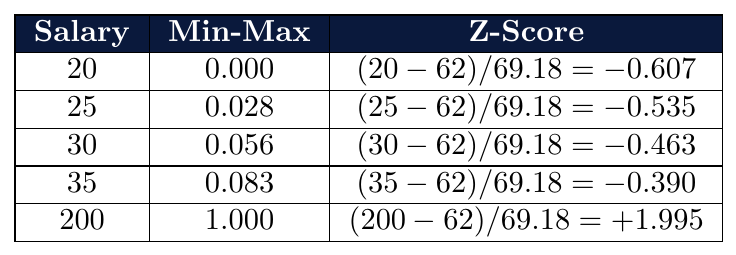
Min-max compresses 20–35 into $[0,\ 0.083]$; Z-score spreads them into $[-0.607,\ -0.390]$
Z-score handles the outlier (200) more gracefully
Decimal Scaling
Normalizes by moving the decimal point of attribute values: \[ v' = \frac{v}{10^j} \] where $j$ is the smallest integer such that $\max(|v'|) < 1$.
Simple to compute — no mean or std dev required
Range of result depends on actual data values
Less commonly used in modern data mining pipelines
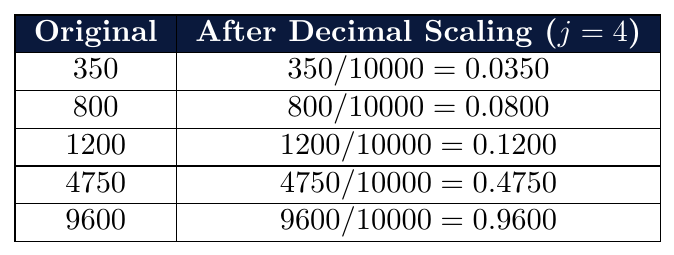
Attribute: Votes {350, 800, 1200, 4750, 9600}
$\max(|v|) = 9600$ — 5 digits, so $j = 4$ makes $\max(|v'|) < 1$?
$9600 / 10^4 = 0.96 < 1$ so $j = 4$
After min-max normalization to $[0,1]$, a value maps to $v' = 0.6$.
If $\min_A = 100$ and $\max_A = 600$, find the original value $v$.
\[
0.6 = \frac{v - 100}{600 - 100} = \frac{v - 100}{500}
\]
\[
v - 100 = 0.6 \times 500 = 300 \implies v = 400
\]
Two data points $P_1 = (20,\ 10000)$ and $P_2 = (50,\ 40000)$
Attributes: Age $\in [20, 80]$, Salary $\in [10000, 70000]$
Before normalization (Euclidean distance):
\[
d = \sqrt{(50-20)^2 + (40000-10000)^2} = \sqrt{900 + 9 \times 10^8} \approx 30000
\]
Salary completely dominates the distance.
After min-max normalization to $[0,1]$:
Age: $P_1 \rightarrow \frac{20-20}{60} = 0.0$, $P_2 \rightarrow \frac{50-20}{60} = 0.5$
Salary: $P_1 \rightarrow \frac{10000-10000}{60000} = 0.0$, $P_2 \rightarrow \frac{40000-10000}{60000} = 0.5$
\[
d' = \sqrt{(0.5-0.0)^2 + (0.5-0.0)^2} = \sqrt{0.25+0.25} = \sqrt{0.5} \approx 0.707
\]
Both attributes now contribute equally to the distance.
Data Discretization
Discretization by Binning
Discretization converts a continuous attribute into a discrete one by dividing the value range into intervals called bins.
Continuous attribute $\rightarrow$ finite set of intervals (ordinal categories)
Each bin is assigned a label:
Low,Medium,Highor bin numbersRequired by algorithms that work only on discrete or categorical data
Also reduces noise by smoothing out minor fluctuations in values
Some algorithms (e.g., Naive Bayes, Apriori) require categorical input
Reduces the number of distinct values — speeds up learning
Smooths noisy data — small variations within a bin are treated as equal
Enables concept hierarchy generation for data cube roll-up
Makes patterns more interpretable: “Age 20–35” is clearer than exact values
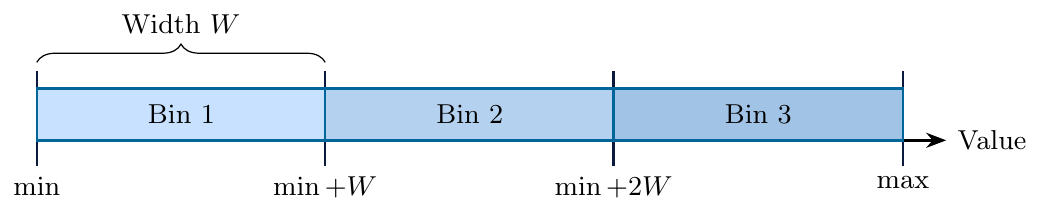
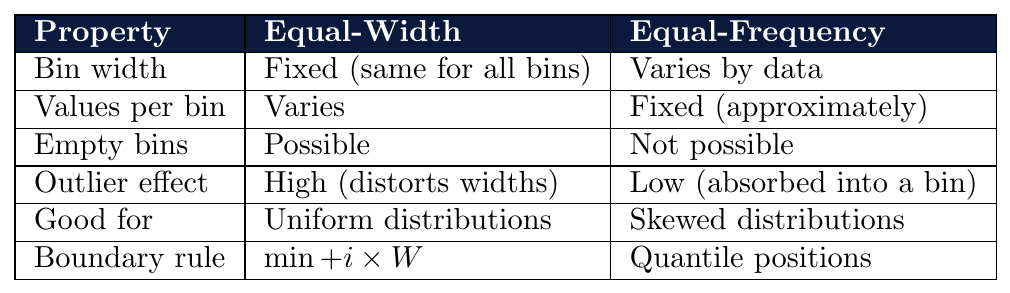
Divides the range $[\min_A,\ \max_A]$ into $k$ bins of equal width: \[ W = \frac{\max_A - \min_A}{k} \] Bin boundaries: \[ \min_A,\quad \min_A + W,\quad \min_A + 2W,\quad \ldots,\quad \max_A \]
Simple to compute — only min, max, and $k$ needed
Sensitive to outliers — one extreme value creates a very wide range, leaving most data in one bin
May produce empty bins if data is skewed
Data (sorted): {5, 10, 15, 20, 25, 30, 35, 40, 45} $k = 3$
\[
W = \frac{45 - 5}{3} = \frac{40}{3} \approx 13.33
\]
Boundaries: $5,\quad 18.33,\quad 31.67,\quad 45$
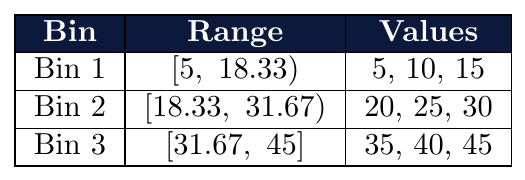
Each bin has 3 values here — balanced only because data is uniformly distributed.
Data: {10, 12, 13, 15, 16, 18, 20, 22, 200} $k = 3$
\[
W = \frac{200 - 10}{3} = \frac{190}{3} \approx 63.33
\]
Boundaries: $10,\quad 73.33,\quad 136.67,\quad 200$
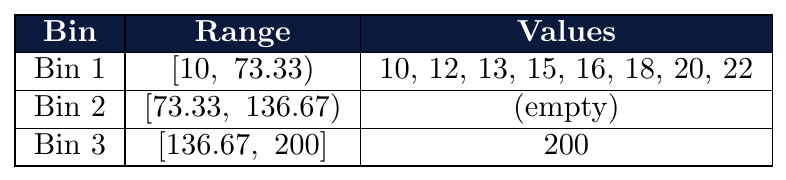
The outlier 200 pulls the range wide, creating an empty bin and packing 8 of 9 values into Bin 1.
This is the key weakness of equal-width binning.
Attribute: Score $\min = 0$, $\max = 100$, $k = 5$
\[
W = \frac{100 - 0}{5} = 20
\]
Bins: $[0,20),\ [20,40),\ [40,60),\ [60,80),\ [80,100]$
Question: A score of 72 falls in which bin, and what is the bin number?
$72 \in [60,\ 80)$ $\rightarrow$ Bin 4
Question: How many bins contain the values {5, 35, 60, 85, 100}?
$5 \in [0,20)$ — Bin 1
$35 \in [20,40)$ — Bin 2
$60 \in [60,80)$ — Bin 4
$85 \in [80,100]$ — Bin 5
$100 \in [80,100]$ — Bin 5
4 distinct bins are occupied.
Divides data so that each bin contains approximately the same number of values: \[ \text{Count per bin} = \frac{N}{k} \]
Also called equi-depth or quantile-based binning
Bin widths vary — determined by the data distribution
No empty bins — guaranteed roughly equal occupancy
Better for skewed data than equal-width
Boundaries are set at the appropriate quantile values
Data (sorted): {5, 10, 15, 20, 25, 30, 35, 40, 45} $N=9$, $k=3$
Count per bin $= 9/3 = 3$
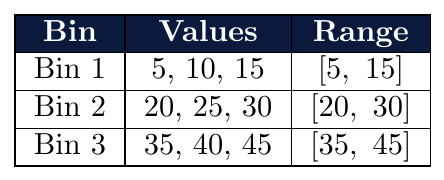
For uniform data, equal-width and equal-frequency produce the same result.
Data (sorted): {2, 3, 4, 5, 6, 50, 55, 60, 100} $N=9$, $k=3$
Count per bin $= 3$
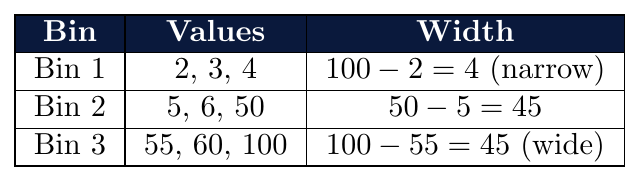
Each bin has exactly 3 values — frequency balanced
Bin widths differ significantly — equal-frequency adapts to skew
Equal-width would have put 2,3,4,5,6 all in one bin here
Data (sorted): {4, 8, 15, 16, 23, 25, 30, 42, 55, 60} $N=10$, $k=2$
Count per bin $= 10/2 = 5$
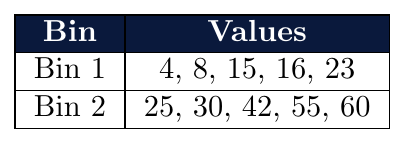
Bin boundary is set between $23$ and $25$ (between 5th and 6th sorted value).
New value 18: falls in Bin 1 $[4,\ 23]$.
New value 24: boundary ambiguity — assign to Bin 1 or Bin 2 based on convention.
Divides the range based on expert knowledge, predefined standards, or specific business logic rather than mathematical distributions:
Meaningful Thresholds — Boundaries represent real-world categories (e.g., Age groups, Credit scores, Temperature zones).
Unequal Widths — Bins can have completely different sizes based on the importance of specific ranges.
Interpretability — Results are immediately actionable for decision-makers.

Data (Scores): {42, 55, 68, 72, 85, 91, 94} Logic: Institutional Policy
Boundaries are fixed by the department: $0, 50, 75, 100$
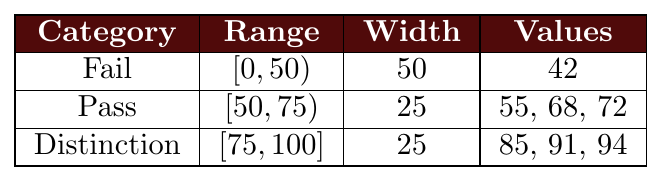
Bin widths are inconsistent (50 vs 25), but the division is meaningful for the domain.
After assigning values to bins, the bin values can be smoothed (replaced) by a representative:
Smoothing by bin mean: Replace each value with the mean of its bin
Smoothing by bin median: Replace each value with the median of its bin
Smoothing by bin boundaries: Replace each value with the nearest boundary (min or max of the bin)
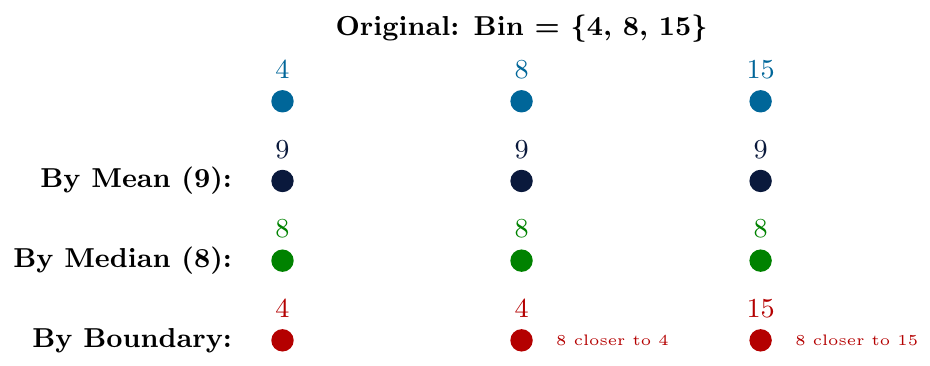
Sorted data divided into 3 bins:
Bin 1: {4, 8, 15}
Bin 2: {21, 24, 25}
Bin 3: {28, 34, 40}
Smoothing by bin mean:
Bin 1 mean $= (4+8+15)/3 = 9$ $\rightarrow$ {9, 9, 9}
Bin 2 mean $= (21+24+25)/3 = 23.33$ $\rightarrow$ {23.33, 23.33, 23.33}
Bin 3 mean $= (28+34+40)/3 = 34$ $\rightarrow$ {34, 34, 34}
Smoothing by bin median:
Bin 1 median $= 8$ $\rightarrow$ {8, 8, 8}
Bin 2 median $= 24$ $\rightarrow$ {24, 24, 24}
Bin 3 median $= 34$ $\rightarrow$ {34, 34, 34}
Smoothing by bin boundaries:
(Each value snapped to nearest of bin min or bin max)
Bin 1: boundaries = 4 and 15
$4 \rightarrow 4$ (distance to 4: 0, to 15: 11) $\rightarrow$ 4
$8 \rightarrow 4$ (distance to 4: 4, to 15: 7) $\rightarrow$ 4
$15 \rightarrow 15$ (distance to 4: 11, to 15: 0) $\rightarrow$ 15
Bin 2: boundaries = 21 and 25 $\rightarrow$ {21, 25, 25}
Bin 3: boundaries = 28 and 40 $\rightarrow$ {28, 28, 40}
Attribute: Price (in hundreds): {10, 20, 30, 40, 50, 60, 70, 80, 90}
Apply equal-width binning with $k=3$ and smooth by bin mean.
Step 1 — Compute width:
\[
W = \frac{90-10}{3} = \frac{80}{3} \approx 26.67
\]
Step 2 — Assign bins:
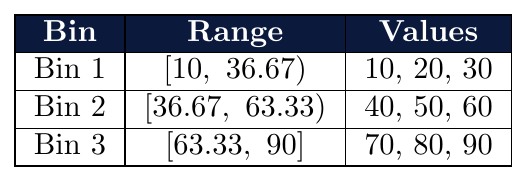
Step 3 — Smooth by bin mean:
Bin 1 mean $= (10+20+30)/3 = 20$ $\rightarrow$ {20, 20, 20}
Bin 2 mean $= (40+50+60)/3 = 50$ $\rightarrow$ {50, 50, 50}
Bin 3 mean $= (70+80+90)/3 = 80$ $\rightarrow$ {80, 80, 80}
Smoothed dataset: {20, 20, 20, 50, 50, 50, 80, 80, 80}
Discretization by Histogram Analysis
A histogram partitions the value range of an attribute into adjacent, non-overlapping intervals and displays the frequency of values in each interval.
Each interval is called a bucket or bin
Height of each bar represents frequency (count) or relative frequency (proportion)
Used for both visualization and discretization
The shape of a histogram reveals the distribution of the attribute
Binning (previous section) focuses on assigning values to bins and smoothing
Histogram analysis focuses on analyzing the frequency distribution to find natural partitions
Histogram-based discretization identifies bin boundaries based on data density rather than fixed width or count rules
Boundaries are placed where frequency drops — natural valleys in the histogram
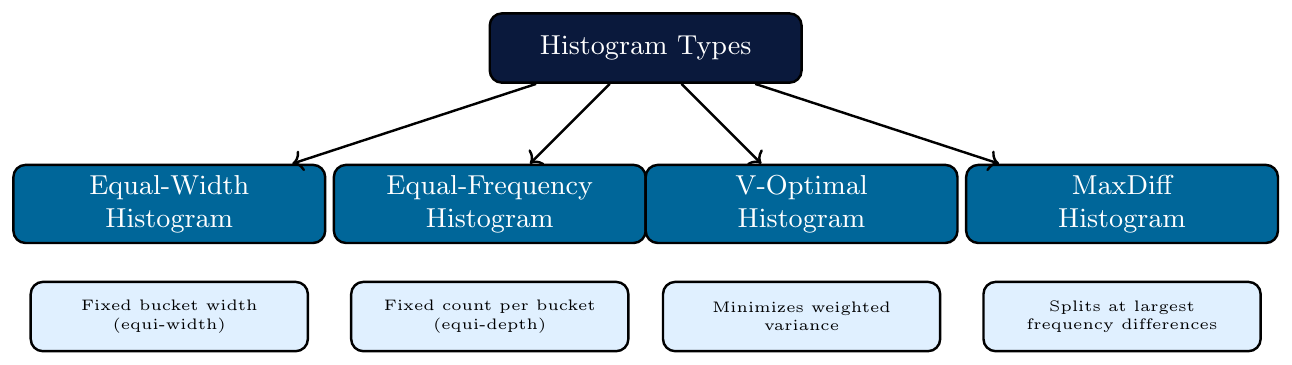
Partitions the range $[\min_A,\ \max_A]$ into $k$ buckets of equal width: \[ W = \frac{\max_A - \min_A}{k} \]
Each bucket spans the same range of values
Bucket heights (frequencies) vary according to data distribution
Same as equal-width binning — the histogram visualizes the result
Easy to construct; sensitive to outliers and skew
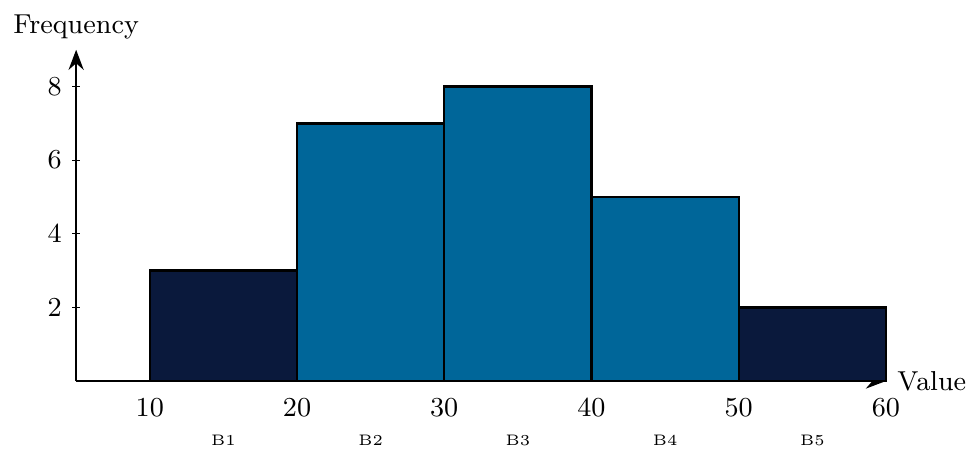
Data: 25 salary values (in thousands) ranging from 10 to 60. $k = 5$ buckets.
\[
W = \frac{60 - 10}{5} = 10
\]
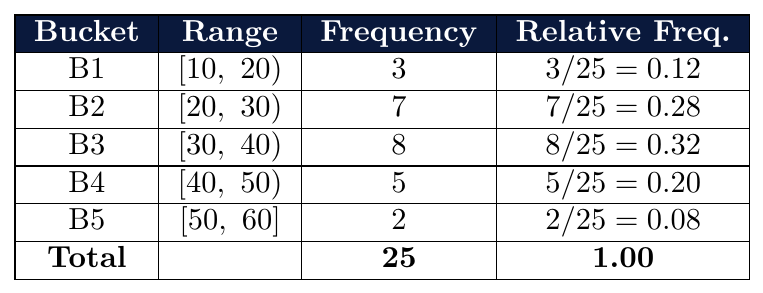
Distribution is roughly bell-shaped — peak at B3
B3 $[30,40)$ is the most frequent bucket — modal class
Discretization assigns: B1 $\rightarrow$ Low, B2–B3 $\rightarrow$ Medium, B4–B5 $\rightarrow$ High
Each bucket contains approximately the same number of data points: \[ \text{Count per bucket} = \frac{N}{k} \]
Bucket widths vary to accommodate equal counts
No bucket is empty — more informative for skewed data
Boundary of each bucket set at quantile positions
Better captures shape of skewed distributions
Sorted data (20 values):
{5, 8, 10, 12, 15, 18, 20, 22, 25, 28, 30, 35, 40, 45, 50, 55, 60, 70, 80, 100}
$k = 4$ buckets, count per bucket $= 20/4 = 5$
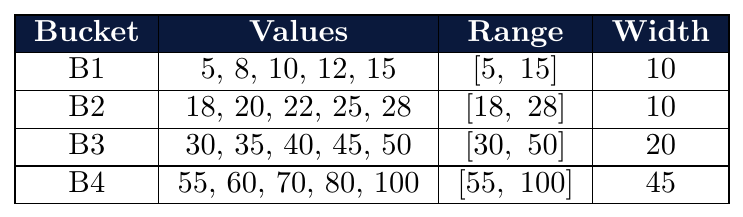
B1 and B2 are narrow — data is dense at lower values
B4 is very wide — data is sparse at higher values
All buckets have exactly 5 values — frequency is balanced
Partitions data into $k$ buckets to minimize total weighted variance:
\[
\text{Cost} = \sum_{i=1}^{k} n_i \cdot \sigma_i^2
\]
where $n_i$ = number of values in bucket $i$, $\sigma_i^2$ = variance of values in bucket $i$
Produces the most accurate histogram approximation
Uses dynamic programming to find the optimal partition
Computationally expensive — $O(N^2 k)$ time complexity
Groups values that are close to each other in the same bucket
Data: {1, 2, 3, 20, 21, 22} $k = 2$
Candidate partitions and their weighted variance:
Partition A: {1,2,3} and {20,21,22}
\[
\bar{x}_1 = 2,\quad \sigma_1^2 = \frac{(1-2)^2+(2-2)^2+(3-2)^2}{3} = \frac{2}{3}
\]
\[
\bar{x}_2 = 21,\quad \sigma_2^2 = \frac{(20-21)^2+(21-21)^2+(22-21)^2}{3} = \frac{2}{3}
\]
\[
\text{Cost}_A = 3 \times \frac{2}{3} + 3 \times \frac{2}{3} = 2 + 2 = \mathbf{4}
\]
Partition B: {1,2,3,20} and {21,22}
\[
\bar{x}_1 = 6.5,\quad \sigma_1^2 = \frac{(1-6.5)^2+(2-6.5)^2+(3-6.5)^2+(20-6.5)^2}{4}
= \frac{30.25+20.25+12.25+182.25}{4} = \frac{245}{4} = 61.25
\]
\[
\text{Cost}_B = 4 \times 61.25 + 2 \times 0.25 = 245 + 0.5 = \mathbf{245.5}
\]
Partition A has much lower cost — V-Optimal selects it.
This matches natural clusters in the data: {1,2,3} and {20,21,22}.
Places bucket boundaries at the $k-1$ largest consecutive differences in the sorted data.
Sort the data values
Compute difference between each pair of adjacent (consecutive) values
Place boundaries at the positions of the $k-1$ largest differences
Natural: splits where data gaps are largest
Simple to compute — no variance calculation needed
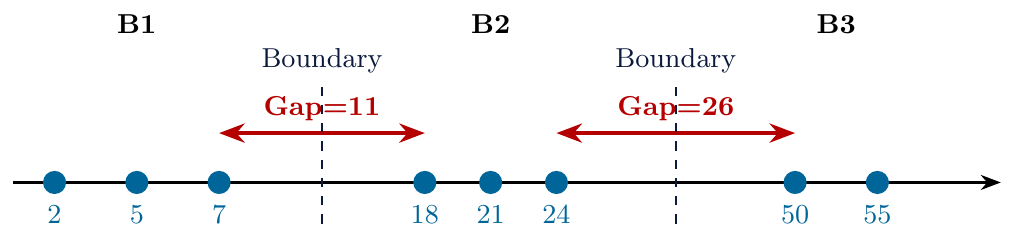
Sorted data: {2, 5, 7, 18, 21, 24, 50, 55} $k = 3$ buckets
Step 1 — Compute consecutive differences:
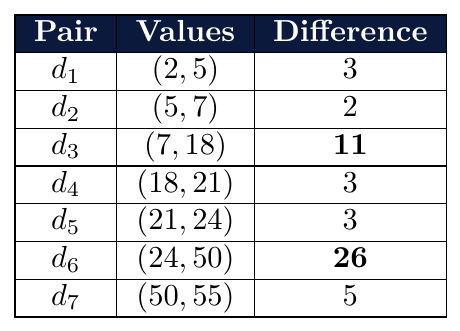
Step 2 — Select $k-1 = 2$ largest differences:
$d_6 = 26$ (largest) and $d_3 = 11$ (second largest)
Step 3 — Place boundaries after 7 and after 24:
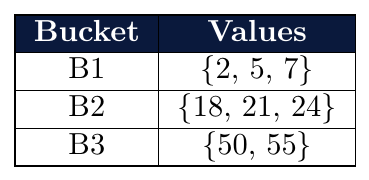
MaxDiff correctly identifies the three natural clusters in the data.
Sorted data: {3, 4, 5, 15, 16, 40, 41, 42, 43, 90} $k = 4$
Consecutive differences:
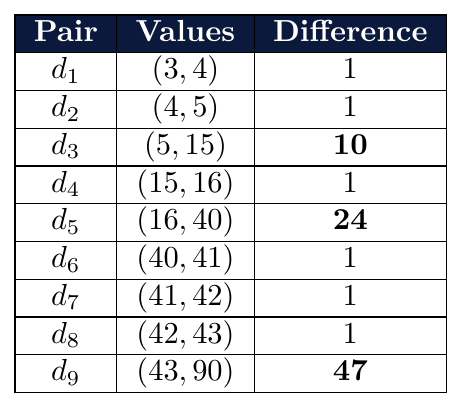
Top $k-1 = 3$ differences: $d_9=47$, $d_5=24$, $d_3=10$
Boundaries placed after: 43, 16, 5
Final buckets:
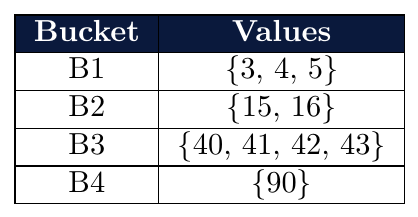
Once a histogram is built, bin boundaries serve as discretization cut points:
Each bucket becomes a discrete interval (category)
Values within a bucket are assigned the same discrete label
Cut points are the boundary values between adjacent buckets
For $k$ buckets, there are $k-1$ cut points and $k$ discrete categories
An equal-width histogram is built for Age with $\min = 0$, $\max = 80$, $k = 4$ buckets.
\[
W = \frac{80-0}{4} = 20
\]
Buckets: $[0,20),\ [20,40),\ [40,60),\ [60,80]$
Cut points: {20, 40, 60} $\rightarrow$ $k-1 = 3$ cut points
Discretized labels:
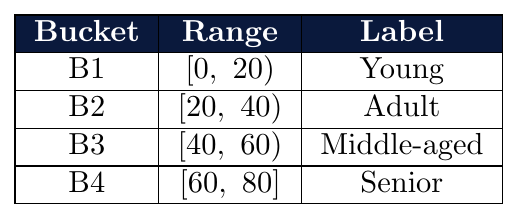
A new value of 35 $\rightarrow$ falls in B2 $\rightarrow$ labeled Adult.
