Data Warehousing and Online Analytical Processing
Data Warehouse: Basic Concepts
A data warehouse is a subject-oriented, integrated, time-variant, and non-volatile collection of data that supports management decision making.
Subject-oriented: Organized around major subjects (sales, customers, products) not transactions
Integrated: Data from multiple heterogeneous sources consolidated into a unified format
Time-variant: Stores historical data — every record has a time element
Non-volatile: Data is loaded and accessed, never updated or deleted in place
OLTP versus OLAP
The major distinction lies between Operational systems and Informational systems:
OLTP (Online Transaction Processing): Systems used for day-to-day operations (e.g., banking, retail checkout).
OLAP (Online Analytical Processing): Systems used for data analysis and decision making (e.g., trend analysis, sales forecasting).
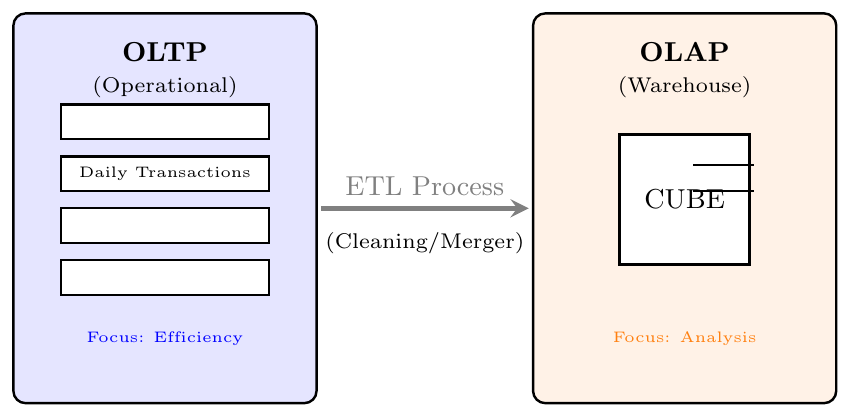
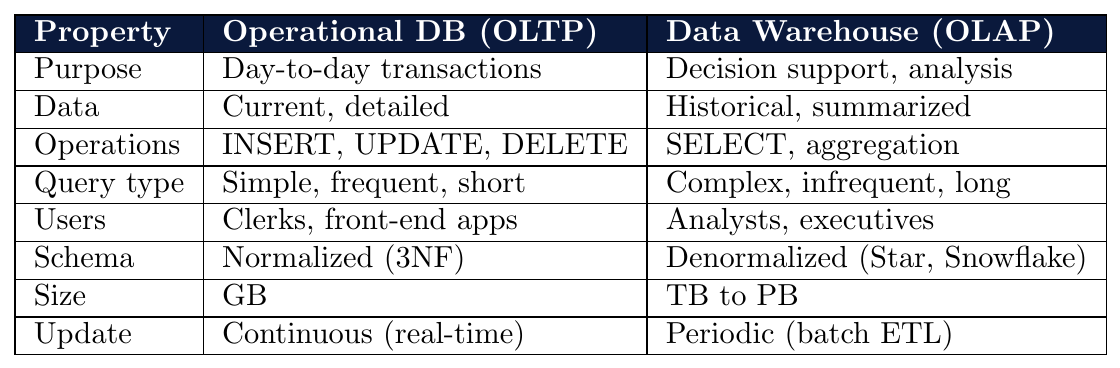
OLTP Task: A customer buys a laptop. The database updates the stock count from 10 to 9 and records the payment. (High frequency, row-level access)
OLAP Task: A manager asks, "What were the sales trends for laptops in South India over the last 3 summers compared to the rainy season?" (Low frequency, massive data aggregation)
Step 1 (OLTP): You withdraw money from an ATM. This is a single, fast transaction that must be consistent (ACID).
Step 2 (Data Flow): At the end of the day, your transaction data is moved to a central Warehouse.
Step 3 (OLAP): The bank analyzes the "Withdrawal Patterns" of all customers in your city to decide if they need to install more ATMs in that area.
Data Warehousing: A Multitiered Architecture
The standard data warehouse architecture has three tiers:
Tier 1 — Bottom Tier: Data sources and data warehouse server (ETL layer)
Tier 2 — Middle Tier: OLAP server (multidimensional analysis engine)
Tier 3 — Top Tier: Front-end client tools (reporting, mining, visualization)
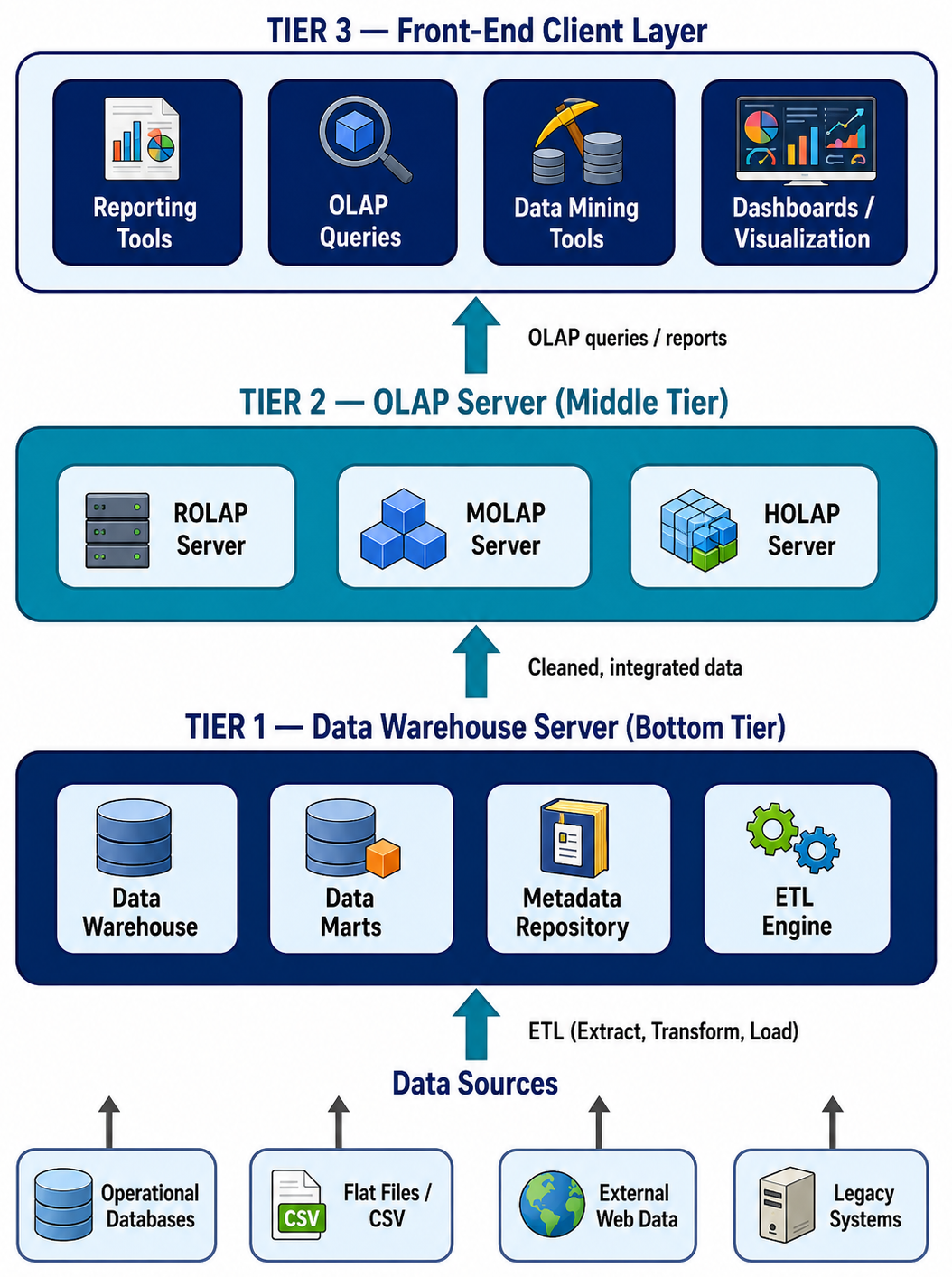
The foundation layer responsible for data storage and ETL processing.
Data Sources: Operational databases, flat files, external feeds, legacy systems
ETL Engine: Extract, Transform, Load — the data integration pipeline
Data Warehouse Server: Central relational database storing integrated, historical data
Data Marts: Smaller, subject-specific subsets of the warehouse
Metadata Repository: Stores information about the data (schema, lineage, transformations)
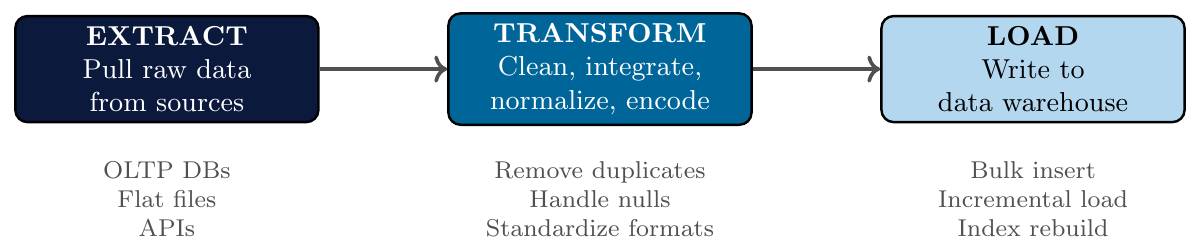
Extract: Pull data from heterogeneous sources — OLTP databases, CSV files, APIs, web scraping
Transform: Apply data cleaning and integration rules:
Handle missing values and duplicates
Standardize formats: Date formats, unit conversion, encoding
Aggregate data to required granularity
Resolve conflicts: Different source systems may store same data differently
Load: Insert transformed data into the warehouse — full or incremental load
ETL runs on a periodic schedule (nightly, weekly) — not real-time
Sources:
Store A database: Sales in USD, date format MM/DD/YYYY
Store B database: Sales in INR, date format DD-MM-YYYY
Online portal: JSON logs with Unix timestamps
Transform steps:
Convert all currencies to INR using exchange rates
Standardize all dates to YYYY-MM-DD format
Parse Unix timestamps to readable date-time
Remove duplicate transaction IDs
Fill missing product categories using product lookup table
Load: Nightly batch job inserts transformed records into the central warehouse.
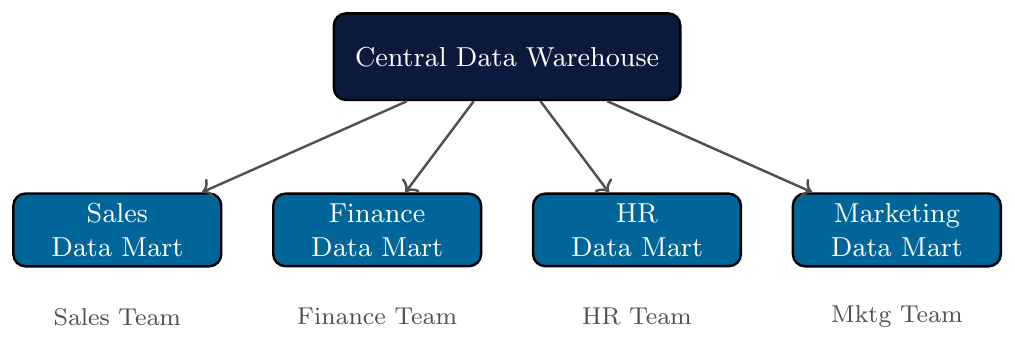
A data mart is a smaller, subject-specific subset of a data warehouse.
Serves a specific business unit or department: Sales, Finance, HR, Marketing
Faster to build and query than the full warehouse
Two types:
Dependent data mart: Created from the central data warehouse (top-down)
Independent data mart: Built directly from source systems without a central warehouse
The metadata repository stores information about the data warehouse — it is the “data about data.”
Business metadata: Definitions, business rules, ownership
Technical metadata: Schema, data types, ETL mappings, transformations applied
Operational metadata: ETL job history, load timestamps, data quality logs
Enables data lineage: track where each piece of data came from and how it was transformed
Critical for auditing, debugging, and governance
The analytical engine that processes multidimensional queries on warehoused data.
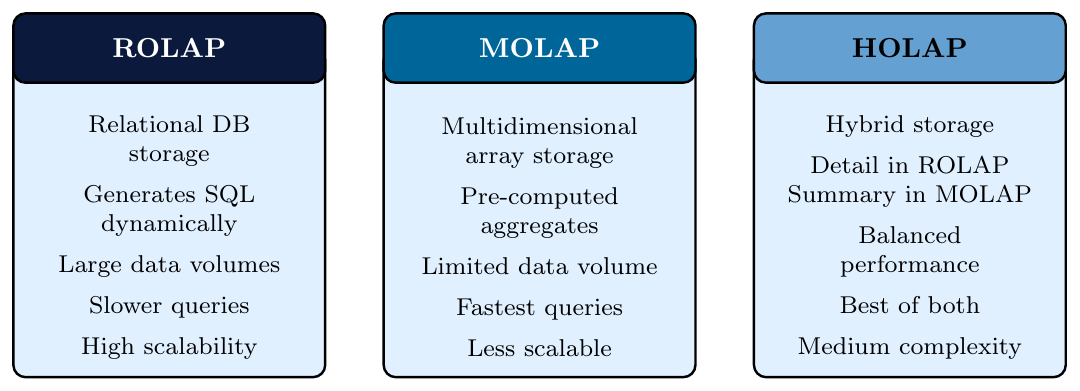
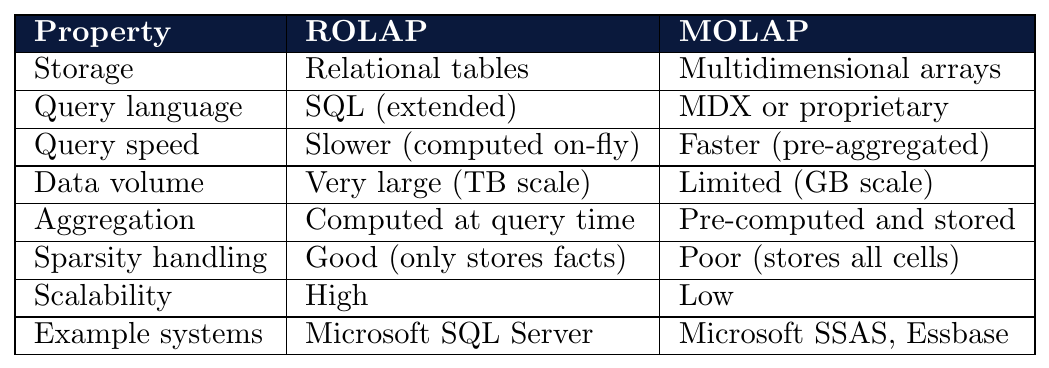
Three types of OLAP servers:
ROLAP (Relational OLAP): Implements multidimensional data on top of a relational database using SQL
MOLAP (Multidimensional OLAP): Stores data in a proprietary multidimensional array (data cube) directly
HOLAP (Hybrid OLAP): Combines ROLAP and MOLAP — detailed data in relational, aggregates in multidimensional
The user-facing layer — tools that query, visualize, and mine the data warehouse.
Reporting tools: Generate fixed-format reports for management (Crystal Reports, SSRS)
OLAP query tools: Ad-hoc multidimensional analysis (drill-down, slice, dice)
Data mining tools: Discover patterns, build predictive models
Dashboards: Real-time KPI visualization (Tableau, Power BI, Looker)
Statistical tools: In-depth statistical analysis (R, Python)
Tier 1 — Data Sources and Warehouse Server:
Sources: Core banking system (Oracle DB), ATM logs (CSV), Mobile app (JSON API), Credit card system (MySQL)
ETL: Nightly batch — extract transactions, standardize currency, clean nulls, load into central warehouse
Warehouse: Stores 10 years of transaction history (Star Schema with Time, Branch, Product, Customer dimensions)
Tier 2 — OLAP Server:
MOLAP cube pre-aggregated for: monthly deposits by branch, loan defaults by region, product-wise revenue
Supports roll-up (branch $\rightarrow$ zone $\rightarrow$ region), drill-down, slice (product = home loan)
Tier 3 — Client Tools:
Executives: Power BI dashboard showing real-time KPIs
Risk analysts: Python-based data mining for default prediction
Compliance: Crystal Reports for audit reports (fixed format)
Branch managers: Ad-hoc OLAP queries for local performance analysis

Data Warehouse Modeling: Data Cube and OLAP
Data Cube: A Multidimensional Data Model
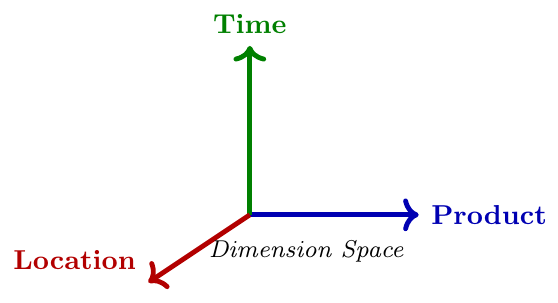
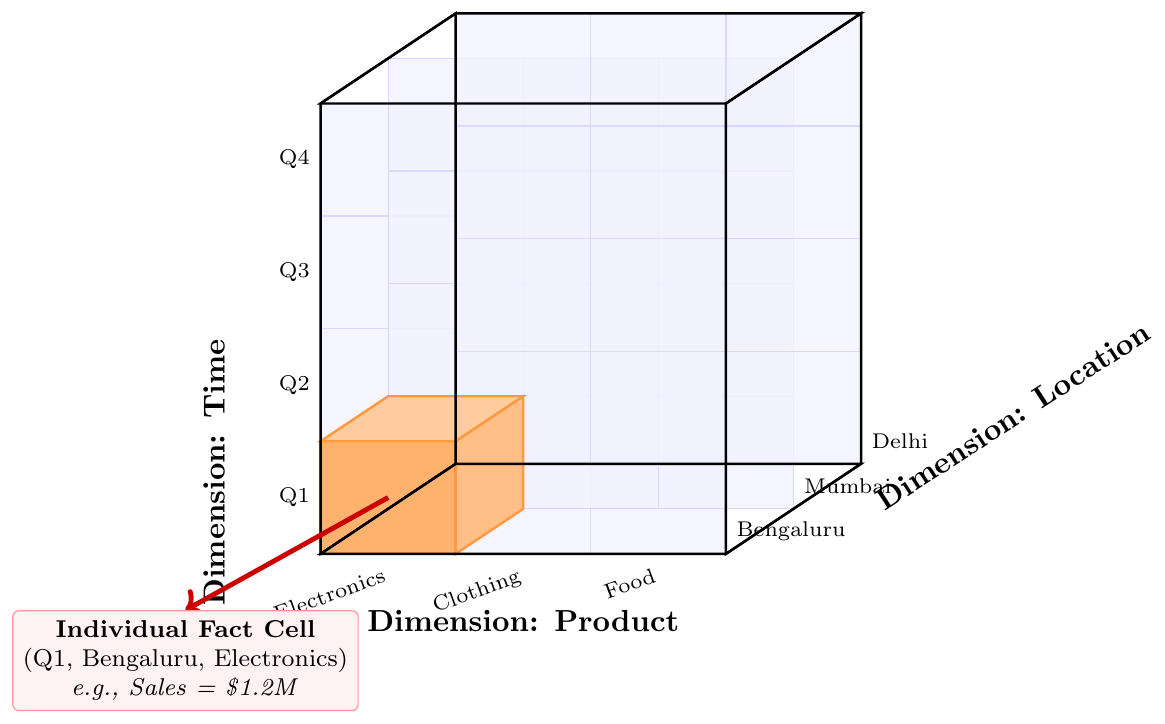
A multidimensional data model views data as a data cube — a structure that organizes data by dimensions and stores measures at each intersection.
Designed for OLAP and data warehouse analysis
Replaces the flat 2D table view with an $n$-dimensional perspective
Each point in the cube represents an aggregated measure for a unique combination of dimension values
Enables efficient roll-up, drill-down, slice, and dice operations
An $n$-dimensional data cube is defined by: \[ \text{Cube} = (D_1,\ D_2,\ \ldots,\ D_n,\ M) \] where:
$D_i$ = $i$-th dimension with domain $\text{dom}(D_i)$
$M$ = measure function mapping each cell $(d_1, d_2, \ldots, d_n)$ to a numeric value
Total number of cells $= |\text{dom}(D_1)| \times |\text{dom}(D_2)| \times \cdots \times |\text{dom}(D_n)|$
Many cells may be empty (sparse) if not all combinations exist in the data
Dimension: An attribute or perspective used to organize data
Examples:Time,Location,ProductDimension Hierarchy: Levels of abstraction within a dimension
Time: Day $\rightarrow$ Month $\rightarrow$ Quarter $\rightarrow$ YearMeasure: A numeric value stored at each cell of the cube
Examples:Sales,Profit,Count,Average PriceCell: One point in the cube identified by a unique combination of dimension values
Example: (Q1, Bengaluru, Electronics) $\rightarrow$ Sales = 120Cuboid: One particular aggregation of the full cube across a subset of dimensions
Dimensions and their domains:
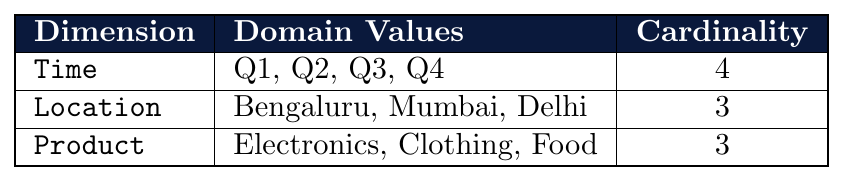
Total cells $= 4 \times 3 \times 3 = 36$
Measure:
Sales (lakhs)— one value per cellIf only 20 of 36 combinations have actual sales data $\rightarrow$ cube is sparse (44% empty)
Q: A 3-dimensional data cube has Time(12), Location($x$), and Product(50) as dimensions. If the total number of cells is 36{,}000, what is the domain size of the Location dimension?
\[ \text{Total cells} = 12 \times x \times 50 = 36{,}000 \] \[ 600x = 36{,}000 \implies x = 60 \] Answer: The Location dimension has $\mathbf{60}$ distinct values (e.g., 60 cities).
Q: A 4-dimensional cube has equal domain size $d$ for all dimensions. If the total number of cells is 10{,}000, what is $d$? \[ d^4 = 10{,}000 \implies d = \sqrt[4]{10{,}000} = 10 \] Answer: Each dimension has $\mathbf{10}$ distinct values.
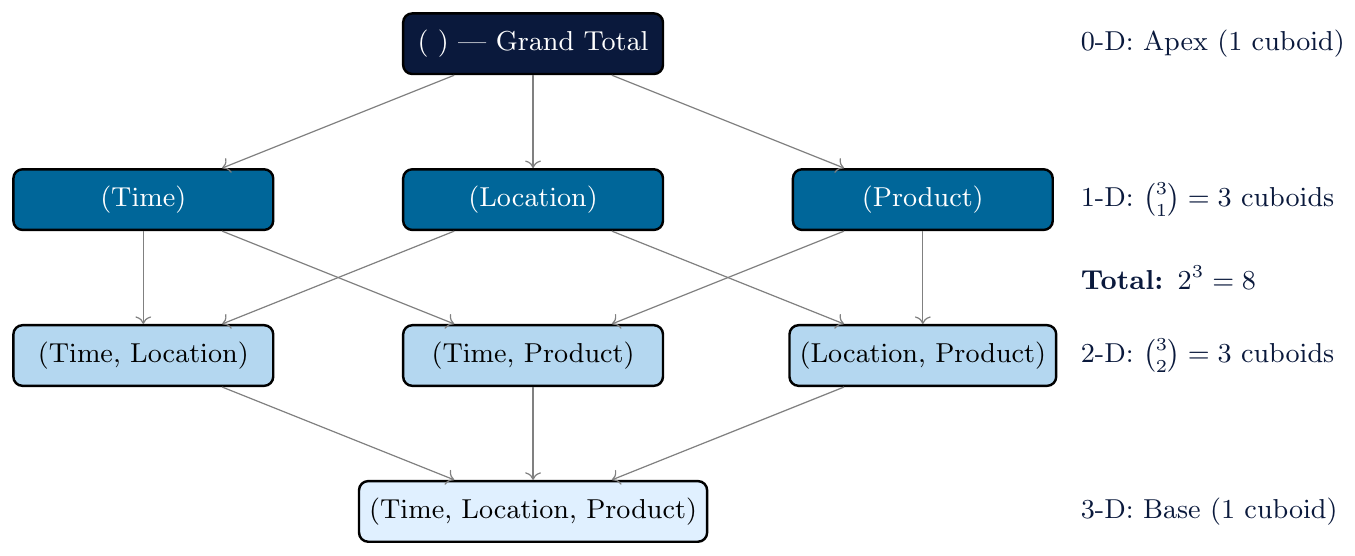
For an $n$-dimensional cube, there exist $2^n$ cuboids — each representing a different level of aggregation.
Base cuboid: All $n$ dimensions present — most detailed, lowest aggregation
Apex cuboid (0-D): All dimensions aggregated — single grand total value
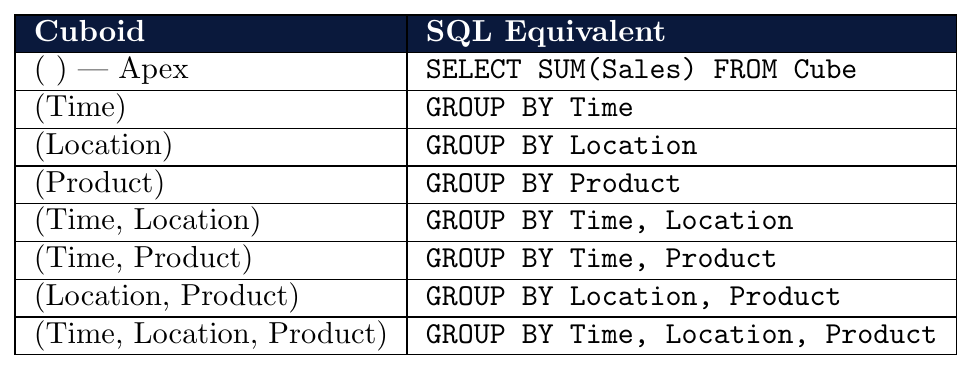
Each cuboid corresponds to a GROUP BY query on a subset of dimensions
The set of all $2^n$ cuboids forms a cuboid lattice
\[ \text{Number of cuboids} = 2^n \]
Each cuboid corresponds to a SQL GROUP BY query on a different subset of dimensions:
For an $n$-dimensional cube, the number of cuboids at each level of the lattice is given by the binomial coefficient: \[ \text{Number of } k\text{-dimensional cuboids} = \binom{n}{k} = \frac{n!}{k!\,(n-k)!} \] The total across all levels: \[ \sum_{k=0}^{n} \binom{n}{k} = 2^n \] This follows directly from the Binomial Theorem: $\sum_{k=0}^{n}\binom{n}{k}1^k 1^{n-k} = 2^n$.
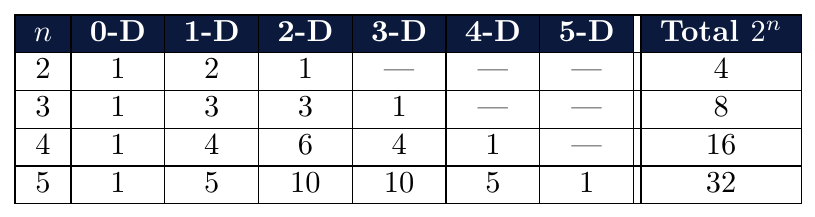
Q: A data cube has 5 dimensions: Time, Location, Product, Customer, Channel.
How many cuboids does the full data cube contain?
\[
\text{Number of cuboids} = 2^5 = 32
\]
1 apex cuboid (0-D)
$\binom{5}{1} = 5$ one-dimensional cuboids
$\binom{5}{2} = 10$ two-dimensional cuboids
$\binom{5}{3} = 10$ three-dimensional cuboids
$\binom{5}{4} = 5$ four-dimensional cuboids
$\binom{5}{5} = 1$ base cuboid (5-D)
Total: $1+5+10+10+5+1 = 32$ cuboids
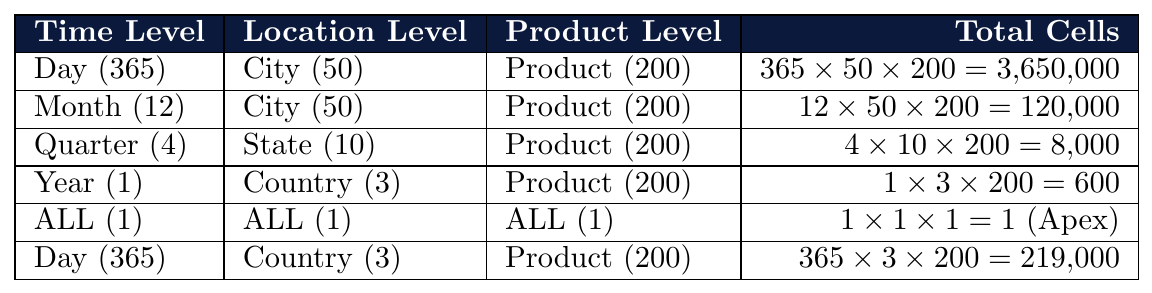
Given a Time dimension with the hierarchy: Day(365) $\to$ Month(12) $\to$ Quarter(4) $\to$ Year(1), and a Location dimension: City(50) $\to$ State(10) $\to$ Country(3) $\to$ ALL, combined with a Product dimension with a flat domain of 200 items, calculate the number of cells for each combination of hierarchy levels:
A cube has 6 dimensions. How many 3-D cuboids exist? What is the total cuboid count? \[ \binom{6}{3} = \frac{6!}{3!\,3!} = 20 \quad \text{three-dimensional cuboids} \] \[ \text{Total cuboids} = 2^6 = 64 \]
A cube has $n$ dimensions. The number of 2-D cuboids equals 21. Find $n$. \[ \binom{n}{2} = \frac{n(n-1)}{2} = 21 \implies n(n-1) = 42 \implies n = 7 \]
How many cuboids does a 10-dimensional cube have? At which level is the number of cuboids maximised? \[ 2^{10} = 1024 \quad \text{total cuboids} \] The maximum occurs at $k = \lfloor n/2 \rfloor = 5$: \[ \binom{10}{5} = 252 \quad \text{(largest single-level count)} \]
A data cube has Time(T), Product(P), Store(S), Promotion(Pr), and Customer(C) as dimensions ($n=5$). An analyst pre-materialises all cuboids involving at least Product and at most 3 dimensions total. How many cuboids satisfy this condition?
The only 1-D cuboid containing $P$ is $\{P\}=1$ .
Cuboids of size exactly 2 containing $P$: choose 1 more from $\{T,S,Pr,C\}$ $= \binom{4}{1} = 4$
Cuboids of size exactly 3 containing $P$: choose 2 more from $\{T,S,Pr,C\}$ $= \binom{4}{2} = 6$
Total: $1 + 4 + 6 = \mathbf{11}$ cuboids
For an $n$-dimensional cube, prove that the number of cuboids containing a specific dimension $D_j$ is $2^{n-1}$.
Fix $D_j$ as present. The remaining $n-1$ dimensions can each independently be included or excluded.
This gives $2^{n-1}$ distinct combinations $\Rightarrow$ $2^{n-1}$ cuboids contain $D_j$.
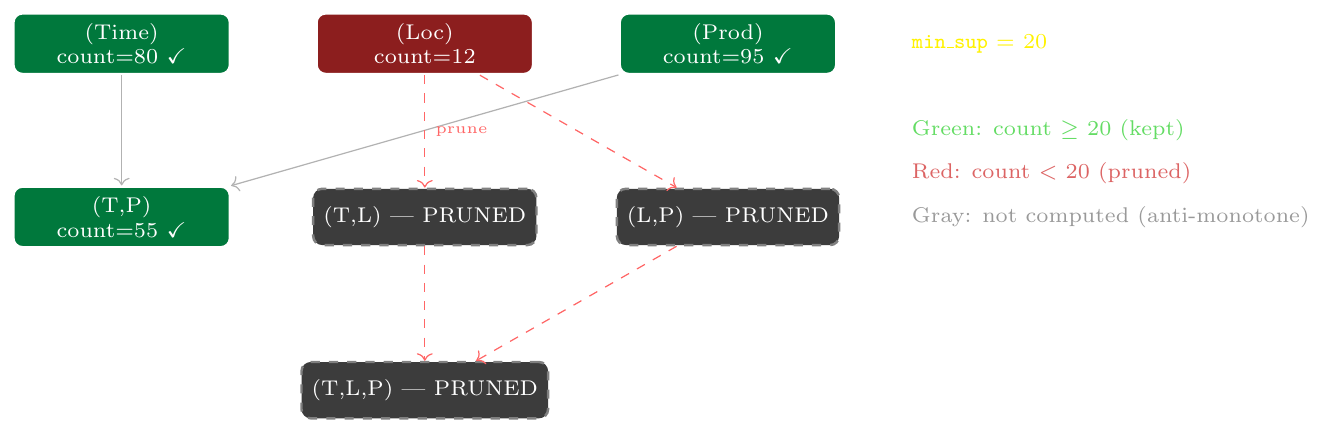
Verification ($n=3$): Each dimension appears in $2^2 = 4$ cuboids. For $T$: $(T)$, $(T,L)$, $(T,P)$, $(T,L,P)$ — indeed 4. ✓
Each dimension with $L_i$ levels contributes $L_i + 1$ choices (including the “ALL” choice). Total cuboids $= \prod_i (L_i + 1)$.
Types of Data Cubes
In practice, most data cubes are sparse — many cells are empty.
Not all combinations of dimension values have corresponding data
Example: Not every product is sold in every city in every quarter
Density of a cube: \[ \text{Density} = \frac{\text{Number of non-empty cells}}{\text{Total possible cells}} \times 100\% \]
Storing all cells wastes memory — sparse representation techniques used
MOLAP stores the full array (wastes space for sparse cubes)
ROLAP stores only non-empty cells (efficient for sparse cubes)
A 4-dimensional cube has dimensions:
Time (12 months), Location (50 cities), Product (200 items), Customer (1000 segments)
Total possible cells:
\[
12 \times 50 \times 200 \times 1000 = 1{,}200{,}000{,}000 \quad \text{(1.2 billion)}
\]
Actual non-empty cells: 3,000,000 (3 million)
\[
\text{Density} = \frac{3{,}000{,}000}{1{,}200{,}000{,}000} \times 100\% = 0.25\%
\]
The cube is 99.75% sparse — ROLAP is preferred; MOLAP would waste enormous memory.
An iceberg cube computes and stores only those cuboid cells whose aggregate value satisfies a minimum threshold. \[ \text{Store cell } (d_1, d_2, \ldots, d_k) \text{ only if } \text{measure}(d_1,\ldots,d_k) \geq \text{min\_sup} \]
Avoids materializing cells with very low counts — reduces storage dramatically
Named after the iceberg metaphor — only the tip (significant cells) is visible
Threshold called minimum support (often count $\geq$ some value)
Useful for association rule mining on large sparse cubes
Sales cube with 36 cells (4 quarters $\times$ 3 locations $\times$ 3 products).
min_sup = 100 lakhs (store only cells where Sales $\geq$ 100).
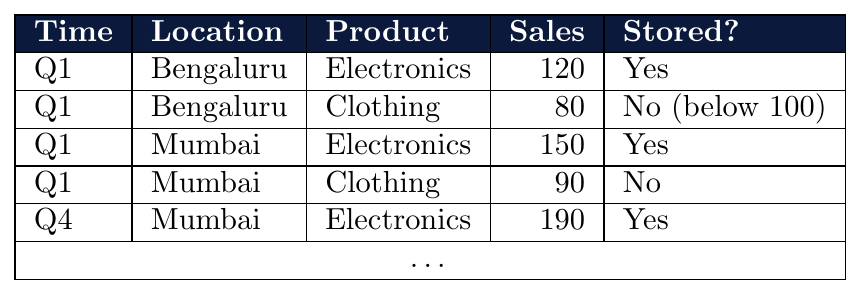
Only cells meeting the threshold are materialized — the rest are pruned.
A 3-D cube has Time(4), Location(3), Product(3) with 22 non-empty cells. \[ \text{Total cells} = 4 \times 3 \times 3 = 36, \qquad \text{Density} = \frac{22}{36} \times 100\% \approx 61.1\% \] Moderately dense; either storage approach is viable.
A 4-D retail cube has Month(12), Store(500), SKU(10{,}000), Channel(5) with 2{,}000{,}000 actual sales records. \[ \text{Total cells} = 12 \times 500 \times 10{,}000 \times 5 = 300{,}000{,}000 \] \[ \text{Density} = \frac{2{,}000{,}000}{300{,}000{,}000} \times 100\% \approx 0.67\% \] Extremely sparse (99.33% empty) — ROLAP is strongly preferred.
A cube has density 2% and $5 \times 10^8$ total cells. How many cells are non-empty? \[ N = 0.02 \times 5 \times 10^8 = 10{,}000{,}000 \quad \text{(10 million non-empty cells)} \]
(MOLAP vs.\ ROLAP storage): For Problem 2 above, with $b = 8$ bytes/cell in MOLAP, and in ROLAP each record has 4 dimension keys (4 bytes each) + 1 measure (8 bytes): \[ \text{MOLAP} = 300{,}000{,}000 \times 8 = 2{,}400{,}000{,}000 \text{ bytes} \approx 2.4 \text{ GB} \] \[ \text{ROLAP} = 2{,}000{,}000 \times (4 \times 4 + 8) = 2{,}000{,}000 \times 24 = 48{,}000{,}000 \text{ bytes} \approx 48 \text{ MB} \] \[ \text{Space saving} = \frac{2400 - 48}{2400} \times 100\% = 98\% \]
(Find density from storage constraint): A 3-D cube has 1 billion total cells. MOLAP requires 8 GB (8 bytes/cell). At what minimum density does ROLAP require more storage than MOLAP? (ROLAP record size = 20 bytes: 3 $\times$ 4-byte keys + 8-byte measure.) \[ N \times 20 = 10^9 \times 8 \implies N = \frac{8 \times 10^9}{20} = 4 \times 10^8 \] \[ \text{Break-even density} = \frac{4 \times 10^8}{10^9} \times 100\% = 40\% \] At density $> 40\%$, MOLAP is more storage-efficient; below 40%, ROLAP wins.
A cuboid cell $(d_1, d_2, \ldots, d_k)$ with measure value $v$ is closed if and only if there is no more specific cell (with additional dimension constraints) that has the same measure value: \[ \nexists\; (d_1,\ldots,d_k, d_{k+1}): \quad \text{measure}(d_1,\ldots,d_k,d_{k+1}) = v \] The closed cube stores only the closed cells, eliminating redundancy while preserving the ability to reconstruct all other cells by roll-up.
If $\text{measure}(d_1,\ldots,d_k) = \text{measure}(d_1,\ldots,d_k,d_{k+1})$ for every value of $d_{k+1}$, then the coarser cell is redundant (the finer cell already captures the same information)
Closed cube $\subseteq$ Iceberg cube $\subseteq$ Full cube
Used primarily with COUNT; a cell is not closed if all its refinements have the same count (i.e., adding a dimension doesn't split the group)
Consider a 2-D cube with dimensions: Location $\in \{North, South\}$ and Customer $\in \{Retail, Wholesale\}$. The base cuboid (2-D) has the following COUNT values:

Checking closedness of (North) in the 1-D (Location) cuboid:
The cell $(North)$ has count = 15. Its refinements in the 2-D cuboid are:
$(North, Retail) = 15$ and $(North, Wholesale) = 0$.
Since the refinement $(North, Retail)$ has the same count (15) as its parent $(North)$, the cell $(North)$ is not closed — adding the Customer dimension does not change the count.
Checking closedness of (Wholesale) in the 1-D (Customer) cuboid:
The cell $(Wholesale)$ has count = 25. Its refinements in the 2-D cuboid are:
$(North, Wholesale) = 0$ and $(South, Wholesale) = 25$.
Since the refinement $(South, Wholesale)$ has the same count (25) as its parent $(Wholesale)$, the cell $(Wholesale)$ is not closed.
Case of a closed cell:
Checking $(South)$ in the 1-D (Location) cuboid: $(South)$ has count = 35.
Its refinements are $(South, Retail) = 10$ and $(South, Wholesale) = 25$.
Since neither refinement equals 35, the cell $(South)$ is closed.
Summary: Non-closed cells (like North and Wholesale in this table) are redundant. In a Closed Cube representation, we prune these and only store cells where every refinement results in a different count value, effectively compressing the data without losing information.
Consider a small 2-D cube: Time $\in \{Q1, Q2\}$, Product $\in \{Electronics, Clothing\}$. The base cuboid (2-D) has the following COUNT values:

Checking closedness of (Q1) in the 1-D (Time) cuboid:
$(Q1)$ has count = 10. Its refinements in the 2-D cuboid are:
$(Q1, \text{Electronics}) = 5$ and $(Q1, \text{Clothing}) = 5$.
Since $5 \neq 10$, the cell $(Q1)$ is closed — adding the Product dimension
changes the count.
Checking closedness of (Electronics) in the 1-D (Product) cuboid:
$(Electronics)$ has count = 13. Its refinements: $(Q1, Electronics) = 5$, $(Q2, Electronics) = 8$.
Since $5 \neq 13$ and $8 \neq 13$, $(Electronics)$ is closed.
Hypothetical non-closed case:
If all sales of Clothing occurred only in Q2 and there were no other data, then:
$(Q2, Clothing) = $ all Clothing sales, and the (Clothing) cuboid cell would equal
$(Q2, Clothing)$ — making (Clothing) not closed (redundant with its 2-D refinement).
Summary: In the example above, all cells happen to be closed. Non-closed cells arise when the same count value is shared by a cell and one of its direct 1-step refinements — signalling that the refinement adds no information.
Schemas for Multidimensional Data Models
A schema in a data warehouse defines how fact tables and dimension tables are organized and related.
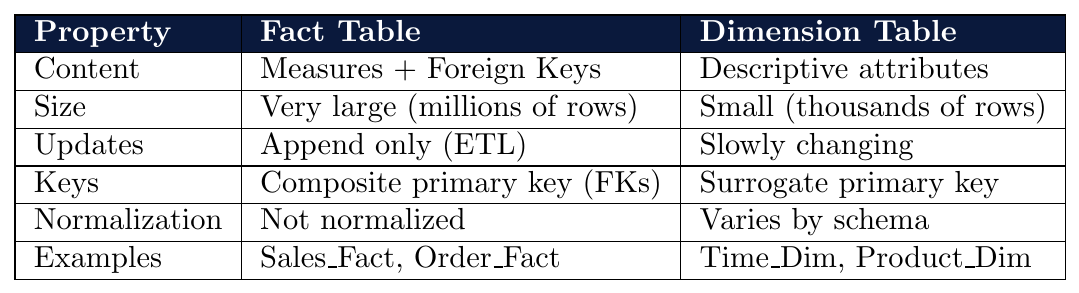
Fact table: Central table storing measures (numeric, quantitative data) and foreign keys to dimension tables
Dimension table: Stores descriptive attributes of a dimension — the context for analysis
Three standard schemas: Star, Snowflake, Fact Constellation (Galaxy)
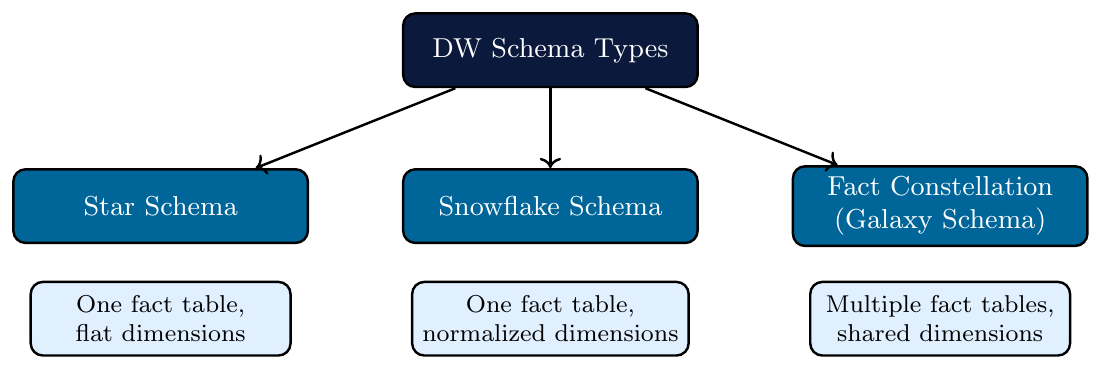
A star schema has a single central fact table connected to multiple denormalized dimension tables — resembling a star shape.
Dimension tables are flat — all attributes in one table, not further decomposed
Simple structure — fewer joins required for queries
Fast query performance — optimized for OLAP
Data redundancy in dimension tables (denormalized)
Most widely used schema in data warehouses
Fact table: Contains measures and foreign keys to all dimension tables
Primary key = composite of all foreign keysDimension tables: One per dimension; contain all attributes of that dimension in a single flat table
Number of joins in a query = number of dimensions involved
Denormalization: Dimension attributes are stored redundantly to avoid joins
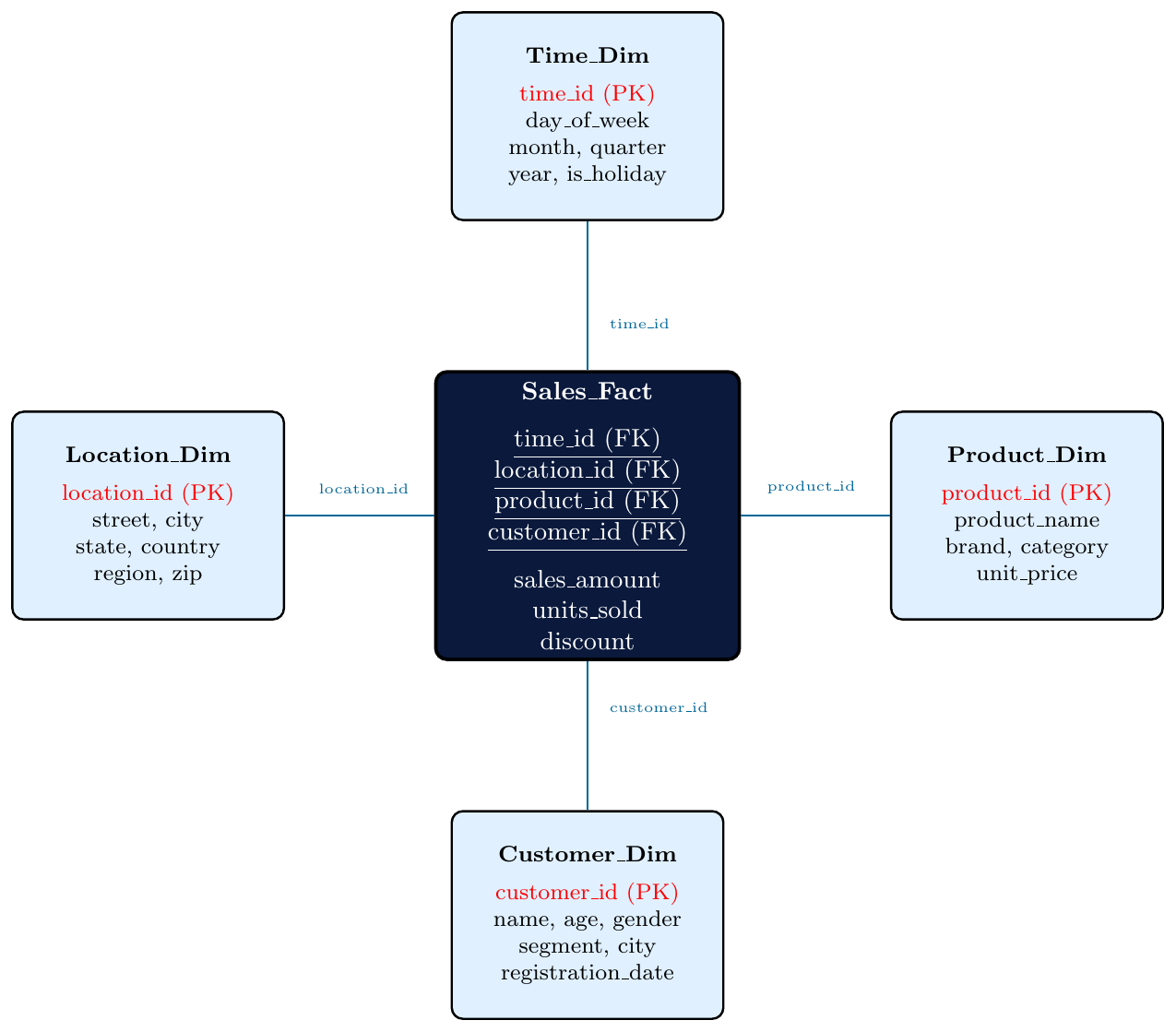
Query: Total sales per product category per quarter for 2024.
SQL on Star Schema:
SELECT  T.quarter, P.category, SUM(F.sales_amount)
FROM    Sales_Fact F
JOIN    Time_Dim T     ON F.time_id     = T.time_id
JOIN    Product_Dim P  ON F.product_id  = P.product_id
WHERE   T.year = 2024
GROUP BY T.quarter, P.category;
Only 2 joins needed (Time and Product) — Location and Customer not touched
All product attributes (name, brand, category) are in one flat table — no further joins
Fast execution — typical OLAP query pattern
Product_Dim stores category alongside individual product:
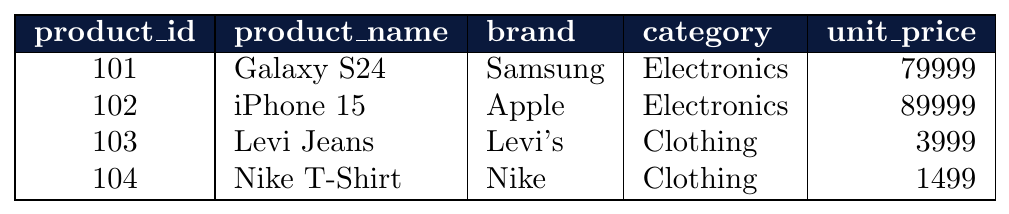
“Electronics” is stored twice — redundancy due to denormalization
In a normalized schema, category would be in a separate table
Star schema accepts this redundancy to avoid extra joins at query time
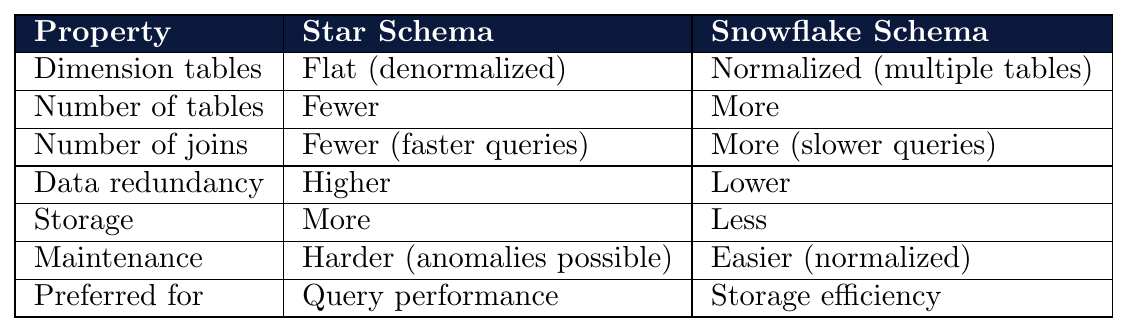
A snowflake schema is a normalized extension of the star schema where dimension tables are further decomposed into multiple related tables.
Dimension tables are normalized — no redundancy
Resembles a snowflake shape — dimensions branch out into sub-dimensions
Reduces storage — eliminates redundant attribute values
More joins required for queries — slower than star schema
Better for frequent dimension updates (normalized tables easier to maintain)
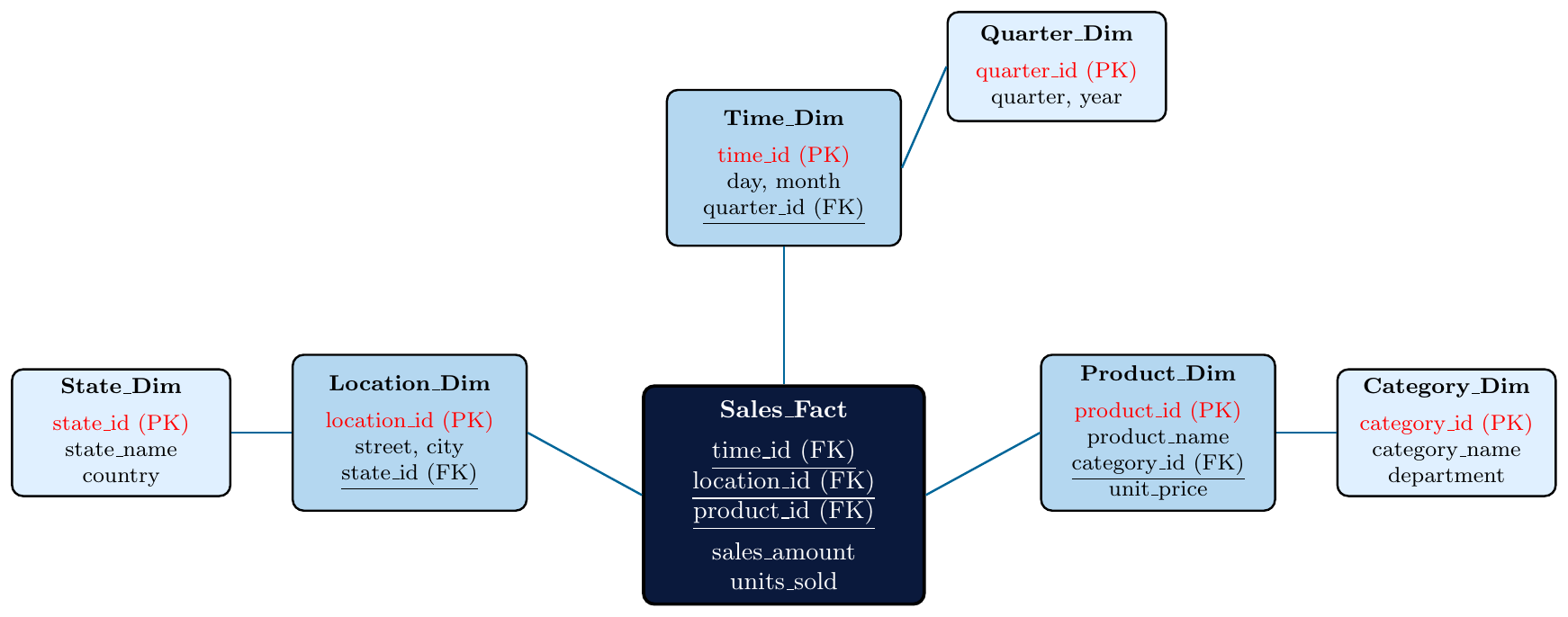
Query: Total sales per department per year.
SQL on Snowflake Schema:
SELECT  Q.year, C.department, SUM(F.sales_amount)
FROM    Sales_Fact F
JOIN    Product_Dim P   ON F.product_id  = P.product_id
JOIN    Category_Dim C  ON P.category_id = C.category_id
JOIN    Time_Dim T      ON F.time_id     = T.time_id
JOIN    Quarter_Dim Q   ON T.quarter_id  = Q.quarter_id
GROUP BY Q.year, C.department;
5 joins required — compared to 2 joins in equivalent star schema query
departmentis not inProduct_Dimdirectly — must traverseCategory_Dimyearis not inTime_Dimdirectly — must traverseQuarter_DimSnowflake pays for normalization with extra join overhead
Star Schema — Product_Dim (denormalized):

“Electronics” and “Technology” repeated 3 times.
Snowflake Schema — normalized into two tables:
Product_Dim:
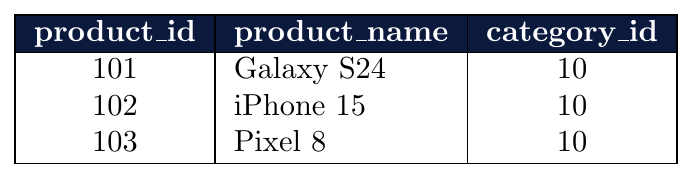
Category_Dim:

“Electronics” and “Technology” stored once only — no redundancy.
A fact constellation (also called galaxy schema) contains multiple fact tables that share dimension tables.
Models complex real-world scenarios where multiple subjects need analysis
Shared dimension tables — consistency across fact tables
Each fact table can have different measures and different grains
Most flexible but most complex schema to design and maintain
Looks like a collection of stars — hence “galaxy” schema
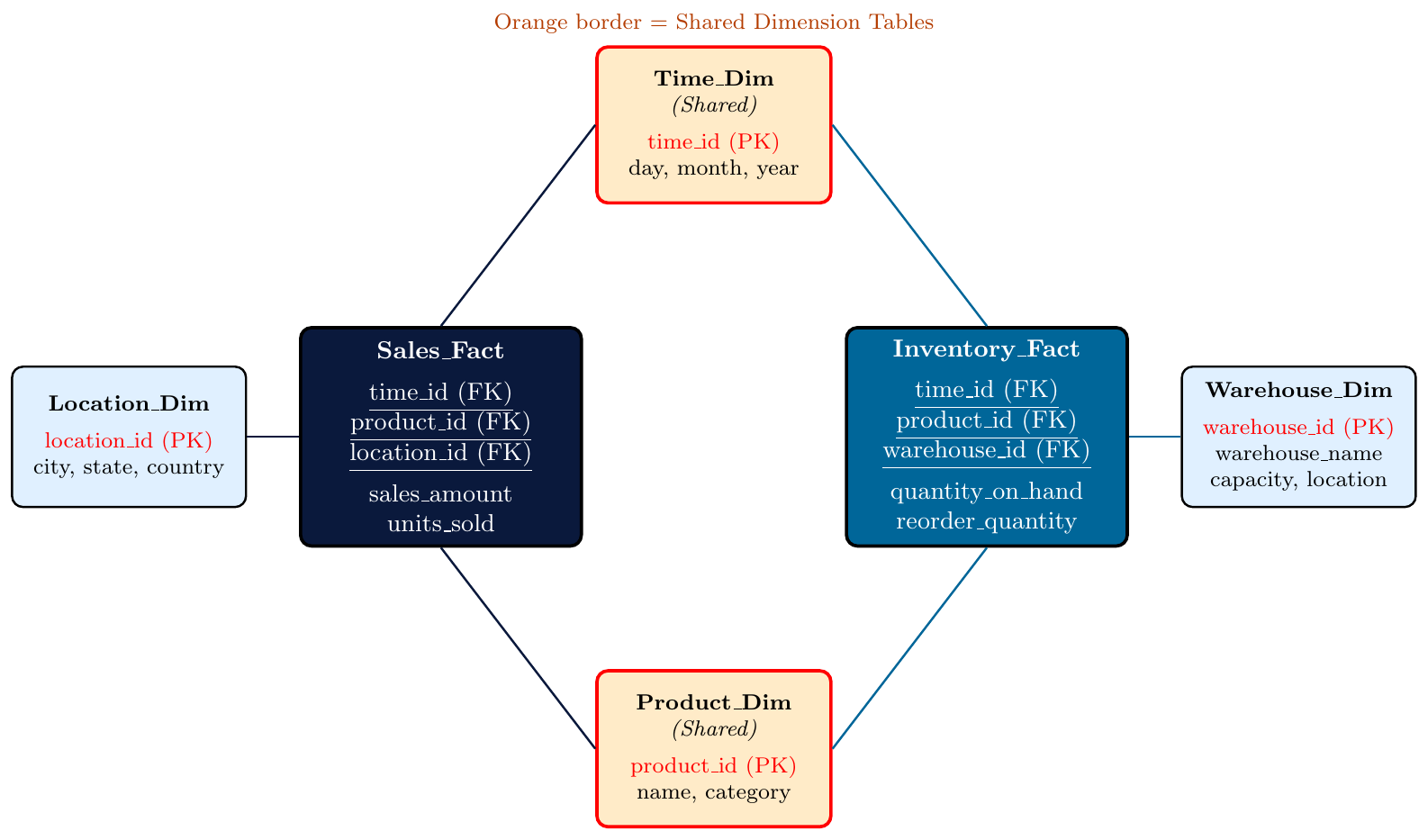
A retail company needs to analyze both Sales and Inventory:
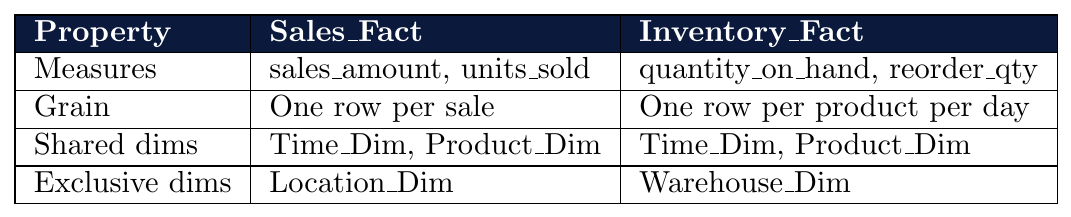
Cross-fact query: “Which products have high sales but low inventory?” — requires joining both fact tables via shared
Product_DimShared dimension ensures consistent product definitions across both facts
Q: A data warehouse has the following tables:
Sales_Fact, Time_Dim, Customer_Dim, Product_Dim, Category_Dim
Product_Dim has a foreign key to Category_Dim.
What schema does this represent?
One fact table (
Sales_Fact) $\rightarrow$ not Fact ConstellationProduct_Dimconnects toCategory_Dim— dimension table is normalizedThis is a Snowflake Schema — dimension hierarchy is normalized out into sub-dimensions
Answer: Snowflake Schema
If Category_Dim were merged into Product_Dim (no sub-table), it would be a Star Schema.
Q: A star schema has a fact table Orders_Fact with foreign keys:
customer_id, product_id, time_id, store_id
What is the primary key of Orders_Fact?
No single attribute uniquely identifies a row in a fact table
Primary key = composite key of all foreign keys:
PK = (customer_id, product_id, time_id, store_id)This assumes one fact per unique combination of all dimensions
If multiple orders can exist for the same combination, a surrogate key (
order_id) is added
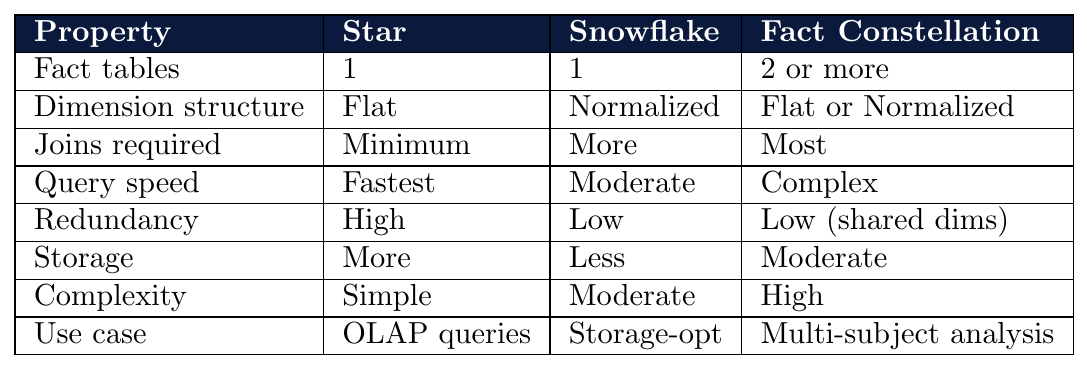
Concept Hierarchy
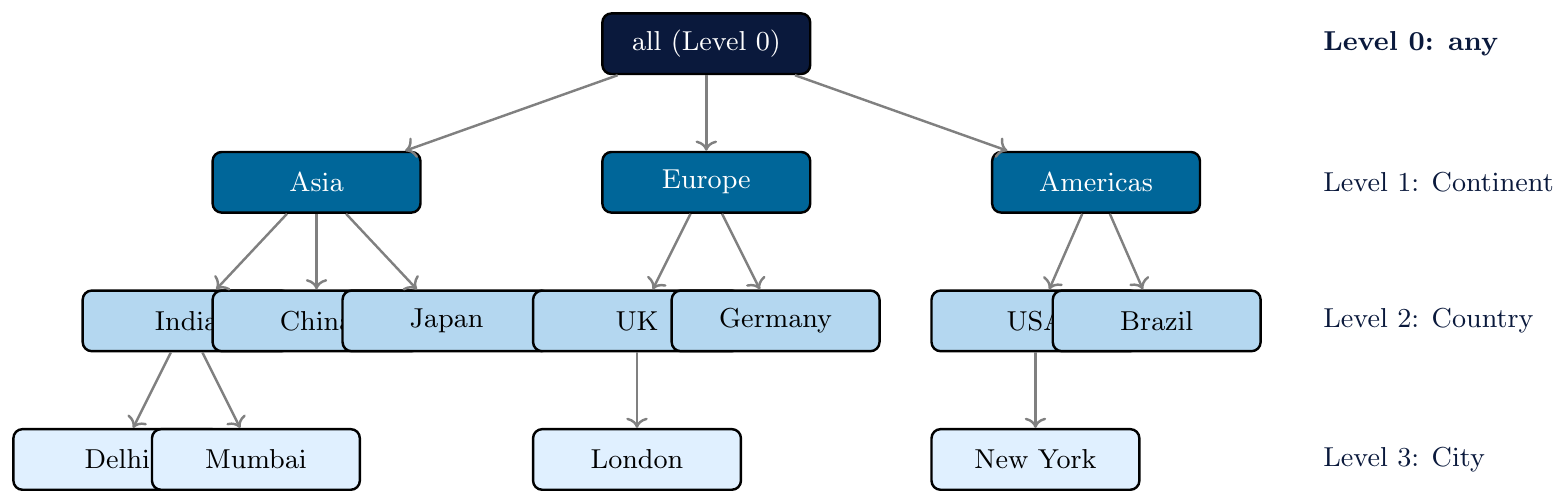
A concept hierarchy defines a sequence of mappings from a set of low-level concepts to higher-level, more general concepts.
Organizes nominal attribute values into levels of abstraction
Enables roll-up and drill-down operations in data cubes
Allows mining at multiple levels of granularity
Example:
City$\rightarrow$State$\rightarrow$Country$\rightarrow$Continent
Nominal attributes have many distinct values at fine levels (e.g., thousands of cities)
Patterns at fine level are too sparse to be statistically meaningful
Rolling up to higher levels groups values, increasing support for patterns
Enables generalization: specific value $\rightarrow$ broader category
Reduces cardinality: fewer distinct values $\rightarrow$ faster mining
Four main approaches:
Method 1: Specified explicitly by a user or domain expert
Method 2: Specified by the order of attributes (schema hierarchy)
Method 3: Automatically generated by number of distinct values
Method 4: Specified by explicit grouping of values
A domain expert manually defines the hierarchy levels and mappings.
Most accurate — captures domain knowledge
Time-consuming and requires expert involvement
Stored as metadata in the data warehouse schema
Example: A retail expert defines product hierarchy:
Item$\rightarrow$Brand$\rightarrow$Category$\rightarrow$Department
A retail database stores individual products. An expert defines:
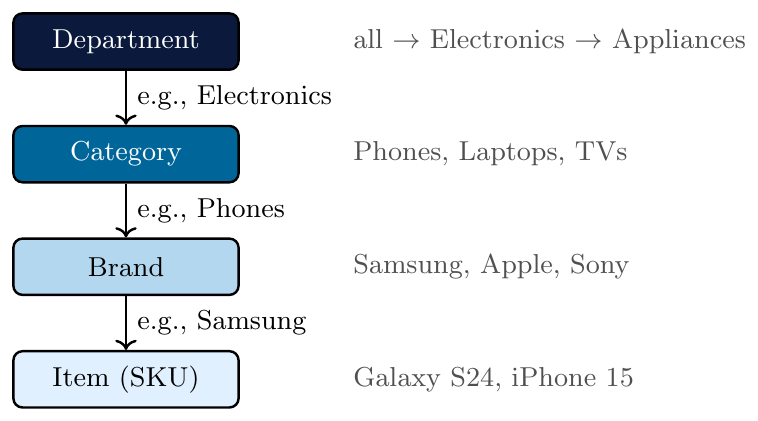
Roll-up from Item to Category: instead of analyzing 10,000 SKUs, analyst sees 5 categories.
The hierarchy is implied by the order of attributes listed in the database schema.
User specifies:
street $<$ city $<$ state $<$ countrySystem automatically infers the hierarchy from this order
A total ordering of attributes defines the levels
Simple to implement — no explicit value-to-value mapping needed
The attribute with fewer distinct values is at a higher level
If a user specifies the partial order:
day $<$ month $<$ quarter $<$ year
Then the system knows:
dayis the most specific level (many distinct values)yearis the most general level (few distinct values)Rolling up moves left to right in the ordering
Drilling down moves right to left
Database table Customer has attributes:
Street, City, District, State, Country
User specifies order: Street $<$ City $<$ District $<$ State $<$ Country
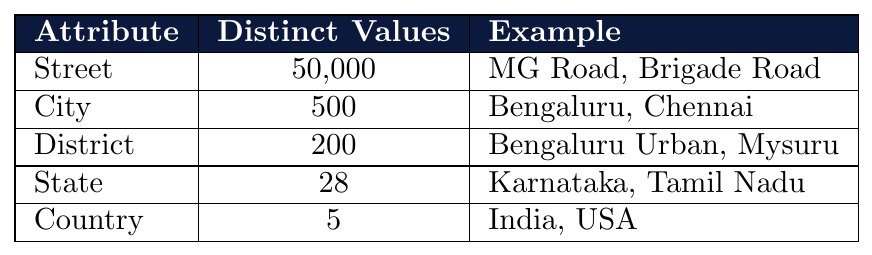
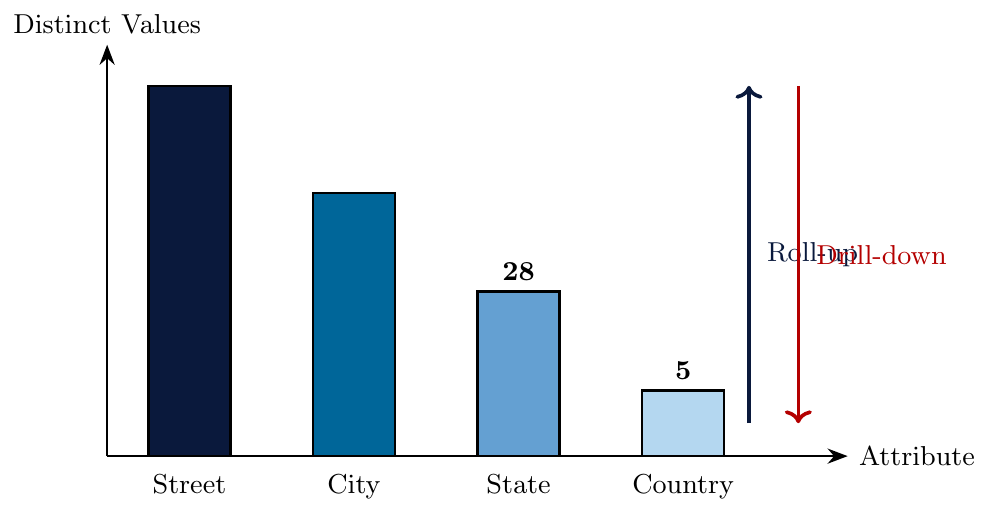
Fewer distinct values $\rightarrow$ higher in hierarchy.
Mining at City level instead of Street reduces cardinality from 50,000 to 500.
System automatically generates the hierarchy by sorting attributes on the number of distinct values:
Attribute with the most distinct values $\rightarrow$ lowest level (most specific)
Attribute with the fewest distinct values $\rightarrow$ highest level (most general)
No user specification of order needed
Works well when attributes have a natural parent-child relationship
May produce incorrect hierarchies if attributes are unrelated
A data warehouse has the following attributes and their distinct value counts:
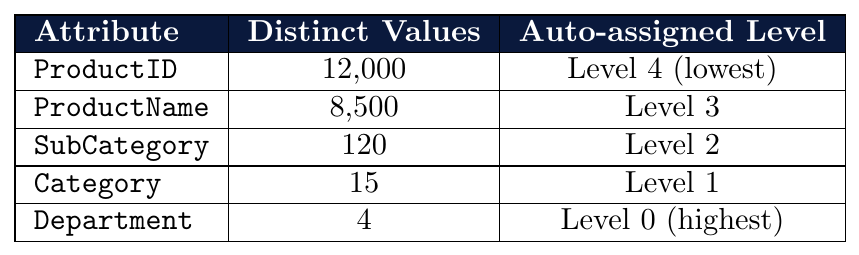
System automatically orders:
ProductID $<$ ProductName $<$ SubCategory $<$ Category $<$ DepartmentNo user input needed — purely driven by cardinality
Risk:
ProductIDandProductNamemay not have a true parent-child relationship
User manually groups specific values of an attribute into higher-level concepts.
Most flexible — handles arbitrary, non-geographic groupings
Example: Group countries by economic classification:
{India, China, Brazil} $\rightarrow$Developing
{USA, UK, Germany} $\rightarrow$DevelopedRequires domain knowledge — groups may not be derivable from data alone
Stored as a mapping table in the data warehouse
Attribute: JobRole with many values. User defines groupings:
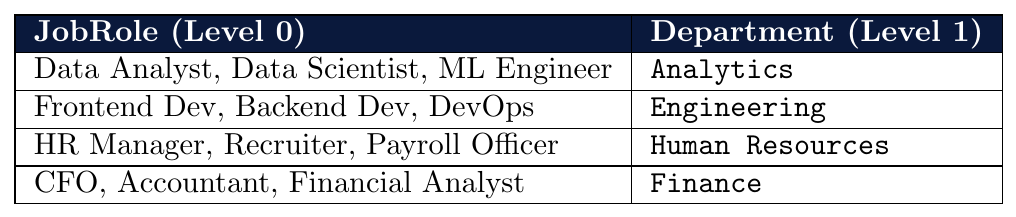
Mining at Department level: “Analytics department has highest project completion rate” — a pattern invisible at the JobRole level due to data sparsity.
Attribute: Grade $\in$ {A+, A, A–, B+, B, B–, C+, C, D, F}
User defines grouping:
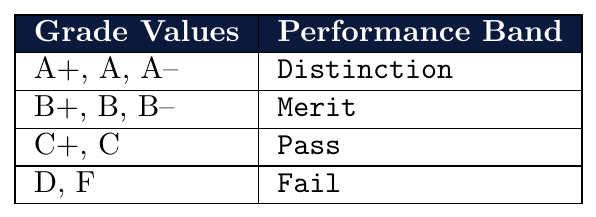
Roll-up from 10 grade values to 4 performance bands — meaningful for policy decisions.
Pattern: “80% of scholarship holders are in Distinction” is clear at rolled-up level.
A Location attribute supports a 4-level hierarchy:
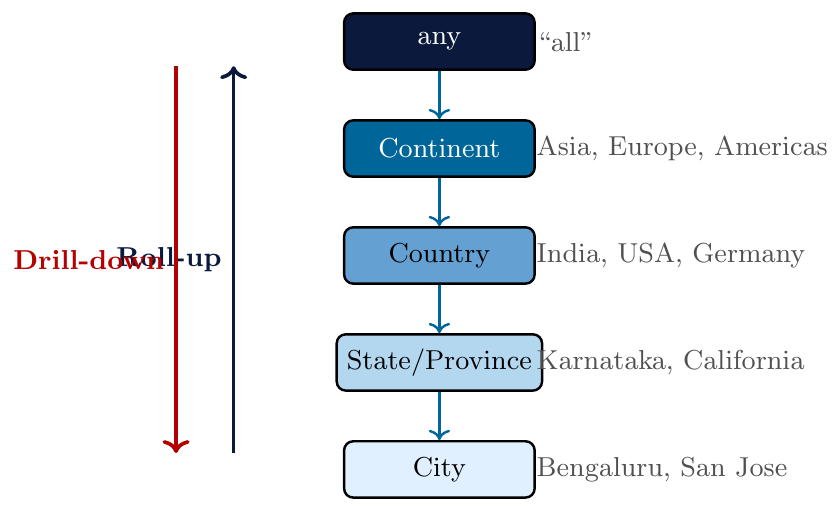
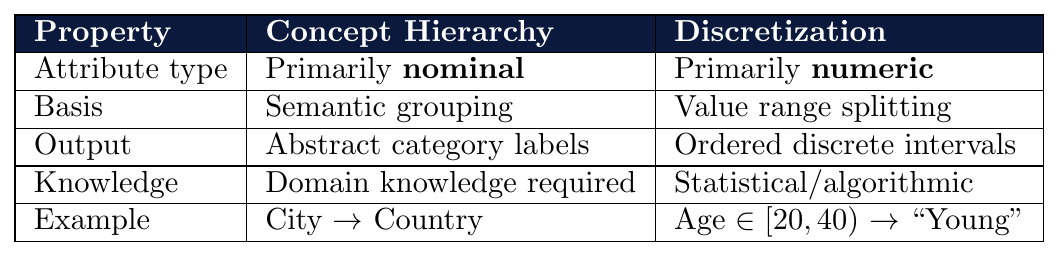
Measures: Categorization and Computation
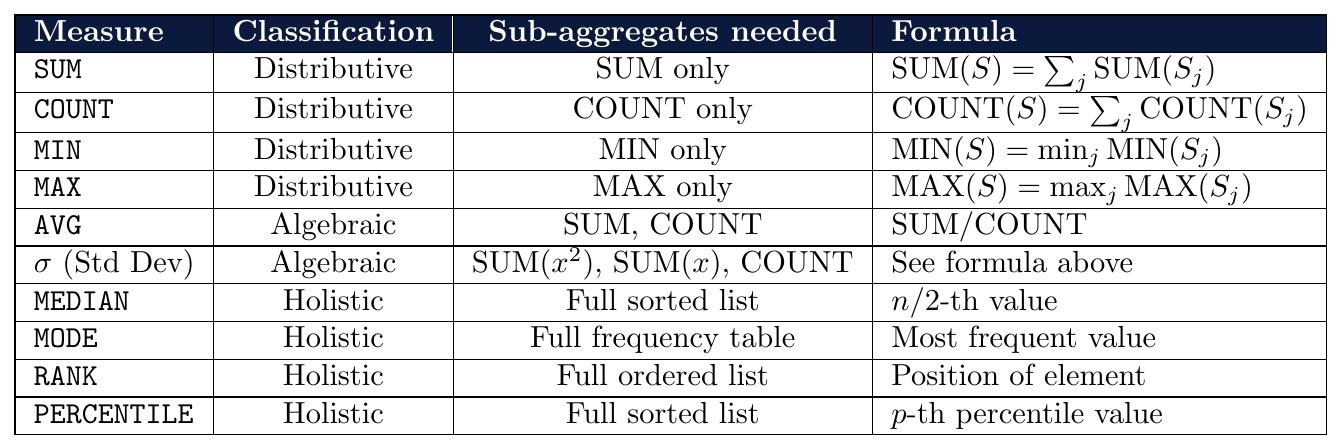
A measure is a numeric function defined over the cells of a data cube. Measures are classified by how they behave under aggregation across cuboids:
Distributive — computable from sub-aggregate results alone.
Algebraic — computable from a fixed finite set of distributive sub-aggregates.
Holistic — require the entire partition; no bounded sub-aggregate suffices.
This classification directly determines how efficiently a measure can be pre-computed and maintained in a data cube or OLAP system.
Measures are classified by how they behave during aggregation:
Distributive: Can be computed from sub-aggregates
$\text{agg}(S) = f(\text{agg}(S_1), \text{agg}(S_2), \ldots)$
Examples:SUM,COUNT,MIN,MAXAlgebraic: Computed from a fixed number of distributive aggregates
Examples:AVG(= SUM / COUNT),Standard DeviationHolistic: Cannot be computed from sub-aggregates — require the full set
Examples:MEDIAN,MODE,RANK

Consider partitioned sales data split by region:
Region A: {10, 20, 30} Region B: {40, 50, 60}
SUM (Distributive):
\[
\text{SUM(A)} = 60, \quad \text{SUM(B)} = 150, \quad \text{SUM(All)} = 60 + 150 = 210 \quad \text{(computable from sub-aggregates)}
\]
AVG (Algebraic):
\[
\text{AVG(A)} = 20, \quad \text{AVG(B)} = 50
\]
\[
\text{AVG(All)} \neq \frac{20+50}{2} = 35 \quad \text{(wrong!)}
\]
\[
\text{AVG(All)} = \frac{\text{SUM(All)}}{\text{COUNT(All)}} = \frac{210}{6} = 35 \quad \text{(correct — needs both SUM and COUNT)}
\]
MEDIAN (Holistic):
\[
\text{MEDIAN(A)} = 20, \quad \text{MEDIAN(B)} = 50
\]
\[
\text{MEDIAN(All)} = \text{MEDIAN}(\{10,20,30,40,50,60\}) = \frac{30+40}{2} = 35
\]
Cannot compute this from MEDIAN(A) and MEDIAN(B) alone — requires the full sorted list.
Three branch offices report quarterly sales:

Incorrect global AVG: \[ \text{AVG}_{\text{wrong}} = \frac{30 + 10 + 30}{3} = \frac{70}{3} \approx 23.33 \quad \text{\ding{55}} \]
Correct global AVG (algebraic combination): \[ \text{AVG}_{\text{correct}} = \frac{240 + 150 + 360}{8 + 15 + 12} = \frac{750}{35} \approx 21.43 \quad \checkmark \]
Conclusion: Simply averaging the branch averages ignores differing counts. The correct approach requires carrying both SUM and COUNT as sub-aggregates — confirming AVG is algebraic, not distributive.
════════════════════════════════════════════╗
Typical OLAP Operations
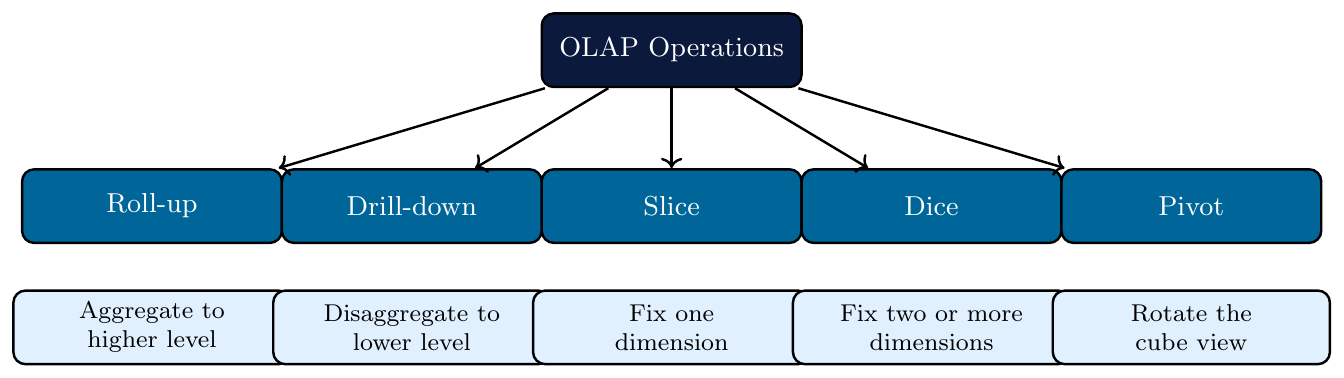
OLAP (Online Analytical Processing) operations allow analysts to navigate and explore data cubes at different levels of abstraction and from different perspectives.
Operate on multidimensional data cubes
Each operation produces a new view of the data
Five fundamental operations: Roll-up, Drill-down, Slice, Dice, Pivot
Supported by data warehouses for fast decision support queries
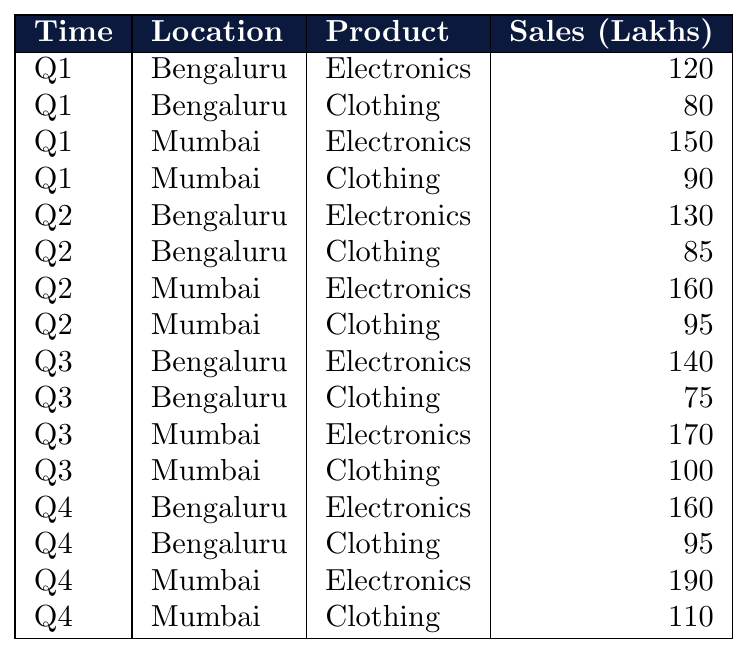
All five operations are demonstrated on the following base data cube:
Dimensions: Time (Quarter), Location (City), Product (Category)
Measure: Sales (in lakhs)
Roll-up aggregates data by climbing up a concept hierarchy or by reducing a dimension.
Moving to a higher, more general level of abstraction
Applies an aggregate function (SUM, AVG, COUNT) across the rolled-up level
Two ways to roll up:
Along a hierarchy: Day $\rightarrow$ Month $\rightarrow$ Quarter $\rightarrow$ Year
By dimension reduction: Remove a dimension entirely
Result has fewer rows and fewer details
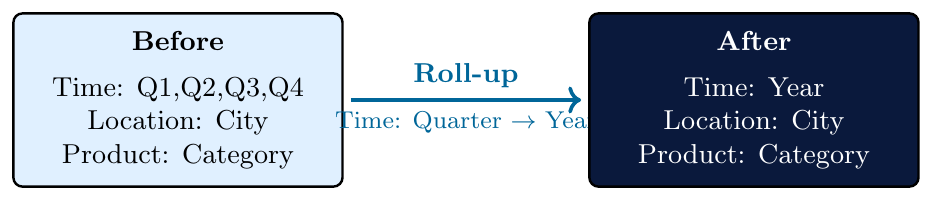
Roll up Time from Quarter to Year — aggregate Sales by SUM.
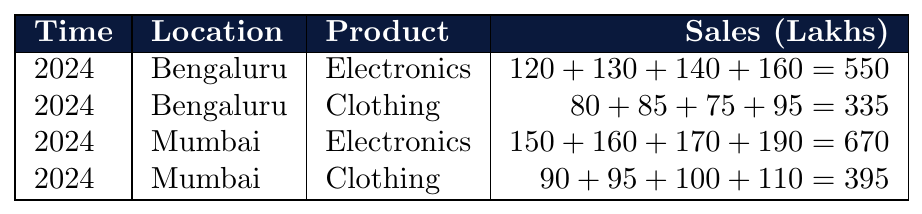
16 rows $\rightarrow$ 4 rows. Detail lost; annual trends visible.
Roll up Location from City to State:
Bengaluru and Mumbai both belong to different states (Karnataka, Maharashtra).
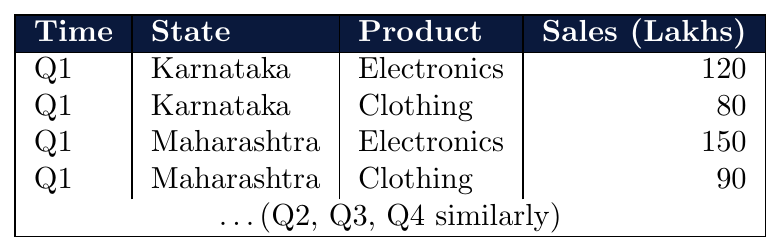
If both cities belonged to the same state, their sales would be summed into one row per state.
Remove Product dimension entirely — sum across all products:
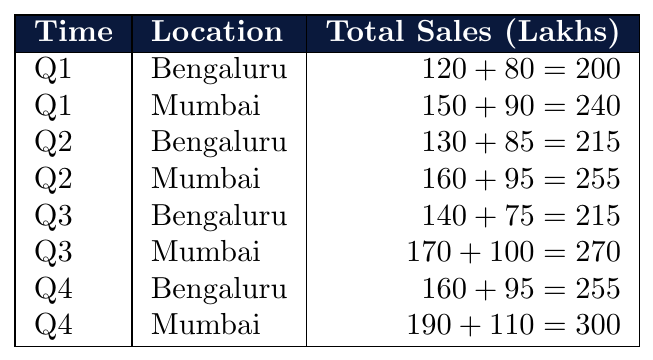
Product breakdown lost — now shows total sales per city per quarter.
Drill-down is the reverse of roll-up — navigates from summarized data to more detailed data.
Moves down a concept hierarchy to a lower, more specific level
Or adds a new dimension to the current view
Result has more rows and finer detail
Used when a summary shows an interesting pattern that warrants deeper investigation
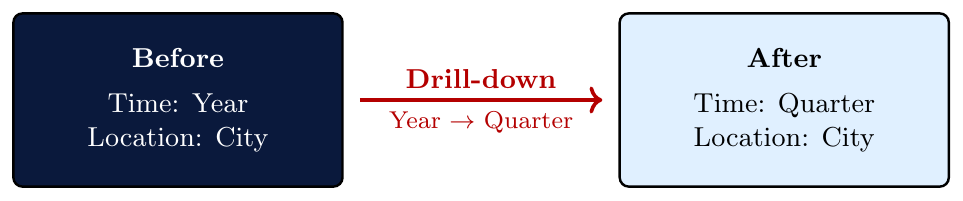
Starting from the rolled-up annual view, drill down Time back to Quarter:
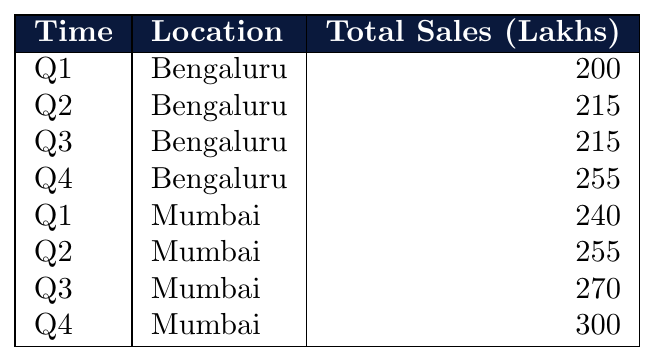
Insight: Mumbai's Q4 sales (300) are consistently highest — visible only after drilling down.
Starting from a 2-dimension view (Time, Location), add Product dimension:
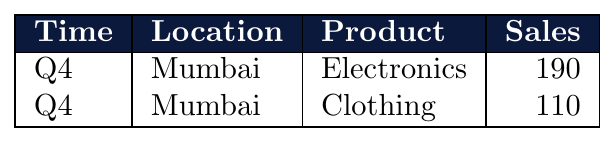
Mumbai Q4 total was 300 — drilling into Product reveals Electronics (190) dominates Clothing (110).
Slice selects a single value for one dimension, reducing the cube by one dimension.
Fixes exactly one dimension to a single specific value
Result is a 2D table (if original was 3D cube)
Equivalent to a WHERE clause on one dimension in SQL
Does not aggregate — all remaining rows at the same granularity are retained
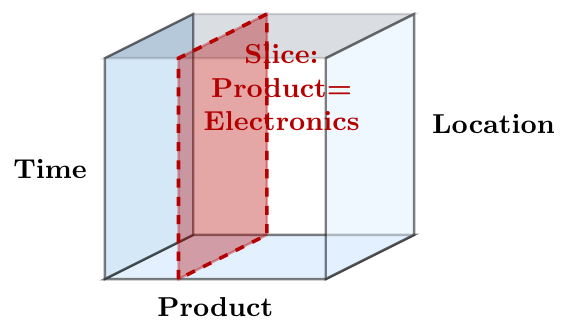
Fix Product = Electronics — remove Product dimension:
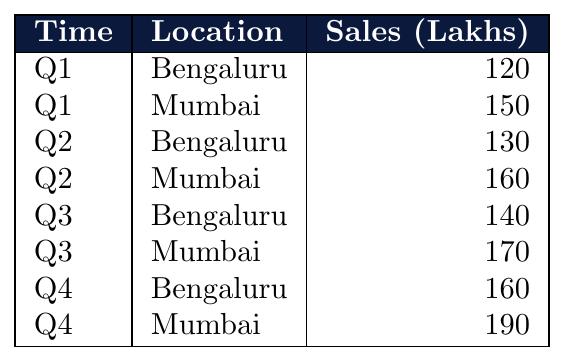
Equivalent SQL:
SELECT Time, Location, SUM(Sales)
FROM SalesCube
WHERE Product = 'Electronics'
GROUP BY Time, Location;Fix Time = Q1 — analyze only first quarter performance:
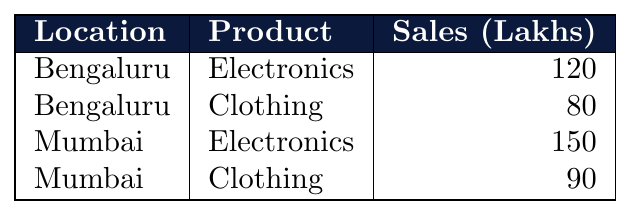
3D cube (Time $\times$ Location $\times$ Product) $\rightarrow$ 2D table (Location $\times$ Product) for Q1 only.
Dice selects a range of values for two or more dimensions, extracting a sub-cube.
Fixes a subset of values (not just one) on multiple dimensions
Result is a smaller cube — same number of dimensions, fewer values per dimension
Equivalent to a WHERE clause on multiple dimensions in SQL
Key difference from Slice: Dice retains dimensionality; Slice reduces it by one
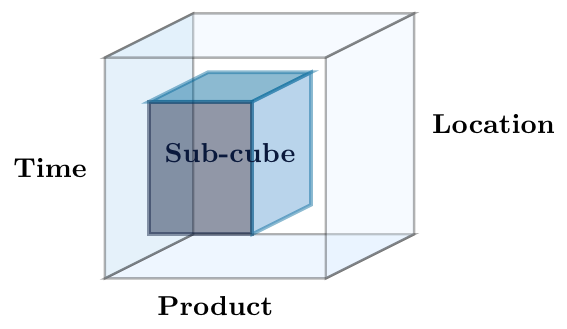
Select sub-cube where Time is Q1 or Q2 and Location is Mumbai:
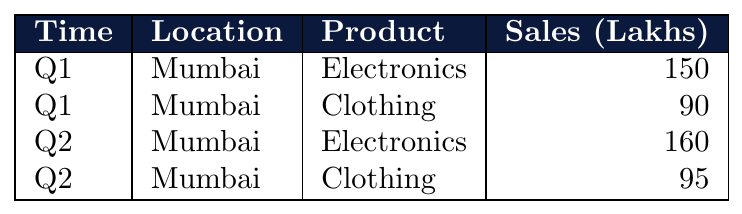
16 rows $\rightarrow$ 4 rows. Still a 3D sub-cube (Time $\times$ Location $\times$ Product).
Equivalent SQL:
SELECT Time, Location, Product, Sales
FROM SalesCube
WHERE Time IN ('Q1','Q2') AND Location = 'Mumbai';Three dimensions constrained:
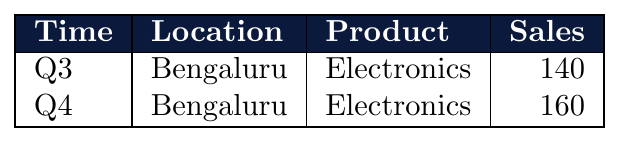
This is the smallest meaningful sub-cube — 2 rows remain, all 3 dimensions still present.
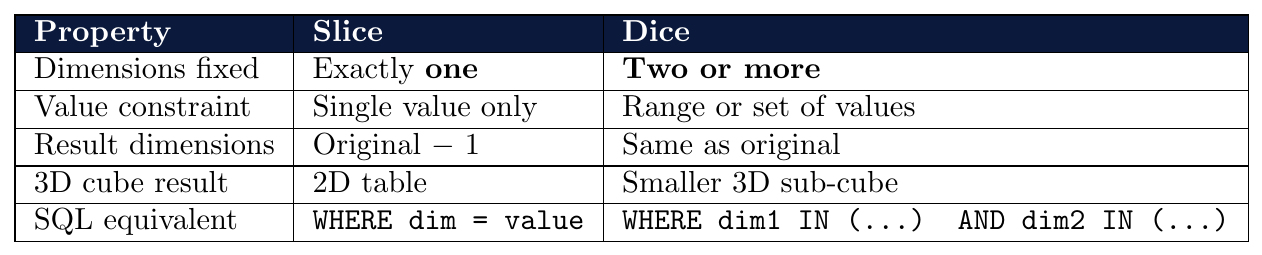
Pivot rotates the data cube to present an alternative view by reorienting dimensions.
Does not change the data — only changes the presentation axis
Swaps rows and columns in a 2D cross-tabulation
Makes different relationships more visible
Also called rotate in some systems
Familiar as Pivot Table in Excel/spreadsheet tools
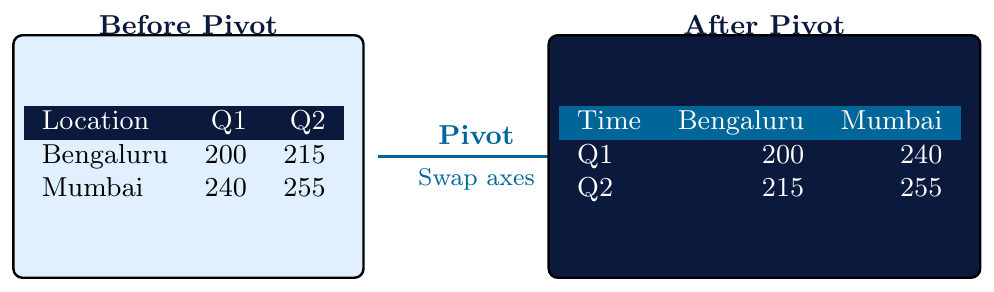
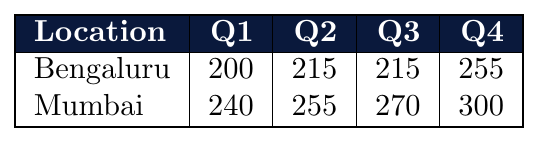
Before Pivot — rows indexed by Location, columns by Time:
After Pivot — rows indexed by Time, columns by Location:
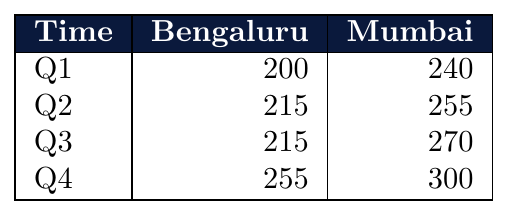
Same data — different perspective. Quarterly growth trend per city is now easier to read.
Before Pivot (after Slice: Location = Bengaluru):
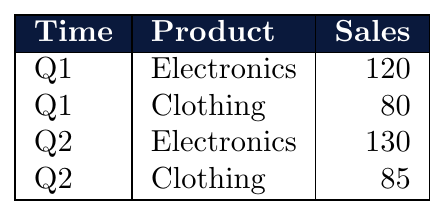
After Pivot:
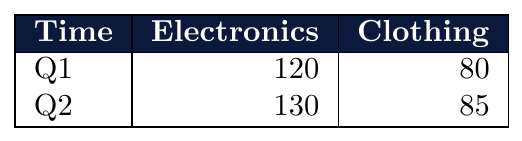
Comparing Electronics vs Clothing across quarters is now immediate from a single row.
