Queues
Core Operations
A queue is a linear data structure where elements are added at one end and removed from the other end. The rule followed is First In, First Out (FIFO), which means the element that entered the queue first is the one that leaves first. Think of people standing in a line at a ticket counter. The person who joined the line first gets the ticket first. New people join at the back of the line. Nobody cuts in from the front.
Think of a printer queue in an office. Document $A$ is sent first, then document $B$, then document $C$. The printer prints $A$ first, then $B$, then $C$. This is exactly FIFO. The first document sent is the first one printed, no matter what.
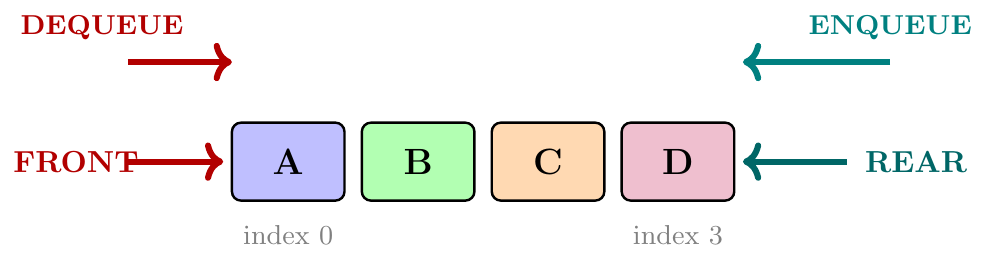
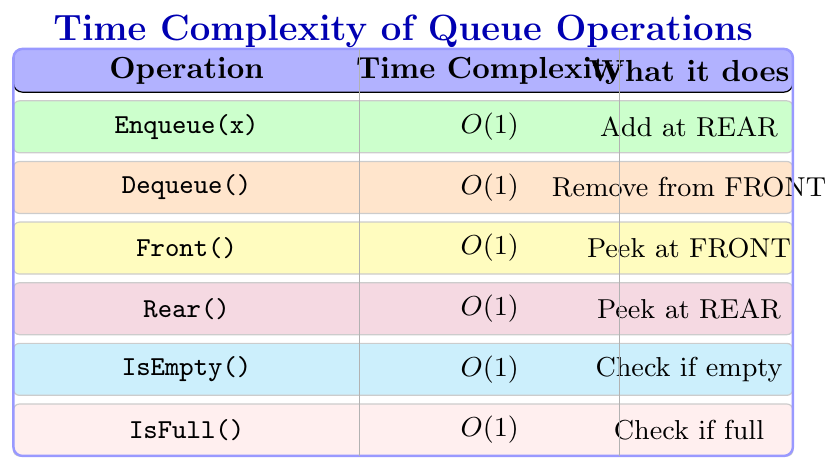
A queue supports four main operations. All four take constant time, $O(1)$.
Enqueue(x): Add element $x$ at the REAR of the queue.
Dequeue(): Remove and return the element at the FRONT of the queue.
Front(): Look at the element at FRONT, without removing it.
Rear(): Look at the element at REAR, without removing it.
IsEmpty(): Check if the queue has no elements.
IsFull(): Check if the queue has no more room (for array implementation).
Array Implementation of Queue
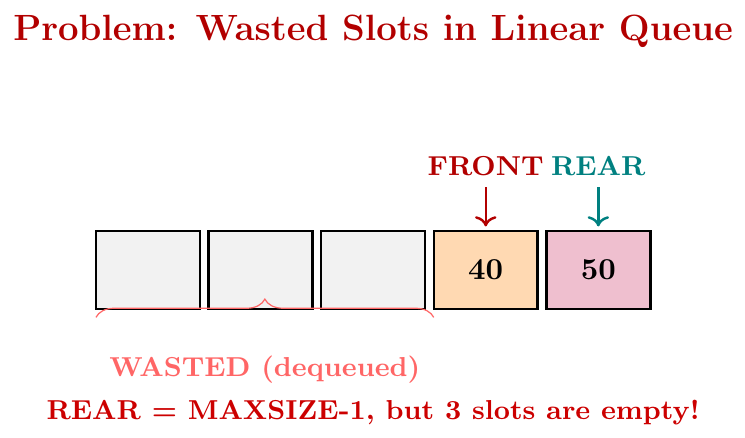
We implement a queue using a fixed-size array. We keep two variables, FRONT and REAR. Initially, both are set to $-1$, which means the queue is empty. When we enqueue the first element, both FRONT and REAR become $0$. After that, each enqueue increases REAR by $1$ and stores the element there. Each dequeue reads the element at FRONT and increases FRONT by $1$. The queue is empty when FRONT $>$ REAR, and full when REAR $=$ MAXSIZE $- 1$.
Maximum size = 5. Perform: Enqueue(10), Enqueue(20), Enqueue(30), Dequeue(), Enqueue(40), Front().
Start: FRONT = $-1$, REAR = $-1$, array = [\_, \_, \_, \_, \_]
Enqueue(10): FRONT = 0, REAR = 0, array = [10, \_, \_, \_, \_]
Enqueue(20): FRONT = 0, REAR = 1, array = [10, 20, \_, \_, \_]
Enqueue(30): FRONT = 0, REAR = 2, array = [10, 20, 30, \_, \_]
Dequeue(): returns 10, FRONT = 1, array = [\_, 20, 30, \_, \_]
Enqueue(40): FRONT = 1, REAR = 3, array = [\_, 20, 30, 40, \_]
Front(): returns 20 (element at FRONT = 1), FRONT stays at 1
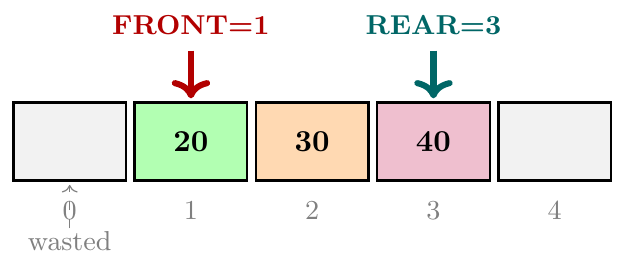
In a simple array implementation, even after dequeue, the slots at the beginning are empty but we never reuse them, because FRONT keeps moving right. Eventually, REAR reaches the last index, and even if there are empty slots at the beginning, we report the queue as full. This wastes memory. The solution is the Circular Queue.
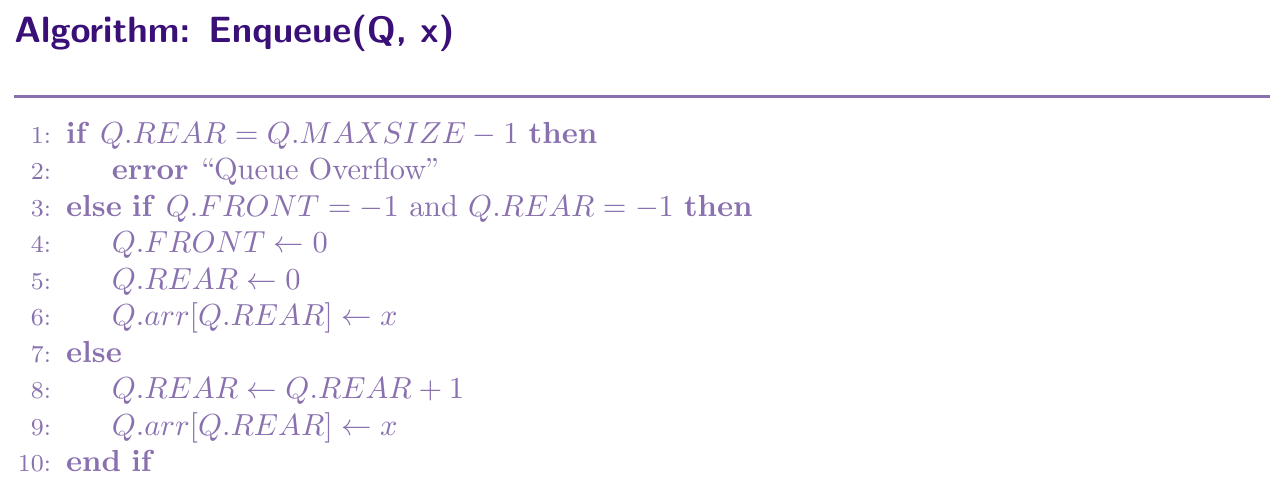
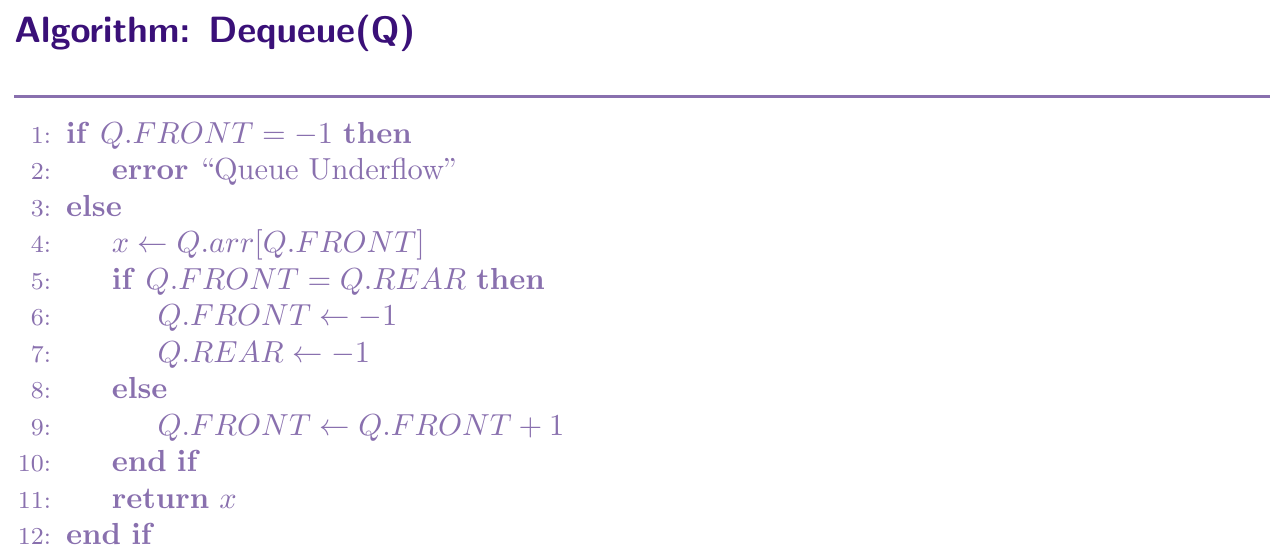
Initialize(Q, maxsize):
Q.arr = array of size maxsize
Q.FRONT = -1
Q.REAR = -1
Q.MAXSIZE = maxsize
Enqueue(Q, x):
if Q.REAR == Q.MAXSIZE - 1:
print “Queue Overflow” and return
if Q.FRONT == -1 and Q.REAR == -1:
Q.FRONT = 0, Q.REAR = 0
else:
Q.REAR = Q.REAR + 1
Q.arr[Q.REAR] = x
Dequeue(Q):
if Q.FRONT == -1: print “Queue Underflow” and return -1
x = Q.arr[Q.FRONT]
if Q.FRONT == Q.REAR: Q.FRONT = -1, Q.REAR = -1
else: Q.FRONT = Q.FRONT + 1
return x
class Queue:
    def __init__(self, maxsize):
        self.arr     = [None] * maxsize
        self.FRONT   = -1
        self.REAR    = -1
        self.MAXSIZE = maxsize

    def is_empty(self):
        return self.FRONT == -1

    def is_full(self):
        return self.REAR == self.MAXSIZE - 1

    def enqueue(self, x):
        if self.is_full():
            print("Queue Overflow")
            return
        if self.FRONT == -1 and self.REAR == -1:
            self.FRONT = 0
            self.REAR  = 0
        else:
            self.REAR += 1
        self.arr[self.REAR] = x

    def dequeue(self):
        if self.is_empty():
            print("Queue Underflow")
            return -1
        x = self.arr[self.FRONT]
        if self.FRONT == self.REAR:  # last element
            self.FRONT = -1
            self.REAR  = -1
        else:
            self.FRONT += 1
        return x

    def front(self):
        if self.is_empty():
            print("Queue is Empty")
            return -1
        return self.arr[self.FRONT]

    def rear(self):
        if self.is_empty():
            print("Queue is Empty")
            return -1
        return self.arr[self.REAR]


# --- Driver Code ---
q = Queue(5)
q.enqueue(10)
q.enqueue(20)
q.enqueue(30)
print("FRONT:", q.front())   # Output: 10
print("Dequeue:", q.dequeue())  # Output: 10
print("FRONT:", q.front())   # Output: 20
Circular Queue
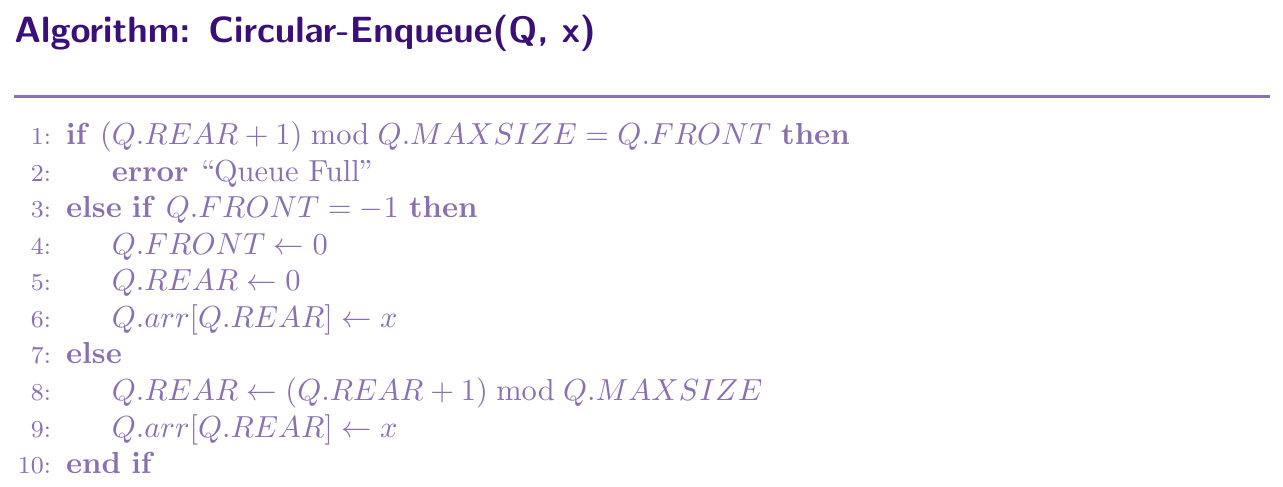
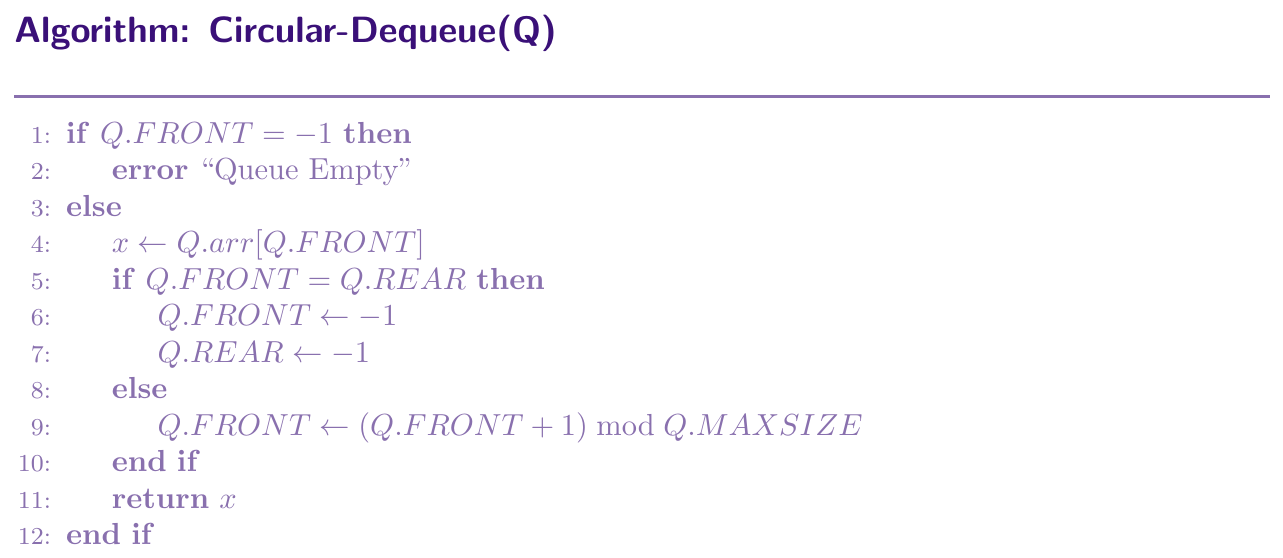
A circular queue fixes the problem of wasted slots. Instead of letting FRONT and REAR just move forward, we connect the end of the array back to the beginning, like a circle. When REAR reaches the last index, the next enqueue wraps REAR around to index $0$, if that slot is free. We use the modulo operator for this. REAR moves as $(REAR + 1) \bmod MAXSIZE$, and FRONT moves as $(FRONT + 1) \bmod MAXSIZE$.
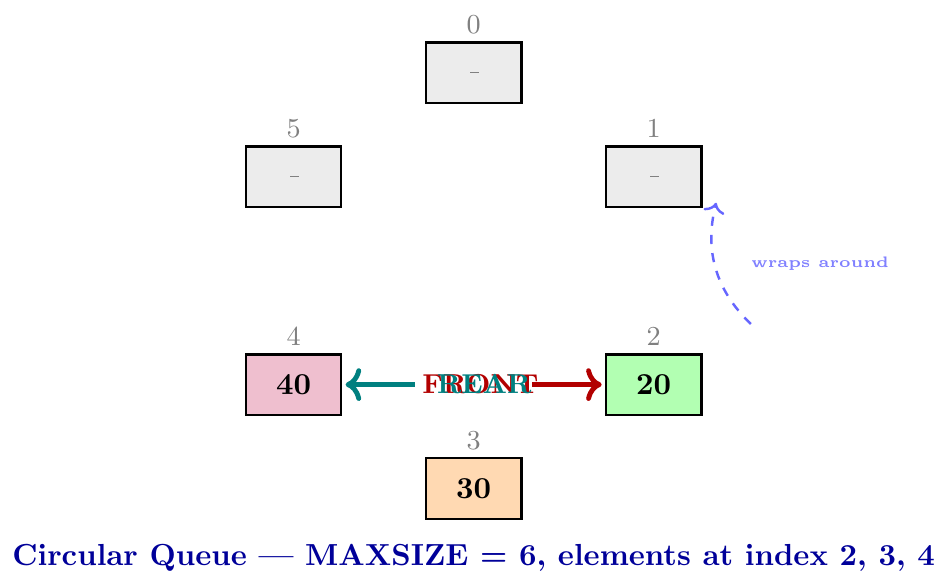
Suppose MAXSIZE = 5, and after several operations REAR is at index 4 (the last slot). The next enqueue would fail in a linear queue. But in a circular queue, \[ \text{new REAR} = (4 + 1) \bmod 5 = 0 \] So the element is placed at index 0, if it is free. Similarly, when FRONT is at index 4, \[ \text{new FRONT} = (4 + 1) \bmod 5 = 0 \] FRONT wraps back to the beginning.
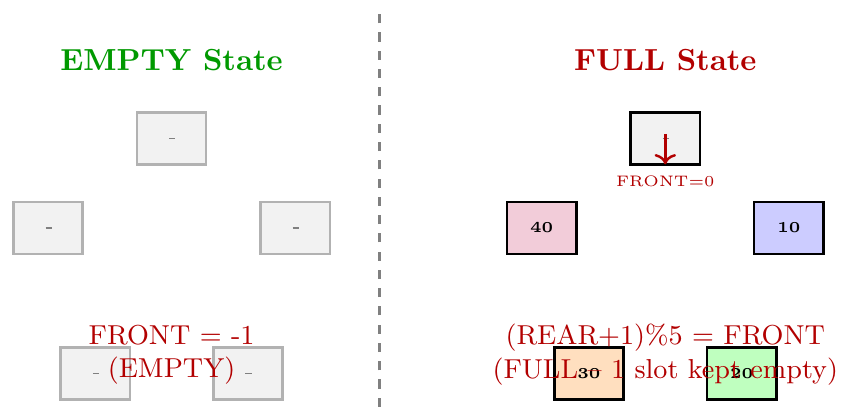
In a circular queue, distinguishing between full and empty needs care, because both can cause FRONT $=$ REAR.
Empty: FRONT $= -1$
Full: $(REAR + 1) \bmod MAXSIZE = FRONT$
This means we always keep one slot empty intentionally, so the full condition can be detected correctly.
class CircularQueue:
    def __init__(self, maxsize):
        self.arr     = [None] * maxsize
        self.FRONT   = -1
        self.REAR    = -1
        self.MAXSIZE = maxsize

    def is_empty(self):
        return self.FRONT == -1

    def is_full(self):
        return (self.REAR + 1) % self.MAXSIZE == self.FRONT

    def enqueue(self, x):
        if self.is_full():
            print("Queue Full")
            return
        if self.FRONT == -1:       # first element
            self.FRONT = 0
            self.REAR  = 0
        else:
            self.REAR = (self.REAR + 1) % self.MAXSIZE
        self.arr[self.REAR] = x

    def dequeue(self):
        if self.is_empty():
            print("Queue Empty")
            return -1
        x = self.arr[self.FRONT]
        if self.FRONT == self.REAR:   # last element
            self.FRONT = -1
            self.REAR  = -1
        else:
            self.FRONT = (self.FRONT + 1) % self.MAXSIZE
        return x

    def front(self):
        if self.is_empty():
            return -1
        return self.arr[self.FRONT]

    def rear(self):
        if self.is_empty():
            return -1
        return self.arr[self.REAR]

    def display(self):
        if self.is_empty():
            print("Queue is Empty")
            return
        print("Queue (FRONT to REAR):", end=" ")
        i = self.FRONT
        while True:
            print(self.arr[i], end=" ")
            if i == self.REAR:
                break
            i = (i + 1) % self.MAXSIZE
        print()


# --- Driver Code ---
cq = CircularQueue(5)
cq.enqueue(10)
cq.enqueue(20)
cq.enqueue(30)
cq.enqueue(40)
cq.display()              # 10 20 30 40
print(cq.dequeue())       # 10
print(cq.dequeue())       # 20
cq.enqueue(50)            # wraps around
cq.enqueue(60)            # wraps around
cq.display()              # 30 40 50 60
Deque (Double-Ended Queue)
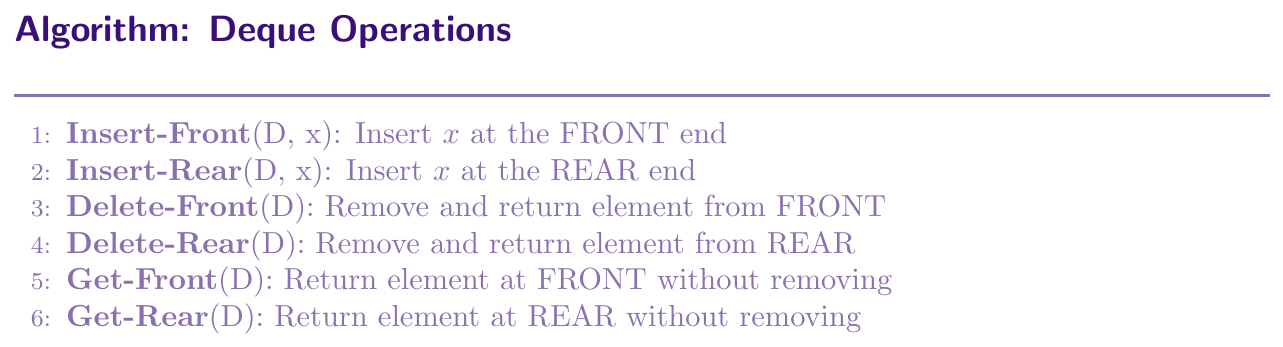
A Deque (pronounced "deck"), short for Double-Ended Queue, is a queue where we can add and remove elements from both ends, the FRONT as well as the REAR. It is a more general structure than both a stack and a simple queue. A stack only allows operations at one end. A queue allows enqueue at REAR and dequeue at FRONT only. A deque allows all four combinations, add at FRONT, add at REAR, remove from FRONT, remove from REAR.
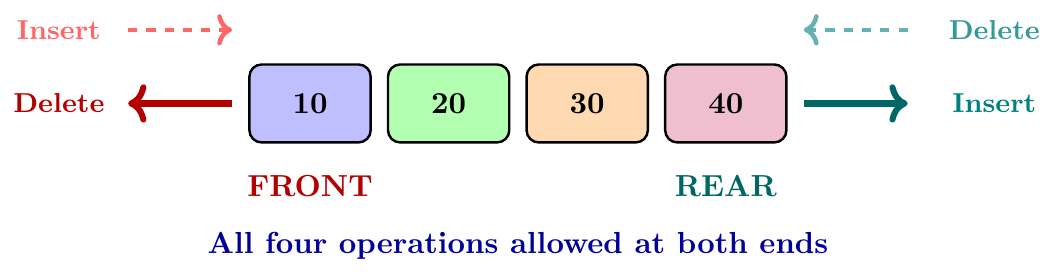
Input Restricted Deque: Insertion is allowed only at REAR, but deletion is allowed at both FRONT and REAR. This is like a queue with extra deletion ability at REAR.
Output Restricted Deque: Deletion is allowed only at FRONT, but insertion is allowed at both FRONT and REAR. This is like a queue with extra insertion ability at FRONT.
Insert-Front(D, x):
if IsFull(D): print “Deque Full” and return
if IsEmpty(D): FRONT = 0, REAR = 0
else: FRONT = (FRONT - 1 + MAXSIZE) mod MAXSIZE
arr[FRONT] = x
Insert-Rear(D, x):
if IsFull(D): print “Deque Full” and return
if IsEmpty(D): FRONT = 0, REAR = 0
else: REAR = (REAR + 1) mod MAXSIZE
arr[REAR] = x
Delete-Front(D):
if IsEmpty(D): print “Deque Empty” and return -1
x = arr[FRONT]
if FRONT == REAR: FRONT = -1, REAR = -1
else: FRONT = (FRONT + 1) mod MAXSIZE
return x
Delete-Rear(D):
if IsEmpty(D): print “Deque Empty” and return -1
x = arr[REAR]
if FRONT == REAR: FRONT = -1, REAR = -1
else: REAR = (REAR - 1 + MAXSIZE) mod MAXSIZE
return x
class Deque:
    def __init__(self, maxsize):
        self.arr     = [None] * maxsize
        self.FRONT   = -1
        self.REAR    = -1
        self.MAXSIZE = maxsize

    def is_empty(self):
        return self.FRONT == -1

    def is_full(self):
        return (self.REAR + 1) % self.MAXSIZE == self.FRONT

    def insert_front(self, x):
        if self.is_full():
            print("Deque Full")
            return
        if self.is_empty():
            self.FRONT = 0
            self.REAR  = 0
        else:
            # move FRONT one step back (wrap around)
            self.FRONT = (self.FRONT - 1 + self.MAXSIZE) % self.MAXSIZE
        self.arr[self.FRONT] = x

    def insert_rear(self, x):
        if self.is_full():
            print("Deque Full")
            return
        if self.is_empty():
            self.FRONT = 0
            self.REAR  = 0
        else:
            self.REAR = (self.REAR + 1) % self.MAXSIZE
        self.arr[self.REAR] = x

    def delete_front(self):
        if self.is_empty():
            print("Deque Empty")
            return -1
        x = self.arr[self.FRONT]
        if self.FRONT == self.REAR:
            self.FRONT = -1
            self.REAR  = -1
        else:
            self.FRONT = (self.FRONT + 1) % self.MAXSIZE
        return x

    def delete_rear(self):
        if self.is_empty():
            print("Deque Empty")
            return -1
        x = self.arr[self.REAR]
        if self.FRONT == self.REAR:
            self.FRONT = -1
            self.REAR  = -1
        else:
            self.REAR = (self.REAR - 1 + self.MAXSIZE) % self.MAXSIZE
        return x

    def get_front(self):
        return -1 if self.is_empty() else self.arr[self.FRONT]

    def get_rear(self):
        return -1 if self.is_empty() else self.arr[self.REAR]


# --- Driver Code ---
d = Deque(6)
d.insert_rear(10)
d.insert_rear(20)
d.insert_rear(30)
d.insert_front(5)       # insert at FRONT
print("FRONT:", d.get_front())   # Output: 5
print("REAR:", d.get_rear())     # Output: 30
print("Delete REAR:", d.delete_rear())   # Output: 30
print("Delete FRONT:", d.delete_front()) # Output: 5
print("FRONT:", d.get_front())           # Output: 10
Applications of Queues
Queues appear naturally in any situation where items are processed in the order they arrived. The FIFO property makes queues the right tool for scheduling, traversal, and buffering tasks.
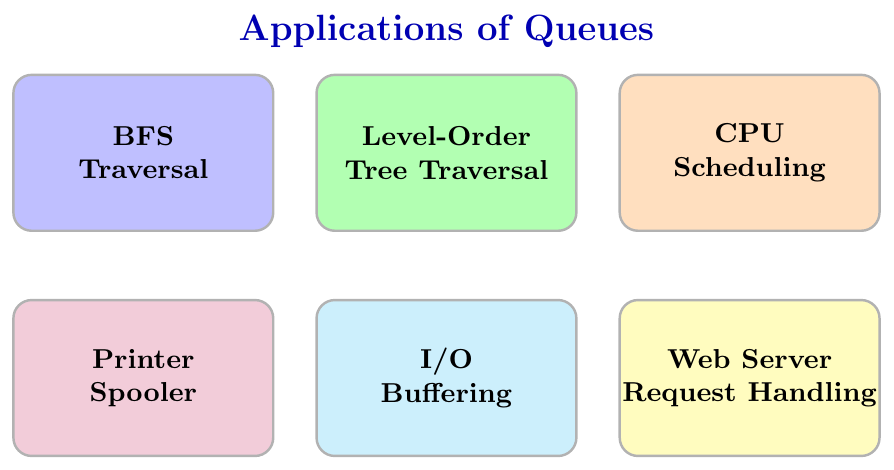
BFS uses a queue to explore all nodes level by level in a graph. Starting from a source node, we enqueue it, then repeatedly dequeue a node, visit it, and enqueue all its unvisited neighbours. The FIFO property ensures we explore nodes in the order they were discovered, which gives level-by-level traversal.
In a binary tree, level-order traversal visits all nodes level by level, from left to right. We enqueue the root, then repeatedly dequeue a node, print it, and enqueue its left and right children. The queue ensures that all nodes at level $k$ are processed before any node at level $k+1$.
Operating systems use queues to manage processes waiting for CPU time. Processes are added to the ready queue in arrival order, and the CPU picks the next process from the FRONT of the queue, following FIFO scheduling. This ensures fairness and prevents starvation of processes.
When multiple users send print jobs to the same printer, each job is added to a print queue. The printer processes jobs in the order they were received. This is a classic real-world queue, where FIFO ensures fairness.
Queues are used to buffer input and output data between a fast processor and a slow device. In web servers, incoming client requests are queued and handled one at a time in order of arrival, so no request is lost even if the server is momentarily busy.