Linked Lists
Singly Linked List
In a singly linked list, each node has exactly two parts: the data field which holds the value, and the next pointer which holds the address of the next node. The last node's next pointer is NULL, meaning end of list. We maintain a pointer called head which always points to the first node. Traversal is one-directional only, from head towards NULL. We cannot go backward.

class Node:
    def __init__(self, data):
        self.data = data   # stores the value
        self.next = None   # pointer to next node (NULL initially)

class SinglyLinkedList:
    def __init__(self):
        self.head = None   # empty list: head is NULL
Singly LL --- Insertion Operations
Insert at Head
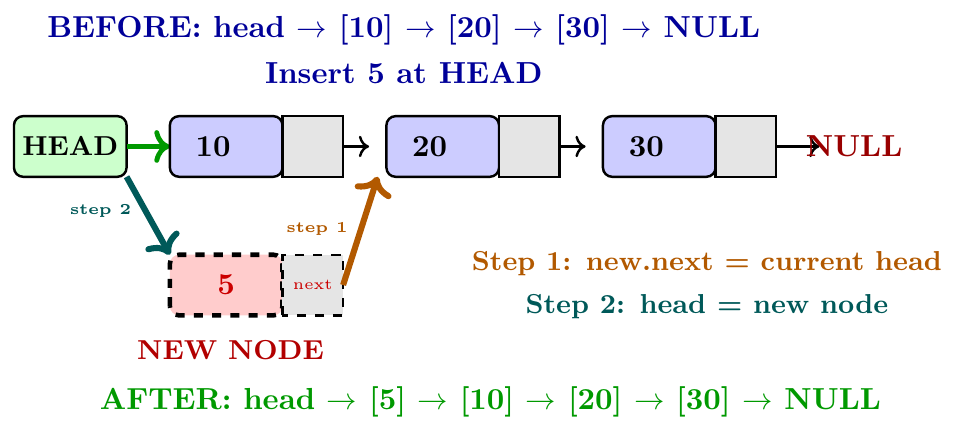
Insert at head means adding a new node before the current first node. The new node becomes the new head. Steps:
Create a new node with the given data.
Set the new node's next pointer to point to the current head.
Update head to point to the new node.
This takes $O(1)$ time because no traversal is needed. We only change two pointers.

SLL-Insert-At-Head(L, data):
new = CreateNode(data)
new.next = L.head
L.head = new
def insert_at_head(self, data):
    new_node      = Node(data)       # create new node
    new_node.next = self.head        # step 1: new points to old head
    self.head     = new_node         # step 2: head now points to new

# --- Driver Code ---
ll = SinglyLinkedList()
ll.insert_at_head(30)   # 30 -> NULL
ll.insert_at_head(20)   # 20 -> 30 -> NULL
ll.insert_at_head(10)   # 10 -> 20 -> 30 -> NULL
# each new element becomes the first element
Insert at Tail (End)
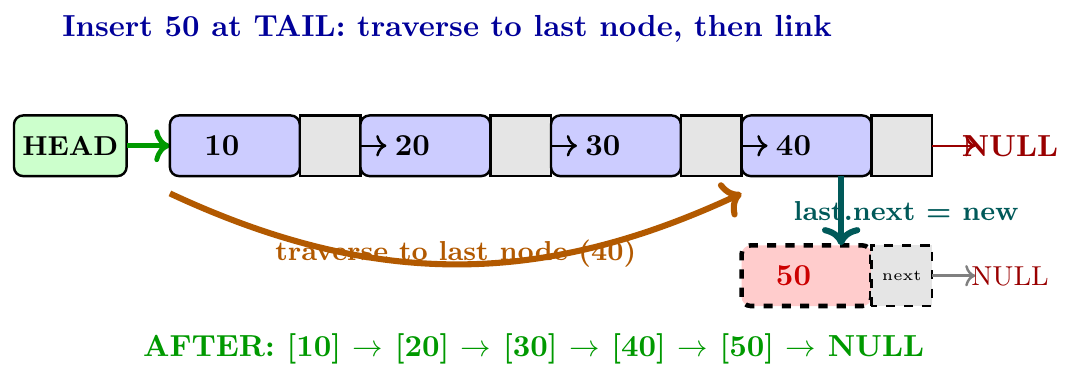
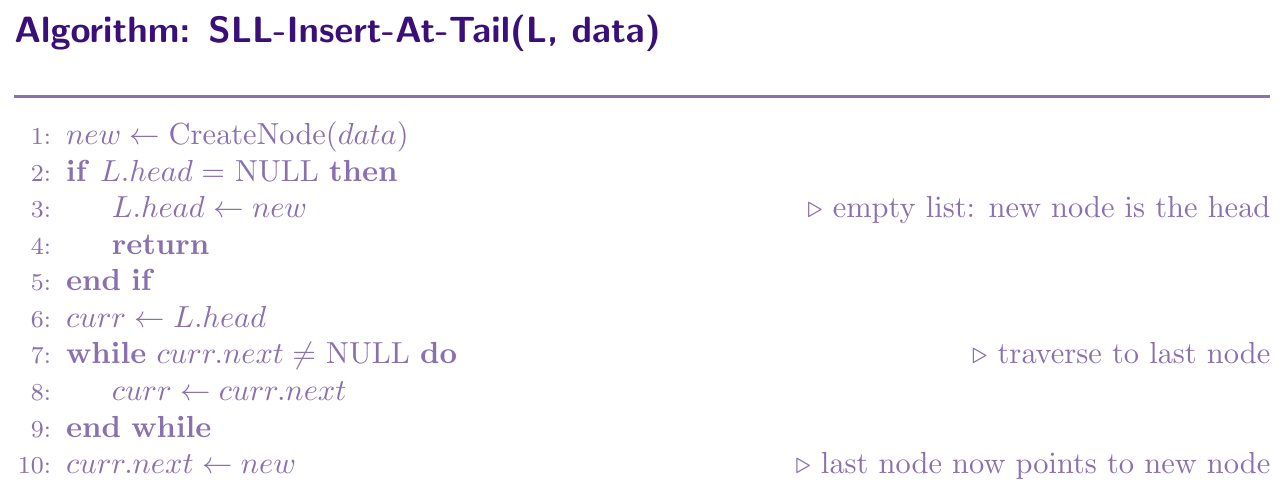
Insert at tail means adding a new node after the current last node. The new node becomes the new last node. Steps:
Create a new node with the given data. Its next is NULL.
If the list is empty, the new node becomes the head directly.
Otherwise, traverse from head to the last node (the one whose next is NULL).
Set that last node's next pointer to point to the new node.
This takes $O(n)$ time because we must traverse the entire list to find the last node. If we maintain a separate tail pointer, this becomes $O(1)$.
def insert_at_tail(self, data):
    new_node = Node(data)
    if self.head is None:         # empty list
        self.head = new_node
        return
    curr = self.head
    while curr.next is not None:  # go to last node
        curr = curr.next
    curr.next = new_node          # link new node at end

# --- Driver Code ---
ll = SinglyLinkedList()
ll.insert_at_tail(10)   # 10 -> NULL
ll.insert_at_tail(20)   # 10 -> 20 -> NULL
ll.insert_at_tail(30)   # 10 -> 20 -> 30 -> NULL
# elements added at the end, order preserved
Insert at Middle (Given Position)
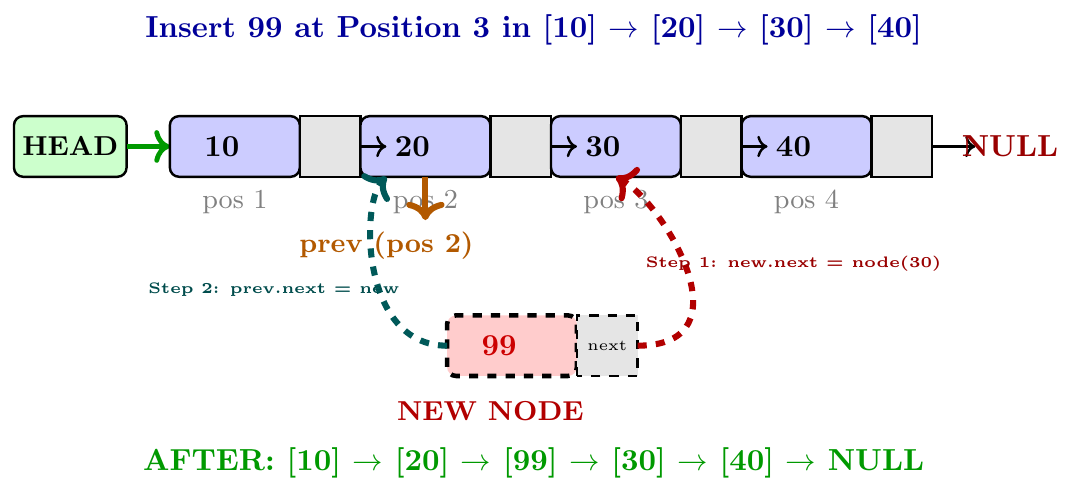
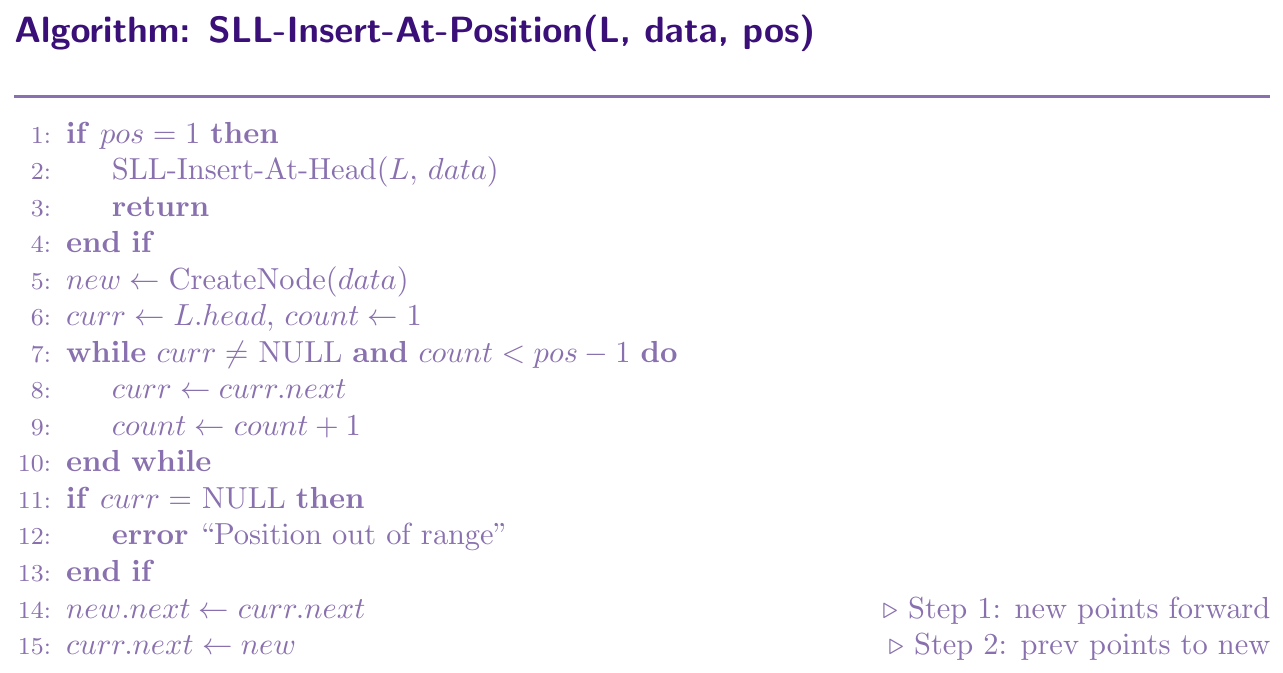
To insert a new node at position $k$ (1-indexed):
If $k = 1$, it is insert at head.
Otherwise, traverse to node at position $k-1$ (the node just before the insertion point).
Set the new node's next to point to the node currently at position $k$.
Set the previous node's next to point to the new node.
Order of the two pointer assignments matters. We must first set new.next, then change prev.next. If we do it the other way, we lose the reference to the rest of the list. Time taken is $O(k)$.
def insert_at_position(self, data, pos):
    if pos == 1:
        self.insert_at_head(data)
        return
    new_node = Node(data)
    curr  = self.head
    count = 1
    while curr is not None and count < pos - 1:
        curr  = curr.next
        count += 1
    if curr is None:
        print("Position out of range")
        return
    new_node.next = curr.next    # step 1: new points forward first!
    curr.next     = new_node     # step 2: prev points to new

# --- Driver Code ---
ll = SinglyLinkedList()
for v in [10, 20, 30, 40]:
    ll.insert_at_tail(v)
# 10 -> 20 -> 30 -> 40 -> NULL

ll.insert_at_position(99, 3)
# 10 -> 20 -> 99 -> 30 -> 40 -> NULL
Singly LL --- Deletion Operations
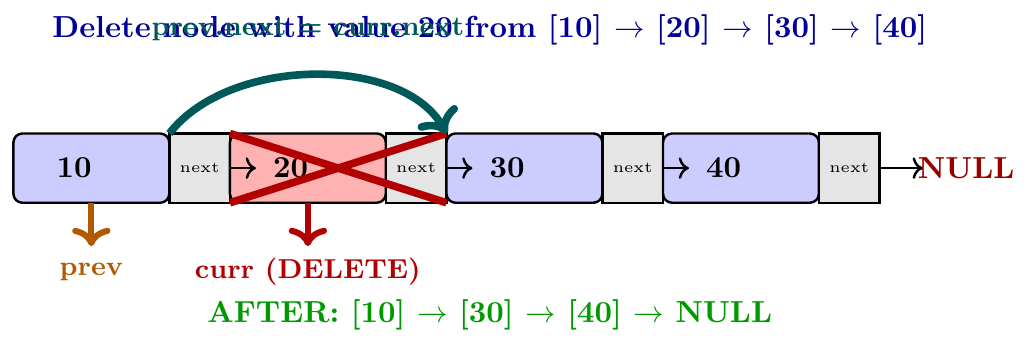
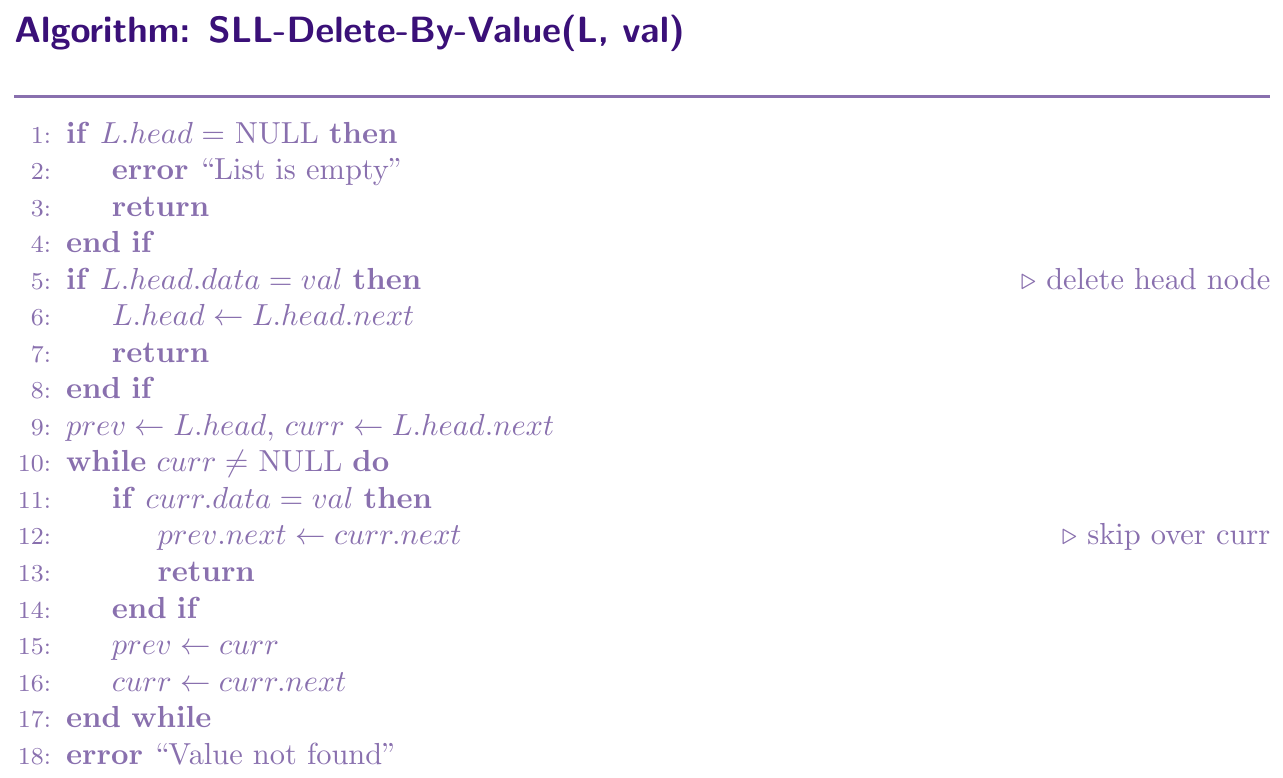
To delete a node from a singly linked list, we need to change the previous node's next pointer to skip over the node being deleted. We cannot go backward, so we always maintain a prev pointer while traversing.
Three possible cases:
Delete head: Move head to the second node. No prev needed.
Delete by value: Traverse with prev and curr together. When found, do prev.next = curr.next.
Delete by position: Same idea but count positions instead of comparing values.
All cases take $O(n)$ in worst case (except delete head which is $O(1)$).
def delete_by_value(self, val):
    if self.head is None:
        print("List is empty")
        return
    if self.head.data == val:     # delete head
        self.head = self.head.next
        return
    prev = self.head
    curr = self.head.next
    while curr is not None:
        if curr.data == val:
            prev.next = curr.next   # skip over curr
            return
        prev = curr
        curr = curr.next
    print(f"Value {val} not found")


def delete_by_position(self, pos):
    if self.head is None:
        print("List is empty")
        return
    if pos == 1:                  # delete head
        self.head = self.head.next
        return
    curr  = self.head
    count = 1
    while curr.next is not None and count < pos - 1:
        curr  = curr.next
        count += 1
    if curr.next is None:
        print("Position out of range")
        return
    curr.next = curr.next.next    # skip over node at pos

# --- Driver Code ---
ll = SinglyLinkedList()
for v in [10, 20, 30, 40]:
    ll.insert_at_tail(v)

ll.delete_by_value(20)
# 10 -> 30 -> 40 -> NULL

ll.delete_by_position(2)
# 10 -> 40 -> NULL
Singly LL --- Search Operation
To search for a value, we start at head and check each node one by one. Since there is no index or sorting guarantee, we must scan linearly. We stop when we find the value or reach NULL. Time complexity is $O(n)$ in the worst case.
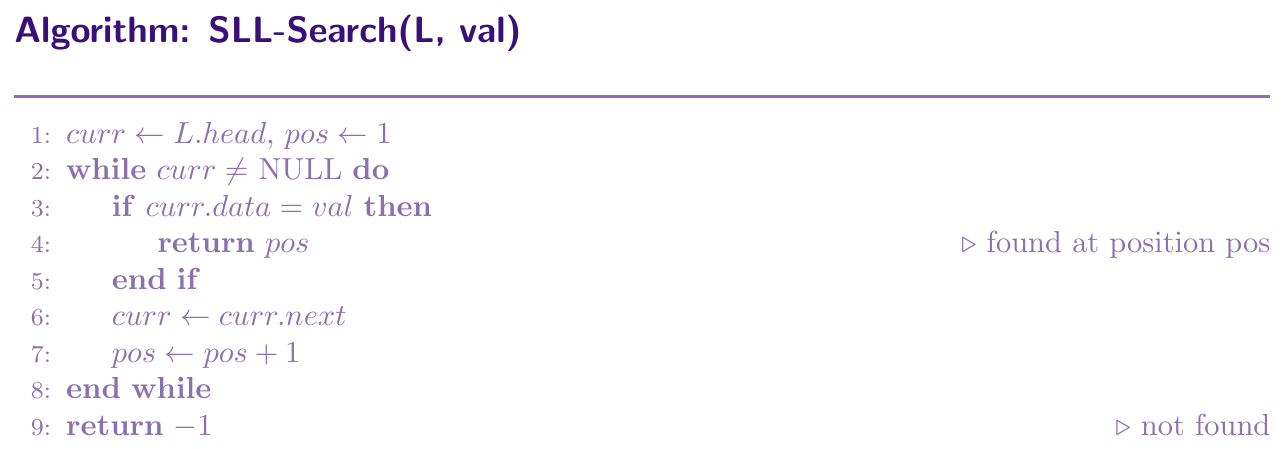
def search(self, val):
    curr = self.head
    pos  = 1
    while curr is not None:
        if curr.data == val:
            return pos        # found: return position
        curr = curr.next
        pos += 1
    return -1                 # not found

def display(self):
    curr = self.head
    while curr:
        print(curr.data, end=" -> ")
        curr = curr.next
    print("NULL")

# --- Driver Code ---
ll = SinglyLinkedList()
for v in [10, 20, 30, 40]:
    ll.insert_at_tail(v)

print(ll.search(30))   # Output: 3
print(ll.search(99))   # Output: -1
Singly LL --- Reversal
Iterative Reversal
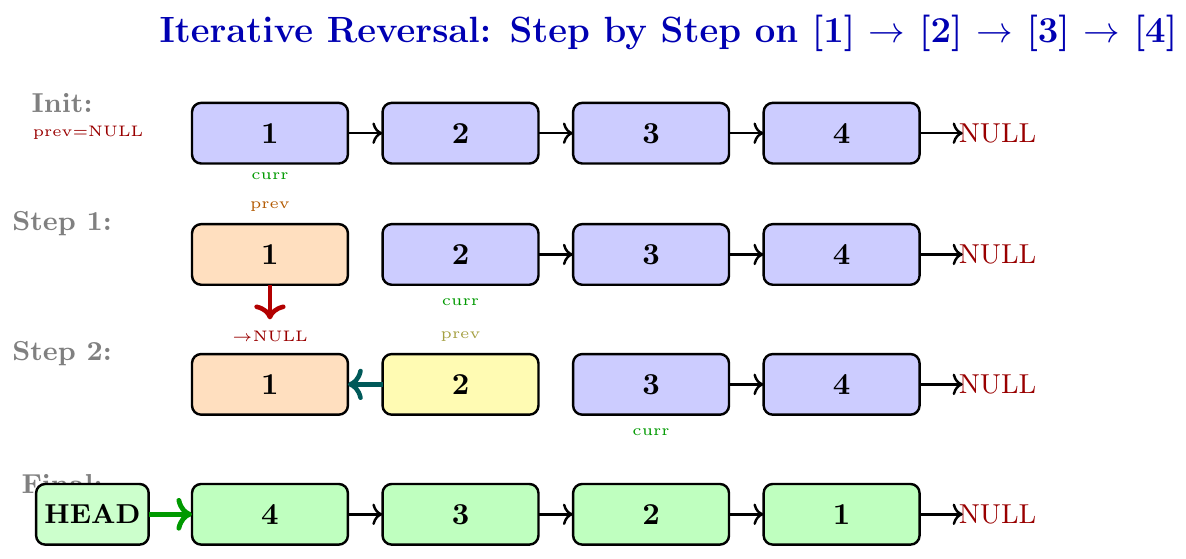
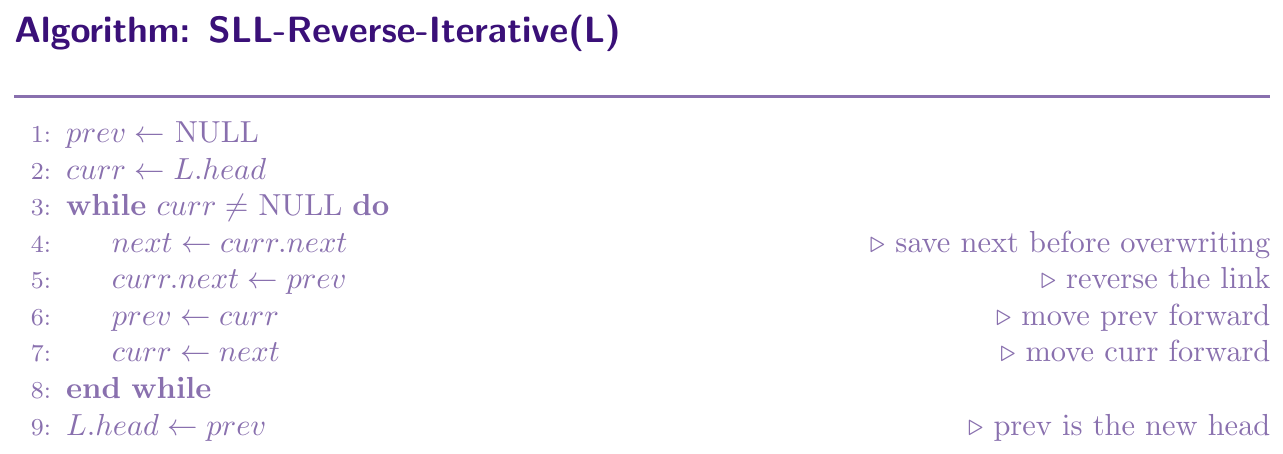
We use three pointers: prev, curr, and next\_node. Initially prev = NULL, curr = head.
At each step:
Save curr.next into next\_node (so we don't lose the rest of list).
Reverse the link: curr.next = prev.
Move prev to curr.
Move curr to next\_node.
When curr becomes NULL, prev is the new head. Time: $O(n)$. Space: $O(1)$.
Recursive Reversal
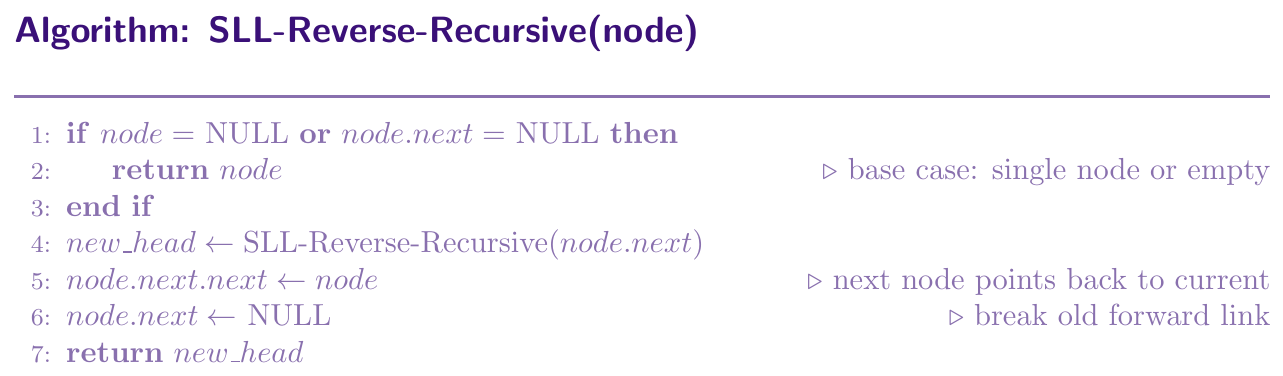
In recursive reversal, we keep calling the function on the next node until we reach the last node. The last node becomes the new head. On the way back (unwinding the recursion):
We have the new head from deeper recursion.
We do node.next.next = node (make the next node point back to current node).
We set node.next = NULL (break the old forward link).
The new head is passed all the way back up. Time: $O(n)$. Space: $O(n)$ recursion stack.
def reverse_iterative(self):
    prev = None
    curr = self.head
    while curr is not None:
        next_node = curr.next   # save next
        curr.next = prev        # reverse link
        prev      = curr        # advance prev
        curr      = next_node   # advance curr
    self.head = prev            # new head


def _reverse_recursive(self, node):
    if node is None or node.next is None:
        return node                      # base case
    new_head       = self._reverse_recursive(node.next)
    node.next.next = node               # reverse the link
    node.next      = None               # break old link
    return new_head

def reverse_recursive(self):
    self.head = self._reverse_recursive(self.head)


# --- Driver Code ---
ll = SinglyLinkedList()
for v in [1, 2, 3, 4, 5]:
    ll.insert_at_tail(v)

ll.display()              # 1 -> 2 -> 3 -> 4 -> 5 -> NULL
ll.reverse_iterative()
ll.display()              # 5 -> 4 -> 3 -> 2 -> 1 -> NULL
ll.reverse_recursive()
ll.display()              # 1 -> 2 -> 3 -> 4 -> 5 -> NULL
Doubly Linked List
In a doubly linked list, each node has three parts: the data field, the next pointer pointing to the next node, and the prev pointer pointing to the previous node. We maintain both a head pointer (first node) and a tail pointer (last node). The first node's prev is NULL, and the last node's next is NULL. We can traverse in both forward and backward direction.

class DNode:
    def __init__(self, data):
        self.data = data
        self.next = None   # forward pointer
        self.prev = None   # backward pointer

class DoublyLinkedList:
    def __init__(self):
        self.head = None   # first node
        self.tail = None   # last node
Doubly LL --- Insertion Operations
Insert at Head
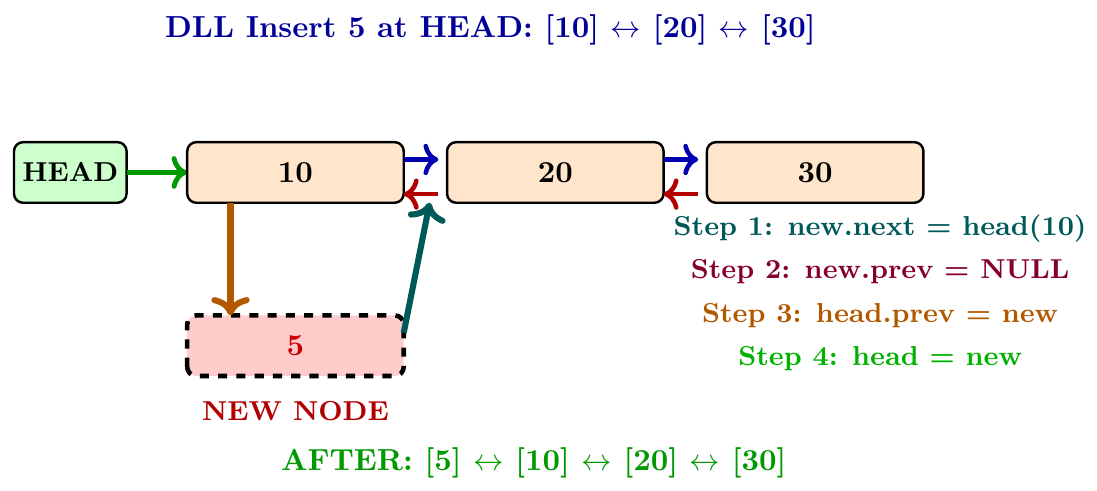
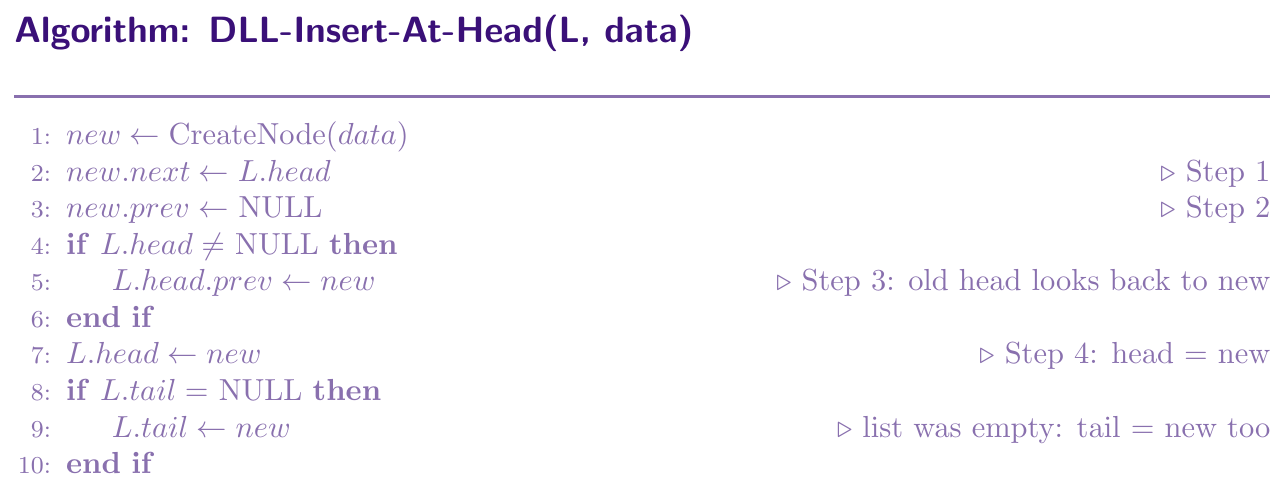
Steps to insert at head in a doubly linked list:
Create a new node.
Set new.next = current head (new node points forward to old head).
Set new.prev = NULL (new node is the first, nothing before it).
If the list is not empty, set head.prev = new (old head now points back to new node).
Update head = new.
If the list was empty, update tail = new as well.
Time: $O(1)$.
Insert at Tail (End)
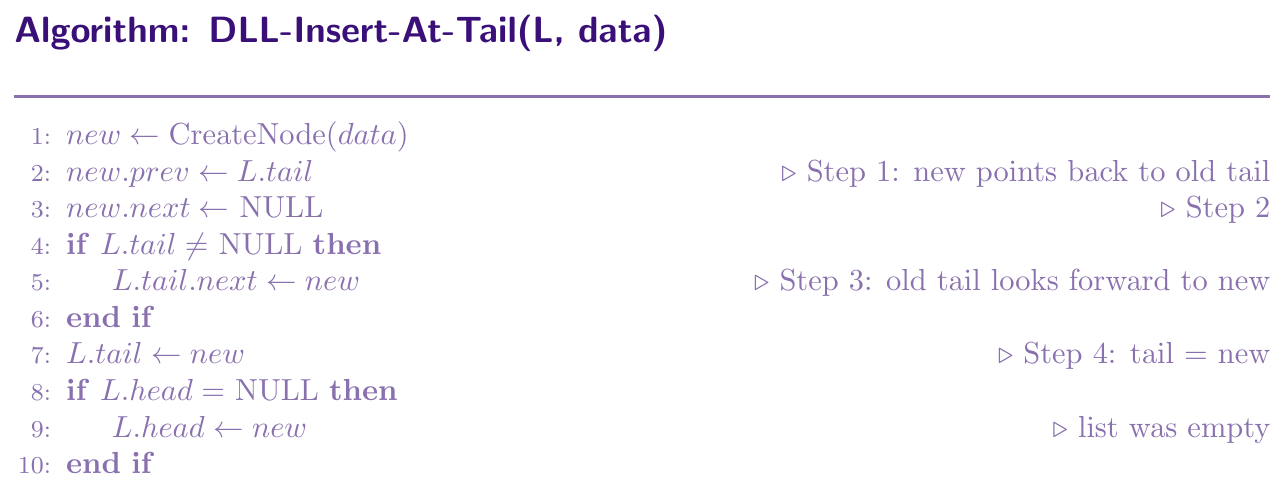
Steps to insert at tail in a doubly linked list:
Create a new node.
Set new.prev = current tail (new node points backward to old tail).
Set new.next = NULL (new node is last, nothing after it).
If the list is not empty, set tail.next = new (old tail now points forward to new).
Update tail = new.
If the list was empty, update head = new as well.
Time: $O(1)$ because we maintain a tail pointer.
Insert at Middle (Given Position)
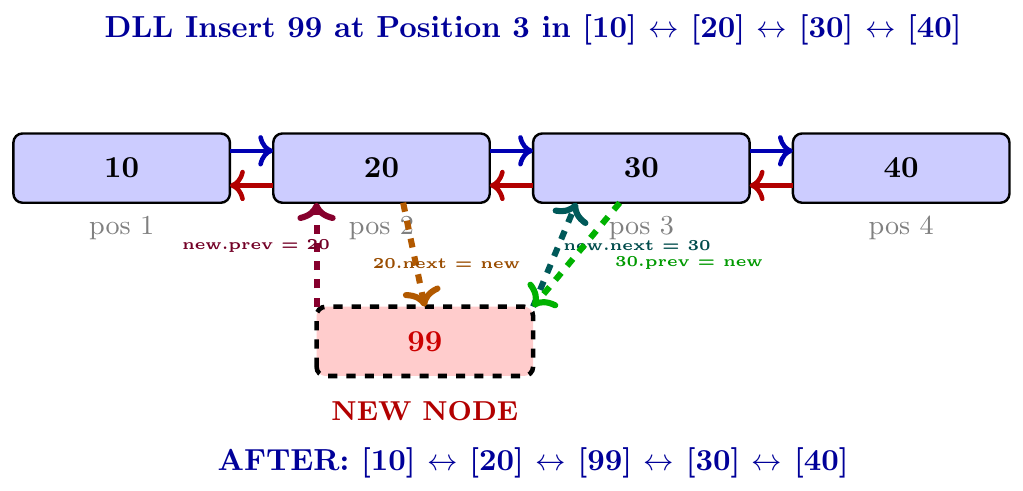
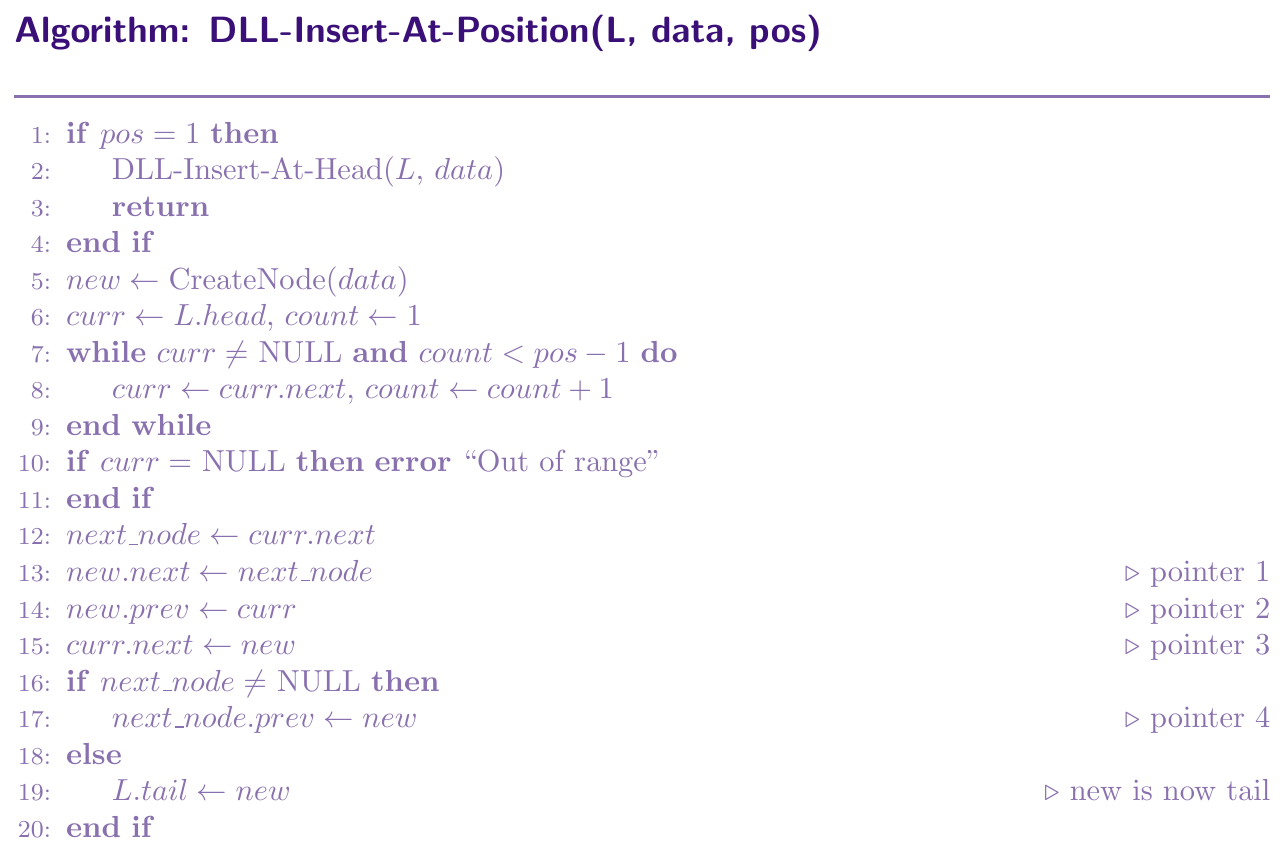
Steps to insert at position $k$ in a doubly linked list:
Traverse to node at position $k-1$ (call it prev\_node).
Let next\_node = prev\_node.next.
Set new.next = next\_node and new.prev = prev\_node.
Set prev\_node.next = new.
If next\_node is not NULL, set next\_node.prev = new.
We must update four pointers total: new.next, new.prev, prev\_node.next, and next\_node.prev. Time: $O(k)$.
class DNode:
    def __init__(self, data):
        self.data = data
        self.next = None
        self.prev = None

class DoublyLinkedList:
    def __init__(self):
        self.head = None
        self.tail = None

    def insert_at_head(self, data):
        new_node = DNode(data)
        new_node.next = self.head
        new_node.prev = None
        if self.head:
            self.head.prev = new_node
        self.head = new_node
        if self.tail is None:
            self.tail = new_node

    def insert_at_tail(self, data):
        new_node = DNode(data)
        new_node.prev = self.tail
        new_node.next = None
        if self.tail:
            self.tail.next = new_node
        self.tail = new_node
        if self.head is None:
            self.head = new_node

    def insert_at_position(self, data, pos):
        if pos == 1:
            self.insert_at_head(data)
            return
        new_node = DNode(data)
        curr  = self.head
        count = 1
        while curr and count < pos - 1:
            curr  = curr.next
            count += 1
        if curr is None:
            print("Out of range")
            return
        next_node     = curr.next
        new_node.next = next_node     # pointer 1
        new_node.prev = curr          # pointer 2
        curr.next     = new_node      # pointer 3
        if next_node:
            next_node.prev = new_node  # pointer 4
        else:
            self.tail = new_node       # new is now tail

    def display_forward(self):
        curr = self.head
        print("HEAD <-> ", end="")
        while curr:
            print(curr.data, end=" <-> ")
            curr = curr.next
        print("NULL")

    def display_backward(self):
        curr = self.tail
        print("TAIL <-> ", end="")
        while curr:
            print(curr.data, end=" <-> ")
            curr = curr.prev
        print("NULL")

# --- Driver Code ---
dll = DoublyLinkedList()
dll.insert_at_tail(10)
dll.insert_at_tail(20)
dll.insert_at_tail(30)
dll.insert_at_tail(40)
dll.display_forward()     # 10 <-> 20 <-> 30 <-> 40 <-> NULL
dll.insert_at_head(5)
dll.display_forward()     # 5 <-> 10 <-> 20 <-> 30 <-> 40 <-> NULL
dll.insert_at_position(99, 3)
dll.display_forward()     # 5 <-> 10 <-> 99 <-> 20 <-> 30 <-> 40 <-> NULL
dll.display_backward()    # 40 <-> 30 <-> 20 <-> 99 <-> 10 <-> 5 <-> NULL
Doubly LL --- Deletion Operations
Deleting a node in a doubly linked list is easier than in a singly linked list because we can reach the previous node directly via the prev pointer. No separate prev tracking variable is needed during traversal. Once we find the node to delete (call it del), we always do the same four pointer fixups:
If del.prev $\ne$ NULL: set del.prev.next = del.next (skip del going forward).
If del.prev $=$ NULL: del is the head, so update head = del.next.
If del.next $\ne$ NULL: set del.next.prev = del.prev (skip del going backward).
If del.next $=$ NULL: del is the tail, so update tail = del.prev.
Finding the node takes $O(n)$. The actual pointer fixup always takes $O(1)$.
Delete at Head
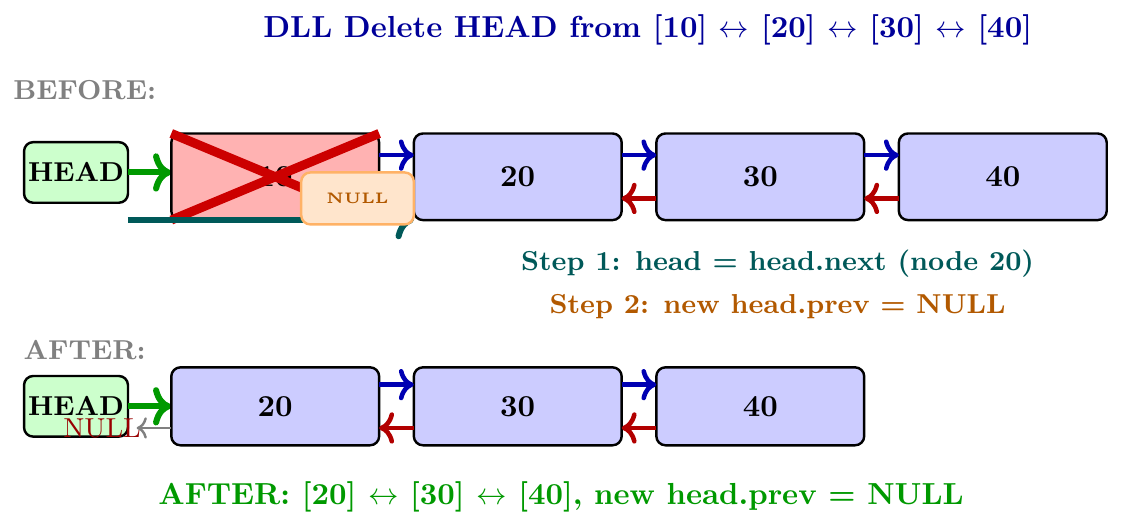
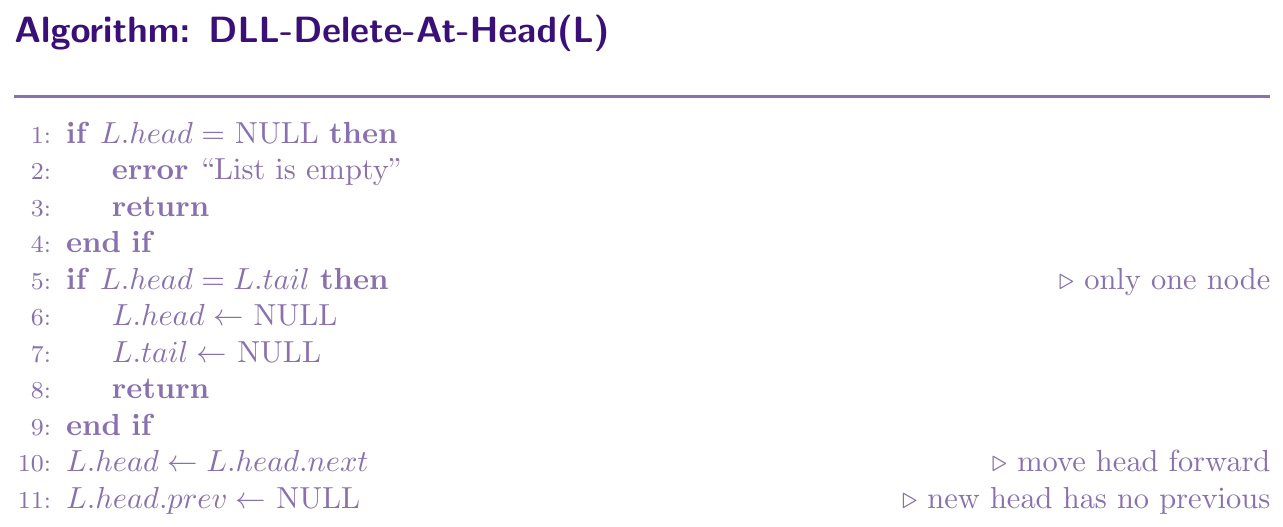
Deleting the head is the simplest case because we already know which node to delete. Steps:
If the list is empty, report error.
If only one node exists: set head = NULL and tail = NULL.
Otherwise: move head to head.next, then set the new head's prev pointer to NULL.
Time: $O(1)$.
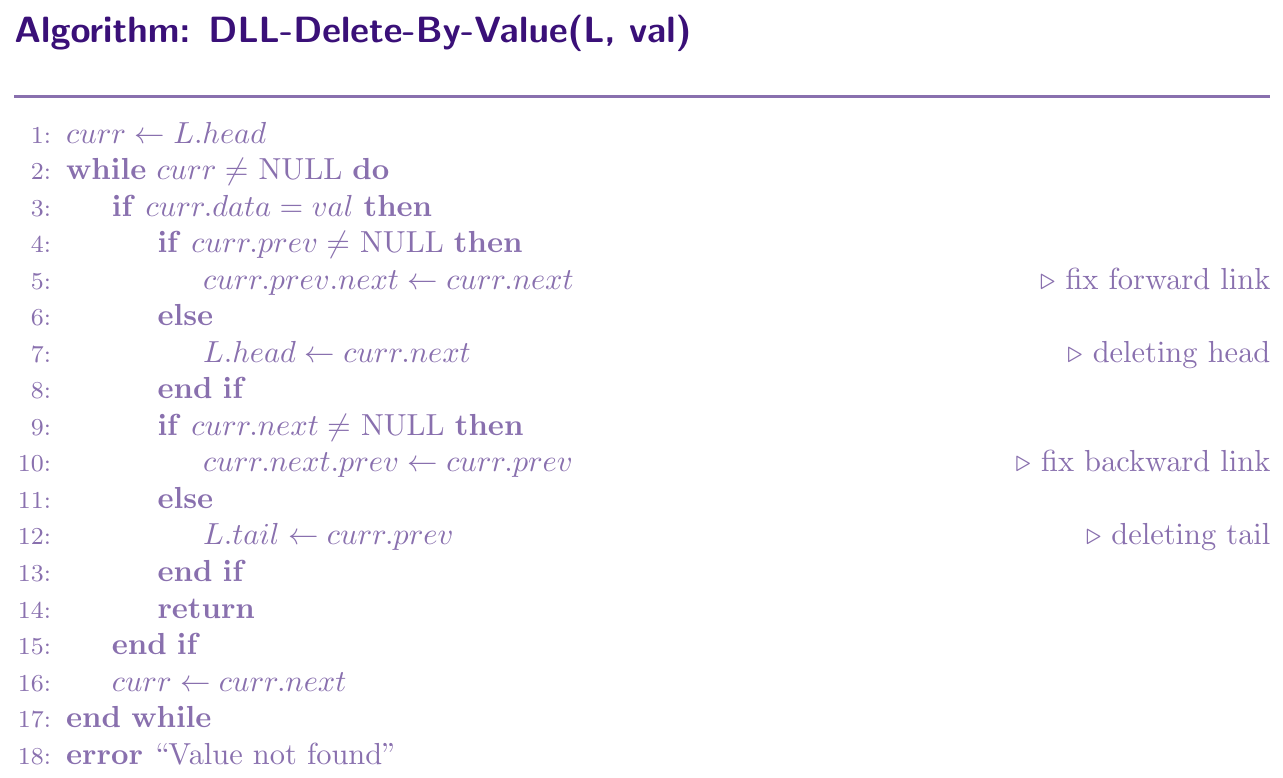
Delete by Value
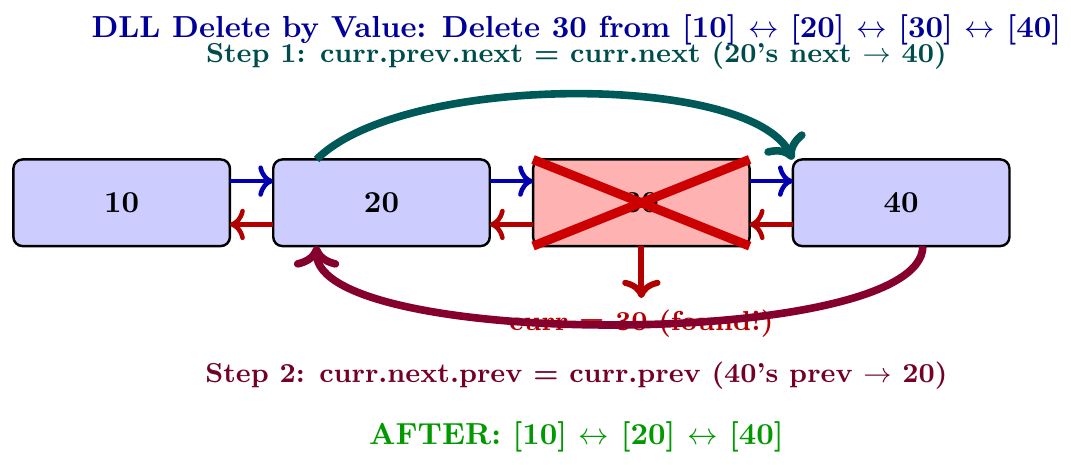
Traverse from head using curr until we find the node whose data equals the target value. Once found, apply the four pointer fixups. Because of the prev pointer available in each node, we do not need a separate prev variable during traversal.
Traverse: curr = head, move curr = curr.next until curr.data = val or curr = NULL.
If not found: report error.
Fix forward link: if curr.prev $\ne$ NULL then curr.prev.next = curr.next, else head = curr.next.
Fix backward link: if curr.next $\ne$ NULL then curr.next.prev = curr.prev, else tail = curr.prev.
Time: $O(n)$ for traversal, $O(1)$ for deletion.
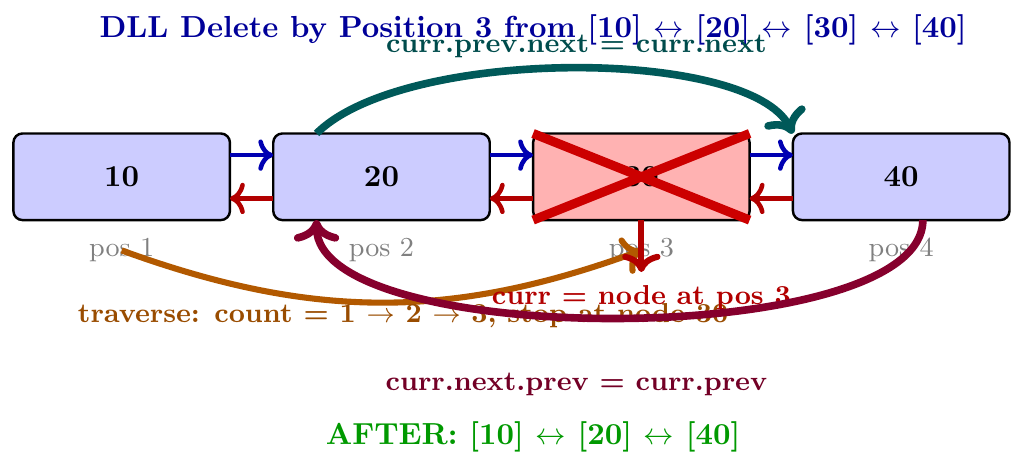
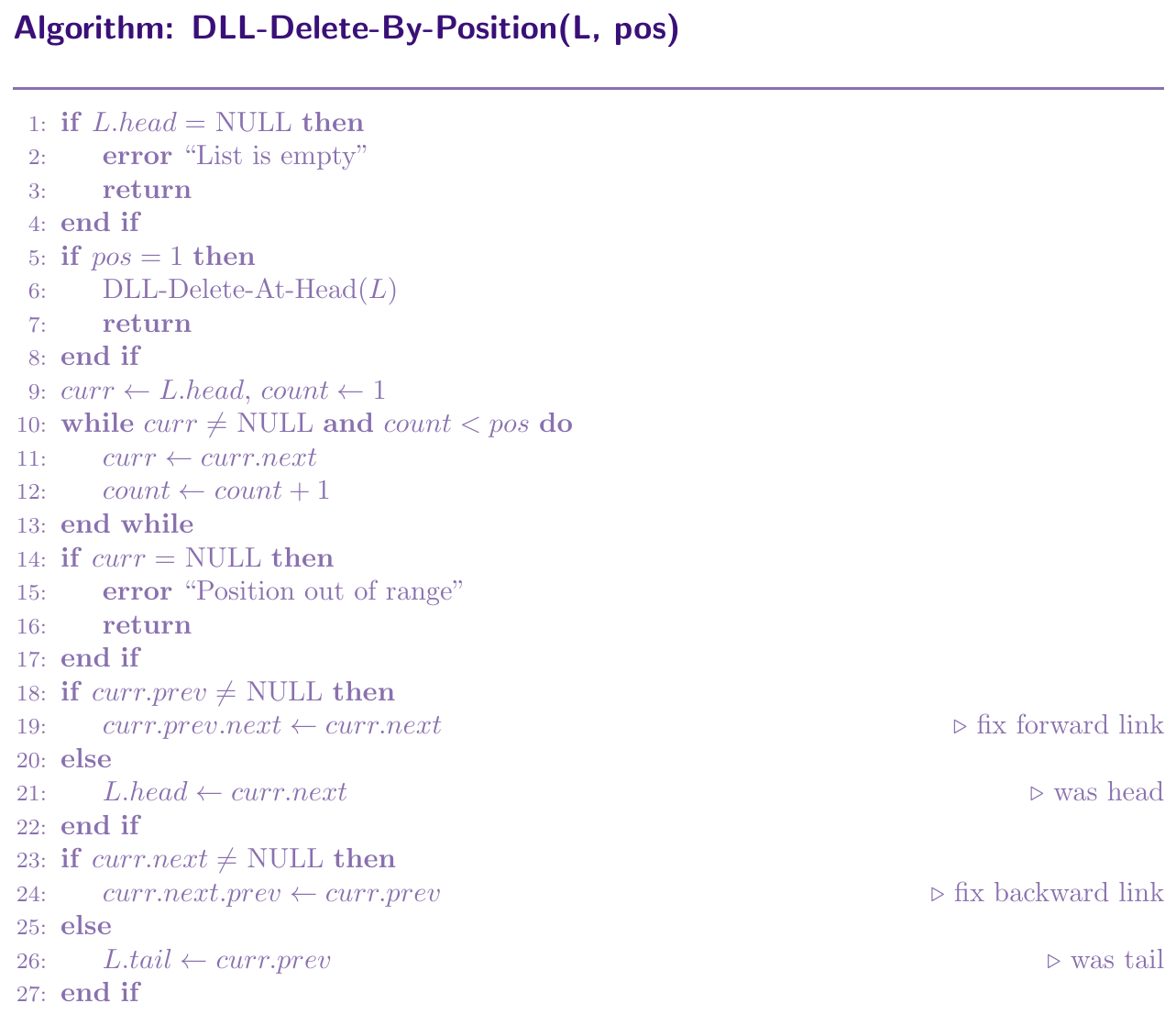
Delete by Position
Traverse to the node at position $k$ (1-indexed). Once we reach that node, apply the same four pointer fixups as delete by value. Position 1 means delete head.
If pos = 1: call Delete-At-Head.
Otherwise: traverse curr to position $k$ by counting steps.
If we run out of nodes before reaching $k$: position is out of range.
Apply the four pointer fixups on curr.
Time: $O(k)$ for traversal, $O(1)$ for deletion.
def delete_at_head(self):
    if self.head is None:
        print("List is empty")
        return
    if self.head == self.tail:     # only one node
        self.head = None
        self.tail = None
        return
    self.head      = self.head.next
    self.head.prev = None          # new head has no predecessor


def delete_by_value(self, val):
    curr = self.head
    while curr:
        if curr.data == val:
            if curr.prev:
                curr.prev.next = curr.next   # fix forward link
            else:
                self.head = curr.next        # deleting head
            if curr.next:
                curr.next.prev = curr.prev   # fix backward link
            else:
                self.tail = curr.prev        # deleting tail
            return
        curr = curr.next
    print(f"{val} not found")


def delete_by_position(self, pos):
    if self.head is None:
        print("List is empty")
        return
    if pos == 1:
        self.delete_at_head()
        return
    curr  = self.head
    count = 1
    while curr and count < pos:
        curr  = curr.next
        count += 1
    if curr is None:
        print("Position out of range")
        return
    if curr.prev:
        curr.prev.next = curr.next   # fix forward link
    else:
        self.head = curr.next        # was head
    if curr.next:
        curr.next.prev = curr.prev   # fix backward link
    else:
        self.tail = curr.prev        # was tail


# --- Driver Code ---
dll = DoublyLinkedList()
for v in [10, 20, 30, 40, 50]:
    dll.insert_at_tail(v)
dll.display_forward()       # 10 <-> 20 <-> 30 <-> 40 <-> 50 <-> NULL

dll.delete_at_head()
dll.display_forward()       # 20 <-> 30 <-> 40 <-> 50 <-> NULL

dll.delete_by_value(40)
dll.display_forward()       # 20 <-> 30 <-> 50 <-> NULL

dll.delete_by_position(2)
dll.display_forward()       # 20 <-> 50 <-> NULL
Doubly LL --- Search Operation
Search in a doubly linked list is the same as in a singly linked list from the forward direction: scan from head to tail. However, with DLL we also have the option to search from tail to head using prev pointers. Both take $O(n)$ time. Searching from both ends simultaneously can save time in some cases.
def delete_by_value(self, val):
    curr = self.head
    while curr:
        if curr.data == val:
            if curr.prev:
                curr.prev.next = curr.next    # step 1
            else:
                self.head = curr.next          # deleting head
            if curr.next:
                curr.next.prev = curr.prev    # step 2
            else:
                self.tail = curr.prev          # deleting tail
            return
        curr = curr.next
    print(f"{val} not found")


def search(self, val):
    curr = self.head
    pos  = 1
    while curr:
        if curr.data == val:
            return pos
        curr = curr.next
        pos += 1
    return -1


# --- Driver Code ---
dll = DoublyLinkedList()
for v in [10, 20, 30, 40]:
    dll.insert_at_tail(v)

print("Search 30:", dll.search(30))   # 3
print("Search 99:", dll.search(99))   # -1

dll.delete_by_value(20)
dll.display_forward()   # 10 <-> 30 <-> 40 <-> NULL

dll.delete_by_value(10)   # delete head
dll.display_forward()   # 30 <-> 40 <-> NULL

dll.delete_by_value(40)   # delete tail
dll.display_forward()   # 30 <-> NULL
Circular Linked List
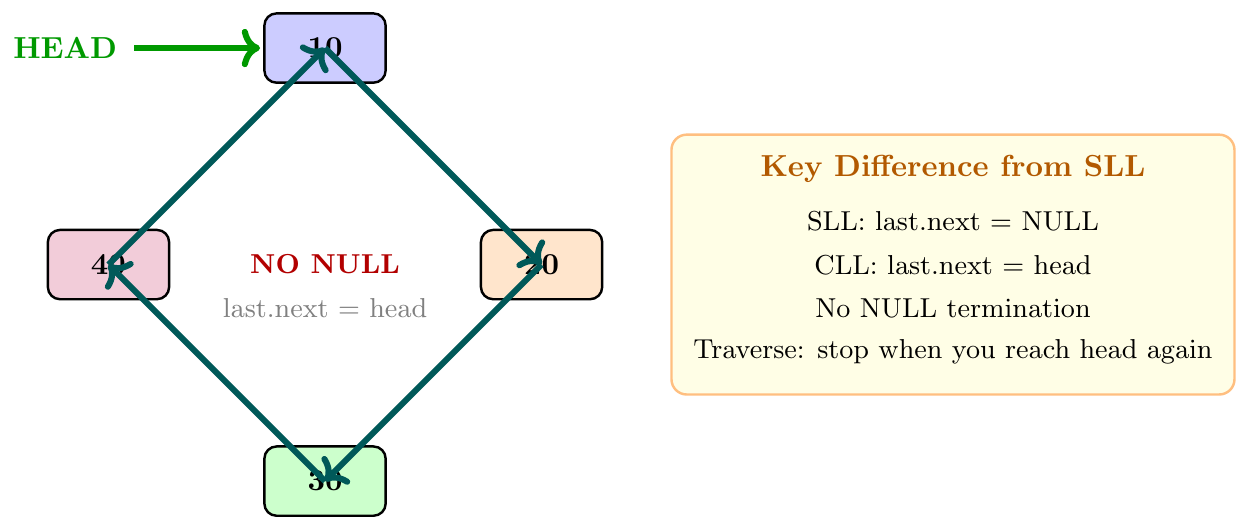
In a circular linked list, the last node's next pointer does not point to NULL. Instead, it points back to the first node (head), forming a circle. There is no natural end. We can keep traversing forever by following next pointers. We maintain a head pointer. To detect when we have gone around once, we check if we have come back to head. Circular lists are used in round-robin scheduling and buffer implementations.
class CNode:
    def __init__(self, data):
        self.data = data
        self.next = None   # will point to head when in circular list

class CircularLinkedList:
    def __init__(self):
        self.head = None   # empty list

    def display(self):
        if self.head is None:
            print("Empty")
            return
        curr = self.head
        print(curr.data, end=" -> ")
        curr = curr.next
        while curr != self.head:   # stop when we come back to head
            print(curr.data, end=" -> ")
            curr = curr.next
        print("(back to head)")
Circular LL --- Insertion Operations
Insert at Head
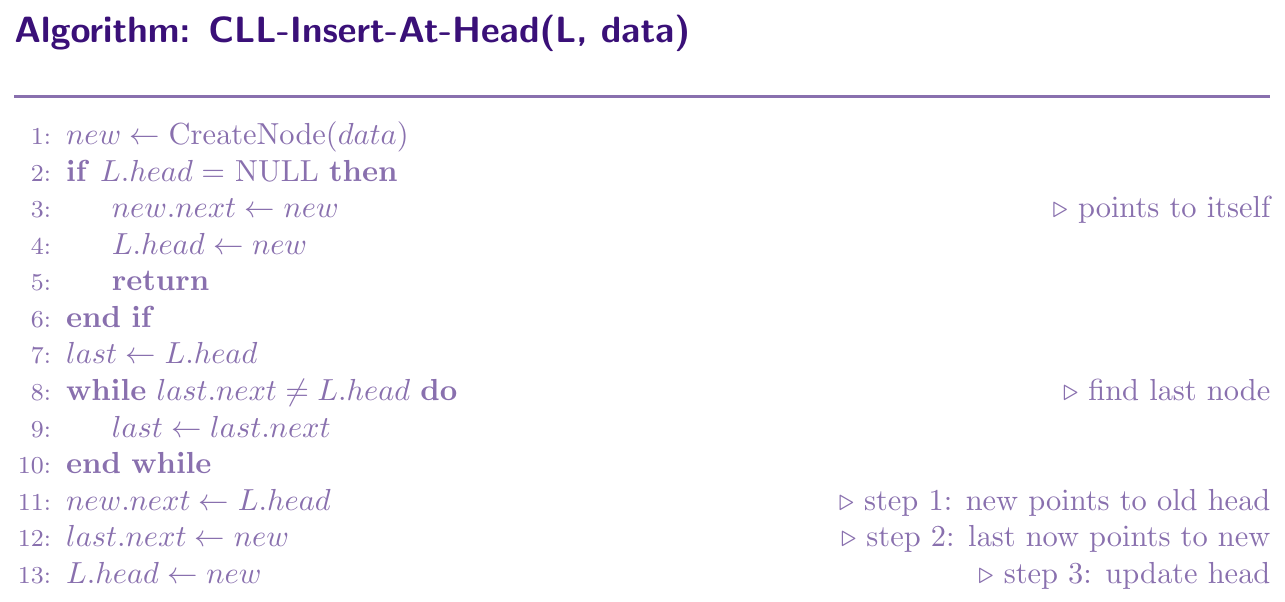
Inserting at head in a circular list requires us to also update the last node's next pointer to point to the new head. Steps:
Create a new node.
If the list is empty: new.next = new (points to itself), head = new. Done.
Otherwise: Traverse to the last node (the one whose next == head).
Set new.next = head (new node points to old head).
Set last.next = new (last node now points to new head).
Update head = new.
Time: $O(n)$ because we must traverse to find the last node. If we maintain a tail pointer, this becomes $O(1)$.
Insert at Tail (End)
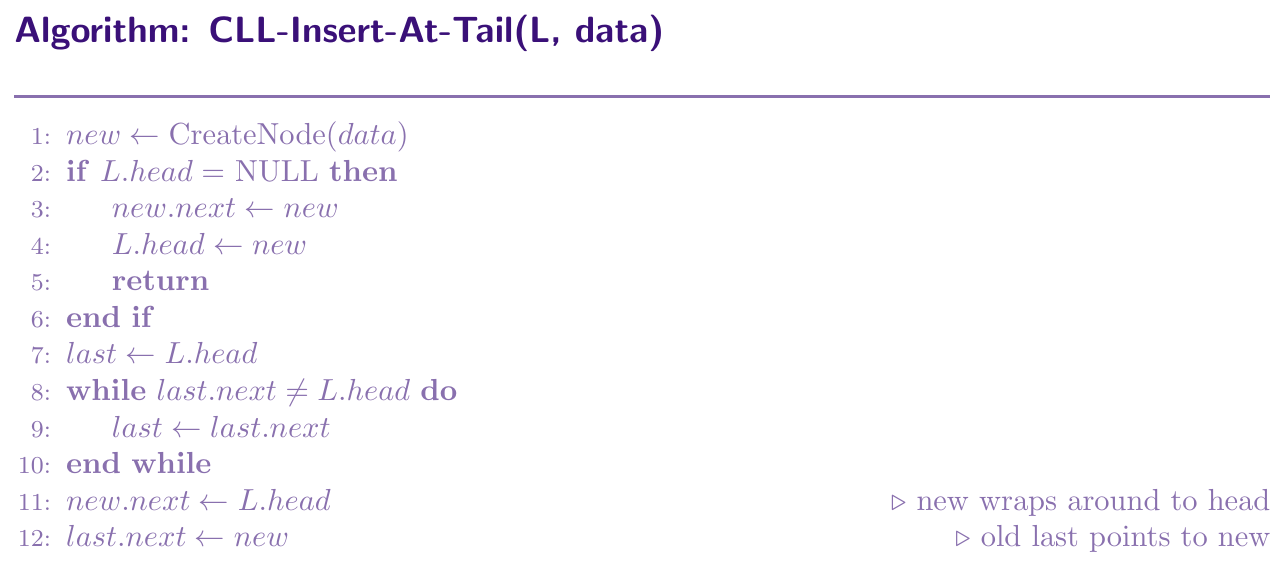
Inserting at tail in a circular list means inserting just before the head (since it is a circle). Steps:
Create a new node.
If the list is empty: new.next = new, head = new. Done.
Otherwise: Traverse to the current last node (whose next == head).
Set new.next = head (new node wraps around to head).
Set last.next = new (old last now points to new last).
Head does not change. Time: $O(n)$ without tail pointer.
Insert at Middle (Given Position)
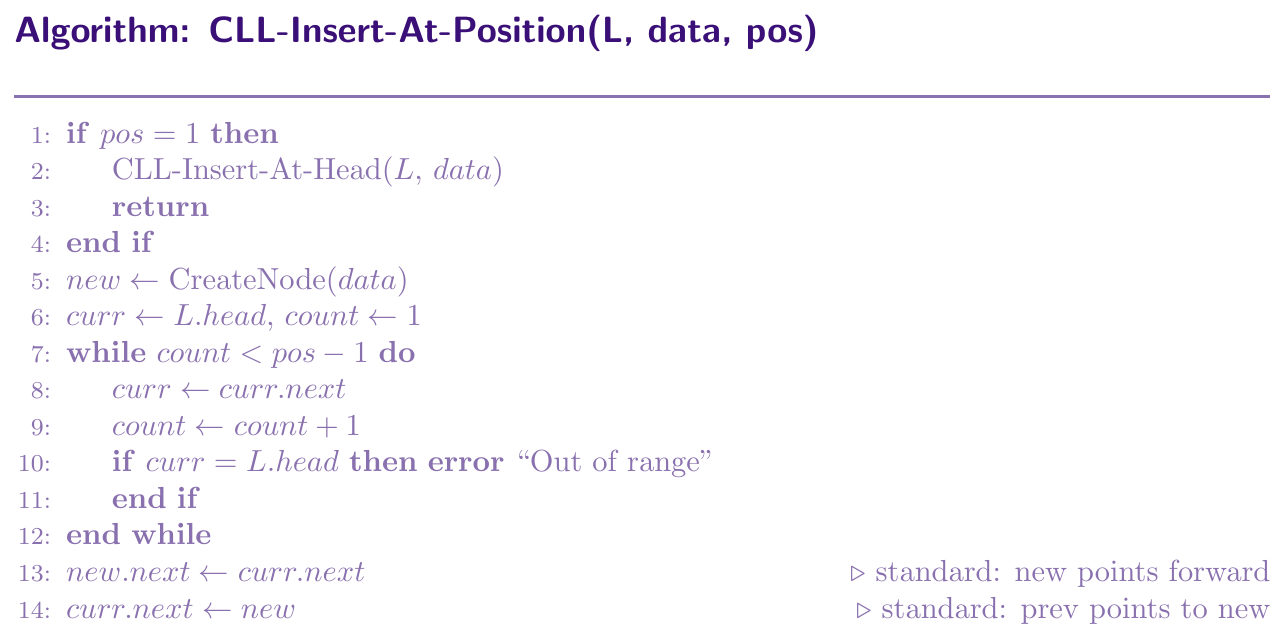
Inserting at position $k$ is similar to singly linked list, but we must be careful about the circular wrap. Steps:
Traverse to node at position $k-1$.
Set new.next = curr.next.
Set curr.next = new.
For inserting at position 1 (head), use Insert at Head. This takes $O(k)$ time.
class CircularLinkedList:
    def __init__(self):
        self.head = None

    def _find_last(self):
        """Find the last node (whose next == head)"""
        if self.head is None:
            return None
        last = self.head
        while last.next != self.head:
            last = last.next
        return last

    def insert_at_head(self, data):
        new_node = CNode(data)
        if self.head is None:
            new_node.next = new_node   # points to itself
            self.head     = new_node
            return
        last          = self._find_last()
        new_node.next = self.head      # step 1: new -> old head
        last.next     = new_node       # step 2: last -> new
        self.head     = new_node       # step 3: head = new

    def insert_at_tail(self, data):
        new_node = CNode(data)
        if self.head is None:
            new_node.next = new_node
            self.head     = new_node
            return
        last          = self._find_last()
        new_node.next = self.head      # new wraps to head
        last.next     = new_node       # old last -> new

    def insert_at_position(self, data, pos):
        if pos == 1:
            self.insert_at_head(data)
            return
        new_node = CNode(data)
        curr  = self.head
        count = 1
        while count < pos - 1:
            curr  = curr.next
            count += 1
            if curr == self.head:
                print("Out of range")
                return
        new_node.next = curr.next
        curr.next     = new_node

    def display(self):
        if self.head is None:
            print("Empty")
            return
        curr = self.head
        print(curr.data, end=" -> ")
        curr = curr.next
        while curr != self.head:
            print(curr.data, end=" -> ")
            curr = curr.next
        print("(back to head)")


# --- Driver Code ---
cll = CircularLinkedList()
cll.insert_at_tail(10)
cll.insert_at_tail(20)
cll.insert_at_tail(30)
cll.display()              # 10 -> 20 -> 30 -> (back to head)

cll.insert_at_head(5)
cll.display()              # 5 -> 10 -> 20 -> 30 -> (back to head)

cll.insert_at_position(99, 3)
cll.display()              # 5 -> 10 -> 99 -> 20 -> 30 -> (back to head)
Circular LL --- Deletion Operations
Deleting from a circular linked list needs special care because there is no NULL to stop traversal, and deleting the head requires updating the last node's next pointer to the new head. All deletions follow these rules:
Single node: head = NULL, done.
Delete head: Find last node. Set last.next = head.next. Update head = head.next.
Delete non-head: Traverse with prev and curr. Set prev.next = curr.next.
Stopping condition: Always check curr != head (not NULL) when traversing.
Time: $O(n)$ for all cases.
Delete at Head
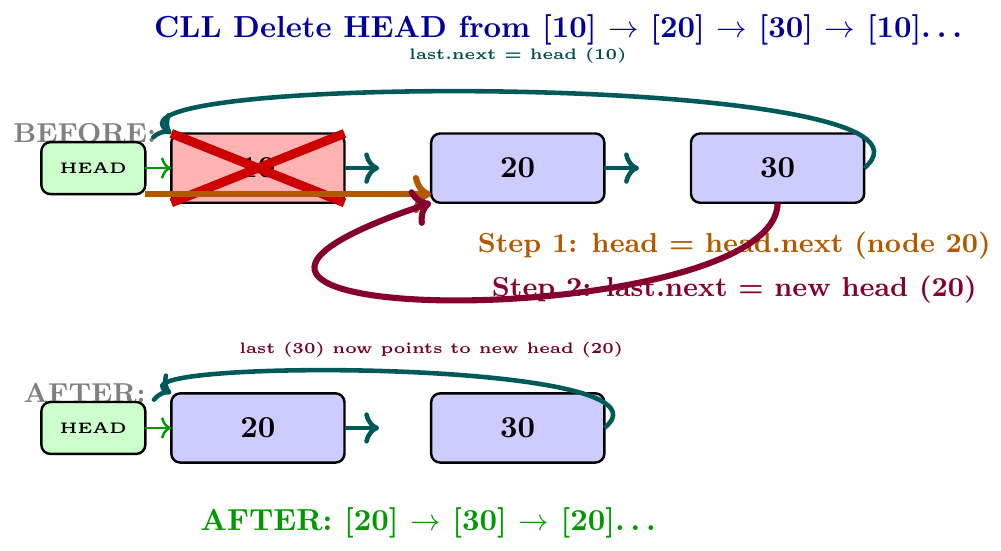
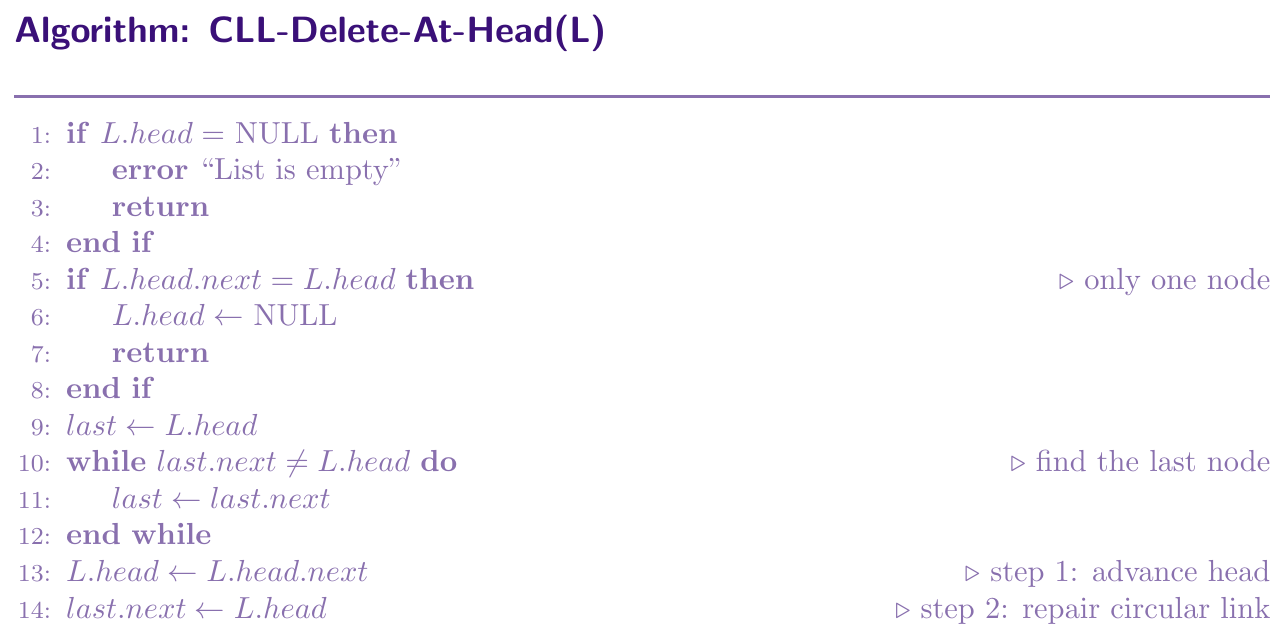
Deleting the head is the trickiest case in CLL because the last node's next must also be updated to point to the new head. Without this fix, the circle breaks.
If list is empty: report error.
If only one node (head.next == head): set head = NULL.
Otherwise: traverse to the last node (whose next == head).
Set head = head.next (advance head).
Set last.next = new head (repair the circular link).
Time: $O(n)$ because we must traverse to the last node.
Delete by Value --- First Occurrence
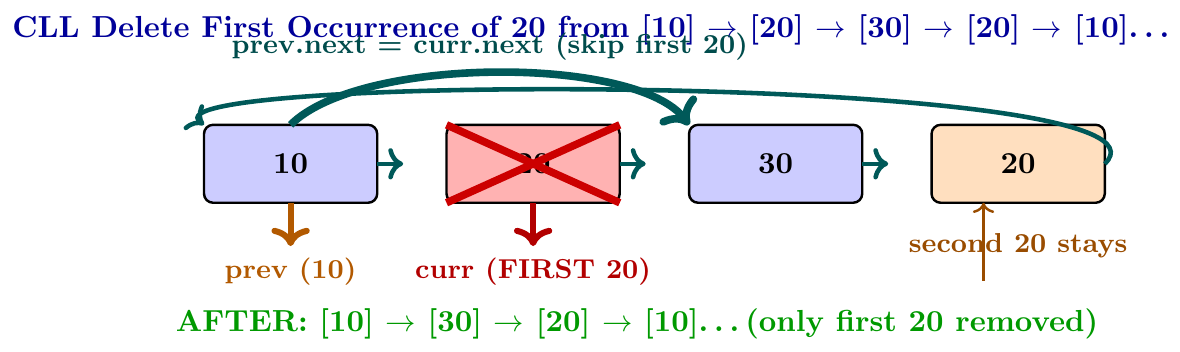
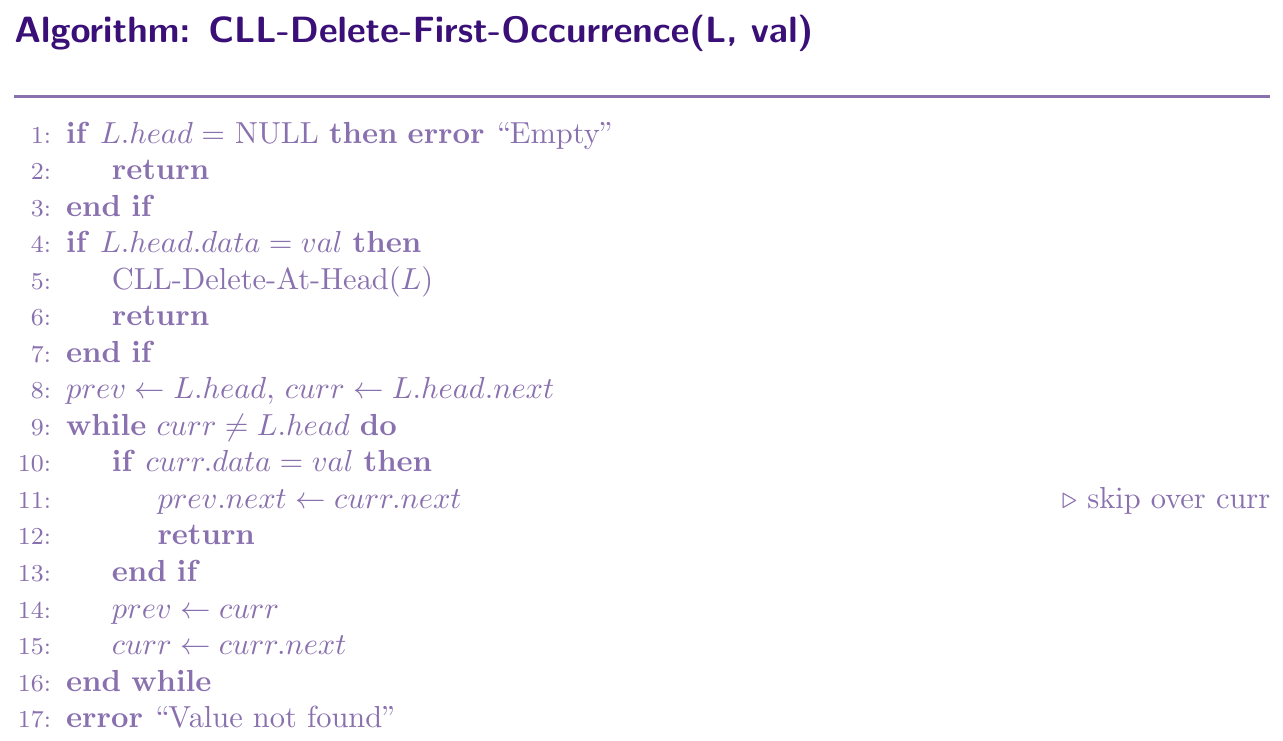
Traverse with two pointers, prev and curr. Start prev = head, curr = head.next. Compare curr.data with the target. When found, set prev.next = curr.next, which removes curr from the circle. If the head itself matches, call Delete-At-Head instead. Stop when curr comes back to head (full circle done).
Delete by Value --- All Occurrences
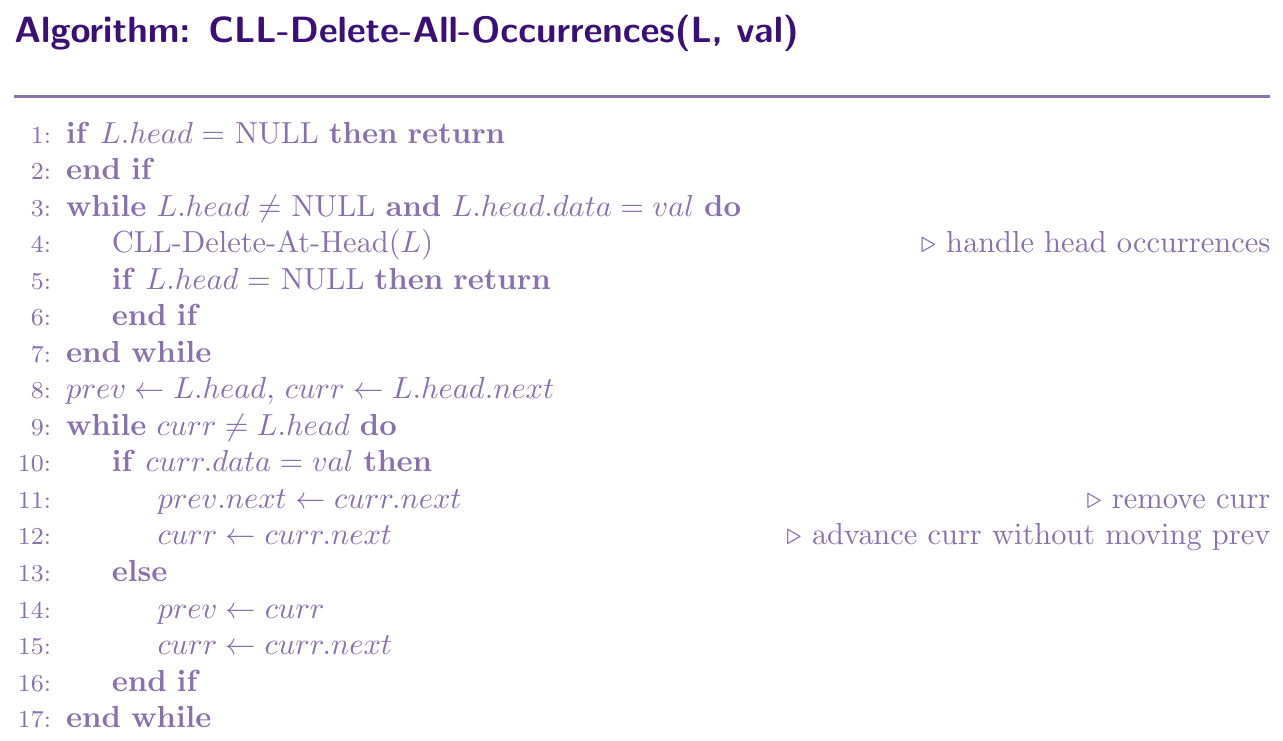
We repeatedly delete all nodes whose data equals the target value. Since nodes can appear anywhere including at the head, we need to:
First, delete all head occurrences in a loop (head may change multiple times).
Then, traverse the rest of the circle once, deleting any matching non-head node using prev.next = curr.next.
After deletion, do NOT advance curr (the new curr is the old curr.next, which is now at prev.next). Advance only when no deletion happened.
Time: $O(n)$ single pass after handling head.
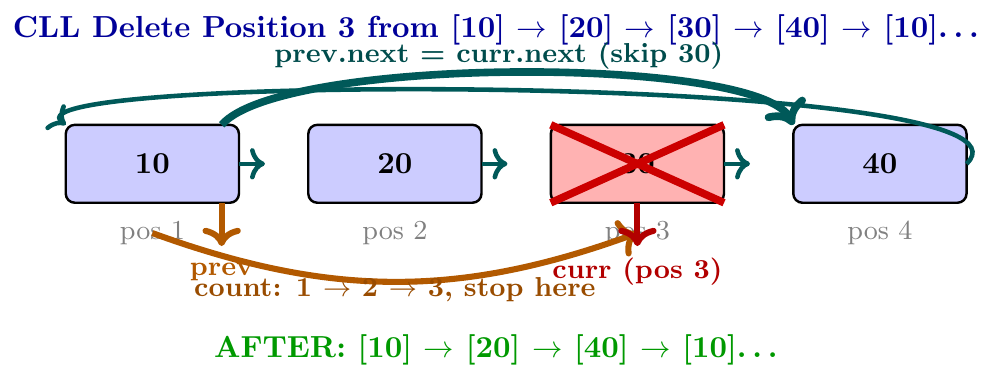
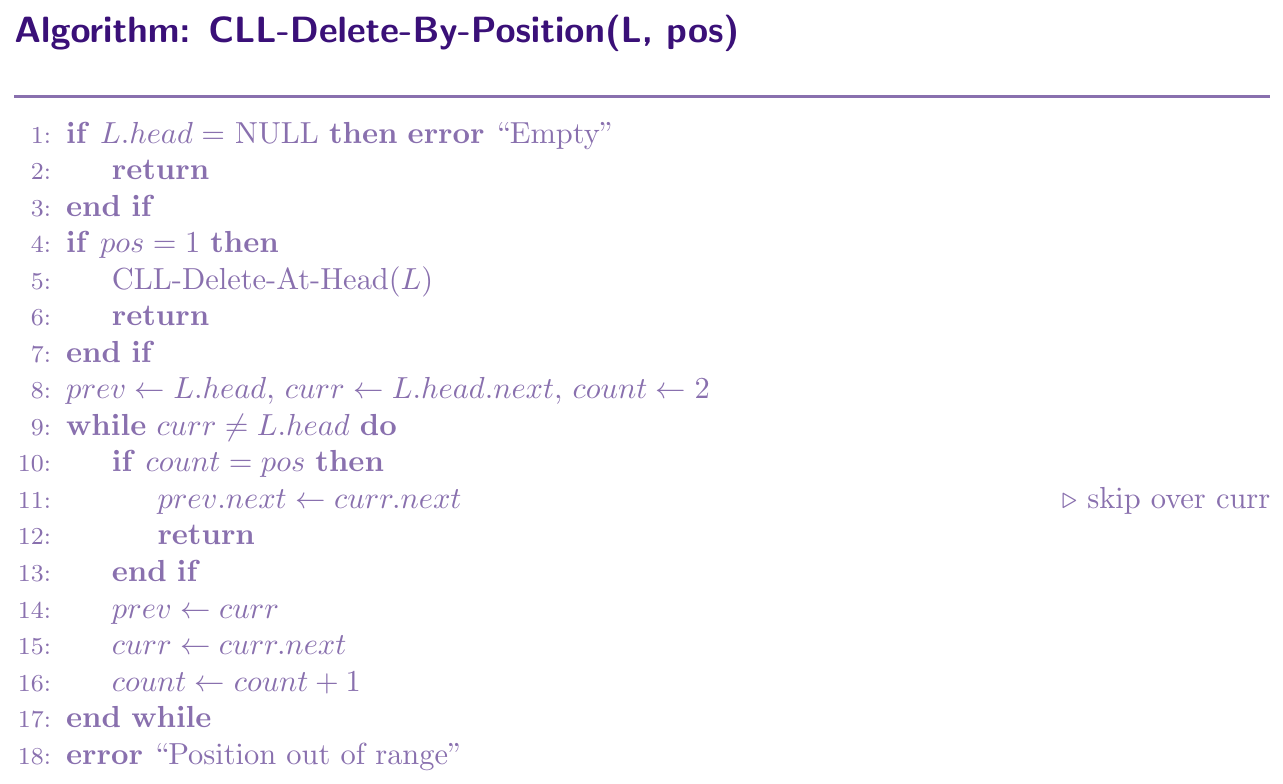
Delete by Position
Traverse to position $k$ (1-indexed) by counting from head. Stop when count reaches $k$.
If pos = 1: call Delete-At-Head.
Otherwise: start from head, count steps until we reach position $k$.
If position exceeds the list length (we come back to head before reaching $k$): report error.
Set prev.next = curr.next to delete the node at position $k$.
Time: $O(k)$.
def _find_last(self):
    if self.head is None:
        return None
    last = self.head
    while last.next != self.head:
        last = last.next
    return last


def delete_at_head(self):
    if self.head is None:
        print("Empty list")
        return
    if self.head.next == self.head:   # only one node
        self.head = None
        return
    last          = self._find_last()
    self.head     = self.head.next    # step 1: advance head
    last.next     = self.head         # step 2: repair circle


def delete_first_occurrence(self, val):
    if self.head is None:
        print("Empty list")
        return
    if self.head.data == val:
        self.delete_at_head()
        return
    prev = self.head
    curr = self.head.next
    while curr != self.head:
        if curr.data == val:
            prev.next = curr.next    # skip over curr
            return
        prev = curr
        curr = curr.next
    print(f"{val} not found")


def delete_all_occurrences(self, val):
    if self.head is None:
        return
    # Step 1: remove all head occurrences
    while self.head is not None and self.head.data == val:
        self.delete_at_head()
        if self.head is None:
            return

    # Step 2: traverse and remove non-head occurrences
    prev = self.head
    curr = self.head.next
    while curr != self.head:
        if curr.data == val:
            prev.next = curr.next    # skip curr, do NOT move prev
            curr      = curr.next
        else:
            prev = curr
            curr = curr.next


def delete_by_position(self, pos):
    if self.head is None:
        print("Empty list")
        return
    if pos == 1:
        self.delete_at_head()
        return
    prev  = self.head
    curr  = self.head.next
    count = 2
    while curr != self.head:
        if count == pos:
            prev.next = curr.next    # skip over curr
            return
        prev  = curr
        curr  = curr.next
        count += 1
    print("Position out of range")


# --- Driver Code ---
cll = CircularLinkedList()
for v in [10, 20, 20, 30, 20, 40]:
    cll.insert_at_tail(v)
cll.display()
# 10 -> 20 -> 20 -> 30 -> 20 -> 40 -> (back to head)

cll.delete_first_occurrence(20)
cll.display()
# 10 -> 20 -> 30 -> 20 -> 40 -> (back to head)

cll.delete_all_occurrences(20)
cll.display()
# 10 -> 30 -> 40 -> (back to head)

cll.delete_at_head()
cll.display()
# 30 -> 40 -> (back to head)

cll.delete_by_position(2)
cll.display()
# 30 -> (back to head)
Circular LL --- Search Operation
Searching in a circular list is similar to singly linked list, but we must stop when we come back to the head, not when we hit NULL (there is no NULL). We traverse until we find the value or come full circle back to head.
def delete_by_value(self, val):
    if self.head is None:
        print("Empty list")
        return
    # Case: only one node
    if self.head.data == val and self.head.next == self.head:
        self.head = None
        return
    # Case: delete head
    if self.head.data == val:
        last = self._find_last()
        self.head      = self.head.next
        last.next      = self.head
        return
    # Case: delete non-head node
    prev = self.head
    curr = self.head.next
    while curr != self.head:
        if curr.data == val:
            prev.next = curr.next    # skip over curr
            return
        prev = curr
        curr = curr.next
    print(f"{val} not found")


def search(self, val):
    if self.head is None:
        return -1
    curr = self.head
    pos  = 1
    while True:
        if curr.data == val:
            return pos
        curr = curr.next
        pos += 1
        if curr == self.head:    # came full circle
            break
    return -1


# --- Driver Code ---
cll = CircularLinkedList()
for v in [10, 20, 30, 40, 50]:
    cll.insert_at_tail(v)
cll.display()
# 10 -> 20 -> 30 -> 40 -> 50 -> (back to head)

print("Search 30:", cll.search(30))   # 3
print("Search 99:", cll.search(99))   # -1

cll.delete_by_value(30)
cll.display()
# 10 -> 20 -> 40 -> 50 -> (back to head)

cll.delete_by_value(10)   # delete head
cll.display()
# 20 -> 40 -> 50 -> (back to head)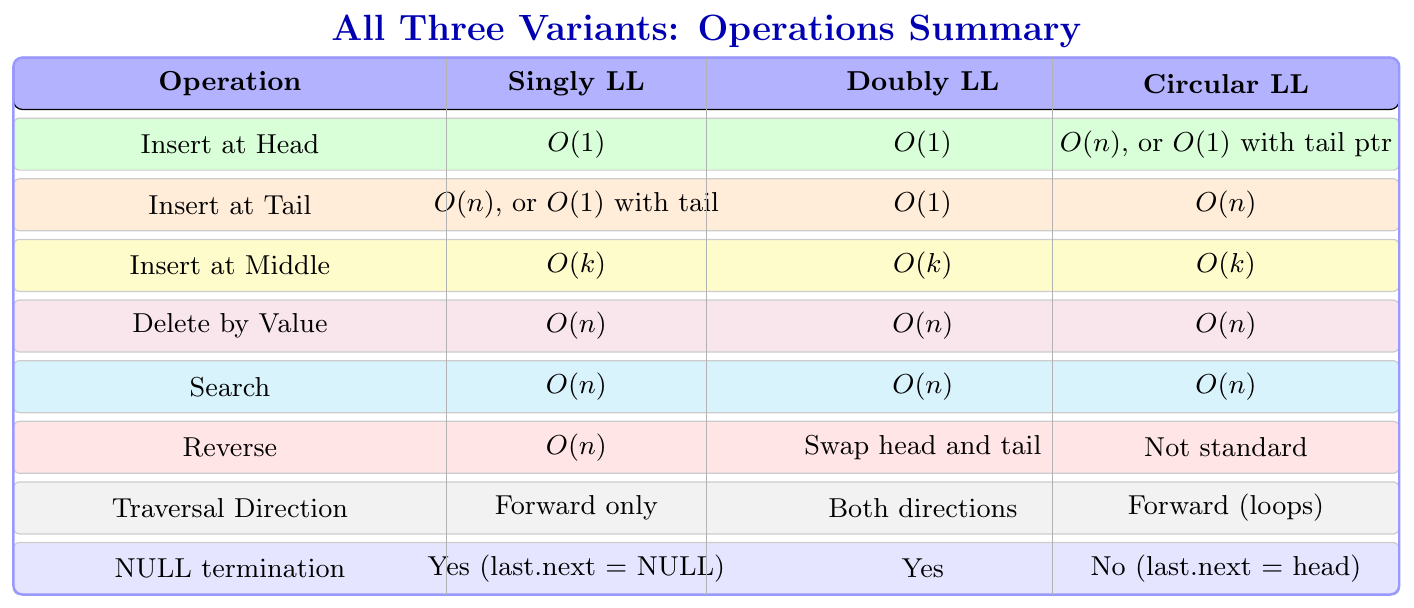
Classic Problems
Floyd's Cycle Detection Algorithm
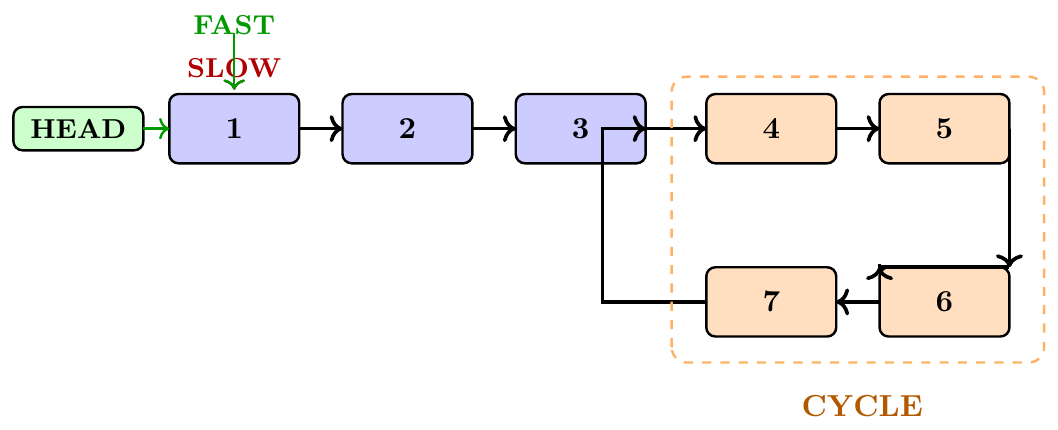
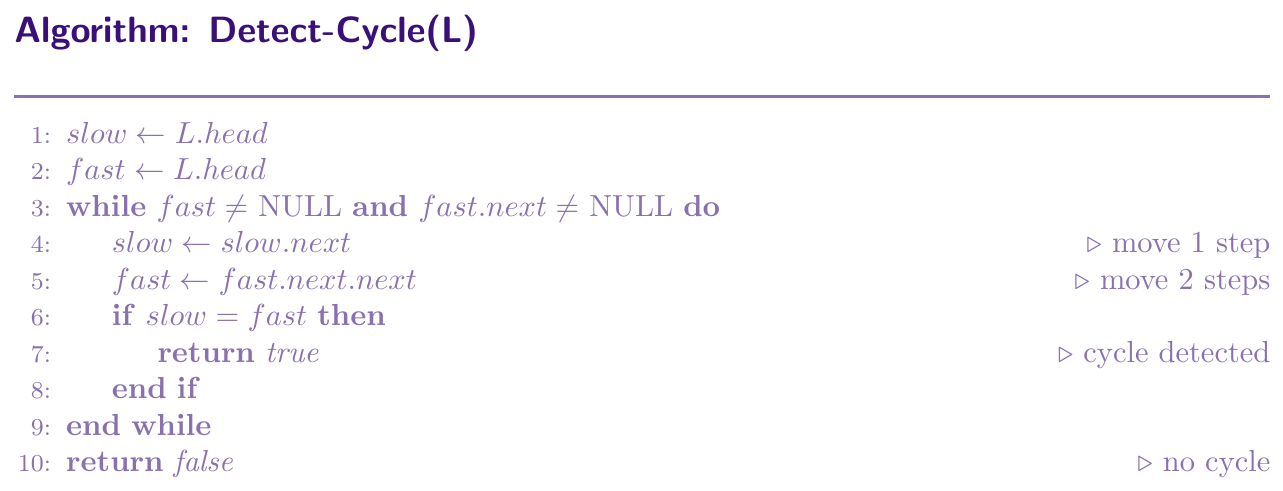
This algorithm uses two pointers, slow and fast. Slow moves one step at a time. Fast moves two steps at a time. If there is no cycle, fast will reach NULL. If there is a cycle, fast and slow will eventually meet inside the cycle, because fast is catching up to slow at a rate of one step per round. This is like two runners on a circular track, the faster runner always laps the slower one.
Finding the Start of a Cycle
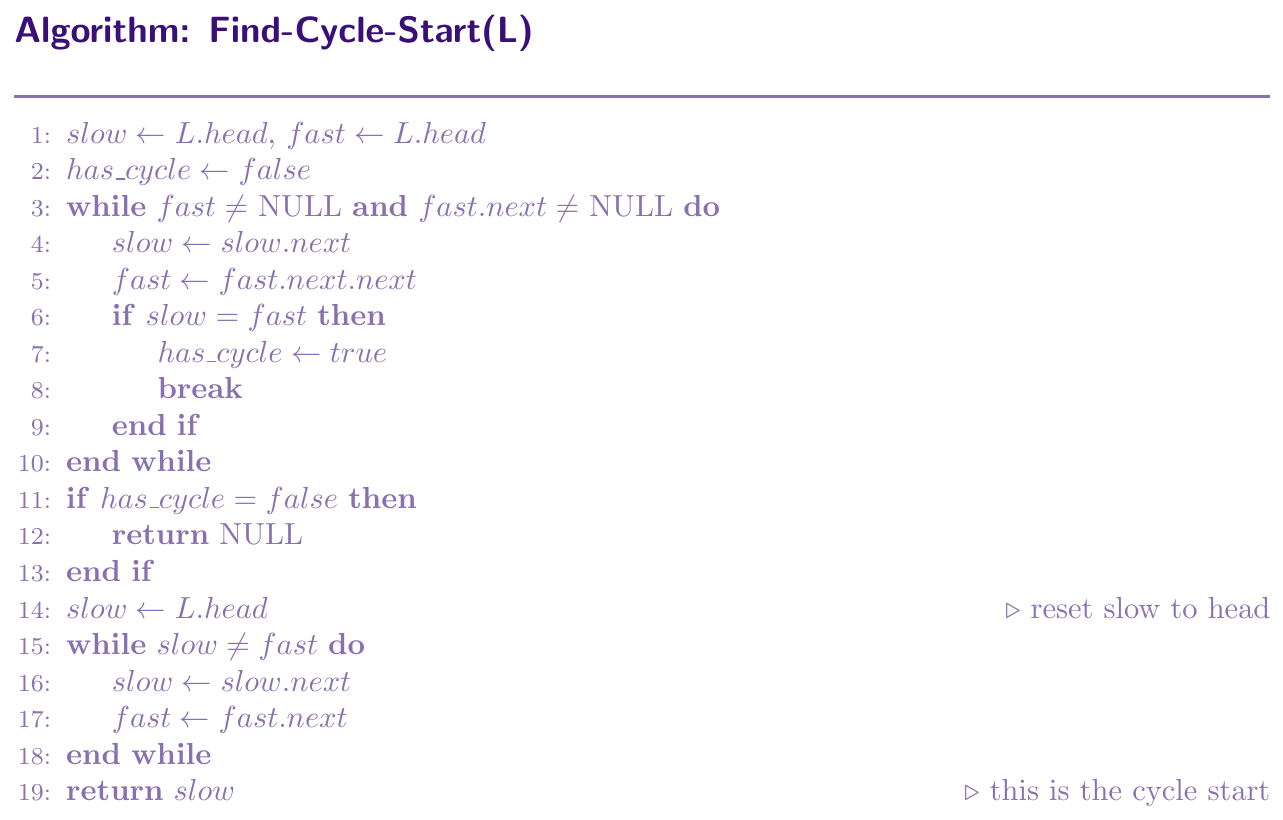
Once Floyd's algorithm detects a cycle (slow and fast meet at some point inside the cycle), we can find where the cycle starts. The mathematical proof shows that the distance from head to cycle start equals the distance from the meeting point to cycle start (going forward). So, after the meeting is detected, we reset one pointer to head, and keep the other at the meeting point. Both move one step at a time. The node where they meet again is the start of the cycle.
Let: $F$ = distance from HEAD to cycle start,
$C$ = cycle length,
$a$ = distance from cycle start to meeting point.
[0.4em]
When slow and fast meet: slow travelled $F + a$, fast travelled $F + a + C$.
[0.4em]
Since fast = $2 \times$ slow: $F + a + C = 2(F + a) \implies C = F + a \implies F = C - a$.
[0.4em]
Resetting one pointer to head and moving both 1 step at a time ensures they meet exactly at the cycle start.
def detect_cycle(self):
    slow = self.head
    fast = self.head
    while fast and fast.next:
        slow = slow.next           # 1 step
        fast = fast.next.next      # 2 steps
        if slow == fast:
            return True            # cycle exists
    return False


def find_cycle_start(self):
    slow = self.head
    fast = self.head
    has_cycle = False

    while fast and fast.next:
        slow = slow.next
        fast = fast.next.next
        if slow == fast:
            has_cycle = True
            break

    if not has_cycle:
        return None

    slow = self.head           # reset slow to head
    while slow != fast:        # both move 1 step
        slow = slow.next
        fast = fast.next

    return slow                # start of cycle


# --- Creating a cycle for testing ---
ll = LinkedList()
for val in [1, 2, 3, 4, 5, 6]:
    ll.insert_at_tail(val)

# Manually create cycle: node 6 points back to node 3
curr = ll.head
nodes = []
while curr:
    nodes.append(curr)
    curr = curr.next

nodes[5].next = nodes[2]   # creates cycle: 6 -> 3

print("Cycle detected:", ll.detect_cycle())   # True
start = ll.find_cycle_start()
print("Cycle starts at node with value:", start.data)  # 3
Finding the Middle Node
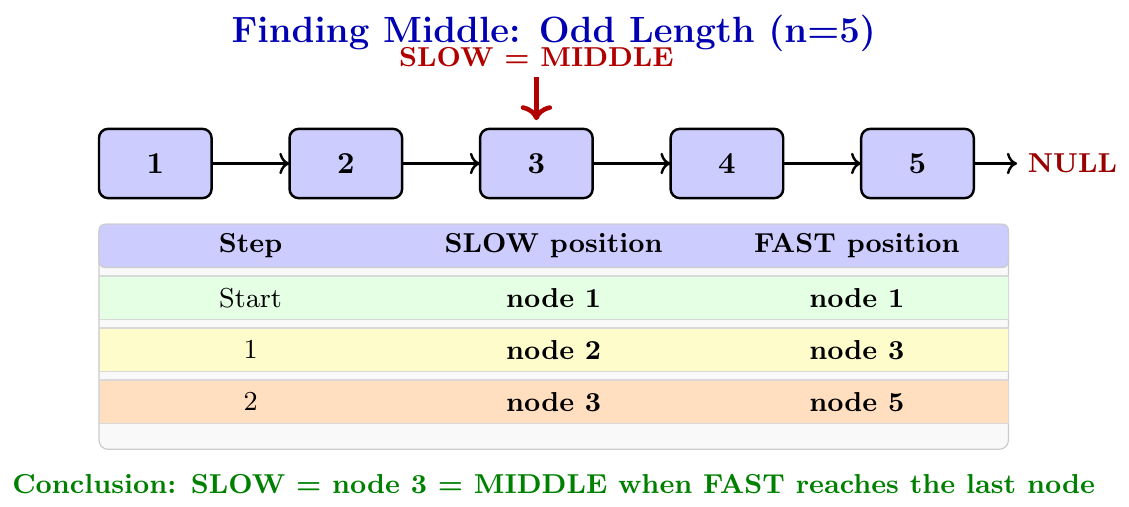
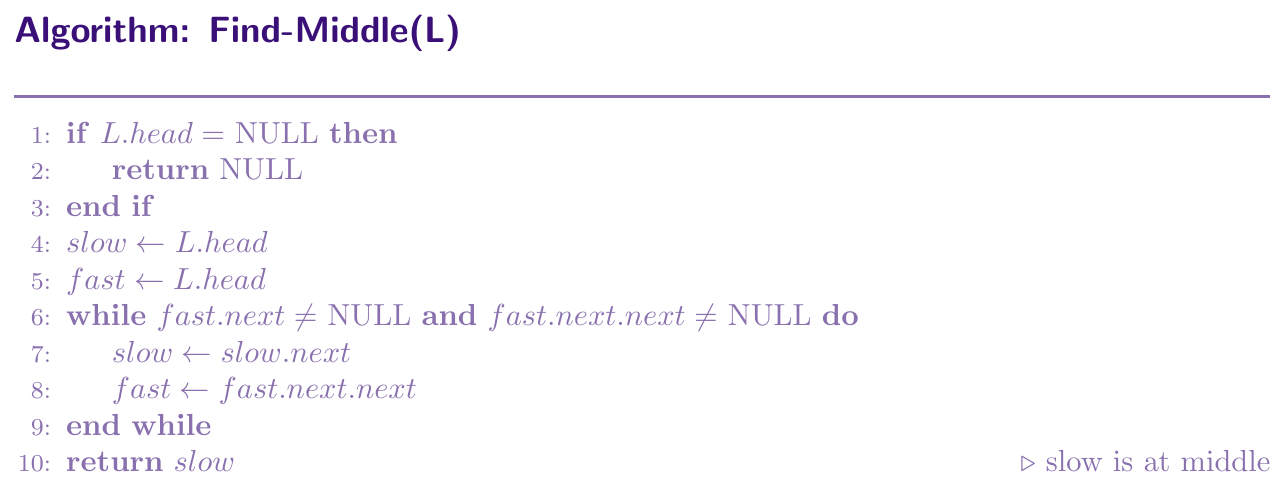
We use two pointers again, slow and fast. Slow moves one step at a time, fast moves two steps at a time. When fast reaches the end, slow is at the middle. This is because fast covers twice the distance in the same number of steps. So when fast has covered the whole list, slow has covered half. For a list of length $n$, this takes $O(n)$ time with only one pass.
def find_middle(self):
    if self.head is None:
        return None
    slow = self.head
    fast = self.head
    while fast.next and fast.next.next:
        slow = slow.next         # 1 step
        fast = fast.next.next    # 2 steps
    return slow                  # slow is at middle


# --- Driver Code ---
ll = LinkedList()
for val in [1, 2, 3, 4, 5]:
    ll.insert_at_tail(val)
mid = ll.find_middle()
print("Middle:", mid.data)   # Output: 3

ll2 = LinkedList()
for val in [1, 2, 3, 4, 5, 6]:
    ll2.insert_at_tail(val)
mid2 = ll2.find_middle()
print("Middle:", mid2.data)  # Output: 3 (first middle for even length)
Merge Two Sorted Linked Lists
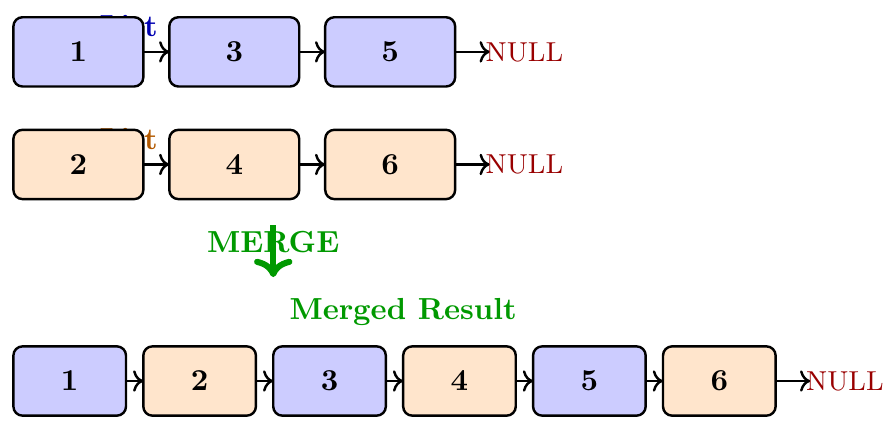
Given two sorted linked lists, we want to merge them into a single sorted linked list. We use two pointers, one on each list. We compare the front elements of both lists, pick the smaller one, attach it to our result list, and move that pointer forward. We keep doing this until one list runs out. Then we attach the remaining list directly to the result.
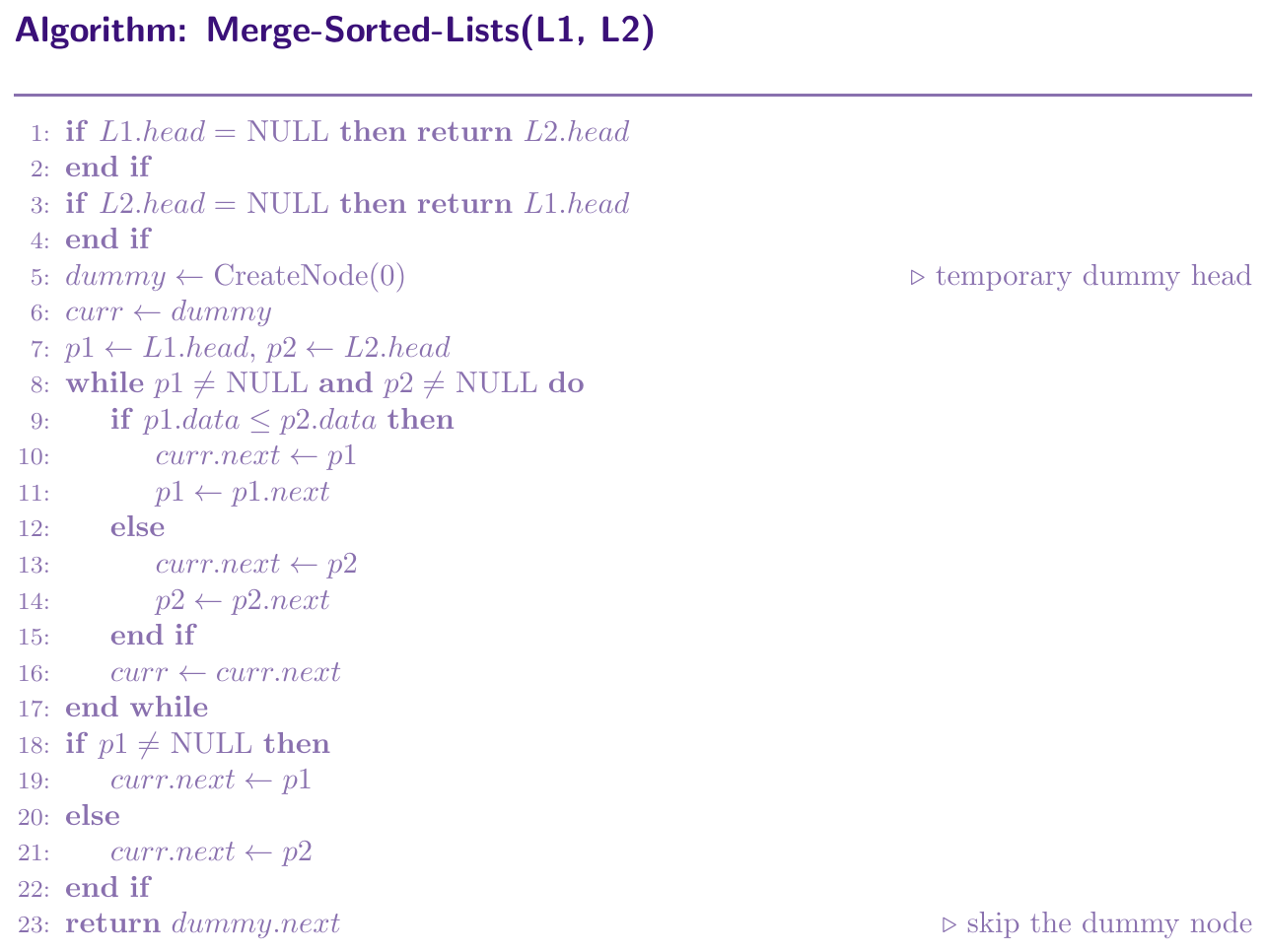
def merge_sorted_lists(head1, head2):
    dummy = Node(0)          # dummy node to simplify code
    curr  = dummy

    p1 = head1
    p2 = head2

    while p1 and p2:
        if p1.data <= p2.data:
            curr.next = p1   # pick from list 1
            p1 = p1.next
        else:
            curr.next = p2   # pick from list 2
            p2 = p2.next
        curr = curr.next

    if p1:                   # remaining elements of list 1
        curr.next = p1
    else:                    # remaining elements of list 2
        curr.next = p2

    return dummy.next        # actual merged head


# --- Driver Code ---
ll1 = LinkedList()
for val in [1, 3, 5, 7]:
    ll1.insert_at_tail(val)

ll2 = LinkedList()
for val in [2, 4, 6, 8]:
    ll2.insert_at_tail(val)

merged_head = merge_sorted_lists(ll1.head, ll2.head)

# print merged list
curr = merged_head
while curr:
    print(curr.data, end=" -> ")
    curr = curr.next
print("NULL")
# Output: 1 -> 2 -> 3 -> 4 -> 5 -> 6 -> 7 -> 8 -> NULL
Nth Node from the End
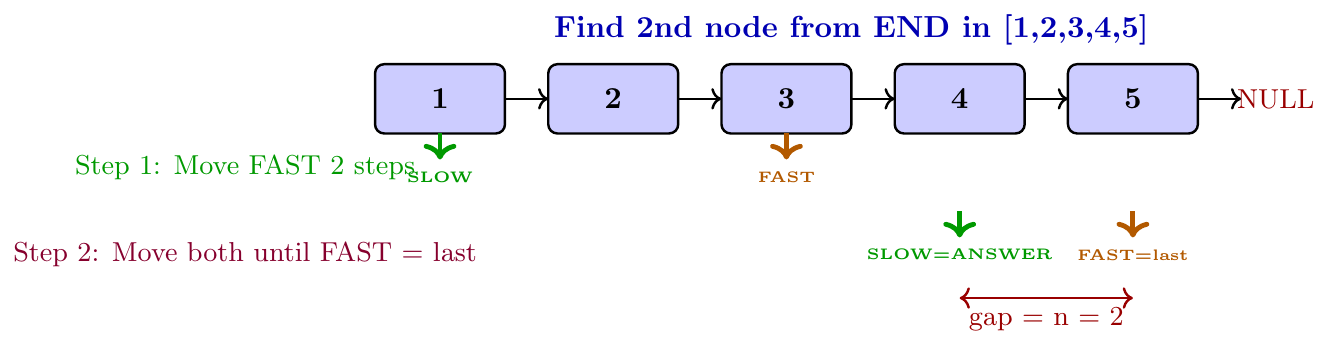
To find the $n$th node from the end in one pass, we use two pointers, fast and slow. First, we move fast $n$ steps ahead from the head. Then, we move both fast and slow one step at a time, until fast reaches the last node. At this point, slow is exactly $n$ positions from the end. This works because we maintained a gap of exactly $n$ nodes between fast and slow throughout.
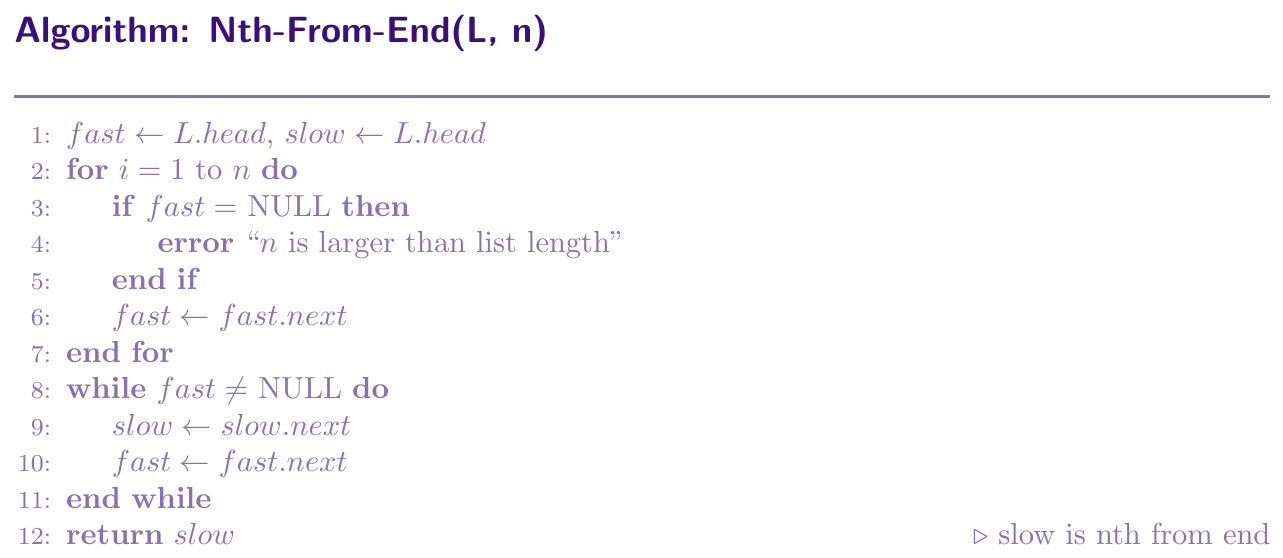
def nth_from_end(self, n):
    fast = self.head
    slow = self.head

    # move fast n steps ahead
    for i in range(n):
        if fast is None:
            print("n is larger than list length")
            return None
        fast = fast.next

    # move both until fast reaches end
    while fast is not None:
        slow = slow.next
        fast = fast.next

    return slow   # slow is at nth node from end


# --- Driver Code ---
ll = LinkedList()
for val in [1, 2, 3, 4, 5]:
    ll.insert_at_tail(val)

node = ll.nth_from_end(2)
print("2nd from end:", node.data)   # Output: 4

node = ll.nth_from_end(1)
print("1st from end:", node.data)   # Output: 5

node = ll.nth_from_end(5)
print("5th from end:", node.data)   # Output: 1
Intersection of Two Linked Lists
Two singly linked lists are said to intersect if they share a common node at some point. From that common node onward, both lists follow the exact same nodes all the way to the end. The shared part forms a Y-shape, not an X-shape, because once the lists merge at the intersection node, they become one, and all nodes after it are shared.
Think of two rivers flowing separately and then joining together at a point. After that joining point, there is only one river, not two. Similarly, after the intersection node, both lists share the same nodes and the same tail.
Imagine two hiking trails starting from different points but eventually joining at a fork. From the fork onward, both trails follow the same path to the summit. The fork is the intersection node. Everything before the fork is separate for each trail. Everything after the fork is shared.
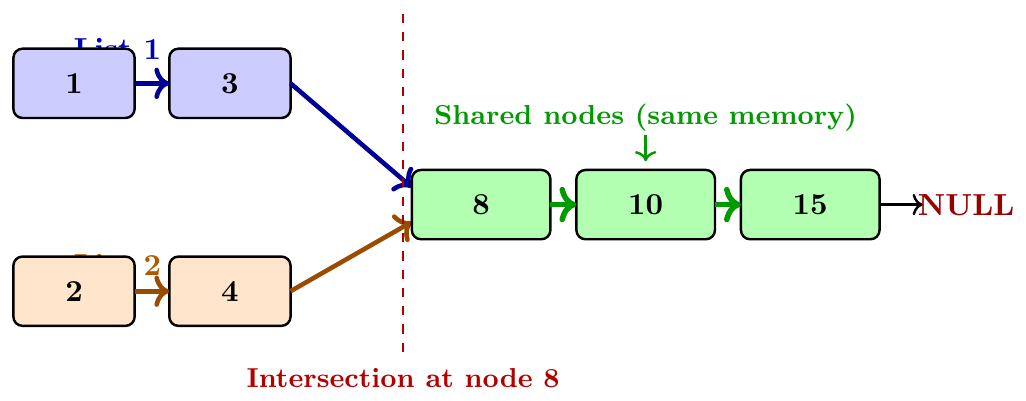
The intersection is defined by same memory address, not same value. Two nodes with value 8 at different memory locations are NOT an intersection.
Once two lists intersect, they must have the same tail node. So, checking if both lists end at the same node is the fastest way to detect intersection.
The lengths of the two lists from head to the intersection node can be different, which is why a naive same-speed traversal misses the intersection.
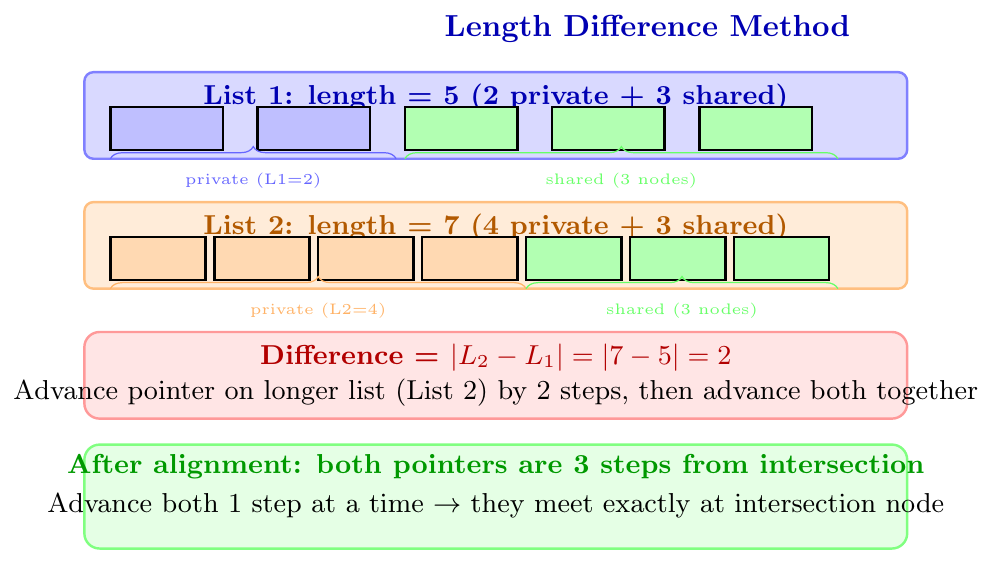
If List 1 has 5 nodes before intersection and List 2 has 3 nodes before intersection, advancing one pointer per step from each head will never land both pointers at the intersection at the same time. They are always out of sync by 2 steps. We need to compensate for this length difference.
Methods to Find Intersection
Method 1: Using Length Difference
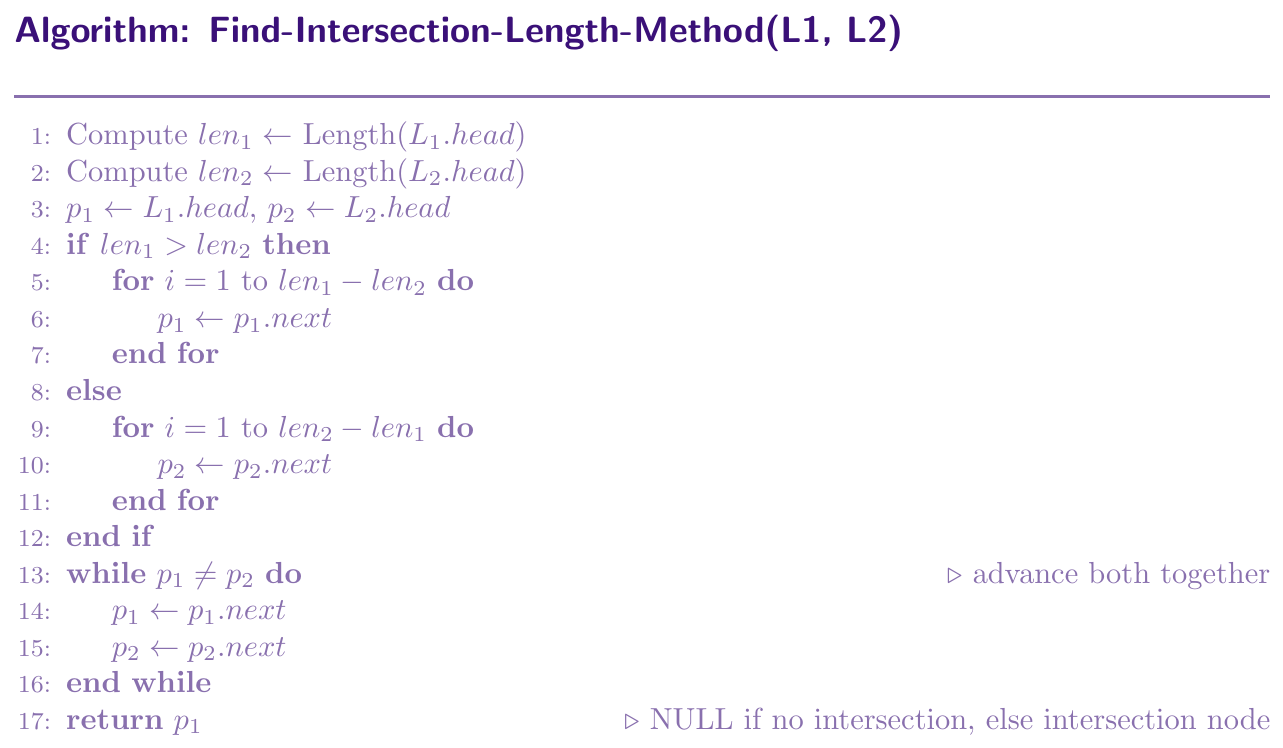
The idea is simple. If List 1 has length $L_1$ and List 2 has length $L_2$, then the longer list's pointer should start $|L_1 - L_2|$ steps ahead. After this adjustment, both pointers are the same distance from the intersection node. We then advance both one step at a time until they meet. That meeting point is the intersection.
Method 2: Two-Pointer Redirect Method (Floyd-like)
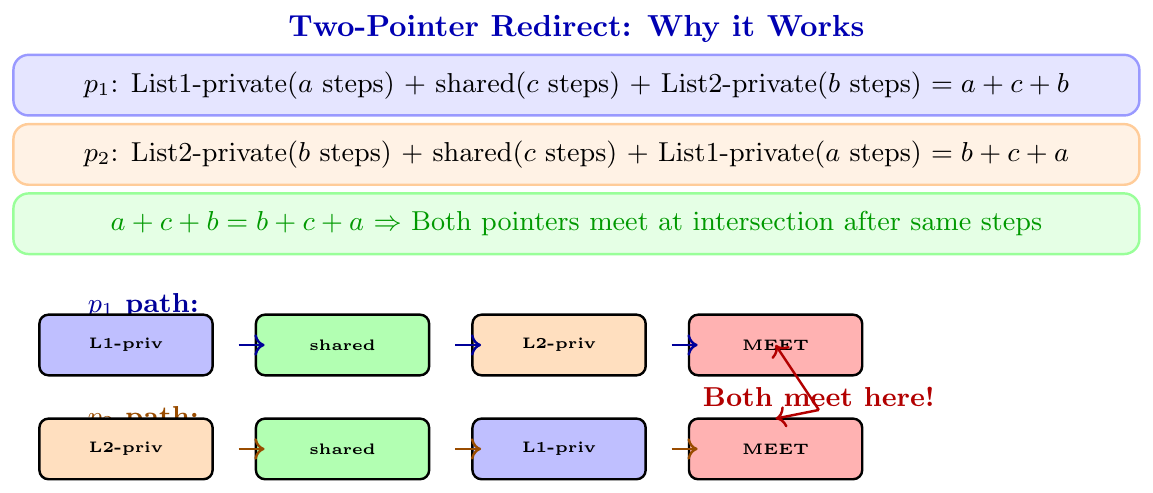
This elegant method uses two pointers $p_1$ and $p_2$, starting at the heads of List 1 and List 2. Both advance one step at a time. When a pointer reaches the end (NULL) of its list, it is redirected to the head of the other list. If the lists intersect, both pointers will meet at the intersection node. If they do not intersect, both will reach NULL at the same time.
Why does this work? By the time both pointers have been redirected once, each has traveled the full length of both lists combined ($L_1 + L_2$ steps total). The private portions cancel out, and both land at the intersection at the same time.
Mathematically: $p_1$ travels $a + c$ steps in List 1, then $b$ steps in List 2 before intersection: total $= a + c + b$. $p_2$ travels $b + c$ steps in List 2, then $a$ steps in List 1 before intersection: total $= b + c + a$. Both are equal, so they meet at the intersection.
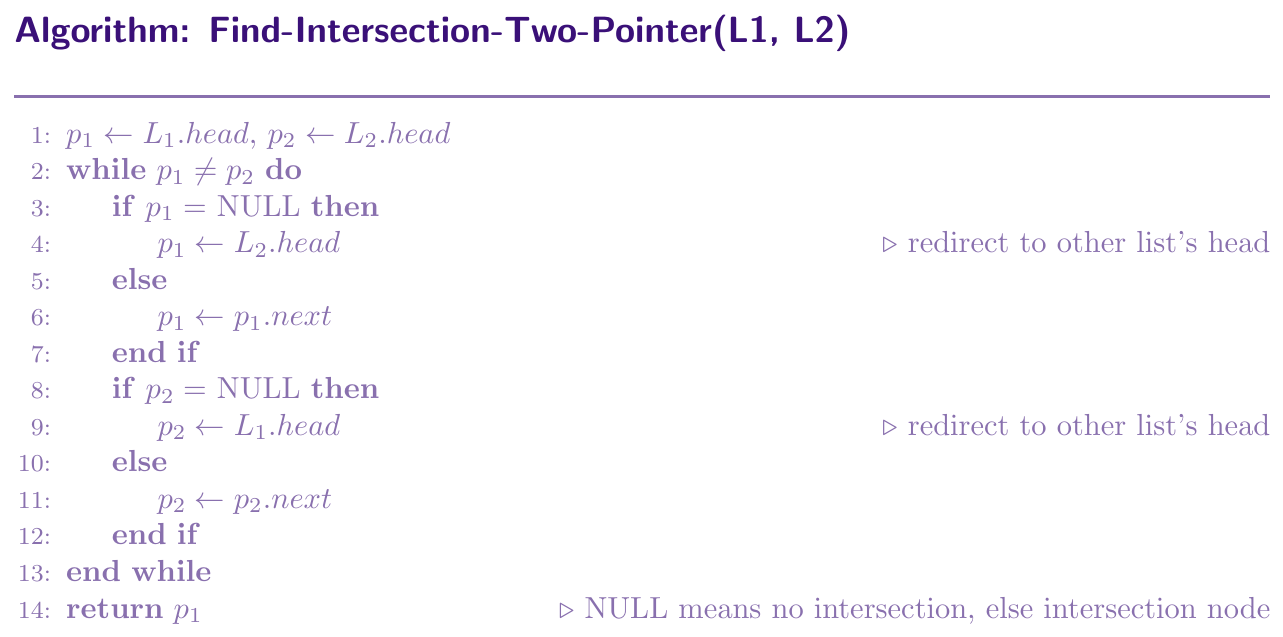
FindIntersection(head1, head2):
p1 = head1, p2 = head2
while p1 != p2:
if p1 == NULL: p1 = head2
else: p1 = p1.next
if p2 == NULL: p2 = head1
else: p2 = p2.next
return p1 (NULL means no intersection)
class Node:
    def __init__(self, data):
        self.data = data
        self.next = None


# ============================================================
# Method 1: Length Difference
# ============================================================
def get_length(head):
    length = 0
    curr   = head
    while curr:
        length += 1
        curr = curr.next
    return length


def find_intersection_length(head1, head2):
    l1 = get_length(head1)
    l2 = get_length(head2)

    p1 = head1
    p2 = head2

    # advance longer list pointer
    if l1 > l2:
        for _ in range(l1 - l2):
            p1 = p1.next
    else:
        for _ in range(l2 - l1):
            p2 = p2.next

    # advance both together
    while p1 != p2:
        p1 = p1.next
        p2 = p2.next

    return p1   # None if no intersection


# ============================================================
# Method 2: Two-Pointer Redirect (elegant)
# ============================================================
def find_intersection_two_pointer(head1, head2):
    if head1 is None or head2 is None:
        return None

    p1 = head1
    p2 = head2

    while p1 != p2:
        p1 = head2 if p1 is None else p1.next   # redirect on reaching end
        p2 = head1 if p2 is None else p2.next   # redirect on reaching end

    return p1   # None if no intersection, else intersection node


# ============================================================
# Build intersecting lists for testing
# ============================================================
# Shared tail: 8 -> 10 -> 15 -> NULL
shared1 = Node(8)
shared2 = Node(10)
shared3 = Node(15)
shared1.next = shared2
shared2.next = shared3

# List 1: 1 -> 3 -> [8 -> 10 -> 15]
h1      = Node(1)
h1.next = Node(3)
h1.next.next = shared1

# List 2: 2 -> 4 -> 6 -> 7 -> [8 -> 10 -> 15]
h2            = Node(2)
h2.next       = Node(4)
h2.next.next  = Node(6)
h2.next.next.next = Node(7)
h2.next.next.next.next = shared1   # same shared1 node

# Test Method 1
result1 = find_intersection_length(h1, h2)
print("Method 1 - Intersection at node with value:",
      result1.data if result1 else "None")
# Output: 8

# Test Method 2
result2 = find_intersection_two_pointer(h1, h2)
print("Method 2 - Intersection at node with value:",
      result2.data if result2 else "None")
# Output: 8

# Test with non-intersecting lists
n1      = Node(10)
n1.next = Node(20)
n2      = Node(30)
n2.next = Node(40)

result3 = find_intersection_two_pointer(n1, n2)
print("Non-intersecting:", result3)
# Output: None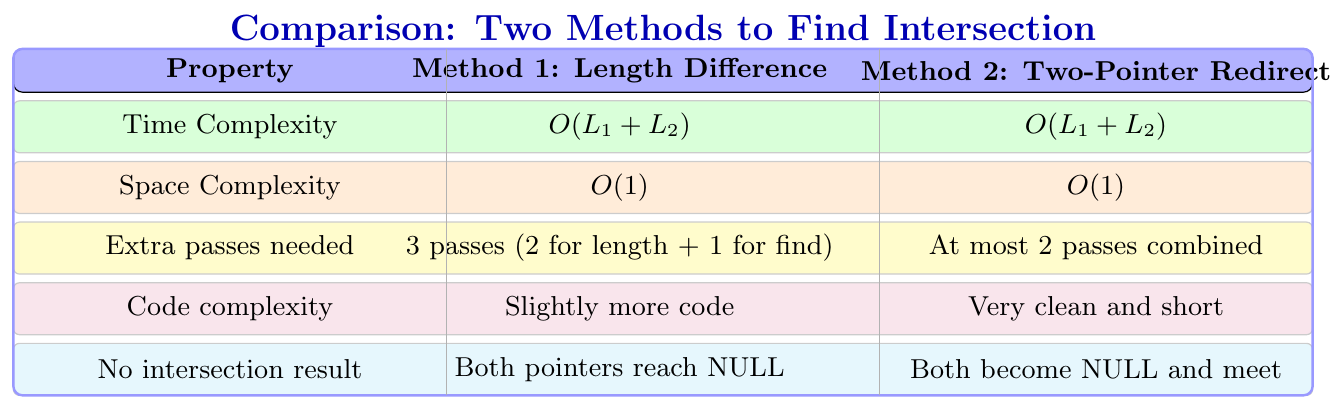
Linked List Implementation of Stack and Queue
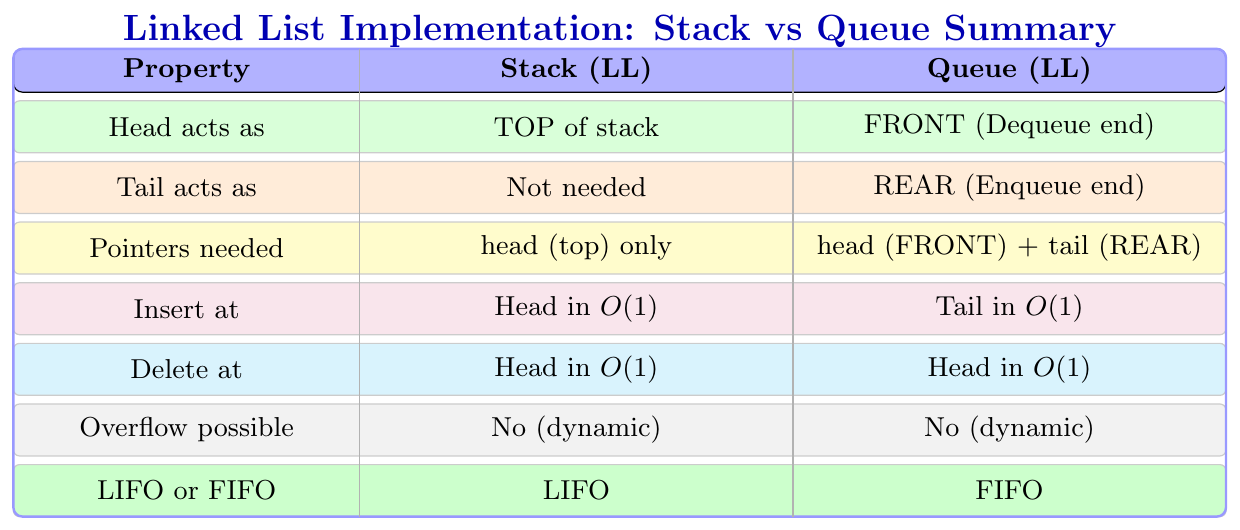
Stack Using Linked List
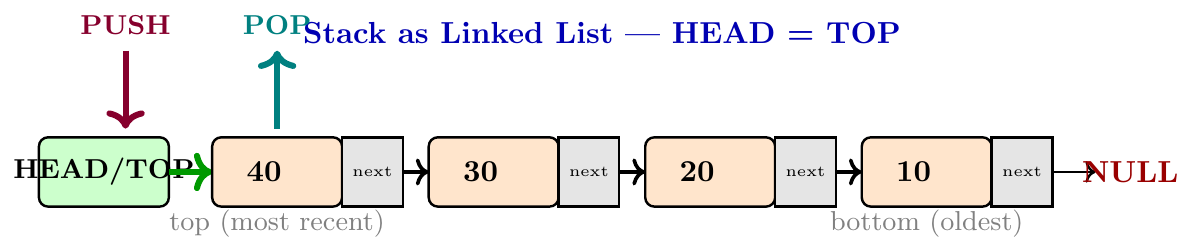
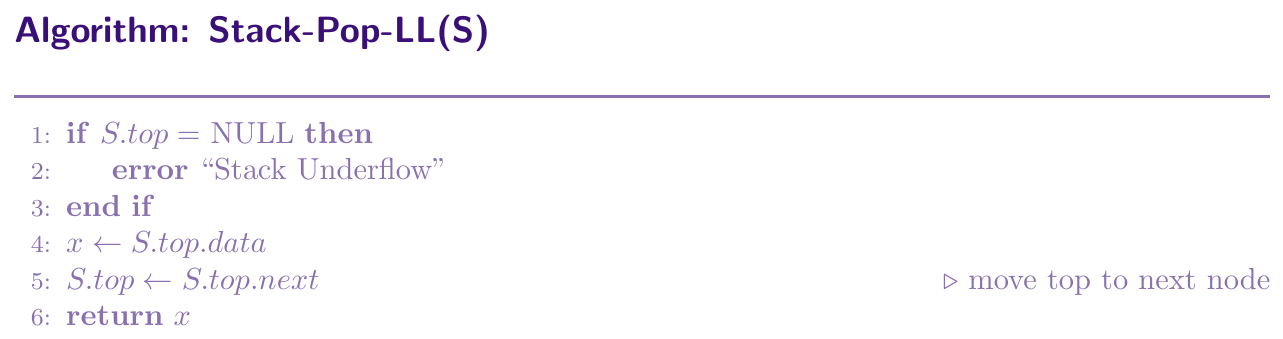
We implement a stack using a singly linked list. The head of the linked list acts as the top of the stack. Push means inserting a new node at the head, which takes $O(1)$ time. Pop means removing the head node, which also takes $O(1)$ time. This approach has no size limit, unlike array-based stacks, because nodes are created dynamically.

class Node:
    def __init__(self, data):
        self.data = data
        self.next = None


class StackLL:
    def __init__(self):
        self.top = None    # head of linked list = top of stack

    def is_empty(self):
        return self.top is None

    def push(self, x):
        new_node      = Node(x)
        new_node.next = self.top  # new node points to old top
        self.top      = new_node  # top is now new node

    def pop(self):
        if self.is_empty():
            print("Stack Underflow")
            return -1
        x        = self.top.data
        self.top = self.top.next  # move top to next
        return x

    def peek(self):
        if self.is_empty():
            return -1
        return self.top.data

    def display(self):
        curr = self.top
        print("TOP ->", end=" ")
        while curr:
            print(curr.data, end=" -> ")
            curr = curr.next
        print("NULL")


# --- Driver Code ---
s = StackLL()
s.push(10)
s.push(20)
s.push(30)
s.display()              # TOP -> 30 -> 20 -> 10 -> NULL
print("Peek:", s.peek()) # 30
print("Pop:", s.pop())   # 30
print("Pop:", s.pop())   # 20
s.display()              # TOP -> 10 -> NULL
Queue Using Linked List
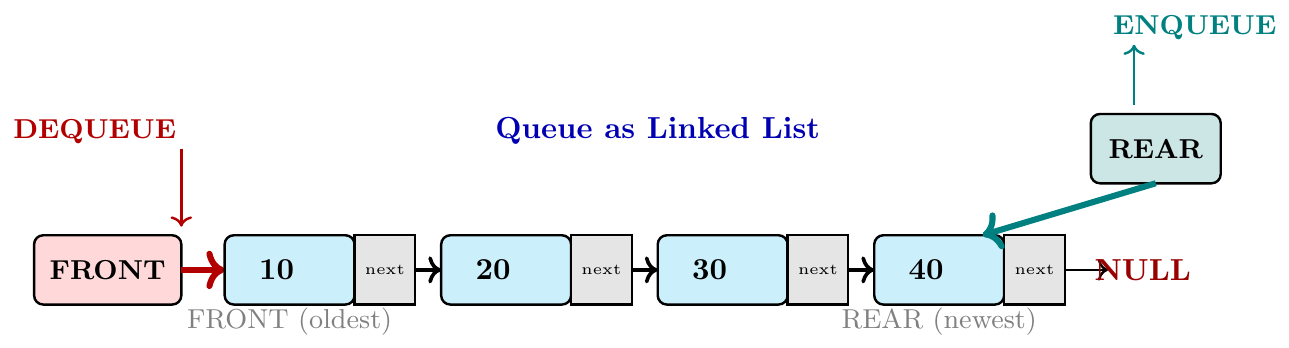
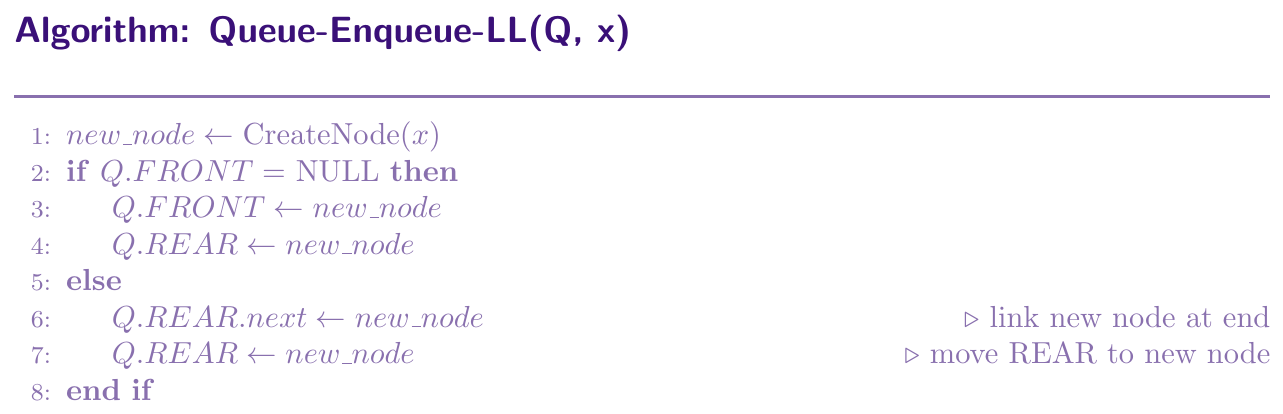
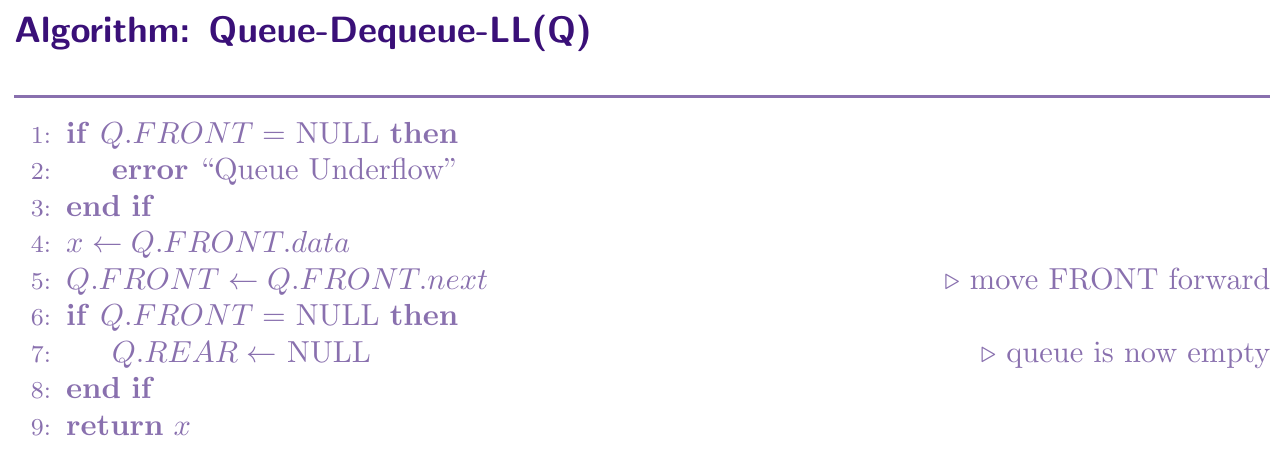
We implement a queue using a singly linked list. The head of the linked list acts as the FRONT (for dequeue), and we maintain a separate tail pointer that always points to the last node, which acts as the REAR (for enqueue). Enqueue adds a new node at the tail in $O(1)$ time. Dequeue removes the head node in $O(1)$ time. Both FRONT and REAR operations are $O(1)$ because we maintain both pointers.
class Node:
    def __init__(self, data):
        self.data = data
        self.next = None


class QueueLL:
    def __init__(self):
        self.FRONT = None   # head node, for dequeue
        self.REAR  = None   # tail node, for enqueue

    def is_empty(self):
        return self.FRONT is None

    def enqueue(self, x):
        new_node = Node(x)
        if self.is_empty():
            self.FRONT = new_node   # first element
            self.REAR  = new_node
        else:
            self.REAR.next = new_node   # link at REAR
            self.REAR      = new_node   # move REAR forward

    def dequeue(self):
        if self.is_empty():
            print("Queue Underflow")
            return -1
        x          = self.FRONT.data
        self.FRONT = self.FRONT.next   # move FRONT forward
        if self.FRONT is None:
            self.REAR = None           # queue is now empty
        return x

    def front(self):
        if self.is_empty():
            return -1
        return self.FRONT.data

    def rear(self):
        if self.is_empty():
            return -1
        return self.REAR.data

    def display(self):
        curr = self.FRONT
        print("FRONT ->", end=" ")
        while curr:
            print(curr.data, end=" -> ")
            curr = curr.next
        print("NULL <- REAR")


# --- Driver Code ---
q = QueueLL()
q.enqueue(10)
q.enqueue(20)
q.enqueue(30)
q.display()                       # 10 -> 20 -> 30
print("FRONT:", q.front())        # 10
print("REAR:", q.rear())          # 30
print("Dequeue:", q.dequeue())    # 10
print("Dequeue:", q.dequeue())    # 20
q.enqueue(40)
q.display()                       # 30 -> 40