Python Basics
Language Overview
Python Characteristics
Interpreted Language
A programming language is called interpreted when its source code is executed directly by an interpreter program at runtime, statement by statement, without a prior separate compilation step that produces machine code.
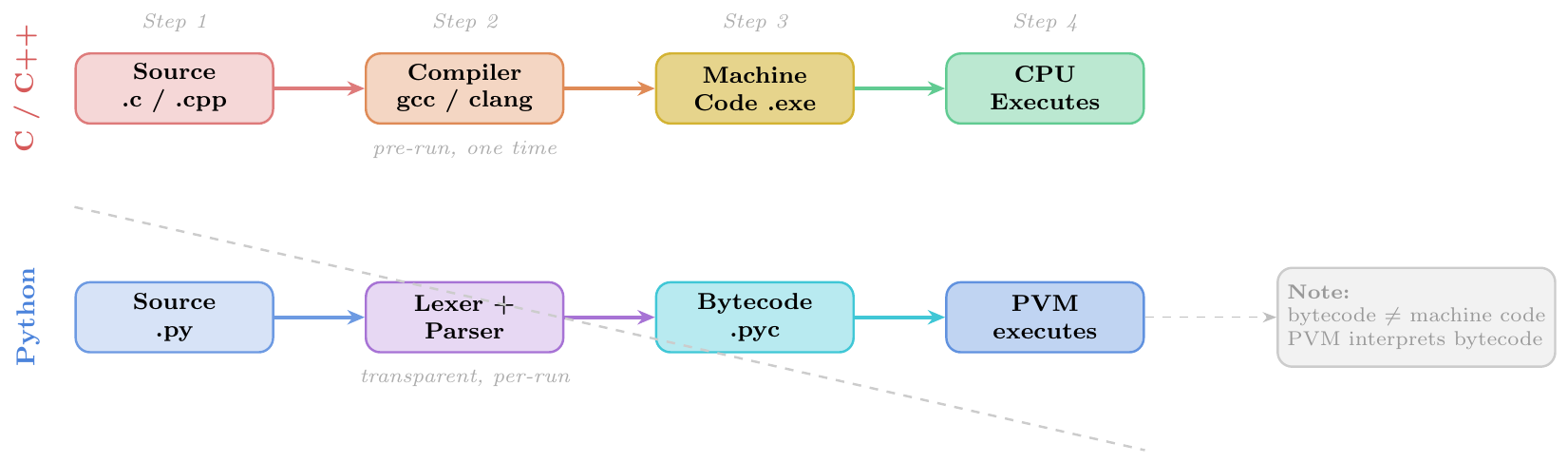
Python uses a two-phase execution model:
Compilation phase (automatic, transparent): source
.pyis compiled to platform-independent bytecode (.pyc) and cached in__pycache__/Interpretation phase: the Python Virtual Machine (PVM) reads bytecode instructions one by one and executes them
This is why Python is called interpreted: no explicit compile step is needed by the programmer, and errors surface at runtime.
No explicit compile step — run with
python script.pydirectlyBytecode caching —
__pycache__/script.cpython-3xx.pyccreated automatically; re-used if source unchanged (checked via modification timestamp)Platform independence — same
.pyruns on Windows, Linux, macOS (bytecode is not platform-specific)Late error detection — syntax errors caught before run; runtime errors (TypeError, NameError …) only when that line executes
Dynamic code execution —
eval()andexec()compile and run strings as Python code at runtimeInteractive REPL — possible because lines are interpreted immediately
# SyntaxError is caught BEFORE execution (static analysis)
# def bad(:          # SyntaxError -- Python detects before line 1 runs

# NameError only caught when the faulty line actually executes
def process(items):
    result = []
    for item in items:
        result.append(item * 2)   # line 4: runs fine
    return undefined_var           # line 5: NameError raised HERE

process([1, 2, 3])   # lines 1-4 execute successfully, crash on line 5
# NameError: name 'undefined_var' is not defined
Takeaway: Python executes code up to the point of failure. In a compiled language such code would be caught before any execution.
disimport dis
def multiply(a, b):
return a * b
dis.dis(multiply)
# Bytecode output (Python 3.11+):
# 3 RESUME 0
# 4 LOAD_FAST 0 (a)
# LOAD_FAST 1 (b)
# BINARY_OP 5 (*)
# RETURN_VALUEThe dis module reveals the actual bytecode instructions the PVM executes.
Each LOAD_FAST pushes a local variable onto the evaluation stack;
BINARY_OP pops two operands, multiplies them, and pushes the result.
eval and exec# eval: evaluates an expression string, returns result
expr = "3 ** 4 + len('hello')"
result = eval(expr)
print(result) # 86
# exec: executes a block of Python code from a string
code = """
def greet(name):
return f"Hello, {name}!"
message = greet("GATE")
"""
namespace = {}
exec(code, namespace)
print(namespace["message"]) # Hello, GATE!
# Practical: dynamic formula evaluator
formula = input("Enter formula: ") # user types: 2*x + 3
x = 10
print(eval(formula)) # 23eval/exec are possible only because Python is interpreted:
bytecode is compiled and run at runtime from a string.
Dynamically Typed
In a dynamically typed language, type information is associated with values (objects), not with variables. A variable is merely a label (name binding) that can be rebound to any object of any type at any time.
Formally: Type checking is performed at runtime (not compile time). The type of a variable is determined by the type of the object it currently refers to.
Contrast with static typing (C, Java, Rust):

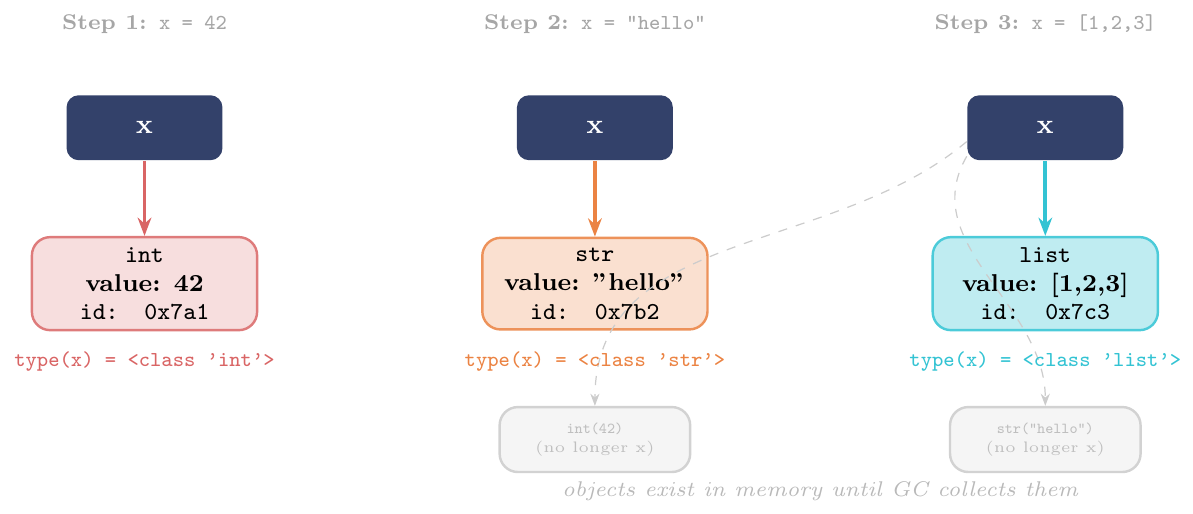
Variable has no type —
x = 5thenx = "hi"is perfectly legalObject has a type — every object carries type info:
type(42)$\to$<class 'int'>Type checking at runtime —
TypeErrorraised when an operation is attempted on an incompatible typeDuck typing — “if it walks like a duck and quacks like a duck…” — Python checks capabilities, not declared types
Optional static type hints (
PEP 484) —x: int = 5is a hint only; Python itself does not enforce it at runtime (tools likemypydo)Identity vs equality —
id(obj)returns unique identity;ischecks identity,==checks value equality
type() / id()x = 42
print(type(x), id(x)) # <class 'int'> 9789376
x = "hello"
print(type(x), id(x)) # <class 'str'> 140223847823984
x = [1, 2, 3]
print(type(x), id(x)) # <class 'list'> 140223847701248
x = lambda n: n**2
print(type(x), id(x)) # <class 'function'> 140223846982144
# id changes every time -- x now refers to a different object
# The variable 'x' itself has no type; its current referent does# Any object with __len__ works -- no type declaration needed
def print_length(obj):
print(f"Length: {len(obj)}") # uses duck typing
print_length("Python") # Length: 6 (str has __len__)
print_length([10, 20, 30]) # Length: 3 (list has __len__)
print_length({"a": 1, "b": 2}) # Length: 2 (dict has __len__)
# print_length(42) # TypeError: 'int' has no len()
# Same function works for any "sized" object -- no isinstance() check!
import numpy as np
arr = np.array([1, 2, 3, 4])
print_length(arr) # Length: 4# Type hints are ADVISORY ONLY -- Python does NOT enforce them
def add(a: int, b: int) -> int:
return a + b
print(add(3, 4)) # 7 -- correct usage
print(add("x", "y")) # xy -- no runtime error! hint is ignored
# Runtime check (explicit) using isinstance
def safe_add(a: int, b: int) -> int:
if not (isinstance(a, int) and isinstance(b, int)):
raise TypeError(f"Expected int, got {type(a)}, {type(b)}")
return a + b
safe_add("x", "y")
# TypeError: Expected int, got <class 'str'>, <class 'str'>Use mypy or pyright externally to enforce type hints statically.
Strongly Typed
A language is strongly typed when it does not perform implicit type
coercions between unrelated types. Operations on incompatible types raise a
TypeError rather than silently converting one operand.
Formal distinction:
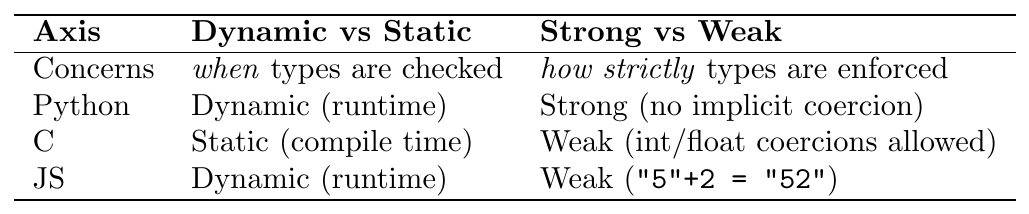
Python is both dynamically typed and strongly typed.
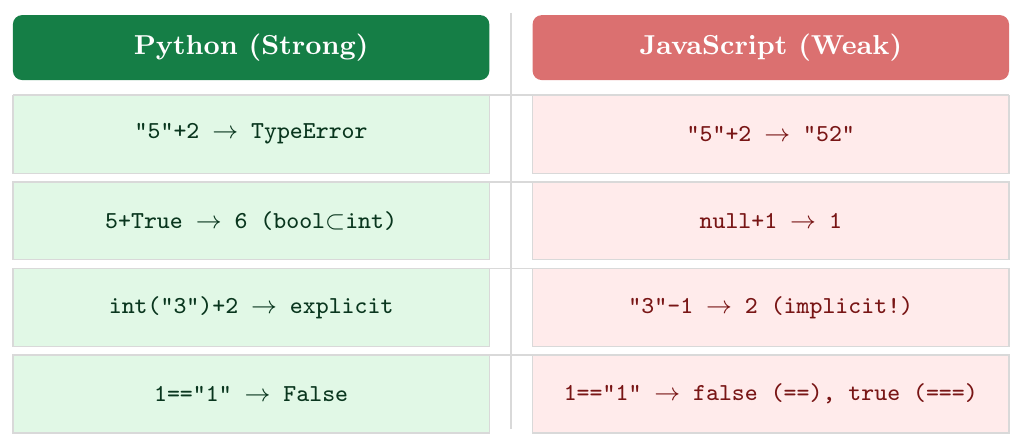
No implicit string$\leftrightarrow$int coercion:
"5" + 3raisesTypeError; must useint("5") + 3Boolean is a subtype of int:
Truebehaves as1andFalseas0(this is the only notable implicit coercion)Explicit conversion always required:
str(),int(),float(),list()etc.\ must be called manuallyComparison across types returns
False:1 == "1"isFalse(not a TypeError) but1 < "1"raisesTypeError+for numbers means addition; for strings means concatenation: mixing raisesTypeErrorOperator overloading is explicit: classes define
__add__,__mul__etc.\ to control behaviour
# ------ TypeError cases (strong typing) ------
try:
    result = "Age: " + 25          # can't concat str + int
except TypeError as e:
    print(e)   # can only concatenate str (not "int") to str

try:
    result = "3" * 1.5             # str * float not defined
except TypeError as e:
    print(e)   # can't multiply sequence by non-int of type 'float'

# ------ Explicit conversion (correct way) ------
result = "Age: " + str(25)         # "Age: 25"
result = int("3") * 2              # 6
result = float("3.14") + 1         # 4.14

# ------ bool IS int (one exception) ------
print(True + 1)       # 2   (True == 1)
print(False * 10)     # 0   (False == 0)
print(sum([True, True, False, True])) # 3 (useful for counting)# == works across types (returns False, not error)
print(1 == "1") # False
print(1 == 1.0) # True (int and float compare by value)
print(True == 1) # True (bool is subtype of int)
print(True == 1.0) # True
# < / > raise TypeError for unrelated types (Python 3)
try:
print(1 < "2")
except TypeError as e:
print(e) # '<' not supported between instances of 'int' and 'str'
# In Python 2, this used to silently return an arbitrary ordering!
# Python 3 fixed this -- another example of stronger type discipline.Everything is an Object
In Python, every value is an object — an instance of some class. This includes:
Primitive values:
42,3.14,True,NoneCollections:
list,tuple,dict,setFunctions and lambda expressions
Classes themselves (instances of
type)Modules and packages
Frames, code objects, tracebacks
Every object has:
Identity — unique integer, returned by
id(obj)(CPython: memory address)Type — the class it belongs to, returned by
type(obj)Value — the data it holds
All objects ultimately inherit from the built-in class object.
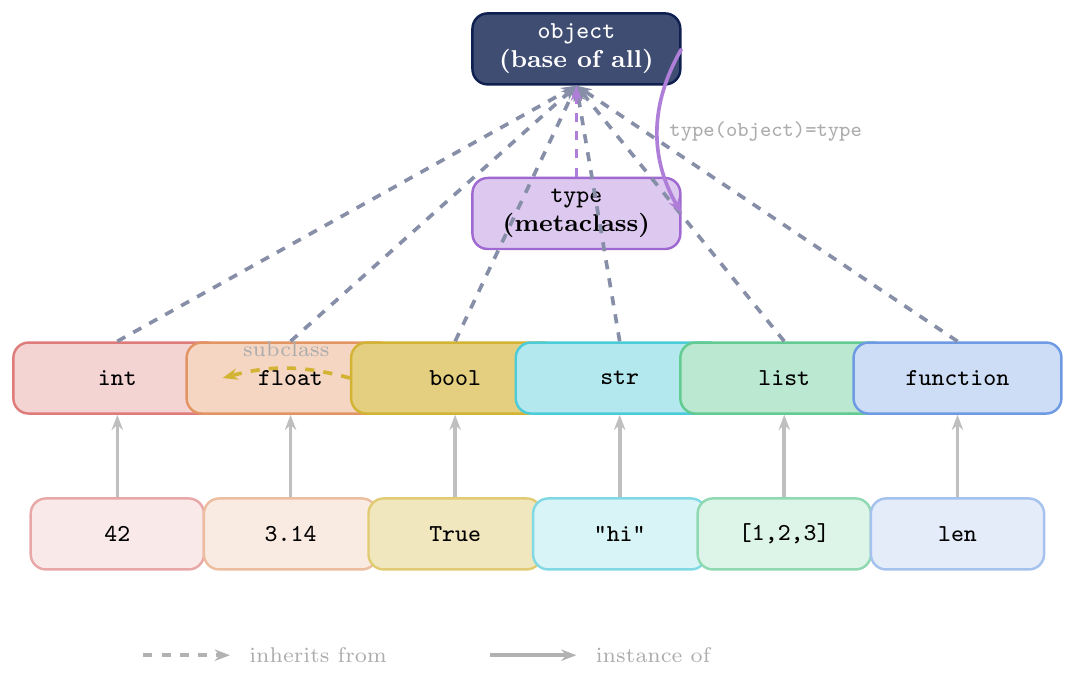
In Python, first-class object means an entity that can be:
Assigned to a variable:
f = lenPassed as an argument:
map(str, [1,2,3])Returned from a function: closures, decorators
Stored in a data structure:
ops = [add, sub, mul]Has attributes and methods:
f.__name__,(42).bit_length()
This applies to functions, classes, modules, and all built-in types.
# Functions are objects
def square(n):
    return n ** 2

print(type(square))          # <class 'function'>
print(square.__name__)       # square
print(square.__code__.co_varnames)  # ('n',)

% Assign function to a variable
f = square
print(f(7))                  # 49

% Store functions in a list
ops = [abs, str, type, id]
for op in ops:
    print(op(-5))            # 5 / '-5' / <class 'int'> / 9789280

% Classes are objects too (instances of 'type')
class Dog:
    sound = "Woof"

print(type(Dog))             # <class 'type'>
print(Dog.__bases__)         # (<class 'object'>,)
print(Dog.__dict__['sound']) # Woof

% Create a class dynamically using type()
Cat = type("Cat", (object,), {"sound": "Meow", "legs": 4})
c = Cat()
print(c.sound, c.legs) # Meow 4# int methods
n = 255
print(n.bit_length()) # 8 (255 = 1111_1111)
print(n.to_bytes(2, 'big')) # b'\x00\xff'
print((1_000_000).bit_count()) # 7 (Python 3.10+)
# float methods
x = 3.75
print(x.is_integer()) # False
print(x.as_integer_ratio()) # (15, 4)
# str methods
s = "gate exam"
print(s.upper()) # GATE EXAM
print(s.title()) # Gate Exam
print(s.count('a')) # 2
# bool is int subclass
print(isinstance(True, int)) # Trueimport math
# Module is an object
print(type(math)) # <class 'module'>
print(math.__name__) # math
print(math.__file__) # /usr/lib/python3.x/lib-dynload/...
print(dir(math)[:5]) # ['__doc__', '__loader__', ...]
# None is a singleton object
print(type(None)) # <class 'NoneType'>
print(id(None) == id(None)) # True (same singleton)
# Checking for None: use 'is', not '=='
result = None
if result is None: # correct idiom
print("No result yet")Indentation Defines Blocks
Python uses consistent indentation (whitespace at the start of a line) to
delimit code blocks, replacing the braces {} used by C, Java, and
many other languages.
Rule: All statements in a block must be indented by the same number of
spaces. The block begins after a colon (:) on the preceding line and ends
when indentation decreases back to the enclosing level.
Recommendation (PEP 8): use 4 spaces per indentation level.
Never mix tabs and spaces (raises TabError in Python 3).
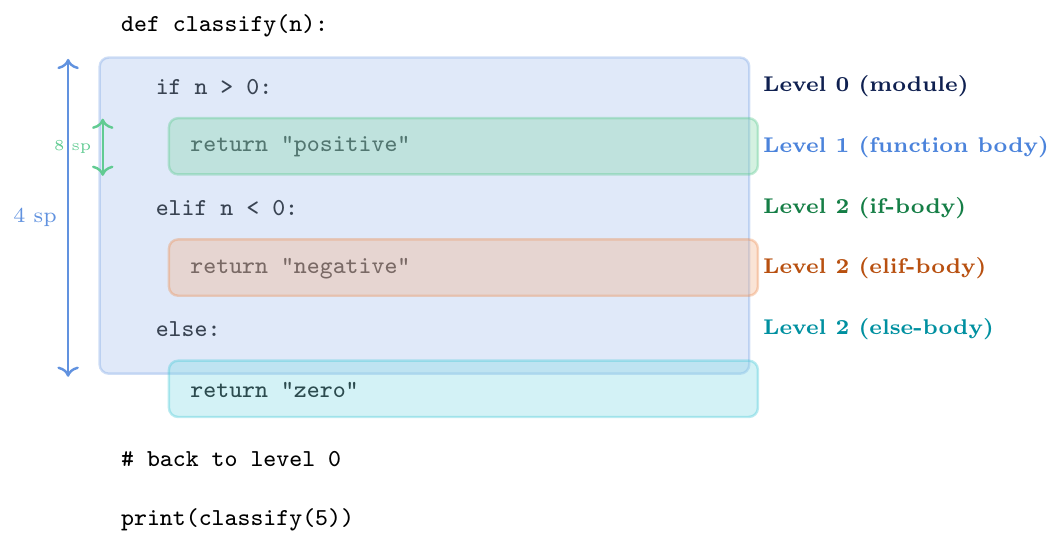
Colon triggers a new block: after
if,elif,else,for,while,def,class,with,try/exceptConsistent spacing required: mixing 2-space and 4-space indentation inside the same block raises
IndentationErrorTabs vs spaces: Python 3 forbids mixing tabs and spaces (
TabError)passplaceholder: used to create an empty block:def todo(): passContinuation lines: long expressions can span multiple lines inside parentheses, brackets, or braces — indentation of continuation lines is flexible
One-liner blocks: allowed but not recommended:
if x > 0: print(x)
# CORRECT: consistent 4-space blocks
def factorial(n):
    if n == 0:
        return 1
    else:
        return n * factorial(n - 1)

print(factorial(5))   # 120

# ─── ERRORS ───────────────────────────────────────────────────
# IndentationError: unexpected indent
# def broken():
#     x = 1
#       y = 2     # <-- extra spaces, not a new block!

# IndentationError: expected an indented block
# def empty():
# print("hi")     # nothing indented after def

# TabError (Python 3): inconsistent use of tabs and spaces
# def mixed():
#     x = 1       # 4 spaces
# y = 2 # 1 tab --> TabError!passmatrix = [[1, 2, 3], [4, 5, 6], [7, 8, 9]]
# Three levels of nesting
for i, row in enumerate(matrix): # level 1 block
for j, val in enumerate(row): # level 2 block
if val % 2 == 0: # level 3 block
print(f"[{i}][{j}] = {val} (even)")
else:
pass # deliberate no-op
# Output:
# [0][1] = 2 (even)
# [1][0] = 4 (even)
# [1][2] = 6 (even)
# [2][1] = 8 (even)# Long expressions: parentheses allow free indentation
result = (
10
+ 20
+ 30
+ 40
)
print(result) # 100
# Long function call
output = sorted(
['banana', 'apple', 'cherry', 'date'],
key=len,
reverse=True
)
print(output) # ['banana', 'cherry', 'apple', 'date']
# Backslash continuation (avoid when possible)
total = 10 + \
20 + \
30
print(total) # 60CPython: Reference Implementation & Execution Model
CPython is the official, reference implementation of Python, written in C. When people say “Python”, they almost always mean CPython.
Other implementations exist for specific use cases:
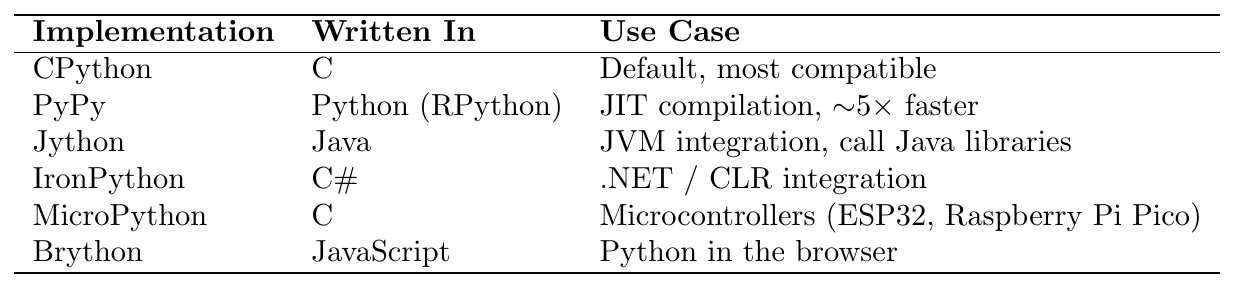
All conforming implementations follow the Python Language Reference
(docs.python.org/3/reference).
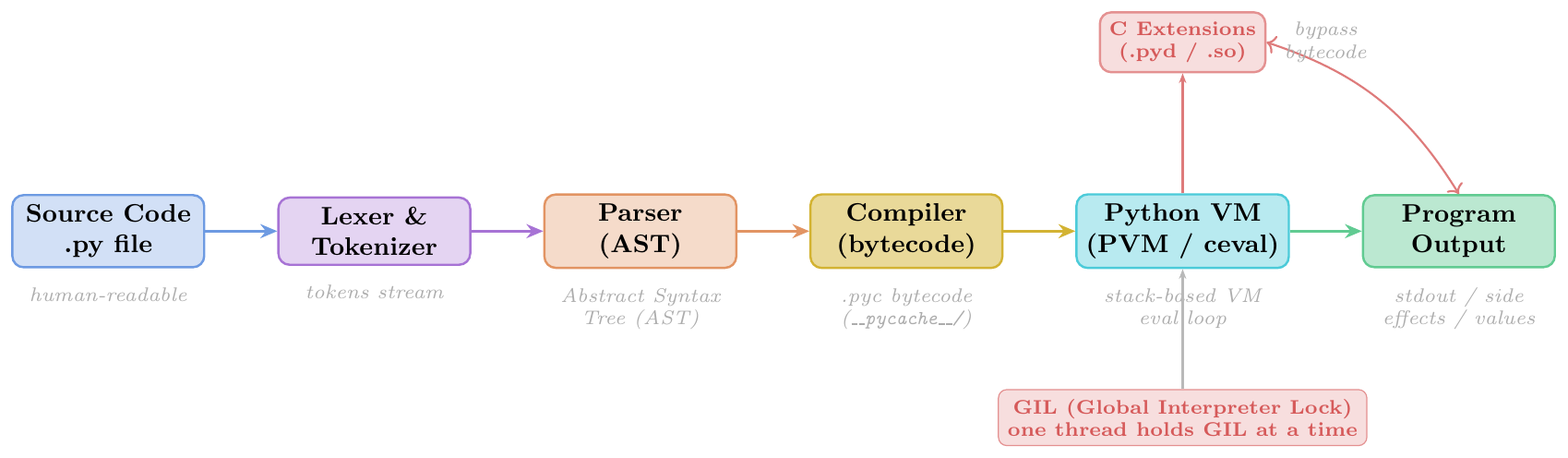
}
The GIL is a mutex (lock) in CPython that allows only one thread to execute Python bytecode at a time, even on multi-core hardware.
Why it exists: CPython's memory management (reference counting) is not thread-safe. The GIL prevents race conditions by serialising access.
Consequences:
CPU-bound multithreading gives no speedup (threads take turns holding the GIL)
I/O-bound multithreading works well (GIL is released during I/O waits)
Multiprocessing (
multiprocessingmodule) bypasses GIL — each process has its own GILC extensions can release the GIL manually (NumPy does this)
Python 3.13+: experimental “free-threaded” build (–disable-gil)
is in progress under PEP 703.
Reference Counting: every object stores
ob_refcnt; when count drops to zero the object is immediately deallocatedCyclic GC: a generational garbage collector handles reference cycles (objects referencing each other) that reference counting alone cannot reclaim
Small-integer cache: CPython caches integers $-5$ to $256$;
id(5) is id(5)is alwaysTrueString interning: short strings and identifiers are interned (one copy in memory);
sys.intern()forces interningMemory allocator: CPython has its own arena/pool allocator (
obmalloc) for objects $\le 512$ bytes
import sys
import platform

# Which implementation?
print(sys.implementation.name)  # cpython
print(sys.version)              # 3.11.5 (default, ...) [GCC 12.3.0]

# Detailed version info
print(sys.version_info)
# sys.version_info(major=3, minor=11, micro=5, ...)

# Platform
print(platform.python_implementation())  # CPython
print(platform.python_version())         # 3.11.5

# Check if we can use free-threaded mode (3.13+)
print(getattr(sys, '_is_gil_enabled', lambda: True)()) # True (GIL on)sys.getrefcountimport sys
x = [] # ref count = 1 (x)
print(sys.getrefcount(x)) # 2 (x + getrefcount argument)
y = x # ref count = 2 (x and y)
z = x # ref count = 3
print(sys.getrefcount(x)) # 4 (x, y, z + getrefcount arg)
del y # ref count = 3
del z # ref count = 2
# When ref count reaches 0, object is immediately freed
# Small-int cache: same object for -5..256
a = 100; b = 100
print(a is b) # True (same cached object)
print(id(a) == id(b)) # True
a = 1000; b = 1000
print(a is b) # False (outside cache range, different objects)import threading
import multiprocessing
import time
def count_down(n):
while n > 0:
n -= 1
N = 50_000_000
# ── Single thread ──────────────────────────────────────────
t0 = time.perf_counter()
count_down(N)
print(f"Single : {time.perf_counter()-t0:.2f}s") # ~1.8s
# ── Two threads (GIL prevents true parallelism) ────────────
t0 = time.perf_counter()
t1 = threading.Thread(target=count_down, args=(N//2,))
t2 = threading.Thread(target=count_down, args=(N//2,))
t1.start(); t2.start(); t1.join(); t2.join()
print(f"Threads : {time.perf_counter()-t0:.2f}s") # ~1.9s (not faster!)
# ── Two processes (each has own GIL) ──────────────────────
t0 = time.perf_counter()
p1 = multiprocessing.Process(target=count_down, args=(N//2,))
p2 = multiprocessing.Process(target=count_down, args=(N//2,))
p1.start(); p2.start(); p1.join(); p2.join()
print(f"Processes: {time.perf_counter()-t0:.2f}s") # ~0.9s (2x faster!)Conclusion: For CPU-bound tasks, use multiprocessing to escape the GIL.
For I/O-bound tasks (network, disk), threading or asyncio is sufficient.
ast Module --- Inspecting the Parse Treeimport ast
source = """
x = 10
y = x * 2 + 1
print(y)
"""
tree = ast.parse(source)
print(ast.dump(tree, indent=2))
# Module(body=[
# Assign(targets=[Name(id='x', ...)], value=Constant(value=10)),
# Assign(targets=[Name(id='y', ...)],
# value=BinOp(
# left=BinOp(left=Name(id='x'), op=Mult(), right=Constant(2)),
# op=Add(), right=Constant(1))),
# Expr(value=Call(func=Name(id='print'), args=[Name(id='y')]))
# ])
# Walk the AST to find all function calls
for node in ast.walk(tree):
if isinstance(node, ast.Call):
if isinstance(node.func, ast.Name):
print(f"Call: {node.func.id}") # Call: printThis shows exactly what CPython's parser produces before the compiler converts the AST to bytecode instructions.
Running Python
Interactive Mode (REPL)
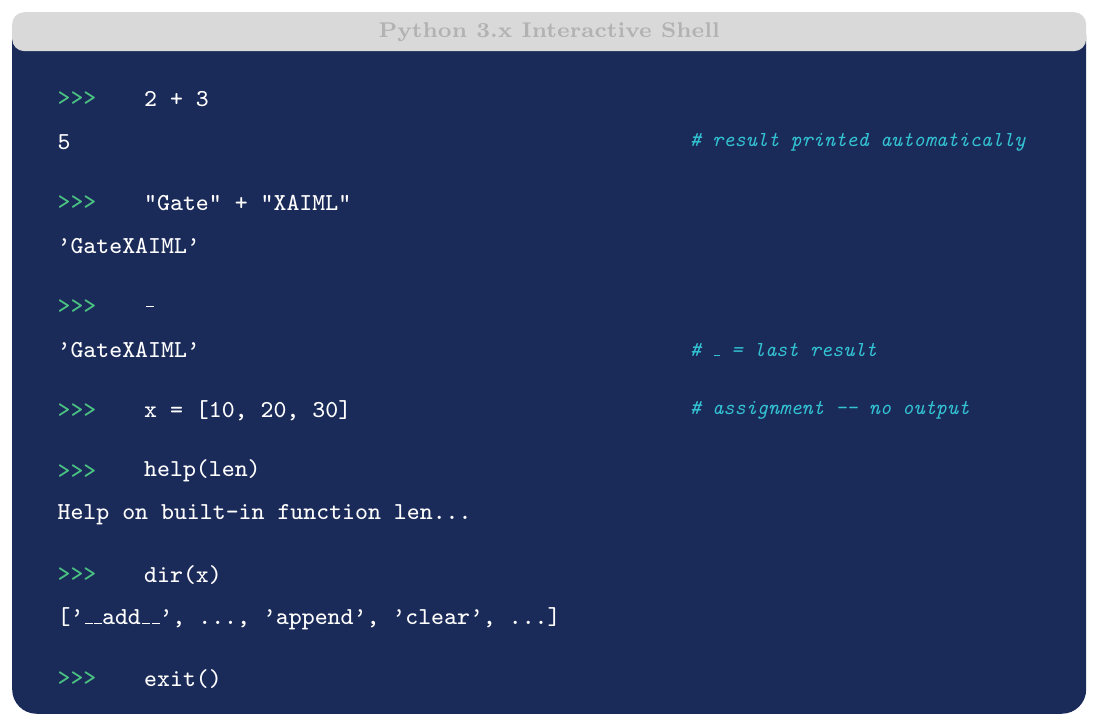
REPL stands for Read-Eval-Print Loop. Python's interactive
interpreter starts when you run python3 (or python) with no
arguments. Each expression you type is read, evaluated, and its
result printed before the prompt reappears.
Key features:
Immediate feedback — ideal for exploration and debugging
_(underscore) stores the last expression resulthelp(obj)shows inline documentationdir(obj)lists all attributes/methodsEnhanced REPLs: IPython, Jupyter Notebook (cells = mini-REPL)
Exit with
exit(),quit(), orCtrl+D(Unix) /Ctrl+Z(Windows)
>>> 100 / 7
14.285714285714286
>>> round(_, 2)         # _ holds last result
14.29
>>> import math
>>> math.factorial(10)
3628800
>>> _ / math.factorial(9)   # _ = 3628800
10.0
>>> type(_)
<class 'float'>
>>> dir(math)[:6]
['__doc__', '__file__', '__loader__', '__name__', '__package__', '__spec__']
Script Mode and __name__
if __name__ == "__main__"Script mode: Python executes a .py file top to bottom when run as:
python3 script.py
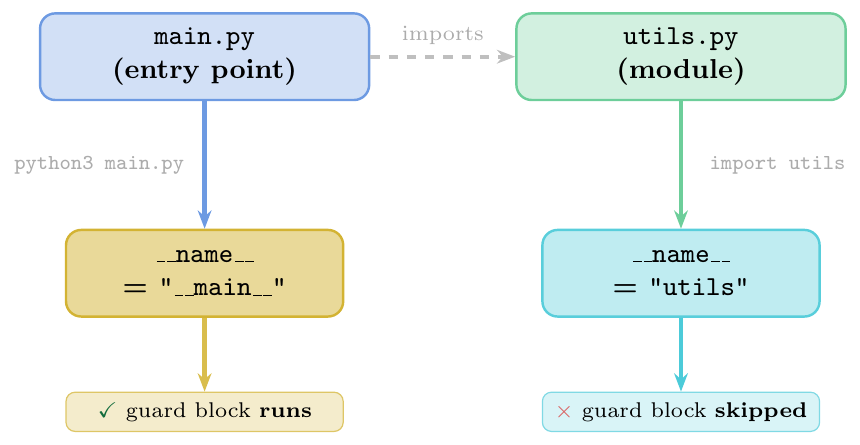
Every module has a built-in attribute __name__:
When a file is run directly:
__name__is set to"__main__"When a file is imported:
__name__is set to the module name (e.g.\"utils")
The guard if __name__ == "__main__": lets you write code that runs
only when the file is the entry point, not when it is imported as a library.
This is the standard Python idiom for making a file both importable and
executable.
Command-line arguments passed via
sys.argv(list of strings;sys.argv[0]is the script name)python3 -c "print('hello')"runs a one-liner without a filepython3 -m moduleruns a module as a script (e.g.\python3 -m http.server)python3 -i script.pyruns the script then drops into REPLReturn code:
0on success; non-zero on error (sys.exit(code))
__main__ Guard# ---------- utils.py ----------
def add(a, b):
return a + b
def multiply(a, b):
return a * b
if __name__ == "__main__":
# Only runs when: python3 utils.py
# Skipped when: import utils
print("Testing utils module...")
print(add(3, 4)) # 7
print(multiply(3, 4)) # 12# ---------- main.py ----------
import utils # __name__ in utils is "utils"
# guard block does NOT run
result = utils.add(10, 20)
print(result) # 30sys.argv# calculator.py
import sys
if len(sys.argv) != 4:
print("Usage: python3 calculator.py <num1> <op> <num2>")
sys.exit(1)
a = float(sys.argv[1])
op = sys.argv[2]
b = float(sys.argv[3])
ops = {'+': a+b, '-': a-b, '*': a*b, '/': a/b}
if op not in ops:
print(f"Unknown operator: {op}")
sys.exit(2)
print(f"{a} {op} {b} = {ops[op]}")
# Usage: python3 calculator.py 10 + 3.5
# Output: 10.0 + 3.5 = 13.5Variables & Assignment
Naming Rules
Identifier Rules
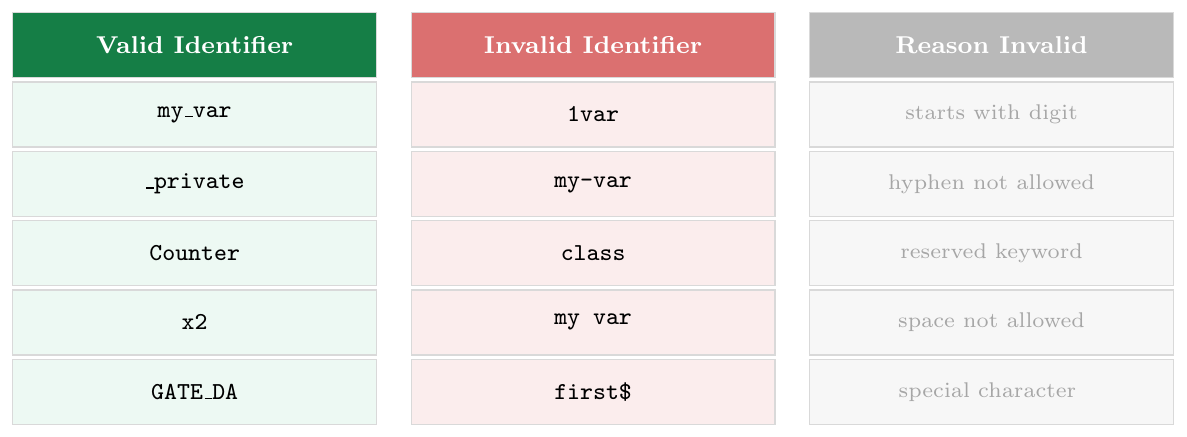
An identifier is a name given to a variable, function, class, or module. Python's lexical rules:
Must begin with a letter (
a–z,A–Z) or underscore (_)Subsequent characters may be letters, digits (0–9), or underscores
No spaces, hyphens, or special characters
Case-sensitive:
count,Count,COUNTare three distinct namesReserved keywords cannot be used as identifiers
Keywords (Python 3.12): False, None, True, and, as, assert,
async, await, break, class, continue, def, del, elif, else, except, finally,
for, from, global, if, import, in, is, lambda, nonlocal, not, or, pass, raise,
return, try, while, with, yield
snake_case— variables and functions:total_marks,get_data()PascalCase(CapWords) — classes:NeuralNetwork,DataLoaderUPPER_SNAKE_CASE— constants:MAX_EPOCHS,PI
keyword Moduleimport keyword
# Check all keywords
print(keyword.kwlist)
# ['False', 'None', 'True', 'and', 'as', 'assert', ...]
# Check if a name is a keyword
print(keyword.iskeyword("for")) # True
print(keyword.iskeyword("forEach")) # False (valid identifier)
print(keyword.iskeyword("GATE")) # False
# Python is case-sensitive
Value = 100
value = 200
VALUE = 300
print(Value, value, VALUE) # 100 200 300 -- three separate variables
# Soft keywords (Python 3.10+): valid identifiers, context-dependent
# match, case, type -- can still be used as variable names
match = 5 # valid (match is a soft keyword)
case = "test" # valid
print(match, case)Assignment Mechanics
Variable as Name Binding
Unlike C/Java where a variable is a typed memory box, a Python variable is simply a name stored in a namespace dictionary that refers (points) to an object in memory.
Assignment does not copy data — it binds a name to an existing (or newly created) object.
Consequences:
Re-assigning a name does not modify the old object
Multiple names can point to the same object
Passing a variable to a function passes the reference (call-by-object-reference / call-by-sharing)
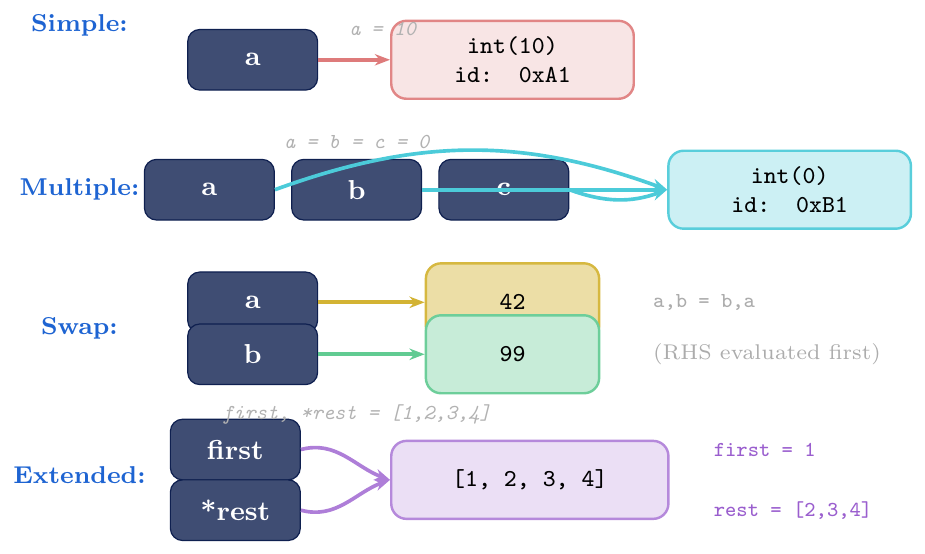
Simple:
x = 10Multiple (chained):
a = b = c = 0— all names bound to the same objectAugmented:
x += 1— equivalent tox = x + 1for immutables; in-place mutation for mutables (list, set, dict)Tuple/simultaneous:
a, b = 1, 2— RHS fully evaluated before any bindingExtended unpacking:
first, *rest = iterable—*captures remaining items as a listWalrus operator (
:=, PEP 572, Python 3.8+): assigns and returns in one expression — used inwhile/if
# Simple
x = 10

# Multiple (all point to the same object)
a = b = c = []
a.append(1)
print(b)           # [1]  -- b IS a (same object!)

# Augmented assignment
n = 5
n += 3             # n = 8
n **= 2            # n = 64
n //= 7            # n = 9
print(n)           # 9

# Tuple / simultaneous swap
x, y = 10, 20
x, y = y, x       # swap -- RHS evaluated first as (20,10)
print(x, y)        # 20 10

# Extended unpacking
first, *middle, last = [1, 2, 3, 4, 5]
print(first)       # 1
print(middle)      # [2, 3, 4]
print(last)        # 5

# Nested unpacking
(a, b), c = (1, 2), 3
print(a, b, c)     # 1 2 3

# Walrus operator (Python 3.8+)
data = [1, 3, 7, 9, 2]
if (n := len(data)) > 3:
print(f"List has {n} elements") # List has 5 elements# IMMUTABLE (int, str, tuple): += creates a new object
x = 5
print(id(x)) # e.g., 9789408
x += 1
print(id(x)) # different id -- new int object created
# MUTABLE (list): += mutates IN-PLACE (__iadd__)
lst = [1, 2, 3]
print(id(lst)) # e.g., 140391234
lst += [4, 5] # calls lst.__iadd__([4,5]) -- same object!
print(id(lst)) # SAME id
print(lst) # [1, 2, 3, 4, 5]
# Compare with lst = lst + [4,5] which creates a NEW list
lst2 = [1, 2, 3]
old_id = id(lst2)
lst2 = lst2 + [4, 5] # creates new object
print(id(lst2) == old_id) # FalseObject Identity vs Equality
== vs is --- Equality vs Identity==calls__eq__: tests whether two objects have the same valueiscomparesid(): tests whether two names refer to the exact same object in memory
Rule of thumb:
Use
==for value comparison in almost all casesUse
isonly forNone,True,FalsesingletonsNever use
isto compare integers, strings, or custom objects (behaviour depends on implementation internals)
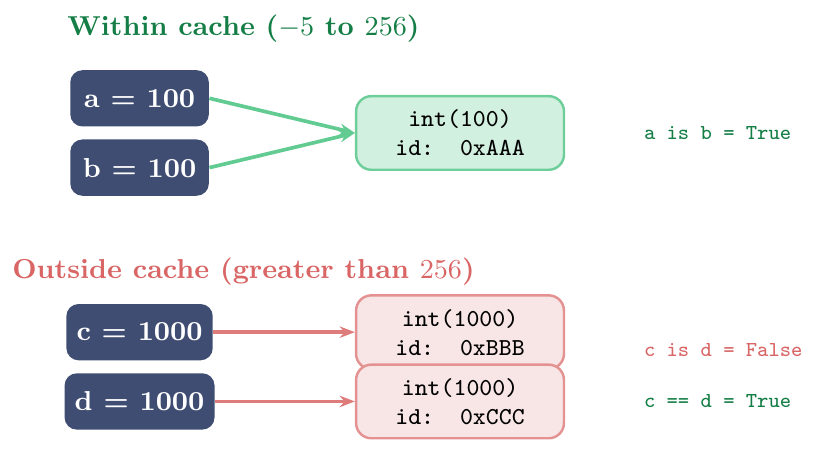
CPython pre-allocates singleton objects for integers $\mathbf{-5}$ to $\mathbf{256}$
Any reference to these values in CPython always points to the same cached object
Outside this range, each literal may create a new object
This is an implementation detail of CPython, not guaranteed by the Python language specification
String interning works similarly: short strings and identifiers are often interned (same object); can be forced with
sys.intern()
is vs == --- When They Differ# Cached integers: is works (coincidentally)
a, b = 100, 100
print(a == b) # True (same value)
print(a is b) # True (same cached object in CPython)
# Uncached integers: is WRONG to use
c = 1000
d = 1000
print(c == d) # True (correct: value comparison)
print(c is d) # False (different objects -- NEVER rely on this!)
# None is a singleton -- use 'is'
def maybe():
pass # returns None implicitly
result = maybe()
print(result == None) # True (works but bad style)
print(result is None) # True (correct idiom)
print(result is not None)# False
# List comparison
x = [1, 2, 3]
y = [1, 2, 3]
z = x
print(x == y) # True (same values)
print(x is y) # False (different objects)
print(x is z) # True (z IS x -- same object)id() and Memory Addressimport sys
x = "hello"
y = "hello"
# CPython interns short string literals
print(x is y) # True (interned)
print(id(x), id(y)) # same address
# Force separate objects
a = "hello world"
b = "hello world"
# May or may not be interned -- don't rely on it
print(a is b) # True in some Python versions (compile-time intern)
# Mutable objects are never shared (different id)
p = [1, 2]
q = [1, 2]
print(p is q) # False always
print(id(p) != id(q)) # True
# sys.intern forces string interning
import sys
s1 = sys.intern("gate exam result")
s2 = sys.intern("gate exam result")
print(s1 is s2) # True -- guaranteed by internData Types
Numeric Types
int --- Arbitrary-Precision Integer
int --- Definition and PrecisionPython's int type stores arbitrary-precision integers — there is
no fixed size, no overflow, no INT_MAX. The only limit is available
memory.
Internally CPython represents small integers as C long and switches to a
multi-digit “bignum” representation for large values (using base $2^{30}$ digits).
Literal forms:
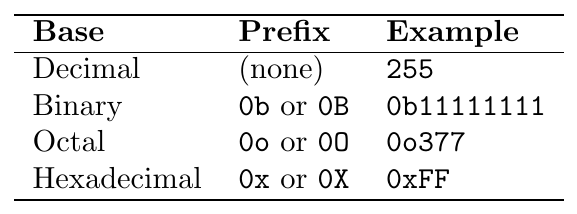
Underscore separator allowed anywhere for readability: 1_000_000,
0xFF_AA_BB.
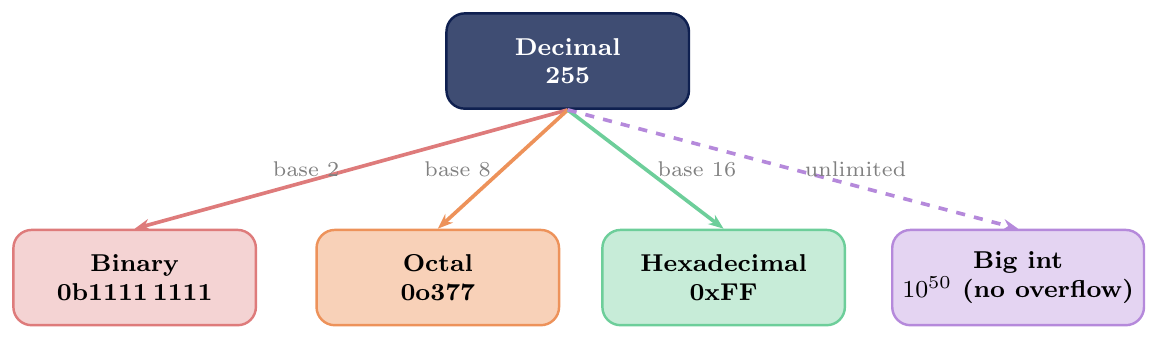
int Properties and MethodsNo overflow:
2**1000is exact (a 302-digit number)bin(n),oct(n),hex(n): convert to string in respective baseint(s, base): parse a string in given base:int("FF", 16)$\to$ 255n.bit_length(): number of bits needed to represent $n$n.bit_count()(3.10+): count of set bits (popcount)n.to_bytes(length, byteorder): convert to bytes objectdivmod(a,b): returns(a//b, a%b)in one callUnderscore literal:
1_000_000for readability (ignored by Python)
int --- Literals, Large Numbers, Bases# Bases
print(0b1010) # 10 (binary)
print(0o17) # 15 (octal)
print(0xFF) # 255 (hex)
print(0b1111_1111) # 255 (binary with underscore)
# Arbitrary precision
big = 2 ** 100
print(big) # 1267650600228229401496703205376
print(type(big)) # <class 'int'>
# No overflow (contrast with C int)
print(10 ** 50)
# 100000000000000000000000000000000000000000000000000
# int methods
n = 255
print(bin(n)) # '0b11111111'
print(oct(n)) # '0o377'
print(hex(n)) # '0xff'
print(n.bit_length()) # 8
print((0b101010).bit_count()) # 3 (three 1-bits)
# Parsing from string
print(int("FF", 16)) # 255
print(int("1010", 2)) # 10
print(int("17", 8)) # 15
# divmod
q, r = divmod(17, 5)
print(q, r) # 3 2 (17 = 3*5 + 2)float --- IEEE 754 Double Precision
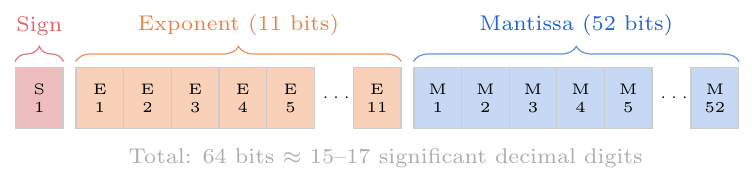
float --- Definition and IEEE 754Python's float corresponds to a C double (64-bit IEEE 754):
1 sign bit, 11 exponent bits, 52 mantissa bits
Range: approximately $\pm 1.8 \times 10^{308}$
Precision: $\approx 15$–17 significant decimal digits
Key consequence: many decimal fractions cannot be represented exactly in binary floating point: \[\texttt{0.1 + 0.2 = 0.30000000000000004} \neq 0.3\] This is not a Python bug — it is fundamental to IEEE 754.
float Properties and Best PracticesSpecial values:
float('inf'),float('-inf'),float('nan')NaN:
nan != nanisTrue; check withmath.isnan(x)Approximate comparison: use
math.isclose(a, b, rel_tol=1e-9)never==for floatsround(x, n): rounds to $n$ decimal places (banker's rounding for.5: rounds to nearest even)Decimalmodule: exact decimal arithmetic (financial/scientific use)fractions.Fraction: exact rational arithmeticScientific notation:
1.5e3$= 1500.0$,2.5e-4$= 0.00025$
math.iscloseimport math
% Floating-point representation error
print(0.1 + 0.2) # 0.30000000000000004
print(0.1 + 0.2 == 0.3) # False (!!)
print(math.isclose(0.1+0.2, 0.3)) # True (correct way)
% Special values
inf = float('inf')
nan = float('nan')
print(inf > 10**100) # True
print(inf + inf) # inf
print(inf - inf) # nan
print(nan == nan) # False (NaN is never equal to anything)
print(math.isnan(nan)) # True
% Exact decimal arithmetic
from decimal import Decimal
print(Decimal("0.1") + Decimal("0.2")) # 0.3 (exact!)
% Fraction arithmetic
from fractions import Fraction
print(Fraction(1,3) + Fraction(1,6)) # 1/2 (exact)
% round() uses banker's rounding
print(round(0.5)) # 0 (rounds to even)
print(round(1.5)) # 2 (rounds to even)
print(round(2.5)) # 2 (rounds to even)
print(round(3.5)) # 4 (rounds to even)
print(round(3.14159, 2)) # 3.14complex --- Complex Numbers
complex --- DefinitionPython has native complex number support. A complex literal is written as
a + bj (using j for the imaginary unit $i$):
\[\texttt{z = 3 + 4j} \quad\Rightarrow\quad z = 3 + 4i\]
Both real and imaginary parts are stored as float.
complex Propertiesz.real: real part (float)z.imag: imaginary part (float)abs(z): modulus $|z| = \sqrt{a^2 + b^2}$z.conjugate(): returns $a - bj$complex(a, b): constructor:complex(3, 4)$\to$(3+4j)All arithmetic operators work:
+, -, *, /cmathmodule for complex-awaresqrt,exp,log
cmathimport cmath, math
z1 = 3 + 4j
z2 = 1 - 2j
print(z1.real, z1.imag) # 3.0 4.0
print(abs(z1)) # 5.0 (= sqrt(9+16))
print(z1.conjugate()) # (3-4j)
% Arithmetic
print(z1 + z2) # (4+2j)
print(z1 * z2) # (11-2j) = (3*1-4*(-2)) + (3*(-2)+4*1)j
print(z1 / z2) # (-1+2j)
% cmath: sqrt of negative number
print(cmath.sqrt(-1)) # 1j
print(cmath.sqrt(-4)) # 2j
print(cmath.exp(1j * math.pi)) # (-1+1.2e-16j) ≈ Euler's formula e^(iπ)=-1bool --- Boolean Type
bool --- Definition and Subclass Relationshipbool is a subclass of int:
\[\texttt{True} \equiv 1, \quad \texttt{False} \equiv 0\]
Only two instances exist: True and False (singletons).
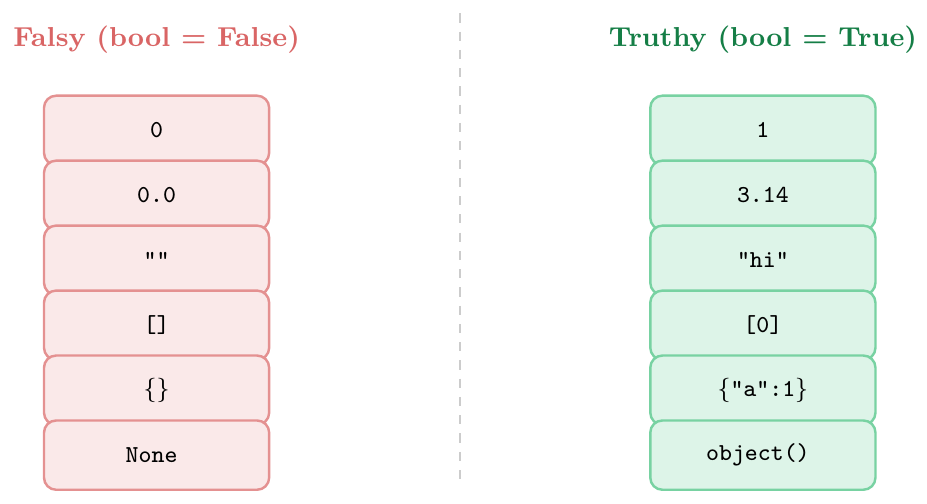
Truthiness — every object has a boolean interpretation in a conditional:
Falsy:
0, 0.0, 0j, "", [], {}, set(), frozenset(), None, range(0)Truthy: everything else (non-zero numbers, non-empty containers, etc.)
Customise via __bool__ or __len__ in user-defined classes.
bool Propertiesisinstance(True, int)returnsTrueArithmetic:
True + True == 2,False * 100 == 0Useful for counting: loops tracking expressions where variable is greater than 0
bool(x)converts any object toTrue/FalseAlways use
is True/is Falseonly when you need exact boolean singleton check; otherwise use truthiness directly (if x:notif x == True:)
bool Arithmetic and Counting# bool is int subclass
print(type(True)) # <class 'bool'>
print(isinstance(True, int)) # True
print(True + True) # 2
print(True * 10) # 10
print(False + 5) # 5
# Counting with bools
scores = [85, 42, 91, 55, 73, 88, 39]
passing = sum(s >= 60 for s in scores)
print(f"{passing} out of {len(scores)} passed") # 4 out of 7 passed
# Truthiness in conditions
for val in [0, 1, "", "hi", [], [0], None, 0.0, {}, {"a":1}]:
print(f"bool({val!r:12}) = {bool(val)}")
# bool(0) = False
# bool(1) = True
# bool('') = False
# bool('hi') = True
# ...NoneType
None --- The Null SingletonNone is the sole instance of NoneType. It represents
the absence of a value.
Always check with is, never ==:
x is None— correctx == None— works but violates PEP 8 (and can be overridden by a class's__eq__)
Functions with no return statement implicitly return None.
None PropertiesSingleton:
id(None)is constant;None is NonealwaysTrueFalsy:
bool(None) == FalseCommon uses: default function argument, sentinel value, uninitialised state
Not the same as
0,False,"",[](though all are falsy)
None --- Implicit Return and Sentinel# Implicit None return
def no_return():
x = 10 # does something but no return
result = no_return()
print(result) # None
print(type(result)) # <class 'NoneType'>
# None as default / sentinel
def search(lst, target):
for i, val in enumerate(lst):
if val == target:
return i
return None # explicit None when not found
idx = search([10, 20, 30], 20)
if idx is not None:
print(f"Found at index {idx}") # Found at index 1
# None as optional argument default
def greet(name, title=None):
if title is None:
return f"Hello, {name}!"
return f"Hello, {title} {name}!"
print(greet("Alice")) # Hello, Alice!
print(greet("Alice", "Dr.")) # Hello, Dr. Alice!Type Conversion
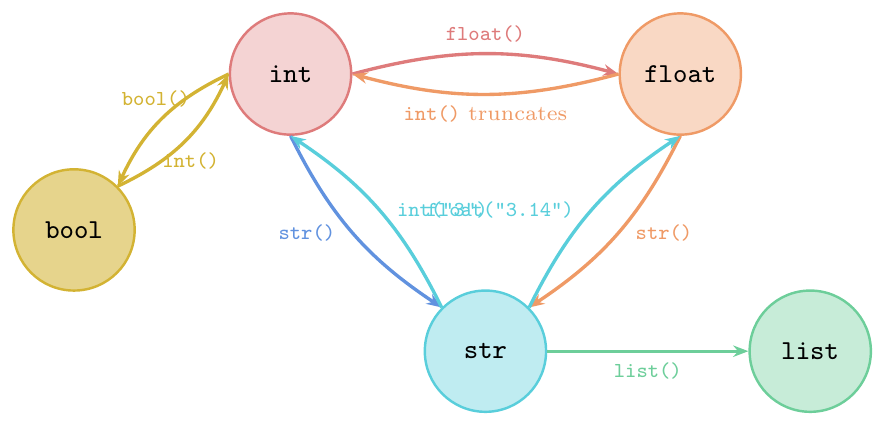
Implicit (coercion): Python automatically converts when safe and unambiguous (only a few cases: integer added to float yields a float; bool in arithmetic)
Explicit (casting): programmer manually calls a constructor function to convert types
Key explicit conversion functions:
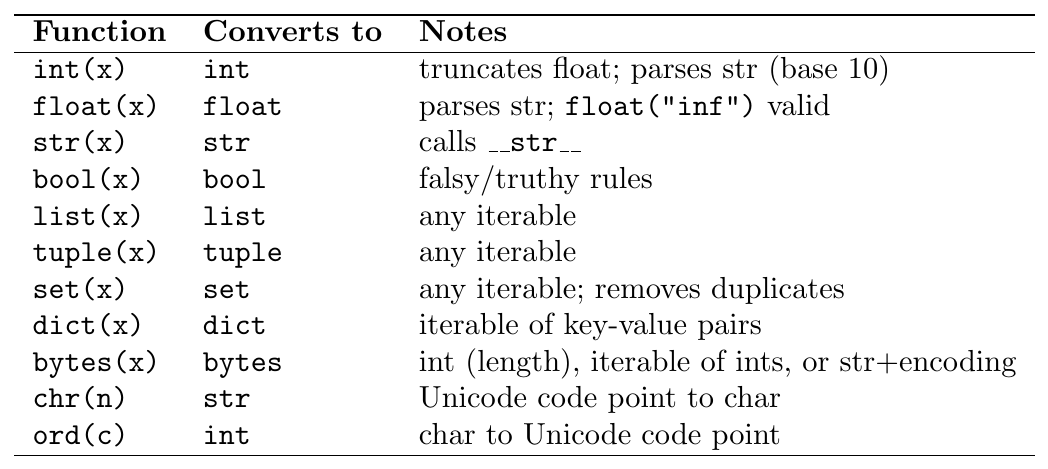
type(x): returns the exact class; does not consider inheritance (type(True) is bool, notint)isinstance(x, T): returnsTrueifxis an instance ofTor any subclass ofT; accepts a tuple of types:isinstance(x, (int, float))issubclass(A, B): returnsTrueif classAis a subclass ofB;issubclass(bool, int)isTruePrefer
isinstanceovertype(x) ==for type-checking (more Pythonic; respects inheritance)
# int conversions
print(int(3.9))       # 3   (truncates toward zero, NOT floor)
print(int(-3.9))      # -3  (truncates toward zero)
print(int("42"))      # 42
print(int("0xFF", 16))# 255
print(int(True))      # 1

# float conversions
print(float("3.14"))  # 3.14
print(float("1e-5"))  # 1e-05
print(float(True))    # 1.0

# str conversions
print(str(100))       # '100'
print(str([1,2,3]))   # '[1, 2, 3]'
print(str(None))      # 'None'

# bool conversions
print(bool(0))        # False
print(bool(-1))       # True
print(bool(""))       # False
print(bool("False"))  # True  (non-empty string!)

# list / set / tuple
print(list("gate"))   # ['g', 'a', 't', 'e']
print(set([1,2,2,3])) # {1, 2, 3}
print(tuple(range(5)))# (0, 1, 2, 3, 4)

# chr and ord
print(ord('A'))       # 65
print(chr(65))        # 'A'
print(chr(ord('a')+5))# 'f'type() vs isinstance()print(type(True) == int) # False (bool, not int)
print(type(True) == bool) # True
print(isinstance(True, int)) # True (bool is subclass of int)
print(isinstance(True, bool)) # True
# isinstance with tuple of types
def process(x):
if isinstance(x, (int, float)):
return x ** 2
elif isinstance(x, str):
return x.upper()
else:
raise TypeError(f"Unsupported: {type(x)}")
print(process(5)) # 25
print(process(3.14)) # 9.8596
print(process("gate")) # GATE
% issubclass
print(issubclass(bool, int)) # True
print(issubclass(int, object)) # True
print(issubclass(float, int)) # FalseOperators
Arithmetic Operators
All Arithmetic Operators
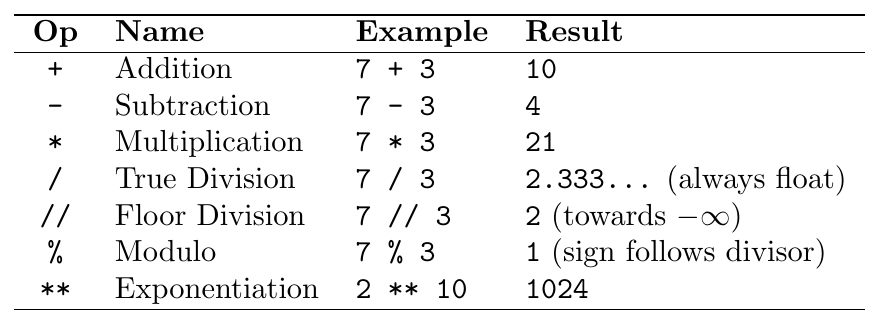
Critical points:
/always returnsfloat:6/2 = 3.0//floors towards negative infinity:-7 // 2 = -4(not $-3$)%sign matches divisor:-7 % 2 = 1(not $-1$)Invariant:
(a // b) * b + (a % b) == aalways holds**is right-associative:2**3**2 = 2**(3**2) = 512

Floor division rounds towards negative infinity (not towards zero):
7 // 2 = 3,-7 // 2 = -4,7 // -2 = -4,-7 // -2 = 3Modulo sign matches the divisor (not dividend):
7 % 2 = 1,-7 % 2 = 1,7 % -2 = -1,-7 % -2 = -3Invariant check:
(a // b) * b + a % b == a**is right-associative:a**b**c = a**(b**c)
# True division always returns float
print(7 / 2)     # 3.5
print(6 / 2)     # 3.0  <-- float, not int!
print(6 / 3)     # 2.0

# Floor division towards -inf
print( 7 // 2)   #  3
print(-7 // 2)   # -4  (not -3!)
print( 7 //-2)   # -4
print(-7 //-2)   #  3

# Modulo sign follows divisor
print( 7 % 2)    #  1
print(-7 % 2)    #  1  (not -1!)
print( 7 %-2)    # -1
print(-7 %-2)    # -3

# Invariant: always holds
for a, b in [(7,2),(-7,2),(7,-2),(-7,-2)]:
    assert (a//b)*b + a%b == a, "invariant broken!"
print("Invariant holds for all cases")

# ** right-associative
print(2 ** 3 ** 2)   # 512  = 2**(3**2) = 2**9
print((2**3) ** 2)   # 64   = 8**2

# Exponentiation with float
print(16 ** 0.5)     # 4.0  (square root)
print(8 ** (1/3))    # 2.0  (cube root)
Comparison Operators
Comparison and Chaining
All comparison operators return True or False:
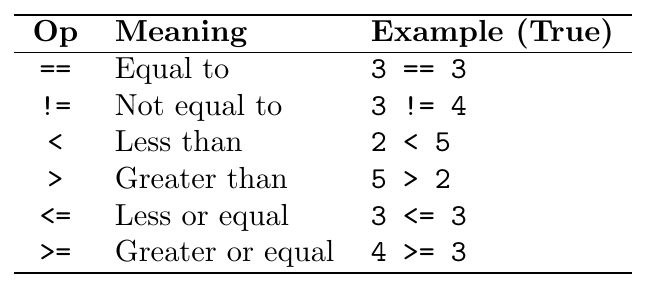
Chaining: Python allows chaining: 1 < x < 10 is evaluated as
(1 < x) and (x < 10) — both conditions must hold. No redundant evaluation.
x = 5
# Chained comparison
print(1 < x < 10)       # True   == (1<5) and (5<10)
print(1 < x < 5)        # False  == (1<5) and (5<5) = True and False
print(1 < 2 < 3 < 4)    # True
print(10 > x >= 5)      # True

# Useful for range checks
def classify_score(score):
    if 90 <= score <= 100:
        return "A"
    elif 70 <= score < 90:
        return "B"
    elif 50 <= score < 70:
        return "C"
    else:
        return "F"

print(classify_score(85))   # B
print(classify_score(50))   # C
print(classify_score(100))  # A
Logical Operators
Short-Circuit Evaluation
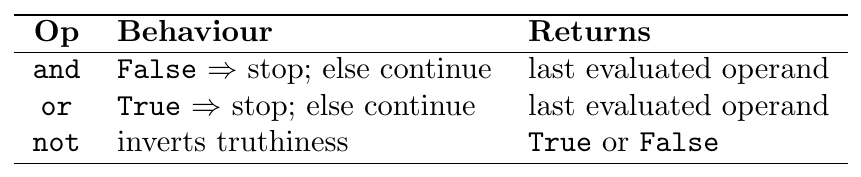
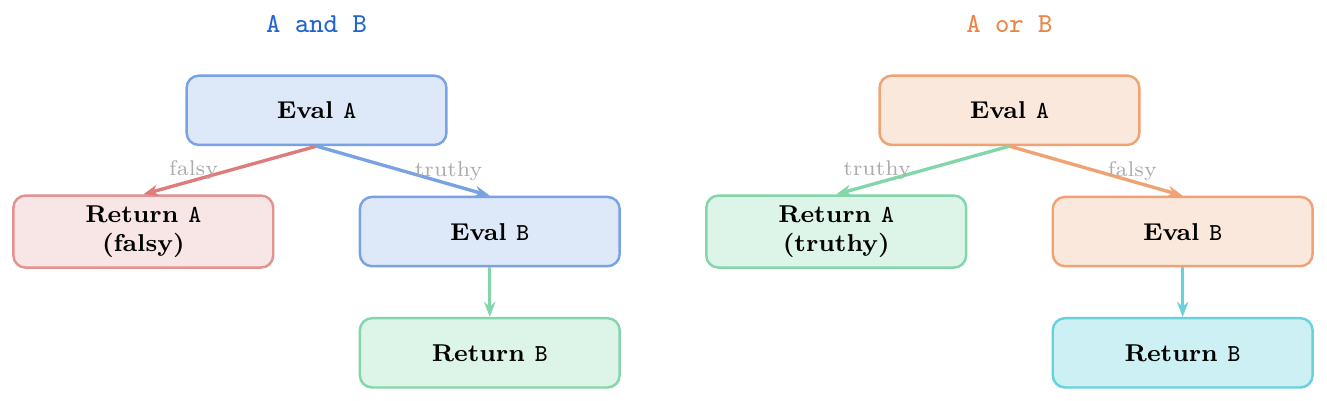
Critical: and and or return the last evaluated
1386operand, not necessarily a boolean. This enables idiomatic patterns.
Short-circuit prevents evaluation of later expressions if result is already determined.
Default value:
x = val or default— usedefaultifvalis falsyConditional call:
obj and obj.method()— only call ifobjis notNone/falsyTernary equivalent:
a if cond else b(preferred overcond and a or bwhich has a bug whenais falsy)Guard check:
lst and lst[0]— safe first-element accessAll-falsy:
not any(lst)is equivalent toall(not x for x in lst)
# and returns first falsy or last value
print(0 and 5)        # 0     (0 is falsy -- short-circuit)
print(3 and 5)        # 5     (3 truthy; return last: 5)
print(3 and 0)        # 0     (3 truthy; return last: 0)
print("" and "hi")    # ''    (empty string falsy)

# or returns first truthy or last value
print(0 or 5)         # 5     (0 falsy; try next)
print(3 or 5)         # 3     (3 truthy -- short-circuit)
print(0 or "")        # ''    (both falsy; return last)
print([] or {})       # {}    (both falsy; return last)

# Practical patterns
name = ""
display = name or "Anonymous"
print(display)   # Anonymous

config = None
value = config and config.get("key")
print(value)     # None  (config is None, short-circuit)

# Short-circuit prevents errors
lst = []
first = lst and lst[0]   # safe: lst is falsy, lst[0] never evaluated
print(first)             # []

# NOT always returns bool
print(not 0)     # True
print(not 5)     # False
print(not "")    # True
print(not [1])   # False
Bitwise Operators
Bit-Level Operations
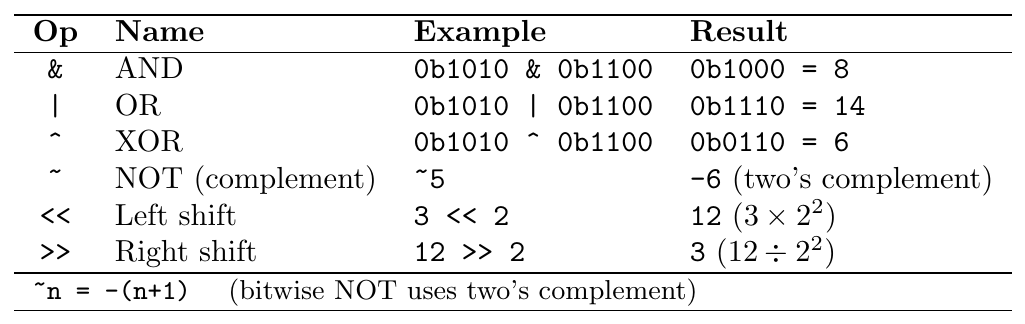
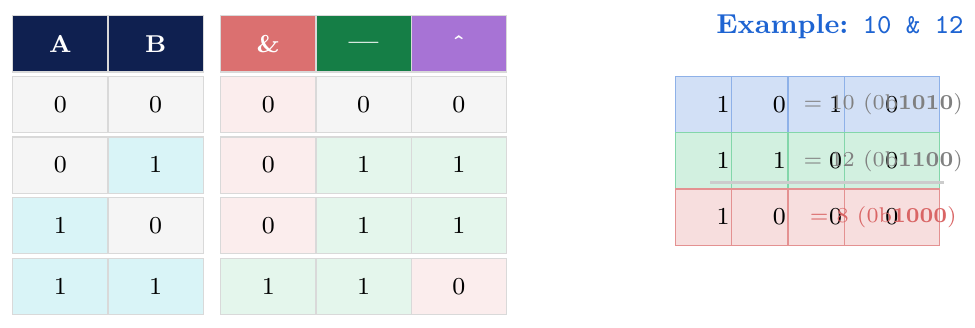
a, b = 0b1010, 0b1100   # 10 and 12

print(bin(a & b))    # 0b1000  = 8   (AND: bits set in both)
print(bin(a | b))    # 0b1110  = 14  (OR:  bits set in either)
print(bin(a ^ b))    # 0b0110  = 6   (XOR: bits set in exactly one)
print(bin(~a))       # -0b1011 = -11 (NOT: ~n = -(n+1))

# Shifts = fast multiply/divide by powers of 2
print(3 << 2)        # 12   = 3 * 4
print(12 >> 2)       # 3    = 12 // 4
print(1 << 8)        # 256  = 2^8

# Practical: check if a number is even (fast)
n = 18
print(n & 1)         # 0 --> even (last bit is 0)
n = 17
print(n & 1)         # 1 --> odd

# Bit masking -- extract lower 4 bits
value = 0b10110111
lower4 = value & 0b00001111
print(bin(lower4))   # 0b111  = 7

# Swap without temp using XOR
x, y = 5, 9
x ^= y;  y ^= x;  x ^= y
print(x, y)          # 9 5
Identity & Membership Operators
is, in and their Negations
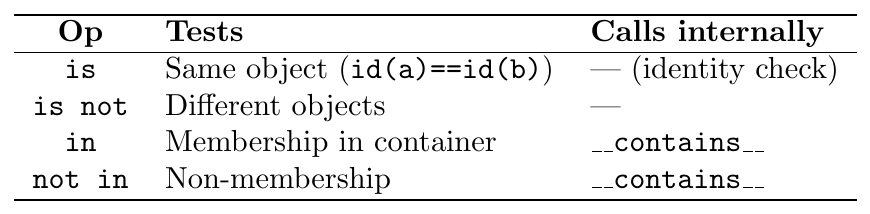
Complexity of in:
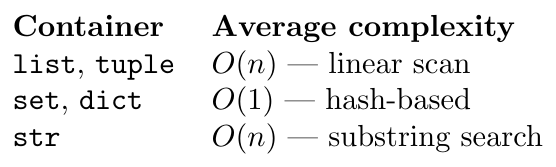
# Membership in various containers
print(3 in [1, 2, 3, 4])          # True  (list)
print(5 not in (1, 2, 3))         # True  (tuple)
print("gate" in {"gate", "exam"}) # True  (set)
print("name" in {"name": "Alice"})# True  (dict keys)
print("lo" in "hello")            # True  (substring)

# Performance: set lookup O(1) vs list O(n)
import time
data_list = list(range(10_000_000))
data_set  = set(range(10_000_000))

t0 = time.perf_counter()
_ = 9_999_999 in data_list
print(f"list: {time.perf_counter()-t0:.4f}s")   # ~0.1s

t0 = time.perf_counter()
_ = 9_999_999 in data_set
print(f"set : {time.perf_counter()-t0:.6f}s")   # ~0.000001s

# is: identity
a = [1, 2, 3]
b = a           # same object
c = [1, 2, 3]  # equal but different object

print(a is b)   # True
print(a is c)   # False
print(a == c)   # True
Operator Precedence
Full Precedence Table
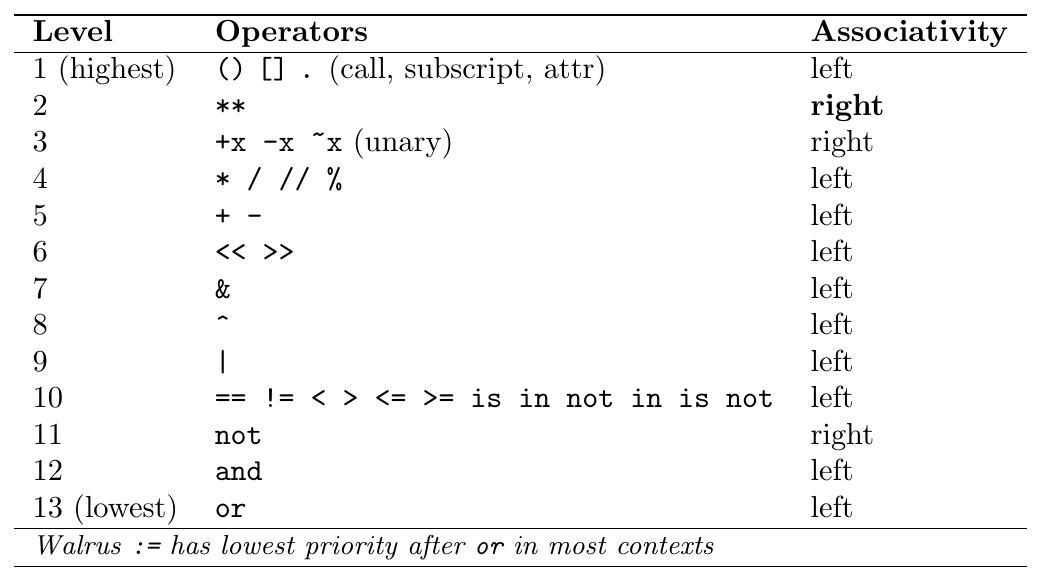
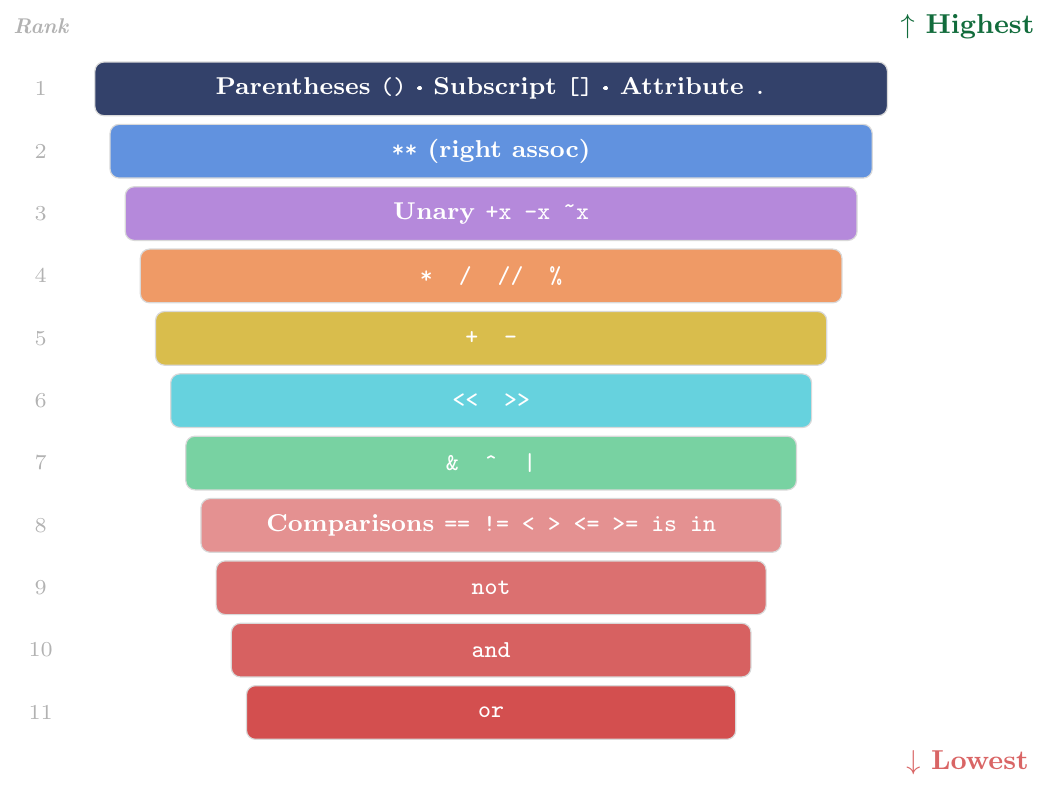
# ** before unary minus
print(-2 ** 2)     # -4  = -(2**2), NOT (-2)**2 = 4
print((-2) ** 2)   # 4   -- explicit override

# Comparison before logical
print(2 + 3 > 4 and 10 - 1 < 15)
# = (5 > 4) and (9 < 15) = True and True = True

# not before and before or
print(True or False and False)
# = True or (False and False) = True or False = True
print(not False or True and False)
# = (not False) or (True and False)
# = True or False = True

# Tricky: chained comparison
print(1 < 2 == 2 < 3)   # True (chained: 1<2 and 2==2 and 2<3)

# is before not
x = None
print(x is not None)   # False  (is not is ONE operator, not "is" and "not")
print(not x is None)   # False  but means not (x is None) -- confusing!
# Always use: x is not None  (not: not x is None)

# Bitwise before comparison
print(2 & 3 == 3)    # True: 2 & (3 == 3) = 2 & True = 2 & 1 = 0? No!
# Actually: (2 & 3) == 3 ... wait: precedence: == is LOWER than &
# 2 & 3 = 2; 2 == 3 = False  -- correct parse
print((2 & 3) == 3)  # False  (2 & 3 = 2, not 3)
print(2 & (3 == 3))  # 2 & True = 2 & 1 = 0... as int, but this is confusing
# Use parentheses whenever mixing bitwise and comparison# Misleading without parens
result = 5 + 3 * 2 ** 2 - 1
# = 5 + 3 * 4 - 1
# = 5 + 12 - 1
# = 16
print(result) # 16
# With explicit parens for clarity
result = 5 + (3 * (2 ** 2)) - 1
print(result) # 16 (same)
# Different meaning with different parens
print((5 + 3) * (2 ** 2) - 1) # 8 * 4 - 1 = 31
print(5 + 3 * 2 ** (2 - 1)) # 5 + 3*2 = 11
# Short-circuit with mixed operators
x = 5
print(x > 3 and x < 10 or x == 5)
# = (x>3 and x<10) or (x==5)
# = (True and True) or True
# = True or True = True
# Rule: when in doubt, use parentheses!