Control Flow
Conditional Statements
if / elif / else
Syntax, Chaining and Nesting
Python conditional execution uses if, elif (else-if), and else. Only the first true branch executes; the rest are skipped.
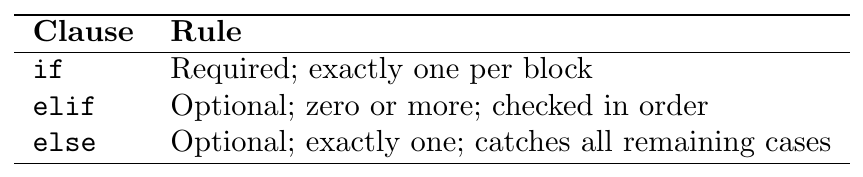
Evaluation: conditions are tested top-to-bottom; as soon as one
is True its block executes and all remaining elif/else are skipped.
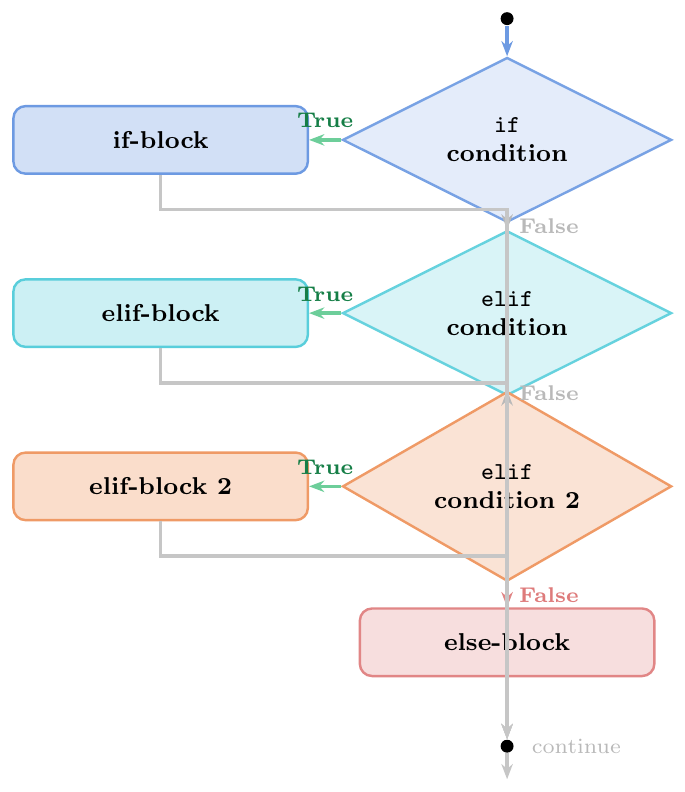
Short-circuit evaluation: once a true branch is found, all subsequent
elif/elseblocks are completely skipped (conditions not even evaluated)No switch/case in Python $<$ 3.10: use
if/elifchains or a dict dispatch tablePython 3.10+:
match/casestructural pattern matching (see below)Any expression as condition — Python evaluates its truthiness (
bool(expr))One-liner:
if x > 0: return xallowed but use sparingly
score = 83

if score >= 90:
    grade = "A"
elif score >= 80:
    grade = "B"
elif score >= 70:
    grade = "C"
elif score >= 60:
    grade = "D"
else:
    grade = "F"

print(grade)  # B

# Short-circuit: only first True branch runs
x = 15
if x > 10:
    print("Greater than 10")     # prints this
elif x > 5:                      # NOT evaluated (first was True)
    print("Greater than 5")
else:
print("5 or less")# match/case: Python 3.10+
point = (5, 0)
match point:
case (0, 0):
result = "Origin"
case (x, 0):
result = f"On x-axis at {x}"
case (0, y):
result = f"On y-axis at {y}"
case (x, y):
result = f"Point at ({x}, {y})"
print(result) # On x-axis at 5
# match with guards (if condition)
value = "hi"
match value:
case int(n) if n < 0:
classification = "negative int"
case int(n) if n == 0:
classification = "zero"
case int(n):
classification = "positive int"
case str(s):
classification = f"string of length {len(s)}"
case _: # wildcard: matches anything
classification = "other"
print(classification) # string of length 2Ternary (Conditional) Expression
Inline if-else
Python's conditional expression (ternary operator) evaluates to one of two values based on a condition, in a single expression:
\[\texttt{value\_if\_true}\quad\texttt{if}\quad\texttt{condition}\quad \texttt{else}\quad\texttt{value\_if\_false}\]
Evaluation order:
Condition is evaluated first
If
True:value_if_trueis evaluated and returnedIf
False:value_if_falseis evaluated and returnedThe unchosen branch is not evaluated (lazy/short-circuit)
Contrast with C/Java ternary: cond ? a : b
Python uses a if cond else b (reads more like English).

Returns a value: can be used anywhere an expression is needed (assignment, function argument, list comprehension, f-string)
Lazy: only the selected branch is evaluated (
1/0 if False else 99$\to$99, noZeroDivisionError)Nesting allowed but discouraged:
a if p else b if q else cis valid but hard to readCommon pattern: safe default —
x if x is not None else 0vs
orpattern:x or defaulthas a subtle difference —x or defaultreturnsdefaultwhenxis any falsy value (including 0,""), not justNone
# Basic usage
x = 10
result = "positive" if x > 0 else "non-positive"
print(result)   # positive

# In assignment
score = 85
grade = "Pass" if score >= 60 else "Fail"
print(grade)    # Pass

# Inside a print call argument
print(f"Status: {'Active' if True else 'Inactive'}")   # Status: Active

# In f-string
n = 7
print(f"{n} is {'odd' if n % 2 else 'even'}")     # 7 is odd

# In list comprehension
data = [-3, -1, 0, 2, 5, -4, 8]
abs_vals = [x if x >= 0 else -x for x in data]
print(abs_vals)   # [3, 1, 0, 2, 5, 4, 8]

# Lazy evaluation: unchosen branch not evaluated
safe = 1/0 if False else 99   # no ZeroDivisionError!
print(safe)   # 99

# Nested ternary (valid, but avoid for readability)
x = 0
sign = "positive" if x > 0 else ("negative" if x < 0 else "zero")
print(sign)   # zero

# PITFALL: or vs ternary for None check
val = 0
print(val or "default")              # "default"  (0 is falsy!)
print(val if val is not None else "default")  # 0  (correct None-check)
Truthy / Falsy Values
Python's Boolean Context
Every Python object has an implicit boolean value used in if, while,
and, or, not contexts.
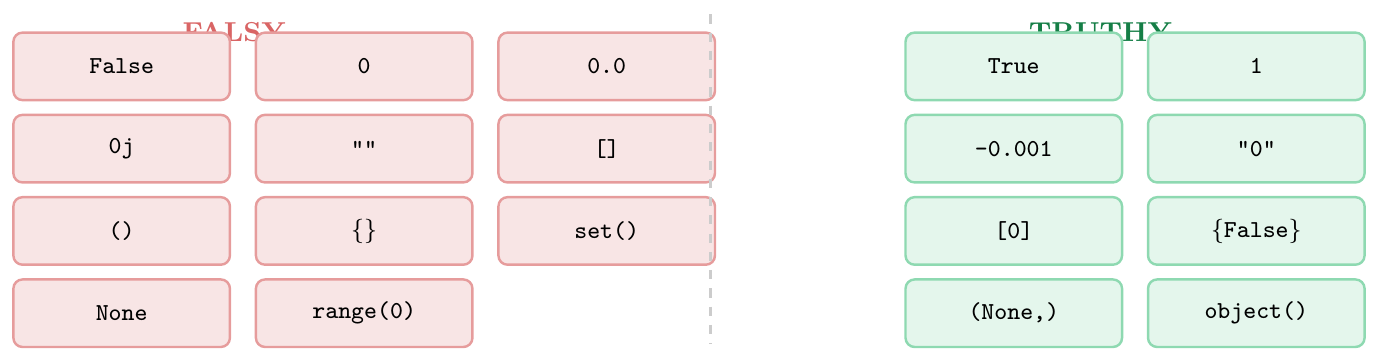
Falsy values — evaluate to False in boolean context:
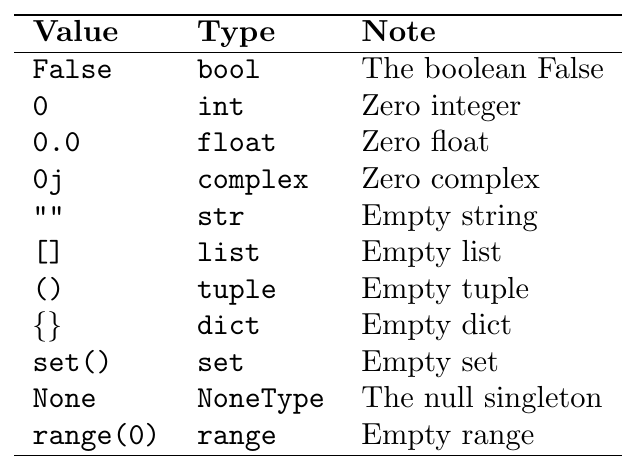
Truthy: everything else — non-zero numbers, non-empty containers, most
objects (including 0.0001, "0", [0], {False}).
Custom objects: define __bool__ (returns True/False)
or __len__ (falsy if len == 0).
# Checking empty containers the Pythonic way
lst = []
if not lst:           # Pythonic: rely on truthiness
    print("empty")

# Anti-pattern (verbose)
if len(lst) == 0:     # works but not idiomatic
    print("empty")

# PITFALL: "0" is truthy (non-empty string)
s = "0"
if s:
    print("truthy!")  # prints! "0" is NOT the int 0

# PITFALL: [0] is truthy (non-empty list)
L = [0]
if L:
    print("truthy!")  # prints! list is non-empty

# PITFALL: {False} is truthy (non-empty set)
st = {False}
if st:
    print("truthy!")  # prints! set is non-empty

# None vs falsy: use 'is None' to distinguish
a, b = 10, 0
result = a / b if b else None   # None on zero

if result is None:          # correct None check
    print("Division by zero")
if not result:              # WRONG: also catches result=0.0
    print("Would also catch 0.0!")
Loops
for Loop
Iterating Iterables, range, enumerate, zip
A for loop is like a train track that visits every single station on a line. It tells Python to take a collection of items (like a list of toys or letters in a word) and look at each item, one by one, from the first to the last.
\[\texttt{for}\ \langle\textit{item}\rangle\ \texttt{in}\ \langle\textit{collection}\rangle\texttt{:} \quad \langle\textit{what to do with it}\rangle\]
Things you can loop through include: str (letters in text), list (a list of things), tuple (fixed list), set (unique items), dict (dictionary keys), and helper functions like range, enumerate, and zip.
range() parameters (How to count):

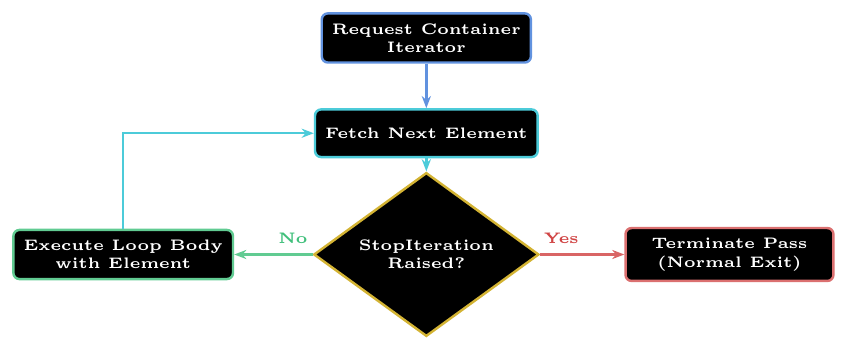
enumerate(items, start=0): Tells you the item *and* its tracking number (index). Like counting: "Item number 0 is an apple, item number 1 is a banana."zip(list1, list2, ...): Pairs things up like matching socks. If you have a list of names and a list of ages, it matches the 1st name with the 1st age. It stops as soon as the shortest list runs out!itertools.zip_longest(): Keeps pairing even if one list is longer, filling the empty spots with a placeholder (likeNoneor 0).zip(*matrix): Swaps rows and columns in a grid (like turning a tall photo into a wide photo).rangeis smart and lazy: It doesn't actually write a massive list of numbers in the computer's memory. Evenrange(10**9)takes up almost no space!
end=""?By default, every time Python uses print(), it automatically jumps to a new line (like pressing the Enter key on a keyboard).
When you use end="", you tell Python: "Don't jump to a new line! Keep the printing cursor right where it is so the next print stays on the same row."
end=""# 1. Without end="" (Default - prints downward)
print("Apple")
print("Banana")
# Output:
# Apple
# Banana
# 2. With end="" (Glues things together side-by-side)
print("Apple", end="")
print("Banana", end="")
# Output: AppleBanana
# 3. Adding a space inside end=" " (Keeps things neat in a row)
for i in range(3):
print("Hi", end=" ")
# Output: Hi Hi Hi
# 4. Adding a symbol inside end="-"
for i in range(3):
print("Go", end="-")
# Output: Go-Go-Go-# 1. Counting up to 5 (stops before 5)
for i in range(5):
print(i, end=" ") # 0 1 2 3 4
# 2. Skipping numbers (count by twos)
for i in range(2, 8, 2):
print(i, end=" ") # 2 4 6
# 3. Rocket countdown!
for i in range(5, 0, -1):
print(i, end=" ") # 5 4 3 2 1
# 4. Spell a word letter by letter
for letter in "CAT":
print(letter, end=" ") # C A T
# 5. Looking at keys in a dictionary
toy_box = {"car": "red", "ball": "blue"}
for toy in toy_box:
print(toy, end=" ") # car ball
# 6. Using enumerate to get numbers
fruits = ["apple", "banana"]
for index, fruit in enumerate(fruits):
print(f"Item {index} is {fruit}")
# Item 0 is apple
# Item 1 is banana
# 7. Using zip to pair friends with their favorite colors
names = ["Alice", "Bob"]
colors = ["Red", "Blue"]
for name, color in zip(names, colors):
print(f"{name} likes {color}")
# Alice likes Red
# Bob likes Blue
# 8. zip stops when the shorter list is empty
numbers = [1, 2, 3, 4, 5]
letters = ["A", "B"]
print(list(zip(numbers, letters))) # [(1, 'A'), (2, 'B')]
# 9. zip_longest keeps going to the end
from itertools import zip_longest
print(list(zip_longest(numbers, letters, fillvalue="Empty")))
# [(1, 'A'), (2, 'B'), (3, 'Empty'), (4, 'Empty'), (5, 'Empty')]# 1. Adding up numbers (Piggy bank)
coins = [5, 2, 10, 1]
total = 0
for coin in coins:
total += coin
print(total) # 18
# 2. Loop inside a loop (Making a multiplication grid)
for row in range(1, 3):
for col in range(1, 3):
print(f"{row}x{col}={row*col}", end=" ")
print() # Moves to the next line
# 1x1=1 1x2=2
# 2x1=2 2x2=4
# 3. Reading dictionary keys and values together
pet_sounds = {"dog": "woof", "cat": "meow"}
for pet, sound in pet_sounds.items():
print(f"The {pet} goes {sound}")
# 4. Making a new list using a loop
numbers = [1, 2, 3]
doubled = []
for x in numbers:
doubled.append(x * 2)
print(doubled) # [2, 4, 6]while Loop
Condition-Controlled Repetition
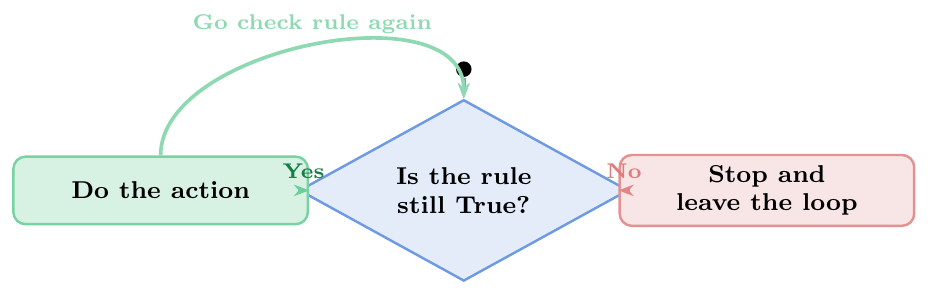
A while loop is like jumping on a trampoline. You keep jumping while you still have energy. You don't know how many times you will jump before you start, you just check if you are tired before every single jump.
\[\texttt{while}\ \langle\textit{rule is true}\rangle\texttt{:} \quad \langle\textit{keep doing this action}\rangle\]
How it works: Python checks the rule *before* it does anything. If the rule is already False at the very start, the loop will never run even once!
Counting Down:
cookies = 5; while cookies > 0: eat()Infinite Loop with a Break: Using
while True:creates a loop that runs forever, unless a specialbreakcommand stops it inside.Input Check: Asking a user to type something until they type the correct answer (like entering a valid password).
The Danger Trap (Infinite Loop): If you forget to change something inside the loop, the rule stays
Trueforever and the computer gets stuck in an infinite loop!
# 1. Simple countdown
candies = 3
while candies > 0:
    print(f"Eating a candy! {candies} left.")
    candies -= 1  # We eat one, so count goes down
# Eating a candy! 3 left.
# Eating a candy! 2 left.
# Eating a candy! 1 left.

# 2. Keep guessing until it's right
secret_number = 7
user_guess = 0  # Start with 0 so the loop begins

# Simulating guesses: 3, then 5, then 7
guesses = iter([3, 5, 7])

while user_guess != secret_number:
    user_guess = next(guesses)
    print(f"Guessed: {user_guess}")
    if user_guess == secret_number:
        print("You got it!")
    else:
        print("Wrong! Try again.")

# 3. THE INFINTIE LOOP PITFALL (What NOT to do!)
# item_count = 5
# while item_count > 0:
#     print("Stuck forever!")
#     # Uh oh! We forgot to do item_count -= 1, so it never stops!
Loop Control
break, continue, pass

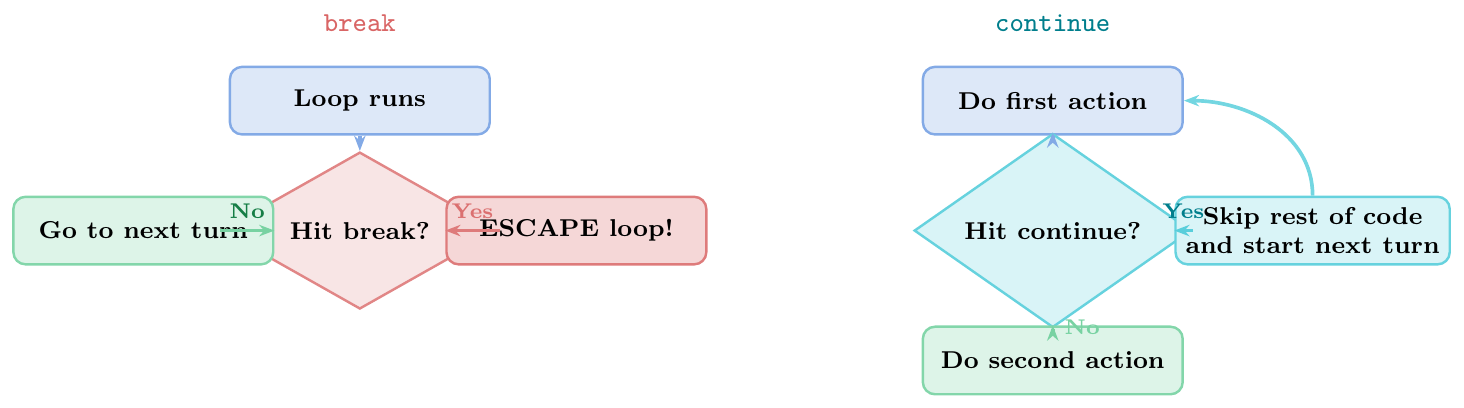
Important Note: break only gets you out of the current closest loop box. If you have a loop inside another loop, it won't escape the outer one!
# 1. break: Stop searching when we find what we want
lucky_numbers = [1, 2, 9, 4, 5]
for num in lucky_numbers:
    if num == 9:
        print("Found the 9! Stopping the search.")
        break
    print(f"Checking: {num}")
# Checking: 1
# Checking: 2
# Found the 9! Stopping the search.

# 2. continue: Skip bad items (Skip even numbers)
for num in range(1, 6):
    if num % 2 == 0:
        continue # Skip this number!
    print(num, end=" ") # 1 3 5
print()

# 3. pass: Just a placeholder so Python doesn't get confused
for num in range(3):
    if num == 1:
        pass # I will write code here tomorrow!
    else:
        print(num, end=" ") # 0 2
else Clause on Loops
Loop--else: The ``No Break'' Reward
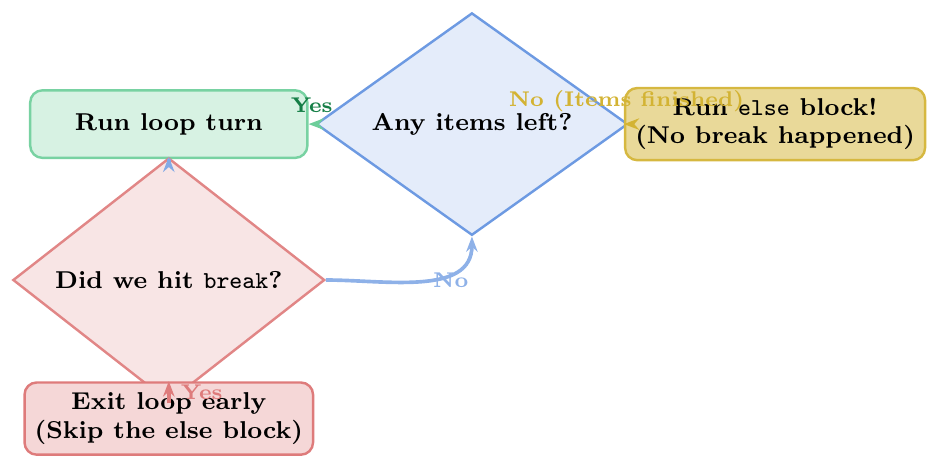
You can attach an else block to a loop. It acts like a reward block that runs **only if the loop finishes its entire run without getting stopped by a break**.

Best way to remember: Think of it as a “No Break Happened” block. It is super useful for searching through things to confirm that something is missing.
# Look for a monster in the closet
closet = ["shirt", "pants", "socks"]

for item in closet:
    if item == "monster":
        print("Ahhh! Found a monster!")
        break
else:
    # This runs only if we checked EVERYTHING and found NO monster
    print("Yay! No monsters found in the closet.")

# Output: Yay! No monsters found in the closet.
Walrus Operator :=
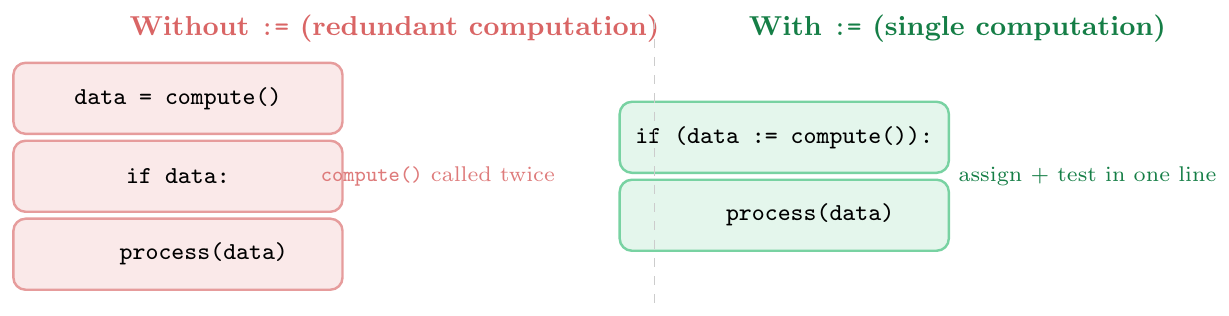
:= --- DefinitionThe walrus operator (:=), introduced in Python 3.8 via PEP 572,
is an assignment expression: it assigns a value to a name and
simultaneously returns that value as an expression.
\[\texttt{name\ :=\ expression}\]
This allows assignment to occur inside a condition, comprehension, or
any other expression context where a plain = statement is not allowed.
Key rules:
Must be parenthesised when used at the top level of an expression statement (
(x := 5)notx := 5standalone)The assigned name is visible in the enclosing scope (not scoped to the comprehension variable)
Cannot be used for attribute or subscript assignment (
obj.x := 5is illegal)
while loop:
while chunk := f.read(4096):— read until empty bytesRegex match:
if m := re.search(pat, text):usem.group()in bodyComprehension filter and use: compute expensive value once, filter and use in the same expression
Input loop:
while (line := input("? ")) != "quit":Chain of transformations: avoid intermediate variables while keeping result accessible
# 1. while loop: read file in chunks
# with open("data.bin", "rb") as f:
#     while chunk := f.read(4096):
#         process(chunk)

# Simulated version
import io
f = io.BytesIO(b"hello world this is a test")
chunks = []
while chunk := f.read(5):
    chunks.append(chunk)
print(chunks)
# [b'hello', b' worl', b'd thi', b's is ', b'a tes', b't']

# 2. Regex: assign match and test existence
import re
texts = ["Phone: 9876543210", "No phone here", "Call: 1234567890"]
for text in texts:
    if m := re.search(r'\d{10}', text):
        print(f"Found: {m.group()}")   # prints matched number
    else:
        print("No number in:", text)

# 3. Comprehension: avoid double computation
import math
data = [1, -2, 4, -9, 16, -25]
results = [root for x in data if (root := math.sqrt(x)) > 1.5]
# note: :=  inside comprehension; 'root' leaks to enclosing scope
print(results)   # [2.0, 4.0]

# 4. Input loop
prompts = iter(["hello", "world", "quit"])  # simulate input
words = []
while (word := next(prompts)) != "quit":
    words.append(word.upper())
print(words)   # ['HELLO', 'WORLD']

# 5. Avoid recomputing expensive call
def expensive(n): return n * n + n - 1

values = [1, 5, 3, 8, 2]
# Without walrus: expensive() called twice per iteration
filtered_bad = [expensive(x) for x in values if expensive(x) > 10]

# With walrus: computed once
filtered_good = [v for x in values if (v := expensive(x)) > 10]
print(filtered_good)   # [29, 61]

# 6. Nested while with walrus
total, count = 0, 0
data_stream = iter([4, 7, 2, -1, 5, -1])   # -1 is sentinel
while (val := next(data_stream)) != -1:
    total += val
    count += 1
print(f"Sum={total}, Count={count}, Mean={total/count:.2f}")
# Sum=13, Count=3, Mean=4.33# Q1: What does this print?
for i in range(3):
for j in range(3):
if j == 1:
break
print(i, j)
# break exits INNER loop; j=1 when break fires, but loop ends
# After inner loop, j retains last value (1 from break, NOT 2)
# Output: 0 1 / 1 1 / 2 1
# Q2: else on for
for i in range(5):
if i == 10: # never True
break
else:
print("no break") # prints: no break
# Q3: continue vs pass
for i in range(5):
if i == 2:
pass # does nothing; loop continues normally
print(i, end=" ") # 0 1 2 3 4 (2 is still printed!)
for i in range(5):
if i == 2:
continue # skips print for i=2
print(i, end=" ") # 0 1 3 4 (2 is skipped!)
# Q4: walrus scope leak
data = [1, 2, 3, 4, 5]
evens = [y for x in data if (y := x*2) > 4]
print(y) # 10 (last value assigned by := leaks out of comprehension!)
# Q5: while-else with continue
n = 10
while n > 0:
n -= 1
if n % 2 == 0:
continue # continue does NOT trigger else
else:
print("while done") # prints: while done (no break occurred)