Built-in Data Structures
Strings
String Properties
Immutable Unicode Sequence
A Python string (str) is an immutable, ordered sequence of
Unicode code points. Every character is a Unicode scalar value (Python 3 is fully
Unicode-aware; there is no separate “byte string” in str).
Immutable means: once created, the contents of a string cannot be changed in place. Any operation that appears to modify a string (replace, upper, strip, …) actually returns a brand-new string object; the original is unchanged.
Sequence means: strings support all sequence operations — indexing,
slicing, len(), in, iteration.
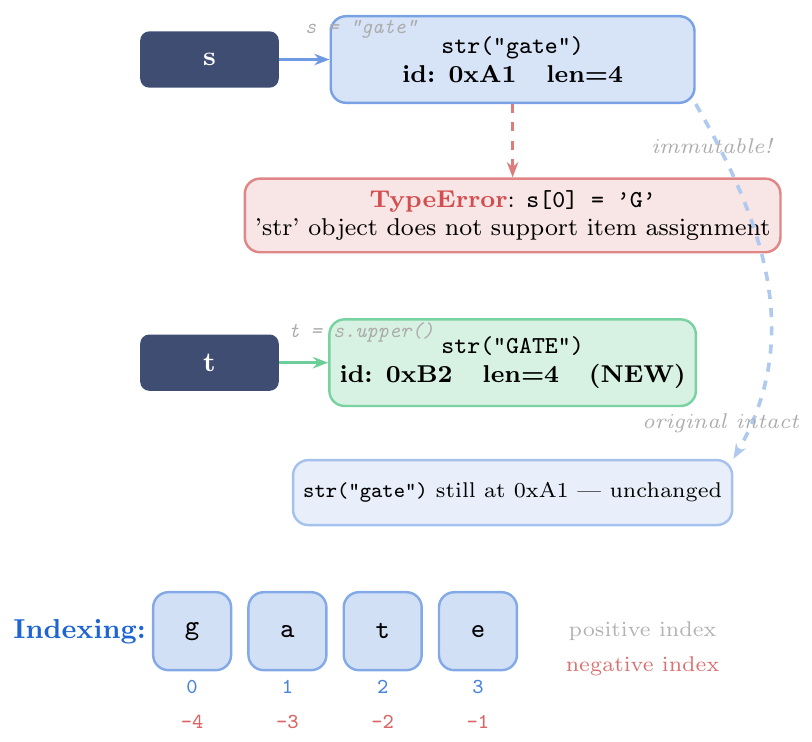
Immutable:
s[0] = 'X'raisesTypeError; uses[:0] + 'X' + s[1:]to build modified stringOrdered sequence: maintains insertion order; supports
len(), indexing, slicing, iterationUnicode: each character is a Unicode code point (
ord('A')=65,ord('$\alpha$')=945)Positive indexing:
s[0]first,s[len(s)-1]lastNegative indexing:
s[-1]last,s[-2]second-last,s[-n] = s[len(s)-n]Hashable: strings can be dict keys and set members (because they are immutable)
Interned: short strings and identifiers are often cached as a single object in CPython
s = "GateXAIML"
print(len(s))        # 9
print(s[0])          # G
print(s[-1])         # L
print(s[-3])         # I   = s[9-3] = s[6]

# Every char is a full Unicode code point
emoji = "Hi ��"
print(len(emoji))    # 4 (each character, including emoji, counts as 1)
print(emoji[-1])     # ��

# Immutability
try:
    s[0] = 'g'
except TypeError as e:
    print(e)         # 'str' object does not support item assignment

# "Modify" by building new string
s_new = 'g' + s[1:]
print(s_new)         # gateXAIML  (new object)
print(s)             # GateXAIML  (original unchanged)

# Concatenation creates new object each time (use join for many strings)
a = "Hello"
b = " World"
c = a + b            # new str object "Hello World"
print(id(a) == id(c))  # False
String Literals
Quoting Styles and Escape Sequences
Python provides multiple ways to write string literals:
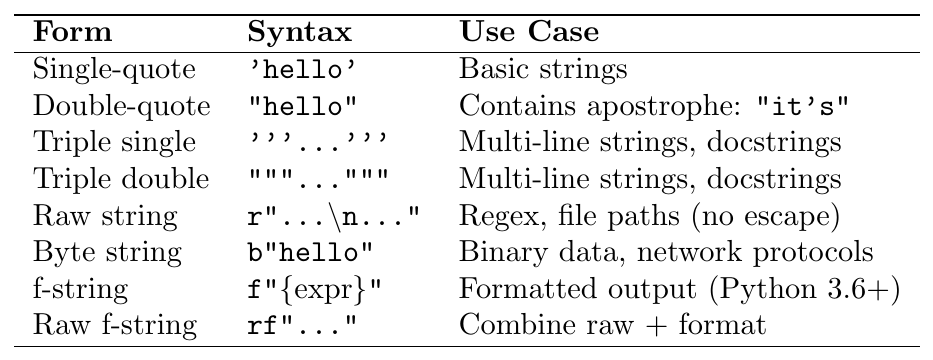
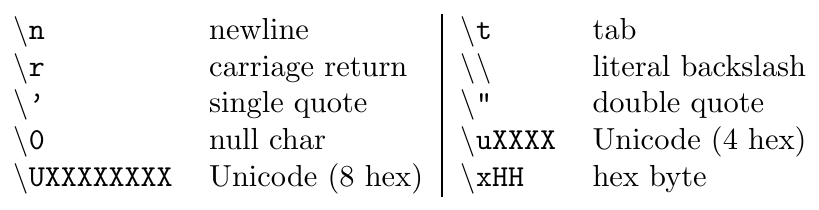
Common escape sequences:
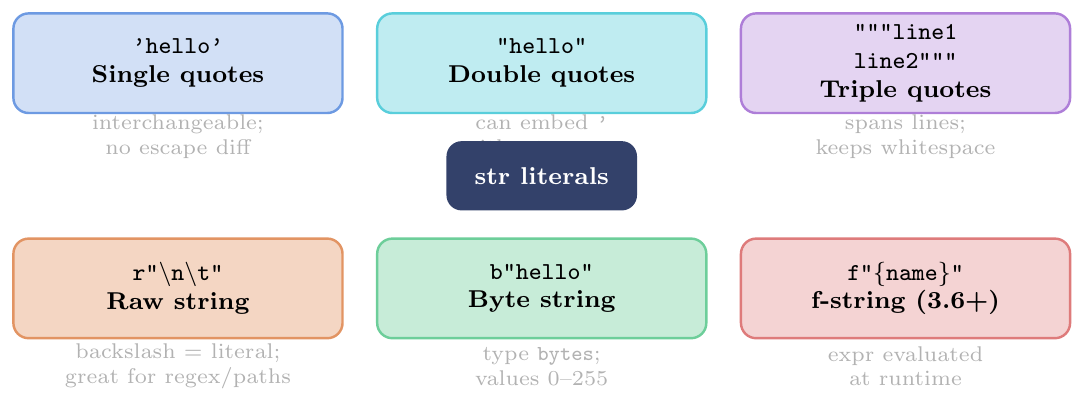
Raw string
r"...": backslash is treated as a literal character —r"\ n"is two chars (\andn), not a newline. Ideal for: regex patterns, Windows file pathsByte string
b"...": type isbytes, notstr; each element is an integer 0–255. Use for binary protocols, file I/Of-string
f"...": expressions inside{...}are evaluated at runtime; supports full format spec inside the braces:f"{x:.2f}",f"{name!r}"f-string
=specifier (Python 3.8+):f"{x=}"printsx=42for debuggingPrefix combinations:
rb"..."(raw bytes),rf"..."(raw f-string),u"..."(Unicode, legacy Python 2)Adjacent string literals are concatenated at compile time:
"hello" " " "world"$\to$"hello world"
# Single and double -- interchangeable
s1 = 'He said "hello"'       # embed double quotes in single
s2 = "it's a test"           # embed apostrophe in double

# Triple quotes -- multi-line
poem = """Roses are red,
Violets are blue,
Python is great,
And so are you!"""
print(poem)

# Triple for long strings with quotes inside
sql = '''SELECT *
FROM users
WHERE name = 'Alice' AND age > 18'''

% Using math mode escape wrapper if Greek character causes engine failures
[escapechar=§]
# Escape sequences
print("Tab:\there") # Tab: here
print("Newline:\nSecond") # Newline: / Second
print("Backslash: \\") # Backslash: \
print("Unicode: \u03B1") # Unicode: §$\alpha$§ (Greek alpha)
print("Hex: \x41\x42") # Hex: ABimport re, os
# Without raw string: double backslash needed
path1 = "C:\\Users\\Alice\\Documents"
print(path1) # C:\Users\Alice\Documents
# With raw string: cleaner
path2 = r"C:\Users\Alice\Documents"
print(path2) # C:\Users\Alice\Documents (same result)
# Regex: raw strings are essential
email_pattern_bad = "\\b[a-zA-Z0-9._%+-]+@[a-zA-Z0-9.-]+\\.[a-zA-Z]{2,}\\b"
email_pattern_good = r"\b[a-zA-Z0-9._%+-]+@[a-zA-Z0-9.-]+\.[a-zA-Z]{2,}\b"
text = "Contact us at gate@aiml.edu or admin@python.org"
emails = re.findall(email_pattern_good, text)
print(emails) # ['gate@aiml.edu', 'admin@python.org']
# Raw string still processes some escapes (e.g. cannot end with odd backslashes)
# r"C:\path\" <-- SyntaxError! (raw string cannot end with '\')
# Workaround:
path3 = r"C:\path" + "\\"name = "Alice"
score = 95.678
items = [10, 20, 30]
# Basic expression
print(f"Name: {name}, Score: {score}")
# Format specification inside {}
print(f"Score: {score:.2f}") # Score: 95.68
print(f"Score: {score:010.3f}") # Score: 000095.678 (zero-padded, width 10)
print(f"Hex : {255:#010x}") # Hex : 0x000000ff
print(f"Sci : {0.000123:e}") # Sci : 1.230000e-04
# Alignment
print(f"{'left':<10}|{'center':^10}|{'right':>10}")
# left | center | right
# Debug specifier (Python 3.8+)
x = 42
print(f"{x=}") # x=42
print(f"{score=:.1f}") # score=95.7
# Arbitrary expressions
print(f"{len(items)} items, sum={sum(items)}") # 3 items, sum=60
print(f"{name.upper()!r}") # 'ALICE' (!r calls repr())
print(f"{2**10 = }") # 2**10 = 1024
# Nested braces for dynamic width
width = 15
print(f"{'centered':^{width}}") # ' centered '
# Multiline f-string
report = (
f"Student : {name}\n"
f"Score : {score:.1f}\n"
f"Grade : {'A' if score >= 90 else 'B'}"
)
print(report)# byte string -- type is bytes, not str
b = b"hello"
print(type(b)) # <class 'bytes'>
print(b[0]) # 1box4 (integer, not char)
print(b[0:3]) # b'hel'
% Encoding str -> bytes
s = "Hello, GATE!"
encoded = s.encode("utf-8") # bytes
print(encoded) # b'Hello, GATE!'
% Decoding bytes -> str
decoded = encoded.decode("utf-8")
print(decoded) # Hello, GATE![escapechar=§]
# Non-ASCII characters
greek = "§$\Lambda\lambda\phi\alpha$§"
b2 = greek.encode("utf-8")
print(b2) # b'\xce\x91\xce\xbb\xce\xb8\xce\xb1'
print(len(greek)) # 4 characters
print(len(b2)) # 8 bytes (each Greek char = 2 UTF-8 bytes)Slicing
The s[start:stop:step] Syntax
Slicing extracts a substring using the syntax: \[\texttt{s[start : stop : step]}\]
Returns a new string (original unchanged)
start: index of first included character (default:0for positive step,len(s)-1for negative step)stop: index of first excluded character (default:len(s)for positive step,-len(s)-1for negative step)step: stride (default:1); negative step reverses directionOut-of-range indices are clamped (no
IndexErroron slices)
Characters included: indices $\{start,\ start+step,\ start+2\cdot step,\ \ldots\}$ such that the index is in $[start, stop)$ for positive step, or $(stop, start]$ for negative step.
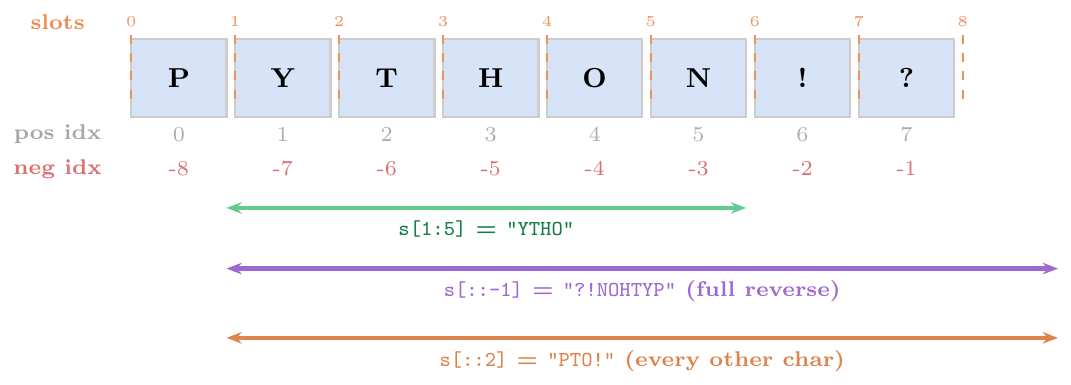
Omitted start: defaults to beginning (
s[:3]= first 3 chars)Omitted stop: defaults to end (
s[2:]= from index 2 onward)Omitted both:
s[:]is a shallow copy (new object, same content)Negative step:
s[a:b:-1]goes fromadown tob+1;s[::-1]reverses entire stringOut-of-bounds silently clamped:
s[0:1000]is same ass[0:len(s)]; noIndexErrorEmpty result: step-incompatible range returns
""Step must not be 0:
s[::0]raisesValueErrorNegative indices in slicing:
s[-3:-1]is second-last two chars
s = "PYTHON!?"

# Basic slices
print(s[1:5])      # YTHO   (chars at index 1,2,3,4)
print(s[:3])       # PYT    (first 3)
print(s[3:])       # HON!?  (from index 3 to end)
print(s[:])        # PYTHON!?  (full copy)

# Negative indices in slices
print(s[-3:])      # N!?    (last 3 characters)
print(s[:-2])      # PYTHON  (all except last 2)
print(s[-5:-2])    # HON    (slice within negative range)

# Step
print(s[::2])      # PTO!   (every 2nd char: P,T,O,!)
print(s[::3])      # PH?    (every 3rd: P,H,?)
print(s[1::2])     # YHN    (start at 1, every 2nd)

# Reversal
print(s[::-1])     # ?!NOHTYP (completely reversed)
print(s[5:1:-1])   # NOHY   (from 5 down to 2)
print(s[::-2])     # ?!TP   (reverse every 2nd)

# Out-of-bounds -- no error
print(s[0:1000])   # PYTHON!?  (clamped to len)
print(s[100:200])  # ""  (empty, no error)

# Common patterns
def is_palindrome(t): return t == t[::-1]
print(is_palindrome("racecar"))  # True
print(is_palindrome("python"))   # False

# Remove prefix/suffix (pre-Python 3.9)
url = "https://example.com"
if url.startswith("https://"):
    url = url[len("https://"):]  # slicing off prefix
print(url)   # example.com
Key String Methods
Searching & Testing
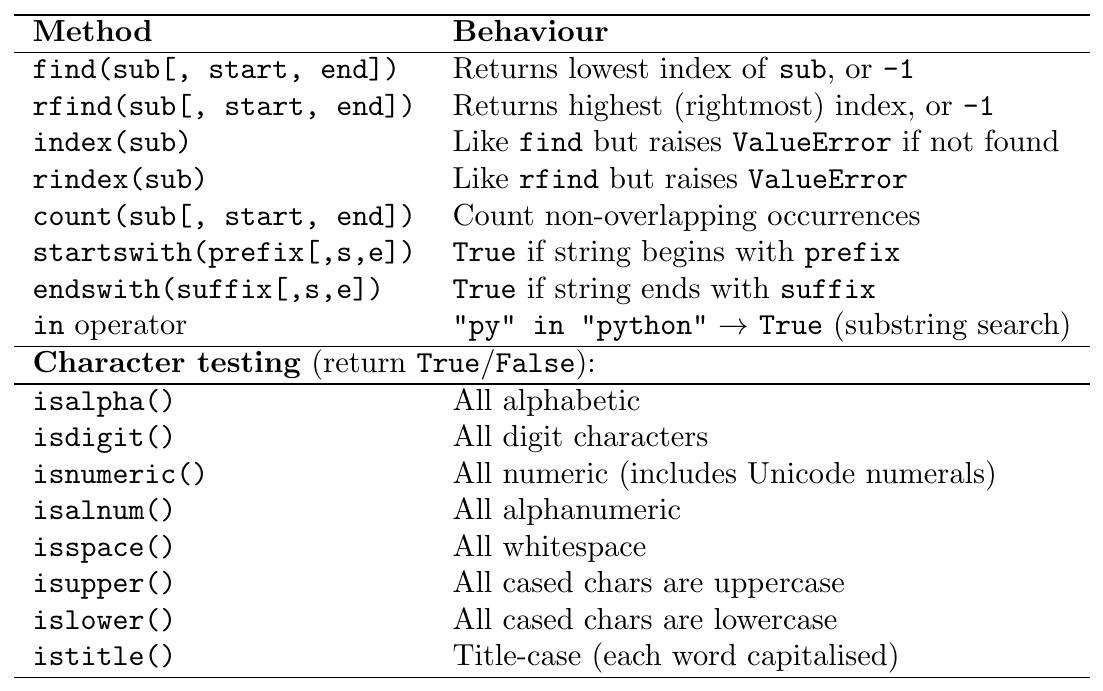
find()returns-1when not found — safe for conditional checks without try/exceptindex()raisesValueErrorwhen not found — use when absence of the substring is a programming errorBoth accept optional
startandendarguments to restrict the search range (like a slice, but doesn't create a new string)inis the idiomatic membership test when you only need existence (not position) — most readablecount()counts non-overlapping occurrences:"aaa".count("aa") == 1(not 2)
s = "the quick brown fox jumps over the lazy dog"

# find / rfind
print(s.find("the"))           # 0  (first occurrence)
print(s.rfind("the"))          # 31 (last occurrence)
print(s.find("cat"))           # -1 (not found)
print(s.find("the", 5))        # 31 (search from index 5)
print(s.find("the", 5, 20))    # -1 (search only s[5:20])

# index raises ValueError
try:
    s.index("cat")
except ValueError as e:
    print(e)   # substring not found

# count (non-overlapping)
print(s.count("the"))          # 2
print("aaaaaa".count("aa"))    # 3  (non-overlapping: aa|aa|aa)
print("aaa".count("aa"))       # 1  (aa|a -- only 1 non-overlapping)

# startswith / endswith with tuple
files = ["report.pdf", "data.csv", "image.png", "notes.txt"]
docs  = [f for f in files if f.endswith((".pdf", ".txt"))]
print(docs)   # ['report.pdf', 'notes.txt']

# in operator
print("fox" in s)       # True
print("FOX" in s)       # False  (case-sensitive)
print("" in s)          # True   (empty string is in any string)

# Character testing
print("Python3".isalpha())   # False (digit present)
print("Python".isalpha())    # True
print("12345".isdigit())     # True
print("abc123".isalnum())    # True
print("  \t\n".isspace())    # True
print("GATE".isupper())      # True
print("Gate Exam".istitle()) # True
Modification Methods (Return New String)
All modification methods return new string objects; the original is unchanged.
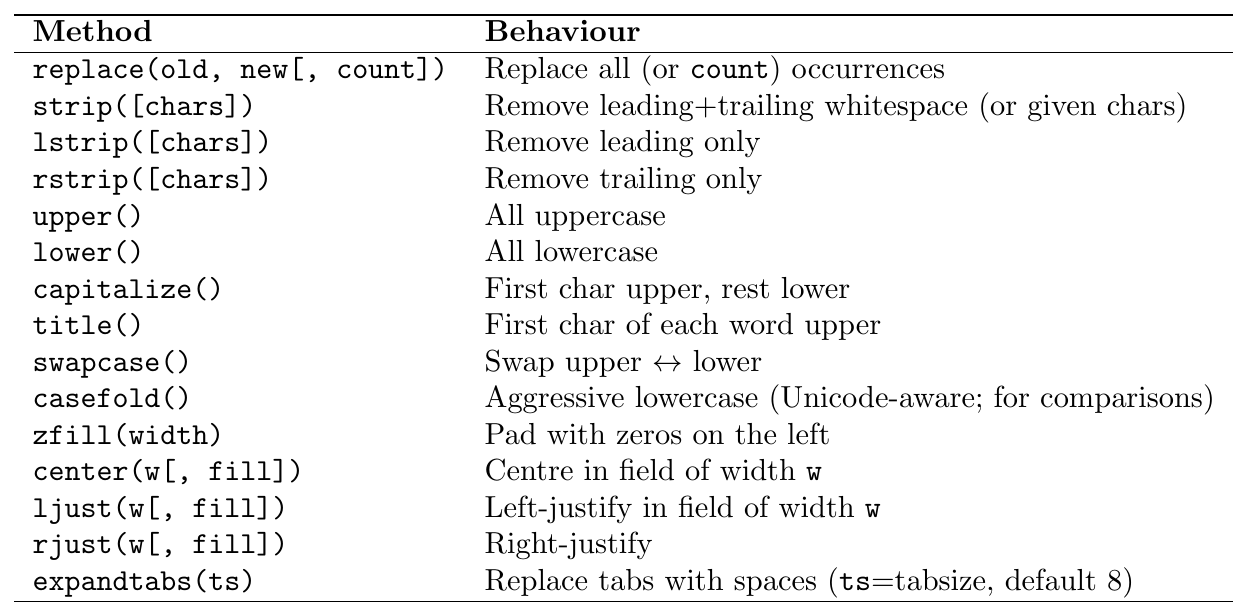
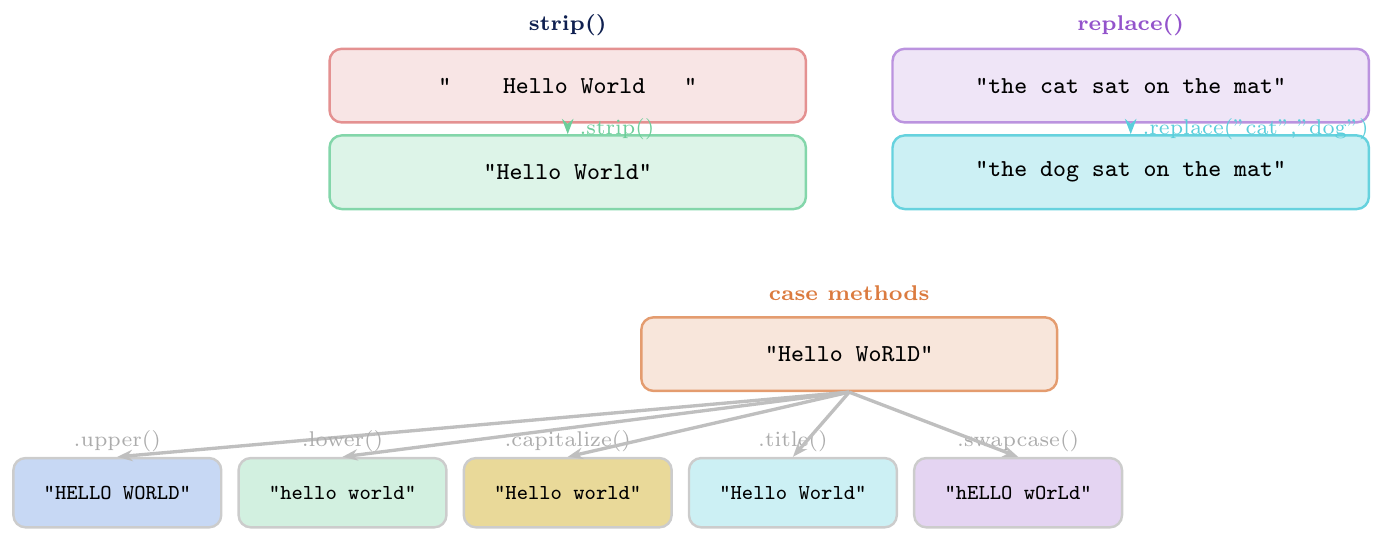
# strip variants
s = "   hello world   "
print(repr(s.strip()))    # 'hello world'
print(repr(s.lstrip()))   # 'hello world   '
print(repr(s.rstrip()))   # '   hello world'

# strip with character set
t = "***ERROR: file not found***"
print(t.strip("*"))       # 'ERROR: file not found'
print(t.strip("*E"))      # 'RROR: file not found'   (strips any of *, E)

# replace
sentence = "the cat sat on the mat"
print(sentence.replace("at", "og"))          # the cog sog on the mog
print(sentence.replace("the", "a", 1))      # a cat sat on the mat (count=1)

# Case methods
s = "hello WoRlD"
print(s.upper())        # HELLO WORLD
print(s.lower())        # hello world
print(s.capitalize())   # Hello world  (only first char up)
print(s.title())        # Hello World  (each word)
print(s.swapcase())     # HELLO wOrLd

# casefold for international comparison
print("straße".casefold())      # strasse  (German ß -> ss)
print("straße".lower())         # straße   (lower doesn't expand ß)
print("straße".casefold() == "strasse")  # True (correct comparison)

# Justification and fill
print("42".zfill(6))           # 000042
print("-42".zfill(6))          # -00042  (sign preserved)
print("GATE".center(12, '-'))  # ----GATE----
print("left".ljust(10, '.'))   # left......
print("right".rjust(10, '.'))  # .....right

# Method chaining (each returns new string)
result = "  GATE Exam 2025  ".strip().lower().replace(" ", "_")
print(result)   # gate_exam_2025
Splitting & Joining

Golden rule for building strings from many pieces:
Never use += in a loop (each iteration creates a new object, $O(n^2)$).
Always use "".join(list) ($O(n)$).
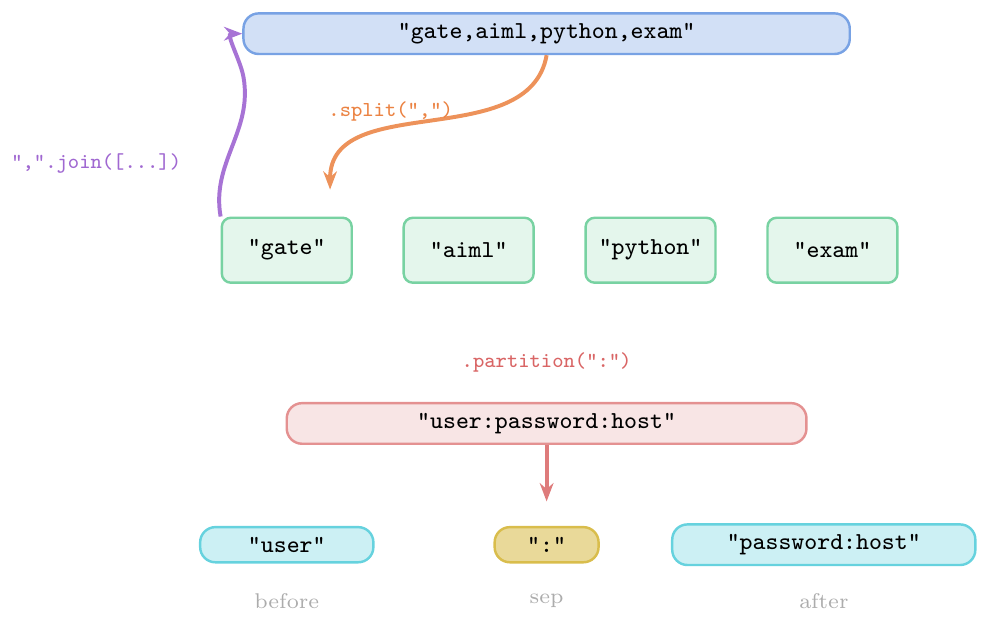
# Default split: any whitespace, strips leading/trailing
s = "  one  two    three  "
print(s.split())             # ['one', 'two', 'three']

# Split on specific separator
csv = "gate,aiml,python,exam"
print(csv.split(","))        # ['gate', 'aiml', 'python', 'exam']

# maxsplit: limit number of splits
print(csv.split(",", 2))     # ['gate', 'aiml', 'python,exam']

# rsplit: split from right
print(csv.rsplit(",", 1))    # ['gate,aiml,python', 'exam']

# splitlines
text = "Line1\nLine2\r\nLine3\rLine4"
print(text.splitlines())     # ['Line1', 'Line2', 'Line3', 'Line4']
print(text.splitlines(True)) # keeps line endings: ['Line1\n', ...]

# join -- the correct way to build strings
words = ["GATE", "2025", "AI", "ML"]
print(" ".join(words))    # GATE 2025 AI ML
print("-".join(words))    # GATE-2025-AI-ML
print("".join(words))     # GATE2025AIML

# Efficient string building (join vs +=)
parts = []
for i in range(5):
    parts.append(str(i * i))   # collect first
result = ", ".join(parts)      # join once at the end
print(result)   # 0, 1, 4, 9, 16

# partition
conn = "user:password:hostname"
before, sep, after = conn.partition(":")
print(before, sep, after)   # user : password:hostname

# rpartition (last occurrence)
before2, sep2, after2 = conn.rpartition(":")
print(before2, sep2, after2) # user:password : hostname

# partition when sep not found
a, b, c = "nocohere".partition(":")
print(repr(a), repr(b), repr(c))  # 'nocohere' '' ''
String Formatting

Format specification mini-language (same for format() and f-strings):
\[\texttt{[[fill]align][sign][z][\#][0][width][grouping\_option][.precision][type]}\]
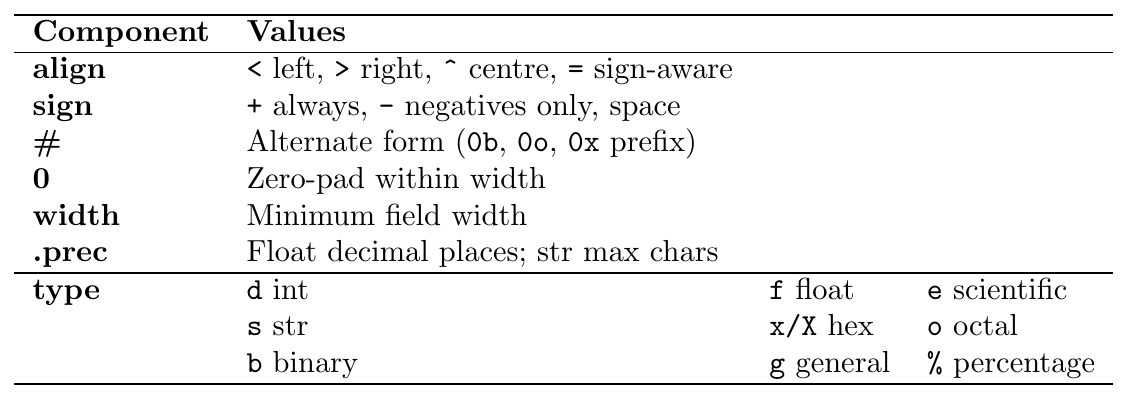
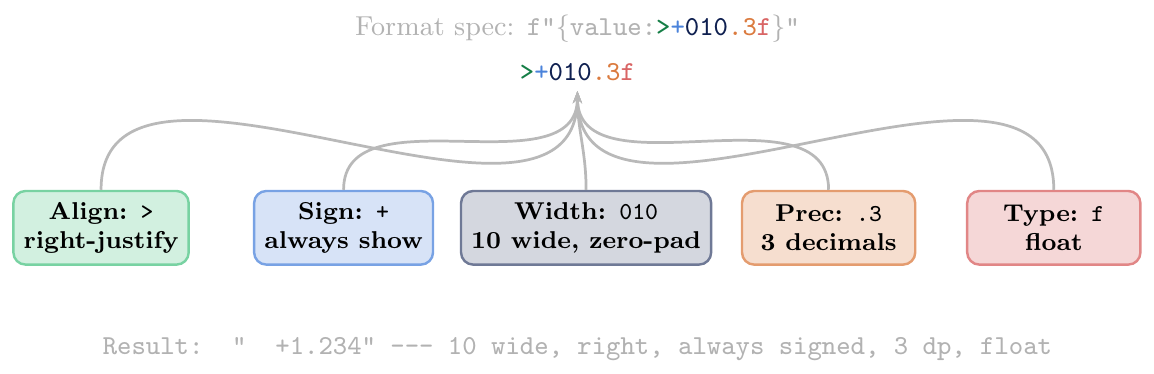
d— Decimal integer:f"{255:d}"$\to$255b— Binary:f"{10:#b}"$\to$0b1010o— Octal:f"{8:#o}"$\to$0o10x/X— Hex lower/upper:f"{255:#x}"$\to$0xfff— Fixed float:f"{3.14159:.2f}"$\to$3.14e/E— Scientific:f"{0.00123:e}"$\to$1.230000e-03g— General (shorter off/e):f"{0.00001:g}"$\to$1e-05%— Percentage:f"{0.856:.1%}"$\to$85.6%s— String (default):f"{"gate":>10s}"$\to$"\ \ \ \ \ \ gate",— Thousands separator:f"{1234567:,}"$\to$1,234,567_— Underscore separator (3.6+):f"{1234567:_}"$\to$1_234_567
name  = "Alice"
score = 95.678
rank  = 3

# Basic substitution
print("Name: %s, Score: %.2f" % (name, score))
# Name: Alice, Score: 95.68

# Width and alignment
print("%-10s | %5d | %8.3f" % (name, rank, score))
# Alice      |     3 |   95.678

# Multiple types
for item, qty, price in [("Pen",5,1.5),("Book",2,299.0)]:
    print("%-8s %3d  Rs %7.2f" % (item, qty, qty*price))
# Pen          5  Rs    7.50
# Book         2  Rs  598.00

# Named substitution using dict
print("%(name)s scored %(score).1f" % {"name":name, "score":score})
# Alice scored 95.7str.format() (New Style)# Positional
print("{} items at Rs {:.2f} each".format(5, 49.99))
# 5 items at Rs 49.99 each
# Explicit positional
print("{0} and {1}, then {0} again".format("A","B"))
# A and B, then A again
# Named
print("{name} scored {score:.1f}%".format(name="Alice", score=95.7))
# Alice scored 95.7%
# Alignment and fill
print("{:*^20}".format("GATE")) # ********GATE********
print("{:>10}".format("right")) # " right"
print("{:<10}".format("left")) # "left "
# Number formatting
print("{:010.3f}".format(3.14)) # 000003.140
print("{:+.2f}".format(-42.5)) # -42.50
print("{:+.2f}".format(42.5)) # +42.50
print("{:,}".format(1_000_000)) # 1,000,000
print("{:#010x}".format(255)) # 0x000000ff
print("{:#010b}".format(10)) # 0b00001010
# Dynamic width/precision
width, prec = 12, 4
print("{:{w}.{p}f}".format(3.14159, w=width, p=prec))
# " 3.1416"import math
pi = math.pi
n = 1_000_000
name = "GATE DA"
score = 0.8567
# Basic
print(f"{name} pass rate: {score:.1%}") # GATE DA pass rate: 85.7%
# Alignment
for lang, rank in [("Python",1),("Java",2),("C",3)]:
print(f"{lang:<10} rank: {rank:>3}")
# Python rank: 1
# Java rank: 2
# C rank: 3
# Number bases
n2 = 255
print(f"Dec:{n2:d} Bin:{n2:#010b} Oct:{n2:#o} Hex:{n2:#x}")
# Dec:255 Bin:0b11111111 Oct:0o377 Hex:0xff
# Scientific and general
print(f"pi = {pi:.5f}") # pi = 3.14159
print(f"pi = {pi:.3e}") # pi = 3.142e+00
print(f"pi = {pi:.4g}") # pi = 3.142
print(f"big = {n:_}") # big = 1_000_000
print(f"big = {n:,}") # big = 1,000,000
# Debug with =
x, y = 10, 20
print(f"{x=}, {y=}, {x+y=}") # x=10, y=20, x+y=30
# Expression inside format spec
col_width = 8
headers = ["Name", "Score", "Rank"]
print(" ".join(f"{h:^{col_width}}" for h in headers))
# Name Score Rank
# Nested f-string
fmt = ".3f"
print(f"{pi:{fmt}}") # 3.142
# Conversion flags: !r (repr), !s (str), !a (ascii)
s = "café"
print(f"{s!r}") # 'café'
print(f"{s!a}") # 'caf\xe9' (ascii-safe)name, score, rank = "Alice", 95.678, 1
# Old style
print("%-10s %5.2f #%d" % (name, score, rank))
# .format()
print("{:<10} {:5.2f} #{:d}".format(name, score, rank))
# f-string (recommended)
print(f"{name:<10} {score:5.2f} #{rank:d}")
# All produce: Alice 95.68 #1
# template strings (safe for user input, no arbitrary expressions)
from string import Template
t = Template("Hello $name, your score is $score")
print(t.substitute(name=name, score=round(score,1)))
# Hello Alice, your score is 95.7Performance and Common Patterns
Concatenation in loop: use
list.append()+"".join()instead ofs += part(avoids $O(n^2)$ copying)Check prefix/suffix: Python 3.9+ has
str.removeprefix()andstr.removesuffix()(cleaner than slicing)Palindrome check:
s == s[::-1](simple); for case-insensitive:s.lower() == s[::-1].lower()Count words:
len(s.split())(handles multiple spaces)Reverse words:
" ".join(s.split()[::-1])String to list of chars:
list(s)or[c for c in s]Check all chars:
all(c.isdigit() for c in s)Caesar cipher:
chr((ord(c) - ord('a') + n) % 26 + ord('a'))String interning:
sys.intern(s)forces a single shared copy ofsin memory (speeds up repeated equality tests)
# 1. Count vowels
s = "Python Programming"
vowels = sum(1 for c in s.lower() if c in "aeiou")
print(vowels)    # 5

# 2. Reverse words in a sentence
sentence = "  Hello World  Python  "
reversed_words = " ".join(sentence.split()[::-1])
print(reversed_words)   # Python World Hello

# 3. Check pangram (contains all 26 letters)
def is_pangram(text):
    return set('abcdefghijklmnopqrstuvwxyz').issubset(set(text.lower()))
print(is_pangram("The quick brown fox jumps over the lazy dog"))  # True

# 4. Remove duplicates preserving order
s = "programming"
unique = "".join(dict.fromkeys(s))
print(unique)    # progamin
Lists
List Properties
Core Characteristics
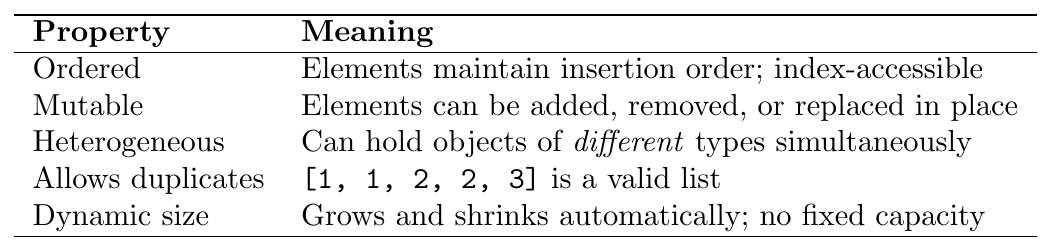
A Python list is an ordered, mutable, heterogeneous sequence that allows duplicate elements. It is Python's workhorse general-purpose container.
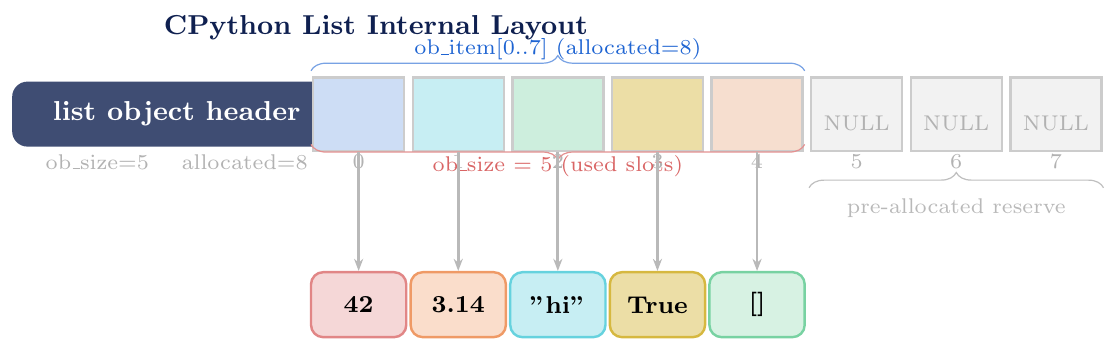
Internally CPython implements list as a dynamic array (array of
pointers to PyObjects):
A contiguous block of memory stores pointers (references) to objects, not the objects themselves
When the array is full, Python over-allocates a larger block (roughly $\times 1.125$ growth factor) and copies pointers over — this gives amortised $O(1)$ for
appendRandom access
L[i]is $O(1)$ (pointer arithmetic)Insertion / deletion at the middle is $O(n)$ (shifting pointers)
Heterogeneous:
[1, "two", 3.0, True, None, [5,6]]is validNestable: lists can contain other lists (any depth)
Mutable: supports item assignment
L[i] = x, slice assignmentL[a:b] = [...],del L[i]Ordered:
[1,2,3] != [3,2,1]even with same elementsIterable: works with
for,map,filter,zip, comprehensionsHashable? No — lists are mutable so cannot be dict keys or set members
Truthiness: empty list
[]is falsy; any non-empty list is truthy
List Creation
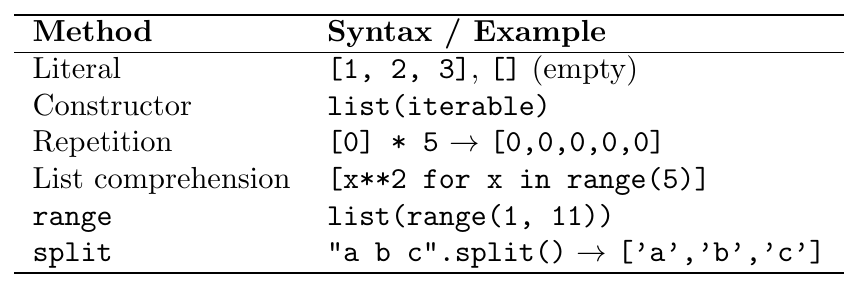
All Creation Methods
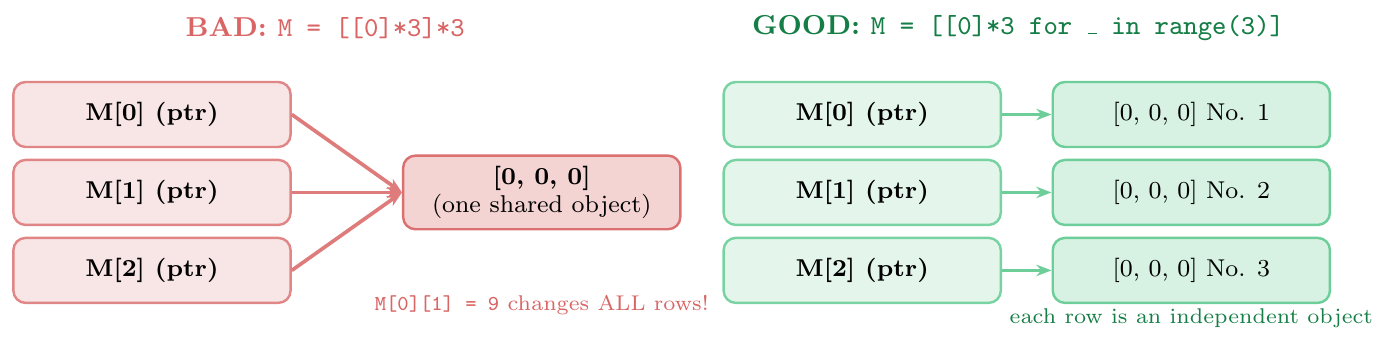
The expression [[]] * n creates a list of n references to the
same single inner list object. Modifying one element modifies all of them.
M = [[0]*3]*3 $\quad\Rightarrow\quad$ all three rows point to the same list
Correct pattern for independent rows:
M = [[0]*3 for _ in range(3)]
# Literal
a = [1, 2, 3]
b = []                       # empty list
c = [1, "hello", 3.14, True, None]  # heterogeneous

# Constructor from iterable
d = list("GATE")             # ['G', 'A', 'T', 'E']
e = list(range(1, 6))        # [1, 2, 3, 4, 5]
f = list((10, 20, 30))       # from tuple
g = list({1, 2, 3})          # from set (order not guaranteed)

# Repetition
zeros  = [0] * 5             # [0, 0, 0, 0, 0]
filler = [None] * 4          # [None, None, None, None]

# PITFALL: nested mutable
bad = [[]] * 3
bad[0].append(1)
print(bad)   # [[1], [1], [1]]  -- ALL rows affected!

# CORRECT: comprehension
good = [[] for _ in range(3)]
good[0].append(1)
print(good)  # [[1], [], []]   -- only row 0 affected

# 2D matrix (3x4) of zeros
matrix = [[0] * 4 for _ in range(3)]
matrix[1][2] = 99
print(matrix)
# [[0, 0, 0, 0],
#  [0, 0, 99, 0],
#  [0, 0, 0, 0]]
Indexing & Slicing
List Indexing, Slice Assignment and del
List slicing uses the same L[start:stop:step] syntax as strings, but because
lists are mutable, they additionally support:
Slice assignment:
L[a:b] = [x, y, z]— replaces the slice with new elements; can change the length of the listdelstatement:del L[i]removes one element;del L[a:b]removes a range;del L[::2]removes every otherSlicing returns a new list (shallow copy of that slice)
Key differences from string slicing:

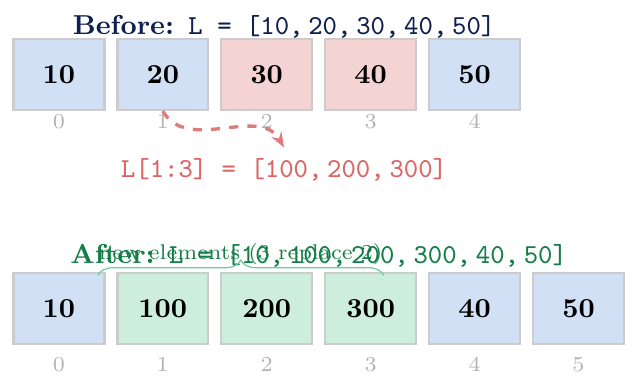
del --- Changing List LengthL = [10, 20, 30, 40, 50]
% Regular slicing: returns NEW list (no modification)
sub = L[1:4]
print(sub) # [20, 30, 40]
print(L) # [10, 20, 30, 40, 50] unchanged
% Slice assignment: modifies IN PLACE, can change length
L[1:3] = [100, 200, 300] # replace 2 elements with 3
print(L) # [10, 100, 200, 300, 40, 50] (length 6)
L[1:4] = [] # delete elements at index 1,2,3
print(L) # [10, 40, 50] (length 3)
L[1:1] = [99, 88] # insert without replacing (stop==start)
print(L) # [10, 99, 88, 40, 50]
# del statement
L = [10, 20, 30, 40, 50]
del L[2] # delete element at index 2
print(L) # [10, 20, 40, 50]
del L[1:3] # delete slice
print(L) # [10, 50]
L = list(range(10))
del L[::2] # delete every other element (indices 0,2,4,6,8)
print(L) # [1, 3, 5, 7, 9]
# Negative index assignment
L = [1, 2, 3, 4, 5]
L[-1] = 99
print(L) # [1, 2, 3, 4, 99]List Methods
Mutation Methods (In-Place)
NoneAll in-place mutation methods return None (not the list). This is a
common bug: L = L.sort() sets L to None!
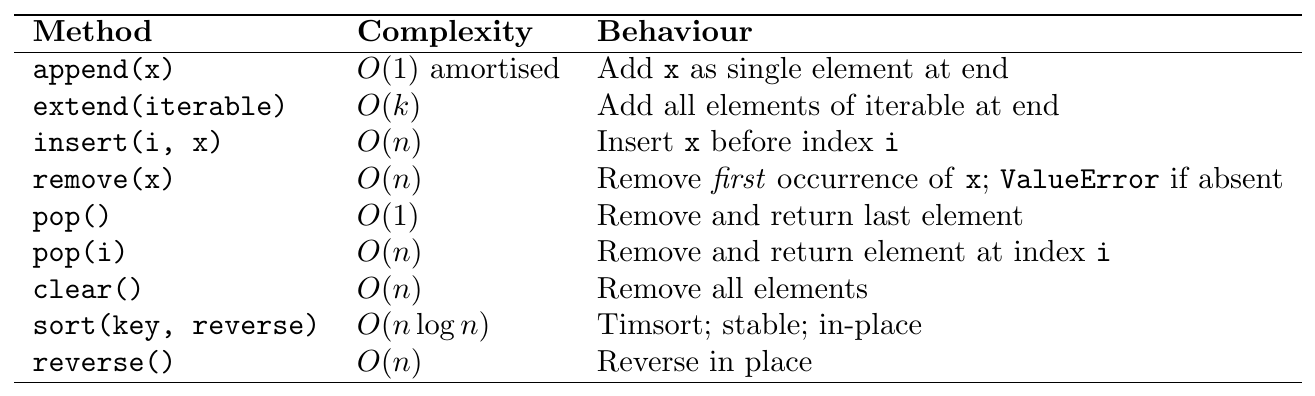
Timsort: hybrid merge sort + insertion sort; Python's native sort since Python 2.3
Stable: equal elements keep their relative order
In-place: modifies the list; returns
Nonekeyparameter: a function applied to each element before comparison; the original values are stored unmodifiedreverse=True: sorts in descending ordersorted(L)vsL.sort():sorted()returns a new sorted list;L.sort()is in-placeTime: $O(n\log n)$ worst/average; $O(n)$ best case (already sorted runs)
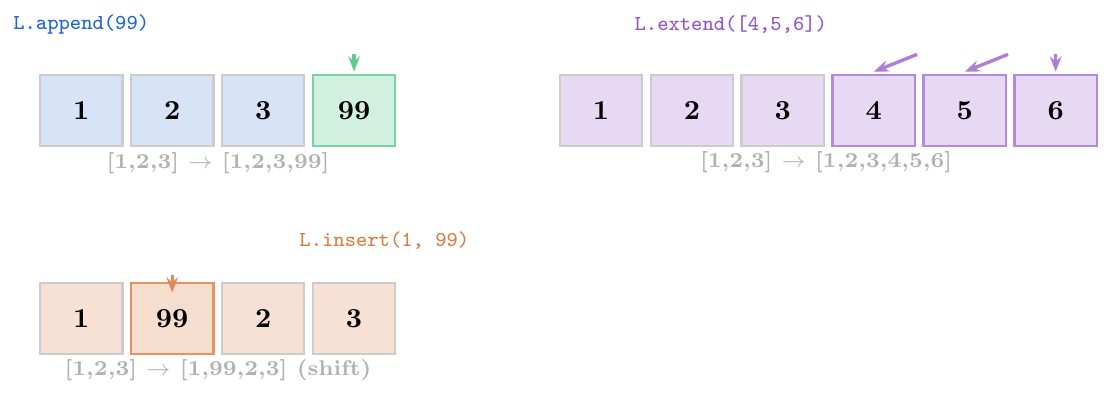
L = [1, 2, 3]

# append: adds one object (even if it's a list)
L.append(4)
print(L)              # [1, 2, 3, 4]
L.append([5, 6])      # adds [5,6] as a SINGLE element (nested list)
print(L)              # [1, 2, 3, 4, [5, 6]]

# extend: adds each element of the iterable
L = [1, 2, 3]
L.extend([4, 5, 6])   # unpacks and appends individually
print(L)              # [1, 2, 3, 4, 5, 6]
L.extend("AB")        # strings are iterable
print(L)              # [1, 2, 3, 4, 5, 6, 'A', 'B']

# insert: O(n)
L = [10, 20, 30, 40]
L.insert(0, 99)       # insert at beginning
print(L)              # [99, 10, 20, 30, 40]
L.insert(len(L), 0)   # same as append
print(L)              # [99, 10, 20, 30, 40, 0]
L.insert(-1, 77)      # before last element
print(L)              # [99, 10, 20, 30, 40, 77, 0]

# remove: removes FIRST occurrence
L = [3, 1, 4, 1, 5, 9, 2, 6]
L.remove(1)           # removes first 1
print(L)              # [3, 4, 1, 5, 9, 2, 6]
try:
    L.remove(99)      # raises ValueError if not found
except ValueError as e:
    print(e)          # list.remove(x): x not in list

# pop: removes and returns
L = [10, 20, 30, 40, 50]
print(L.pop())        # 50  (from end, O(1))
print(L.pop(1))       # 20  (from index 1, O(n))
print(L) # [10, 30, 40]sort() vs sorted() --- key and reverse# sort() -- in-place, returns None
nums = [3, 1, 4, 1, 5, 9, 2, 6]
nums.sort()
print(nums) # [1, 1, 2, 3, 4, 5, 6, 9]
# sorted() -- returns new list, original unchanged
nums2 = [3, 1, 4, 1, 5, 9, 2, 6]
result = sorted(nums2)
print(result) # [1, 1, 2, 3, 4, 5, 6, 9]
print(nums2) # [3, 1, 4, 1, 5, 9, 2, 6] unchanged!
# reverse=True
nums.sort(reverse=True)
print(nums) # [9, 6, 5, 4, 3, 2, 1, 1]
# key function -- sort by absolute value
data = [-5, 2, -1, 8, -3]
data.sort(key=abs)
print(data) # [-1, 2, -3, -5, 8]
# sort strings by length
words = ["banana", "kiwi", "apple", "fig", "pear"]
words.sort(key=len)
print(words) # ['fig', 'kiwi', 'pear', 'apple', 'banana']
# sort complex objects
students = [("Alice",85), ("Bob",92), ("Charlie",78)]
students.sort(key=lambda s: s[1], reverse=True)
print(students) # [('Bob',92), ('Alice',85), ('Charlie',78)]
# stable sort: equal keys preserve original order
data = [("a",2),("b",1),("c",2),("d",1)]
data.sort(key=lambda x: x[1])
print(data) # [('b',1), ('d',1), ('a',2), ('c',2)]
# Common bug
L = [3, 1, 2]
L = L.sort() # BUG: sort() returns None!
print(L) # NoneNon-Mutating Methods
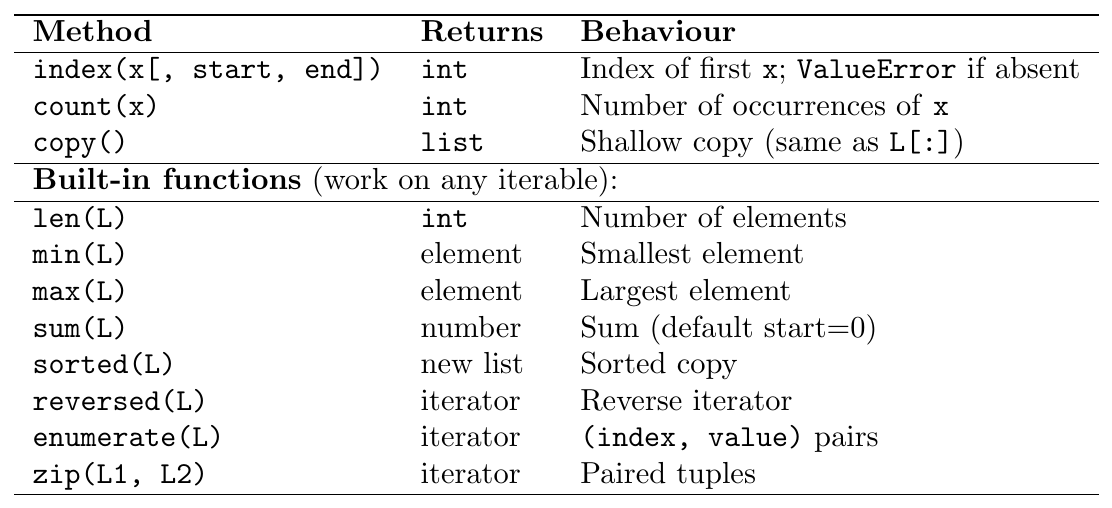
L = [10, 20, 30, 20, 40, 20]

# index: first occurrence
print(L.index(20))        # 1
print(L.index(20, 2))     # 3  (search from index 2)
print(L.index(20, 4))     # 5  (search from index 4)
try:
    L.index(99)
except ValueError as e:
    print(e)              # 99 is not in list

# count
print(L.count(20))        # 3
print(L.count(99))        # 0  (no error for missing)

# enumerate: index + value pairs
fruits = ["apple", "banana", "cherry"]
for i, fruit in enumerate(fruits):
    print(f"{i}: {fruit}")

for i, fruit in enumerate(fruits, start=1):  # start index at 1
    print(f"{i}. {fruit}")

# zip: pair corresponding elements
names  = ["Alice", "Bob", "Charlie"]
scores = [85, 92, 78]
for name, score in zip(names, scores):
    print(f"{name}: {score}")

# zip stops at shortest
a = [1, 2, 3, 4]
b = [10, 20]
print(list(zip(a, b)))    # [(1,10), (2,20)]

# zip(*list) to unzip (transpose)
pairs = [(1,'a'), (2,'b'), (3,'c')]
nums, chars = zip(*pairs)
print(nums)    # (1, 2, 3)
print(chars)   # ('a', 'b', 'c')
Copying Semantics
Assignment, Shallow Copy, Deep Copy
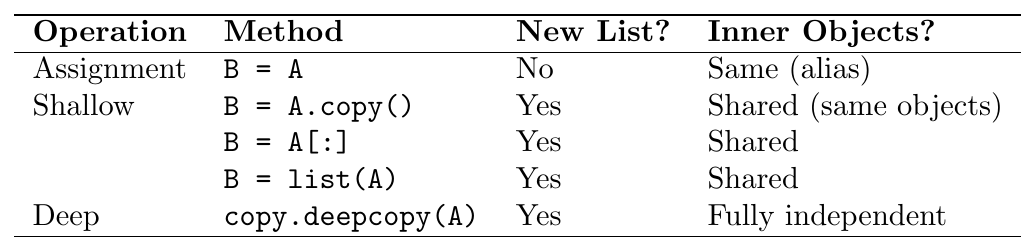
Shallow copy is sufficient when the list contains only immutable objects (ints, strings, tuples). A deep copy is needed when the list contains mutable inner objects (lists, dicts, custom objects).
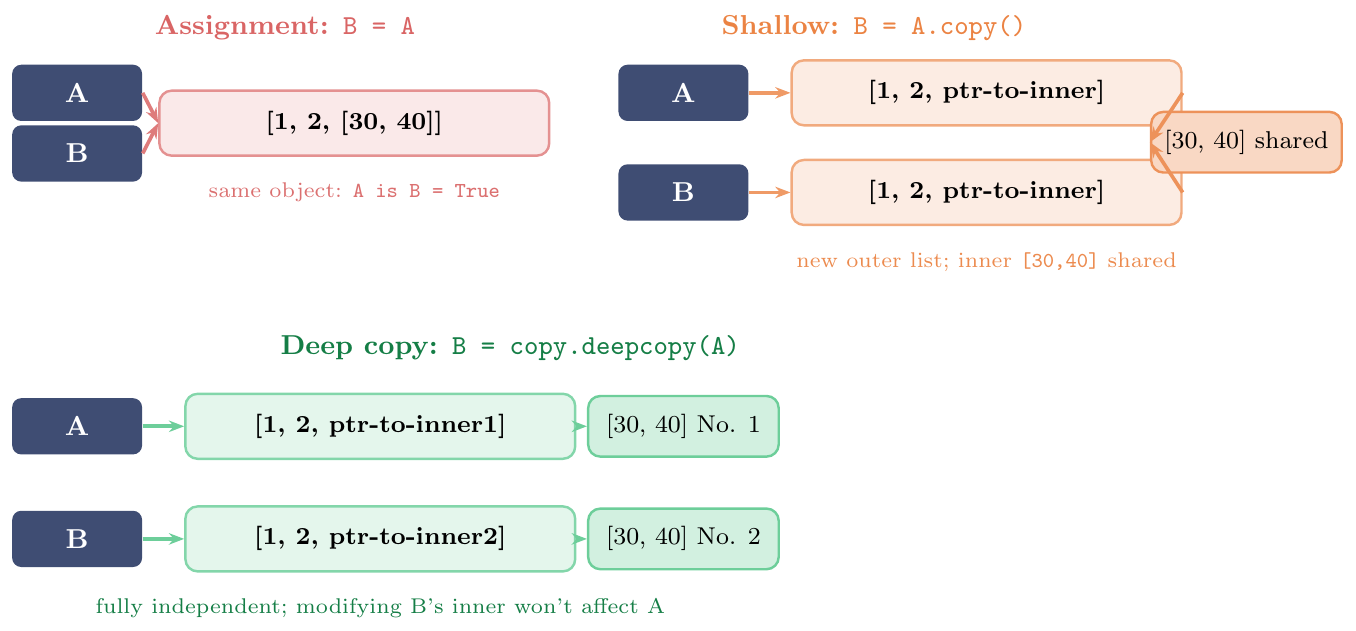
import copy

original = [1, 2, [30, 40]]

# ── 1. Assignment: alias, NOT a copy ──────────────────────
alias = original
alias.append(99)
print(original)   # [1, 2, [30, 40], 99]
alias[2].append(50)
print(original)   # [1, 2, [30, 40, 50], 99]

# ── 2. Shallow copy ───────────────────────────────────────
original = [1, 2, [30, 40]]
shallow = original.copy()

shallow.append(99)          # does NOT affect original
print(original)   # [1, 2, [30, 40]]

shallow[2].append(50)       # DOES affect original!
print(original)   # [1, 2, [30, 40, 50]]
print(shallow)    # [1, 2, [30, 40, 50], 99]

# ── 3. Deep copy: fully independent ───────────────────────
original = [1, 2, [30, 40]]
deep = copy.deepcopy(original)

deep.append(99)
deep[2].append(50)          # does NOT affect original
print(original)   # [1, 2, [30, 40]]
print(deep)       # [1, 2, [30, 40, 50], 99]

# ── Confirming identity ────────────────────────────────────
a = [1, [2, 3]]
s = a.copy()
d = copy.deepcopy(a)

print(a is s)           # False (different outer list)
print(a[1] is s[1])     # True  (same inner list -- shallow!)
print(a[1] is d[1]) # False (different inner list -- deep)[[0]*3]*3# PITFALL: repetition creates shared references to inner list
bad_matrix = [[0] * 3] * 3
print(bad_matrix) # [[0, 0, 0], [0, 0, 0], [0, 0, 0]]
bad_matrix[0][1] = 99
print(bad_matrix)
# Proof: all rows are the same object
print(bad_matrix[0] is bad_matrix[1]) # True
print(bad_matrix[1] is bad_matrix[2]) # True
# CORRECT: list comprehension creates independent rows
good_matrix = [[0] * 3 for _ in range(3)]
good_matrix[0][1] = 99
print(good_matrix)
print(good_matrix[0] is good_matrix[1]) # Falseappend vs extend vs + vs +=
Adding Elements and Combining Lists

Key distinction:
append([4,5])adds the list[4,5]as a single nested elementextend([4,5])adds4and5as two separate elementsL + [4,5]creates a new list;Lis unchangedL += [4,5]calls__iadd__(same asextend); same id
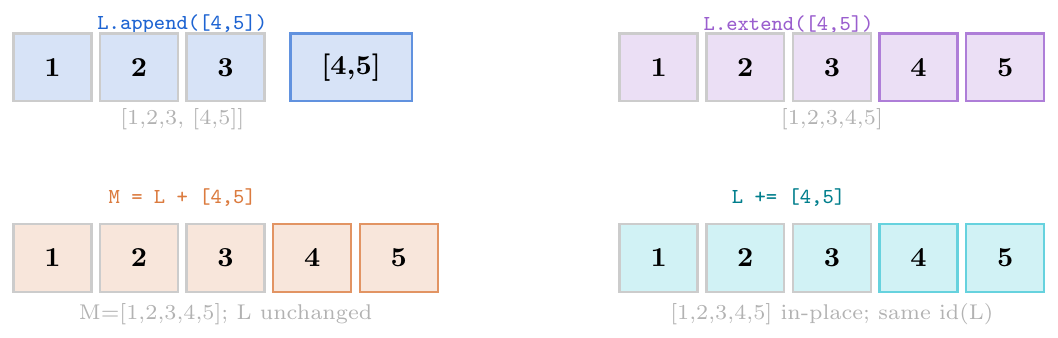
# ── append: adds ONE item (even if it's a list) ────────────
L = [1, 2, 3]
L.append([4, 5])
print(L)               # [1, 2, 3, [4, 5]]
print(len(L))          # 4

# ── extend: unpacks iterable, adds each item ───────────────
L = [1, 2, 3]
L.extend([4, 5])
print(L)               # [1, 2, 3, 4, 5]
print(len(L))          # 5

# ── + creates NEW list ─────────────────────────────────────
L = [1, 2, 3]
M = L + [4, 5]
print(M)               # [1, 2, 3, 4, 5]
print(L)               # [1, 2, 3]
print(id(L) == id(M))  # False

# ── += modifies IN PLACE (same id) ─────────────────────────
L = [1, 2, 3]
old_id = id(L)
L += [4, 5]
print(L)               # [1, 2, 3, 4, 5]
print(id(L) == old_id) # True

# ── += vs + with immutables ────────────────────────────────
s = "hello"
old_id = id(s)
s += " world"
print(id(s) == old_id) # False

# ── Practical: build list efficiently ──────────────────────
L = []
L.extend(range(5))     # L = [0,1,2,3,4]

L2 = []
for x in range(5):
    L2.append(x)

matrix_rows = [[1,2],[3,4],[5,6]]
flat1 = []
for row in matrix_rows:
    flat1.extend(row)
flat2 = []
for row in matrix_rows:
    flat2.append(row)
print(flat1)   # [1, 2, 3, 4, 5, 6]
print(flat2) # [[1, 2], [3, 4], [5, 6]]# 1. Flatten a 2D list
matrix = [[1,2,3],[4,5,6],[7,8,9]]
flat = [x for row in matrix for x in row]
print(flat) # [1, 2, 3, 4, 5, 6, 7, 8, 9]
# 2. Remove duplicates preserving order
def unique(lst):
seen = set()
return [x for x in lst if not (x in seen or seen.add(x))]
print(unique([3,1,4,1,5,9,2,6,5])) # [3, 1, 4, 5, 9, 2, 6]
# 3. Rotate list by k positions
def rotate(lst, k):
k %= len(lst)
return lst[-k:] + lst[:-k]
print(rotate([1,2,3,4,5], 2)) # [4, 5, 1, 2, 3]
# 4. Stack and Queue using list
stack = []
stack.append(1); stack.append(2); stack.append(3)
print(stack.pop()) # 3
from collections import deque
queue = deque()
queue.append(1); queue.append(2); queue.append(3)
print(queue.popleft()) # 1
# 5. Two-pointer technique
def two_sum(lst, target):
lst_sorted = sorted(lst)
lo, hi = 0, len(lst_sorted) - 1
while lo < hi:
s = lst_sorted[lo] + lst_sorted[hi]
if s == target: return (lst_sorted[lo], lst_sorted[hi])
elif s < target: lo += 1
else: hi -= 1
return None
print(two_sum([2,7,11,15], 9)) # (2, 7)
# 6. List as default argument pitfall
def bad_append(x, L=[]):
L.append(x)
return L
print(bad_append(1)) # [1]
print(bad_append(2)) # [1, 2]
def good_append(x, L=None):
if L is None:
L = []
L.append(x)
return LTuples
Tuple Properties
Core Characteristics
A Python tuple is an ordered, immutable, heterogeneous sequence that allows duplicate elements. It is Python's built-in fixed-size container.
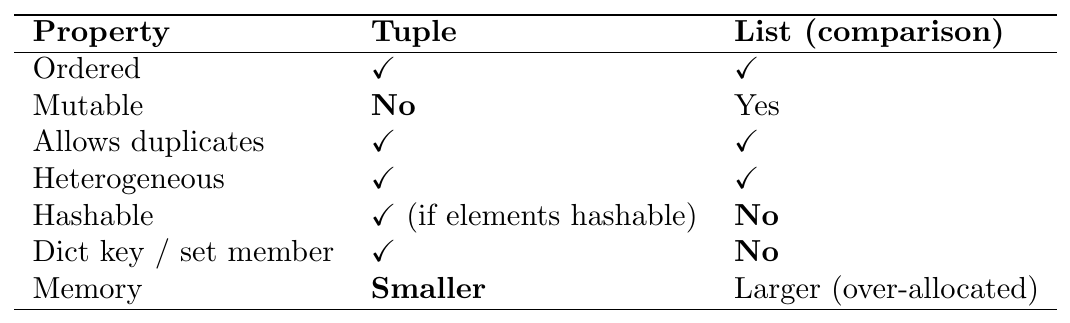
Immutable means the tuple's structure (which objects it refers to) cannot change after creation. However:
If a tuple contains a mutable object (e.g.\ a list), that object's contents can still change. The tuple's reference to it does not.
A tuple is hashable only if all its elements are hashable.
(1, 2, 3)is hashable;(1, [2, 3])is not (list is unhashable).
Formal:\ hash(t) succeeds $\Leftrightarrow$ every element
e in t satisfies hash(e) succeeds (recursively).
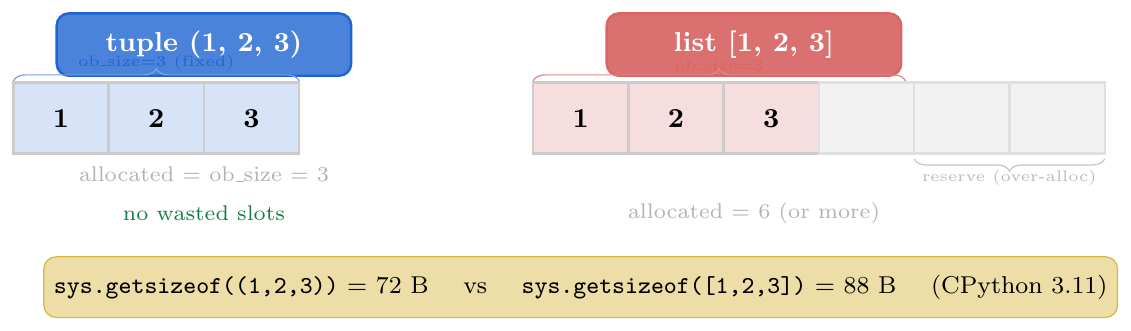
Why tuples are faster / smaller:
CPython allocates exactly the right number of slots (no over-allocation)
Tuples of literals are stored as compile-time constants in bytecode
CPython maintains a free-list of small empty/1-element tuples for reuse
sys.getsizeof((1,2,3))$<$sys.getsizeof([1,2,3])
Heterogeneous records:
person = ("Alice", 30, "Delhi")— fields have fixed meaning by positionDict keys:
grid[(0, 3)] = "start"— (row, col) pairsSet members:
{(1,2), (3,4), (1,2)}$\to$ dedup worksMultiple return values:
return x, y(Python returns a tuple implicitly)Named tuples:
collections.namedtuplefor readable field accessConstant data: configuration, RGB colours, coordinates that should not change
Performance-critical code: iteration over a tuple is marginally faster than over a list of the same size
import sys

% Tuple is immutable
t = (10, 20, 30)
try:
    t[0] = 99
except TypeError as e:
    print(e)   # 'tuple' object does not support item assignment

% But a mutable element inside can still change
t2 = (1, [2, 3], 4)
t2[1].append(99)        # list inside the tuple is mutable!
print(t2)               # (1, [2, 3, 99], 4)  -- tuple reference unchanged

% Hashable tuples can be dict keys
locations = {}
locations[(28.6, 77.2)] = "Delhi"
locations[(19.1, 72.8)] = "Mumbai"
print(locations[(28.6, 77.2)])   # Delhi

% Tuple with mutable element is NOT hashable
try:
    hash((1, [2, 3]))
except TypeError as e:
    print(e)   # unhashable type: 'list'

% Memory comparison
t3 = (1, 2, 3, 4, 5)
l3 = [1, 2, 3, 4, 5]
print(f"tuple: {sys.getsizeof(t3)} bytes")  # tuple: 80 bytes
print(f"list : {sys.getsizeof(l3)} bytes")  # list : 104 bytes

% Tuples as set members
points = {(0,0), (1,2), (3,4), (0,0)}   # duplicate removed
print(points)   # {(0, 0), (1, 2), (3, 4)}
Creation & Special Syntax
Literal Forms and the Comma Rule
A common misconception: parentheses do not create tuples — the comma does. Parentheses are only for grouping or disambiguation.
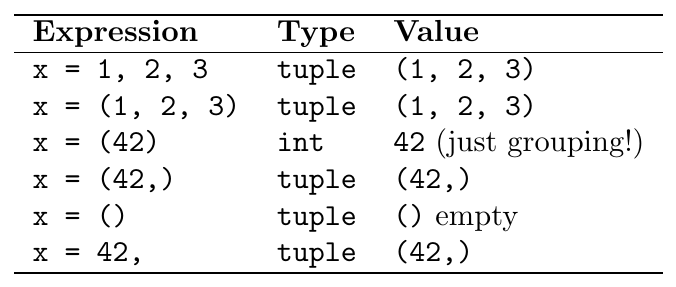
Single-element tuple: the trailing comma (x,) is mandatory.
Without it, (42) is just an integer in parentheses.
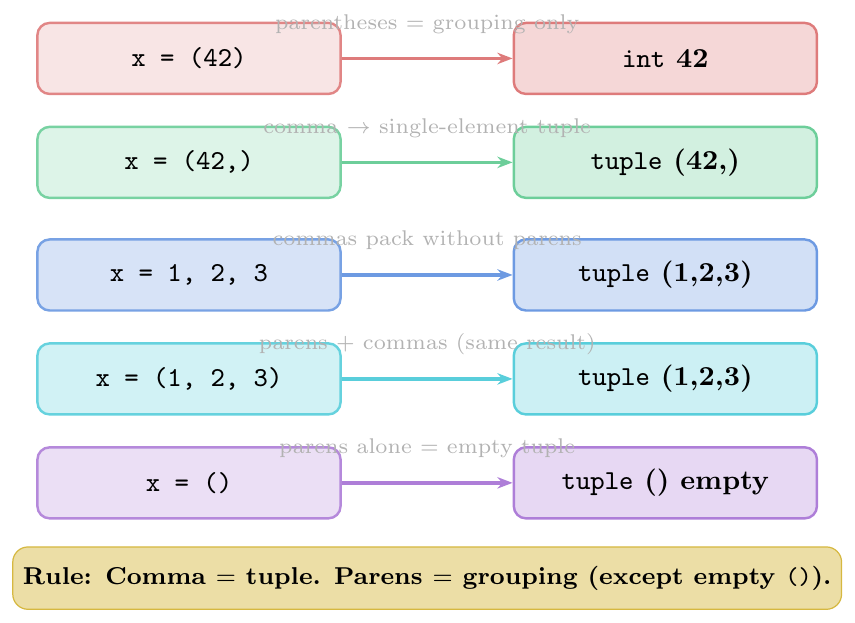
Packing literal:
t = 1, 2, 3ort = (1, 2, 3)Single-element:
t = (x,)ort = x,— trailing comma is requiredEmpty:
t = ()ort = tuple()Constructor:
tuple(iterable)— converts any iterableRepetition:
(0,) * 5$\to$(0, 0, 0, 0, 0)(safe for immutables; same pitfall as lists for nested mutables)Nested:
t = ((1,2), (3,4), (5,6))— tuple of tuplesConcatenation:
(1,2) + (3,4)$\to$(1,2,3,4)(creates new tuple)
% Literal with parentheses
t1 = (1, 2, 3)
print(type(t1), t1)    # <class 'tuple'> (1, 2, 3)

% Parentheses are OPTIONAL (comma packs)
t2 = 1, 2, 3
print(type(t2), t2)    # <class 'tuple'> (1, 2, 3)
print(t1 == t2)        # True

% Single element: COMMA IS MANDATORY
a = (42,)
b = (42)               # this is just int 42!
print(type(a), a)      # <class 'tuple'> (42,)
print(type(b), b)      # <class 'int'>   42

% Trailing comma works without parens too
c = 42,
print(type(c), c)      # <class 'tuple'> (42,)

% Empty tuple
e = ()
print(type(e), len(e)) # <class 'tuple'> 0

% Constructor from iterables
t3 = tuple("GATE")               # ('G', 'A', 'T', 'E')
t4 = tuple(range(1, 6))          # (1, 2, 3, 4, 5)
t5 = tuple([10, 20, 30])         # from list
t6 = tuple({3, 1, 2})            # from set (order not guaranteed)
print(t3, t4, t5)

% Repetition
t7 = (0,) * 5
print(t7)              # (0, 0, 0, 0, 0)

% Concatenation creates NEW tuple
t8 = (1, 2) + (3, 4)
print(t8)              # (1, 2, 3, 4)

% Nested tuple
coords = ((0.0, 1.0), (3.5, 4.2), (-1.0, 2.0))
print(coords[1])       # (3.5, 4.2)
print(coords[1][0])    # 3.5
Packing & Unpacking
All Unpacking Forms
Packing: multiple values on the right of = are automatically
gathered into a tuple.
Unpacking: a tuple (or any iterable) on the right of = is
distributed across multiple names on the left. The number of names must match the
number of elements (unless * is used).
Forms:
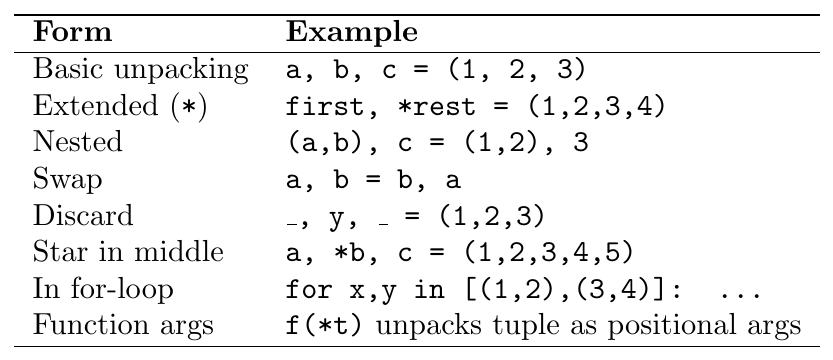
Rules:
Only one
*variable allowed per unpacking expression*always captures a list (not a tuple), even when unpacking a tupleWorks for any iterable on the right, not just tuples
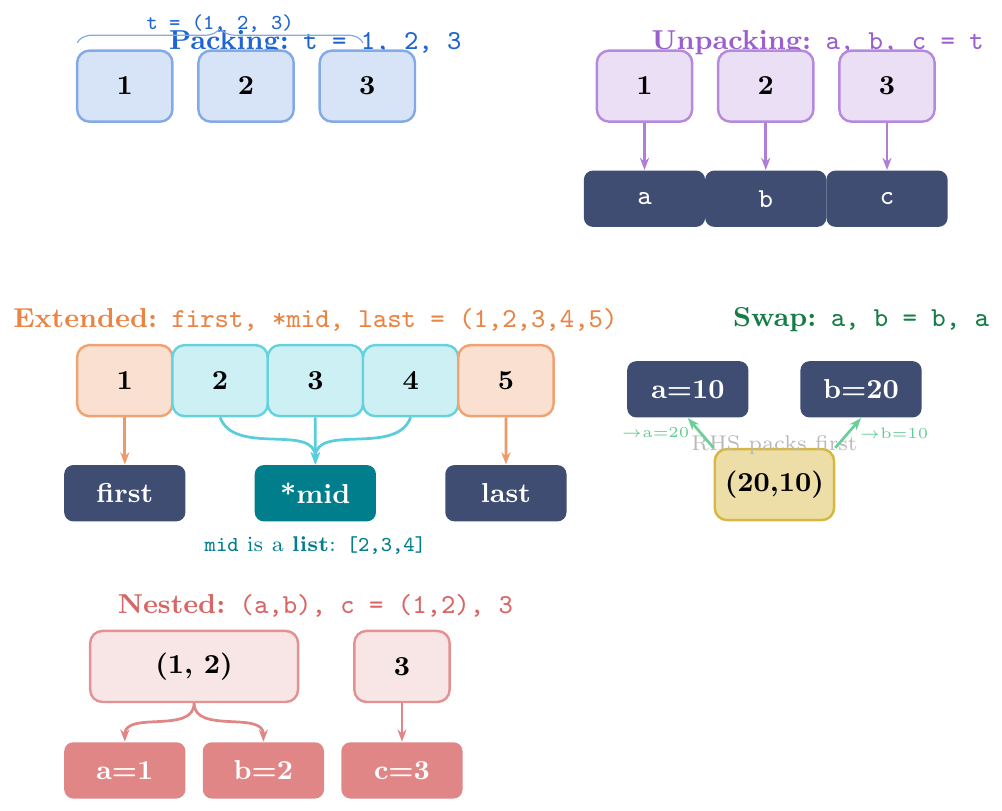
Only one
*per assignment:a, *b, *c = tis aSyntaxError*always collects a list: even when unpacking a tuple, the starred variable gets alistobjectZero or more elements:
first, *rest = (1,)givesfirst=1,rest=[]Works on any iterable: list, range, string, generator, etc.
Nested unpacking: patterns can be nested to arbitrary depth
Underscore convention: use
_for values you want to discard
% Basic
a, b, c = (10, 20, 30)
print(a, b, c)           # 10 20 30

% Too few / too many -- ValueError
try:
    x, y = (1, 2, 3)
except ValueError as e:
    print(e)   # too many values to unpack (expected 2)

% Extended unpacking
first, *rest = (1, 2, 3, 4, 5)
print(first)             # 1
print(rest)              # [2, 3, 4, 5]   <-- list!
print(type(rest))        # <class 'list'>

*init, last = (1, 2, 3, 4, 5)
print(init, last)        # [1, 2, 3, 4]  5

a, *mid, z = (1, 2, 3, 4, 5)
print(a, mid, z)         # 1  [2, 3, 4]  5

% Star captures zero elements too
first2, *empty, last2 = (1, 2)
print(first2, empty, last2)   # 1 [] 2

% Discarding values with _
_, y, _ = (1, 99, 3)
print(y)                 # 99

% Unpack in for-loop (very common!)
pairs = [(1, 'a'), (2, 'b'), (3, 'c')]
for num, char in pairs:
    print(f"{num}: {char}")
% 1: a  /  2: b  /  3: c

% Works on strings (any iterable)
first_char, *rest_chars = "Python"
print(first_char)        # P
print(rest_chars) # ['y', 't', 'h', 'o', 'n']% Nested tuple unpacking
(a, b), c = (1, 2), 3
print(a, b, c) # 1 2 3
% Unpack nested in for-loop
matrix = [(1, (2, 3)), (4, (5, 6)), (7, (8, 9))]
for x, (y, z) in matrix:
print(f"x={x}, y={y}, z={z}")
% x=1, y=2, z=3
% x=4, y=5, z=6
% x=7, y=8, z=9
% Deep nesting
((a, b), (c, d)) = ((1, 2), (3, 4))
print(a, b, c, d) # 1 2 3 4
% Mixed nesting with *
(first, *rest), last = (1, 2, 3), 4
print(first, rest, last) # 1 [2, 3] 4
% Practical: parse CSV-like records
records = [
("Alice", 25, ("Delhi", "IN")),
("Bob", 30, ("London", "UK")),
]
for name, age, (city, country) in records:
print(f"{name}, {age}, {city}, {country}")
% Alice, 25, Delhi, IN
% Bob, 30, London, UK% Simultaneous swap -- RHS fully evaluated first
a, b = 10, 20
a, b = b, a # packs (20,10) then unpacks
print(a, b) # 20 10
% Three-way rotation
x, y, z = 1, 2, 3
x, y, z = y, z, x
print(x, y, z) # 2 3 1
% Unpack as function arguments with *
def add3(x, y, z):
return x + y + z
args = (3, 4, 5)
print(add3(*args)) # 12 (same as add3(3, 4, 5))
% Mixed: some explicit, some starred
def greet(name, greeting, punct):
return f"{greeting}, {name}{punct}"
params = ("World", "!")
print(greet("Hello", *params)) # Hello, World!
% ** for dict unpacking into keyword args
def describe(name, age, city):
return f"{name}, {age}, {city}"
info = {"age": 30, "city": "Delhi"}
print(describe("Alice", **info)) # Alice, 30, Delhi
% Function returning multiple values as tuple
def minmax(lst):
return min(lst), max(lst) # implicitly packs a tuple
low, high = minmax([3, 1, 4, 1, 5, 9])
print(low, high) # 1 9
result = minmax([3, 1, 4])
print(type(result)) # <class 'tuple'>Tuple Methods
count() and index()
Tuples have exactly two methods (because they are immutable; no mutation methods exist):

All other sequence operations are built-in functions (not methods):
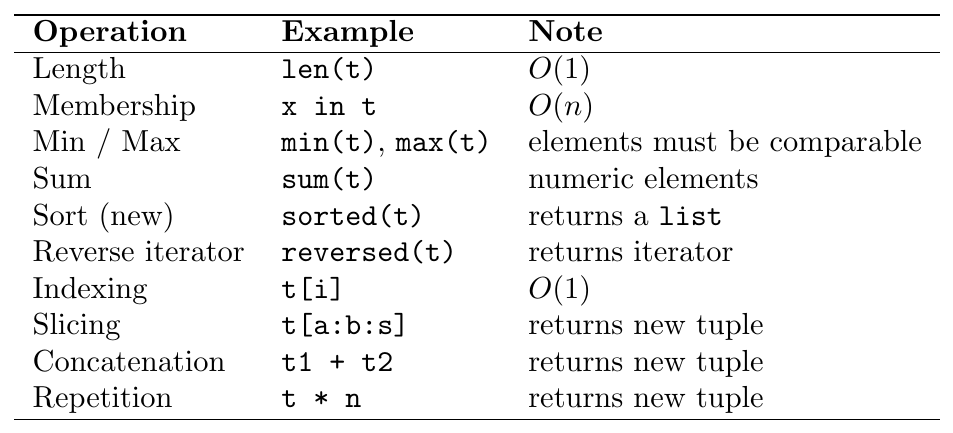
collections.namedtupleNamed tuples are a subclass of tuple that give each position a
name, making records self-documenting without the overhead of a full class.
Accessed by name (
p.x) or index (p[0])Still immutable (no assignment to fields)
Usable anywhere a regular tuple is (hashing, dict keys, unpacking)
_asdict()returns anOrderedDictof field values_replace(**kwargs)returns a new tuple with some fields changedPython 3.6+
typing.NamedTuple: cleaner class-based syntax with type hints
count(), index() and All Sequence Operationst = (3, 1, 4, 1, 5, 9, 2, 6, 1, 4)
% count: occurrences (no ValueError for missing)
print(t.count(1)) # 3
print(t.count(7)) # 0
% index: first occurrence
print(t.index(4)) # 2
print(t.index(4, 3)) # 9 (search from index 3)
try:
t.index(99)
except ValueError as e:
print(e) # tuple.index(x): x not in tuple
% Built-in operations on tuples
print(len(t)) # 10
print(min(t), max(t)) # 1 9
print(sum(t)) # 36
print(1 in t) # True
print(99 not in t) # True
% sorted returns NEW LIST
print(sorted(t)) # [1, 1, 1, 2, 3, 4, 4, 5, 6, 9]
print(type(sorted(t))) # <class 'list'>
% reversed returns iterator
print(list(reversed(t))) # [4, 1, 6, 2, 9, 5, 1, 4, 1, 3]
% Slicing returns NEW TUPLE
print(t[2:6]) # (4, 1, 5, 9)
print(t[::-1]) # (4, 1, 6, 2, 9, 5, 1, 4, 1, 3)
% Concatenation and repetition
print((1, 2) + (3, 4)) # (1, 2, 3, 4)
print((0,) * 4) # (0, 0, 0, 0)from collections import namedtuple
% Define a named tuple type
Point = namedtuple('Point', ['x', 'y'])
Person = namedtuple('Person', 'name age city') # space-separated too
% Create instances
p = Point(3.0, 4.0)
print(p) # Point(x=3.0, y=4.0)
print(p.x, p.y) # 3.0 4.0 (field access by name)
print(p[0], p[1]) # 3.0 4.0 (index access still works)
% Distance from origin
dist = (p.x**2 + p.y**2) ** 0.5
print(dist) # 5.0
% Unpacking works as usual
x, y = p
print(x, y) # 3.0 4.0
% _asdict: convert to dict
print(p._asdict()) # {'x': 3.0, 'y': 4.0}
% _replace: returns NEW tuple with changed fields
p2 = p._replace(x=10.0)
print(p2) # Point(x=10.0, y=4.0)
print(p) # Point(x=3.0, y=4.0) original unchanged
% Hashable -- can be dict key or set member
locations = {Point(0,0): "origin", Point(1,0): "unit-x"}
print(locations[Point(0,0)]) # origin
% Python 3.6+: class-based syntax with type hints
from typing import NamedTuple
class Student(NamedTuple):
name: str
score: float
rank: int = 0 # default value
s = Student("Alice", 95.5)
print(s) # Student(name='Alice', score=95.5, rank=0)
print(s.name, s.score) # Alice 95.5
% Iterate namedtuple fields
for field, val in s._asdict().items():
print(f" {field}: {val}")% 2D grid mapping using tuple keys
grid = {}
grid[(0, 0)] = "start"
grid[(3, 4)] = "end"
grid[(1, 2)] = "obstacle"
print(grid[(0, 0)]) # start
print((3, 4) in grid) # True
% Memoisation with tuple key
memo = {}
def fib(n):
if n <= 1:
return n
if (n,) not in memo: # single-element tuple key
memo[(n,)] = fib(n-1) + fib(n-2)
return memo[(n,)]
% Multi-key grouping
from collections import defaultdict
sales = [
("Jan", "North", 500),
("Jan", "South", 300),
("Feb", "North", 700),
("Jan", "North", 200),
]
region_monthly = defaultdict(int)
for month, region, amount in sales:
region_monthly[(month, region)] += amount # tuple as compound key
for key, total in sorted(region_monthly.items()):
print(f"{key}: {total}")
% ('Feb', 'North'): 700
% ('Jan', 'North'): 700
% ('Jan', 'South'): 300
% Sorting a list of tuples
data = [("Charlie", 78), ("Alice", 95), ("Bob", 78), ("Diana", 95)]
% Sort by score desc, then name asc
data.sort(key=lambda x: (-x[1], x[0]))
print(data)
% [('Alice', 95), ('Diana', 95), ('Bob', 78), ('Charlie', 78)]Tuple vs List --- When to Use Which
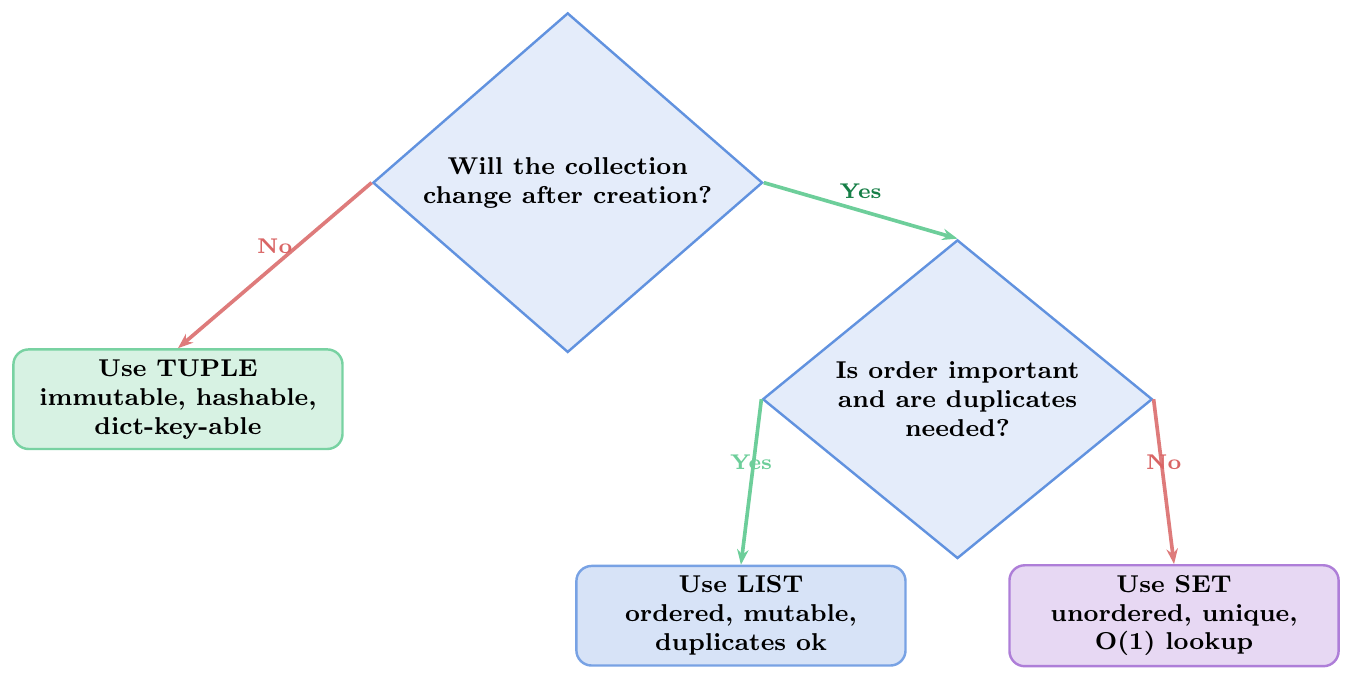
Choose tuples for fixed structured records, coordinates, lookup keys, and static configuration constants to optimize performance and guard safety.
Choose lists for collections of homogeneous elements that grow, shrink, dynamically reorder, or update frequently throughout execution.
Dictionaries
Dictionary Properties
Core Characteristics
A Python dictionary (dict) is an ordered mapping of
hashable keys to arbitrary values. It is Python's primary
associative data structure.
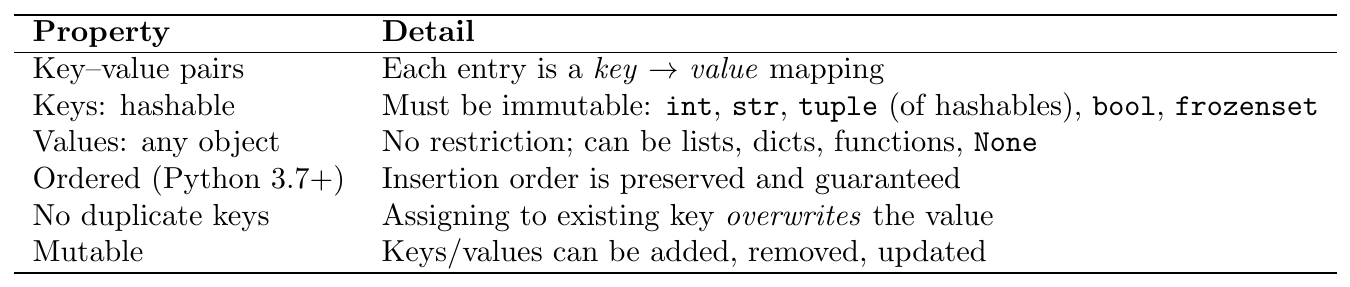
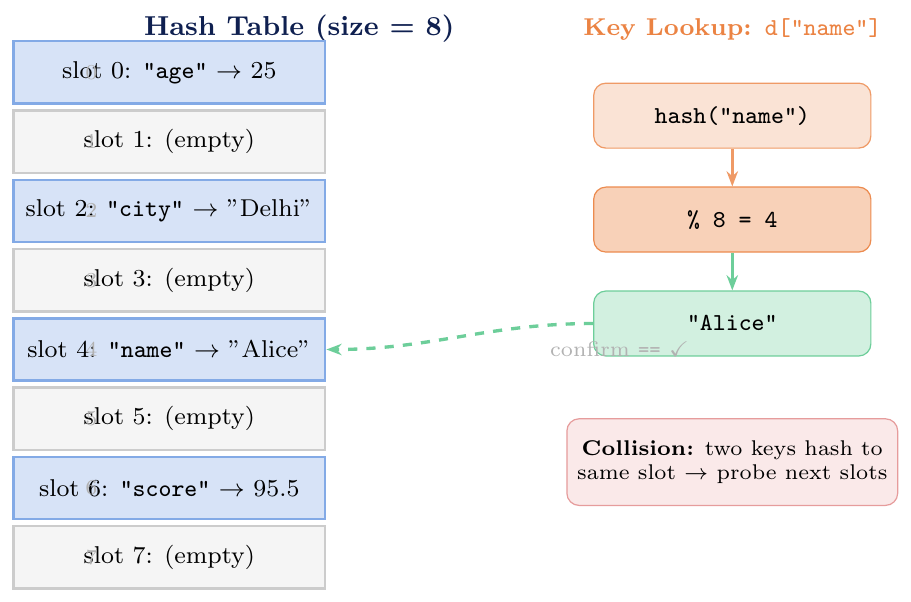
CPython implements dict as a compact hash table:
Hash the key:
hash(k)produces an integer (e.g.\hash("name") = -8134...)Compute slot:
slot = hash(k) % table_sizeProbe on collision: if the slot is occupied by a different key, Python probes subsequent slots (open addressing with perturbation)
Compare: once the slot is reached, Python checks
k == stored_keyto confirm (hash equality does not guarantee key equality)
Resizing: when the load factor exceeds $\approx 2/3$, the table is resized (doubled) and all entries are rehashed — $O(n)$ occasionally, $O(1)$ amortised.
Valid keys (hashable):
int,float,str,bool,bytes,tuple(of hashables),frozenset,None, custom objects with__hash__Invalid keys (unhashable):
list,dict,set— raiseTypeError: unhashable typeEquality determines uniqueness:
True == 1andhash(True) == hash(1), so{True: "a", 1: "b"}has only one key (True) with value"b"Float keys: technically valid but dangerous due to floating-point imprecision; avoid using floats as keys
# Valid key types
d = {
    42:          "int key",
    3.14:        "float key",     # valid but risky
    "name":      "str key",
    True:        "bool key",
    (1, 2):      "tuple key",
    frozenset({1,2}): "frozenset key",
    None:        "None key",
}
print(d[42], d["name"], d[(1,2)])  # int key / str key / tuple key

# Invalid key: list raises TypeError
try:
    bad = {[1,2]: "value"}
except TypeError as e:
    print(e)   # unhashable type: 'list'

# True == 1 and hash(True) == hash(1): same key!
d2 = {True: "first", 1: "second"}
print(d2)        # {True: 'second'}  -- only one entry; value overwritten
print(len(d2))   # 1

d3 = {False: "zero", 0: "also zero"}
print(d3)        # {False: 'also zero'}
print(len(d3))   # 1

# Ordered by insertion (Python 3.7+)
d4 = {"c": 3, "a": 1, "b": 2}
print(list(d4.keys()))   # ['c', 'a', 'b']  -- insertion order preserved
Dictionary Creation
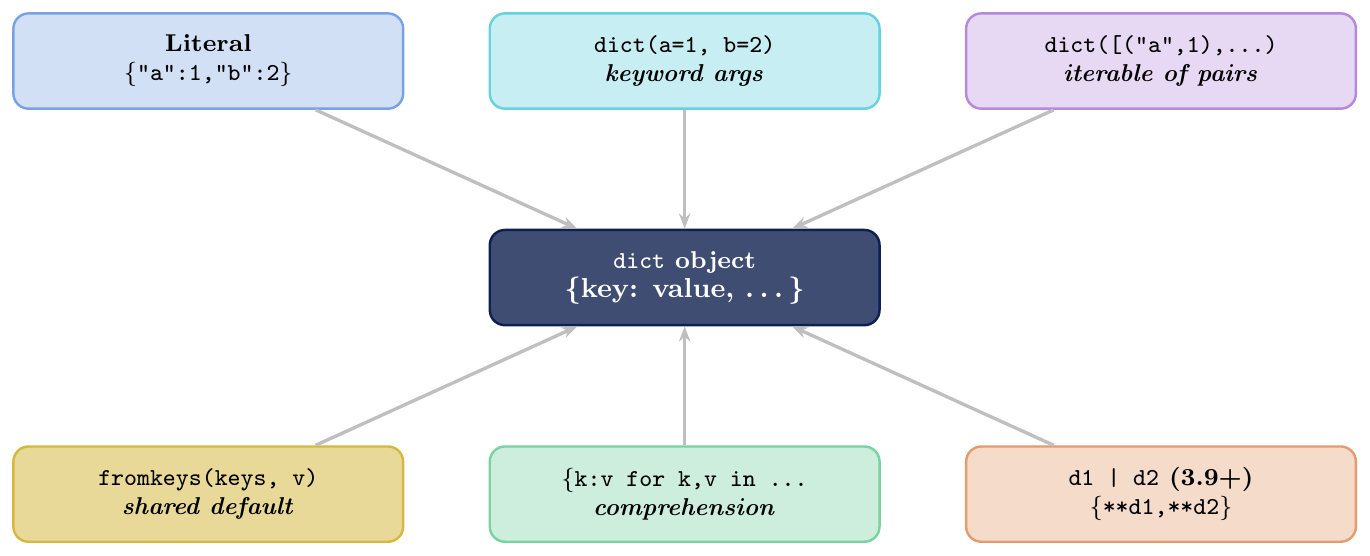
All Creation Methods
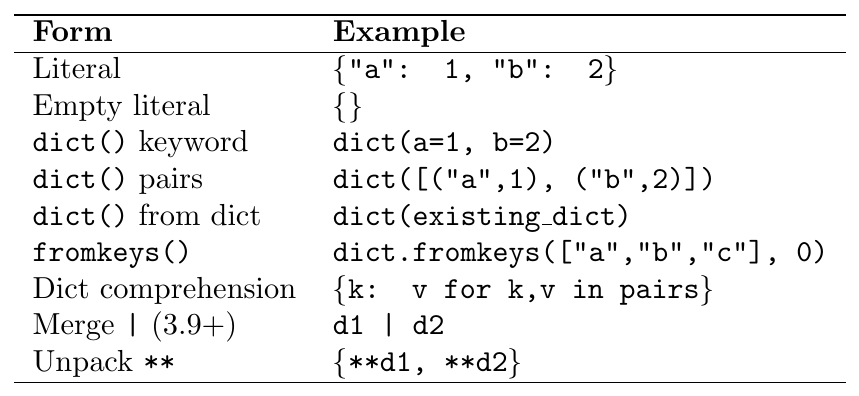
fromkeys pitfall: dict.fromkeys(keys, []) shares the same
list object for all keys — same pitfall as [[]] * n in lists.
# Literal
d1 = {"name": "Alice", "age": 25, "city": "Delhi"}

# dict() with keyword arguments (keys must be valid identifiers)
d2 = dict(name="Alice", age=25, city="Delhi")
print(d1 == d2)       # True

# dict() from list of (key, value) pairs
pairs = [("x", 10), ("y", 20), ("z", 30)]
d3 = dict(pairs)
print(d3)             # {'x': 10, 'y': 20, 'z': 30}

# dict() from zip
keys   = ["a", "b", "c"]
values = [1, 2, 3]
d4 = dict(zip(keys, values))
print(d4)             # {'a': 1, 'b': 2, 'c': 3}

# fromkeys: all keys get the SAME default
d5 = dict.fromkeys(["x", "y", "z"], 0)
print(d5)             # {'x': 0, 'y': 0, 'z': 0}

# fromkeys PITFALL with mutable default
d6 = dict.fromkeys(["a", "b", "c"], [])   # shared list!
d6["a"].append(1)
print(d6)     # {'a': [1], 'b': [1], 'c': [1]}  ALL changed!

# Correct: use comprehension for independent defaults
d7 = {k: [] for k in ["a", "b", "c"]}
d7["a"].append(1)
print(d7)     # {'a': [1], 'b': [], 'c': []}  only 'a' changed

# Merge two dicts (Python 3.9+)
base    = {"a": 1, "b": 2}
updates = {"b": 99, "c": 3}
merged  = base | updates
print(merged)   # {'a': 1, 'b': 99, 'c': 3}  (right dict wins on conflict)

# Unpack merge (all Python 3 versions)
merged2 = {**base, **updates}
print(merged2)  # {'a': 1, 'b': 99, 'c': 3}
Access & Mutation
Reading, Writing, Deleting
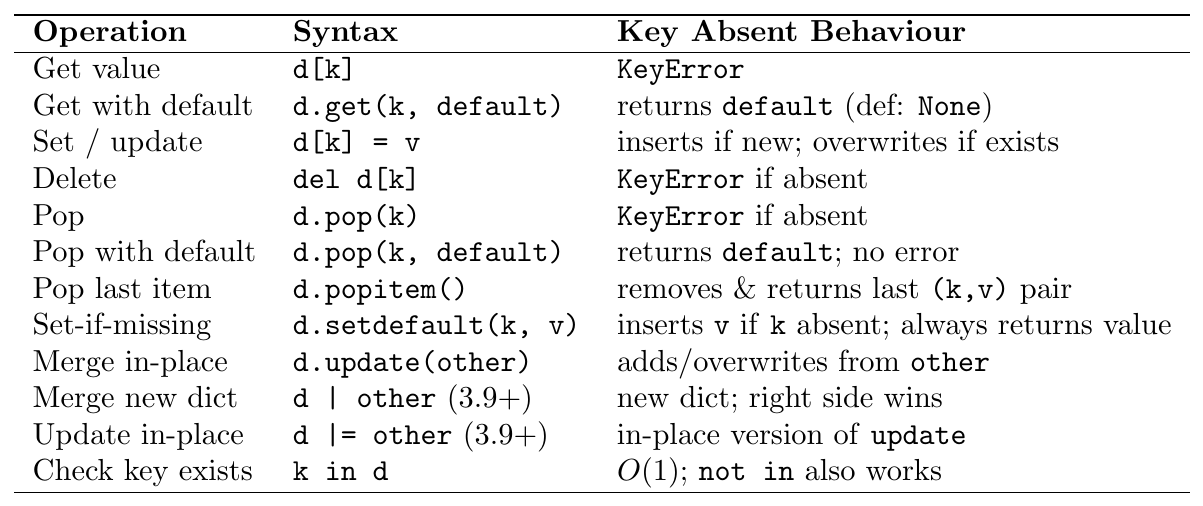
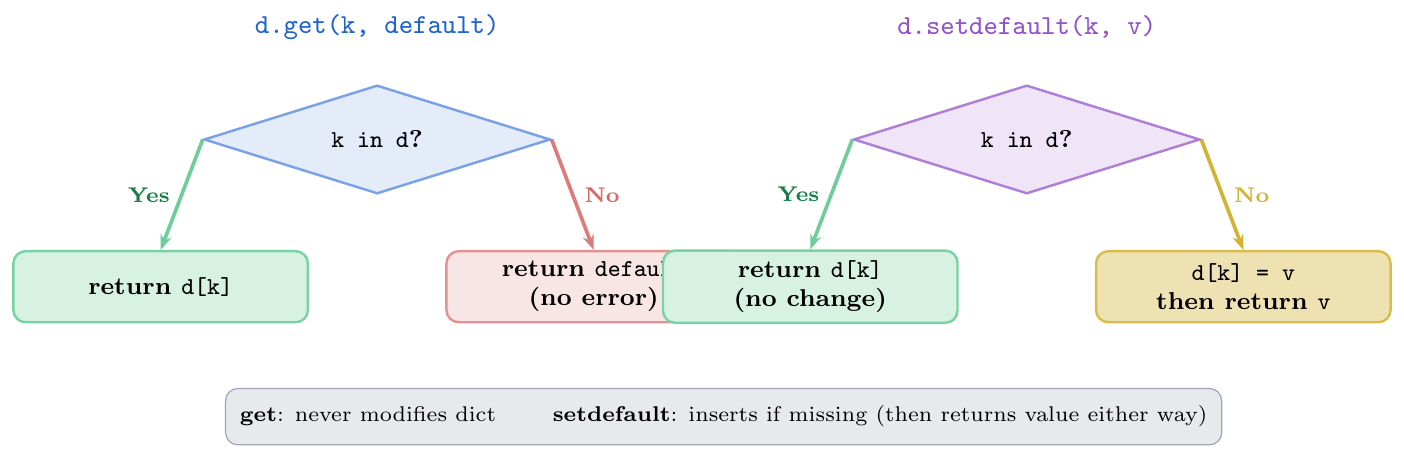
d.get(k, default): read-only safe access; does not modify dictd.setdefault(k, default): ensures key exists with default; inserts on first miss; idiomatic for building grouped dictscollections.defaultdict(factory): auto-insertsfactory()for any missing key; cleaner thansetdefaultfor aggregation patternsNever use
d[k]when key may be absent unless you handleKeyErrorexplicitlyd.pop(k, None): safe delete — never raisesKeyError
d = {"name": "Alice", "age": 25}

# d[k] vs d.get()
print(d["name"])              # Alice
try:
    print(d["score"])         # KeyError!
except KeyError as e:
    print(f"KeyError: {e}")

print(d.get("score"))         # None  (no error)
print(d.get("score", 0))      # 0     (custom default)
print(d.get("name",  "?"))    # Alice (key exists, default ignored)

# setdefault: insert-then-return
d.setdefault("score", 100)    # inserts "score": 100
print(d["score"])             # 100
d.setdefault("score", 200)    # key already exists: no change
print(d["score"])             # 100  (still 100!)

# Grouping with setdefault
words = ["apple","ant","banana","blueberry","avocado","cherry"]
grouped = {}
for word in words:
    grouped.setdefault(word[0], []).append(word)
print(grouped)
# {'a': ['apple','ant','avocado'], 'b': ['banana','blueberry'], 'c': ['cherry']}

# pop
removed = d.pop("age")        # removes and returns
print(removed)                # 25
print("age" in d)             # False

d.pop("nonexistent", "safe")  # no KeyError with default
# d.pop("nonexistent")        # would raise KeyError!

# popitem: removes last inserted item (Python 3.7+ guaranteed LIFO)
d2 = {"x": 1, "y": 2, "z": 3}
print(d2.popitem())           # ('z', 3)
print(d2)                     # {'x': 1, 'y': 2}

# update: merge in-place
base = {"a": 1, "b": 2}
base.update({"b": 99, "c": 3})   # b overwritten, c added
print(base)   # {'a': 1, 'b': 99, 'c': 3}

base.update(d=4, e=5)            # keyword form
print(base)   # {'a': 1, 'b': 99, 'c': 3, 'd': 4, 'e': 5}

# |= in-place merge (Python 3.9+)
d3 = {"x": 1}
d3 |= {"y": 2, "z": 3}
print(d3) # {'x': 1, 'y': 2, 'z': 3}from collections import defaultdict
# defaultdict(list): auto-creates [] for missing keys
grouped = defaultdict(list)
words = ["apple","ant","banana","blueberry","avocado","cherry"]
for word in words:
grouped[word[0]].append(word) # no setdefault needed!
print(dict(grouped))
# {'a': ['apple','ant','avocado'], 'b': ['banana','blueberry'], 'c': ['cherry']}
# defaultdict(int): word frequency counter
sentence = "the quick brown fox jumps over the lazy fox"
freq = defaultdict(int)
for word in sentence.split():
freq[word] += 1 # missing key auto-initialised to 0
print(dict(freq))
# {'the': 2, 'quick': 1, 'brown': 1, 'fox': 2, ...}
# defaultdict(set): group into sets (dedup)
pairs = [("A","x"),("B","y"),("A","z"),("B","y"),("A","x")]
mapping = defaultdict(set)
for k, v in pairs:
mapping[k].add(v)
print(dict(mapping)) # {'A': {'x', 'z'}, 'B': {'y'}}Views & Iteration
Live Views: keys(), values(), items()
The three view objects returned by d.keys(), d.values(),
d.items() are live views: they reflect changes to the
dictionary in real time without creating copies.

Set operations on views (keys and items):
d.keys() & other.keys() (intersection),
d.keys() | other.keys() (union),
d.keys() - other.keys() (difference).
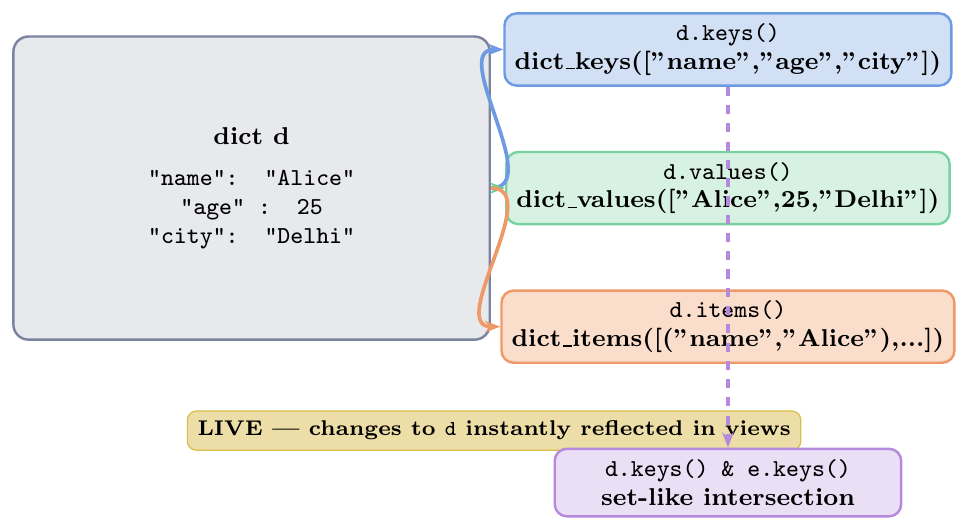
Iterate keys:
for k in d:(same asfor k in d.keys())Iterate values:
for v in d.values():Iterate key-value:
for k, v in d.items():(most common)Never modify a dict while iterating over it — raises
RuntimeError: dictionary changed size during iterationSafe delete during iteration: iterate over
list(d.keys())(a copy) and delete from the originalk in dtests key membership in $O(1)$;v in d.values()is $O(n)$
d = {"name": "Alice", "age": 25, "city": "Delhi", "score": 95.5}

% Iterate keys (default)
for k in d:
    print(k, end=" ")     # name age city score

% Iterate values
for v in d.values():
    print(v, end=" ")     # Alice 25 Delhi 95.5

% Iterate items (most useful)
for key, val in d.items():
    print(f"{key}: {val}")

% Views are LIVE
kv = d.keys()
print(list(kv))           # ['name', 'age', 'city', 'score']
d["rank"] = 1
print(list(kv))           # ['name', 'age', 'city', 'score', 'rank']  updated!

% Set operations on keys
d1 = {"a": 1, "b": 2, "c": 3}
d2 = {"b": 20, "c": 30, "d": 40}
print(d1.keys() & d2.keys())   # {'b', 'c'}   intersection
print(d1.keys() | d2.keys())   # {'a','b','c','d'}  union
print(d1.keys() - d2.keys())   # {'a'}  difference

% Membership: O(1) for keys, O(n) for values
print("name" in d)            # True   O(1)
print("Alice" in d.values())  # True   O(n) -- linear scan!

% Safe deletion during iteration
d3 = {"a": 1, "b": -2, "c": 3, "d": -4, "e": 5}
for k in list(d3.keys()):      # copy the keys!
    if d3[k] < 0:
        del d3[k]
print(d3) # {'a': 1, 'c': 3, 'e': 5}inventory = {"apple": 50, "banana": 0, "cherry": 30, "date": 0}
# Filter: items with non-zero stock
in_stock = {k: v for k, v in inventory.items() if v > 0}
print(in_stock) # {'apple': 50, 'cherry': 30}
# Invert a dict (value -> key)
original = {"a": 1, "b": 2, "c": 3}
inverted = {v: k for k, v in original.items()}
print(inverted) # {1: 'a', 2: 'b', 3: 'c'}
# Sort by value (returns list of tuples)
scores = {"Alice": 85, "Bob": 92, "Charlie": 78, "Diana": 95}
sorted_scores = sorted(scores.items(), key=lambda x: x[1], reverse=True)
print(sorted_scores)
# [('Diana', 95), ('Bob', 92), ('Alice', 85), ('Charlie', 78)]
# Sorted dict (preserves insertion order after sort in 3.7+)
sorted_dict = dict(sorted(scores.items(), key=lambda x: x[1]))
print(sorted_dict)
# Enumerate with dict
for i, (k, v) in enumerate(scores.items(), 1):
print(f"{i}. {k}: {v}")
# Merge and aggregate
monthly = [
{"region": "North", "sales": 500},
{"region": "South", "sales": 300},
{"region": "North", "sales": 200},
]
total = {}
for entry in monthly:
total[entry["region"]] = total.get(entry["region"], 0) + entry["sales"]
print(total) # {'North': 700, 'South': 300}Nested Dictionaries
Access, Mutation, and the Sharing Trap
A nested dictionary is a dictionary whose values are themselves dictionaries (or other containers). This models hierarchical data (JSON, configs, databases).
Accessing nested values: \[\texttt{d['outer']['inner']} \quad\equiv\quad \texttt{temp = d['outer'];\ temp['inner']}\]
Safe access for deep nesting: \[\texttt{d.get('outer', \{\}).get('inner', default)}\]
Mutation trap: when a mutable object (list, dict) is a value in two different dictionaries (because one was assigned from the other without a deep copy), modifying through one dict modifies both.
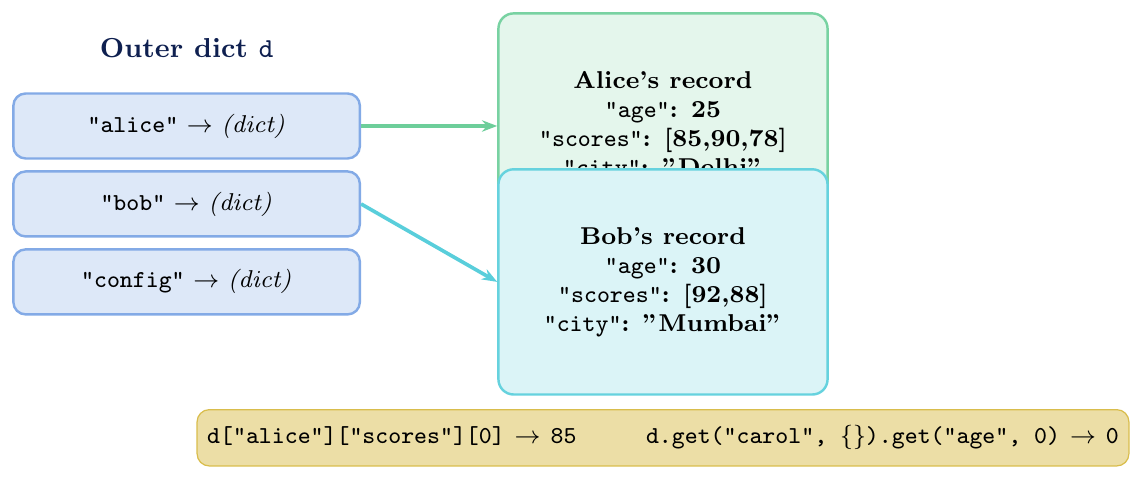
Safe deep access:
d.get("k1", {}).get("k2", default)chains safely withoutKeyErrorcollections.ChainMap: overlay multiple dicts without copyingDeep copy for independence:
copy.deepcopy(d)when nested mutable values must be independentFlattening: use recursive function or
pandas.json_normalizeJSON roundtrip:
json.dumps(d)$\leftrightarrow$json.loads(s)— nested dicts map directly to JSON objectsAvoid key chains longer than 3 levels — prefer a class or
dataclassinstead
# Building a nested dict
students = {
    "alice": {"age": 25, "scores": [85, 90, 78], "city": "Delhi"},
    "bob":   {"age": 30, "scores": [92, 88],      "city": "Mumbai"},
}

# Access: chained []
print(students["alice"]["age"])          # 25
print(students["alice"]["scores"][0])    # 85

# Modify nested value
students["alice"]["scores"].append(95)
print(students["alice"]["scores"])       # [85, 90, 78, 95]

# Add new nested key
students["alice"]["rank"] = 1
print(students["alice"])
# {'age': 25, 'scores': [85, 90, 78, 95], 'city': 'Delhi', 'rank': 1}

# Safe access: missing key at any level
print(students.get("carol", {}).get("age", 0))   # 0  (no KeyError)
print(students.get("alice", {}).get("phone", "N/A"))  # N/A

# KeyError example
try:
    print(students["carol"]["age"])  # KeyError: 'carol'
except KeyError as e:
    print(f"KeyError: {e}")

% Iterate nested
for name, info in students.items():
    avg = sum(info["scores"]) / len(info["scores"])
    print(f"{name.title()}: avg = {avg:.1f}, city = {info['city']}")
# Alice: avg = 87.0, city = Delhi
# Bob : avg = 90.0, city = Mumbaiimport copy
# TRAP: shallow copy shares nested dicts
original = {
"alice": {"scores": [85, 90]},
"bob": {"scores": [92, 88]},
}
shallow = original.copy() # shallow copy
# Outer dict: independent
shallow["carol"] = {"scores": [70]}
print("carol" in original) # False (outer is independent)
# Inner dict: SHARED
shallow["alice"]["scores"].append(99)
print(original["alice"]["scores"]) # [85, 90, 99] MODIFIED!
# CORRECT: deep copy
original = {
"alice": {"scores": [85, 90]},
"bob": {"scores": [92, 88]},
}
deep = copy.deepcopy(original)
deep["alice"]["scores"].append(99)
print(original["alice"]["scores"]) # [85, 90] unchanged
# TRAP: fromkeys with mutable default (same issue)
d = dict.fromkeys(["alice", "bob"], {"scores": []})
d["alice"]["scores"].append(100)
print(d) # {'alice': {'scores': [100]}, 'bob': {'scores': [100]}} -- Both mutated!Sets & Frozensets
Properties
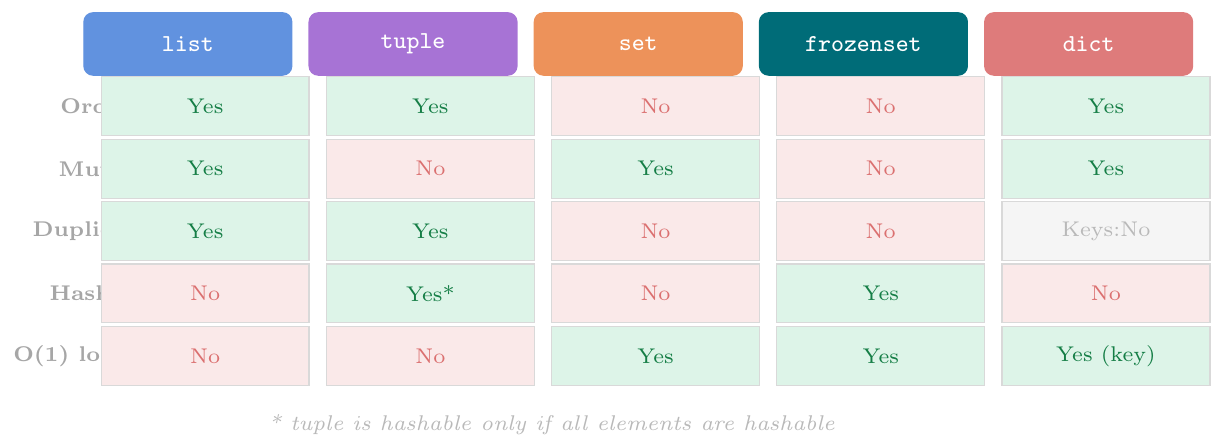
Core Characteristics
A Python set is an unordered collection of unique, hashable elements. It models the mathematical notion of a set.
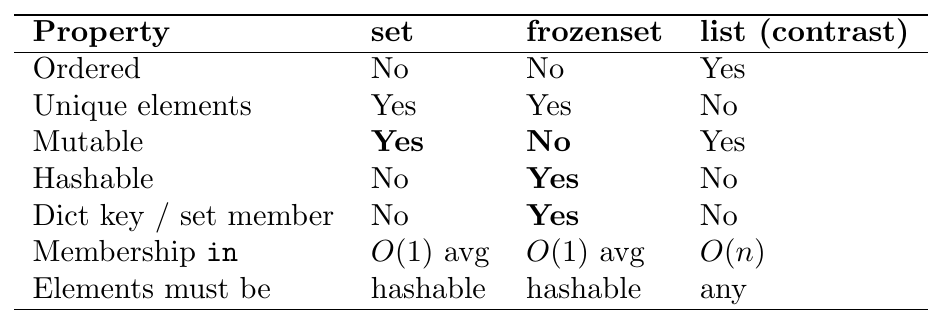
Frozenset is the immutable version of set. Because it is
immutable it is hashable and can be used as a dict key or as an element of another
set.
Like dict, both set and frozenset are implemented as
hash tables, which gives:
$O(1)$ average time complexity for
add,remove,discard, andin(membership testing).$O(n)$ worst-case time complexity (driven by systematic hash collisions, though exceptionally rare with robust internal hash distributions).
No inherent ordering: iterating a set yields elements in an arbitrary (but deterministic within a single process lifecycle) execution order.
Elements must be explicitly hashable: attempting to insert a mutable container like a
listinstantly triggers aTypeError: unhashable type: 'list'.
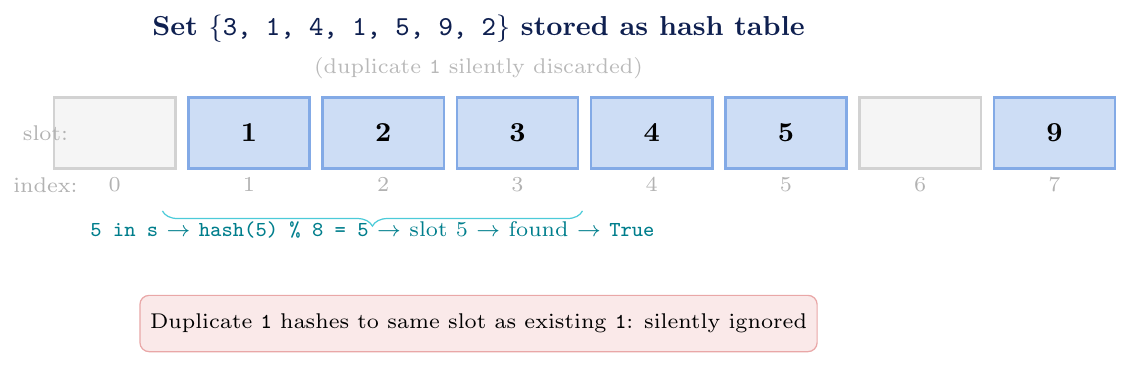
set: Data deduplication, rapid empirical membership evaluation, implementation of discrete mathematical set algebra operations on dynamic mutations.
frozenset: Keys within a
dictschema requiring structural compounding, multi-element sets of intersecting criteria (set of sets), unalterable system wide global flags/registries, and secure shared-state thread operations.Algorithmic Selection Rule: Choose a
setover a linear sequence (list) whenever processing scale compounds alongside dense, repetitive membership validation iterations ($O(1)$ constant vs. $O(n)$ linear sweep cost).Truthiness evaluations: An uninstantiated or empty structural reference
set()maps cleanly to booleanFalse; any non-empty variant resolves explicitly toTrue.
# Duplicates automatically removed
s = {3, 1, 4, 1, 5, 9, 2, 6, 5}
print(s)        # {1, 2, 3, 4, 5, 6, 9}  (order not guaranteed)
print(len(s))   # 7  (not 9 -- duplicates gone)

# No ordering: index access raises TypeError
try:
    print(s[0])
except TypeError as e:
    print(e)    # 'set' object is not subscriptable

# O(1) membership test (vs O(n) for list)
print(5 in s)   # True
print(7 in s)   # False

# Elements must be hashable
try:
    bad = {[1, 2], [3, 4]}
except TypeError as e:
    print(e)    # unhashable type: 'list'

# frozenset is hashable -- can be dict key or set element
fs = frozenset({1, 2, 3})
d = {fs: "frozen group"}
print(d[frozenset({1, 2, 3})])   # frozen group

# set of frozensets
groups = {frozenset({1,2}), frozenset({3,4}), frozenset({1,2})}
print(groups)   # {frozenset({1, 2}), frozenset({3, 4})}  (deduped)

# Truthiness
print(bool(set()))          # False
print(bool({0}))            # True  (non-empty, even if element is 0)
Set Creation
Literals and Constructors
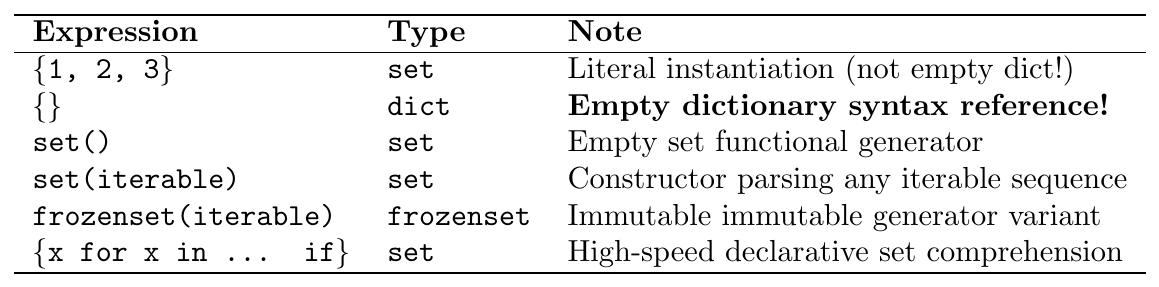
Critical Architectural Warning: Standard structural compiler mapping rules route explicit {} declarations directly to an unallocated empty dict. An explicit target conversion sequence must utilize the explicit constructor function set().
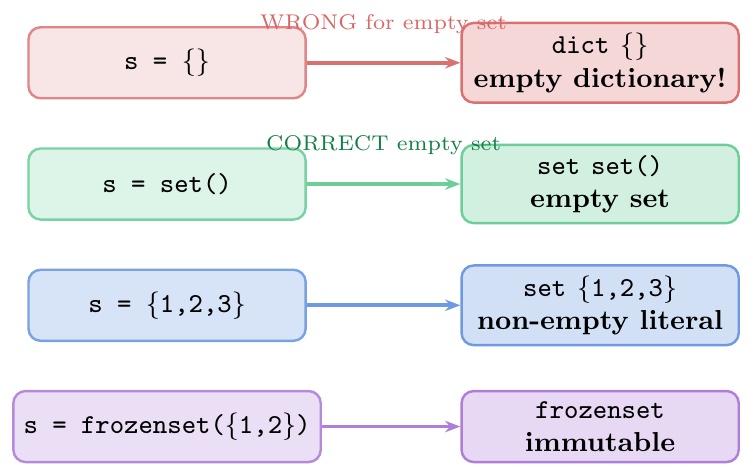
# Literal: {1, 2, 3}
s1 = {3, 1, 4, 1, 5}
print(s1, type(s1))    # {1, 3, 4, 5}  <class 'set'>

# EMPTY SET: must use set(), not {}
empty_set  = set()
empty_dict = {}
print(type(empty_set))   # <class 'set'>
print(type(empty_dict))  # <class 'dict'>  <- common mistake!

# From iterables
s2 = set("abracadabra")       # {'a','b','c','d','r'}
s3 = set([1, 2, 2, 3, 3, 3]) # {1, 2, 3}
s4 = set(range(0, 10, 2))     # {0, 2, 4, 6, 8}
s5 = set((10, 20, 10, 30))    # {10, 20, 30}

# Set comprehension
squares = {x**2 for x in range(1, 6)}
print(squares)   # {1, 4, 9, 16, 25}

evens = {x for x in range(20) if x % 2 == 0}
print(evens)     # {0, 2, 4, 6, 8, 10, 12, 14, 16, 18}

# frozenset
fs1 = frozenset({1, 2, 3})
fs2 = frozenset("python")
print(fs1)       # frozenset({1, 2, 3})
print(fs2)       # frozenset({'p','y','t','h','o','n'})

# frozenset is hashable: use as dict key
edges = {frozenset({"A","B"}): 5, frozenset({"B","C"}): 3}
print(edges[frozenset({"A","B"})])   # 5

# Deduplication idiom: list -> set -> list
lst = [3,1,4,1,5,9,2,6,5,3,5]
unique = list(set(lst))       # order NOT preserved
print(sorted(unique))         # [1, 2, 3, 4, 5, 6, 9]

# Preserve order while deduping (Python 3.7+ dict keeps order)
seen = {}
unique_ordered = list(dict.fromkeys(lst))
print(unique_ordered)   # [3, 1, 4, 5, 9, 2, 6]  insertion order preserved
Set Operations
Mathematical Set Operators
Python provides both highly structured operator syntax (restricting interaction evaluation properties explicitly between strict matching set objects) and programmatic method syntax (accepting any arbitrary iterable as an evaluation argument):
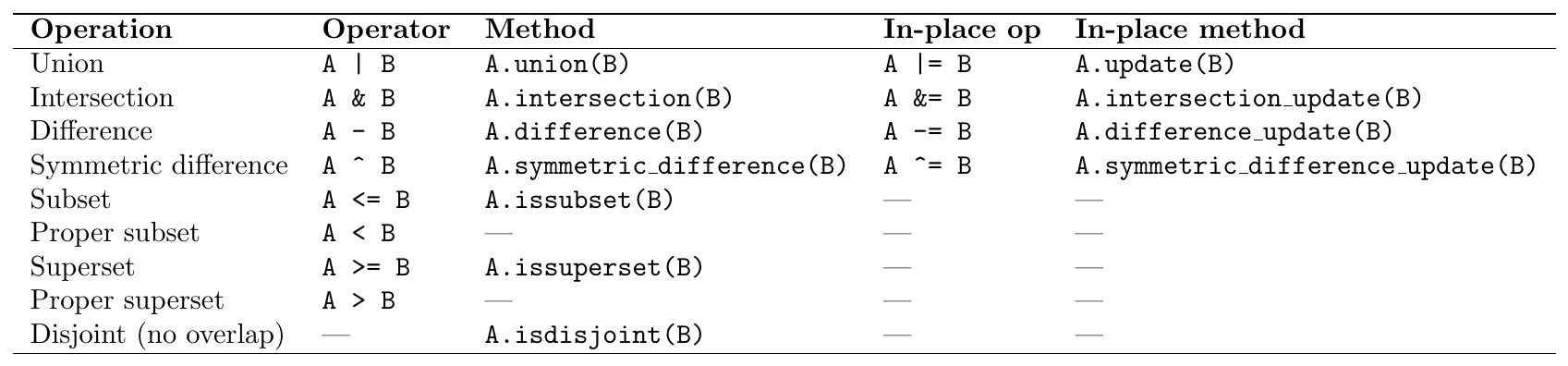
Type Constraint Difference: A | B enforces compilation constraints requiring clean type uniformity across all operators. Conversely, invocation properties like A.union(B) implicitly execute cast operations across any operational container target sequence passed within parameter scopes.
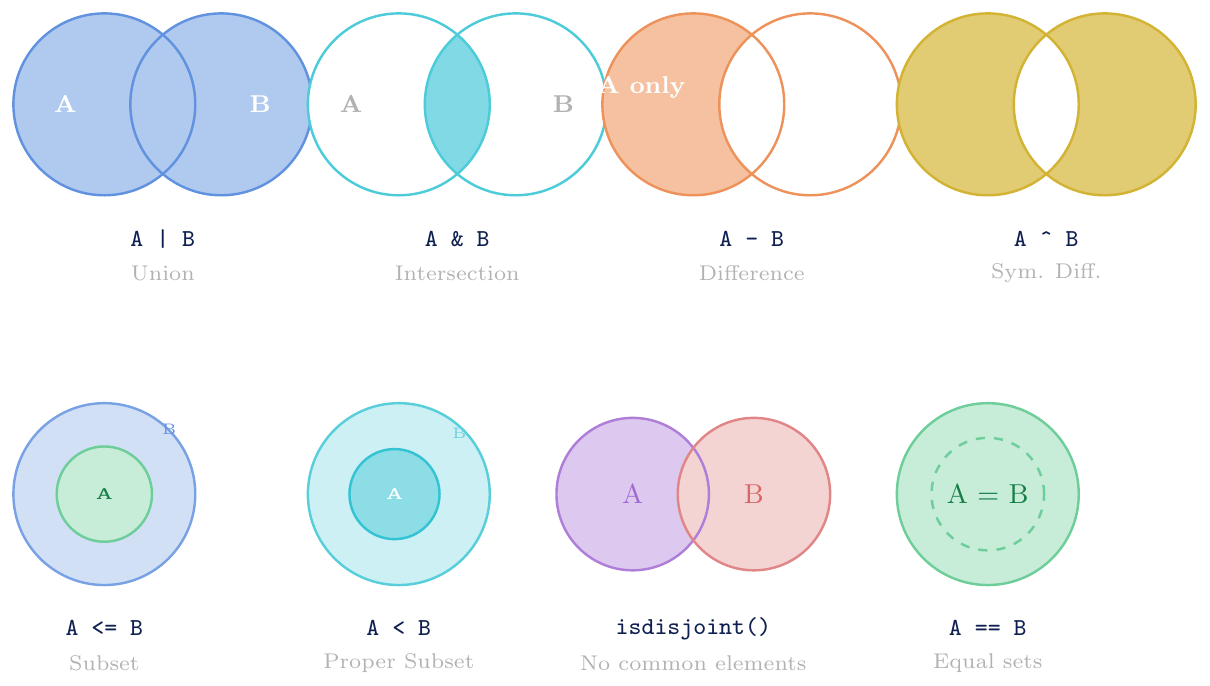
Operators (
|, &, -, \^{}): Enforce strict verification rules requiring both operational parameters to conform explicitly assetorfrozensetinstances.Methods (
.union(),.intersection(), …): Provide extensive execution latitude by unpacking any sequential stream or iterable entity passed during operational lifecycle execution.Modular expansion strategies enable execution calls across several arguments simultaneously, mapping the conversion equation
A.union(B, C, D)identically toA | B | C | D.In-place operations execute memory conservation parameters by directly restructuring active state definitions over target addresses; these structural shifts fail under immutable
frozensetboundaries.Type system consistency dictates that calls dispatched against structural variable instances preserve parent instance types exactly upon execution output generation.
A = {1, 2, 3, 4, 5}
B = {4, 5, 6, 7, 8}

# Union: all elements from both
print(A | B)                  # {1, 2, 3, 4, 5, 6, 7, 8}
print(A.union(B))             # same
print(A.union([4,5,6,7,8]))   # method accepts any iterable!
% print(A | [4,5,6])          # TypeError: operator needs set

# Intersection: only common elements
print(A & B)                  # {4, 5}
print(A.intersection(B))      # {4, 5}

# Difference: in A but not B
print(A - B)                  # {1, 2, 3}
print(B - A)                  # {6, 7, 8}  (not symmetric!)

# Symmetric difference: in exactly one of A, B
print(A ^ B)                  # {1, 2, 3, 6, 7, 8}
print(A.symmetric_difference(B))  # same

# Multiple sets with methods
C = {5, 6, 9}
print(A.union(B, C))          # {1,2,3,4,5,6,7,8,9}
print(A.intersection(B, C))   # {5}   common to all three

# In-place operations
X = {1, 2, 3, 4}
X |= {4, 5, 6}                # X = X | {4,5,6}
print(X)                      # {1, 2, 3, 4, 5, 6}

Y = {1, 2, 3, 4, 5}
Y &= {3, 4, 5, 6}
print(Y)                      # {3, 4, 5}

Z = {1, 2, 3, 4, 5}
Z -= {3, 4}
print(Z)                      # {1, 2, 5}

W = {1, 2, 3, 4}
W ^= {3, 4, 5, 6}
print(W) # {1, 2, 5, 6}A = {1, 2, 3}
B = {1, 2, 3, 4, 5}
C = {4, 5, 6}
D = {1, 2, 3} # same as A
# Subset: A <= B (A is subset of B)
print(A <= B) # True (all of A is in B)
print(A.issubset(B)) # True
print(B <= A) # False (B has elements not in A)
# Proper subset: A < B (subset AND not equal)
print(A < B) # True (A subset of B, A != B)
print(A < D) # False (A == D, so NOT proper subset)
print(A <= D) # True (A == D, still a subset)
# Superset: B >= A
print(B >= A) # True
print(B.issuperset(A)) # True
print(B > A) # True (proper superset)
print(D > A) # False (D == A)
# Disjoint: no common elements
print(A.isdisjoint(C)) # True (A={1,2,3}, C={4,5,6})
print(A.isdisjoint(B)) # False (share 1,2,3)
print(A.isdisjoint([7,8])) # True (method accepts any iterable)
# Equality
print(A == D) # True
print(A == B) # False
# Practical validation pattern: verify structural dictionary signatures
required = {"name", "age", "email"}
form_data = {"name": "Alice", "age": 25, "email": "a@b.com", "city": "Delhi"}
print(required <= form_data.keys()) # True (all required keys present)
missing = required - form_data.keys()
print(missing) # set() (no missing keys)Mutation Methods

Defensive Choice: remove vs discard:
Leverage
remove(x)when missing query components reveal logic breaking validation states across system runtimes.Leverage
discard(x)when structural mapping configurations do not promise structural membership continuity during execution passes.
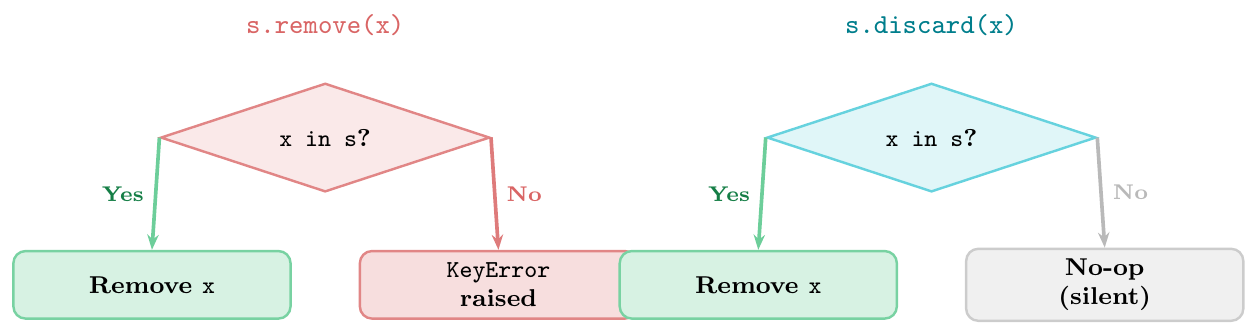
s = {1, 2, 3, 4, 5}

# add: no-op if already present
s.add(6)
print(s)              # {1, 2, 3, 4, 5, 6}
s.add(3)              # already in set: no change, no error
print(s)              # {1, 2, 3, 4, 5, 6}  unchanged

# remove: raises KeyError if missing
s.remove(6)
print(s)              # {1, 2, 3, 4, 5}
try:
    s.remove(99)
except KeyError as e:
    print(f"KeyError: {e}")   # KeyError: 99

# discard: silent if missing
s.discard(5)          # 5 was in set: removed
print(s)              # {1, 2, 3, 4}
s.discard(99)         # 99 not in set: no error
print(s)              # {1, 2, 3, 4}  unchanged

# pop: removes and returns arbitrary element
s2 = {10, 20, 30}
val = s2.pop()
print(val)            # some element (arbitrary: 10 or 20 or 30)
print(s2)             # remaining 2 elements

# pop on empty set
try:
    empty = set()
    empty.pop()
except KeyError as e:
    print(e)   # 'pop from an empty set'

# clear: empty the set
s3 = {1, 2, 3}
s3.clear()
print(s3)             # set()
print(len(s3))        # 0

# In-place update methods (same as |=, &=, -=, ^=)
A = {1, 2, 3, 4}
A.update([5, 6, 7])                   # A |= {5,6,7}
print(A)              # {1, 2, 3, 4, 5, 6, 7}

A.intersection_update([2, 4, 6, 8])   # A &= {2,4,6,8}
print(A)              # {2, 4, 6}

A.difference_update([4])              # A -= {4}
print(A)              # {2, 6}

A.symmetric_difference_update([2,3,4])  # A ^= {2,3,4}
print(A)              # {3, 4, 6}
Frozenset Details and Practical Set Patterns
Complete Evaluation Symmetry: Every non-mutating query pipeline supported by standard mutable instances operates cleanly on immutable variants:
in,|,&,-,\^{},issubset,issuperset,isdisjoint, data-length metrics, and sequence loops.Total Immutability Protection: Mutation gateways such as
add,remove,discard,pop,clear, andupdateare completely omitted from the interface definition.Heterogeneous Computation Rules: Intersection evaluation patterns yield types derived from the primary operand sequence:
frozenset & setgenerates afrozenset; reversing evaluation sequences shifts output allocation cleanly to standardsetconfigurations.Hash Consistency Verification: Evaluating structural inputs via
hash(frozenset({1,2,3}))processes securely; checking matching state definitions viafrozenset({1,2}) == {1,2}tracks cleanly to mathematical evaluation criteria.
fs = frozenset({1, 2, 3, 4, 5})
s  = {3, 4, 5, 6, 7}

# All read operations work
print(3 in fs)           # True
print(fs & s)            # frozenset({3, 4, 5})
print(fs | s)            # frozenset({1, 2, 3, 4, 5, 6, 7})
print(fs - s)            # frozenset({1, 2})
print(fs.issubset({1,2,3,4,5,6}))  # True

# Hashable: dict key
graph_edges = {
    frozenset({"A","B"}): 5,
    frozenset({"B","C"}): 3,
    frozenset({"A","C"}): 7,
}
print(graph_edges[frozenset({"A","C"})])   # 7

# Hashable: element of set
families = {
    frozenset({"Alice","Bob"}),
    frozenset({"Charlie","Diana"}),
    frozenset({"Alice","Bob"}),    # duplicate -- removed
}
print(len(families))   # 2

# Mutation raises AttributeError
try:
    fs.add(6)
except AttributeError as e:
    print(e)   # 'frozenset' object has no attribute 'add'

# Mixed operations: frozenset op set -> frozenset; set op frozenset -> set
print(type(fs & s))        # <class 'frozenset'>
print(type(s & fs))        # <class 'set'>

# Equality across types
print(frozenset({1,2,3}) == {1,2,3}) # True# 1. High-Speed Linear Array Deduplication
data = [1,2,3,2,4,1,5,3,6]
unique = list(set(data)) # order not preserved
print(sorted(unique)) # [1, 2, 3, 4, 5, 6]
# 2. Performance Profiling: Linear Array Sweep vs. Constant Hash Lookup
import time
large_list = list(range(1_000_000))
large_set = set(range(1_000_000))
t0 = time.perf_counter()
_ = 999_999 in large_list
print(f"list: {time.perf_counter()-t0:.4f}s") # ~0.01s (O(n) dependency loop)
t0 = time.perf_counter()
_ = 999_999 in large_set
print(f"set : {time.perf_counter()-t0:.6f}s") # ~0.0000001s (O(1) constant index look)
# 3. Dissecting Overlaps and Set Variances
list1 = [1, 2, 3, 4, 5]
list2 = [3, 4, 5, 6, 7]
common = set(list1) & set(list2) # {3, 4, 5}
only_l1 = set(list1) - set(list2) # {1, 2}
only_l2 = set(list2) - set(list1) # {6, 7}
all_uniq = set(list1) ^ set(list2) # {1, 2, 6, 7}
# 4. Identity Evaluation Mechanics (Character Frequency Invariant Check)
def is_same_letters(a, b):
return set(a.lower()) == set(b.lower())
print(is_same_letters("listen", "silent")) # True
# 5. Schema Validation Architecture
def validate_form(data, required):
missing = required - data.keys()
if missing:
return f"Missing fields: {missing}"
return "OK"
required = {"name", "email", "age"}
form = {"name": "Alice", "email": "a@b.com", "city": "Delhi"}
print(validate_form(form, required)) # Missing fields: {'age'}
# 6. Graph Structures: Tracking Network Reachability via Constant Sets
graph = {1:[2,3], 2:[4], 3:[4,5], 4:[], 5:[]}
def reachable(start, graph):
visited = {start}
queue = [start]
while queue:
node = queue.pop(0)
for nb in graph[node]:
if nb not in visited: # Fast constant evaluation barrier
visited.add(nb)
queue.append(nb)
return visited
print(reachable(1, graph)) # {1, 2, 3, 4, 5}
# 7. Combinatorial Generation: Designing Power Sets via Immutable Composition
def power_set(s):
ps = {frozenset()}
for elem in s:
ps = ps | {sub | {elem} for sub in ps}
return ps
print(power_set({1,2,3}))Collection Types --- At a Glance