Functions
Defining & Calling Functions
Basic Syntax
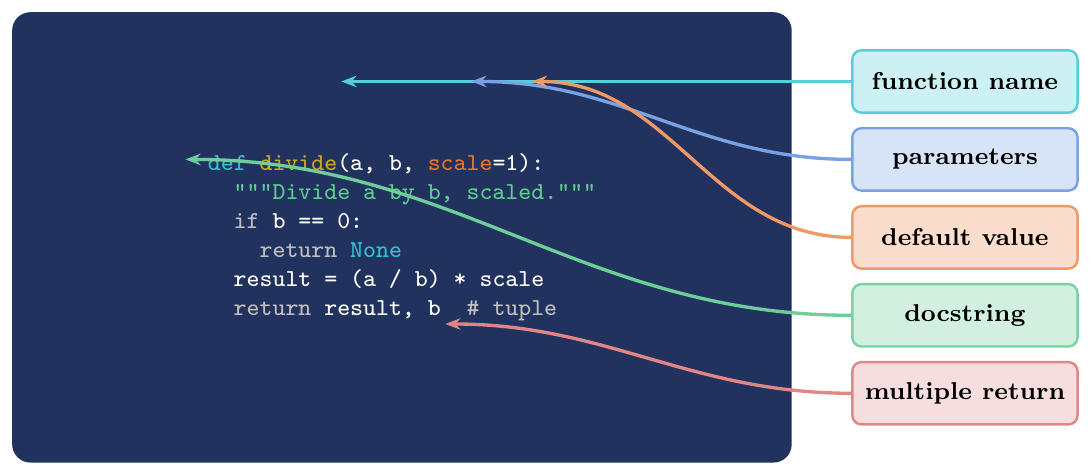
def, return, docstrings
A Python function is defined with the def keyword:
\[\texttt{def}\ \langle\textit{name}\rangle \texttt{(}\langle\textit{params}\rangle\texttt{):} \quad \langle\textit{body}\rangle\]
returnexits the function and optionally passes a value back to the callerNo
return(or barereturn): function returnsNoneimplicitlyMultiple return values: Python packs them into a
tuple(return x, y$\equiv$return (x, y))Docstring: first statement in the body, if a string literal, is stored as
func.__doc__; shown byhelp(func)
Bare
returnor fall-off-end: returnsNonereturn expr: evaluatesexprand returns itreturn a, b, c: packs into tuple(a, b, c); caller can unpack:x, y, z = f()Multiple
returnstatements: first one reached exits the functionreturninside a generator becomesStopIteration(covered in generators chapter)
# Basic function
def greet(name):
    """Return a greeting string for the given name."""
    return f"Hello, {name}!"

print(greet("GATE"))          # Hello, GATE!
print(greet.__doc__)          # Return a greeting string for the given name.

# No return -> None
def no_return(x):
    x * 2   # result not returned

print(no_return(5))            # None

# Multiple return values (tuple)
def divmod_custom(a, b):
    """Return (quotient, remainder) of a ÷ b."""
    return a // b, a % b       # packs into tuple

q, r = divmod_custom(17, 5)   # unpack
print(q, r)                    # 3  2

result = divmod_custom(17, 5)  # as tuple
print(result)                  # (3, 2)
print(type(result))            # <class 'tuple'>

# Early return
def absolute(n):
    if n >= 0:
        return n
    return -n                  # unreachable if n >= 0

# Docstring access
def area(r):
    """Compute the area of a circle with radius r."""
    import math
    return math.pi * r ** 2

help(area)    # shows the docstring
print(area.__doc__)
Function Objects
First-Class Functions
In Python, functions are objects (instances of function type).
A first-class object can be:
Assigned to a variable:
f = my_funcPassed as an argument:
map(str, [1,2,3])Returned from a function: decorators, closures
Stored in a data structure:
ops = [add, sub, mul]Has attributes:
f.__name__,f.__doc__,f.__code__
callable(obj) returns True if obj can be called
with (): functions, classes, objects with __call__,
built-ins.
def square(n): return n ** 2
def cube(n):   return n ** 3
def negate(n): return -n

# Assign to variable
f = square
print(f(5))           # 25
print(f.__name__)     # square (name stays "square")

# Pass as argument
data = [1, 2, 3, 4, 5]
print(list(map(square, data)))     # [1, 4, 9, 16, 25]
print(list(filter(lambda x: x%2==0, data)))  # [2, 4]

# Store in data structure
ops = {"sq": square, "cb": cube, "neg": negate}
for name, op in ops.items():
    print(f"{name}(3) = {op(3)}")
# sq(3) = 9 / cb(3) = 27 / neg(3) = -3

# Return from function (higher-order)
def make_power(exp):
    def power(base):
        return base ** exp
    return power        # return function object

square2 = make_power(2)
cube2   = make_power(3)
print(square2(5))      # 25
print(cube2(4))        # 64

# callable()
print(callable(square))    # True
print(callable(42))        # False
print(callable(print))     # True
print(callable([]))        # False

class Adder:
    def __call__(self, x): return x + 1

add1 = Adder()
print(callable(add1))  # True  (has __call__)
print(add1(10))        # 11
Arguments & Parameters
Positional and Keyword Arguments
Matching Rules
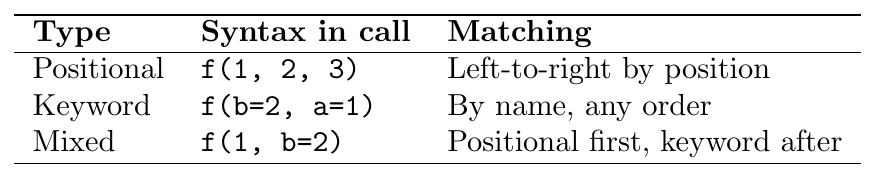
Rule: all positional arguments must come before keyword arguments
in any function call.
f(1, b=2) is valid; f(a=1, 2) is a SyntaxError.
Default Parameters
Evaluated Once at Definition Time
Default parameter values are evaluated exactly once at the time the
def statement is executed, not at call time.
Consequence: if the default is an immutable object (int,
str, None), re-evaluation doesn't matter. If it is a
mutable object (list, dict), the same object is shared
across all calls that use the default.
Mutable Default Argument Trap
GATE Critical --- Shared Mutable Default
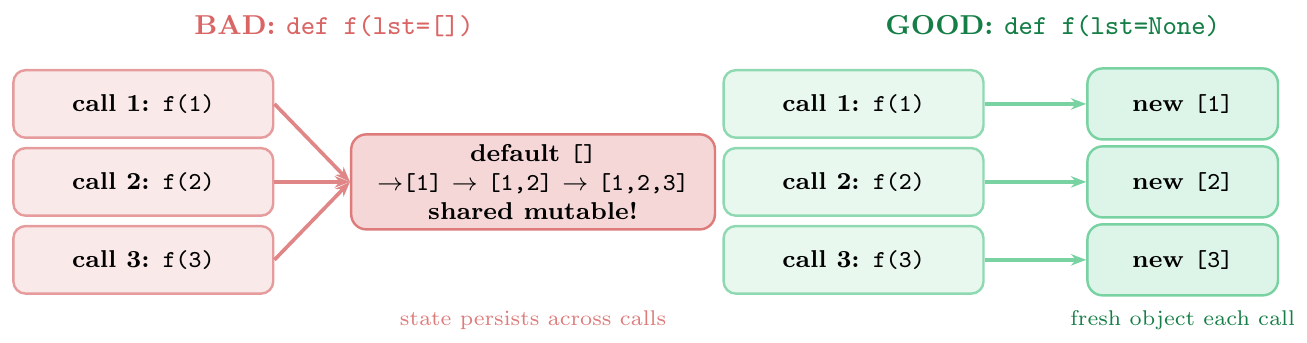
When a mutable object (list, dict, set) is used as a
default parameter, it is created once at function definition time and
shared across all calls that rely on the default. State accumulated in one
call persists into the next.
Fix: use None as the sentinel default and create the mutable
object inside the function body.
# ── BUG: shared mutable default ───────────────────────────
def append_to(val, lst=[]):    # lst created ONCE at def time
    lst.append(val)
    return lst

print(append_to(1))   # [1]
print(append_to(2))   # [1, 2]   UNEXPECTED!
print(append_to(3))   # [1, 2, 3]  state persists!

# Proof: it's always the same list object
print(id(append_to.__defaults__[0]))   # same id each call

# ── FIX: use None sentinel ─────────────────────────────────
def append_to_fixed(val, lst=None):
    if lst is None:
        lst = []               # new list created every call
    lst.append(val)
    return lst

print(append_to_fixed(1))   # [1]
print(append_to_fixed(2))   # [2]   correct
print(append_to_fixed(3))   # [3]   correct

# Explicit argument bypasses the shared default entirely
print(append_to(4, []))    # [4]  -- no shared state

# ── GATE variant: dict default ─────────────────────────────
def add_entry(key, val, store={}):
    store[key] = val
    return store

print(add_entry("a", 1))   # {'a': 1}
print(add_entry("b", 2))   # {'a': 1, 'b': 2}  shared!

# ── GATE question: what does this print? ──────────────────
def mystery(x, result=[]):
    result.append(x * 2)
    return result

print(mystery(1))   # [2]
print(mystery(2))   # [2, 4]
print(mystery(3))   # [2, 4, 6]
# Each call appends to the SAME list
*args and **kwargs
Variable-Length Arguments

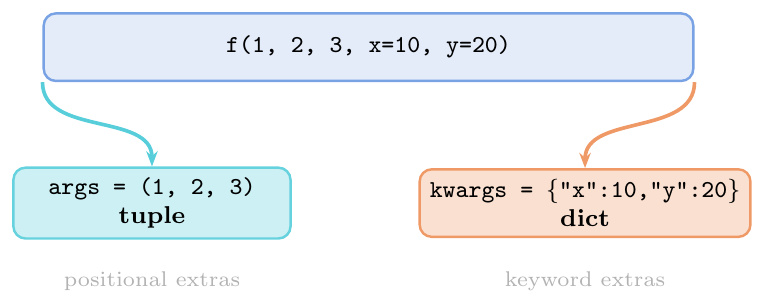
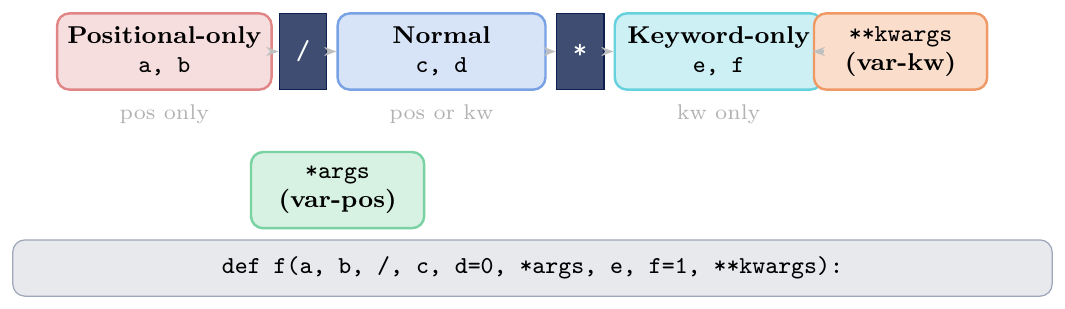
Parameter order (formal rule): \[ \underbrace{\texttt{pos}}_{\text{positional}} \;\to\; \underbrace{\texttt{*args}}_{\text{var-pos}} \;\to\; \underbrace{\texttt{kw-only}}_{\text{after *}} \;\to\; \underbrace{\texttt{**kwargs}}_{\text{var-kw}} \]
Names args/kwargs are convention, not syntax —
*nums and **opts work equally.
Keyword-only (after
*or*args): parameter must be passed by name; cannot be satisfied positionally \[\texttt{def f(a, *, b, c=0):}\quad\Rightarrow\quad \texttt{f(1, b=2)}\text{ ok};\quad\texttt{f(1, 2)}\text{ TypeError}\]Positional-only (before
/, Python 3.8+): parameter can only be passed positionally;f(a=1)raisesTypeError\[\texttt{def f(a, b, /, c):}\quad\Rightarrow\quad \texttt{f(1, 2, c=3)}\text{ ok};\quad\texttt{f(a=1)}\text{ TypeError}\]Combined:
def f(a, b, /, c, *, d, e):—a,bpos-only;cnormal;d,ekw-only
# *args: collects extra positionals into a tuple
def total(*args):
    print(type(args), args)   # <class 'tuple'>
    return sum(args)

print(total(1, 2, 3))        # 6
print(total(10, 20))         # 30
print(total())               # 0  (empty tuple)

# **kwargs: collects extra keywords into a dict
def show_info(**kwargs):
    print(type(kwargs), kwargs)
    for key, val in kwargs.items():
        print(f"  {key}: {val}")

show_info(name="Alice", age=25, city="Delhi")
# <class 'dict'> {'name': 'Alice', 'age': 25, 'city': 'Delhi'}
# name: Alice  / age: 25  / city: Delhi

# Combined: positional + *args + kw-only + **kwargs
def full_sig(a, b, *args, flag=False, **kwargs):
    print(f"a={a}, b={b}")
    print(f"args={args}")        # tuple of extra positionals
    print(f"flag={flag}")        # keyword-only
    print(f"kwargs={kwargs}")    # dict of extra keywords

full_sig(1, 2, 3, 4, 5, flag=True, x=10, y=20)
# a=1, b=2
# args=(3, 4, 5)
# flag=True
# kwargs={'x': 10, 'y': 20}

# Forwarding all arguments (common in decorators)
def debug(func):
    def wrapper(*args, **kwargs):
        print(f"Calling {func.__name__} with {args}, {kwargs}")
        result = func(*args, **kwargs)
        print(f"Returned: {result}")
        return result
    return wrapper

@debug
def add(x, y): return x + y
add(3, y=4)
# Calling add with (3,), {'y': 4}
# Returned: 7# Keyword-only (after *)
def connect(host, port, *, timeout=30, retries=3):
print(f"Connect to {host}:{port}, timeout={timeout}, retries={retries}")
connect("localhost", 8080) # defaults
connect("localhost", 8080, timeout=10) # kw only
connect("localhost", 8080, timeout=5, retries=1)
# TypeError: timeout cannot be passed positionally
try:
connect("localhost", 8080, 10)
except TypeError as e:
print(e) # takes 2 positional arguments but 3 were given
# Positional-only (before /)
def power(base, exp, /):
return base ** exp
print(power(2, 10)) # 1024
try:
power(base=2, exp=10) # TypeError
except TypeError as e:
print(e) # got some positional-only arguments passed as keyword
# Combined: pos-only / normal * kw-only
def f(a, b, /, c, *, d):
return a + b + c + d
print(f(1, 2, 3, d=4)) # 10
print(f(1, 2, c=3, d=4)) # 10 (c can be positional or keyword)
try:
f(a=1, b=2, c=3, d=4) # TypeError: a,b are positional-only
except TypeError as e:
print(e)Argument Unpacking in Calls
* and ** at the Call Site
The * and ** operators can appear at the call site (not just in function definitions) to unpack containers into arguments:

Multiple unpacking is allowed in a single call (Python 3.5+):
f(*a, *b, **c, **d)
def add3(x, y, z):
    return x + y + z

args = (3, 4, 5)
print(add3(*args))          # 12  same as add3(3, 4, 5)

vals = [10, 20, 30]
print(add3(*vals))          # 60

# ** unpacks dict as keyword args
def describe(name, age, city):
    return f"{name}, {age}, from {city}"

info = {"age": 25, "city": "Delhi"}
print(describe("Alice", **info))   # Alice, 25, from Delhi

# Full unpack: *args + **kwargs
def f(a, b, c, x=0, y=0):
    return a + b + c + x + y

pos  = [1, 2, 3]
kw   = {"x": 10, "y": 20}
print(f(*pos, **kw))   # 36

# Multiple unpacking (Python 3.5+)
a = [1, 2]
b = [3, 4]
print([*a, *b])             # [1, 2, 3, 4]  (list merge)
print({**{"a":1}, **{"b":2}})  # {'a':1,'b':2}  (dict merge)

# Practical: pass config dict to function
import json
config = {"indent": 2, "sort_keys": True}
data = {"b": 2, "a": 1}
print(json.dumps(data, **config))
# {"a": 1, "b": 2}  (sorted, indented)
Pass-by-Object-Reference
How Python Passes Arguments
Python uses pass-by-object-reference (also called call by sharing or call by assignment). The function receives a reference to the same object — not a copy of the object, not the variable itself.
Key rules:
Rebinding (
x = new_val) inside a function creates a new local binding; it never affects the caller's variableMutation of a mutable object (e.g.\
lst.append(x)) is visible to the caller because both names refer to the same objectImmutable objects (int, str, tuple) cannot be mutated — any “modification” creates a new object; caller is unaffected
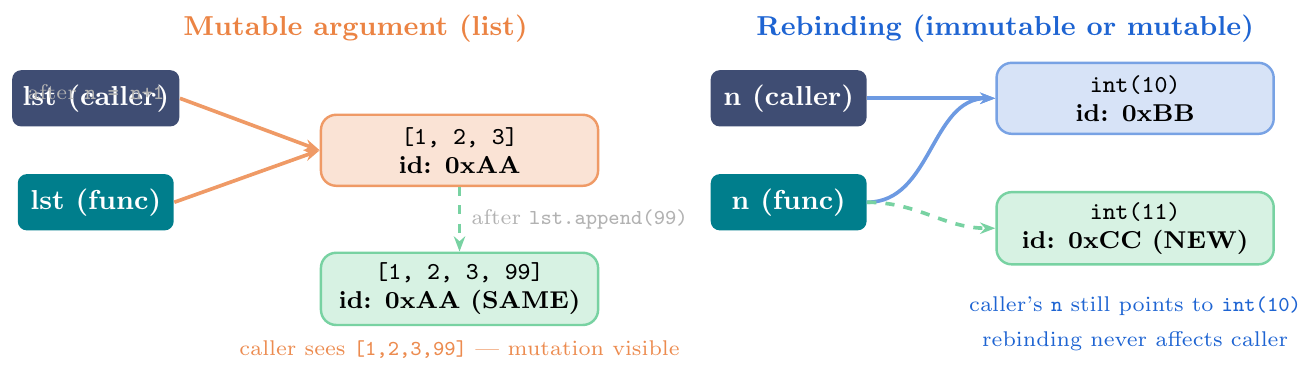
Mutation (mutable objects):
lst.append(x),dct[k] = v,obj.attr = val— caller sees the changeRebinding:
x = something_newinside function — caller's name unaffected; local name now refers to a different objectImmutable types (int, str, float, tuple, frozenset): impossible to mutate in place — any “modification” produces a new object (rebinding)
Augmented assignment on mutable:
lst += [x]calls__iadd__which mutates in place and rebinds — caller sees changeAugmented assignment on immutable:
n += 1creates new object and rebinds local name — caller unaffectedTo prevent mutation: pass
lst[:],tuple(lst), orcopy.deepcopy(obj)
# ── 1. Mutable argument: mutation IS visible ───────────────
def add_element(lst, val):
    lst.append(val)        # mutates the object caller passed

my_list = [1, 2, 3]
add_element(my_list, 99)
print(my_list)             # [1, 2, 3, 99]  -- changed!

# ── 2. Rebinding does NOT affect caller ─────────────────────
def try_rebind(lst):
    lst = [10, 20, 30]     # local rebind; caller unaffected
    lst.append(40)

my_list2 = [1, 2, 3]
try_rebind(my_list2)
print(my_list2)            # [1, 2, 3]  -- unchanged!

# ── 3. Immutable: always creates new object ─────────────────
def increment(n):
    n += 1                 # creates new int; local rebind
    print(f"inside: {n}")

x = 10
increment(x)               # inside: 11
print(x)                   # 10  -- unchanged!

# ── 4. Same with strings ────────────────────────────────────
def modify_str(s):
    s += " World"          # new str object
    print(f"inside: {s}")

greeting = "Hello"
modify_str(greeting)       # inside: Hello World
print(greeting)            # Hello  -- unchanged!

# ── 5. Augmented += on mutable: mutates AND rebinds ────────
def extend_list(lst):
    lst += [99]            # calls __iadd__: mutates in place!

L = [1, 2, 3]
extend_list(L)
print(L)                   # [1, 2, 3, 99]  -- changed!

# ── 6. How to truly prevent mutation: pass a copy ──────────
import copy

def safe_process(lst):
    lst.append(999)        # modifies the copy, not original
    return lst

original = [1, 2, 3]
result = safe_process(original[:])     # shallow copy
print(original)            # [1, 2, 3]  -- safe!

result2 = safe_process(copy.deepcopy(original))
print(original) # [1, 2, 3] -- safe!# Q1: Trace the output
def f(x, lst=[]):
lst.append(x)
return lst
print(f(1)) # [1]
print(f(2)) # [1, 2] shared default!
print(f(3,[])) # [3] explicit arg bypasses default
print(f(4)) # [1, 2, 4] still using shared default
# Q2: What does this print?
def swap(a, b):
a, b = b, a # local rebind; tuple unpacking
print(f"inside: {a}, {b}")
x, y = 10, 20
swap(x, y) # inside: 20, 10
print(x, y) # 10 20 -- caller unchanged!
# Q3: Mutable inside immutable (tuple containing list)
def modify(t):
t[0].append(99) # modifies the LIST inside the tuple
# t[0] = [] # would TypeError: tuple is immutable
data = ([1, 2], "hello")
modify(data)
print(data) # ([1, 2, 99], 'hello') list inside changed!
# Q4: *args receives a tuple
def check_types(*args):
print(type(args)) # <class 'tuple'>
for a in args:
print(type(a).__name__, a)
check_types(1, "hi", [1,2], None)
# tuple
# int 1
# str hi
# list [1, 2]
# NoneType None
# Q5: Keyword-only enforcement
def strict(a, b, *, c):
return a + b + c
print(strict(1, 2, c=3)) # 6
try:
strict(1, 2, 3) # TypeError: c is keyword-only
except TypeError as e:
print(e)Scope --- LEGB Rule
The Four Scopes
LEGB Lookup Order
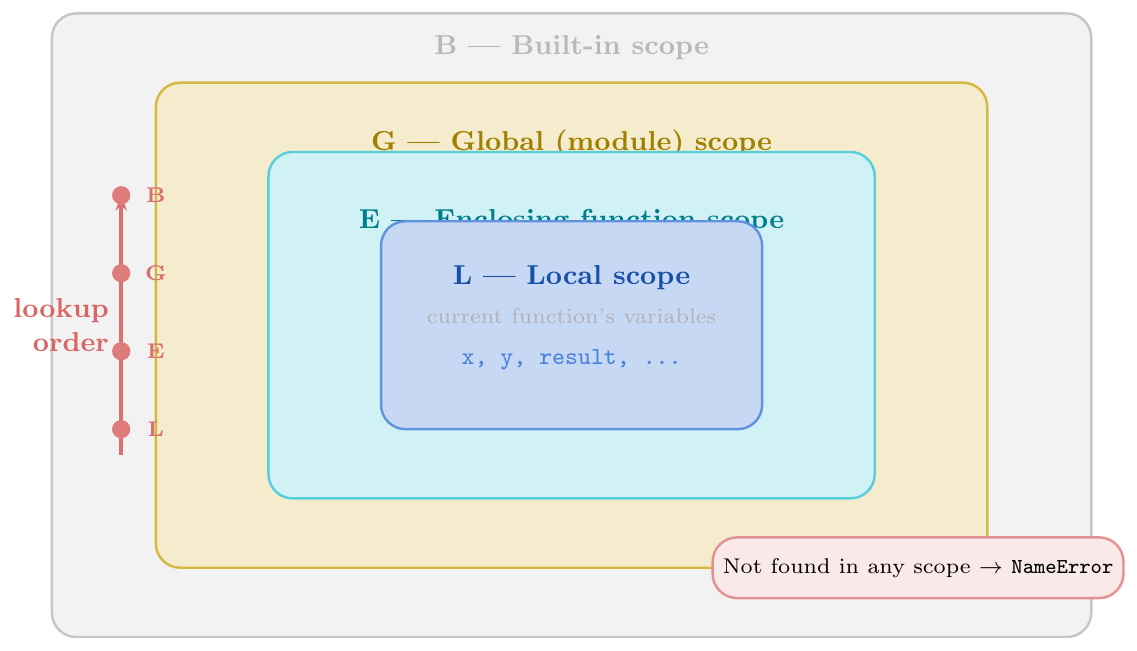
Scope defines where in code a name (variable, function, class) is visible and accessible. Python resolves names using the LEGB rule — a strict lookup order through four nested scopes:
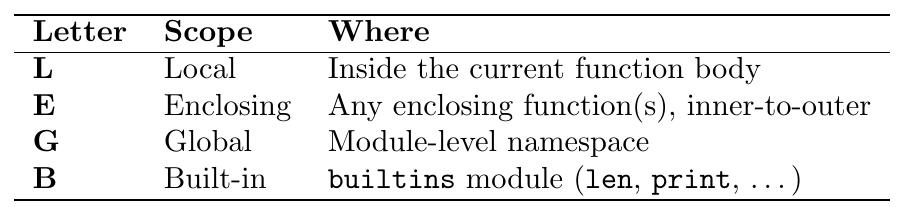
Python searches L $\to$ E $\to$ G $\to$ B in order and uses the
first match found. If no match exists in any scope, a
NameError is raised.
Assignment creates a local binding unless global or
nonlocal is declared. Reading a name never creates a binding.
New scope created by:
def,class,lambda(not byif,for,while,with— these share the enclosing scope)Assignment in a function ($=$,
+=,fortarget,with ... as, function parameter,import) creates a local variable in that function's scopeReading only (no assignment anywhere in the function): looks up LEGB
UnboundLocalError: Python sees an assignment to
xanywhere in a function, so it treatsxas local — readingxbefore the assignment raisesUnboundLocalError, notNameErrorInspect scopes:
locals(),globals(),vars(),dir()
# Built-in scope
print(len([1,2,3]))    # len found in B (built-in)

# Global scope
x = "global"
def show_global():
    print(x)           # not in L or E; found in G
show_global()          # global

# Local shadows global
x = "global"
def show_local():
    x = "local"        # creates LOCAL binding
    print(x)           # found in L
show_local()           # local
print(x)               # global  (global unchanged)

# LEGB full chain
PI = 3.14159           # G

def outer():
    base = 10          # E (for inner)

    def inner():
        radius = 5     # L
        area = PI * radius ** 2    # radius:L, PI:G
        result = base * radius     # base:E
        print(f"area={area:.2f}, result={result}")

    inner()

outer()   # area=78.54, result=50

# if/for do NOT create new scope
for i in range(3):
    loop_var = i * 2
print(loop_var)   # 4  (loop_var leaks into enclosing scope!)
# this would be an error in Java/C++ -- not in Python

# UnboundLocalError trap
val = 100
def tricky():
    print(val)    # ERROR: Python sees 'val = ...' below,
    val = 200     # so 'val' is treated as LOCAL throughout
# tricky() # UnboundLocalError: free variable 'val' ...MODULE_VAR = 42
def demo(a, b):
c = a + b
d = "local"
print(locals()) # {'a': 10, 'b': 20, 'c': 30, 'd': 'local'}
demo(10, 20)
# globals() returns the module-level namespace dict
g = globals()
print("MODULE_VAR" in g) # True
print(g["MODULE_VAR"]) # 42
# Dynamic lookup using globals()
def call_by_name(func_name, *args):
func = globals()[func_name] # look up function by name string
return func(*args)
def add(a, b): return a + b
def mul(a, b): return a * b
print(call_by_name("add", 3, 4)) # 7
print(call_by_name("mul", 3, 4)) # 12global Keyword
Accessing and Modifying Module-Level Names
By default, assigning to a name inside a function creates a local
variable. To make an assignment target the module-level (global) name
instead, declare it with global:
\[\texttt{global}\ \langle\textit{name}\rangle\]
Rules:
global xmust appear before any use ofxin the function (best practice: at the very top of the function)After
global x, all reads and writes in that function refer to the globalxReading a global without assignment does not need
global— LEGB handles it automaticallyCan declare multiple:
global x, y, zAnti-pattern: excessive
globaluse makes code hard to test and reason about; prefer returning values
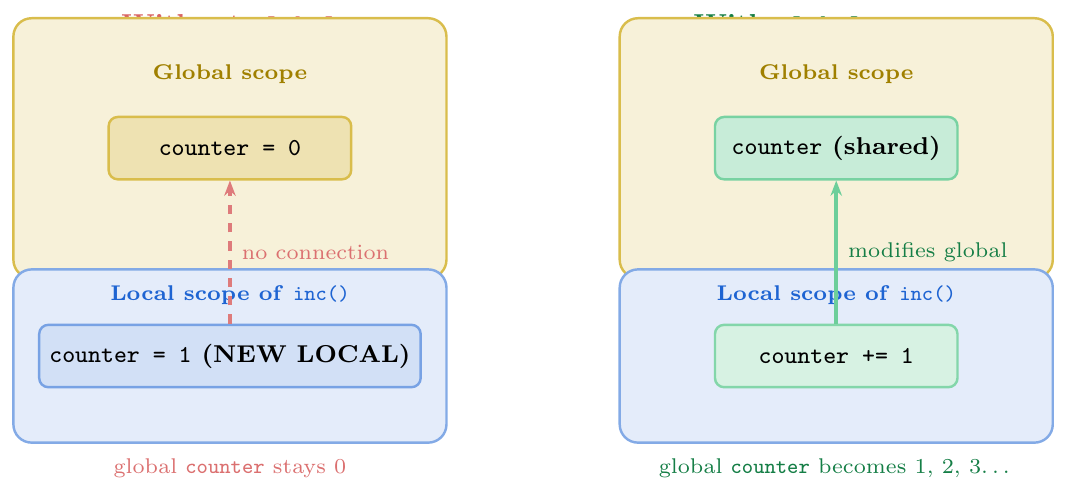
#  global needed for ASSIGNMENT
counter = 0

def increment():
    global counter         # declare intent to modify global
    counter += 1

increment(); increment(); increment()
print(counter)             # 3

# ── Without global: creates local, global untouched ─────────
total = 100
def try_modify():
    total = 200            # creates LOCAL 'total'; global unchanged
    print(f"inside: {total}")

try_modify()               # inside: 200
print(total)               # 100  -- global unchanged!

# ── Reading global WITHOUT global keyword (no declaration needed) ──
PI = 3.14159
def area(r):
    return PI * r ** 2     # reads PI from G via LEGB -- no 'global' needed

print(area(5))             # 78.53975

# ── UnboundLocalError: assignment makes var local throughout ─
value = 50
def broken():
    print(value)           # UnboundLocalError! assignment below
    value = 99             # Python treats 'value' as local in whole func

# Fix with global:
def fixed():
    global value
    print(value)           # 50
    value = 99
fixed()
print(value)               # 99  (global modified)

# ── Practical: function registry ────────────────────────────
_registry = {}

def register(func):
    global _registry
    _registry[func.__name__] = func
    return func

@register
def add(a, b): return a + b

@register
def mul(a, b): return a * b

print(_registry)     # {'add': <function add...>, 'mul': <function mul...>}
print(_registry["add"](3, 4))   # 7
nonlocal Keyword
Rebinding in Enclosing Scope (Closures)
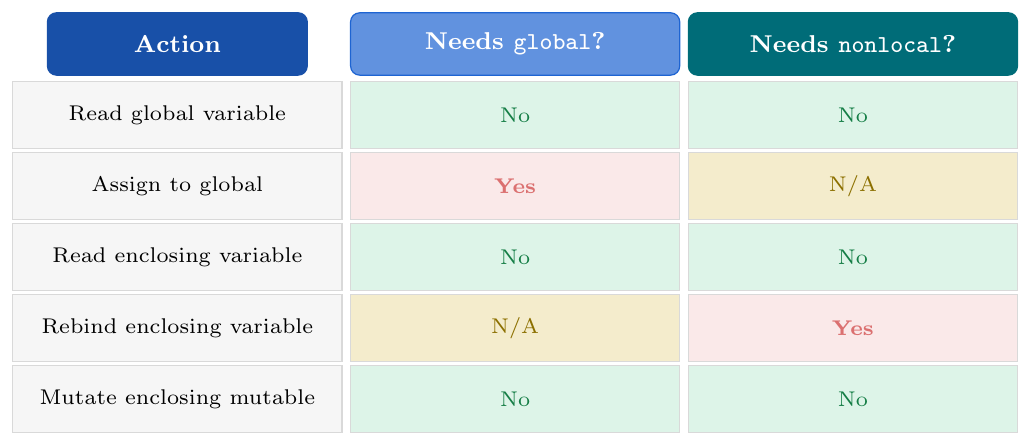
nonlocal rebinds a name in the nearest enclosing
(non-global) function scope. It is needed only for assignment; reading
an enclosing variable works automatically via LEGB.
\[\texttt{nonlocal}\ \langle\textit{name}\rangle\]
Rules:
The name must already exist in an enclosing function scope (not module-level) —
nonlocal xwhenxis only global raisesSyntaxErrorAfter declaration, all reads and writes refer to the enclosing variable
Mutation of a mutable object does NOT require
nonlocal:lst.append(x)mutates the object the enclosing name refers to; it never rebinds the nameChains: if multiple levels nest,
nonlocalreaches the nearest enclosing scope that has the name
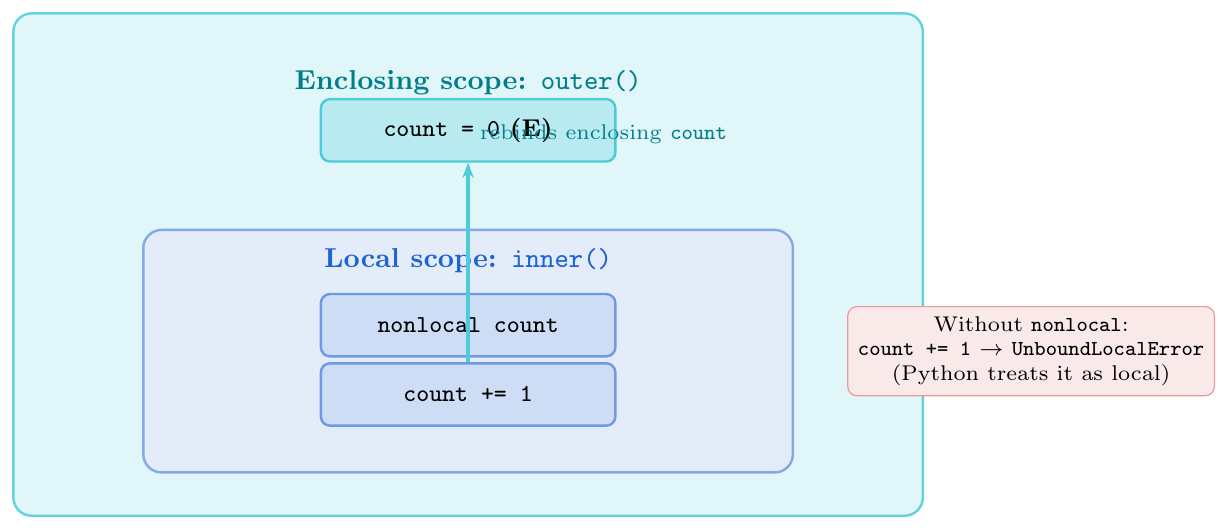
# ── nonlocal needed for rebinding ────────────────────────────
def make_counter(start=0):
    count = start              # E scope

    def increment(step=1):
        nonlocal count         # declare: modify E scope's 'count'
        count += step          # rebind enclosing count
        return count

    def reset():
        nonlocal count
        count = start

    def get():
        return count           # READ only -- no nonlocal needed

    return increment, reset, get

inc, rst, get = make_counter(0)
print(inc())      # 1
print(inc())      # 2
print(inc(5))     # 7
print(get())      # 7
rst()
print(get())      # 0  (reset to start)

# ── WITHOUT nonlocal: reading works, rebinding fails ─────────
def outer():
    x = 10

    def inner_read():
        print(x)       # OK: LEGB reads from E

    def inner_write():
        x += 1         # UnboundLocalError! treated as local

    inner_read()       # 10

outer()
# inner_write() would crash with UnboundLocalError

# ── Mutation of mutable does NOT need nonlocal ───────────────
def make_history():
    log = []                   # E scope, mutable

    def record(event):
        log.append(event)      # MUTATES the list; no nonlocal needed
        return log

    def clear():
        log.clear()            # also mutation; no nonlocal needed

    return record, clear

rec, clr = make_history()
print(rec("login"))    # ['login']
print(rec("query"))    # ['login', 'query']
clr()
print(rec("logout"))   # ['logout']   (fresh after clear)

# ── nonlocal chains multiple levels ─────────────────────────
def level1():
    n = 0

    def level2():

        def level3():
            nonlocal n         # skips level2; reaches level1's n
            n += 100

        level3()
        print(f"after level3: {n}")   # 100

    level2()
    print(f"level1 n: {n}")           # 100

level1()# Closure: inner function "closes over" enclosing variables
def make_multiplier(factor):
"""Return a function that multiplies its argument by factor."""
def multiply(x):
return x * factor # factor captured from E scope
return multiply
double = make_multiplier(2)
triple = make_multiplier(3)
print(double(5)) # 10
print(triple(5)) # 15
print(double.__closure__) # (<cell at 0x...>,)
print(double.__closure__[0].cell_contents) # 2
# Closure cell shared across multiple inner functions
def make_adder_pair(n):
def add(x):
nonlocal n
n += x
return n
def subtract(x):
nonlocal n
n -= x
return n
return add, subtract
add5, sub5 = make_adder_pair(100)
print(add5(10)) # 110
print(sub5(5)) # 105 (shared n)
print(add5(20)) # 125
# GOTCHA: closure captures variable, not value
def make_funcs_bad():
funcs = []
for i in range(3):
funcs.append(lambda: i) # ALL capture the SAME 'i'
return funcs
fs = make_funcs_bad()
print([f() for f in fs]) # [2, 2, 2] -- all see final i=2!
# FIX: capture by default argument (snapshot the value)
def make_funcs_good():
funcs = []
for i in range(3):
funcs.append(lambda i=i: i) # default arg binds current i
return funcs
fs2 = make_funcs_good()
print([f() for f in fs2]) # [0, 1, 2] -- correct!# Q1: What does this print?
x = 1
def f():
x = 2
def g():
x = 3
print(x) # L: 3
g()
print(x) # L (f's): 2
f()
print(x) # G: 1
# Output: 3 / 2 / 1
# Q2: global vs local -- UnboundLocalError
y = 10
def h():
y += 5 # UnboundLocalError: y treated as local
# h() # would crash
def h_fixed():
global y
y += 5
h_fixed()
print(y) # 15
# Q3: nonlocal or mutation?
def outer():
data = []
def add_item(x):
data.append(x) # mutation: no nonlocal needed
# data = [x] # THIS would need nonlocal (rebinding)
add_item(1); add_item(2); add_item(3)
print(data) # [1, 2, 3]
outer()
# Q4: closure variable capture
def make_powers():
return [lambda x, n=n: x**n for n in range(1, 4)]
square, cube_fn, fourth = make_powers()
print(square(3)) # 3 (3^1)
print(cube_fn(3)) # 9 (3^2)
print(fourth(3)) # 27 (3^3)
# Q5: scope chain
a = "global_a"
def outer2():
b = "enclosing_b"
def inner():
c = "local_c"
print(a, b, c) # G, E, L -- all accessible
inner()
outer2() # global_a enclosing_b local_c
# Q6: What happens here?
total = 0
def add_to_total(n):
total = total + n # UnboundLocalError! (no global declaration)
return total
# Fix:
def add_to_total_fixed(n):
global total
total = total + n
return total
print(add_to_total_fixed(5)) # 5
print(add_to_total_fixed(3)) # 8global vs nonlocal --- Quick Reference
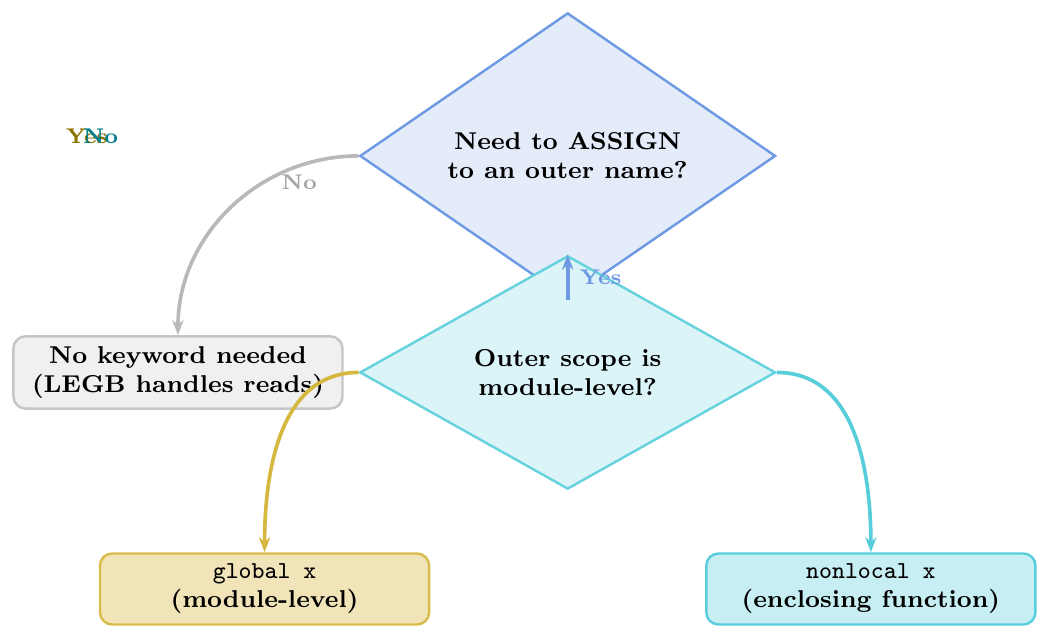
Use
globalwhen the target variable lives at module levelUse
nonlocalwhen the target variable lives in an enclosing function (closure)Neither is needed to read an outer variable or to mutate a mutable object (list, dict, set) in an outer scope
Prefer returning values over
globalwhenever possible — cleaner, testable, side-effect-free
Recursion
Mechanics
Call Stack, Base Case, Recursive Case
A function is recursive when it calls itself (directly or indirectly) as part of its own definition.
Every recursive function needs two components:
Base case: a condition under which the function returns directly without another recursive call — terminates the recursion
Recursive case: reduces the problem toward the base case and makes a recursive call with the reduced input
Call stack mechanics:
Each function call pushes a frame (local variables, return address) onto the call stack
When the call returns, its frame is popped
CPython's default recursion limit is 1000 frames; exceeding it raises
RecursionError: maximum recursion depth exceededCheck / change:
sys.getrecursionlimit(),sys.setrecursionlimit(n)
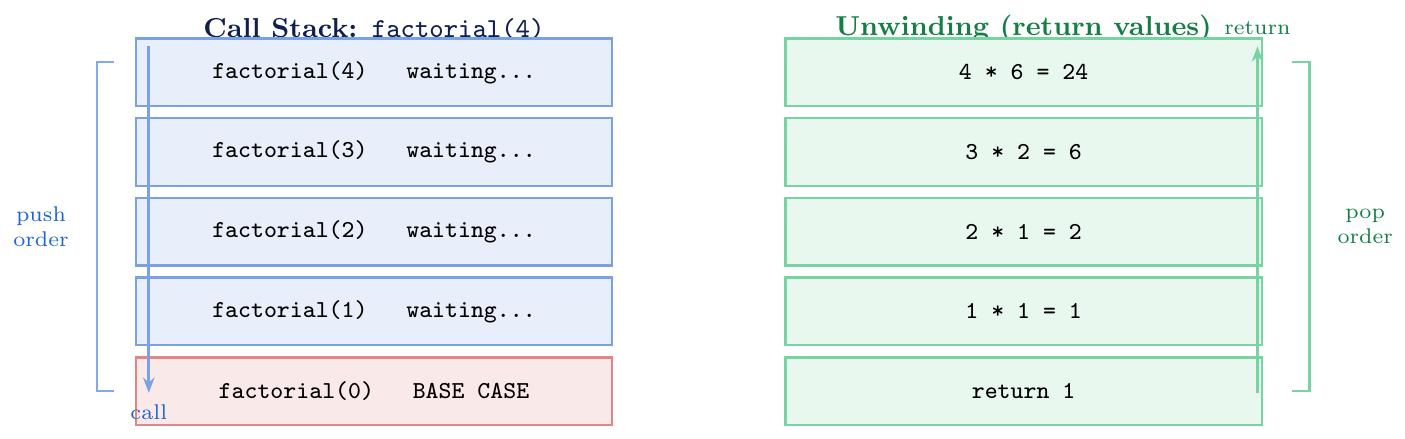
Stack depth: each recursive call adds one frame; depth = number of open calls at any instant
Maximum depth: CPython default is 1000;
sys.setrecursionlimit(10000)can increase it (use with care)Space complexity: $O(\text{depth})$ stack frames, each holding local variables
RecursionError most often caused by: missing base case, wrong base case condition, or input that never reaches the base case
No tail-call optimisation (TCO) in Python: even a pure tail-recursive function uses one frame per call (Python intentionally omits TCO)
import sys

def factorial(n):
    """n! for non-negative integer n."""
    if n == 0:           # BASE CASE: terminates recursion
        return 1
    return n * factorial(n - 1)   # RECURSIVE CASE: n reduced by 1 each time

print(factorial(0))   # 1
print(factorial(5))   # 120
print(factorial(10))  # 3628800

# Recursion depth
def depth_count(n):
    if n == 0:
        return 0
    return 1 + depth_count(n - 1)

print(depth_count(100))   # 100 frames on the stack at peak

# RecursionError: no base case reached
def bad_recursion(n):
    return bad_recursion(n - 1)   # never reaches 0 for negative n

try:
    bad_recursion(5)
except RecursionError as e:
    print(str(e)[:50])   # maximum recursion depth exceeded

# Check and change limit
print(sys.getrecursionlimit())    # 1000 (default)
# sys.setrecursionlimit(5000)     # increase carefully
Tracing Recursive Calls
Call Trees, Node Count, Fibonacci
To trace any recursive function:
Draw the call tree: each node is one function call; children are the recursive calls it makes
Total activations = total number of nodes (including leaves)
Compute return values bottom-up: leaves return first; parents combine children's returns
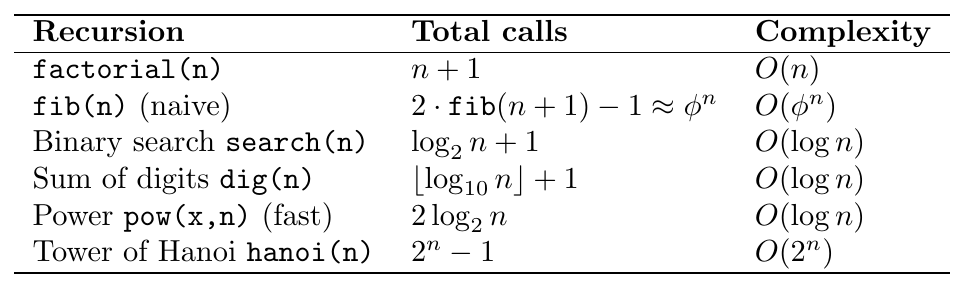
Fibonacci complexity: \[\texttt{fib(n) = fib(n-1) + fib(n-2)}\]
Total calls for
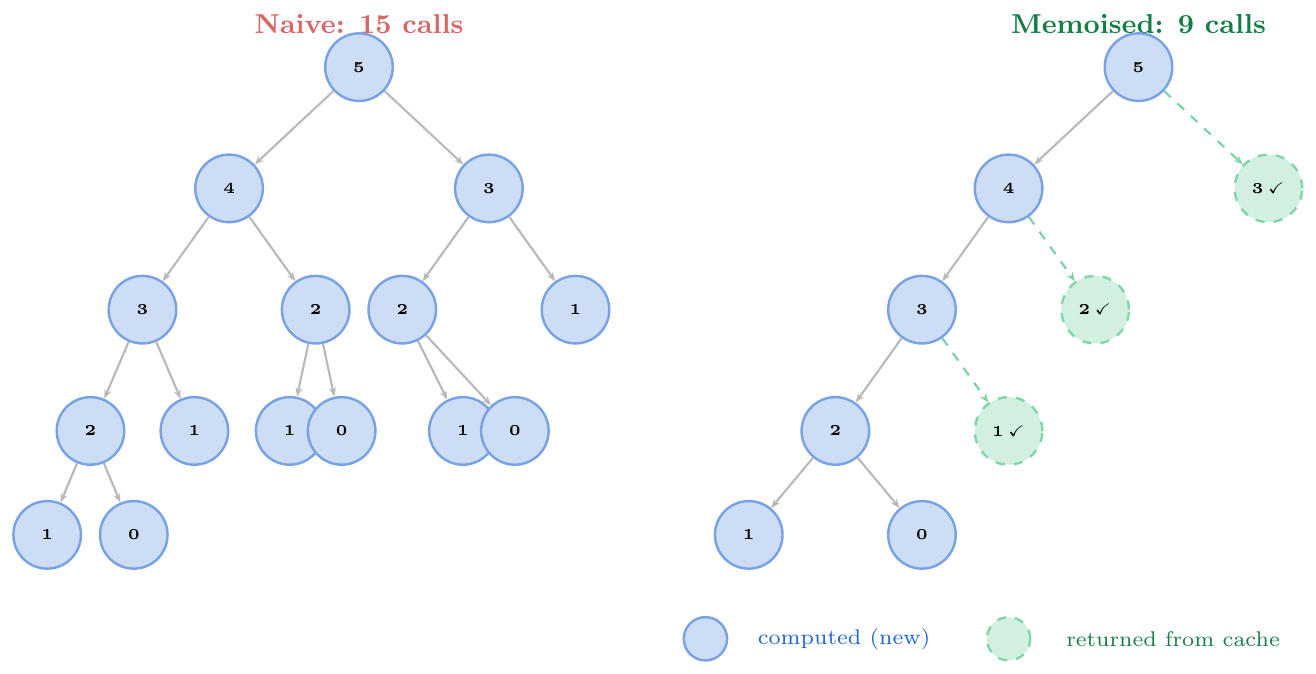
fib(n): $T(n) = T(n-1)+T(n-2)+1$ $\approx 2^{n/2}$ — exponentialRecomputes the same sub-problems many times (e.g.\
fib(2)computed 3 times insidefib(5))
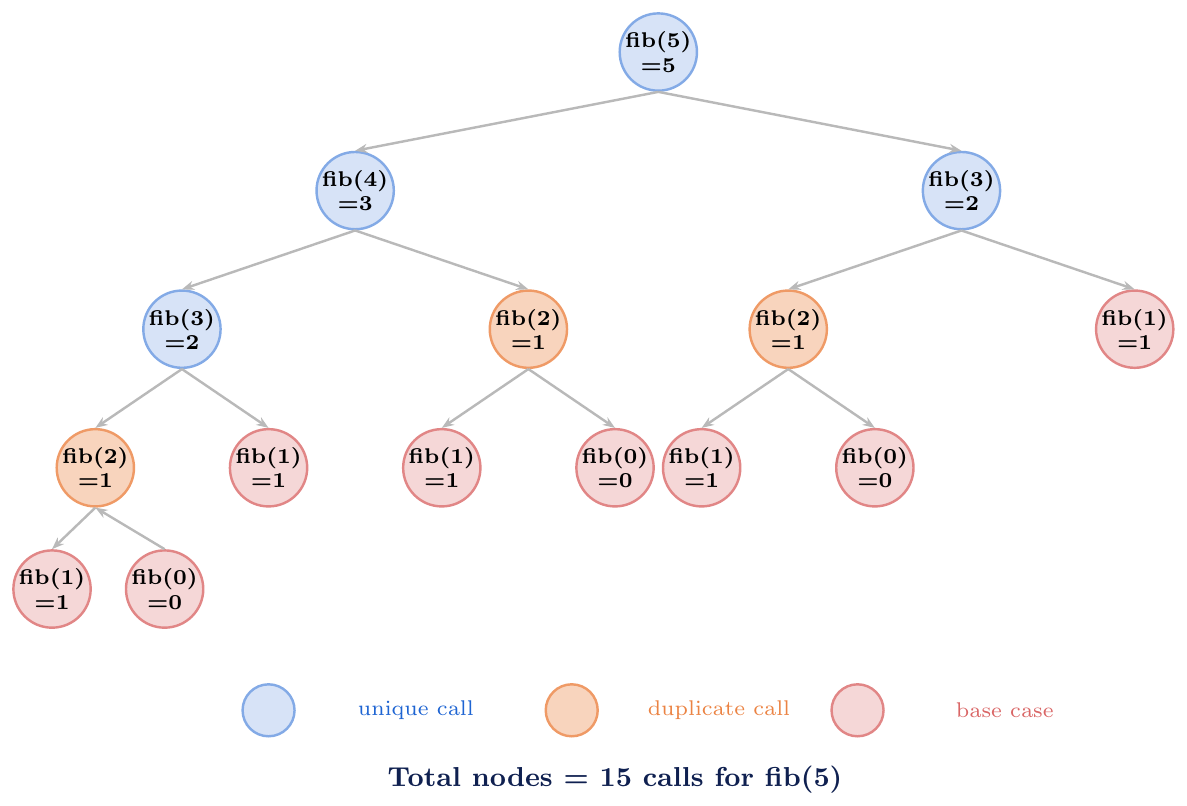
GATE tip: count nodes, not edges. Each node = one function call = one frame.
# Traced factorial(4)
# factorial(4) -> 4 * factorial(3)
#                      3 * factorial(2)
#                               2 * factorial(1)
#                                        1 * factorial(0)
#                                                  = 1   (base)
#                                        = 1*1 = 1
#                               = 2*1 = 2
#                      = 3*2 = 6
# = 4*6 = 24

# Instrument to count calls
call_count = 0

def fib_count(n):
    global call_count
    call_count += 1
    if n <= 1:
        return n
    return fib_count(n-1) + fib_count(n-2)

for k in range(1, 8):
    call_count = 0
    result = fib_count(k)
    print(f"fib({k}) = {result:3d}  calls = {call_count}")
# fib(1) =   1  calls =   1
# fib(2) =   1  calls =   3
# fib(3) =   2  calls =   5
# fib(4) =   3  calls =   9
# fib(5) =   5  calls =  15
# fib(6) =   8  calls =  25
# fib(7) =  13  calls =  41

# Pattern: calls(n) = calls(n-1) + calls(n-2) + 1
# Roughly doubles every 2 steps -> exponential

# GATE question: how many times is fib(2) called in fib(6)?
# Answer: 3 times (draw the tree to verify)
Return Value Aggregation
Accumulating Results Bottom-Up
Recursive functions aggregate results from sub-calls by:
Sum:
return f(n-1) + valueCount:
return f(n-1) + 1or+ (1 if cond else 0)Max/Min:
return max(f(left), f(right), current)List building:
return [current] + f(rest)Boolean:
return cond and f(rest)
Tracing rule: resolve the deepest call first (base case), then work upward substituting return values.
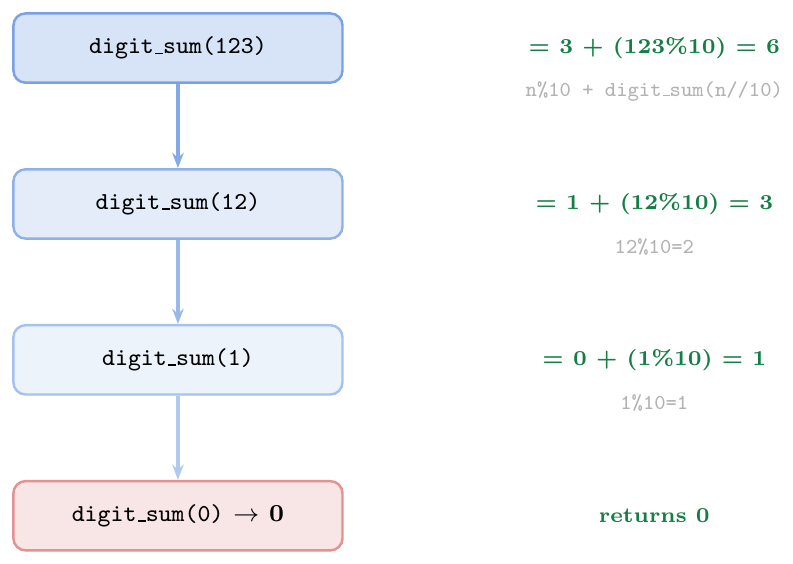
# 1. Sum of digits
def digit_sum(n):
    n = abs(n)
    if n < 10:
        return n
    return n % 10 + digit_sum(n // 10)

print(digit_sum(123))    # 6  (1+2+3)
print(digit_sum(9999))   # 36

# 2. Count occurrences in nested list
def count_in(lst, target):
    if not lst:
        return 0
    head, *tail = lst
    if isinstance(head, list):
        return count_in(head, target) + count_in(tail, target)
    return (1 if head == target else 0) + count_in(tail, target)

data = [1, [2, 1, [3, 1]], 1, [1]]
print(count_in(data, 1))   # 5

# 3. Flatten nested list
def flatten(lst):
    if not lst:
        return []
    head, *tail = lst
    if isinstance(head, list):
        return flatten(head) + flatten(tail)
    return [head] + flatten(tail)

nested = [1, [2, [3, 4]], [5, 6], 7]
print(flatten(nested))   # [1, 2, 3, 4, 5, 6, 7]

# 4. Palindrome check
def is_palindrome(s):
    if len(s) <= 1:
        return True
    return s[0] == s[-1] and is_palindrome(s[1:-1])

print(is_palindrome("racecar"))  # True
print(is_palindrome("python"))   # False

# 5. Power (fast exponentiation: O(log n) calls)
def power(base, exp):
    if exp == 0:    return 1
    if exp % 2 == 0:
        half = power(base, exp // 2)
        return half * half        # only ONE recursive call!
    return base * power(base, exp - 1)

print(power(2, 10))   # 1024
print(power(3, 5))    # 243

# 6. Binary search (recursive)
def binary_search(lst, target, lo=0, hi=None):
    if hi is None: hi = len(lst) - 1
    if lo > hi:    return -1
    mid = (lo + hi) // 2
    if lst[mid] == target:   return mid
    if lst[mid] < target:    return binary_search(lst, target, mid+1, hi)
    return binary_search(lst, target, lo, mid-1)

arr = [1,3,5,7,9,11,13,15,17,19]
print(binary_search(arr, 11))   # 5
print(binary_search(arr, 6))    # -1
Recursive vs Iterative Equivalence
Converting Recursion to Iteration
Any recursive algorithm can be converted to an iterative one by:
Replacing the call stack with an explicit stack (Python
listused as LIFO)Pushing the “work to do” instead of making a recursive call
Popping from the stack and processing until the stack is empty
When to prefer iterative:
Deep recursion risks
RecursionError(stack depth $> 1000$)Performance: function call overhead is eliminated
Python has no tail-call optimisation — even pure tail recursion uses one frame per call
Tail recursion: a recursive call is in tail position when it is the last action of the function (no further computation after it returns). Python does not optimise tail calls — tail-recursive functions still consume $O(n)$ stack frames.
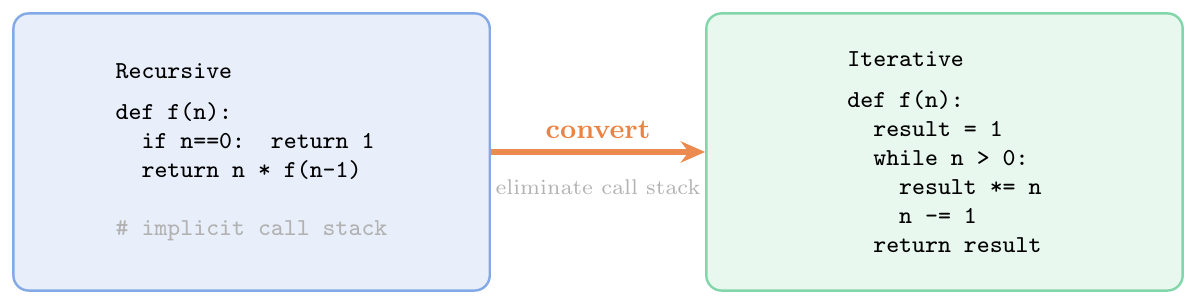
# ── 1. Factorial: trivial tail recursion -> loop ───────────────
def fact_recursive(n):
    if n == 0: return 1
    return n * fact_recursive(n - 1)    # NOT tail: multiply after return

def fact_iterative(n):
    result = 1
    while n > 0:
        result *= n
        n -= 1
    return result

print(fact_iterative(10))   # 3628800

# ── 2. Fibonacci: recursion -> DP / iteration ─────────────────
def fib_iterative(n):
    a, b = 0, 1
    for _ in range(n):
        a, b = b, a + b
    return a

print([fib_iterative(k) for k in range(8)])
# [0, 1, 1, 2, 3, 5, 8, 13]

# ── 3. DFS (tree traversal): recursion -> explicit stack ───────
def dfs_recursive(graph, node, visited=None):
    if visited is None: visited = set()
    visited.add(node)
    for nb in graph.get(node, []):
        if nb not in visited:
            dfs_recursive(graph, nb, visited)
    return visited

def dfs_iterative(graph, start):
    visited = set()
    stack   = [start]
    while stack:
        node = stack.pop()      # LIFO -- explicit stack replaces call stack
        if node not in visited:
            visited.add(node)
            stack.extend(nb for nb in graph.get(node, [])
                         if nb not in visited)
    return visited

graph = {1:[2,3], 2:[4,5], 3:[6], 4:[], 5:[], 6:[]}
print(dfs_recursive(graph, 1))  # {1, 2, 3, 4, 5, 6}
print(dfs_iterative(graph, 1))  # {1, 2, 3, 4, 5, 6}

# ── 4. Tail recursion: Python still uses O(n) frames ───────────
def fact_tail(n, acc=1):
    if n == 0: return acc
    return fact_tail(n - 1, acc * n)  # tail position: no work after return

# Still O(n) stack frames in Python (no TCO)
# For n=1000, this still RecursionErrors; use the loop version
Memoisation
Caching with lru_cache and Manual Dicts
Memoisation (from memo, Latin for “to be remembered”) is an optimisation that caches the return values of a function so that repeated calls with the same arguments are returned instantly from cache instead of recomputed.
Effect on Fibonacci:

functools.lru_cache:
@lru_cache(maxsize=None): unlimited cache (equivalent to@cachein Python 3.9+)@lru_cache(maxsize=128): keeps the 128 most recently used; evicts oldest when full (Least Recently Used policy)Arguments must be hashable (the cache key is the args tuple)
func.cache_info():hits, misses, maxsize, currsizefunc.cache_clear(): empties the cache
from functools import lru_cache, cache

# ── 1. Fibonacci with lru_cache ───────────────────────────────
@lru_cache(maxsize=None)
def fib(n):
    if n <= 1: return n
    return fib(n-1) + fib(n-2)

print(fib(50))    # 12586269025  (instant with cache)
print(fib(100))   # 354224848179261915075

print(fib.cache_info())
# CacheInfo(hits=97, misses=101, maxsize=None, currsize=101)

fib.cache_clear()   # reset cache

# ── 2. Manual dict cache (explicit, same effect) ──────────────
memo = {}
def fib_manual(n):
    if n in memo: return memo[n]
    if n <= 1:    return n
    memo[n] = fib_manual(n-1) + fib_manual(n-2)
    return memo[n]

print(fib_manual(30))  # 832040

# ── 3. Coin change (number of ways) ──────────────────────────
@lru_cache(maxsize=None)
def coin_ways(amount, coins=(1, 5, 10, 25)):
    if amount == 0: return 1
    if amount < 0:  return 0
    return sum(coin_ways(amount - c, coins) for c in coins)

print(coin_ways(30))   # number of ways to make 30 cents

# ── 4. Climbing stairs (1 or 2 steps at a time) ──────────────
@cache    # Python 3.9+: same as lru_cache(maxsize=None)
def climb(n):
    if n <= 1: return 1
    if n == 2: return 2
    return climb(n-1) + climb(n-2)

print([climb(k) for k in range(1, 9)])
# [1, 2, 3, 5, 8, 13, 21, 34]  (Fibonacci-like)

# ── 5. Measuring the speedup ─────────────────────────────────
import time

def fib_slow(n):
    if n <= 1: return n
    return fib_slow(n-1) + fib_slow(n-2)

t0 = time.perf_counter()
fib_slow(35)
print(f"Without cache: {time.perf_counter()-t0:.3f}s")   # ~2-5s

t0 = time.perf_counter()
fib(35)
print(f"With cache   : {time.perf_counter()-t0:.6f}s")   # ~0.000001s

# ── 6. Cache with maxsize (LRU eviction) ─────────────────────
@lru_cache(maxsize=4)
def expensive(n):
    print(f"  computing {n}")
    return n * n

expensive(1); expensive(2); expensive(3); expensive(4)
expensive(1)   # HIT (still in cache)
expensive(5)   # MISS -> evicts LRU entry (2)
expensive(2)   # MISS again (was evicted)
print(expensive.cache_info())# ── Tower of Hanoi (exactly 2^n - 1 moves) ────────────────────
def hanoi(n, src="A", dst="C", aux="B"):
if n == 1:
print(f"Move disk 1: {src} -> {dst}")
return 1
moves = hanoi(n-1, src, aux, dst) # move n-1 to aux
print(f"Move disk {n}: {src} -> {dst}")
moves += hanoi(n-1, aux, dst, src) # move n-1 from aux to dst
return moves + 1
total = hanoi(3)
print(f"Total moves: {total}") # 7 (= 2^3 - 1)
% ── Permutations of a string ──────────────────────────────────
def permutations(s):
if len(s) <= 1:
return [s]
result = []
for i, ch in enumerate(s):
rest = s[:i] + s[i+1:]
for perm in permutations(rest):
result.append(ch + perm)
return result
print(sorted(permutations("ABC")))
# ['ABC','ACB','BAC','BCA','CAB','CBA'] (3! = 6)
# ── GCD (Euclidean algorithm) ─────────────────────────────────
def gcd(a, b):
if b == 0: return a
return gcd(b, a % b)
print(gcd(48, 18)) # 6
# Call trace: gcd(48,18) -> gcd(18,12) -> gcd(12,6) -> gcd(6,0) = 6
# ── Exponentiation by squaring O(log n) calls ─────────────────
@lru_cache(maxsize=None)
def fast_pow(base, exp):
if exp == 0: return 1
if exp % 2 == 0:
half = fast_pow(base, exp // 2)
return half * half # only 1 recursive call!
return base * fast_pow(base, exp - 1)
print(fast_pow(2, 32)) # 4294967296
print(fast_pow.cache_info())
# ── GATE question: count total calls for fib(6) ──────────────
# Answer: calls(n) = calls(n-1) + calls(n-2) + 1
# calls(0)=1, calls(1)=1
# calls(2)=3, calls(3)=5, calls(4)=9, calls(5)=15, calls(6)=25
# fib(6) makes 25 total function calls (without memoisation)
# ── GATE question: what is the output? ──────────────────────
def mystery(n):
if n <= 0: return 0
return mystery(n-2) + n
print(mystery(6)) # mystery(4)+6 = mystery(2)+4+6 = mystery(0)+2+4+6 = 0+12 = 12
print(mystery(5)) # mystery(3)+5 = mystery(1)+3+5 = mystery(-1)+1+3+5 = 0+9 = 9Lambda Functions
Anonymous Single-Expression Functions
A lambda is an anonymous, single-expression function created with the
lambda keyword:
\[\texttt{lambda}\ \langle\textit{params}\rangle\texttt{:}\ \langle\textit{expression}\rangle\]
The body must be a single expression (not statements like
if/elseblocks,forloops, orreturn)The expression's value is implicitly returned (no
returnkeyword)Produces a function object, identical in capability to a
def— same scoping rules, closures, and first-class statusCan have default arguments:
lambda x, n=2: x**nCan have *args and **kwargs
Ternary expression is allowed (it is an expression):
lambda x: x if x > 0 else -x
When to use lambda: short, throwaway functions passed as arguments.
Prefer def when the function is complex, reused, or needs a docstring.
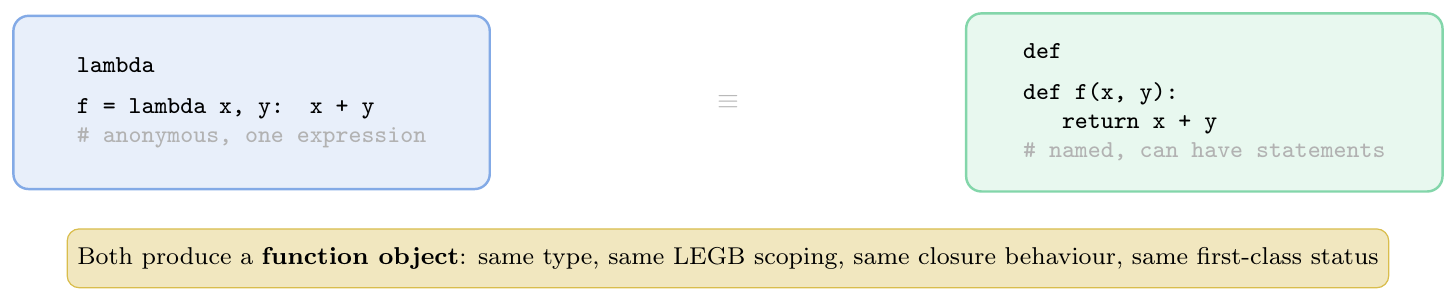
Allowed: expressions, ternary
(a if c else b), nested lambdas,*args,**kwargs, default args, function calls, comprehensionsNot allowed: statements (
printis a function in Python 3, solambda: print("hi")is fine; butfor,while,if/elif/elseblocks,return,assert,raiseare not)Debugging: lambda functions show as
<lambda>in tracebacks — hard to debug; preferdefin complex codeLate binding: same closure behaviour as nested
def(loop lambda bug applies equally)
# Basic
square = lambda x: x ** 2
print(square(5))           # 25
print(type(square))        # <class 'function'>
print(square.__name__)     # <lambda>

# Multiple parameters
add  = lambda x, y: x + y
dist = lambda x1, y1, x2, y2: ((x2-x1)**2 + (y2-y1)**2)**0.5
print(add(3, 4))           # 7
print(dist(0,0,3,4))       # 5.0

# Default arguments
power = lambda x, n=2: x ** n
print(power(3))            # 9   (n=2 default)
print(power(3, 3))         # 27

# Ternary in lambda body
absolute = lambda x: x if x >= 0 else -x
sign     = lambda x: 1 if x > 0 else (-1 if x < 0 else 0)
print(absolute(-5), sign(-3), sign(0), sign(7))   # 5 -1 0 1

# *args and **kwargs
vsum  = lambda *args: sum(args)
greet = lambda **kw: f"Hello, {kw.get('name','World')}!"
print(vsum(1,2,3,4,5))          # 15
print(greet(name="Alice"))       # Hello, Alice!

# Nested lambda (lambda returning lambda)
make_adder = lambda n: (lambda x: x + n)
add5 = make_adder(5)
print(add5(10))            # 15

# Immediately invoked lambda (IIFE)
print((lambda x, y: x * y)(6, 7))   # 42

# Sorting key (most common use)
students = [("Alice",85),("Bob",72),("Charlie",91),("Diana",85)]
by_score  = sorted(students, key=lambda s: s[1], reverse=True)
by_name   = sorted(students, key=lambda s: s[0])
tiebreak  = sorted(students, key=lambda s: (-s[1], s[0]))
print(by_score)    # [('Charlie',91),('Alice',85),('Diana',85),('Bob',72)]
print(tiebreak)    # [('Charlie',91),('Alice',85),('Diana',85),('Bob',72)]
Higher-Order Functions
map()
Applying a Function to Every Element
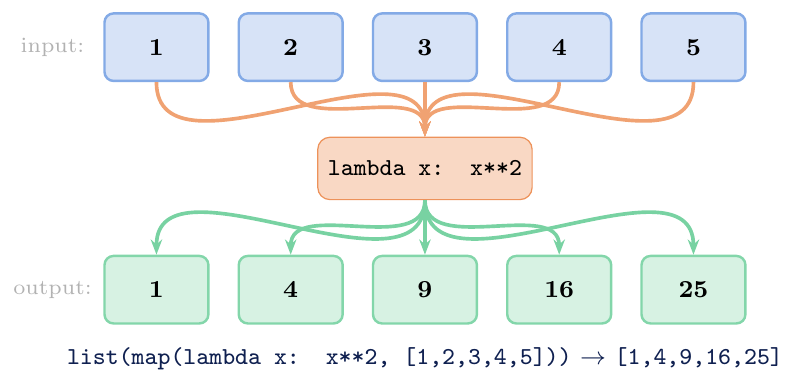
map(func, iterable, ...) applies func to each element of
iterable and returns a lazy iterator (not a list).
\[ \text{map}(f, [x_1, x_2, \ldots, x_n]) \;\longrightarrow\; (f(x_1), f(x_2), \ldots, f(x_n)) \]
Multiple iterables: map(f, it1, it2) passes pairs
(e1, e2) to f(e1, e2); stops at the shortest iterable.
Lazy: elements are computed only when consumed. Use
list(map(...)) to materialise, or iterate with for.
# Basic: single iterable
nums = [1, 2, 3, 4, 5]
squares = list(map(lambda x: x**2, nums))
print(squares)              # [1, 4, 9, 16, 25]

# Using a named function
def celsius_to_f(c): return c * 9/5 + 32
temps_c = [0, 20, 37, 100]
temps_f = list(map(celsius_to_f, temps_c))
print(temps_f)              # [32.0, 68.0, 98.6, 212.0]

# String operations
words = ["hello", "WORLD", "python"]
print(list(map(str.upper,  words)))   # ['HELLO', 'WORLD', 'PYTHON']
print(list(map(str.title,  words)))   # ['Hello', 'World', 'Python']
print(list(map(len, words)))          # [5, 5, 6]

# Multiple iterables: stops at shortest
a = [1, 2, 3, 4]
b = [10, 20, 30]
print(list(map(lambda x,y: x+y, a, b)))   # [11, 22, 33]  (4 ignored)
print(list(map(pow, [2,3,4], [3,2,1])))   # [8, 9, 4]  2^3, 3^2, 4^1

# map is lazy: no computation until consumed
m = map(lambda x: (print(f"  computing {x}"), x**2)[1], range(3))
print("map object created")   # no computation yet
print(next(m))                # computing 0  ->  0
print(next(m))                # computing 1  ->  1
print(list(m))                # computing 2  ->  [4]

# map vs list comprehension (equivalent)
result_map  = list(map(lambda x: x*2, range(5)))
result_comp = [x*2 for x in range(5)]
print(result_map == result_comp)   # True
# List comprehension generally preferred for readability
filter()
Selecting Elements by Predicate
filter(func, iterable) returns an iterator of elements for which
func(element) is truthy.
\[ \text{filter}(p, [x_1, \ldots, x_n]) \;\longrightarrow\; ( x_i \mid p(x_i) \text{ is truthy} ) \]
Special case: func=None uses the element's own truthiness
(removes all falsy values: 0, "", [],
None, False, …).
Like map, filter is lazy.
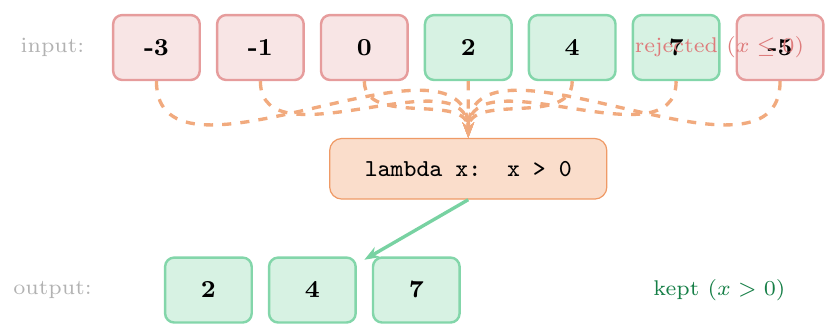
data = [-3, -1, 0, 2, 4, 7, -5]

# Filter with lambda
positives = list(filter(lambda x: x > 0, data))
print(positives)       # [2, 4, 7]

evens = list(filter(lambda x: x % 2 == 0, data))
print(evens)           # [0, 2, 4]

# filter(None, ...) removes falsy values
mixed = [0, 1, "", "hi", [], [1,2], None, False, True, 0.0, 3.14]
print(list(filter(None, mixed)))
# [1, 'hi', [1, 2], True, 3.14]

# Filtering strings
words = ["apple", "banana", "cherry", "avocado", "blueberry"]
a_words = list(filter(lambda w: w.startswith("a"), words))
print(a_words)    # ['apple', 'avocado']

long_words = list(filter(lambda w: len(w) > 6, words))
print(long_words) # ['banana', 'avocado', 'blueberry']

# filter + map: filter then transform
scores = [45, 82, 33, 91, 67, 55, 88]
grade_A = list(map(lambda s: f"{s}->A",
                   filter(lambda s: s >= 80, scores)))
print(grade_A)    # ['82->A', '91->A', '88->A']

# Equivalent comprehension (usually preferred)
grade_A2 = [f"{s}->A" for s in scores if s >= 80]
print(grade_A == grade_A2)  # True
functools.reduce()
Folding an Iterable to a Single Value
functools.reduce(func, iterable[, initializer]) reduces an iterable to a
single value by applying func(accumulator, current) repeatedly
from left to right:
\[ \text{reduce}(f, [x_1, x_2, x_3, x_4]) = f(f(f(x_1, x_2), x_3), x_4) \]
Initializer: if provided, it is placed before the iterable elements and serves as the starting accumulator value. Required when the iterable might be empty.
Without initializer + empty iterable: raises TypeError.
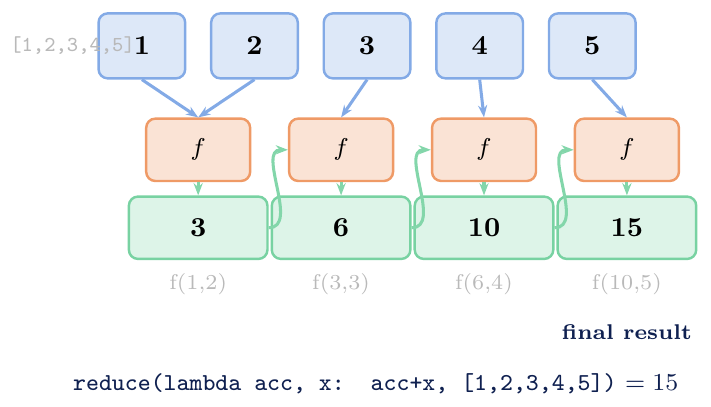
from functools import reduce

data = [1, 2, 3, 4, 5]

# Sum (equivalent to sum())
print(reduce(lambda acc, x: acc + x, data))          # 15
print(reduce(lambda acc, x: acc + x, data, 100))     # 115  (initializer)

# Product (no built-in in Python < 3.8)
print(reduce(lambda acc, x: acc * x, data))          # 120 = 5!

# Max (equivalent to max())
print(reduce(lambda a, b: a if a > b else b, data))  # 5

# String concatenation
words = ["Python", " ", "is", " ", "great"]
print(reduce(lambda a, b: a + b, words))             # Python is great

# Flatten list of lists
nested = [[1,2],[3,4],[5,6]]
flat   = reduce(lambda a, b: a + b, nested)
print(flat)   # [1, 2, 3, 4, 5, 6]

# Function composition: compose(f,g)(x) = f(g(x))
double = lambda x: x * 2
inc    = lambda x: x + 1
square = lambda x: x ** 2

def compose(*funcs):
    return reduce(lambda f, g: lambda x: f(g(x)), funcs)

% compose(square, inc, double): x -> double -> inc -> square
transform = compose(square, inc, double)
print(transform(3))   # double(3)=6, inc(6)=7, square(7)=49

% Empty iterable: needs initializer
print(reduce(lambda a,b: a+b, [], 0))   # 0
try:
    reduce(lambda a,b: a+b, [])          # TypeError: no initial value!
except TypeError as e:
    print(e)

% map + filter + reduce pipeline
data = range(1, 11)
result = reduce(
    lambda acc, x: acc + x,             # reduce: sum
    filter(lambda x: x % 2 == 0,        # filter: evens
           map(lambda x: x**2, data))   # map: squares
)
print(result)   # 2^2+4^2+6^2+8^2+10^2 = 4+16+36+64+100 = 220
Closures & Nested Functions
What is a Closure?
Definition and __closure__ Cells
A closure is a function object that remembers values in its enclosing scope even after program execution has left that scope.
More precisely, a closure is formed when:
There is a nested (inner) function defined inside an outer function
The inner function references at least one name from the outer function's local scope (a free variable)
The outer function returns the inner function (or the inner function escapes the outer scope in some other way)
The captured variables are stored as cell objects inside the inner
function's __closure__ attribute. Each cell wraps one variable;
cell.cell_contents retrieves the current value.
Why closures matter: they provide stateful functions without requiring a class, and they are the foundation of decorators, factories, and memoisation.
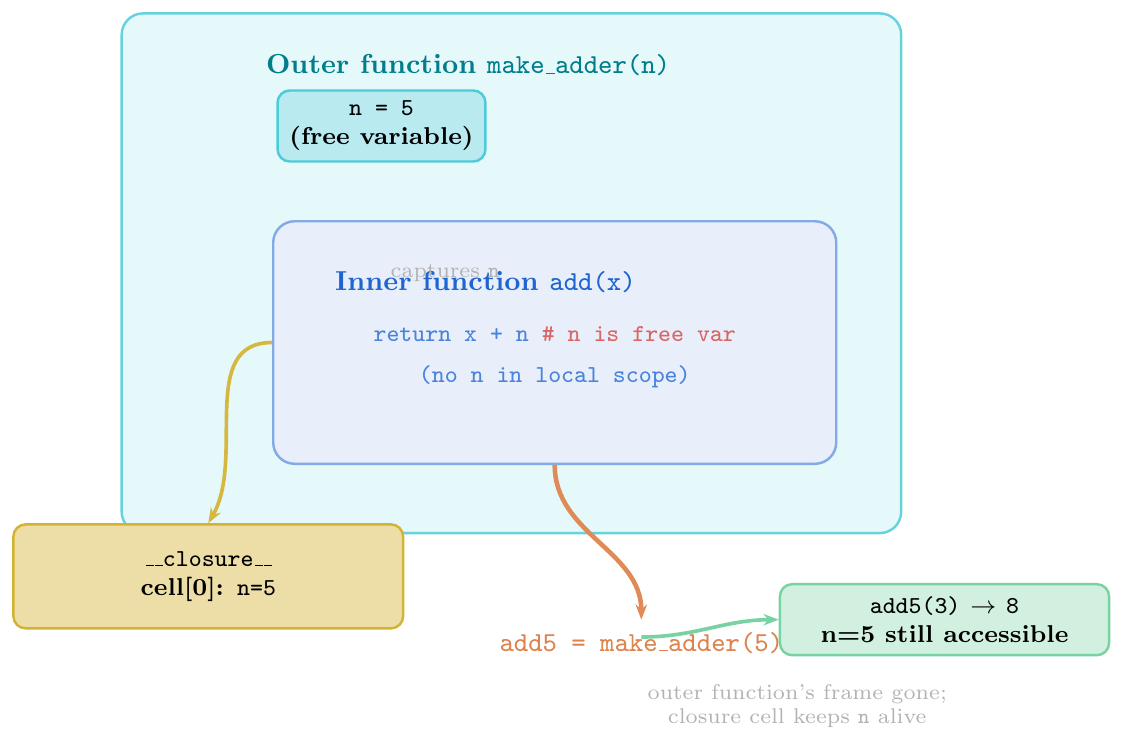
__closure__: tuple ofcellobjects, orNoneif no free variablescell.cell_contents: current value stored in that cellfunc.__code__.co_freevars: names of the free variables (matches__closure__index-for-index)A function with no free variables is not a closure (
__closure__isNone)The outer function's frame is deallocated after it returns, but the cell objects remain alive as long as the closure exists
A closure makes the enclosing variable's lifetime independent of the enclosing function's call lifetime
def make_adder(n):
    """Return a closure that adds n to its argument."""
    def add(x):
        return x + n        # n is a free variable
    return add

add5  = make_adder(5)
add10 = make_adder(10)

print(add5(3))              # 8
print(add10(3))             # 13

# Inspect the closure
print(add5.__closure__)                         # (<cell at 0x...>,)
print(add5.__closure__[0].cell_contents)        # 5
print(add10.__closure__[0].cell_contents)       # 10

print(add5.__code__.co_freevars)                # ('n',)

# A plain function has no closure
def plain(x): return x * 2
print(plain.__closure__)    # None

# Closure keeps outer variable alive
import gc, sys
def outer():
    big_data = list(range(1000))   # would normally be GC'd after outer() returns
    def inner():
        return len(big_data)       # big_data captured in cell
    return inner

get_len = outer()           # outer() returned; big_data NOT freed
print(get_len()) # 1000 (big_data still alive in closure)def make_counter(start=0, step=1):
"""Factory: returns a counter closure."""
count = [start] # list so mutation works without nonlocal
def counter():
val = count[0]
count[0] += step
return val
return counter
c1 = make_counter(0, 1)
c2 = make_counter(10, 5)
print(c1(), c1(), c1()) # 0 1 2
print(c2(), c2()) # 10 15
print(c1()) # 3 (c1 and c2 are independent!)
# More idiomatic: using nonlocal
def make_counter2(start=0):
n = start
def inc():
nonlocal n
n += 1
return n
def dec():
nonlocal n
n -= 1
return n
def reset():
nonlocal n
n = start
return inc, dec, reset
inc, dec, rst = make_counter2(0)
print(inc(), inc(), inc()) # 1 2 3
print(dec()) # 2
rst()
print(inc()) # 1Independent Closure Instances
Each Outer Call Creates a New Environment
Every call to the outer function creates a brand-new, independent set of cell objects. Two closures returned by two separate calls to the same outer function never share their enclosing variables — even though they were created by the same code.
This is the mechanism that makes closures useful as factories: the same
def block produces customised function objects on demand.
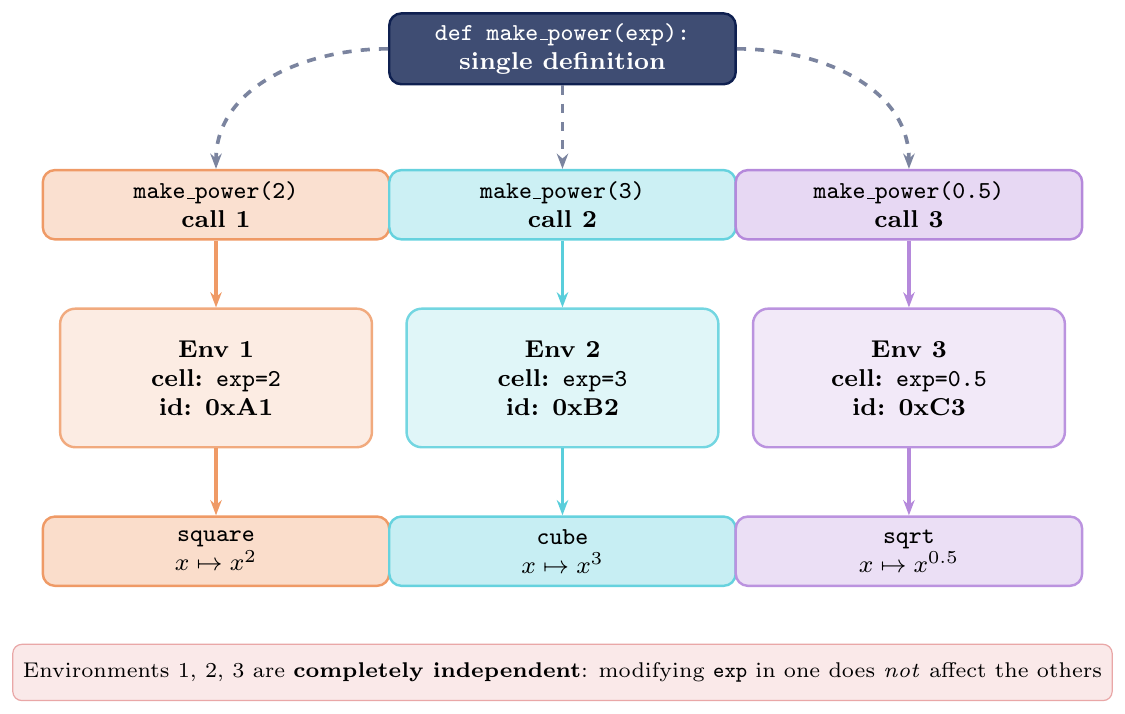
def make_power(exp):
    def power(base):
        return base ** exp
    return power

square = make_power(2)
cube   = make_power(3)
sqrt_  = make_power(0.5)

print(square(4))    # 16
print(cube(4))      # 64
print(sqrt_(4))     # 2.0

# They share NO state
print(square.__closure__[0].cell_contents)   # 2
print(cube.__closure__[0].cell_contents)     # 3  (different cell)
print(square.__closure__ is cube.__closure__)  # False

# Real factory: validators
def make_range_validator(lo, hi):
    def validate(x):
        if lo <= x <= hi:
            return x
        raise ValueError(f"{x} not in [{lo}, {hi}]")
    return validate

check_score  = make_range_validator(0, 100)
check_age    = make_range_validator(0, 150)
check_rating = make_range_validator(1, 5)

print(check_score(85))    # 85
print(check_rating(4))    # 4
try:
    check_score(110)
except ValueError as e:
    print(e)              # 110 not in [0, 100]

# Multiple calls: each closure is truly independent
counters = [make_power(n) for n in range(1, 5)]
for p in counters:
    print(p(2), end=" ")   # 2 4 8 16
Shared Mutable State Within One Closure
Multiple Inner Functions, One Shared Cell
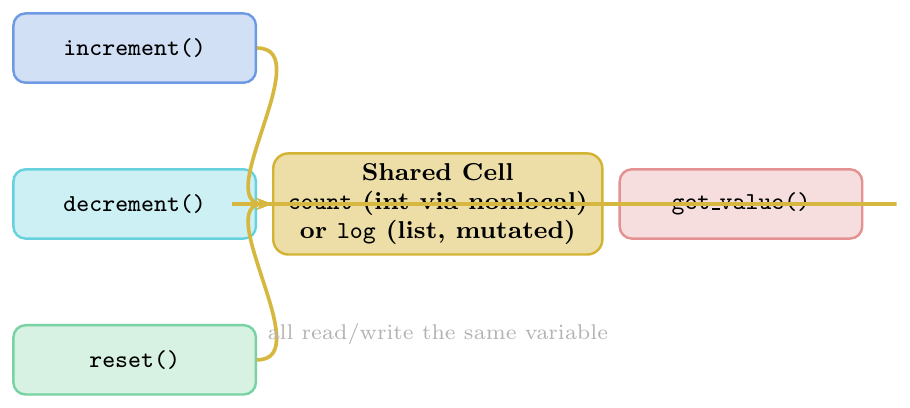
When multiple inner functions are defined inside the same outer function, they share the same cell objects for any variables from that outer scope.
If the closed-over variable is a mutable object (list, dict), all inner functions see every mutation made by any of them. This is the basis of shared-state closures — an OOP-like pattern using only functions.
Important distinction:
Sharing the same cell $\Rightarrow$ rebinding with
nonlocalis visible to all inner functionsSharing the same mutable object $\Rightarrow$ mutations are visible without
nonlocal
# ── Shared state via nonlocal (immutable int) ──────────────────
def make_bank_account(initial=0):
    balance = initial

    def deposit(amount):
        nonlocal balance
        if amount <= 0:
            raise ValueError("Deposit must be positive")
        balance += amount
        return balance

    def withdraw(amount):
        nonlocal balance
        if amount > balance:
            raise ValueError("Insufficient funds")
        balance -= amount
        return balance

    def get_balance():
        return balance         # read only: no nonlocal needed

    return deposit, withdraw, get_balance

dep, wdr, bal = make_bank_account(1000)
print(dep(500))    # 1500
print(wdr(200))    # 1300
print(bal())       # 1300  (all three share the same 'balance' cell)

# ── Shared state via mutable object (no nonlocal needed) ───────
def make_history_tracker():
    log = []           # mutable: shared without nonlocal

    def record(event):
        log.append({"event": event, "n": len(log)+1})

    def undo():
        if log:
            return log.pop()
        return None

    def show():
        for entry in log:
            print(f"  [{entry['n']}] {entry['event']}")

    return record, undo, show

rec, undo, show = make_history_tracker()
rec("login")
rec("query_db")
rec("update_profile")
show()
# [1] login
# [2] query_db
# [3] update_profile
print(undo())   # {'event': 'update_profile', 'n': 3}
show()
# [1] login
# [2] query_db

# ── Two separate outer calls share NOTHING ─────────────────────
dep2, wdr2, bal2 = make_bank_account(0)   # fresh account
dep2(100)
print(bal())    # 1300  (first account: unchanged)
print(bal2())   # 100   (second account: independent)
Late Binding in Closures
The Loop Closure Bug
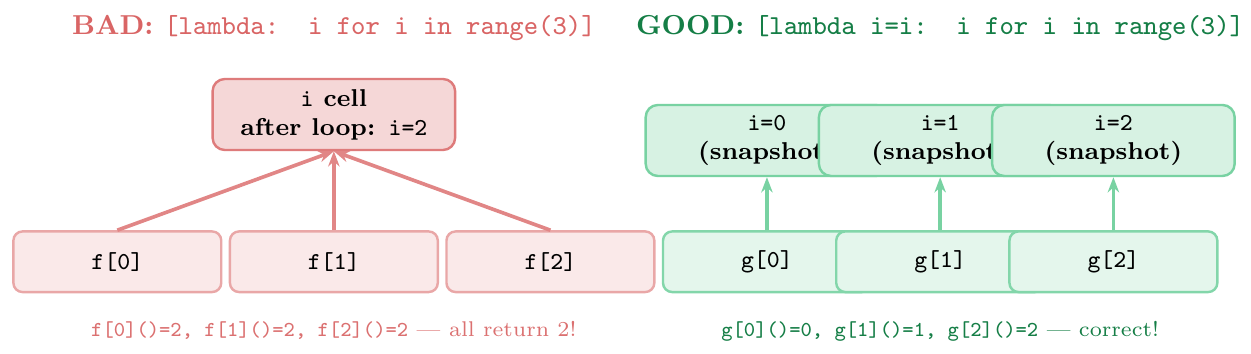
Python closures capture the variable (the cell reference) — not the value at the time the closure is created. When the closure is called, it looks up the current value of the variable in the cell.
The loop closure bug is the most common manifestation:
A loop creates multiple closures (e.g.\ via
lambdaordefinside afor)All closures capture the same loop variable
After the loop ends, the loop variable holds its final value
Calling any of the closures returns the final value — not the value at iteration time
Fixes:
Default argument
lambda x, i=i: ...— evaluatesiat definition time and binds it as a defaultImmediately Invoked Function (IIFE):
(lambda i=i: lambda x: x*i)()— same principleExplicit factory function:
def make(i): return lambda x: x*i
# ── BUG: late binding captures variable, not value ────────────
funcs_bad = [lambda: i for i in range(5)]
print([f() for f in funcs_bad])
# [4, 4, 4, 4, 4]  ALL return 4 (final value of i)

# ── FIX 1: Default argument (most Pythonic) ───────────────────
funcs_fix1 = [lambda i=i: i for i in range(5)]
print([f() for f in funcs_fix1])
# [0, 1, 2, 3, 4]  correct!

# ── FIX 2: Explicit factory function ─────────────────────────
def make_func(i):
    return lambda: i        # i is now a local in make_func

funcs_fix2 = [make_func(i) for i in range(5)]
print([f() for f in funcs_fix2])
# [0, 1, 2, 3, 4]  correct!

# ── FIX 3: functools.partial ──────────────────────────────────
from functools import partial

def get_val(i): return i
funcs_fix3 = [partial(get_val, i) for i in range(5)]
print([f() for f in funcs_fix3])
# [0, 1, 2, 3, 4]  correct!

# ── The bug extends to any mutable loop variable ──────────────
names = ["Alice", "Bob", "Charlie"]
greets_bad  = [lambda: f"Hello, {name}!" for name in names]
greets_good = [lambda name=name: f"Hello, {name}!" for name in names]

print([g() for g in greets_bad])
# ['Hello, Charlie!', 'Hello, Charlie!', 'Hello, Charlie!']

print([g() for g in greets_good])
# ['Hello, Alice!', 'Hello, Bob!', 'Hello, Charlie!']

# ── More subtle: variable mutated AFTER closure creation ──────
x = 10
get_x = lambda: x          # captures 'x' from enclosing scope
print(get_x())             # 10
x = 99                     # mutate AFTER closure was created
print(get_x()) # 99 (sees the NEW value! late binding)# Q1: What does this print?
def outer(x):
def inner(y):
return x + y
return inner
f = outer(10)
g = outer(20)
print(f(5)) # 15 (x=10 from f's closure)
print(g(5)) # 25 (x=20 from g's closure)
print(f(g(1))) # f(21) = 10+21 = 31
# Q2: Trace with nonlocal and shared cell
def make_pair():
n = 0
def inc(): nonlocal n; n += 1; return n
def dec(): nonlocal n; n -= 1; return n
return inc, dec
a, b = make_pair()
print(a()) # 1
print(a()) # 2
print(b()) # 1
print(a()) # 2 (n was 1, inc -> 2)
# Q3: Late binding with multiplication
multipliers = [lambda x: x * i for i in range(1, 4)]
print(multipliers[0](5)) # 15 (NOT 5! i is 3 at call time)
print(multipliers[1](5)) # 15
print(multipliers[2](5)) # 15
# Q4: closure cell identity
def outer2():
val = []
def f(): val.append(1)
def g(): val.append(2)
return f, g, lambda: val
f2, g2, get = outer2()
f2(); g2(); f2()
print(get()) # [1, 2, 1] all three share same list object
# Q5: What is closure of inner here?
def make(a, b):
def inner():
return a * b
return inner
h = make(3, 4)
print(h.__code__.co_freevars) # ('a', 'b')
print(h.__closure__[0].cell_contents) # 3 (a)
print(h.__closure__[1].cell_contents) # 4 (b)
print(h()) # 12
# Q6: Default arg vs closure --- crucial difference
def create():
results = []
for n in [1, 2, 3]:
# WRONG: lambda captures n by reference
results.append(lambda: n)
return results
fns = create()
print([f() for f in fns]) # [3, 3, 3] (n=3 after loop)
def create_fixed():
results = []
for n in [1, 2, 3]:
results.append(lambda n=n: n) # snapshot n
return results
fns2 = create_fixed()
print([f() for f in fns2]) # [1, 2, 3]Closure vs Class --- When to Use Which
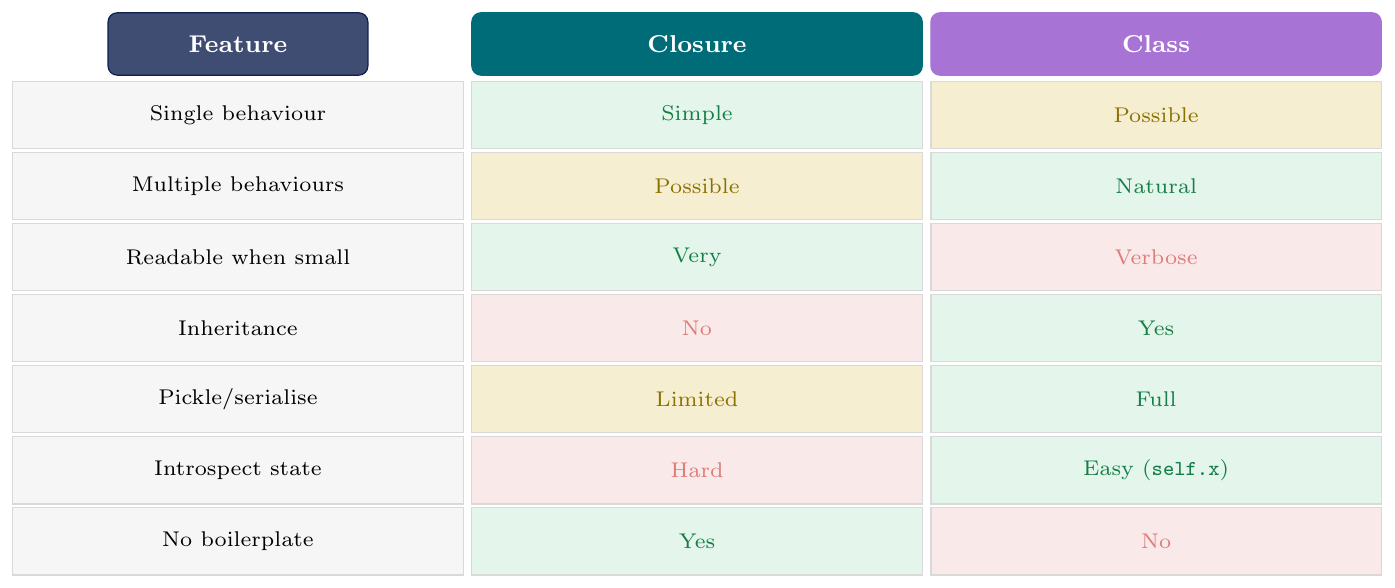
Rule of thumb: use a closure for a single callable with private state; use a class when you need multiple methods, inheritance, serialisation, or clear state introspection.
# ── Closure approach ──────────────────────────────────────────
def make_moving_average():
    data = []
    def update(x):
        data.append(x)
        return sum(data) / len(data)
    return update

avg = make_moving_average()
print(avg(10))    # 10.0
print(avg(20))    # 15.0
print(avg(30))    # 20.0

# ── Class approach (equivalent) ──────────────────────────────
class MovingAverage:
    def __init__(self):
        self._data = []

    def update(self, x):
        self._data.append(x)
        return sum(self._data) / len(self._data)

    @property
    def history(self):           # extra: easy introspection
        return list(self._data)

avg2 = MovingAverage()
print(avg2.update(10))   # 10.0
print(avg2.update(20))   # 15.0
print(avg2.history)      # [10, 20]  -- not possible with closure easily
Decorators
Concept
What a Decorator Is
A decorator is a callable that takes a function (or class) and returns a new callable. It wraps the original function to add behaviour before or after (or instead of) the original call.
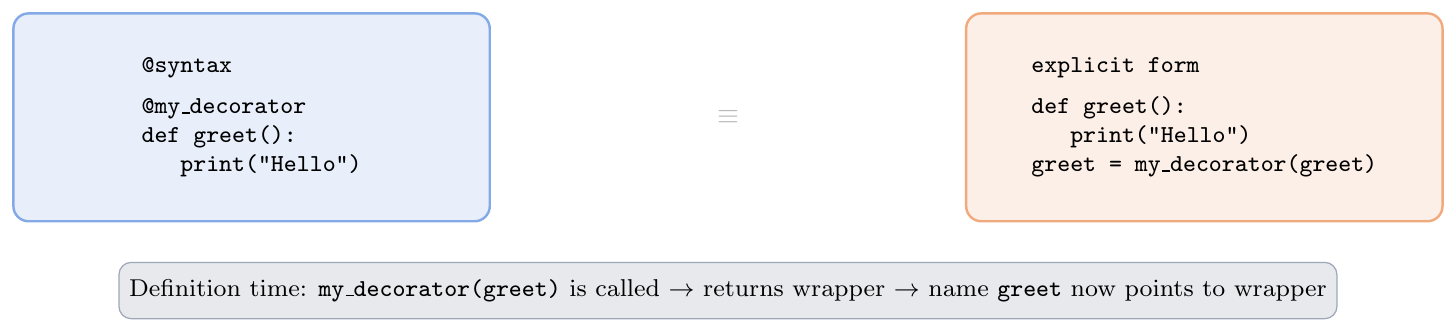
Syntactic sugar: \[ \begin{aligned} &\texttt{@decorator} \\ &\texttt{def f(): ...} \end{aligned} \quad\equiv\quad \begin{aligned} &\texttt{def f(): ...} \\ &\texttt{f = decorator(f)} \end{aligned} \]
The @ syntax is applied at function definition time, not at call
time.
Writing a Decorator
Wrapper Pattern and functools.wraps
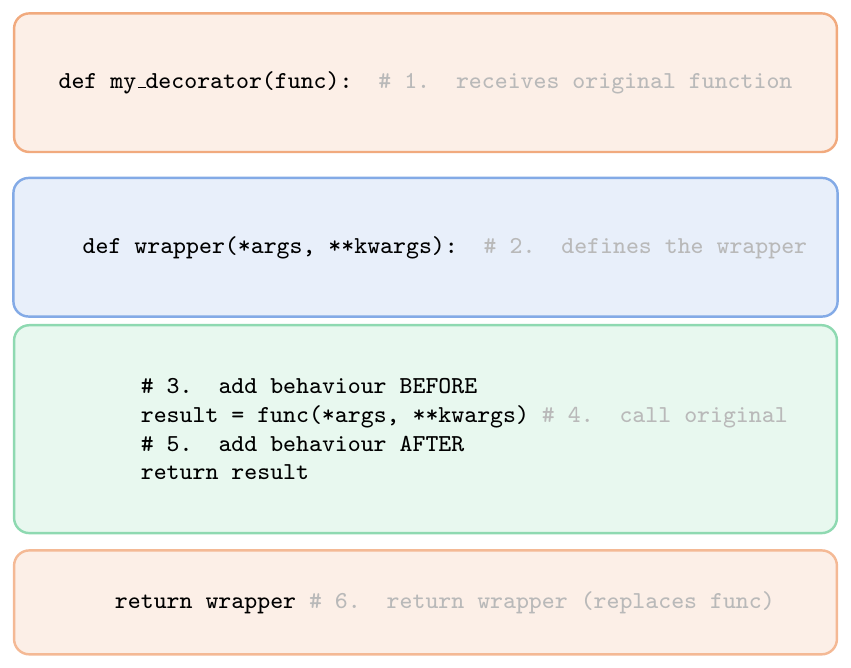
Without @wraps, the wrapped function loses its identity:
__name__ becomes "wrapper", __doc__ is lost.
@functools.wraps(func) copies __name__, __doc__,
__module__, __qualname__, __annotations__,
__dict__ from the wrapped function to the wrapper.
Always use @functools.wraps(func) in production decorators.
import time, functools

# ── 1. Timer decorator ──────────────────────────────────────
def timer(func):
    @functools.wraps(func)           # preserves __name__, __doc__
    def wrapper(*args, **kwargs):
        start  = time.perf_counter()
        result = func(*args, **kwargs)
        end    = time.perf_counter()
        print(f"[{func.__name__}] took {end-start:.4f}s")
        return result
    return wrapper

@timer
def slow_sum(n):
    """Sum 0..n-1."""
    return sum(range(n))

print(slow_sum(10_000_000))   # [slow_sum] took 0.3xxx s
                               # 49999995000000

print(slow_sum.__name__)       # slow_sum   (not 'wrapper'!)
print(slow_sum.__doc__)        # Sum 0..n-1.

# ── 2. Logger decorator ─────────────────────────────────────
def logger(func):
    @functools.wraps(func)
    def wrapper(*args, **kwargs):
        print(f"Calling {func.__name__}({args}, {kwargs})")
        result = func(*args, **kwargs)
        print(f"{func.__name__} returned {result!r}")
        return result
    return wrapper

@logger
def add(x, y): return x + y

add(3, y=4)
# Calling add((3,), {'y': 4})
# add returned 7

# ── 3. Retry decorator ──────────────────────────────────────
def retry(max_attempts=3):
    def decorator(func):
        @functools.wraps(func)
        def wrapper(*args, **kwargs):
            for attempt in range(1, max_attempts + 1):
                try:
                    return func(*args, **kwargs)
                except Exception as e:
                    print(f"Attempt {attempt} failed: {e}")
                    if attempt == max_attempts:
                        raise
        return wrapper
    return decorator

# (decorator with arguments -- see next subsection)
Stacking Decorators
Bottom-Up Application Order
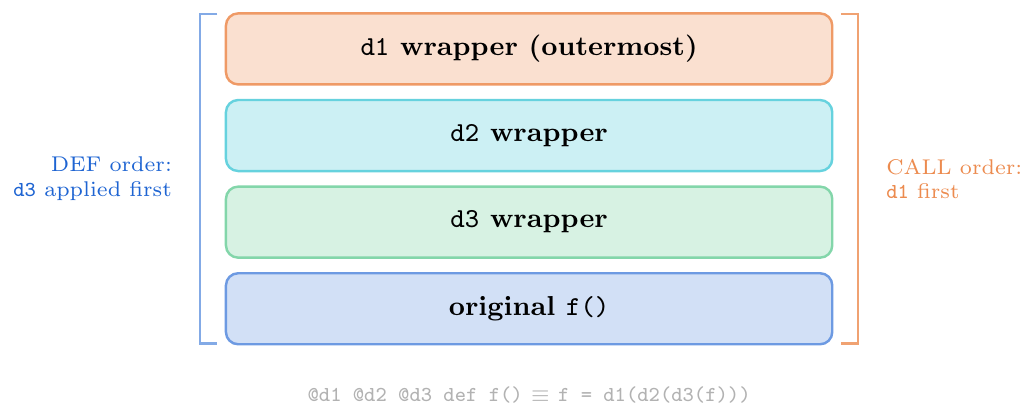
Multiple decorators stack bottom-up at definition time:
\[ \begin{aligned} &\texttt{@d1} \\ &\texttt{@d2} \\ &\texttt{@d3} \\ &\texttt{def f(): ...} \end{aligned} \quad\equiv\quad \texttt{f = d1(d2(d3(f)))} \]
Definition: d3 applied first, then d2, then d1.
Call: d1's wrapper runs first, then d2's, then
d3's, then the original f.
import functools

def decorator_factory(name):
    """Creates a decorator that announces itself."""
    def decorator(func):
        @functools.wraps(func)
        def wrapper(*args, **kwargs):
            print(f"[{name}] BEFORE")
            result = func(*args, **kwargs)
            print(f"[{name}] AFTER")
            return result
        return wrapper
    return decorator

d1 = decorator_factory("d1")
d2 = decorator_factory("d2")
d3 = decorator_factory("d3")

@d1
@d2
@d3
def greet(name):
    print(f"  Hello, {name}!")

greet("Alice")
# [d1] BEFORE
# [d2] BEFORE
# [d3] BEFORE
#   Hello, Alice!
# [d3] AFTER
# [d2] AFTER
# [d1] AFTER

# Definition is: greet = d1(d2(d3(greet)))
# d3 applied first (innermost), d1 outermost
# At call: d1's wrapper runs first, d2's next, d3's next, then original
Decorator with Arguments
Three-Level Nesting: Factory $\to$ Decorator $\to$ Wrapper
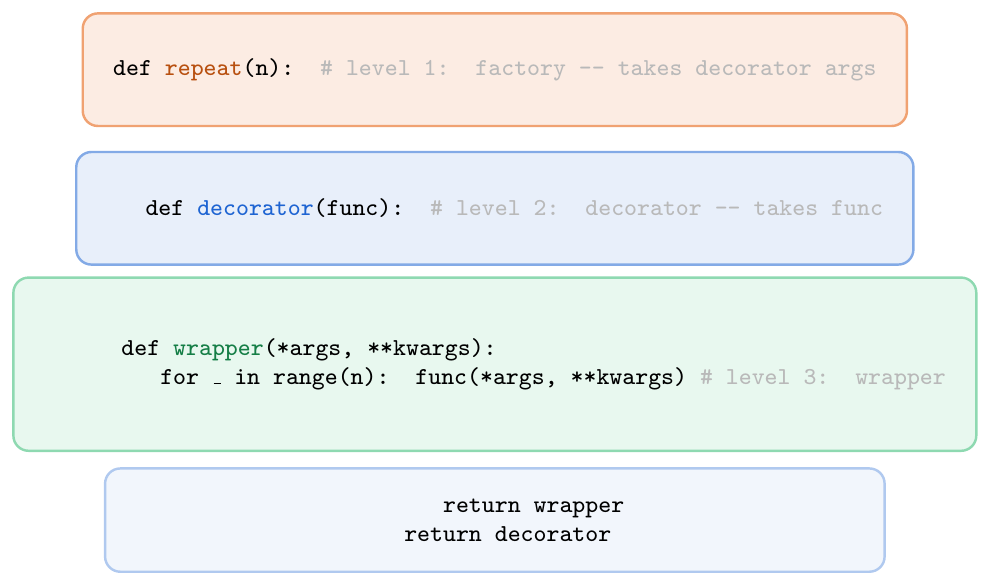
To pass arguments to a decorator, add one more level of nesting: a decorator factory that accepts the arguments and returns a decorator:
\[ \underbrace{\text{repeat}(3)}_{\text{factory call}} \;\longrightarrow\; \underbrace{\text{decorator}}_{\text{receives func}} \;\longrightarrow\; \underbrace{\text{wrapper}}_{\text{wraps call}} \]
@repeat(3) def f() $\equiv$ f = repeat(3)(f)
import functools, time

# ── 1. repeat(n): call function n times ─────────────────────
def repeat(n):
    def decorator(func):
        @functools.wraps(func)
        def wrapper(*args, **kwargs):
            results = [func(*args, **kwargs) for _ in range(n)]
            return results[-1]   # return last result
        return wrapper
    return decorator

@repeat(3)
def hello(name):
    print(f"Hello, {name}!")

hello("Bob")
# Hello, Bob!
# Hello, Bob!
# Hello, Bob!

# ── 2. Type validation decorator ────────────────────────────
def validate_types(**expected):
    def decorator(func):
        @functools.wraps(func)
        def wrapper(**kwargs):
            for key, typ in expected.items():
                if key in kwargs and not isinstance(kwargs[key], typ):
                    raise TypeError(
                        f"Arg '{key}' expected {typ.__name__}, "
                        f"got {type(kwargs[key]).__name__}")
            return func(**kwargs)
        return wrapper
    return decorator

@validate_types(name=str, age=int)
def register(name, age):
    print(f"Registered: {name}, {age}")

register(name="Alice", age=25)    # OK
try:
    register(name="Bob", age="25")  # TypeError!
except TypeError as e:
    print(e)   # Arg 'age' expected int, got str

# ── 3. rate_limit(calls_per_sec) ────────────────────────────
def rate_limit(calls_per_sec):
    interval = 1.0 / calls_per_sec
    def decorator(func):
        last_called = [0.0]        # mutable cell trick
        @functools.wraps(func)
        def wrapper(*args, **kwargs):
            elapsed = time.time() - last_called[0]
            if elapsed < interval:
                time.sleep(interval - elapsed)
            last_called[0] = time.time()
            return func(*args, **kwargs)
        return wrapper
    return decorator

@rate_limit(calls_per_sec=2)   # max 2 calls per second
def api_call(endpoint):
    return f"response from {endpoint}"

# ── 4. Combining @wraps with argument inspection ─────────────
import inspect

def log_calls(level="INFO"):
    def decorator(func):
        sig = inspect.signature(func)
        @functools.wraps(func)
        def wrapper(*args, **kwargs):
            bound = sig.bind(*args, **kwargs)
            bound.apply_defaults()
            print(f"[{level}] {func.__name__}({dict(bound.arguments)})")
            result = func(*args, **kwargs)
            print(f"[{level}] returned: {result!r}")
            return result
        return wrapper
    return decorator

@log_calls(level="DEBUG")
def divide(a, b=1):
    return a / b

divide(10, b=2)
# [DEBUG] divide({'a': 10, 'b': 2})
# [DEBUG] returned: 5.0
Common Built-in Decorators
functools.lru_cache, cached_property
from functools import cached_property, total_ordering
import math

# ── cached_property: computed once, stored on instance ────────
class Circle:
    def __init__(self, radius):
        self.radius = radius

    @cached_property
    def area(self):
        print("  computing area...")
        return math.pi * self.radius ** 2

    @cached_property
    def circumference(self):
        print("  computing circumference...")
        return 2 * math.pi * self.radius

c = Circle(5)
print(c.area)              # computing area... / 78.539...
print(c.area)              # (cached: no "computing" print)
print("area" in c.__dict__) # True -- stored in instance dict

# ── total_ordering: define __eq__ + one comparison ───────────
@total_ordering
class Student:
    def __init__(self, name, gpa):
        self.name = name
        self.gpa  = gpa

    def __eq__(self, other):
        return self.gpa == other.gpa

    def __lt__(self, other):
        return self.gpa < other.gpa

    # @total_ordering auto-generates: __le__, __gt__, __ge__

s1 = Student("Alice", 3.8)
s2 = Student("Bob",   3.5)
s3 = Student("Charlie", 3.8)

print(s1 > s2)    # True   (auto-generated __gt__)
print(s1 >= s3)   # True   (auto-generated __ge__)
print(s2 <= s1)   # True   (auto-generated __le__)
var_students = [s1, s2, s3]
print(sorted(var_students, key=lambda s: s.gpa))
# Bob(3.5), Alice(3.8), Charlie(3.8)# Q1: What does this print?
def d(f):
def w():
print("A")
f()
print("B")
return w
@d
def hello(name):
print("C")
hello()
# A / C / B
# Q2: Stacking order
def p(c):
def dec(f):
def w(*a,**k):
print(c, end=" ")
return f(*a,**k)
return w
return dec
@p("1") @p("2") @p("3")
def fn(): print("X")
fn() # 1 2 3 X (d1 runs first, prints 1; d2 prints 2; d3 prints 3)
# Q3: wraps vs no wraps
def bad(f):
def wrapper(): return f()
return wrapper
def good(f):
@functools.wraps(f)
def wrapper(): return f()
return wrapper
@bad
def foo(): """foo docstring"""; pass
@good
def bar(): """bar docstring"""; pass
print(foo.__name__) # wrapper (LOST original name)
print(bar.__name__) # bar (preserved by @wraps)
print(foo.__doc__) # None
print(bar.__doc__) # bar docstring
# Q4: decorator = factory call at definition time
import functools
def count_calls(func):
@functools.wraps(func)
def wrapper(*a, **k):
wrapper.calls += 1
return func(*a, **k)
wrapper.calls = 0 # attach counter to wrapper function!
return wrapper
@count_calls
def add(x, y): return x + y
add(1,2); add(3,4); add(5,6)
print(add.calls) # 3
\newpage