Object-Oriented Programming
Classes & Objects
Class Definition
What is a Class?
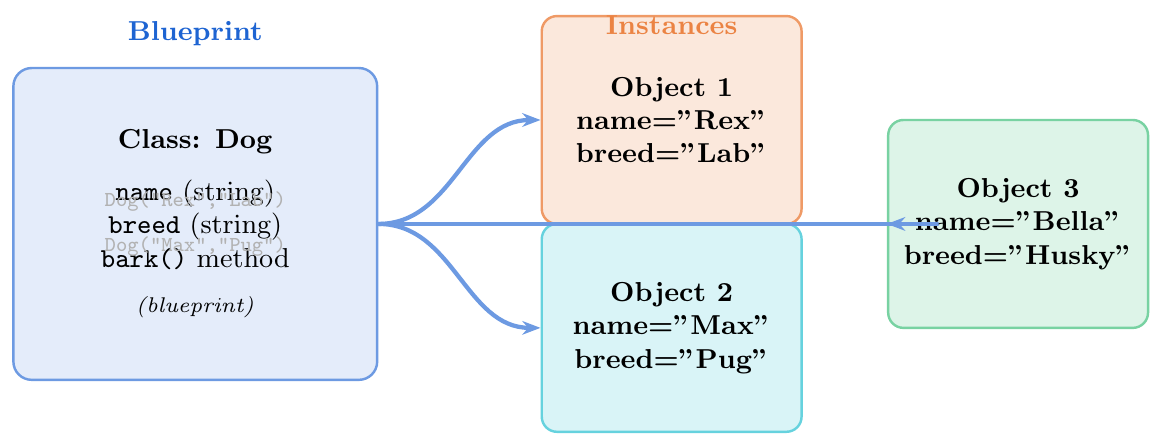
A class is like a blueprint or template. Just like a house blueprint tells you what every house built from it will have (rooms, doors, windows), a class tells Python what every object made from it will have.
An object (also called an instance) is one real thing built from that blueprint. You can build many objects from one class, just like you can build many houses from one blueprint.
Syntax:
class ClassName(Base):
\ \ \ \ # body: attributes and methods
The class body is run once at definition time. A class object is created
and stored under the name ClassName.
# Define a class (blueprint)
class Dog:
    # This runs when we create a Dog object
    def __init__(self, name, breed):
        self.name  = name    # store name on this object
        self.breed = breed   # store breed on this object

    # A method (a function inside a class)
    def bark(self):
        return f"{self.name} says: Woof!"

    def info(self):
        return f"{self.name} is a {self.breed}"

# Create objects (instances) from the class
dog1 = Dog("Rex",   "Labrador")
dog2 = Dog("Max",   "Pug")
dog3 = Dog("Bella", "Husky")

# Use the objects
print(dog1.bark())    # Rex says: Woof!
print(dog2.info())    # Max is a Pug
print(dog3.name)      # Bella

# Each object is independent
dog1.name = "Rocky"   # only dog1 changes
print(dog1.name)      # Rocky
print(dog2.name)      # Max   (unchanged)

# Check type
print(type(dog1))               # <class '__main__.Dog'>
print(isinstance(dog1, Dog))    # True
__init__ and self
Setting Up an Object
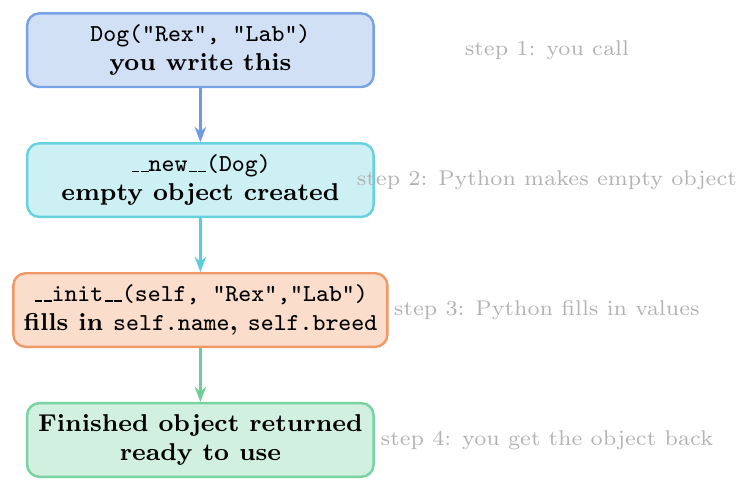
__init__is the setup method. Python calls it automatically right after a new object is created. Think of it as the “fill in the details” step.selfis the name for “this exact object”. When you writeself.name = name, you are saving the value on this object.selfis always the first parameter of every instance method. Python passes the object automatically — you do not pass it yourself.__new__actually creates the object (allocates memory);__init__just fills in the values. For most purposes you only need__init__.
class Student:
    def __init__(self, name, roll, marks):
        # 'self' means 'this student object'
        self.name  = name    # save name on this student
        self.roll  = roll    # save roll number
        self.marks = marks   # save marks

    def grade(self):
        if self.marks >= 90:
            return "A"
        elif self.marks >= 75:
            return "B"
        else:
            return "C"

    def introduce(self):
        return (f"I am {self.name}, "
                f"Roll #{self.roll}, "
                f"Grade: {self.grade()}")

# Create students -- __init__ runs automatically
s1 = Student("Alice", 101, 92)
s2 = Student("Bob",   102, 78)
s3 = Student("Carol", 103, 65)

print(s1.introduce())   # I am Alice, Roll #101, Grade: A
print(s2.introduce())   # I am Bob, Roll #102, Grade: B
print(s3.grade())       # C

# self.marks is different for each student
print(s1.marks, s2.marks, s3.marks)   # 92 78 65

# __init__ is called again for each new object
s4 = Student("Dave", 104, 85)
print(s4.grade())   # B
Class Variables vs Instance Variables
Shared vs Per-Object Data
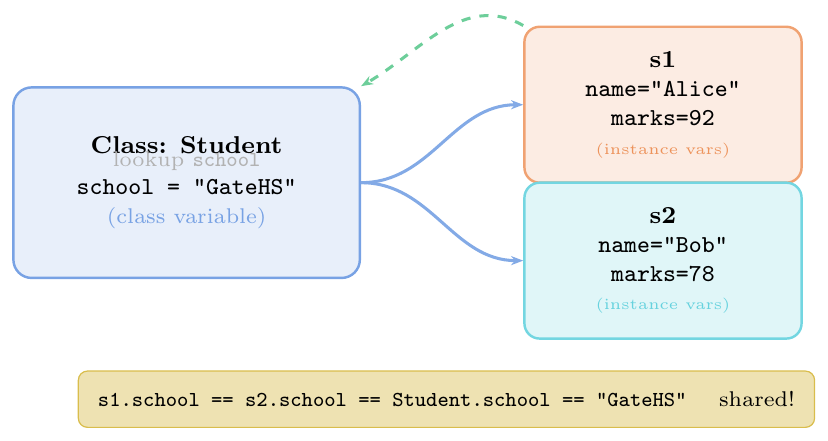
Class variable: written inside the class but outside any method. Shared by all objects of that class. Like a notice board that every student in a class can see.
Instance variable: written using
self.attrinside a method. Belongs to one specific object. Like each student's personal notebook.
Lookup order: Python first looks in the object's own storage
(__dict__); if not found, it looks in the class's storage.
Important traps:
Assignment through instance:
obj.class_var = xcreates a new instance variable that shadows the class variable — it does NOT change the class variable.Mutation through instance: if the class variable is a mutable object (list, dict), doing
obj.class_var.append(x)changes the shared object — all instances see the change.
class Student:
    school  = "GateHS"    # class variable: shared by ALL students
    count   = 0           # class variable: how many students created
    history = []          # class variable: MUTABLE -- careful!

    def __init__(self, name, marks):
        Student.count += 1         # update shared counter
        self.name  = name          # instance variable: per student
        self.marks = marks         # instance variable: per student

s1 = Student("Alice", 92)
s2 = Student("Bob",   78)

# Both share the same class variable
print(s1.school)          # GateHS
print(s2.school)          # GateHS
print(Student.school)     # GateHS  (access via class name)
print(Student.count)      # 2  (both students counted)

# Instance variables are different for each
print(s1.name, s1.marks)  # Alice 92
print(s2.name, s2.marks)  # Bob   78

# ── TRAP 1: assigning via instance creates a new instance variable ──
s1.school = "NewSchool"   # creates s1's OWN 'school' (shadows class var!)
print(s1.school)          # NewSchool   (s1's own copy)
print(s2.school)          # GateHS      (class var unchanged)
print(Student.school)     # GateHS      (class var unchanged)
print("school" in s1.__dict__)  # True  (now s1 has its own 'school')

# ── TRAP 2: mutating a mutable class variable affects ALL instances ──
s1.history.append("joined")    # mutates the SHARED list!
print(s1.history)   # ['joined']
print(s2.history)   # ['joined']  s2 also sees it -- same list!
print(Student.history)  # ['joined']
Dunder (Magic) Methods
String Representation: __str__ and __repr__

Simple rule: if you only define one, define __repr__ —
Python uses it as a fallback for __str__ too.
class Point:
    def __init__(self, x, y):
        self.x = x
        self.y = y

    def __str__(self):
        # For humans: nice and clean
        return f"Point({self.x}, {self.y})"

    def __repr__(self):
        # For developers: shows how to recreate it
        return f"Point(x={self.x}, y={self.y})"

p = Point(3, 4)

# __str__ used by print and f-strings
print(p)              # Point(3, 4)
print(f"Location: {p}")   # Location: Point(3, 4)
print(str(p))         # Point(3, 4)

# __repr__ used in REPL and repr()
print(repr(p))        # Point(x=3, y=4)

# Without __str__, Python falls back to __repr__
class Bare:
    def __repr__(self):
        return "I am Bare"

b = Bare()
print(b)              # I am Bare  (__repr__ used as fallback)
print(repr(b))        # I am Bare

# In a list, __repr__ is used for each item
pts = [Point(1,2), Point(3,4)]
print(pts)
# [Point(x=1, y=2), Point(x=3, y=4)]  -- uses __repr__ inside list
Inheritance
Single Inheritance
Child Getting Everything from Parent
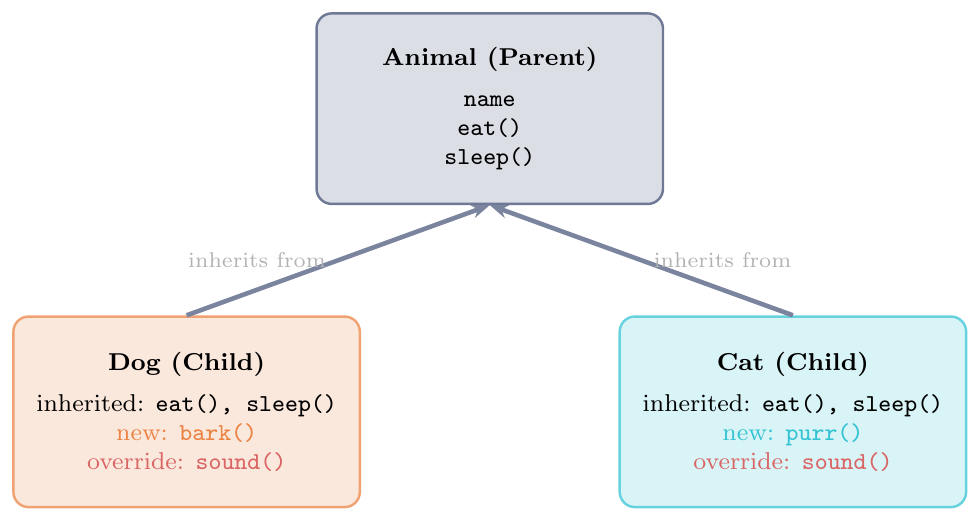
Inheritance means a child class gets all the methods and attributes of a parent class for free. The child can also:
Add new methods and attributes
Override (replace) a parent method with its own version
Call the parent's version using
super()
Think of it like this: a Dog is an Animal.
Every animal can eat and sleep. A dog can also bark.
Instead of writing “eat” and “sleep” again for Dog,
we inherit them from Animal.
Hierarchical Inheritance
class Animal:
    def __init__(self, name):
        self.name = name

    def eat(self):
        return f"{self.name} is eating"

    def sleep(self):
        return f"{self.name} is sleeping"

    def sound(self):
        return f"{self.name} makes a sound"

class Dog(Animal):   # Dog inherits from Animal
    def __init__(self, name, breed):
        super().__init__(name)   # call Animal's __init__
        self.breed = breed       # add extra attribute

    def bark(self):              # new method (only for Dog)
        return f"{self.name} says: Woof!"

    def sound(self):             # OVERRIDE: replace Animal's version
        return f"{self.name} says: Woof!"

class Cat(Animal):
    def __init__(self, name, indoor):
        super().__init__(name)
        self.indoor = indoor

    def sound(self):             # OVERRIDE: Cat's own version
        return f"{self.name} says: Meow!"

dog = Dog("Rex", "Lab")
cat = Cat("Whiskers", True)

# Inherited methods work
print(dog.eat())     # Rex is eating
print(cat.sleep())   # Whiskers is sleeping

# Overridden method: each uses its own version
print(dog.sound())   # Rex says: Woof!
print(cat.sound())   # Whiskers says: Meow!

# New method only in Dog
print(dog.bark())    # Rex says: Woof!
# cat.bark()         # AttributeError: Cat has no bark()

# isinstance check
print(isinstance(dog, Dog))     # True
print(isinstance(dog, Animal))  # True (Dog IS an Animal)
print(isinstance(cat, Dog)) # Falseclass Shape:
def __init__(self, colour):
self.colour = colour
def describe(self):
return f"I am a {self.colour} shape"
class Circle(Shape):
def __init__(self, colour, radius):
super().__init__(colour) # runs Shape's __init__
self.radius = radius
def describe(self):
# Call parent's describe, then add more info
base = super().describe() # "I am a red shape"
return f"{base} (circle, radius={self.radius})"
def area(self):
return 3.14159 * self.radius ** 2
class Square(Shape):
def __init__(self, colour, side):
super().__init__(colour)
self.side = side
def area(self):
return self.side ** 2
c = Circle("red", 5)
s = Square("blue", 4)
print(c.describe()) # I am a red shape (circle, radius=5)
print(s.describe()) # I am a blue shape (from parent)
print(c.area()) # 78.53975
print(s.area()) # 16Method Overriding
Method overriding occurs when a child class provides a specialized implementation for a method that is already defined in its parent class. This allows subclasses to customize behavior while maintaining a consistent interface.
Exact Match: The child method must use the exact same name and signature as the parent method.
Dynamic Routing: When invoked on a child object, Python bypasses the parent implementation and executes the child version immediately.
Extension via super(): Overriding does not mean abandoning parent logic. You can augment the parent's code by calling
super().method()inside the child's version.
Think of it like tax systems or reporting frameworks: every report can “generate,” but an encrypted report will call the default generation mechanism first and then wrap the result in security tags.
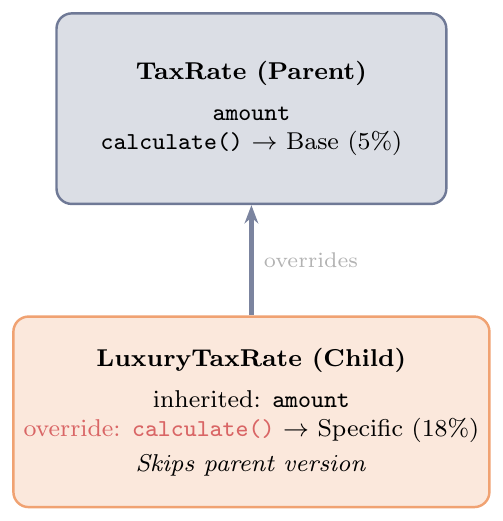
class TaxRate:
    def calculate(self, amount):
        return amount * 0.05  # Base default rate (5%)

class LuxuryTaxRate(TaxRate):
    def calculate(self, amount):
        return amount * 0.18  # OVERRIDE: Replace parent rate entirely

# --------------------------------------------------------------
# Framework Extension using super()
# --------------------------------------------------------------
class Report:
    def generate(self):
        return "Base Report Content"

class EncryptedReport(Report):
    def generate(self):
        # 1. Fetch data from base parent framework using super()
        raw_data = super().generate()
        # 2. Add specific child modification layer
        return f"[ENCRYPTED] {raw_data}"

# --- Testing Replacement Overriding ---
standard = TaxRate()
luxury = LuxuryTaxRate()

print(standard.calculate(1000))  # Output: 50.0
print(luxury.calculate(1000))    # Output: 180.0 (Parent calculation is skipped)

# --- Testing Extended Overriding ---
secure_doc = EncryptedReport()
print(secure_doc.generate())      # Output: [ENCRYPTED] Base Report Content
Multilevel Inheritance
Multilevel inheritance occurs when a child class inherits from a parent class, which in turn inherits from another parent class, creating a linear, multi-tiered chain (Grandparent $\rightarrow$ Parent $\rightarrow$ Child).
Linear Accumulation: The lowest-level child class automatically inherits all attributes and methods across every structural tier above it.
The super() Forwarder: Using
super().__init__()allows constructors to pass arguments cleanly up to the immediate parent layer without explicitly hardcoding class names.One-Way Visibility: Lower classes can seamlessly see and call methods from higher-up tiers, but higher classes have absolutely no visibility down the chain.
Think of it like a vehicle manufacturing line: a basic Vehicle establishes tracking, a Car adds doors, and an ElectricCar adds battery specifications.
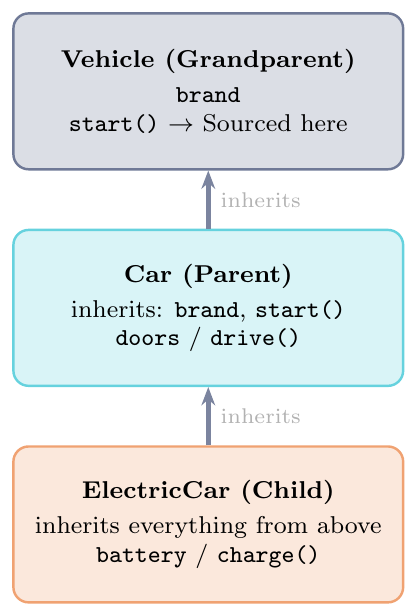
class Vehicle:
    """Tier 1: The Grandparent Class"""
    def __init__(self, brand):
        self.brand = brand

    def start(self):
        return f"{self.brand} engine started."

class Car(Vehicle):
    """Tier 2: The Parent Class"""
    def __init__(self, brand, doors):
        super().__init__(brand) # Forward to Vehicle constructor
        self.doors = doors

    def drive(self):
        return f"Driving the {self.brand} car with {self.doors} doors."

class ElectricCar(Car):
    """Tier 3: The Child Class"""
    def __init__(self, brand, doors, battery_kwh):
        super().__init__(brand, doors) # Forward to Car constructor
        self.battery_kwh = battery_kwh

    def charge(self):
        return f"Charging the {self.battery_kwh}kWh battery pack."

# --- Testing the Multi-Tier Blueprint ---
tesla = ElectricCar(brand="Tesla", doors=4, battery_kwh=75)

# Accessing methods accumulated from all 3 structural tiers
print(tesla.start())   # Tier 1 Grandparent Method
print(tesla.drive())   # Tier 2 Parent Method
print(tesla.charge())  # Tier 3 Child Method

# --- Verifying Method Resolution Order (MRO) ---
print([cls.__name__ for cls in ElectricCar.__mro__])
# Output: ['ElectricCar', 'Car', 'Vehicle', 'object']
Multiple Inheritance and MRO
Getting from Two Parents, Diamond Problem
Python allows a class to inherit from more than one parent: \[\texttt{class C(A, B):}\]
The diamond problem: if both A and B have a method
with the same name, which one does C use?
Python uses the MRO (Method Resolution Order) to decide. The MRO is computed using the C3 algorithm (left-to-right, no repeats).
Simple rule: Python searches left-to-right through the parents listed
in the class definition, going through each parent's own parents.
super() follows this same order.
Check the MRO with ClassName.__mro__ or ClassName.mro().
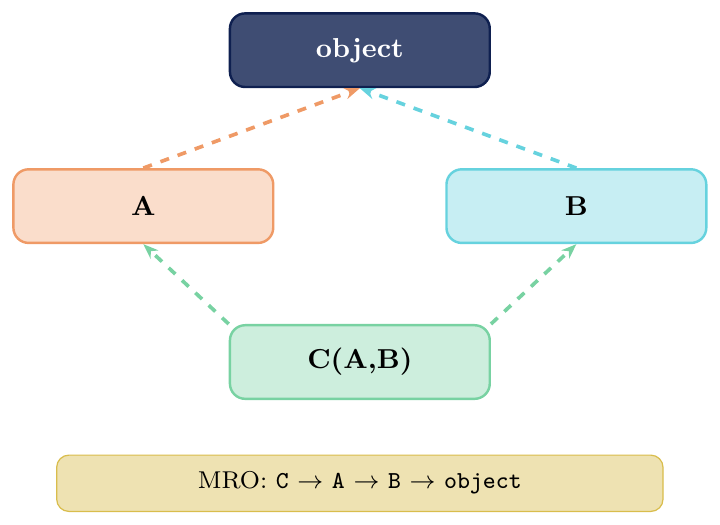
When a class inherits from multiple parents, Python determines method execution using the C3 Linearization / MRO (Method Resolution Order) algorithm. It follows strict layout principles:
Left-to-Right Priority: For a class defined as
Child(Left, Right), Python evaluates the immediate parents from left to right.Subclass First Rule: A parent class (
Right) will always be searched before a grandparent class (Root), even ifLeftis a direct child ofRoot.Early Termination: The search stops immediately at the first class that provides an implementation of the requested method.
Think of it as a depth-first search that is intentionally blocked from hitting the very top root until all local, lower-level subclass branches have been fully exhausted.
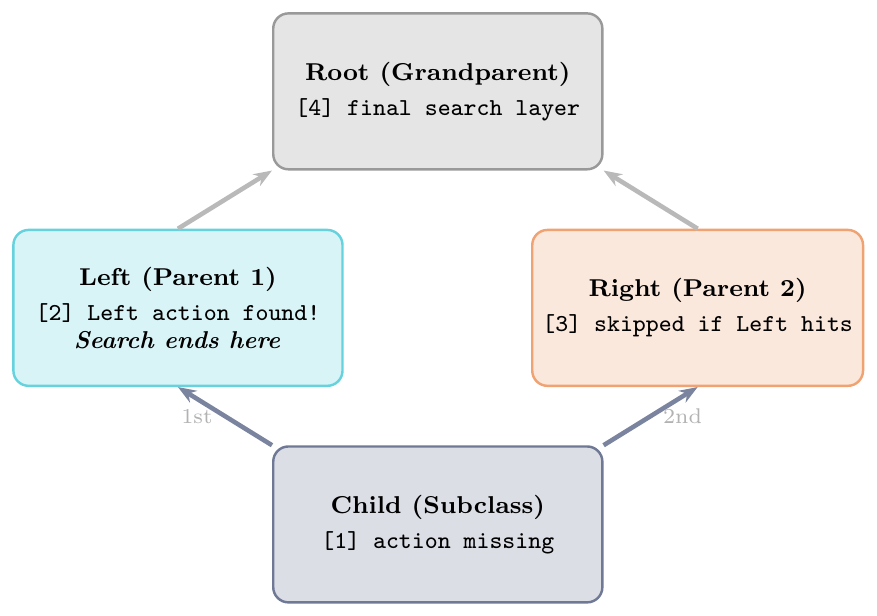
class Root:
    def action(self):
        return "Root action"

class Left(Root):
    def action(self):
        return "Left action"  # Python hits this first and stops

class Right(Root):
    def action(self):
        return "Right action" # Saved for step 3 if Left didn't implement it

class Child(Left, Right):
    pass # Child doesn't define the action, forcing an MRO search

# --- Execution Output ---
obj = Child()
print(obj.action())  # Output: Left action

# --- Inspecting the True Resolution Order Path ---
# Python explicitly lists out the lookup sequence in the __mro__ attribute:
print([cls.__name__ for cls in Child.__mro__])
# Output: ['Child', 'Left', 'Right', 'Root', 'object']
Polymorphism
Polymorphism literally means "many forms." In object-oriented programming, it allows different classes to be treated as if they were the same type through a shared, uniform interface.
Unified Interface: It allows a single function, loop, or method to work seamlessly with different types of objects.
Customized Response: Each individual object responds to the exact same method call in its own specific way.
Reduced Complexity: It decouples your code from explicit type checks, letting you focus entirely on actions rather than underlying identity.
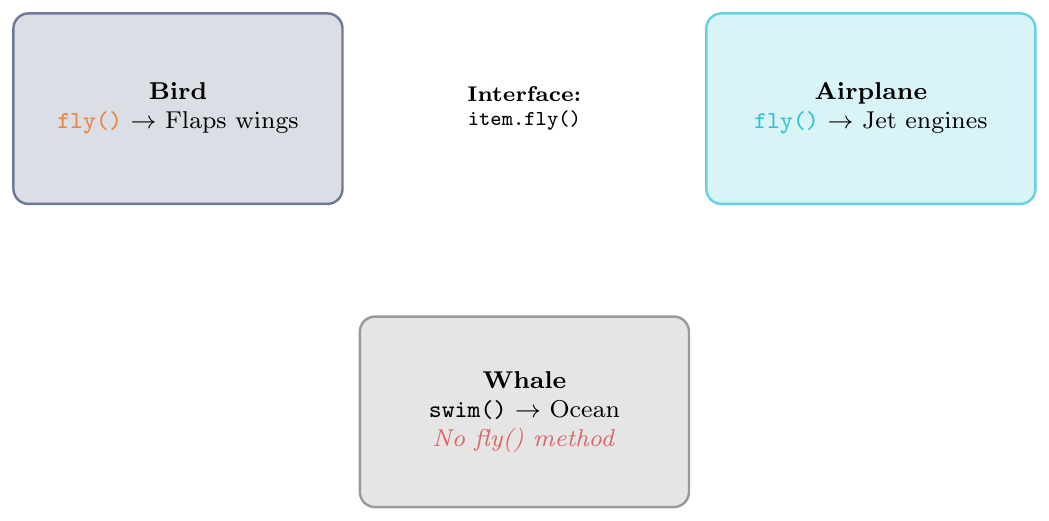
Think of it like an interface action: a Car, a Plane, and a Boat can all execute a move() action. The caller doesn't care how they move—the car drives, the plane flies, and the boat sails.
Compile-Time (Overloading): Python does not support native method overloading. It is simulated using default arguments (
None) or variable arguments (*args).Runtime (Overriding): Subclasses redefine a parent method. The correct execution path is chosen dynamically at runtime based on the object instance.
Duck Typing: Structural typing based on behaviors instead of inheritance. If an object has a required method at runtime, Python executes it without type-checking.
Operator Overloading: Operator overloading allows the same operator to perform different actions depending on the objects it works with. Python supports operator overloading for both built-in data types and user-defined classes.
# 1. COMPILE-TIME OVERLOADING SIMULATION (Asset Depreciation)
class Asset:
    def depreciate(self, value, rate=None):
        if rate is not None:
            return value * rate       # Custom rate tracking
        return value * 0.10            # Standard default rate (10%)

# 2. RUNTIME METHOD OVERRIDING (Payment Processing Architecture)
class Payment:
    def pay(self): return "Standard processing pipeline"

class UPI(Payment):
    def pay(self): return "Redirecting to secure QR gateway"

class Wallet(Payment):
    def pay(self): return "Deducting tokens from application balance"

# 3. FUNCTION-BASED DUCK TYPING (File Export Subsystem)
class PDFExporter:
    def export(self): return "Writing byte streams to disk"

class CSVExporter:
    def export(self): return "Writing comma-separated strings"

def run_export_pipeline(engine):
    print(engine.export()) # No subclass dependency; checks for .export() method

# --- Execution Output Verification ---
# Overloading Check
asset = Asset()
print(asset.depreciate(1000))        # Output: 100.0
print(asset.depreciate(1000, 0.25))  # Output: 250.0

# Overriding Check
transactions = [UPI(), Wallet(), Payment()]
for txn in transactions:
    print(txn.pay())

# Duck Typing Check
run_export_pipeline(PDFExporter())   # Output: Writing byte streams to disk
run_export_pipeline(CSVExporter())   # Output: Writing comma-separated strings

# 4. BUILT-IN OPERATOR & FUNCTION POLYMORPHISM
print(100 + 50)             # Operator: Numeric addition (150)
print("Data" + "base")      # Operator: String concatenation (Database)
print(len("Python"))        # Function: Character count (6)
print(len([5, 10, 15]))     # Function: Item count (3)
print("GATE" * 3) # GATEGATEGATEclass Dog:
def speak(self):
return "Woof!"
class Cat:
def speak(self):
return "Meow!"
# A polymorphic function that does not care about the underlying class type
def animal_sound(animal):
print(animal.speak())
dog = Dog()
cat = Cat()
animal_sound(dog) # Output: Woof!
animal_sound(cat) # Output: Meow!
# --------------------------------------------------------------
# Duck Typing: Focus on Behavior over Type Identity
# --------------------------------------------------------------
class Bird:
def fly(self):
return "Flapping wings"
class Airplane:
def fly(self):
return "Using jet engines"
# Both work inside the same loop because they both possess the .fly() method
entities = [Bird(), Airplane()]
for item in entities:
print(item.fly())
# Output:
# Flapping wings
# Using jet enginesEncapsulation & Name Mangling
Hiding Data Inside a Class
Encapsulation means keeping data inside a class and controlling how
it is accessed or changed. Python uses naming conventions (not strict
access control like Java's private):

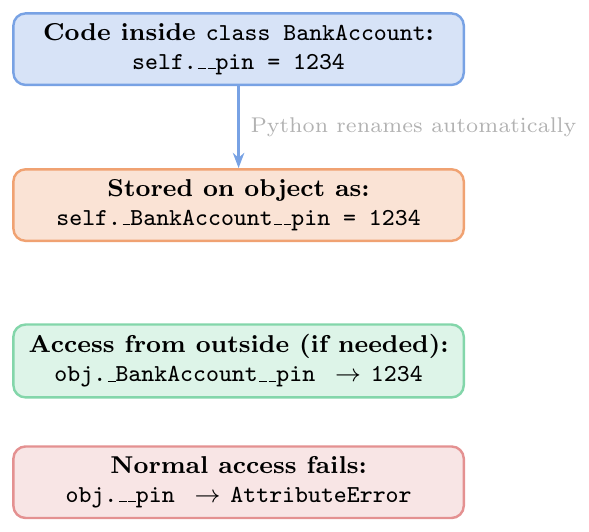
Name mangling: self.__pin inside class BankAccount
is stored as self._BankAccount__pin. This stops child classes from
accidentally overwriting the same name.
Python is not truly private — anyone can still access
obj._BankAccount__pin if they really want to.
The double underscore is a safety guard, not a lock.
class BankAccount:
    def __init__(self, owner, balance, pin):
        self.owner    = owner          # public: ok to read
        self._balance = balance        # "please don't touch"
        self.__pin    = pin            # name mangled: hard to access

    def deposit(self, amount):
        if amount > 0:
            self._balance += amount
            return f"Deposited {amount}. Balance: {self._balance}"

    def withdraw(self, amount, pin):
        if pin != self.__pin:
            return "Wrong PIN!"
        if amount > self._balance:
            return "Not enough money"
        self._balance -= amount
        return f"Withdrew {amount}. Balance: {self._balance}"

    @property
    def balance(self):               # read-only access via property
        return self._balance

acc = BankAccount("Alice", 10000, 1234)

# Public attribute: accessible
print(acc.owner)           # Alice

# Protected: accessible but convention says don't
print(acc._balance)        # 10000  (works but bad style)

# Name-mangled: acc.__pin fails
try:
    print(acc.__pin)       # AttributeError!
except AttributeError as e:
    print(e)               # 'BankAccount' object has no attribute '__pin'

# But you can still reach it this way (don't do this!)
print(acc._BankAccount__pin)   # 1234  (mangled name)

# Use the methods properly
print(acc.deposit(5000))       # Deposited 5000. Balance: 15000
print(acc.withdraw(2000, 9999)) # Wrong PIN!
print(acc.withdraw(2000, 1234)) # Withdrew 2000. Balance: 13000
print(acc.balance)              # 13000  (via property)

# Name mangling prevents child class collision
class SavingsAccount(BankAccount):
    def __init__(self, owner, balance, pin, interest_rate):
        super().__init__(owner, balance, pin)
        self.__pin = "child_pin"    # stored as _SavingsAccount__pin
                                     # does NOT overwrite BankAccount's __pin!

sa = SavingsAccount("Bob", 5000, 5678, 0.05)
print(sa.withdraw(1000, 5678))   # Withdrew 1000... (uses BankAccount's __pin)
Abstract Base Classes
Forcing Child Classes to Implement Methods
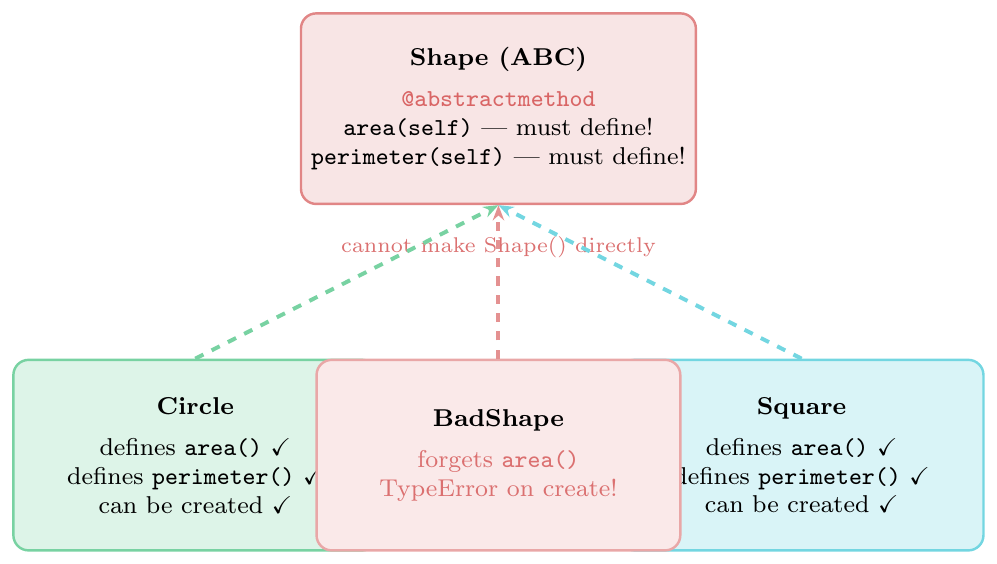
An Abstract Base Class (ABC) is a class that says: “I am an incomplete template. Any class that inherits from me must define certain methods, or Python will not let you create objects from it.”
You mark methods as abstract with @abstractmethod.
If a child class does not define all abstract methods, trying to create an object
from it raises a TypeError.
Why use it: it is a contract. If you have many different
classes (e.g.\ Circle, Square, Triangle) that
should all have an area() method, define Shape as an ABC
with abstract area(). Now Python enforces the contract.
from abc import ABC, abstractmethod
import math

class Shape(ABC):   # ABC makes this an abstract class
    """Every shape must have area() and perimeter()."""

    @abstractmethod
    def area(self):
        pass   # no body needed -- child must provide it

    @abstractmethod
    def perimeter(self):
        pass

    # Non-abstract method: shared by all shapes
    def describe(self):
        return (f"{self.__class__.__name__}: "
                f"area={self.area():.2f}, "
                f"perimeter={self.perimeter():.2f}")

class Circle(Shape):
    def __init__(self, radius):
        self.radius = radius

    def area(self):              # MUST define
        return math.pi * self.radius ** 2

    def perimeter(self):         # MUST define
        return 2 * math.pi * self.radius

class Rectangle(Shape):
    def __init__(self, width, height):
        self.width  = width
        self.height = height

    def area(self):
        return self.width * self.height

    def perimeter(self):
        return 2 * (self.width + self.height)

class Triangle(Shape):
    def __init__(self, a, b, c):
        self.a, self.b, self.c = a, b, c

    def area(self):
        s = (self.a + self.b + self.c) / 2   # semi-perimeter
        return math.sqrt(s*(s-self.a)*(s-self.b)*(s-self.c))

    def perimeter(self):
        return self.a + self.b + self.c

# Cannot create Shape directly
try:
    s = Shape()   # TypeError!
except TypeError as e:
    print(e)      # Can't instantiate abstract class Shape

# Can create concrete subclasses
c = Circle(5)
r = Rectangle(4, 6)
t = Triangle(3, 4, 5)

print(c.describe())   # Circle: area=78.54, perimeter=31.42
print(r.describe())   # Rectangle: area=24.00, perimeter=20.00
print(t.describe())   # Triangle: area=6.00, perimeter=12.00

# Use polymorphism: list of shapes
shapes = [Circle(3), Rectangle(2,5), Triangle(3,4,5)]
total_area = sum(s.area() for s in shapes)
print(f"Total area: {total_area:.2f}")   # Total area: 48.27

# Class that misses an abstract method
class BadShape(Shape):
    def area(self):
        return 0
    # forgot perimeter()!

try:
    b = BadShape()   # TypeError!
except TypeError as e:
    print(e)   # Can't instantiate abstract class BadShape
# without an implementation for abstract method 'perimeter'# Q1: Class variable shared -- what prints?
class Counter:
count = 0
def __init__(self):
Counter.count += 1
a = Counter()
b = Counter()
c = Counter()
print(Counter.count) # 3 (shared across all instances)
# Q2: Instance variable shadows class variable
class Dog:
legs = 4
d = Dog()
d.legs = 3 # creates instance var, shadows class var
print(d.legs) # 3
print(Dog.legs) # 4 (class var unchanged)
# Q3: MRO -- which method runs?
class A:
def hello(self): return "A"
class B(A):
def hello(self): return "B"
class C(A):
def hello(self): return "C"
class D(B, C):
pass
print(D().hello()) # B (MRO: D -> B -> C -> A)
print(D.__mro__) # D, B, C, A, object
# Q4: super() chain
class X:
def go(self): print("X")
class Y(X):
def go(self): print("Y"); super().go()
class Z(Y):
def go(self): print("Z"); super().go()
Z().go() # Z / Y / X
# Q5: Property vs plain method
class Circle:
def __init__(self, r): self.r = r
@property
def area(self): return 3.14 * self.r**2
c = Circle(5)
print(c.area) # 78.5 (no parentheses -- it's a property)
# print(c.area()) # TypeError: 'float' is not callable