Introduction
Overview
What is DBMS and Roles
A database-management system (DBMS) is a collection of interrelated data along with a set of programs used to access those data. The collection of data, commonly called the database, stores information relevant to an enterprise. The primary objective of a DBMS is to provide a convenient and efficient way to store and retrieve database information.
Database systems are designed to manage large volumes of information.
Data management involves defining storage structures for information.
It also includes providing mechanisms for data manipulation.
A database system must ensure the safety and reliability of stored data.
Data protection must be maintained even during system crashes.
The system must prevent unauthorized access to information.
When data are shared among multiple users, the system must avoid anomalous and inconsistent results.
Applications of DBMS
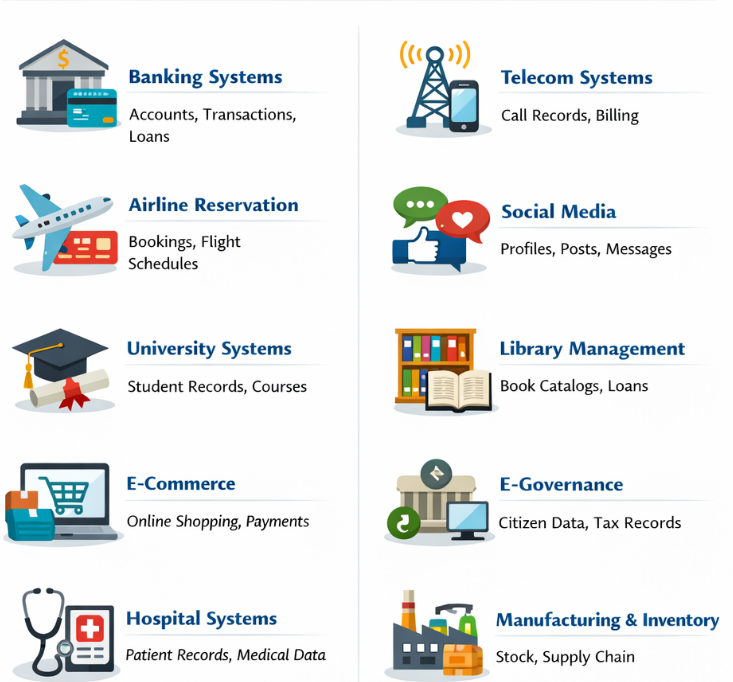
Banking Systems
Databases store customer information, account details, transactions, loans, and credit records, ensuring data consistency, security, and concurrent access.Airline Reservation Systems
Database systems manage flight schedules, seat availability, passenger details, bookings, and cancellations while preventing double booking.University and Education Systems
Databases maintain student records, course registrations, grades, attendance, and faculty data, supporting multiple users.E-commerce Applications
Online platforms use databases to handle product catalogs, customer profiles, orders, payments, and inventory management.Hospital and Healthcare Systems
Databases store patient records, medical histories, prescriptions, diagnostic reports, and billing information with strict access control.Telecommunication Systems
Database systems manage call detail records, customer plans, billing data, and network usage at very large scale.Social Media Platforms
Databases store user profiles, posts, comments, likes, messages, and relationships, enabling real-time data access.Library Management Systems
Databases track books, authors, issued and returned books, members, and fines efficiently.Government and E-Governance Systems
Databases manage citizen records, tax data, land records, voting information, and public service delivery systems.Manufacturing and Inventory Systems
Databases monitor production data, inventory levels, suppliers, orders, and supply chain operations.
Advantages Over File Processing Systems
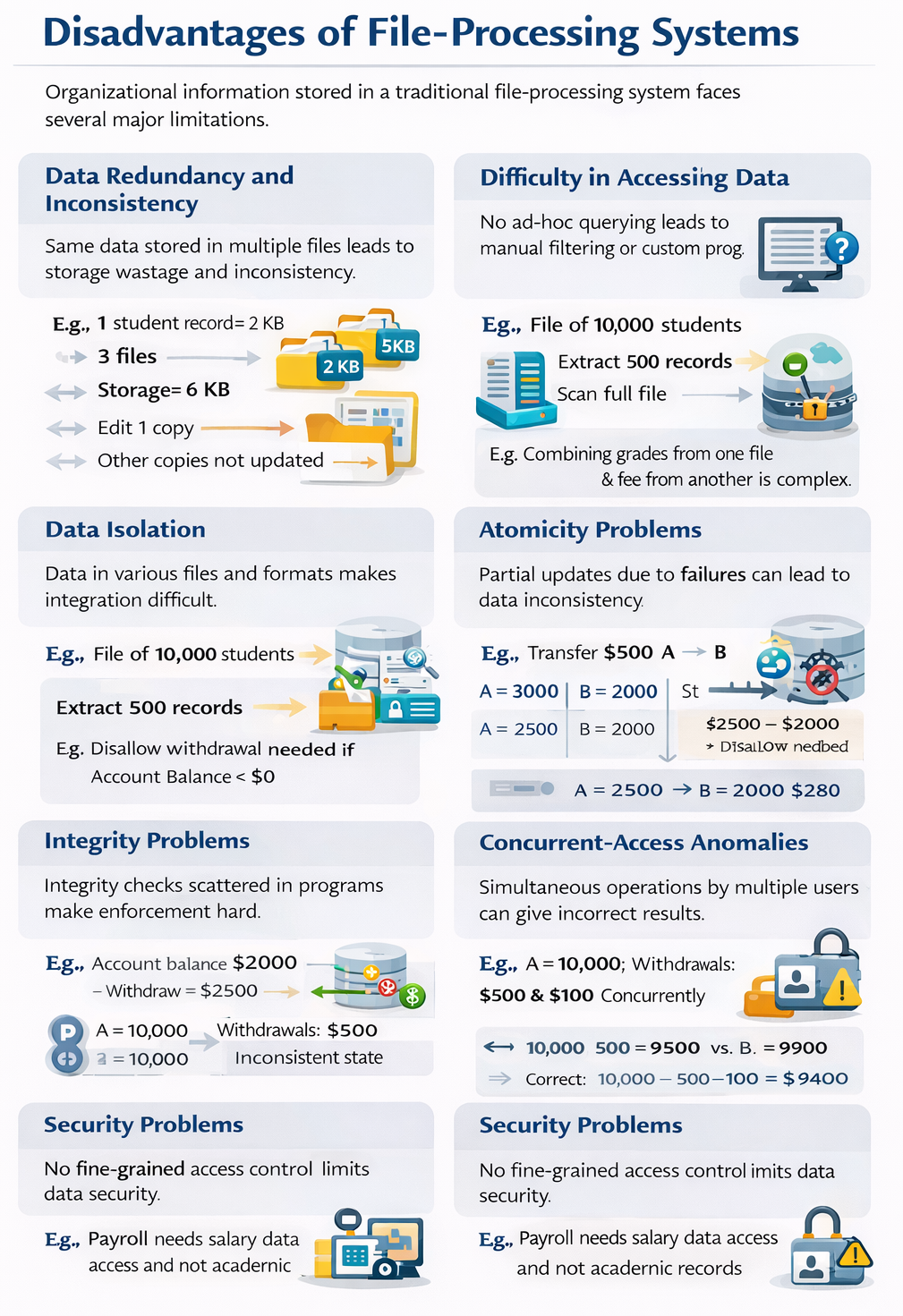
Data Redundancy and Inconsistency
In a file-processing environment, different application programs are developed independently over time. As a result, the same data may be stored in multiple files. For example, a student enrolled in both the Music and Mathematics departments may have personal details stored in two separate files. If the storage required for one student record is $2$ KB and it is duplicated in $3$ files, the total storage becomes $6$ KB. If one copy is updated while others are not, the system enters an inconsistent state.Difficulty in Accessing Data
File-processing systems do not support flexible queries. If a clerk needs a list of students living in a specific postal-code area, and no such program exists, the options are to manually filter data or write a new program. For example, extracting $500$ relevant records from a file of $10{,}000$ students requires scanning the entire file, leading to inefficient data access.Data Isolation
Data is scattered across multiple files with different formats, making integration difficult. For instance, combining student academic data stored in one file with fee details stored in another requires custom programs, increasing complexity and development time.Integrity Problems
Integrity constraints must be enforced through application code. For example, consider a department account balance that must never fall below $\$0$. If an account has a balance of $$2000$, a withdrawal of $$2500$ should be disallowed. In file systems, such checks must be implemented in every relevant program, making updates and maintenance difficult.Atomicity Problems
Operations must be executed completely or not at all. Consider a fund transfer of $\$500$ from account $A$ to account $B$: \[ A = 3000,\quad B = 2000 \] After debit: \[ A = 2500 \] If a system failure occurs before crediting $B$, the database becomes inconsistent. Ensuring atomicity is difficult in file-processing systems.Concurrent-Access Anomalies
Simultaneous data access by multiple users can lead to incorrect results. For example, if account $A$ has a balance of $\$10{,}000$ and two withdrawals of $$500$ and $$100$ occur concurrently, both programs may read the same initial balance and write back $$9500$ and $$9900$. The correct balance should be: \[ 10{,}000 - 500 - 100 = 9400 \]Security Problems
File-processing systems lack fine-grained access control. For instance, payroll staff may need access only to salary data, not academic records. Since access control is embedded in individual programs, enforcing security policies consistently becomes difficult.
Data View
A database system consists of a collection of interrelated data along with a set of programs that enable users to access and modify this data. One of the primary objectives of a database system is to provide users with a data view—an abstract representation of the information—so that the system hides the internal details of how the data is stored and managed.
Data Models
The foundation of a database is its data model, which provides a set of conceptual tools to describe the data, define the relationships among data elements, capture the semantics of the data, and specify constraints to maintain consistency.
Data models can be broadly categorized into four types:
Relational Model
The relational model organizes data and the relationships among data using a collection of tables (also called relations). Each table consists of multiple columns (attributes), and each column has a unique name. The database is structured as fixed-format records, where each record corresponds to a row in the table. The relational model is a type of record-based model and is the most widely adopted model; the majority of modern database systems are based on it.Entity-Relationship (E-R) Model
The E-R model represents data using entities—objects or things in the real world that are distinguishable from one another—and the relationships between these entities. This model is extensively used in database design to conceptually structure data.Semi-Structured Data Model
The semi-structured model allows individual data items of the same type to have different sets of attributes, unlike relational or E-R models where all items of a type share the same attributes. Common formats include JSON and XML, which are widely used for representing semi-structured data.Object-Based Data Model
With the rise of object-oriented programming (e.g., Java, C++, C#), databases evolved to support object-oriented concepts. In this model, objects can be stored in the database along with their methods, supporting encapsulation and object identity. Modern relational databases often integrate object-oriented features, effectively extending the relational model with objects and procedures stored in the database.
Data Abstraction
For a database system to be practical and effective, it must be able to retrieve data efficiently. To achieve this efficiency, developers employ complex data structures to represent data internally. However, since many users are not computer experts, the system hides this complexity using multiple levels of data abstraction, simplifying the way users interact with the database.
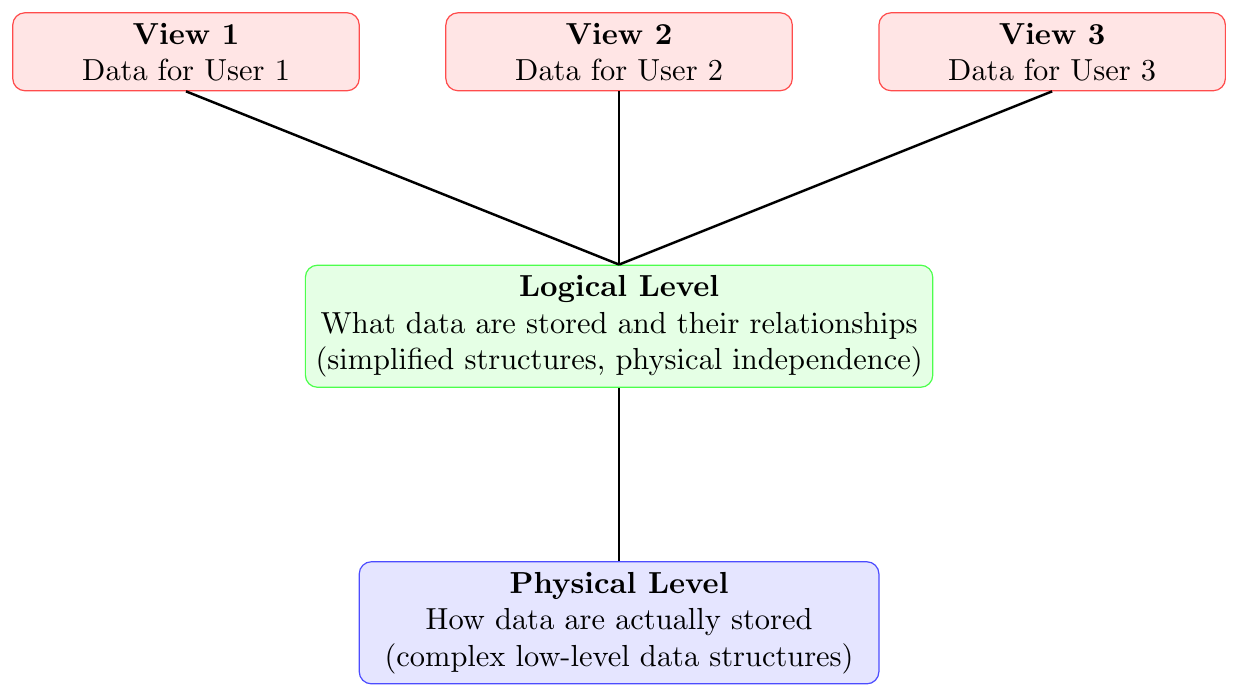
Database systems use multiple levels of data abstraction to simplify user interaction while hiding complexity. These levels are:
Physical Level or Internal
This is the lowest level of abstraction that describes how data are physically stored. It details the complex low-level data structures used to manage information efficiently.Logical Level or Conceptual
The middle level of abstraction specifies what data are stored and the relationships among them. It uses simplified structures to represent the database while hiding the underlying physical complexity, providing physical data independence. Database administrators primarily interact with this level to determine which information is stored.View Leve or Externall
The highest level of abstraction presents only the portion of the database relevant to a user or application. It simplifies user access and interaction by hiding unnecessary details. A database can provide multiple views tailored for different users’ needs.
Data Independence
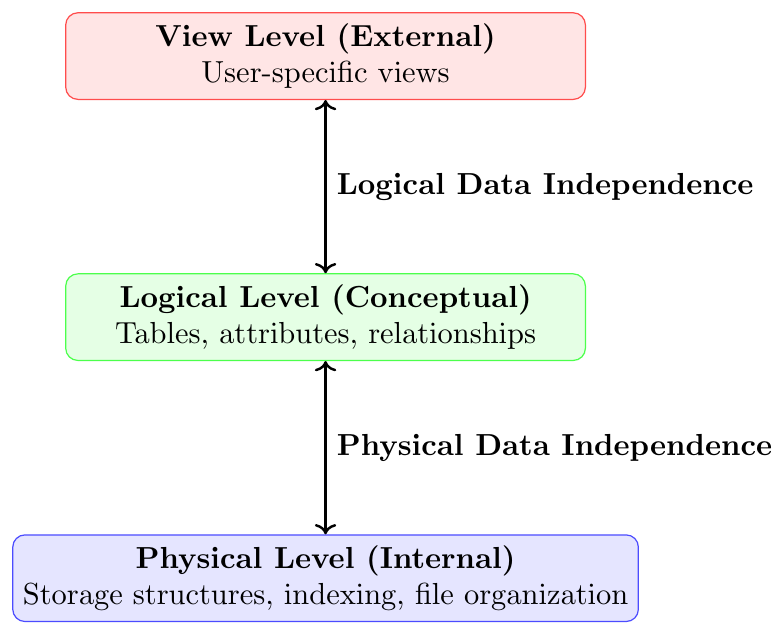
Data Independence is the ability of a database system to modify the schema at one level of abstraction without affecting the schema at the next higher level.
It ensures that changes in storage details or logical structure do not require rewriting application programs.
Data independence is a key advantage of a DBMS over traditional file systems.
There are two types of data independence:
Physical Data Independence
The ability to change the internal (physical) schema without changing the conceptual schema. It hides changes in storage structure from users.Example: Changing file organization from heap file to B+ tree index or adding an index on
RollNodoes not affect the logical structure of the table.Logical Data Independence
The ability to change the conceptual schema without changing the external (view) schema. It hides changes in logical structure from users.Example: Adding a new attribute
Emailto theStudenttable does not affect users who only accessNameandRollNo.
Consider a database storing student information:
Conceptual Schema:
Student(RollNo, Name, Department, CGPA)View for Faculty:
Student(RollNo, Name, CGPA)View for Accounts Section:
Student(RollNo, Name)Physical Change:
Suppose the database administrator creates a B+ tree index on RollNo.
This change affects only the physical level.
Neither the conceptual schema nor the user views change.
This is Physical Data Independence.
Logical Change:
Suppose a new attribute Email is added:
Student(RollNo, Name, Department, CGPA, Email)If faculty and accounts views remain unchanged, this demonstrates Logical Data Independence.
Database Schema and Instance
A database is dynamic, changing over time as information is inserted or deleted. The collection of data stored in the database at a particular moment is called an instance of the database. The overall design of the database is called the database schema.
This concept can be understood by analogy with a program in a programming language:
The database schema corresponds to the variable declarations and their types in a program.
The instance of the database corresponds to the values of the variables at a particular point in time.
Database systems can have multiple schemas, organized according to the levels of abstraction:
Physical Schema: Describes the database design at the physical level.
Logical Schema: Describes the database design at the logical level. This is the most important schema for application programs, as programmers construct applications using the logical schema.
View Schemas (Subschemas): Describe different views of the database at the view level.
The physical schema is hidden beneath the logical schema and can usually be modified without affecting application programs. Application programs are said to have physical data independence if they do not depend on the physical schema, meaning they do not need to be rewritten when the physical schema changes.
Database Languages
A database system supports multiple query and control languages:
A Data-Definition Language (DDL) is used to define the structure and schema of the database.
A Data-Manipulation Language (DML) is used to retrieve, insert, delete, and modify data.
A Data-Control Language (DCL) is used to grant and revoke access permissions on database objects.
A Transaction-Control Language (TCL) is used to manage transactions and control changes using commit, rollback, and savepoints.
Data Definition Language (DDL)
A Data-Definition Language (DDL) is used to define the structure of a database, called the database schema.
Using DDL, we specify:
tables (relations),
attributes and their data types,
relationships among tables,
constraints on data.
DDL is also used to describe storage structures and access methods through a specialized form called data storage and definition language.
These statements define physical implementation details, which are normally hidden from users.
Execution of DDL statements produces metadata.
Metadata is stored in the data dictionary.
The data dictionary contains:
schema definitions,
constraints,
storage details,
authorization information.
It is maintained only by the database system.
The system consults it before accessing or modifying data.
Data Manipulation Language
A Data-Manipulation Language (DML) allows users to access and modify data stored in a database.
DML operations are performed on data that are organized according to a data model.
Retrieval of existing data from the database.
Insertion of new data into the database.
Deletion of existing data from the database.
Modification (update) of stored data.
Procedural DML
User specifies what data are required.
User also specifies how to retrieve those data.
Emphasizes the procedure or steps of execution.
Declarative DML (Nonprocedural DML)
User specifies only what data are needed.
User does not specify how to obtain the data.
The database system decides the execution strategy.
Comparison
Declarative DMLs are generally easier to learn and use.
They reduce the burden on users by hiding retrieval details.
The database system must determine an efficient access plan.
Data Control Language
A Data Control Language (DCL) is used to control access and permissions on database objects.
DCL commands define who can access which data and what operations they are allowed to perform.
It is mainly related to security and authorization.
Granting privileges to users or roles.
Revoking privileges from users or roles.
GRANT — gives privileges
GRANT SELECT, INSERT ON student TO user1;REVOKE — removes privileges
REVOKE INSERT ON student FROM user1;
Transaction Control Language
A Transaction Control Language (TCL) manages transactions in a database.
TCL ensures consistency and integrity of data by controlling transaction execution.
It works closely with the ACID properties of transactions.
Commit — permanently saves changes.
Rollback — undoes changes since last commit.
Savepoint — creates intermediate rollback points.
COMMIT — make changes permanent
UPDATE account SET balance = balance - 500 WHERE acc_no = 101;
COMMIT;
ROLLBACK — undo uncommitted changes
DELETE FROM orders WHERE order_id = 9001;
ROLLBACK;
SAVEPOINT — set a checkpoint
SAVEPOINT sp1;
UPDATE employee SET salary = salary * 1.1;
ROLLBACK TO sp1;
Database Engine and Core Internal Components
Database Engine — Overview
The database engine is the core execution layer of a DBMS.
It is responsible for:
executing queries,
managing stored data,
enforcing rules and constraints,
handling transactions safely.
It acts as the bridge between:
user queries and application programs, and
the actual data stored on disk.
Internally, the database engine mainly consists of:
Storage Manager
Query Processor
Transaction Manager
Storage Manager
The storage manager connects high-level database operations with low-level physical storage.
It serves as the interface between:
application programs and queries, and
the operating system file system.
Raw data are stored on disk using OS file services.
The storage manager converts DML commands into low-level file operations.
It is responsible for:
storing data,
retrieving data,
updating data efficiently.
Authorization and Integrity Manager
Verifies user access rights.
Enforces integrity constraints.
Prevents unauthorized data access or invalid updates.
Transaction Manager
Ensures database correctness during failures.
Coordinates concurrent operations safely.
Prevents conflicting updates.
File Manager
Controls disk space allocation.
Maintains physical file structures.
Organizes how records are stored on disk.
Buffer Manager
Moves data between disk and main memory.
Caches frequently used data in RAM.
Decides which pages remain in memory and which are replaced.
Enables databases larger than RAM to be processed efficiently.
Data Files
Store the actual database records.
Data Dictionary (Metadata Repository)
Stores schema definitions.
Contains structure and constraint information.
Used internally by the DBMS.
Indexes
Provide fast lookup of records.
Store pointers to matching data rows.
Example: index on EmployeeID speeds up search.
Query Processor
The query processor handles query interpretation and execution.
It converts user queries into efficient execution steps.
DDL Interpreter
Processes schema definition commands.
Updates metadata in the data dictionary.
DML Compiler
Translates queries into low-level execution plans.
Generates multiple alternative plans.
Performs query optimization.
Chooses the lowest-cost execution strategy.
Query Evaluation Engine
Executes the selected execution plan.
Runs low-level database operations.
Transaction Management
A transaction is a set of database operations forming one logical task.
Example: transfer money from Account A to Account B.
Each transaction must preserve database correctness.
Temporary inconsistency may occur during execution.
Final committed state must be consistent.
Atomicity
A transaction executes completely or not at all.
If any step fails, all prior changes are rolled back.
No partial updates are allowed.
Consistency
A transaction must preserve all integrity constraints.
Database moves only from one valid state to another valid state.
Rules, keys, and constraints must remain satisfied after commit.
Isolation
Concurrent transactions must not interfere with each other.
Intermediate results of one transaction are hidden from others.
Effect is equivalent to serial (one-by-one) execution.
Durability
Once a transaction is committed, its results are permanent.
Changes survive system crashes and power failures.
Achieved using logs and recovery mechanisms.
Transaction manager consists of:
Concurrency-control manager
Recovery manager
If a transaction fails:
its effects must be completely undone.
database must be restored to the earlier state.
This is handled by the recovery manager.
Multiple transactions may run simultaneously.
Concurrent updates can cause conflicts.
The concurrency-control manager:
coordinates concurrent execution,
prevents data inconsistency,
enforces isolation.
Database and Application Architecture
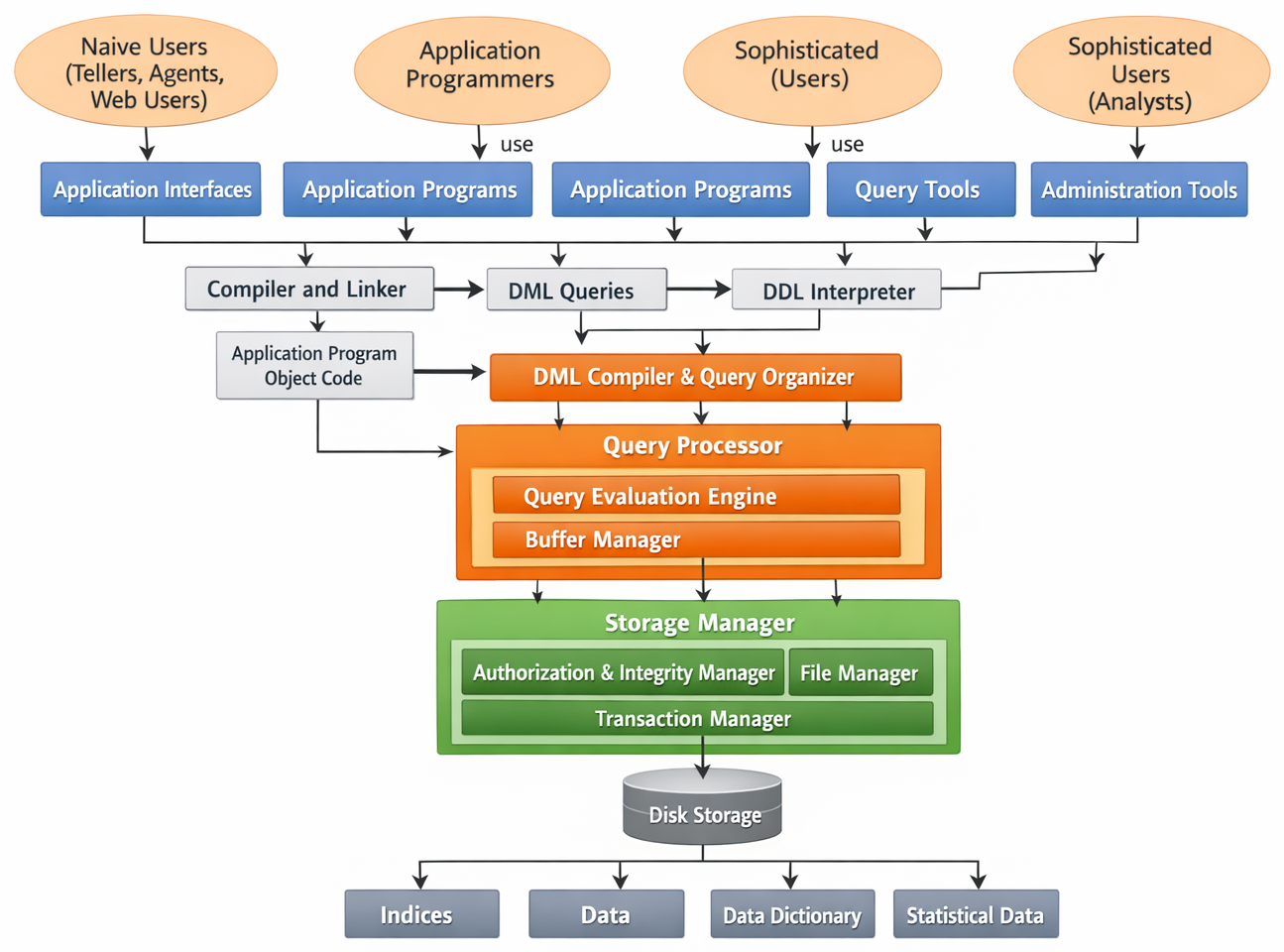
The figure shows the internal structure of a Database Management Systems(DBMS) and how different types of users interact with database components through multiple processing layers.
Naive Users — use predefined interfaces (forms, web apps, teller screens).
Application Programmers — write application programs using DML calls.
Sophisticated Users (Analysts) — directly use query tools for analysis.
Database Administrators (DBA) — use administration tools for control and maintenance.
Database Architecture
Naive users → Application Interfaces
Programmers → Application Programs
Analysts → Query Tools
DBA → Administration Tools
Application programs are processed by the Compiler and Linker.
This produces Object Code.
DML queries inside programs are extracted for further processing.
DDL Interpreter — processes schema definitions and updates metadata.
DML Compiler and Organizer — parses and optimizes DML queries.
Output is given to the Query Evaluation Engine.
Query Evaluation Engine — executes optimized queries.
Buffer Manager — manages data pages in main memory.
Authorization & Integrity Manager — checks permissions and constraints.
Transaction Manager — ensures ACID properties.
File Manager — handles file organization on disk.
Actual Data Tables
Indexes for fast access
Data Dictionary (metadata)
Statistical Data for query optimization
User submits request (query/program/interface).
Query or program is compiled or interpreted.
DML is optimized by the query processor.
Storage manager checks authorization and integrity.
Buffer manager fetches required data pages.
Data is read/written on disk.
Results are returned to the user.
Two-Tier vs Three-Tier Database Application Architecture
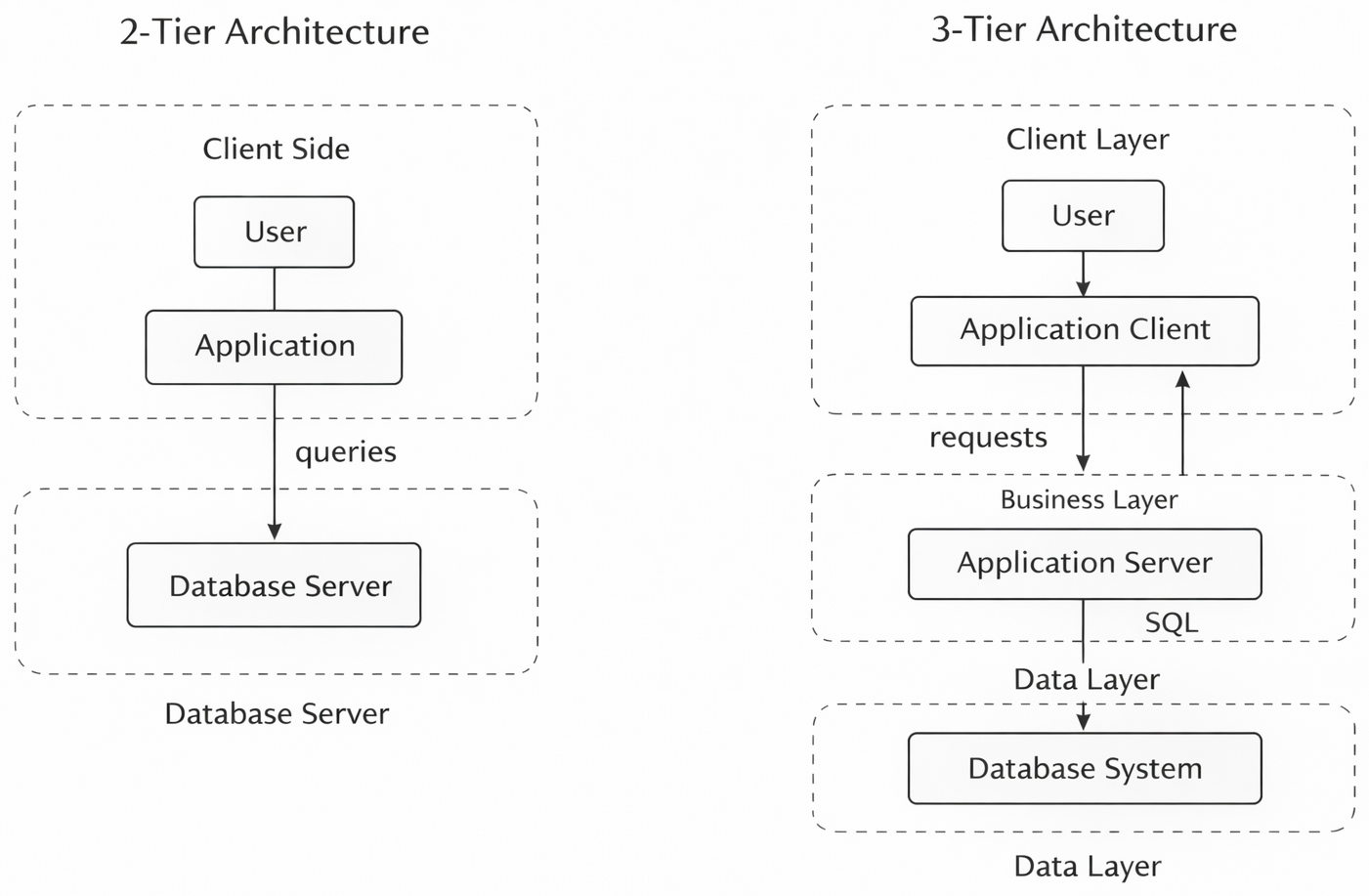
In two-tier architecture, the application runs directly on the client machine.
The client program sends database queries directly to the database server.
The database server processes queries and returns results to the client.
The client contains:
User interface
Application logic
Database query calls (SQL/DML)
Communication happens directly between: \[ \text{Client Application} \leftrightarrow \text{Database Server} \]
Characteristics:
Simple design
Suitable for small systems
Harder to maintain when many clients exist
Lower security (database exposed to clients)
Business logic duplicated across clients
In three-tier architecture, the client is only a front end.
The client does not directly talk to the database.
A separate application server sits between client and database.
All business logic is placed in the application server.
Communication flow: \[ \text{Client} \leftrightarrow \text{Application Server} \leftrightarrow \text{Database Server} \]
Layer roles:
Client Layer:
Web browser or mobile app
Handles UI only
Application Server Layer:
Contains business rules
Validates requests
Builds database queries
Controls transactions
Database Layer:
Stores and retrieves data
Executes queries
Advantages:
Better security (database not directly exposed)
Better scalability
Easier maintenance
Centralized business logic
Improved performance under heavy load
Two-tier:
User → Client App → Database → Client App → User
Three-tier:
User → Client → Application Server → Database → Application Server → Client → User