ER Model
Entity–Relationship (E–R) Data Model
The Entity–Relationship (E–R) data model was introduced to simplify database design by providing a structured method to define an enterprise schema. This schema represents the overall logical structure of a database.
The E–R model helps convert real-world objects, their properties, and their interactions into a conceptual database design. Due to its clarity and effectiveness, many database design tools are based on E–R modeling concepts.
The model is built on three primary components:
Entity sets
Relationship sets
Attributes
The conceptual design created using this model is typically represented using an E–R diagram, which gives a graphical view of entities, relationships, and their attributes.
Symbols used in ER Diagrams
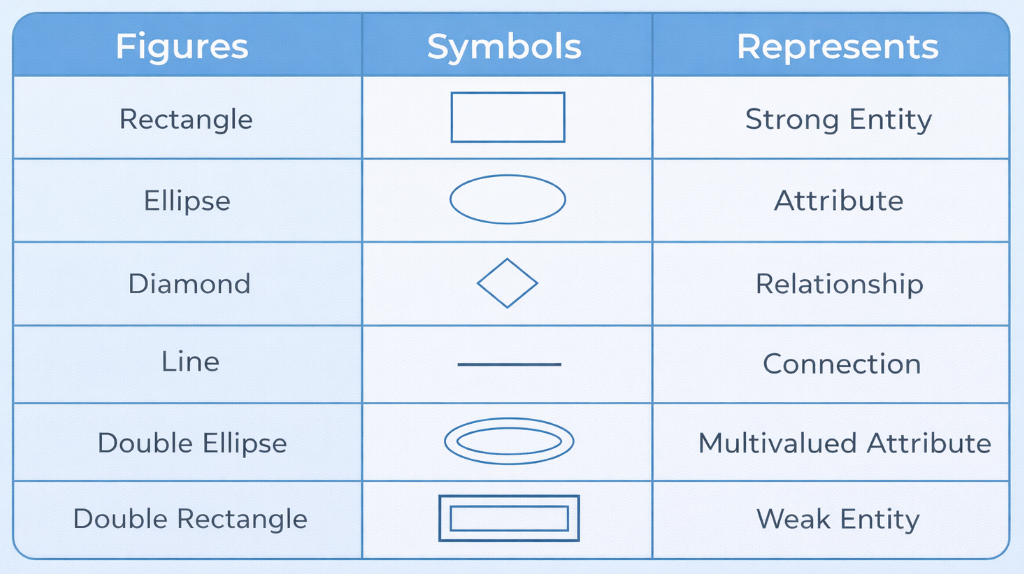
ER Model is used to model the logical view of the system from a data perspective which consists of these symbols:
Rectangles: Rectangles represent Entities in the ER Model.
Ellipses: Ellipses represent Attributes in the ER Model.
Diamond: Diamonds represent Relationships among Entities.
Lines: Lines represent attributes to entities and entity sets with other relationship types.
Single Lines: Single lines represent the partial participation from the entity in an relationship.
Double Lines: Double lines represent the total participation from the entity in an relationship.
Double Ellipse: Double Ellipses represent Multi-Valued Attributes.
Double Rectangle: Double Rectangle represents a Weak Entity.
Components of ER Diagram
ER diagram has three core components: Entities, Attributes, and Relationships. Entities represent real-world objects (like Student or Course). Attributes describe properties of entities (like RollNo, Name, Age). Relationships define how entities are connected to each other (like Enrolls, Works_In).
Entity and Entity Sets
Entity means a real-world object or concept that can be uniquely identified.
It can be physical — such as a person, book, laptop.
It can be abstract — such as a course, bank account, reservation.
Every entity has a set of properties called attributes. At least one attribute (or a combination) must uniquely identify each entity.
Example: Person Entity
Attributes: PersonID, Name, Email
PersonID is unique → used for identification
Even if two people have the same name, PersonID is different
Example: Course Entity
Attributes: CourseID, Title, Credits
CourseID uniquely identifies each course
An entity set is a collection of similar entities that share the same attributes.
All students in a university → entity set Student
All instructors → entity set Instructor
All courses → entity set Course
Each entity set defines:
What type of objects are stored
What attributes describe them
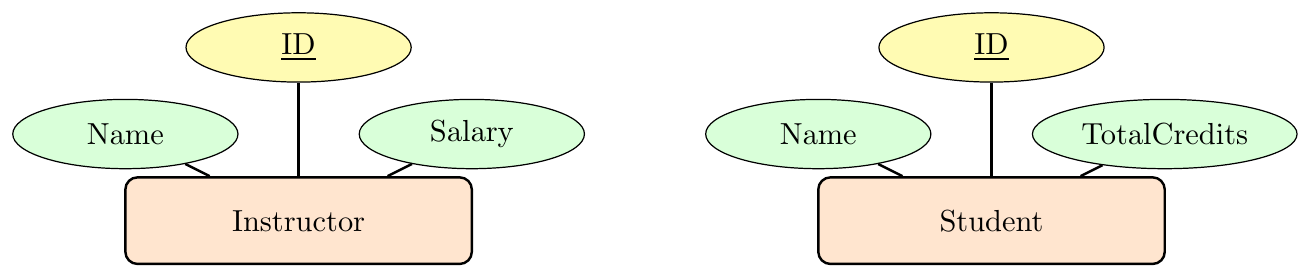
Entity Set (definition) → structure description Example: Student(ID, Name, TotalCredits)
Entity Set Data (instances) → actual stored rows Example: (101, Ravi, 84), (102, Meena, 72)
Entity Sets Need Not Be Disjoint
One entity can belong to multiple entity sets.
A person may be both a Student and an Instructor
So entity sets can overlap
Attributes
Attributes are descriptive properties of entities.
Each entity has one value for each attribute
Different entities → different values
Example: Instructor Attributes
ID = 12121
Name = Dr.\ Virat
Department = Finance
Salary = 90000
Weak Entity Set
A weak entity set is an entity set that does not have a complete primary key of its own. It cannot be uniquely identified using only its attributes.
To uniquely identify a weak entity, we must use:
its own partial key, and
the primary key of a related strong (owner) entity.
Because of this dependency, a weak entity:
cannot exist independently
must be associated with a strong entity
is connected using an identifying relationship
Strong Entity → has full primary key
Weak Entity → has only partial key
Partial Key → uniquely identifies weak entity within owner
Identifying Relationship → links weak entity to strong entity
Consider a library system.
LibraryBook is a strong entity:
BookID (primary key)
Title
Author
Each physical copy of a book is stored as BookCopy.
But CopyNumber alone is not unique globally:
CopyNumber = 1 exists for many books
So BookCopy is a weak entity.
It is uniquely identified using: \[ (BookID + CopyNumber) \]
ER Diagram Notation Rules for Weak Entity
Weak entity → double rectangle
Identifying relationship → double diamond
Partial key → dashed underline
Total participation → double line to relationship
ER Diagram — Weak Entity Example
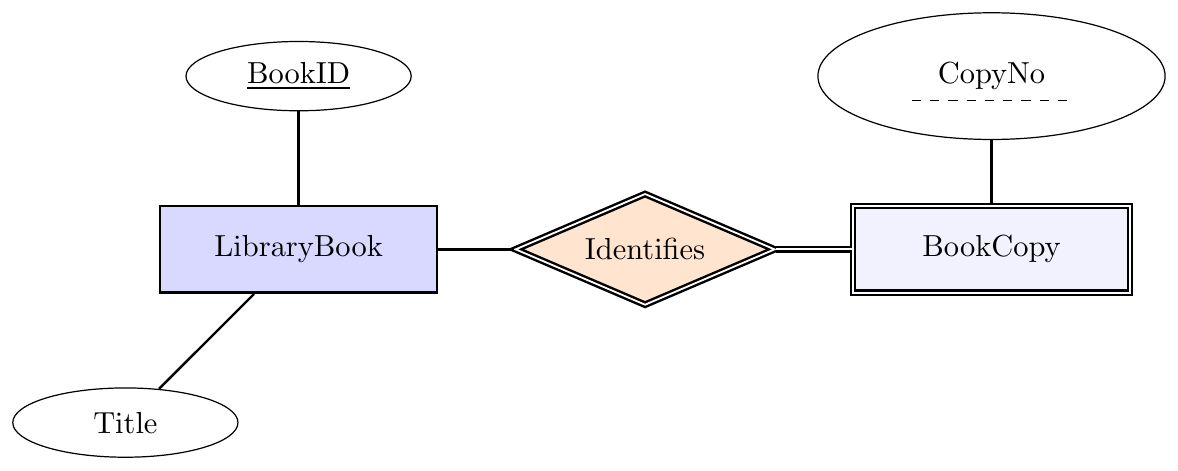
Weak Entity BookCopy identified by LibraryBook
Identifying the Entity
The process of identifying entities involves analyzing the requirements of the database system and identifying the nouns present in the problem statement or domain description. These nouns represent the entities that need to be represented and managed within the database. By extracting and listing these nouns, designers can establish a foundational understanding of the entities that will form the basis of the database schema.
Consider the goal statement for a hypothetical student enrollment database:
Goal: To assist universities in tracking enrolled students, their chosen subjects, and the instructors of those subjects.
From this statement, the following nouns can be identified as entities:
University
Student
Subject
Teacher
These entities represent the primary objects or concepts that the database will manage and track information about. It's important to note that entities are typically named using singular nouns for consistency and clarity. Additionally, the list of entities may evolve as the database design process progresses, allowing for the addition of new entities as needed to meet the requirements of the system.
Relationship Sets
A relationship describes how two or more entities are connected in the real world. While entities represent objects, relationships represent associations between those objects.
Think of entities as nouns and relationships as verbs.
Entity → Customer, Product, Employee
Relationship → buys, manages, assigned_to
A single connection between specific entities is called a relationship instance.
Assume we have two entity sets:
Customer
Product
If customer Anita buys product Laptop, that is one relationship instance of the relationship purchases.
If many customers buy many products, all such connections together form the relationship set purchases.
Key Idea:
Entity Set = collection of objects
Relationship Set = collection of connections between objects
A relationship set can be defined formally as a mathematical relation involving $n \ge 2$ entity sets (the sets need not be distinct). If the entity sets are $E_1, E_2, \dots, E_n$, then a relationship set $R$ consists of tuples formed by selecting one entity from each set.
In other words, $R$ is a subset of all possible combinations: \[ (e_1, e_2, \dots, e_n) \text{ where } e_1 \in E_1,\; e_2 \in E_2,\; \dots,\; e_n \in E_n \]
Each such tuple is called a relationship instance. When entities from these sets appear in the relationship set, we say the entity sets participate in that relationship.
Degree (or arity) of a Relationship Set
The number of different entity sets participating in a relationship set is called the degree of a relationship set.
A unary relationship (also called a recursive relationship) occurs when an entity set is related to itself. Here, different instances of the same entity type participate in a relationship with different roles.
Employees can supervise other employees.
Entity set: Employee
Relationship: supervises
Roles: Supervisor and Subordinate
Without role labels, the meaning becomes ambiguous.
E–R Diagram — Recursive Relationship

Recursive Relationship — Role-Based Representation
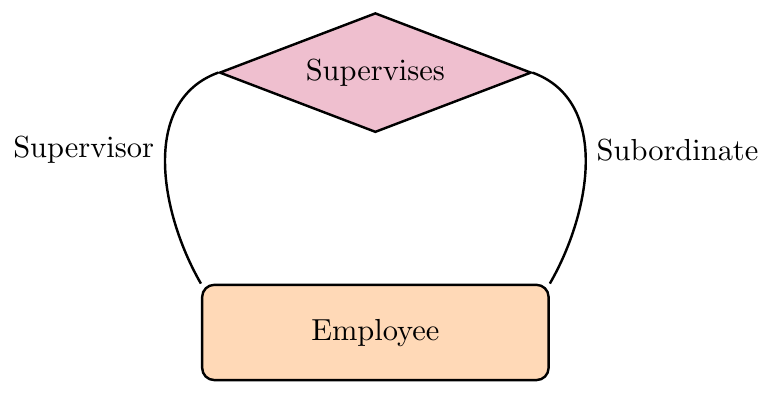
Recursive Relationship — Single Entity Representation
Binary Relationship (Two Entity Sets) When exactly two entity sets are involved, it is called a binary relationship. This is the most common case in database design.
Entity sets: Doctor, Patient
Relationship: treats
Meaning: A doctor treats a patient.
Each doctor–patient pair is one relationship instance.
Participation Meaning
If an entity set is connected to a relationship, we say it participates in that relationship.
In the example:
Doctor participates in Treats
Patient participates in Treats
Participation simply means “takes part in the association.”
E–R Diagram — Binary Relationship

Binary Relationship: Doctor treats Patient
Relationship Involving Three Entity Sets
Some real-world facts depend on three entities together. These are modeled using a ternary relationship.
We want to store:
which Trainer
teaches which Course
to which Batch
This cannot be correctly represented using only pairs — all three must appear together.
E–R Diagram — Ternary Relationship
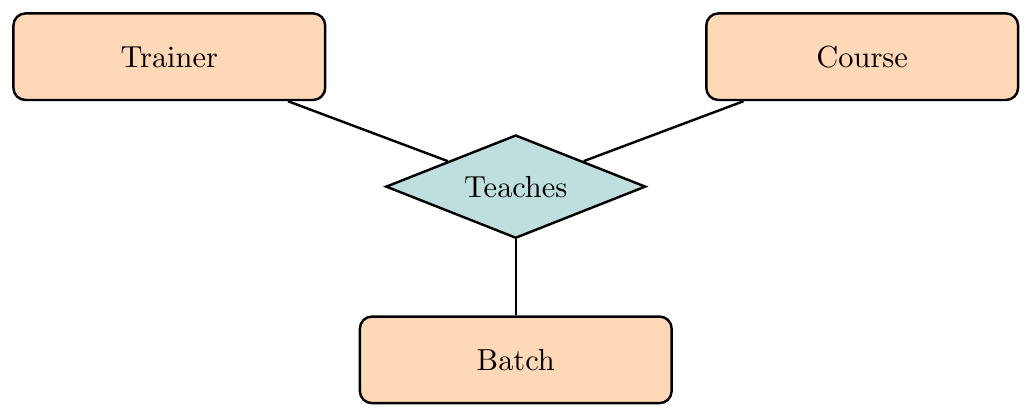
Ternary Relationship Example
Relationship Involving N Entity Sets
When a relationship depends on more than two entities together, it is called an N-ary relationship. The relationship instance is defined only when all participating entities are considered simultaneously. Binary decomposition may lose semantic constraints in such cases.
We want to store:
which Supplier
supplies which Part
to which Project
using which Contract
This fact depends on all entities together — so it must be modeled as an N-ary relationship.
E–R Diagram — N-ary Relationship
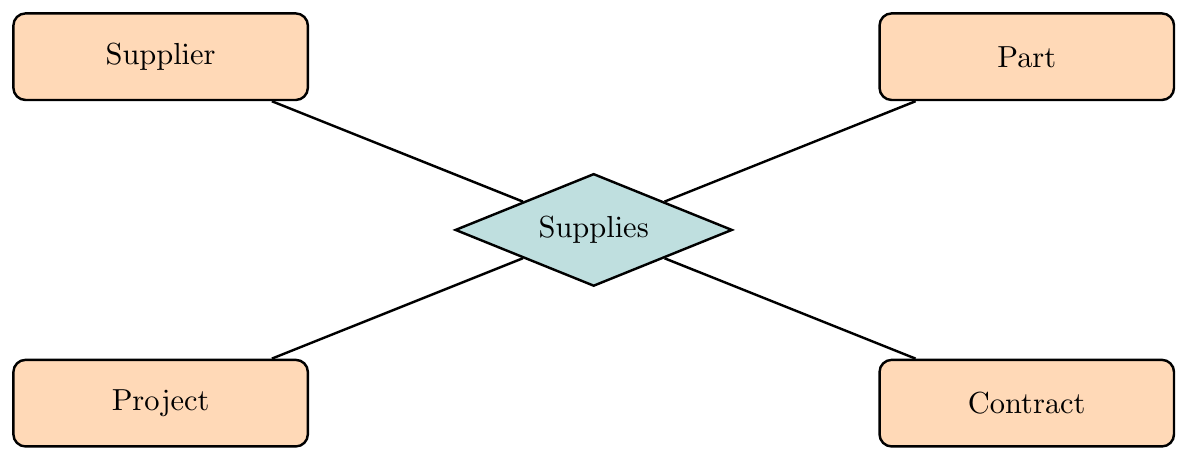
N-ary Relationship Example
Relationship = association between entities
Relationship instance = one specific connection
Relationship set = all similar connections
Binary = two entity sets
Recursive = same entity set appears twice (use roles)
Ternary = three entity sets participate together
Diagram symbol for relationship = diamond
Attributes
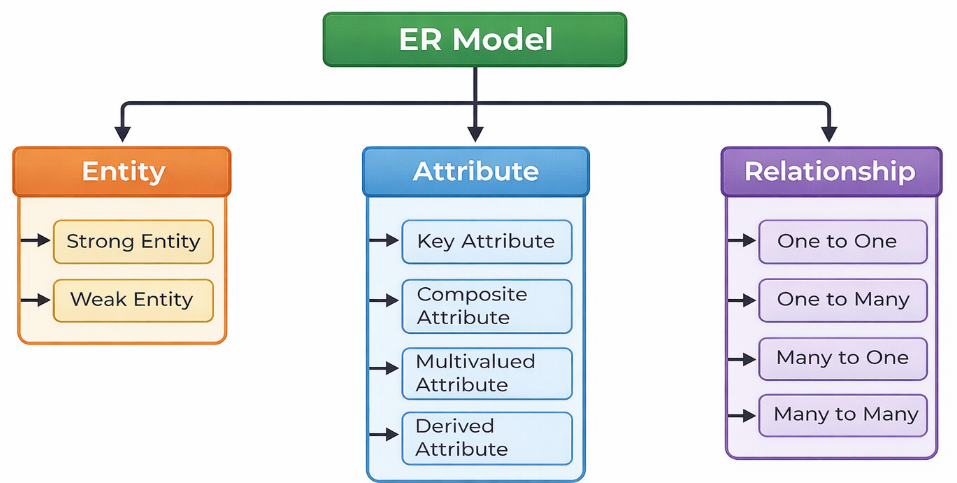
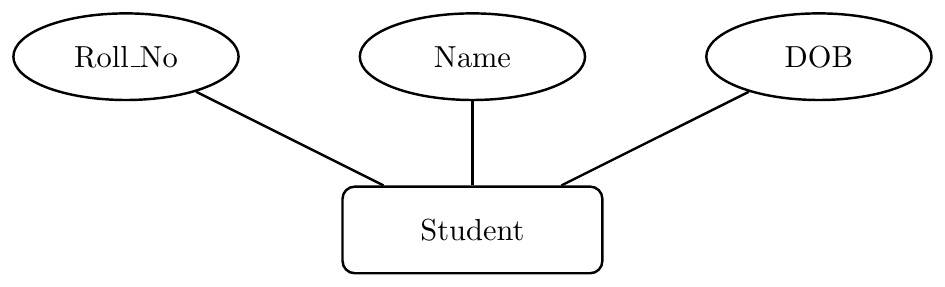
Attributes are the descriptive properties that tell us more about an entity type. They specify what information we store about each entity instance. For example, for the entity Student, attributes can include Roll_No, Name, DOB, Age, Address, and Mobile_No. In an ER diagram, attributes are drawn using an oval connected to the entity rectangle.
Attributes are classified based on structure and behavior into key, composite, multivalued, and derived attributes.
Entity: Student with simple attributes.
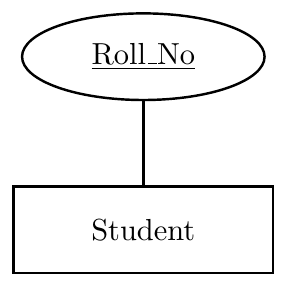
A key attribute is an attribute whose value is unique for every entity instance. It is used to distinguish one entity from all others in the same entity set. No two entities can share the same key value. In ER diagrams, a key attribute is shown by underlining the attribute name.
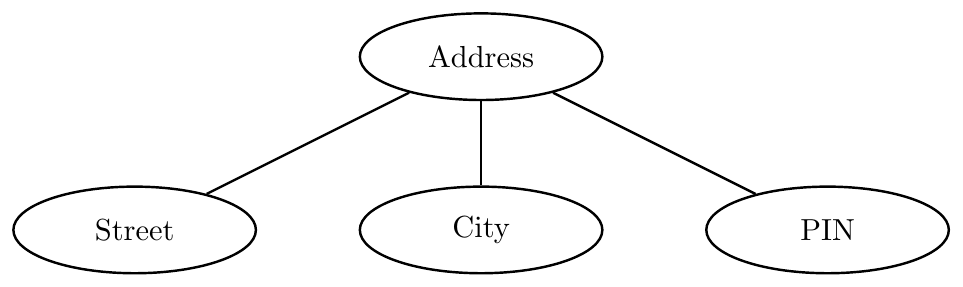
A composite attribute is an attribute that can be broken into smaller meaningful sub-attributes. Instead of storing it as one single value, it is modeled as a group of related parts. This helps in better structuring and querying of data. In ER diagrams, it is drawn as an oval connected to multiple sub-ovals.
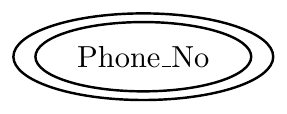
A multivalued attribute can hold more than one value for a single entity instance. For example, a student may have multiple phone numbers. In ER diagrams, it is represented using a double oval.
A derived attribute is an attribute whose value is calculated from other stored data instead of being stored directly in the database. In an ER diagram, it is always shown using a dashed oval. A derived attribute can be attached to either an entity set or a relationship set, depending on what it is computed from.
Rule:
If the value is computed from attributes of one entity → attach to the entity.
If the value is computed from relationship data (or multiple entities) → attach to the relationship.
Age is computed from DOB, so Age is derived and connected to the entity.
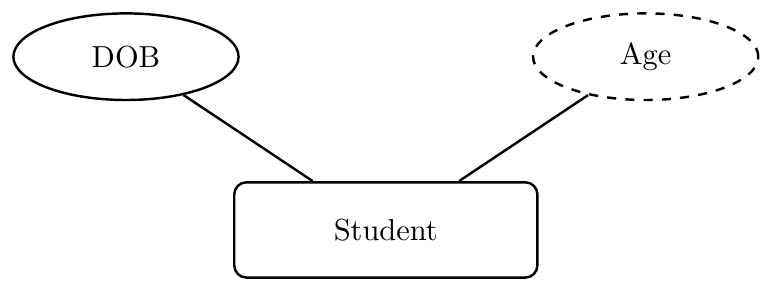
Here the dashed oval shows Age is derived from DOB.
Total_Payment is a derived attribute computed as: \[ \textbf{Total\_Payment} = \textbf{Hours} \times \textbf{Rate} \] Since it depends on relationship attributes, it is attached to the relationship diamond.
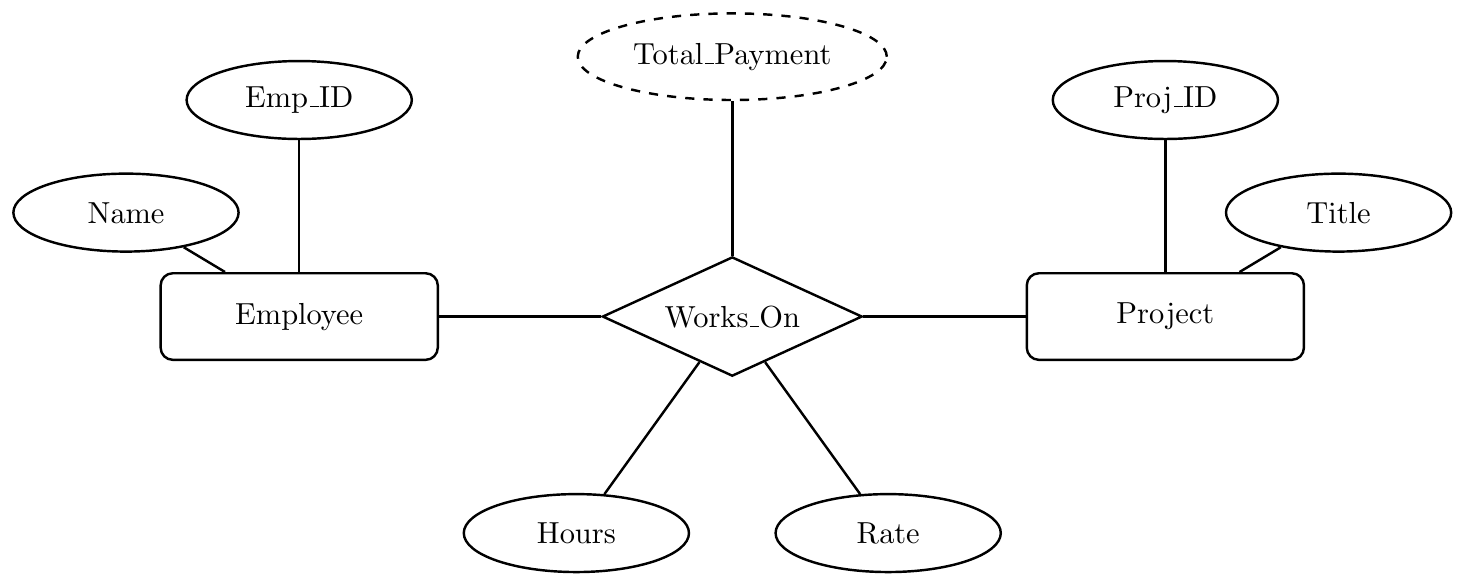
Explanation:
Hours and Rate are attributes of the Works_On relationship.
Total_Payment is derived as Hours × Rate.
Therefore, the dashed oval is connected to the relationship, not to an entity.
A Null Value is a special marker used in a database to indicate that a data value does not exist in the database. It is important to distinguish between the different semantic meanings of a null value:
Not Applicable: The attribute does not apply to this specific entity. Example: A
middle_initialattribute for a person who does not have a middle name, or anapt_number(Apartment Number) for a single-family house.Unknown (Missing): The value exists in the real world, but it has not been recorded in the system. Example: Every
instructormust have aname; if the field is null, the data is simply missing.Unknown (Not Known): It is currently unknown whether a value even exists for the entity. Example: If an instructor's
apt_numberis null, it could mean they don't live in an apartment (not applicable) OR they do live in one but we don't have the number (missing).
In ER diagrams, null values are not explicitly drawn as nodes; rather, they are handled by defining the Participation Constraints and Nullability of the attributes during the schema mapping phase.
Cardinality
Cardinality specifies how many instances of one entity can be associated with instances of another entity through a relationship. It captures the numeric participation constraint between entity sets in a relationship. In ER diagrams, cardinality is shown using labels such as 1, N, or M on the connecting lines.
The four standard cardinality types are: One–to–One, One–to–Many, Many–to–One, and Many–to–Many.
1. Numeric (Ratio) Notation — Chen Style:
One-to-One: 1 : 1
One-to-Many: 1 : N
Many-to-One: N : 1
Many-to-Many: M : N
2. Min–Max (Participation / Multiplicity) Notation:
Exactly one: $(1, 1)$ or $1..1$ (often simplified to just $1$)
Zero or one: $(0, 1)$ or $0..1$
One or many: $(1, N)$ or $1..*$ (or $1..N$)
Zero or many: $(0, N)$ or $0..*$ (or $0..N$)
3. Crow’s Foot Notation:
$|$ = one (mandatory)
$||$ = exactly one
$\circ$ = zero (optional)
crow foot = many
Crow's Foot Notation
Zero: The symbol above denotes zero in , indicated by the circle at the right side of the line.

One: The symbol above denotes one, shown by a short vertical line crossing the horizontal line.

Many: The symbol above denotes many; it looks like a crow's foot.

Zero or Many: This symbol combines zero and many indicators.

One or Many: This symbol combines one and many indicators.

One and Only One: This symbol indicates exactly one.

In a one-to-one relationship, each entity in set A is related to at most one entity in set B, and vice versa. This model is used when the pairing is exclusive on both sides.
Mapping note: Usually implemented using two tables with a foreign key (or sometimes merged into one table).
Each Person has exactly one Passport and each Passport belongs to exactly one Person. Below are equivalent ER representations using different cardinality notations.
(1) Numeric Ratio Notation — 1 : 1

(2) Min–Max Notation — (1,1) : (1,1)

(3) Crow’s Foot Style — exactly one on both sides

In a one-to-many relationship, one entity from set A can be related to many entities in set B, but each entity in set B is related to only one entity in set A.
Mapping note: Implemented using two tables — foreign key placed on the “many” side.
One Department has many Doctors, but each Doctor belongs to only one Department. Below are equivalent ER representations using different cardinality notations.
(1) Numeric Ratio Notation — 1 : N

(2) Min–Max Notation — (1,N) : (1,1)

(3) Crow’s Foot Style — One-to-Many

Many-to-one is the reverse view of one-to-many. Many entities in set A are related to one entity in set B. Each A chooses only one B, but B can be linked with many A’s.
Mapping note: Also implemented using two tables with foreign key on the many side.
Many Students are assigned to one Advisor, but each Student has only one Advisor. Below are equivalent ER representations using different cardinality notations.
(1) Numeric Ratio Notation — N : 1

(2) Min–Max Notation — (1,1) : (1,N)

(3) Crow’s Foot Style — Many-to-One

In a many-to-many relationship, entities on both sides can participate multiple times. Each entity in A can relate to many in B, and each in B can relate to many in A.
Mapping note: Requires a separate relationship table (junction table), so total tables become three.
A Student can enroll in many Courses, and each Course can have many Students. Below are equivalent ER representations using different cardinality notations.
(1) Numeric Ratio Notation — M : N (or * : *)

(2) Min–Max Notation — (1,N) : (1,M)

(3) Crow’s Foot Style — Many-to-Many (Mandatory Many)

Participation Constraints
In the Entity-Relationship (E-R) model, the participation of an entity set in a relationship set specifies whether all or only some entities in that entity set are involved in the relationship.
If every entity in an entity set $E$ must participate in at least one relationship in $R$, the participation is called total.
If it is possible that some entities in $E$ do not participate in any relationship in $R$, the participation is called partial.
Total participation occurs when every entity in an entity set must participate in at least one relationship in the relationship set. Total participation is represented by a double line in ER diagrams.
In a university, every Student must have at least one Advisor. Therefore, the participation of the Student entity set in the Assigned relationship is total.

Entities may or may not participate in the relationship. Partial participation is represented as single line.
In this scenario, enrollment is optional for both parties: a Student may exist without being enrolled in any Course, and a Course may exist without any Students.

Solved Examples
Problem Statement: A University wants to manage its research projects. Design an ER diagram based on the following business rules:
Professors are identified by a StaffId, Name, and Dept.
Research Projects are identified by a ProjectId, Title, and Budget.
Each Project must be managed by exactly one Professor. A Professor may manage multiple projects, but some professors may not manage any projects at all.
Solution Analysis:
Cardinality: $1:N$ (One Professor manages many Projects).
Participation: Total on the Project side (Every project needs a manager), Partial on the Professor side.
ER Diagram:
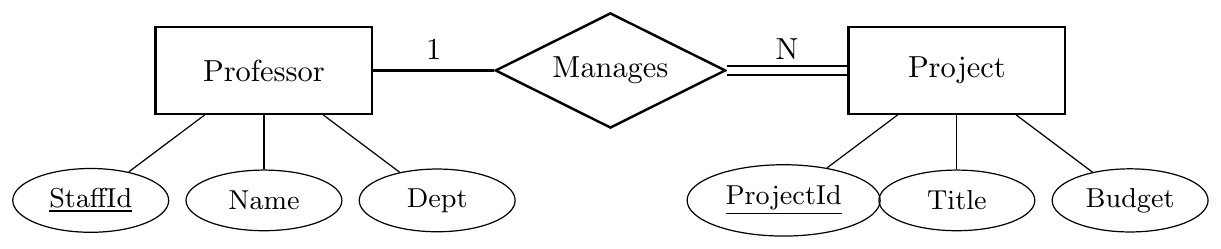
Explanation: The $1$ is placed near Professor and $N$ near Project to show the 1-to-many relationship. The double line is on the Project side because a Project cannot exist without a Professor managing it (Total Participation).
Problem Statement: A hospital requires a database to track its operations. Based on the following requirements, identify the entities, relationships, cardinalities, and participation constraints, and provide an ER diagram:
Patients are identified by a PatientID, Name, and BloodGroup.
Doctors are identified by a DoctorID, Name, and Specialization.
Each patient is assigned to exactly one primary doctor for their stay. A doctor can be the primary doctor for many patients, but some doctors might not have any primary patients assigned to them.
A patient must have at least one doctor assigned to them to be admitted.
Solution:
1. Constraint Analysis:
Cardinality: $N:1$ (Many Patients to one Doctor).
Participation: Total for Patient (Double line), Partial for Doctor (Single line).
2. ER Diagram:

Explanation: The double line connects Patient to the relationship because the problem states every patient must have a doctor. The single line for Doctor reflects that some doctors do not have assigned patients.
Problem Statement: A Software Company needs a database to manage its employees. Design an ER diagram based on the following requirements:
Employees have an EmployeeID (unique), a Salary, and a Name. The Name consists of a First Name and a Last Name.
We track the Phone Numbers of employees; an employee can have more than one phone number.
We store the Date of Birth of each employee and need to display their Age in the system.
Employees work in Departments. A department has a DeptID and a DeptName.
Every employee must belong to exactly one department. A department must have at least one employee to exist in the system.
Solution Analysis:
Composite Attribute: Name (split into First and Last Name).
Multi-valued Attribute: Phone Number (represented by a double ellipse).
Derived Attribute: Age (calculated from Date of Birth, represented by a dashed ellipse).
Cardinality: $1:N$ (One Department has many Employees).
Participation: Total on both sides (Every employee needs a department, and every department needs at least one employee).
ER Diagram:
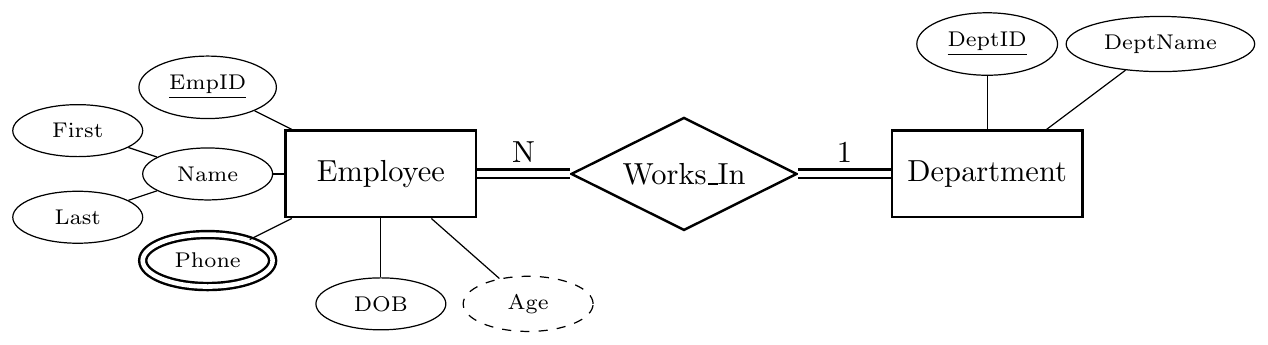
Explanation:
Double Ellipse (Phone): Indicates a multi-valued attribute.
Dashed Ellipse (Age): Indicates a derived attribute because age changes over time and is calculated from the Date of Birth.
Hierarchical Attributes (Name): Represents a composite attribute.
Double Lines: Indicates that the relationship is mandatory for both entities (Total Participation).
Problem Statement: A Bank manages customer accounts. Design an ER diagram based on the following rules:
Customers have a SSN (unique), a Name.
Accounts have an AccountNumber and a Balance.
Every Account must be owned by exactly one Customer.
A Customer can own multiple accounts, but a person can be a customer of the bank without having an account yet (e.g., they just have a loan or a profile).
Solution Analysis:
Cardinality: $1:N$ (One Customer can have many Accounts).
Customer Participation (Partial): A Customer can exist with zero accounts. We use a Single Line.
Account Participation (Total): An Account cannot exist without an owner. We use a Double Line.
ER Diagram:

Why the lines are drawn this way:
The '1' and 'N': These tell us the Maximums. One customer $\rightarrow$ Many accounts (N). One account $\rightarrow$ One customer (1).
The Double Line (on Account side): This tells us the Minimum. Every account must have at least one owner. It is a "Mandatory" relationship for the Account.
The Single Line (on Customer side): Participation is Optional. A Customer can exist in the database without being linked to an account.
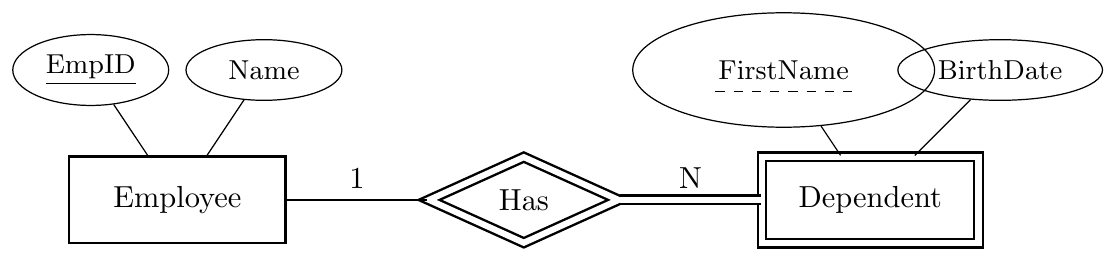
Problem Statement: An Insurance Company tracks employees and their dependents.
Employees have an EmpID (unique) and a Name.
Dependents (family members) have a FirstName and BirthDate.
Dependents do not have a unique ID of their own; they are identified by their FirstName combined with their specific Employee's ID.
Each Dependent belongs to exactly one Employee. An Employee can have zero or more dependents.
Solution Analysis:
Weak Entity: Dependent is a weak entity because it lacks a primary key.
Identifying Relationship: The link between Employee and Dependent is an "Identifying Relationship" (drawn with a double diamond).
Partial Key: FirstName is a partial key (discriminator), drawn with a dashed underline.
Participation: Total on the Dependent side (A dependent must have an employee to exist).
ER Diagram: