Relational Algebra & Tuple Calculus
Relational Algebra
Relational Algebra is a procedural query language used in DBMS to operate on relations (tables). It defines a set of formal operations to retrieve and manipulate data. It is important because it forms the theoretical foundation of SQL and query optimization in relational databases.
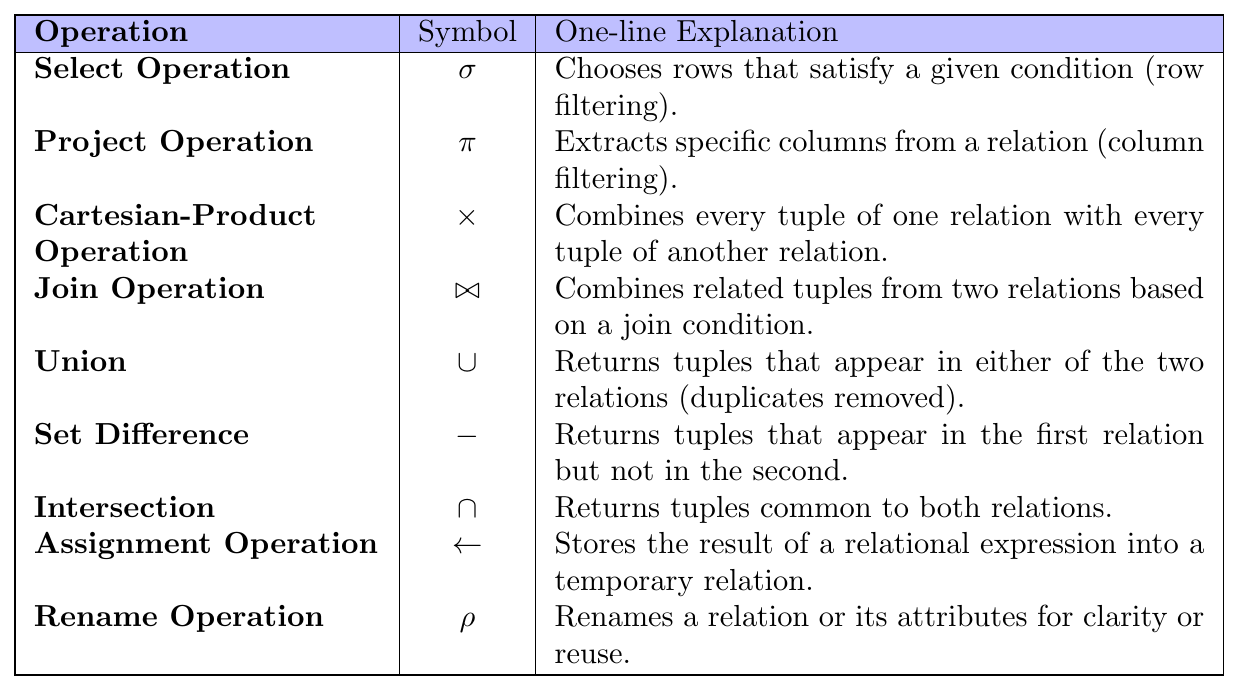
Selection Operation ($\sigma$)
The Select operation in Relational Algebra is used to filter rows (tuples) from a relation that satisfy a given condition called a predicate. It does not change the attributes (columns); it only reduces the number of tuples (rows).
It is denoted by the lowercase Greek letter sigma $(\sigma)$.
General form: \[ \sigma_{\text{predicate}}(\text{Relation}) \]
The predicate is written as a subscript to $\sigma$, and the relation name is written in parentheses.
Assume the relation instructor:
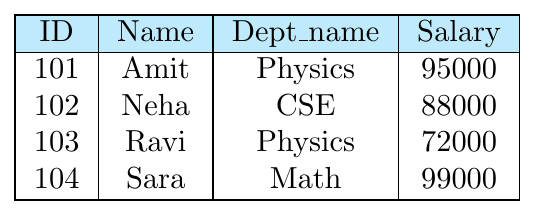
To select tuples where an attribute equals a specific value, we use the equality operator.
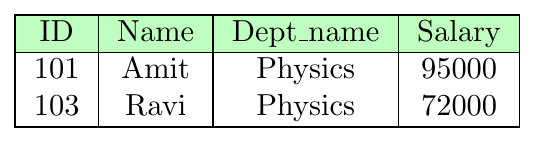
\[ \sigma_{\text{dept\_name = “Physics”}}(\text{instructor}) \]
This returns only those instructors who belong to the Physics department. Result:
Selection predicates may use comparison operators:
\[ =,\ \neq,\ <,\ \le,\ >,\ \ge \]
Example form:
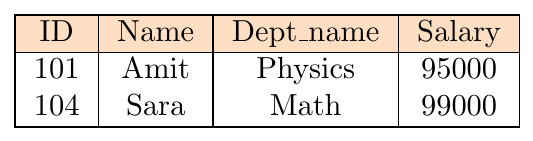
\[ \sigma_{{salary > 90000}}(\text{instructor}) \]
This filters tuples based on numeric comparison.
Result:
Multiple predicates can be combined using logical connectives:
\[ \land \ (\text{AND}), \quad \lor \ (\text{OR}), \quad \lnot \ (\text{NOT}) \]
Example:
\[ \sigma_{\text{dept\_name = “Physics”} \land {salary > 90000}}(\text{instructor}) \]
Only tuples satisfying all conditions are selected when AND is used.
Result:

The selection predicate can also compare two attributes of the same relation.
Form:
\[ \sigma_{\text{Attribute1 = Attribute2}}(\text{Relation}) \]
This selects tuples where the two attribute values are equal.
Assume relation department:
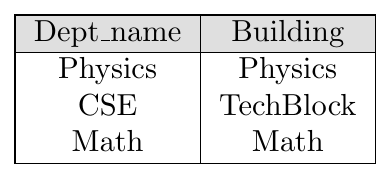
Query:
\[ \sigma_{\text{dept\_name = building}}(\text{department}) \]
Result keeps only rows where both attributes match.
Projection Operation ($\Pi$)
The Project operation is used to select specific attributes (columns) from a relation and discard the remaining attributes. It is a unary operation that works on a single relation.
Projection does not filter rows based on conditions — instead, it reduces the number of columns in the result.
Since a relation is a set of tuples, any duplicate rows are automatically removed after projection.
Projection is denoted by the uppercase Greek letter Pi $(\Pi)$.
General form: \[ \Pi_{A_1, A_2, \dots, A_n}(\text{Relation}) \]
Only the listed attributes appear in the output relation.
Assume the relation instructor:
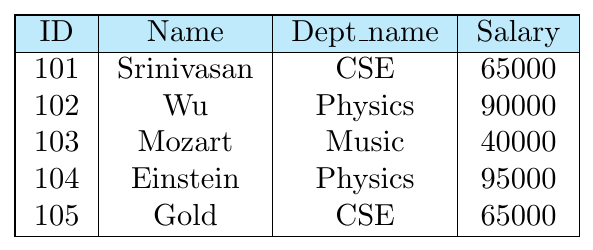
Suppose we want only ID, Name, and Salary and do not care about department. We use projection to keep only these attributes.
\[ \Pi_{\text{ID, Name, Salary}}(\text{instructor}) \]
The Dept_name column is removed in the result. Result:
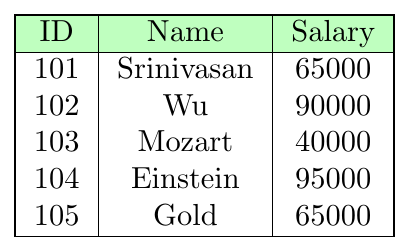
After projection, if two or more tuples become identical on the selected attributes, only one copy is kept because relations do not allow duplicate tuples.
Projection therefore performs duplicate elimination automatically.
\[ \Pi_{\text{Salary}}(\text{instructor}) \]
Result (note that salary 65000 appears once even if multiple instructors have it):
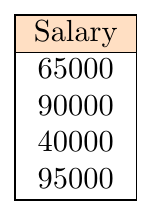
The basic projection operator allows only attribute names. A generalized projection allows expressions on attributes.
This is useful when computed values are required in the result.
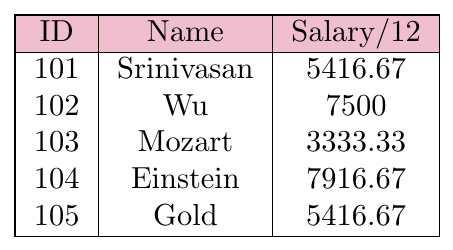
Example: \[ \Pi_{\text{ID, Name, Salary/12}}(\text{instructor}) \]
This computes derived attributes during projection.
\[ \Pi_{\text{ID, Name, Salary/12}}(\text{instructor}) \]
Result (monthly salary):
Composition of Relational Operations
A key property of Relational Algebra is that the result of every operation is itself a relation. Because of this closure property, the output of one operation can be used directly as the input to another operation.
This ability to combine multiple relational operations into a single expression is called composition of relational operations.
It allows us to build complex queries step by step using simpler operations.
In a composed relational-algebra expression, instead of giving a base relation name as input to an operator, we can give a relational expression that evaluates to a relation.
General pattern: \[ \text{OuterOp}(\text{InnerOp}(\text{Relation})) \]
This is similar to arithmetic composition such as: \[ (3 + 5) \times 2 \] where the result of one operation becomes the input to another.
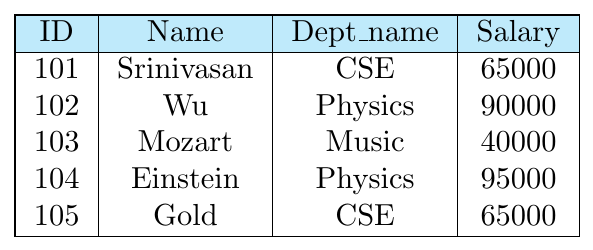
Query: Find the names of all instructors in the Physics department.
This requires two steps:
First select Physics department tuples
Then project only the Name attribute
Relational algebra expression:
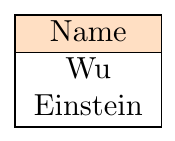
\[ \Pi_{\text{Name}} \big( \sigma_{\text{dept\_name = “Physics”}}(\text{instructor}) \big) \]
Inner operation: selection
Outer operation: projection
Step 1 — Selection: \[ \sigma_{\text{dept\_name = “Physics”}}(\text{instructor}) \]
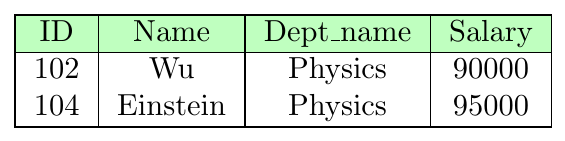
Step 2 — Projection on result: \[ \Pi_{\text{Name}}(\cdot) \]
Final Result:
Composition is powerful because it enables:
Multi-step query construction
Reuse of intermediate results
Formal query optimization by DBMS
Direct mapping to nested SQL queries
All complex relational queries are built by composing basic operations like $\sigma$, $\Pi$, $\bowtie$, $\times$, and set operations.
The Cartesian-Product Operation ($\times$)
The Cartesian-product operation combines tuples from two relations in all possible pairs. It is denoted by the cross symbol $\times$.
If $r_1$ and $r_2$ are two relations, their Cartesian product is written as:
\[ r_1 \times r_2 \]
Each tuple of $r_1$ is concatenated with every tuple of $r_2$ to form a new tuple. Thus, the result relation contains attributes from both relations.
If relation $r_1$ has $n_1$ tuples and relation $r_2$ has $n_2$ tuples, then:
\[ |r_1 \times r_2| = n_1 \times n_2 \]
So the result can become very large. Because of this, Cartesian product is usually followed by a selection condition (which leads to a join).
Unlike the mathematical Cartesian product that produces ordered pairs $(t_1,t_2)$, relational algebra concatenates the two tuples into a single longer tuple containing attributes of both relations.
Schema of result is the concatenation of schemas.
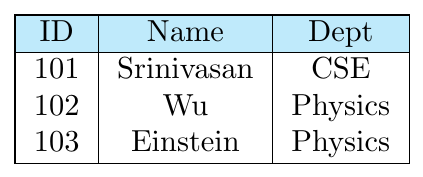
instructor
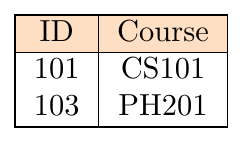
teaches
Result of instructor $\times$ teaches
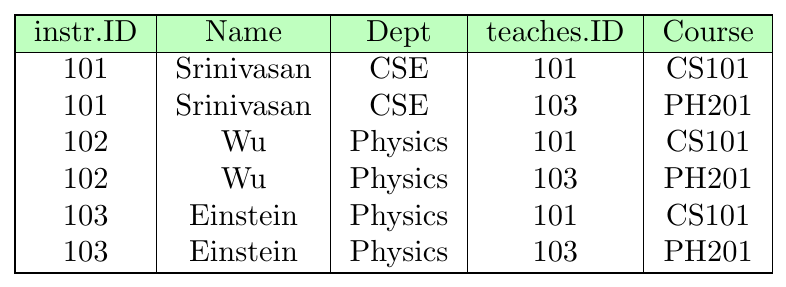
Number of tuples = $3 \times 2 = 6$
If both relations contain attributes with the same name (like ID), we must prefix them with relation names to avoid ambiguity.
Example schema:
\[ (\text{instructor.ID}, \text{Name}, \text{Dept}, \text{teaches.ID}, \text{Course}) \]
If an attribute appears in only one relation, the prefix may be dropped when no confusion arises.
The two operand relations must have distinct names. Problems arise when:
A relation is multiplied with itself
A derived expression has no relation name
This is handled using the rename operation ($\rho$), which assigns a new temporary name to a relation before applying Cartesian product.
Cartesian product alone is rarely used in queries because it produces many unrelated tuple combinations. In practice it is almost always followed by a selection condition, forming a join operation.
Rename Operator ($\rho$)
The Rename operation assigns a new name to:
a relation (result of an expression), or
the attributes of a relation
Relational-algebra expressions normally produce unnamed intermediate results. The rename operator $\rho$ allows us to reference them later.
Symbol: lowercase Greek rho — $\rho$
Two forms exist:
(1) Rename Relation Only \[ \rho_{X}(E) \] Result of expression $E$ is given relation name $X$.
(2) Rename Relation + Attributes \[ \rho_{X(A_1,A_2,\dots,A_n)}(E) \] Result is named $X$ and its attributes are renamed.
Rename is required when:
Same relation is used multiple times (self join)
Intermediate results must be referenced
Attribute names clash
Derived attributes need meaningful names
Most common use: self joins and comparison queries.
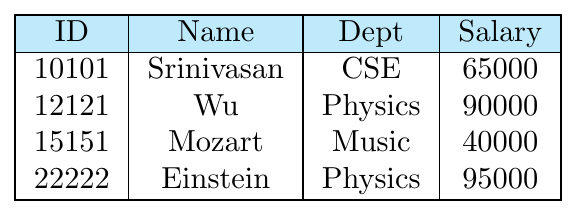
Query: Find ID and Name of instructors who earn more than the instructor with ID = 12121.
Strategy:
Create two copies of the relation via renaming.
Let $I1$ represent all instructors.
Let $I2$ represent the specific instructor with ID 12121.
Perform a Cartesian product and filter where $I1.Salary > I2.Salary$.
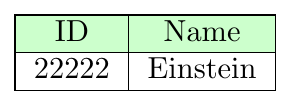
Relational Algebra Expression: \[ I2 \leftarrow \sigma_{ID=12121}(\text{Instructor}) \] \[ \Pi_{I1.ID, I1.Name} (\sigma_{I1.Salary > I2.Salary} (\rho_{I1}(\text{Instructor}) \times I2)) \]
Final Query Result:
Assignment Operator ($\leftarrow$)
The Assignment operation allows us to store the result of a relational-algebra expression into a temporary relation variable.
Symbol used: $\leftarrow$
It works like variable assignment in programming languages.
Syntax: \[ X \leftarrow E \]
where:
$E$ = relational algebra expression
$X$ = temporary relation name
The assigned relation can be reused in later expressions.
Assignment improves query writing by:
Breaking complex queries into steps
Improving readability
Avoiding repeated expressions
Enabling modular query construction
Supporting intermediate result reuse
Assignment itself does not display output. Only the final expression result is shown.
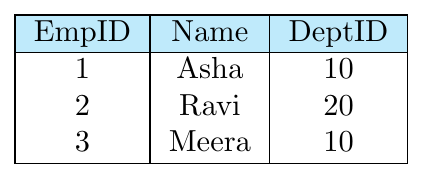
Employee(EmpID, Name, DeptID)
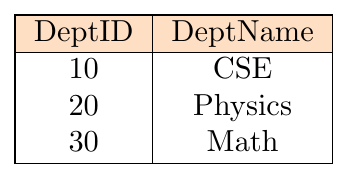
Department(DeptID, DeptName)
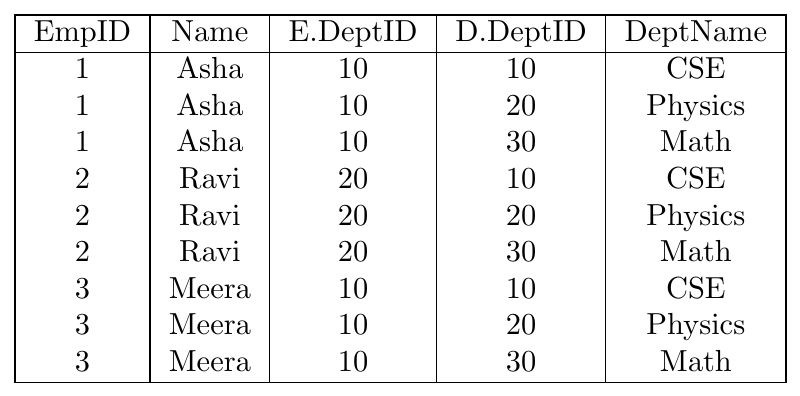
[Step 1 — Assignment with Cartesian Product]
\[ T \leftarrow Employee \times Department \]
Temporary relation $T$ stores the Cartesian product.
[Step 2 — Assignment with Selection]
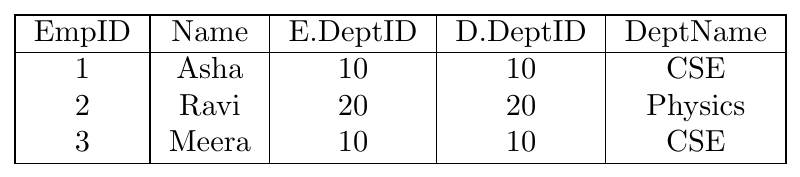
\[ M \leftarrow \sigma_{E.DeptID = D.DeptID}(T) \]
Keep only matching department rows.
[Step 3 — Assignment with Projection]
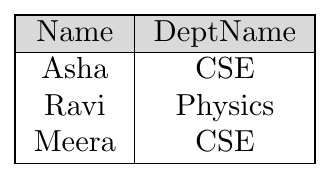
\[ Result \leftarrow \Pi_{Name, DeptName}(M) \]
Final projected result.
Join Operation ($\bowtie$)
The Join operation is used to combine related tuples from two relations based on a matching condition. It brings together information stored in different tables using a common attribute.
Join is needed because a plain Cartesian product pairs every tuple with every other tuple, which creates many incorrect combinations.
Join keeps only those tuple pairs that satisfy a specified condition.
A join can be formally defined using Cartesian product followed by selection.
For relations $r(R)$ and $s(S)$ with condition $\theta$:
\[ r \bowtie_{\theta} s \;=\; \sigma_{\theta}(r \times s) \]
So join is a derived operation:
First compute Cartesian product
Then apply selection condition
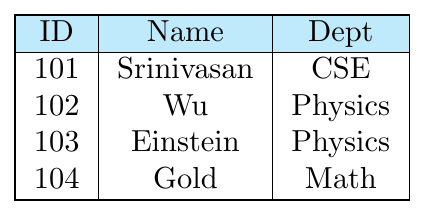
instructor
teaches
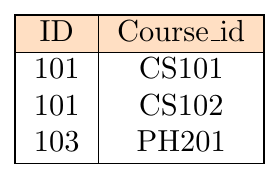
Query: Find instructor information together with course ids of courses they taught.
Cartesian product alone is incorrect because it pairs every instructor with every course.
Correct pairs occur only where: \[ \text{instructor.ID = teaches.ID} \] Using selection on product:
\[ \sigma_{\text{instructor.ID = teaches.ID}} (\text{instructor} \times \text{teaches}) \]
Using join operator:
\[ \text{instructor} \;\bowtie_{\text{instructor.ID = teaches.ID}}\; \text{teaches} \]
Both expressions are equivalent.
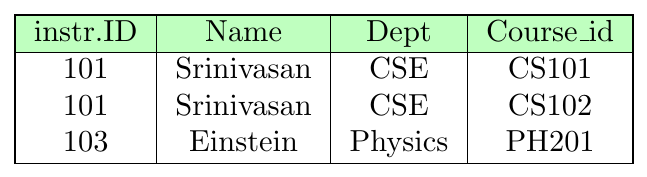
Instructor 102 and 104 do not appear because they have no matching tuple in teaches.
After join, common attributes (like ID from both relations) may appear twice. We usually remove redundancy using projection.
Example:
\[ \Pi_{\text{Name, Dept, Course\_id}} (\text{instructor} \bowtie_{\text{instructor.ID = teaches.ID}} \text{teaches}) \]
Theta Join — any comparison condition
Equi Join — equality condition only
Natural Join — equi join + duplicate column removal
Left Outer — keep all left tuples
Right Outer — keep all right tuples
Full Outer — keep all tuples from both sides
Self Join — relation joined with itself
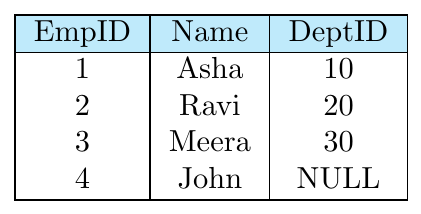
Employee(EmpID, Name, DeptID)
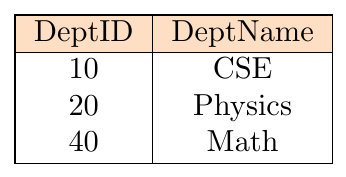
Department(DeptID, DeptName)
Theta join uses any comparison operator $(=, \neq, <, >, \le, \ge)$ in the join condition.
General form: \[ R \bowtie_{\theta} S \]
Definition: \[ R \bowtie_{\theta} S = \sigma_{\theta}(R \times S) \]
\[ \text{Employee} \;\bowtie_{\text{Employee.DeptID = Department.DeptID}}\; \text{Department} \]

Non-matching tuples are removed.
Equi join is a special case of theta join where the condition uses only equality (=) comparisons.
Duplicate join columns are not automatically removed.
Symbol is still $\bowtie_{\text{condition}}$.
Equi join condition:
\[ \text{Employee} \;\bowtie_{\text{Employee.DeptID = Department.DeptID}}\; \text{Department} \]
Output relation (both join attributes are retained):

Notice that:
Meera (DeptID 30) is excluded — no matching department
John (NULL DeptID) is excluded — no match
DeptID 40 (Math) is excluded — no matching employee
Both DeptID columns appear — projection can remove one if needed
Natural join:
automatically joins on attributes with the same name
uses equality comparison
removes duplicate join columns in the output
No explicit condition is written.
\[ Employee \;\bowtie\; Department \]
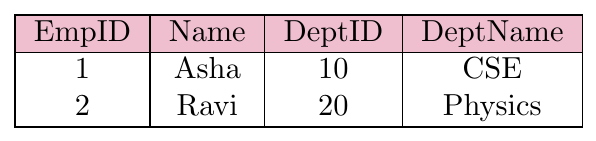
Only one DeptID column appears.
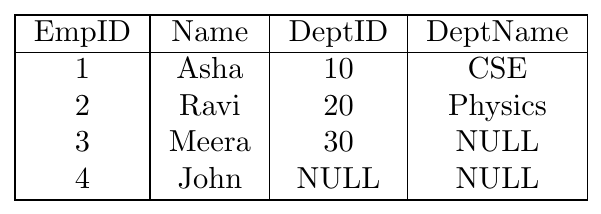
Left outer join keeps:
all matching tuples
all tuples from left relation
fills NULLs where right side has no match
\[ Employee \;\leftouterjoin\; Department \]
Right outer join keeps:
all matching tuples
all tuples from right relation
NULLs where left side has no match
Right outer join expression:
\[ Employee \;\rightouterjoin\; Department \]
All departments are preserved even if no employee belongs to them.
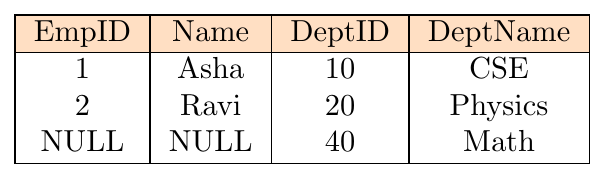
Explanation:
Dept 10 → matched with Asha
Dept 20 → matched with Ravi
Dept 40 → no employee → Employee attributes become NULL
Meera (DeptID 30) and John (NULL DeptID) are excluded — not preserved in right outer join
Full outer join keeps:
all matching tuples
all non-matching tuples from both relations
fills NULLs on whichever side is missing
Full outer join expression:
\[ Employee \;\fullouterjoin\; Department \]
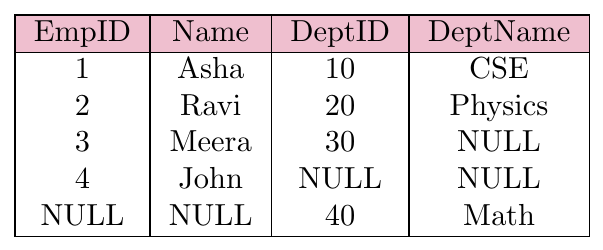
Explanation:
Asha and Ravi — matching rows
Meera — no department match → DeptName = NULL
John — DeptID is NULL → no match → DeptName = NULL
DeptID 40 (Math) — no employee → Employee columns are NULL
A self join joins a relation with itself. Rename operator $\rho$ is used to create aliases.
Used for hierarchical or comparison queries.
\[ \rho_{E1}(Employee) \;\bowtie_{E1.DeptID = E2.DeptID}\; \rho_{E2}(Employee) \]
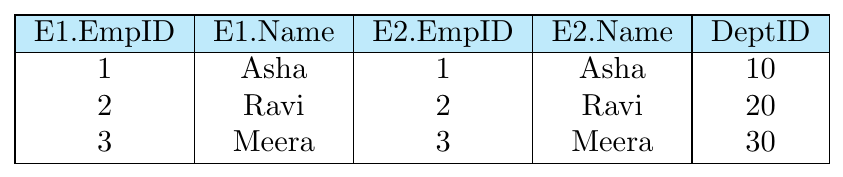
Notes:
Each employee matches with themselves (same DeptID)
No cross pairs appear because no two employees share a DeptID
John is excluded because NULL does not match with NULL in join condition
SET Operations ($\cap \cup -$)
The union operation combines tuples from two relations and removes duplicates.
Rules for union:
Both relations must have the same number of attributes (same arity).
Corresponding attributes must have the same type.
Result contains all tuples that appear in either relation.
Data:
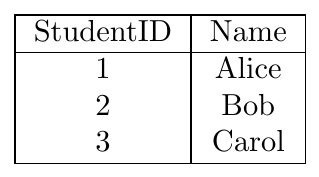
ChessClub(StudentID, Name)
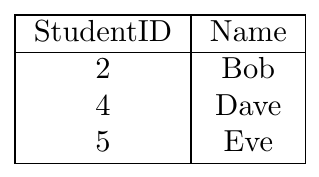
DramaClub(StudentID, Name)
Query: Find all students who are in either Chess or Drama Club:
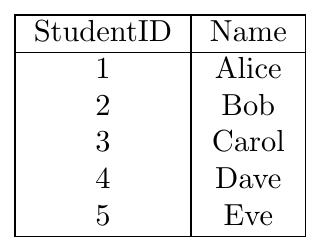
\[ AllStudents \leftarrow ChessClub \cup DramaClub \]
Result:
The intersection operation finds tuples common to both relations.
Rules for intersection:
Both relations must have the same number of attributes (same arity).
Corresponding attributes must have the same type.
Result contains only tuples present in both relations.
Using the same data as above:
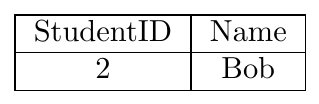
\[ CommonStudents \leftarrow ChessClub \cap DramaClub \]
Result:
The set difference operation finds tuples in one relation but not in the other.
Rules for difference:
Both relations must have the same number of attributes (same arity).
Corresponding attributes must have the same type.
Result contains tuples in the first relation that are not in the second.
Using the same data as above:
\[ ChessOnly \leftarrow ChessClub - DramaClub \]
Result:
In relational algebra, relations are sets of tuples, not multisets. This means:
Duplicates are automatically removed in all set operations: Union ($\cup$), Intersection ($\cap$), and Difference ($-$).
Even if a tuple appears multiple times in a relation, it is considered only once.
The result of a set operation will contain each distinct tuple at most once.
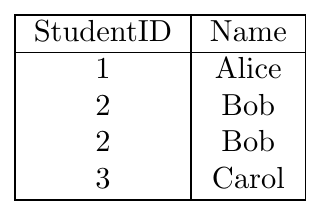
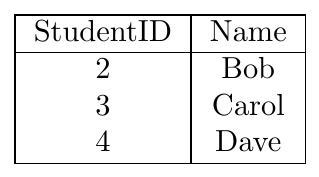
Relations:
A(StudentID, Name)
B(StudentID, Name)
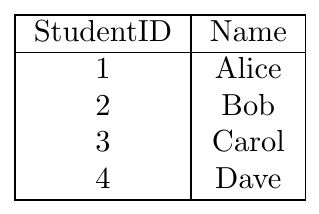
Union: \( A \cup B \)
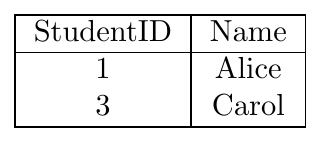
Intersection: \( A \cap B \)
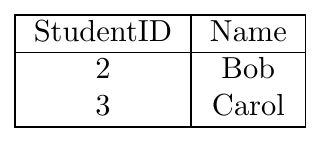
Difference: \( A - B \)
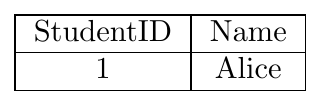
Note: Even though Bob appears twice in relation A, duplicates are removed automatically in all operations.
Division Operator
The division operator is used to answer queries of the form:
"Find all X such that X is related to all Y."
Formally, given two relations:
\(R(A, B)\) — the dividend
\(S(B)\) — the divisor
The expression:
\[ R \div S \]
returns a relation with attribute(s) \(A\) containing all values of \(A\) that are associated with every value of \(B\) in \(S\).
Rules / Requirements:
The attributes of \(S\) must be a subset of the attributes of \(R\).
The resulting relation will have attributes \(R - S\).
Duplicates are removed automatically (relations are sets).
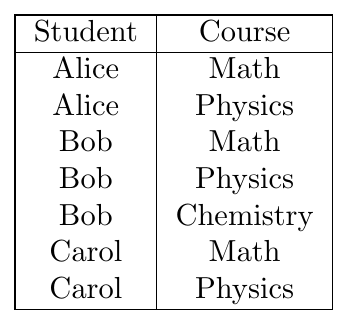
Relations:
Enrolled(Student, Course)
Required Courses:
Required(Course)
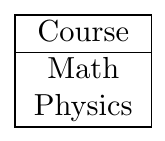
Query: Find students who are enrolled in all required courses.
\[ \text{Enrolled} \div \text{Required} \]
Result:
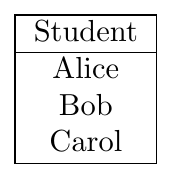
Explanation:
Alice is enrolled in Math & Physics - satisfies all required courses.
Bob is enrolled in Math & Physics & Chemistry - satisfies all required courses.
Carol is enrolled in Math & Physics - satisfies all required courses.
Only courses in the Required relation are considered.
Operators: Min/Max Tuples in Relational Algebra
\begin{tabularx}{\textwidth}{|l|c|c|X|}
\hline
\rowcolor{cyan!25}
Operator & Min Tuples & Max Tuples & Explanation
\hline
Cartesian ($\times$) & $|R| \cdot |S|$ & $|R| \cdot |S|$ & Every tuple of R pairs with every tuple of S, fixed number.
\hline
Theta / Equi Join ($\bowtie_\theta$) & 0 & $|R| \cdot |S|$ & Min zero if no match; max all pairs satisfy join condition.
\hline
Natural Join ($\bowtie$) & 0 & $\sum_{v \in V} (\text{count of } v \text{ in R} \cdot \text{count of } v \text{ in S})$ & Min zero if no common values; max depends on multiplicities of join attributes.
\hline
Left Outer Join ($\leftouterjoin$) & $|R|$ & $|R| \cdot |S|$ & All R tuples appear at least once; max if all R × S match.
\hline
Right Outer Join ($\rightouterjoin$) & $|S|$ & $|R| \cdot |S|$ & All S tuples appear at least once; max if all R × S match.
\hline
Full Outer Join ($\fullouterjoin$) & $\max(|R|,|S|)$ & $|R| \cdot |S|$ & All tuples from both sides appear at least once; max if all R × S match.
\hline
\end{tabularx}
Examples on Relation Algebra
Schema:
Suppliers(sid: integer, sname: string, address: string)
Parts(pid: integer, pname: string, color: string)
Catalog(sid: integer, pid: integer, cost: real)
Queries and Solutions:
Find the names of suppliers who supply some red part. \[ \Pi_{sname}\Big((\sigma_{color='Red'}(Parts)) \;\bowtie\; Catalog \;\bowtie\; Suppliers\Big) \] Result: Anil, Balu, Deepak
Find the sids of suppliers who supply some red or green part. \[ \Pi_{sid}\Big((\sigma_{color='Red' \lor color='Green'}(Parts)) \;\bowtie\; Catalog\Big) \] Result: 1, 2, 3, 4
Find the sids of suppliers who supply some red part or are at Bengaluru. \[ \Pi_{sid}(\sigma_{color='Red'}(Parts) \;\bowtie\; Catalog) \;\cup\; \Pi_{sid}(\sigma_{address='Bengaluru'}(Suppliers)) \] Result: 1, 2, 4
Find the sids of suppliers who supply some red part and some green part. \[ (\Pi_{sid}(\sigma_{color='Red'}(Parts) \;\bowtie\; Catalog)) \;\cap\; (\Pi_{sid}(\sigma_{color='Green'}(Parts) \;\bowtie\; Catalog)) \] Result: 1
Find the sids of suppliers who supply every part. \[ \Pi_{sid, pid}(Catalog) \div \Pi_{pid}(Parts) \] Result: None
Find the sids of suppliers who supply every red part. \[ \Pi_{sid, pid}(Catalog) \div \Pi_{pid}(\sigma_{color='Red'}(Parts)) \] Result: 2 (Supplies 101 and 103)
Find the sids of suppliers who supply every red or green part. \[ \Pi_{sid, pid}(Catalog) \div \Pi_{pid}(\sigma_{color='Red' \lor color='Green'}(Parts)) \] Result: None (No supplier provides 101, 102, and 103)
Find the sids of suppliers who supply every red part or supply every green part. \[ (\Pi_{sid, pid}(Catalog) \div \Pi_{pid}(\sigma_{color='Red'}(Parts))) \;\cup\; (\Pi_{sid, pid}(Catalog) \div \Pi_{pid}(\sigma_{color='Green'}(Parts))) \] Result: 1, 2, 3
Find pairs of sids $(s_1, s_2)$ such that $s_1$ charges more for some part than $s_2$ for that same part. \[ \Pi_{C1.sid, C2.sid}(\sigma_{C1.pid = C2.pid \land C1.cost > C2.cost}( \rho_{C1}(Catalog) \times \rho_{C2}(Catalog) )) \]
Find the pids of parts supplied by every supplier at less than $200.
\[ \Pi_{pid}(Catalog) - \Pi_{pid}(\sigma_{cost \ge 200}(Catalog)) \] Result: 101, 102, 103, 104
Schema:
author(author_id, first_name, last_name)
author_pub(author_id, pub_id, author_position)
author_id $\rightarrow$ author(author_id)
pub_id $\rightarrow$ pub(pub_id)
book(book_id, book_title, month, year, editor)
editor $\rightarrow$ author(author_id)
pub(pub_id, title, book_id)
book_id $\rightarrow$ book(book_id)
Questions and Solutions:
Query: $\Pi_{book\_title}(book)$
Solution: Projection returns all distinct book titles. \[ \text{tuples returned} = |\text{distinct book\_title values in book}| \]Query: $|\Pi_{author\_id}(author) - \Pi_{editor}(book)|$
Solution: Set difference finds authors who are not editors. Cardinality counts them. \[ \text{Answer: Number of authors who have never acted as a book editor.} \]Query: Names of all authors who are book editors
Solution: \[ \Pi_{first\_name, last\_name} (author \;\bowtie_{author.author\_id = book.editor}\; book) \] This joins authors with books where they are listed as editors, and returns their names.Query: Find author_ids of authors who have a publication in every book.
Solution (Division): First, we need a relation matching authors to books via their publications, then divide by all book IDs. \[ \text{Let } R = \Pi_{author\_id, book\_id} (author\_pub \bowtie pub) \] \[ \text{Let } S = \Pi_{book\_id} (book) \] \[ \text{Final Query: } R \div S \] Note: The dividend $R$ must contain both author_id and book_id so the result is ({author_id, book_id} - {book_id}) = {author_id}.Query: Find names of authors who have published in every book edited by 'John Doe'.
Solution: \[ \text{TargetBooks} = \Pi_{book\_id} (\sigma_{first\_name='John' \land last\_name='Doe'} (author \bowtie_{author\_id=editor} book)) \] \[ \text{AuthorBookMap} = \Pi_{author\_id, book\_id} (author\_pub \bowtie pub) \] \[ \text{Final Result: } \Pi_{first\_name, last\_name} (author \bowtie (AuthorBookMap \div TargetBooks)) \]
Tuple Relational Calculus
Tuple Relational Calculus (TRC) is a non-procedural (declarative) query language where queries are written as logical formulas that describe what result is required rather than how to compute it. It is important because it provides the formal logical basis for declarative query languages like SQL.
TRC is a nonprocedural query language: it specifies what information is desired rather than how to compute it (unlike relational algebra).
A TRC query is expressed as: \[ \{ t \mid P(t) \} \] where $t$ is a tuple variable and $P(t)$ is a predicate (condition) that must hold true.
Notation:
$t[A]$ denotes the value of attribute $A$ in tuple $t$.
$t \in r$ denotes that tuple $t$ belongs to relation $r$.
Logical constructs in TRC:
$\exists t \in r (Q(t))$: There exists a tuple $t$ in relation $r$ such that predicate $Q(t)$ is true.
$\forall t \in r (Q(t))$: For all tuples $t$ in relation $r$, predicate $Q(t)$ is true.
$\neg P$: Logical NOT (negation)
$P \wedge Q$: Logical AND
$P \vee Q$: Logical OR
$P \Rightarrow Q$: Implication (equivalent to $\neg P \vee Q$)
Resulting relation attributes: A tuple variable $t$ only contains the attributes explicitly mentioned in the query. TRC respects set semantics, so duplicates are automatically removed.
TRC expressions can involve multiple relations, connected with logical operators.
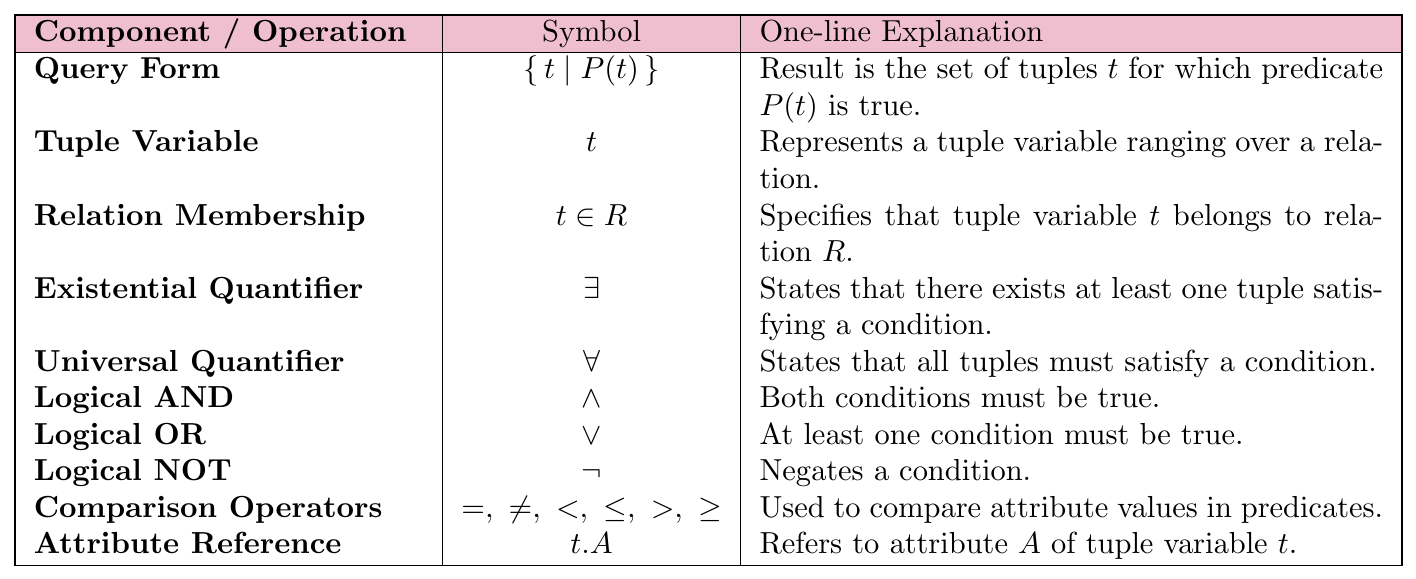
Example 1: Find instructors with salary greater than $80,000
Relation schema:
instructor(ID, name, dept_name, salary)
Sample data:
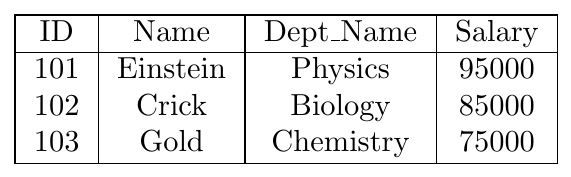
TRC query: \[ \{ t \mid \exists s \in instructor (t[ID] = s[ID] \wedge s[salary] > 80000) \} \]
Explanation:
$t$ is a tuple variable defined only on ID.
$s$ ranges over all tuples of instructor.
Only instructors with salary $> 80000$ satisfy the predicate.
Result: \[ \{ (101), (102) \} \]
Example 2: Find names of instructors whose department is in Watson building
Relation schemas:
instructor(ID, name, dept_name, salary)
department(dept_name, building)
Sample data:
instructor:
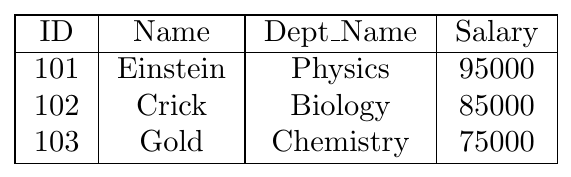
department:
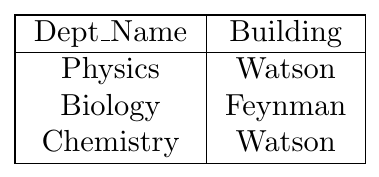
TRC query: \begin{align*} \Bigl\{ t \;\Big|\; & \exists s \in \text{instructor} \;\big( t[\text{name}] = s[\text{name}] \;\wedge\; \\ & \exists u \in \text{department} \;\big( u[\text{dept\_name}] = s[\text{dept\_name}] \;\wedge\; u[\text{building}] = 'Watson' \big) \big) \Bigr\} \end{align*}
Explanation:
$t$ is defined only on name.
$s$ ranges over instructors; $u$ ranges over departments.
Select instructors whose dept_name matches a department in Watson building.
Result: \[ \{ \text{Einstein}, \text{Gold} \} \]
Example 3: Courses taught in Fall 2017 or Spring 2018
Relation schema:
section(course_id, semester, year)
Sample data:
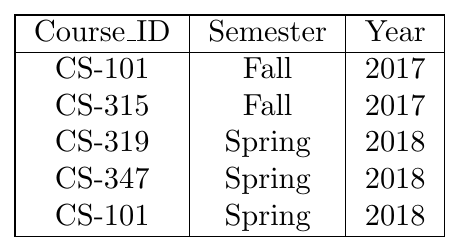
TRC query (union / OR): \begin{align*} \Bigl\{ t \;\Big|\; & \big( \exists s \in \text{section} \; ( t[\text{course\_id}] = s[\text{course\_id}] \;\wedge\; s[\text{semester}] = 'Fall' \;\wedge\; s[\text{year}] = 2017 ) \big) \\ & \vee \big( \exists u \in \text{section} \; ( t[\text{course\_id}] = u[\text{course\_id}] \;\wedge\; u[\text{semester}] = 'Spring' \;\wedge\; u[\text{year}] = 2018 ) \big) \Bigr\} \end{align*}
Result: \[ \{ \text{CS-101}, \text{CS-315}, \text{CS-319}, \text{CS-347} \} \]
TRC query (intersection / AND): Courses offered in both Fall 2017 and Spring 2018: \begin{align*} \Bigl\{ t \;\Big|\; & \exists s \in \text{section} \; ( t[\text{course\_id}] = s[\text{course\_id}] \;\wedge\; s[\text{semester}] = 'Fall' \;\wedge\; s[\text{year}] = 2017 ) \\ & \wedge \; \exists u \in \text{section} \; ( t[\text{course\_id}] = u[\text{course\_id}] \;\wedge\; u[\text{semester}] = 'Spring' \;\wedge\; u[\text{year}] = 2018 ) \Bigr\} \end{align*}
Result: \[ \{ \text{CS-101} \} \]
Example 4: Students who have taken all courses in Biology
Relation schemas:
student(ID, name)
course(course_id, dept_name)
takes(ID, course_id)
TRC query: \begin{align*} \Bigl\{ t \;\Big|\; & \exists r \in \text{student} \; ( r[\text{ID}] = t[\text{ID}] ) \\ & \wedge \; \forall u \in \text{course} \; \big( u[\text{dept\_name}] = 'Biology' \;\Rightarrow\; \exists s \in \text{takes} \; ( t[\text{ID}] = s[\text{ID}] \;\wedge\; s[\text{course\_id}] = u[\text{course\_id}] ) \big) \Bigr\} \end{align*}
Explanation:
$t$ ranges over students (ID only).
For every Biology course $u$, there must exist a tuple $s$ in takes showing that $t$ has taken it.
Subtlety: If no Biology courses exist, all student IDs satisfy the condition (hence first $\exists r$ clause is needed).
A tuple-relational-calculus expression may generate an infinite relation if unrestricted. For example:
\[ \{ t \mid \neg (t \in \text{instructor}) \} \]
produces infinitely many tuples not in instructor, many of which contain values that do not appear in the database. Such expressions are unsafe.
To formally define safe expressions, we introduce the domain of a tuple relational formula $P$, denoted $\text{dom}(P)$.
$\text{dom}(P)$ is the set of all values referenced by $P$, including:
Constants explicitly mentioned in $P$, and
Values appearing in tuples of any relation mentioned in $P$.
An expression $\{t \mid P(t)\}$ is safe if all values that appear in the result are from $\text{dom}(P)$.
Examples:
$\text{dom}(t \in \text{instructor} \wedge t[\text{salary}] > 80000)$ is the set containing $80000$ and all values appearing in the instructor relation.
$\text{dom}(\neg (t \in \text{instructor}))$ is also the set of all values appearing in instructor, but the expression itself is unsafe because it could generate tuples containing values outside $\text{dom}(\neg (t \in \text{instructor}))$.
Key Point: Safe expressions are guaranteed to produce finite results, whereas unsafe expressions may produce infinite results. Therefore, the class of allowed tuple-relational-calculus expressions is restricted to safe expressions.