Data Organization and Indexing
Record Organization
Record organization defines how records (tuples) are physically stored inside database files on disk. The choice of record organization directly affects search cost, insertion cost, deletion cost, and range query performance.
A file is a collection of records stored in blocks. Different file organization methods optimize different types of operations such as lookup, scan, update, and join.
Determines how quickly records can be located.
Impacts insertion and deletion performance.
Affects disk I/O cost and block access patterns.
Influences index design and query optimization.
Different workloads require different organization strategies.
A record is a collection of related fields stored together.
A file is a collection of records.
A block (page) is the unit of disk I/O.
Record organization defines how records are arranged inside blocks and files.
Organization is independent of logical schema but critical for performance.
Records and Record Types
Data in database systems is typically stored in the form of records. A record is a collection of related data values or data items, where each value corresponds to a particular field of the record.
Each field value consists of one or more bytes and represents a specific attribute of an entity. Records are used to describe entities and their attributes in a structured way.
For example, an EMPLOYEE record represents an employee entity. Each field in the record stores information about a specific attribute of the employee such as:
Name
Birth_date
Salary
Supervisor
Thus, a record can be viewed as a structured representation of a real-world entity.
A record type (or record format) defines the structure of records by specifying:
The list of field names
The data type of each field
The size of each field
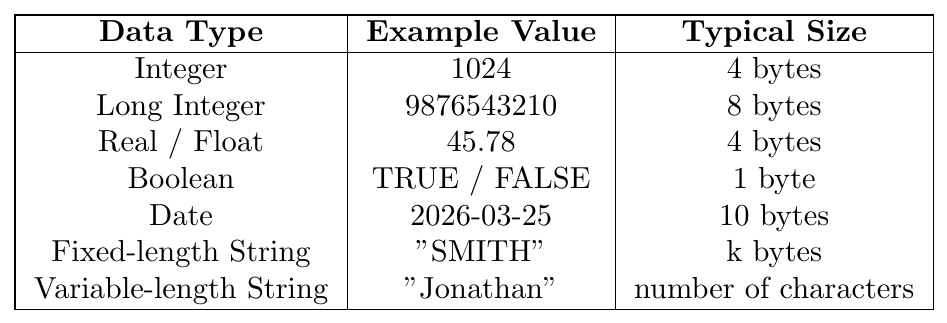
Each field has an associated data type that determines the set of values the field can store.
Database systems typically use standard programming data types for fields.
Observations
Numeric data types have fixed storage sizes.
Fixed-length strings occupy the same number of bytes regardless of actual value length.
Variable-length strings require space proportional to the number of characters stored.
Date and time fields often use specially encoded formats.
A record format defines the fields and their data types.
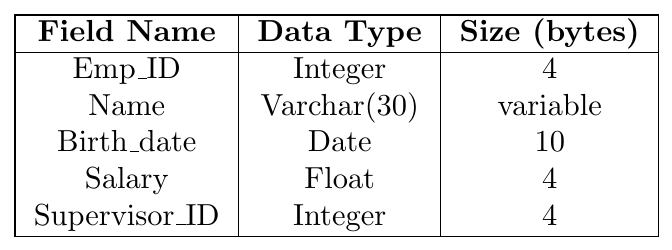
This table specifies the structure of the EMPLOYEE record type.

In many modern database applications, it is necessary to store large unstructured data items.
Examples include:
Images
Audio recordings
Video streams
Large text documents
These types of data are stored as Binary Large Objects (BLOBs).
Characteristics of BLOBs:
They store large binary data.
They may occupy thousands or millions of bytes.
They are usually stored outside the normal record structure.
Records store only a pointer or reference to the BLOB location.
BLOB storage is commonly used in multimedia databases and document management systems.
Consider the EMPLOYEE record type defined earlier.
An example record stored in the database may be:

Interpretation:
Employee ID is 101
Employee name is Alice
Birth date is April 12, 1995
Salary is 55,000
Supervisor ID is 205
Thus, a record instance stores actual data values corresponding to the defined record type.
Files, Fixed-Length Records, and Variable-Length Records
A file is a collection or sequence of records stored on secondary storage. In most database systems, all records within a file belong to the same record type, meaning they share the same structure of fields.
Depending on the structure of records, files can be classified into two categories:
Fixed-Length Record Files
Variable-Length Record Files
Fixed-Length Records
If every record in a file occupies exactly the same number of bytes, the file is said to contain fixed-length records. In this case:
Each field has a fixed size.
Every record has identical structure.
The starting position of each field can be calculated directly.
This simplifies record access because the system can easily compute the location of any record using:
\[ \text{Record Address} = \text{Base Address} + (i-1) \times \text{Record Size} \]
where $i$ is the record number.
A file may contain variable-length records when records have different sizes.
This occurs due to several reasons:
Variable-Length Fields
Some fields may not have fixed size. For example, the Name field in an EMPLOYEE record may contain names of different lengths.
Repeating Fields
Certain fields may contain multiple values for a single record. Such fields are called repeating fields, and the collection of values is called a repeating group.
Example: A student may have multiple phone numbers.
Optional Fields
Some fields may exist for certain records but not for others.
Example: A Middle_Name field may exist only for some employees.
Mixed Record Types
A file may contain records of different record types with different sizes.
Example: A STUDENT record followed by several GRADE_REPORT records for that student.
In a fixed-length record file, every field has a predetermined number of bytes.

Characteristics:
All fields have fixed storage sizes.
The position of each field is predetermined.
Direct byte offsets can be used to locate fields.
Example:
Name starts at byte 1
SSN starts at byte 31
Salary starts at byte 40
When records contain fields of varying length, separator characters can be used to identify field boundaries.
Special characters such as $, |, or # may be used as field separators.

In this representation:
Field lengths vary depending on the stored value.
Separator characters indicate where one field ends and the next begins.
Another approach is to store each field as a $<field-name, field-value>$ pair.

This format is useful when:
The number of possible fields is large.
Only a few fields appear in most records.
Many fields are optional.
A more compact implementation may store $<field-type code, field-value>$ pairs instead of full field names.
Consider a file storing EMPLOYEE records.
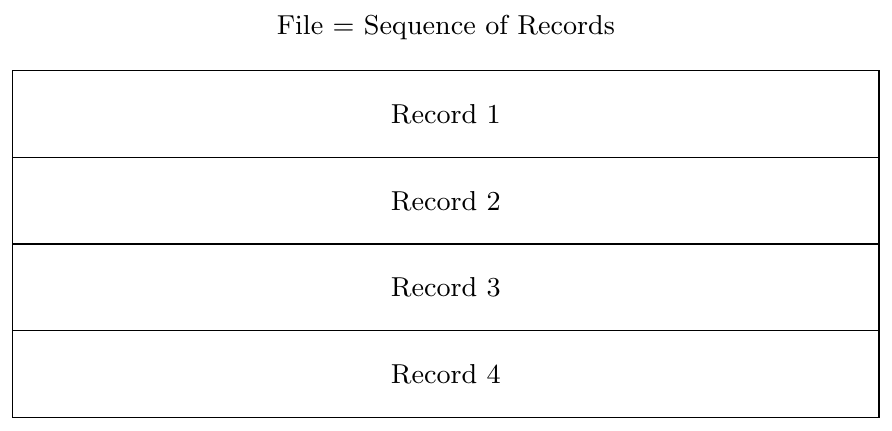
Thus:
A file is simply a sequence of records.
Each record corresponds to one entity instance.
Records may be either fixed-length or variable-length.
Record Blocking and Spanned versus Unspanned Records
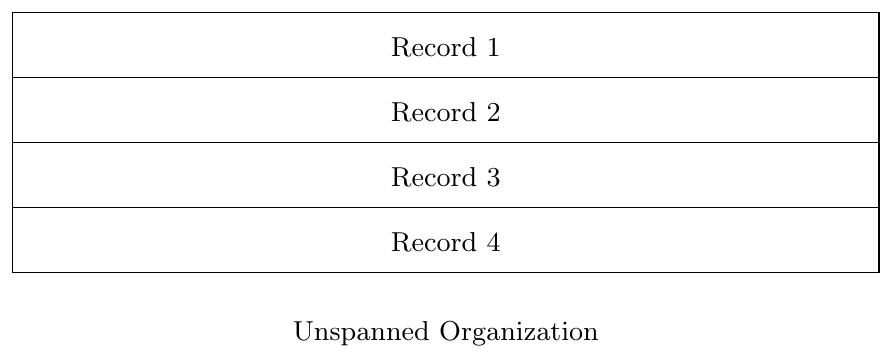
In an unspanned organization, a record must be stored completely inside a single block.
Records are not allowed to cross block boundaries.
If a record cannot completely fit in the remaining space of a block, that space remains unused.
This approach simplifies record access since record locations are predictable.
Advantages
Simple record processing
Direct computation of record locations
Efficient for fixed-length records
Disadvantage
May waste disk space due to unused block space
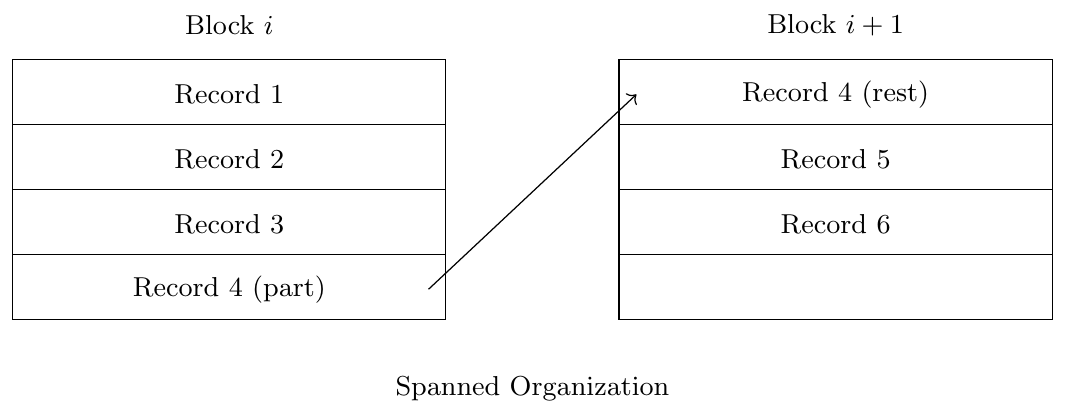
In a spanned organization, a record is allowed to span across multiple blocks.
If a record cannot fit completely in the remaining space of a block:
Part of the record is stored in the current block
The remaining part is stored in the next block
A pointer is used to indicate where the remainder of the record continues.
Spanned organization is necessary when:
Record size $R > B$
Variable-length records are large
Storage efficiency is important
Records stored in files must be placed inside disk blocks because a block is the basic unit of data transfer between disk and main memory.
Let
$B$ = Block size (bytes)
$R$ = Record size (bytes)
If $B \ge R$, multiple records can fit inside a single block.
The number of records stored in a block is called the Blocking Factor (bfr).
\[ bfr = \left\lfloor \frac{B}{R} \right\rfloor \]
Unused space in a block is
\[ \text{Unused Space} = B - (bfr \times R) \]
Records stored in files must be placed inside disk blocks because a block is the basic unit of data transfer between disk and main memory.
In spanned organization, a record is allowed to cross block boundaries. A record that does not completely fit in the remaining space of a block continues in the next block.
Let
$B$ = Block size (bytes)
$R$ = Record size (bytes)
Because records may span across blocks, the average number of records per block is
\[ bfr = \frac{B}{R} \]
Unused space inside blocks is minimized because leftover space in a block can be used to store part of the next record.
If a file contains $r$ records and the blocking factor is $bfr$, the number of blocks required is
\[ b = \left\lceil \frac{r}{bfr} \right\rceil \]
where $\lceil x \rceil$ denotes the ceiling function.
If a file contains $r$ records and each record has size $R$ bytes,
then the total file size is $r \times R$
Let $B$ be the block size. The number of blocks required is
\[
b = \left\lceil \frac{r \times R}{B} \right\rceil
\]
where $\lceil x \rceil$ denotes the ceiling function.
This formula is used for spanned organization because a record can span across multiple blocks.
A file has block size $B = 1024$ bytes and record size $R = 100$ bytes.
Find the blocking factor and the unused space per block assuming unspanned. Calculate blocking factor for spanned.
Solution:
For unspanned organization
\[ \text{Blocking Factor} = \left\lfloor \frac{B}{R} \right\rfloor \]
\[ = \left\lfloor \frac{1024}{100} \right\rfloor = 10 \]
Unused space per block:
\[ 1024 - (10 \times 100) = 24 \text{ bytes} \]
For spanned organization
\[ \text{Blocking Factor} = \frac{B}{R} = \frac{1024}{100} = 10.24 \]
A file contains 10,000 records. Block size $B = 4096$ bytes and record size $R = 200$ bytes.
Find the number of blocks required assuming unspanned organization.
Solution:
Blocking factor:
\[ bfr = \left\lfloor \frac{4096}{200} \right\rfloor = 20 \]
Number of blocks required:
\[ \text{Blocks} = \left\lceil \frac{10000}{20} \right\rceil = 500 \]
Block size $B = 512$ bytes and record size $R = 800$ bytes.
Determine whether spanned or unspanned organization must be used.
Solution:
In unspanned organization, a record must fit completely inside one block.
Since
\[ R = 800 > B = 512 \]
the record cannot fit into a single block.
Therefore, unspanned organization is not possible.
Hence, the file must use spanned organization where a record can span multiple blocks.
A file contains 12,500 records. Block size $B = 2048$ bytes and record size $R = 150$ bytes.
Find the blocking factor and the number of blocks required assuming unspanned organization.
Solution:
Blocking factor:
\[ bfr = \left\lfloor \frac{2048}{150} \right\rfloor = 13 \]
Number of blocks:
\[ \text{Blocks} = \left\lceil \frac{12500}{13} \right\rceil \]
\[ = 962 \]
A file uses unspanned organization. Block size $B = 4096$ bytes and record size $R = 300$ bytes.
Find the blocking factor, unused space per block, and total wasted space if the file has 200 blocks.
Solution:
Blocking factor:
\[ bfr = \left\lfloor \frac{4096}{300} \right\rfloor = 13 \]
Space used in each block:
\[ 13 \times 300 = 3900 \]
Unused space per block:
\[ 4096 - 3900 = 196 \text{ bytes} \]
Total wasted space for 200 blocks:
\[ 200 \times 196 = 39200 \text{ bytes} \]
A file uses spanned organization. Block size $B = 4096$ bytes and record size $R = 300$ bytes.
The file contains 200 records.
Find the number of blocks required to store the file.
Solution:
Total data size:
\[ 200 \times 300 = 60000 \text{ bytes} \]
Number of blocks required:
\[ \text{Blocks} = \left\lceil \frac{60000}{4096} \right\rceil \]
\[ = 15 \]
Organization of Records in Files
Heap File Organization
Sequential File Organization
Hash File Organization
Multitable Clustering Organization
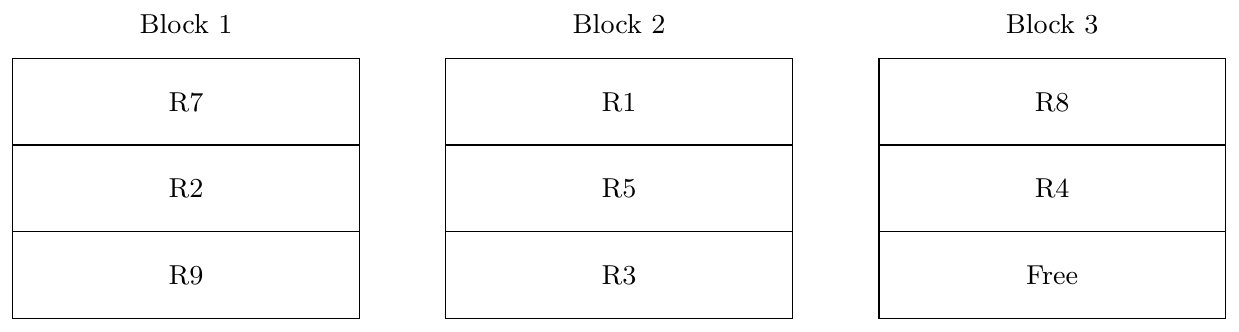
In Heap File Organization, records are stored in the order in which they are inserted. There is no ordering based on any search key. New records are simply placed in the next available free space.
This organization is simple and supports very fast insert operations.
However, searching for a particular record requires scanning the file sequentially.
Search Cost
If the file occupies $b$ disk blocks,
\[ \text{Worst case block accesses} = b \]
\[ \text{Average case block accesses} = \frac{b}{2} \]
Insertion Cost
Usually
\[ 1 \text{ block access} \]
because the record is appended to the last block.
A heap file contains $b = 120$ blocks.
Find the number of block accesses required to search a record.
Solution
Worst case
\[ 120 \text{ block accesses} \]
Average case
\[ \frac{120}{2} = 60 \]
Thus heap files are efficient for insertion but inefficient for searching.
In Sequential File Organization, records are stored in sorted order of a search key.
Because the records are ordered, searching can be performed using binary search.
This organization is efficient for applications that frequently process records in sorted order.
However, insertion and deletion are expensive because the ordering must be preserved.
Search Cost
If the file has $b$ blocks,
\[ \text{Binary search cost} = \log_2 b \]
Insertion Cost
Records may need to be shifted.
Worst case
\[ b \text{ block accesses} \]
Suppose a sequential file contains
\[ b = 1024 \text{ blocks} \]
Find the block accesses required for searching.
Solution
\[ \log_2 1024 = 10 \]
Therefore,
\[ 10 \text{ block accesses} \]
are required using binary search.
In Hash File Organization, records are distributed across blocks using a hash function applied to the search key.
\[ h(k) = k \bmod m \]
where $m$ is the number of buckets.
Hashing is very efficient for exact-match queries.
However it is inefficient for range queries.
Search Cost
Ideally
\[ 1 \text{ block access} \]
because the hash function directly identifies the block.
If collisions occur, overflow blocks may need to be accessed.
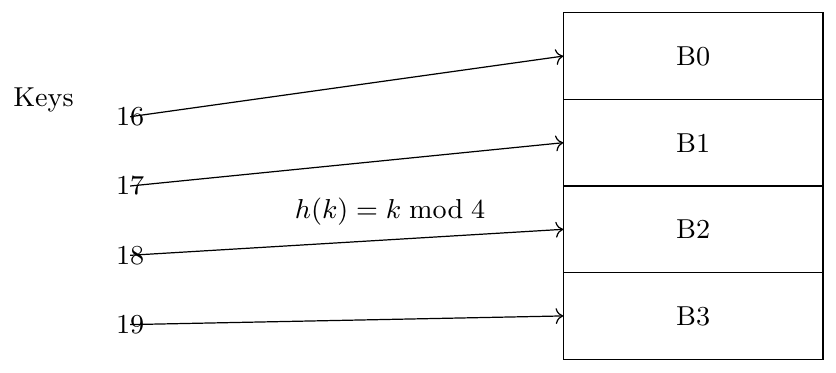
Given hash function
\[ h(k) = k \bmod 4 \]
Find the block where key $k=22$ will be stored.
Solution
\[ h(22) = 22 \bmod 4 = 2 \]
Thus the record will be stored in
\[ \text{Block } B2 \]
Block accesses required
\[ 1 \]
In Multitable Clustering Organization, records from multiple related tables are stored together in the same block.
This improves the performance of queries that frequently join these tables.
For example, a STUDENT record and all corresponding ENROLLMENT records can be stored in the same block.
Advantage
Reduces the number of disk accesses required for join operations.
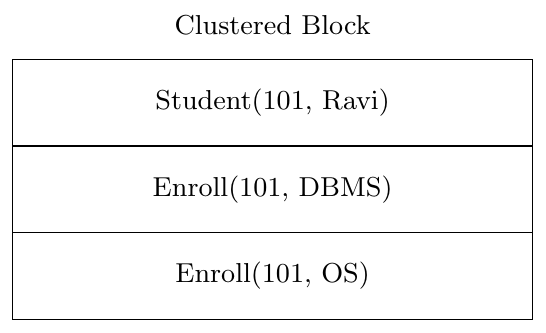
Suppose retrieving a student and all enrolled courses.
Without clustering
\[ 2 \text{ block accesses} \]
Student table block
Enrollment table block
With clustering
\[ 1 \text{ block access} \]
because related records are stored together.
Indexing
Indexing is a technique used to improve the speed of data retrieval from a file.
Instead of scanning every record in the file, an index structure stores search key values along with pointers to the blocks or records where the data is stored.
An index works similar to the index of a book. Instead of reading the entire book to find a topic, we use the index to directly locate the page number.
In databases, the index allows the system to quickly locate the block containing the required record.
Basic Idea
Data records are stored in disk blocks.
An index stores (search key, pointer) pairs.
The pointer refers to the block containing the record.
Effect on Block Access
If a file occupies $b$ blocks:
\[ \text{Without index search cost} = b \]
\[ \text{With index search cost} \approx \log_2(b) \]
Thus indexing significantly reduces disk I/O.
Sequential search in large files is expensive because disk I/O operations are slow.
Suppose a database file has thousands of blocks. To find one record, the system may need to read many blocks.
Indexing solves this problem by providing a fast lookup structure.
Advantages of Indexing
Reduces number of block accesses required to locate records.
Improves performance of search queries.
Speeds up range queries and join operations.
Essential for large databases where sequential scanning is costly.
Consider a file containing employee records stored sequentially on disk blocks.
Each block contains multiple records.
An index file is created that stores the search key (Employee ID) and a pointer to the block containing that record.
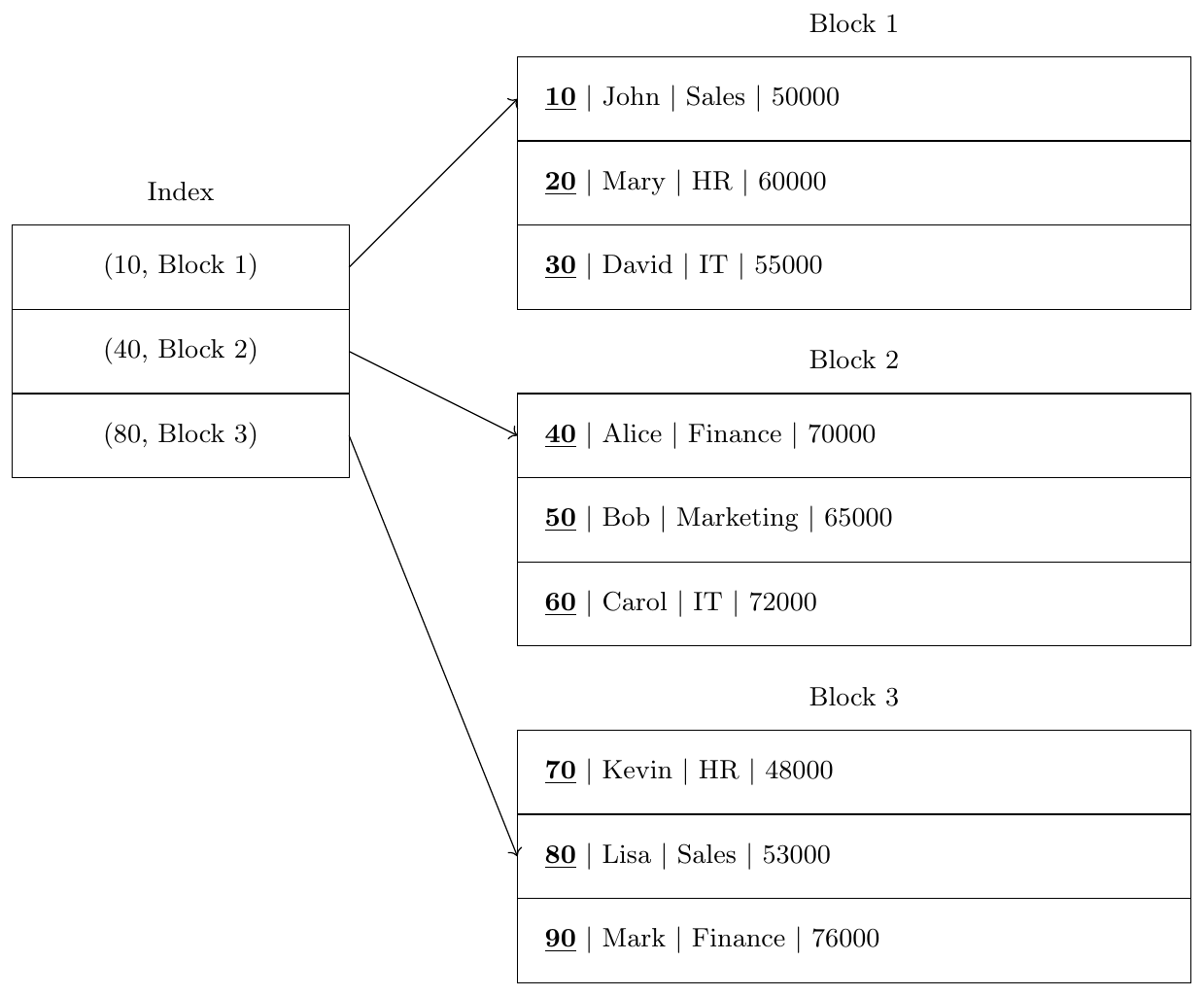
Explanation
The index stores the first key value of each block.
Each index entry contains
\[ (\text{Search Key}, \text{Block Pointer}) \]
When searching for a key, the system first searches the index.
The index directly points to the correct data block.
Suppose a file contains
\[ b = 1000 \text{ blocks} \]
Without Index
To find a record, the system may scan the file sequentially.
\[ \text{Worst case block accesses} = 1000 \]
\[ \text{Average case} = 500 \]
With Index
Assume the index has 100 entries.
Binary search on index:
\[ \log_2(100) \approx 7 \]
Then one additional access to retrieve the data block.
\[ \text{Total block accesses} = 7 + 1 = 8 \]
Conclusion
\[ 1000 \rightarrow 8 \text{ block accesses} \]
Thus indexing dramatically improves query performance.
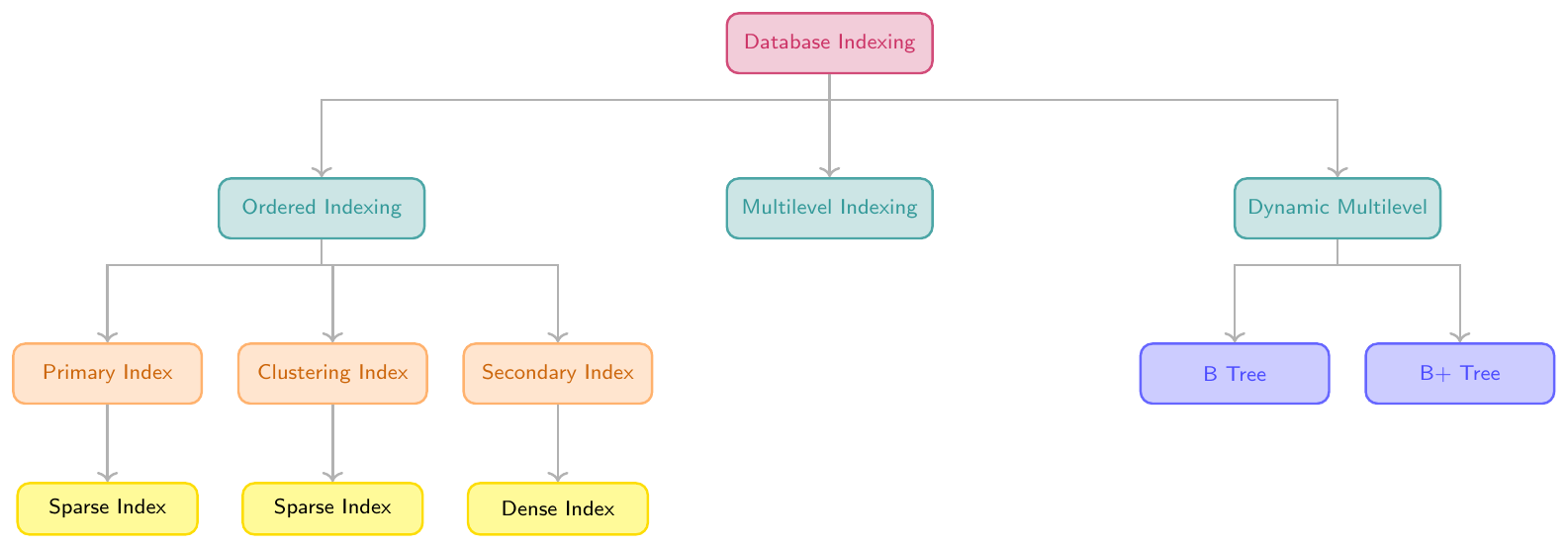
Types of Indexes
Ordered Indexing
Primary Index
Clustering Index
Secondary Index
Dense Index
Sparse Index
Multilevel Indexing
Dynamic Multilevel Indexing (B Trees, B+ Trees)
Ordered Indexing
Ordered indexing is a technique where index entries are stored in sorted order based on the value of the search key.
Each index entry typically contains:
\[ (\text{Search Key}, \text{Pointer to Record or Block}) \]
Because the index is ordered, the DBMS can perform efficient searches using binary search or range scanning.
Ordered indexing is commonly used in database systems for queries such as:
Equality search (find record with a specific key)
Range queries (e.g., salary $>$ 50000)
Ordered retrieval (sorted results)
Block Access Cost
If the index has $b_i$ blocks, then search requires:
\[ \log_2(b_i) + 1 \text{ block accesses} \]
where:
$\log_2(b_i)$ = searching the index
$+1$ = accessing the data block
A Dense Index has an index entry for every search-key value in the data file.
Each entry points directly to the corresponding record.
Characteristics
One index entry per record
Faster search
Larger index size
Example
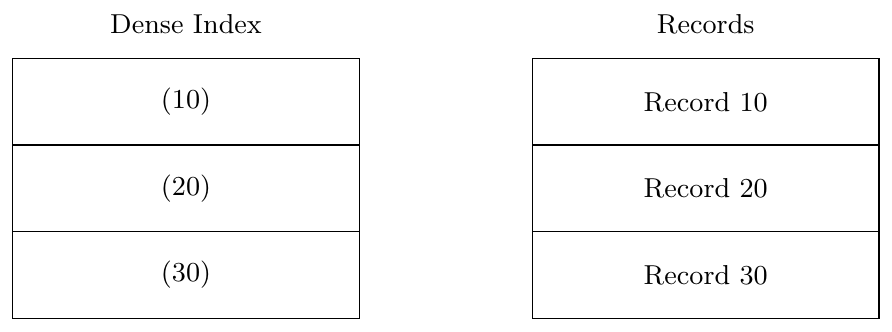
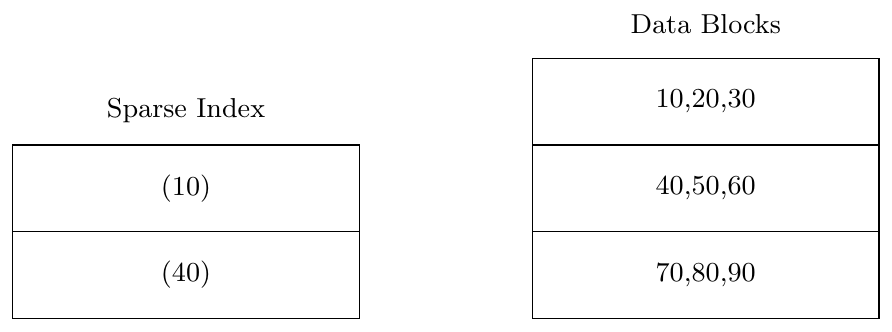
A Sparse Index contains entries for only some search-key values, usually one per block.
Each entry points to the first record in the block.
Characteristics
One index entry per block
Smaller index
Requires block scanning
Example
A Primary Index is an ordered index built on the primary key of a file where the data file itself is stored in sorted order based on the primary key.
Only one primary index can exist because the file can be physically sorted in only one way.
The primary index is usually a sparse index, meaning that the index stores only the first key value of each data block.
Characteristics
Data file is sorted by primary key
One index entry per block
Index entry points to the block
Usually sparse
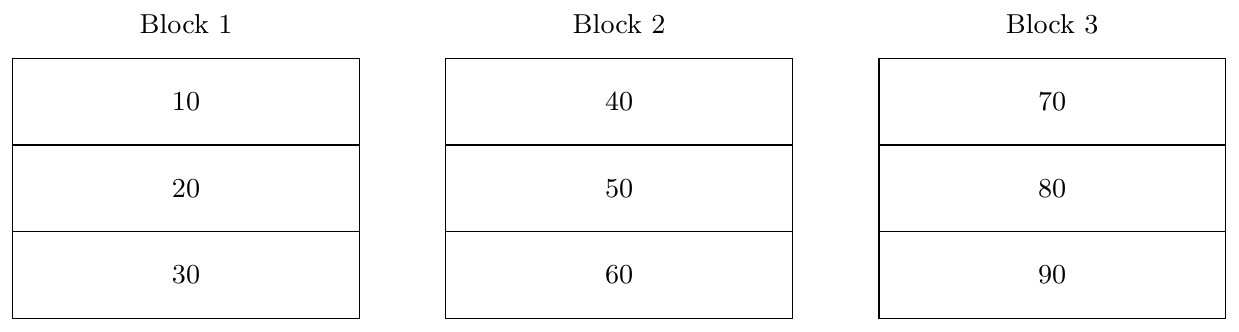
Example
Suppose EMPLOYEE records are stored sorted by EmployeeID.
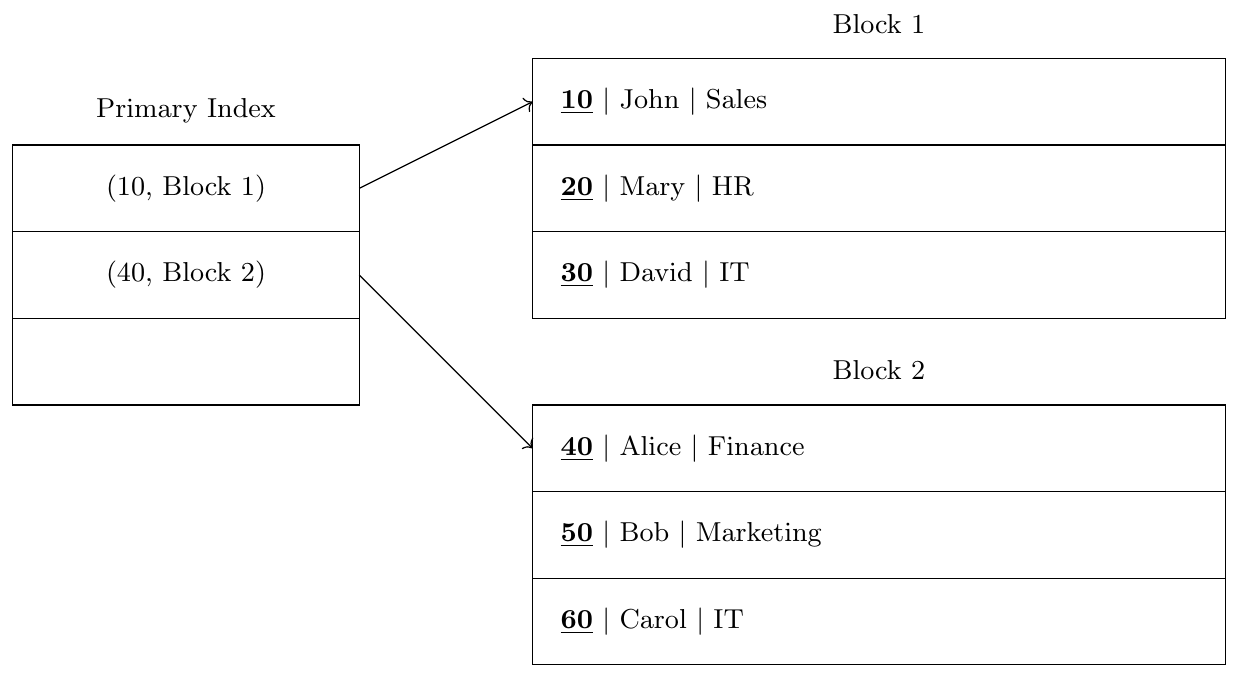
Search Example
Search EmployeeID = 50
Check index to find closest key (40)
Access Block 2
Scan block to locate record
Block access cost:
\[ 1 \text{ index block} + 1 \text{ data block} = 2b \]
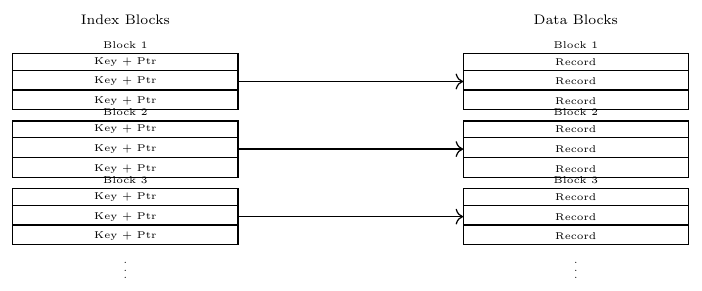
Index File (Index Block Access)
$r_i$ = number of index entries
$e$ = index entry size
$bfr_i = \left\lfloor \dfrac{B}{e} \right\rfloor$
$b_i = \left\lceil \dfrac{r_i}{bfr_i} \right\rceil$
Data File (Data Block Access)
$r$ = number of records
$R$ = record size
$bfr = \left\lfloor \dfrac{B}{R} \right\rfloor$
$b = \left\lceil \dfrac{r}{bfr} \right\rceil$
Total Block Accesses = Index Access + Data Block Accesses \[ \text{Index Access} = \begin{cases} 1, & b_i = 1 \\ \lceil \log_2 b_i \rceil, & b_i > 1 \end{cases} \]
Question
A file contains 10,000 employee records stored sequentially on disk.
Record size $R = 100$ bytes
Block size $B = 1000$ bytes
Index entry size $= 20$ bytes
The file is ordered on Employee ID and a Primary Index is created. Assume unspanned organization
Find:
Blocking factor
Number of data blocks
Number of index entries
Number of index blocks
Block accesses required to search a record
Solution
Blocking factor
\[ bfr = \left\lfloor \frac{B}{R} \right\rfloor \]
\[ bfr = \left\lfloor \frac{1000}{100} \right\rfloor = 10 \]
Number of data blocks
\[ b = \left\lceil \frac{10000}{10} \right\rceil = 1000 \]
Primary index contains one entry per block
\[ \text{Index entries} = 1000 \]
Index blocking factor
\[ bfr_i = \left\lfloor \frac{1000}{20} \right\rfloor = 50 \]
Number of index blocks
\[ b_i = \left\lceil \frac{1000}{50} \right\rceil = 20 \]
Binary search on index
\[ \log_2 20 \approx 5 \]
One more block access to fetch the record.
\[ \textbf{Total block accesses} = 5 + 1 = 6 \]
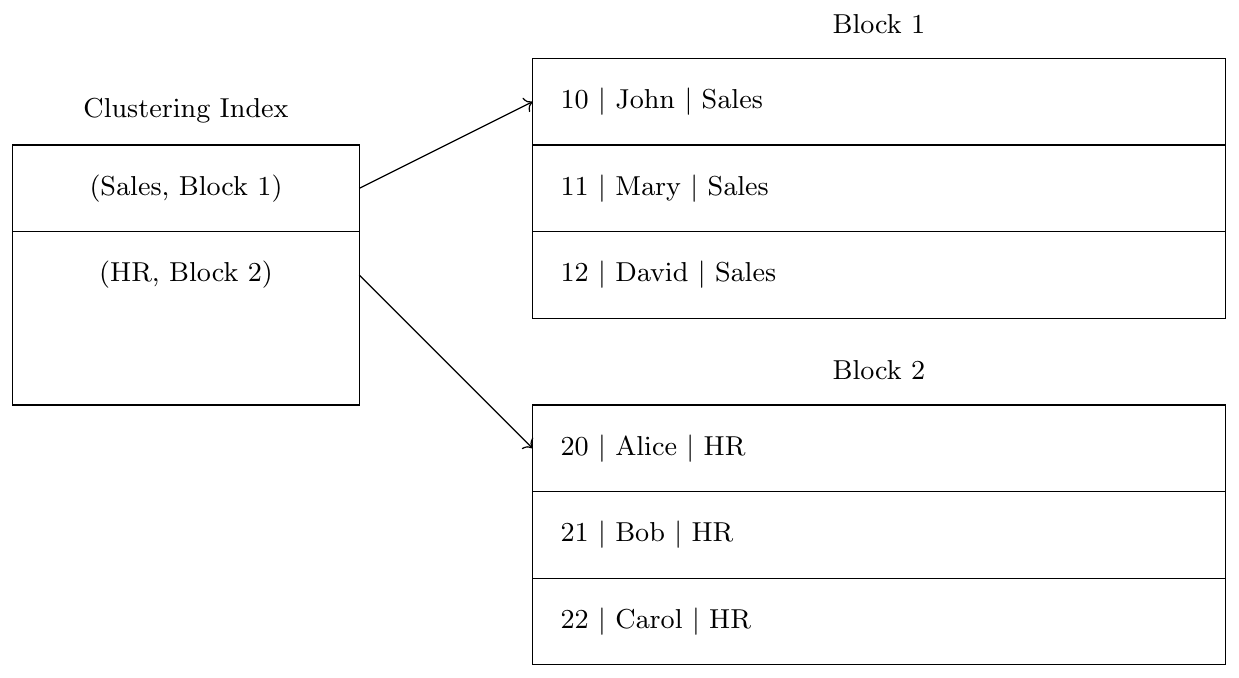
A Clustering Index is built on a non-key attribute that determines the physical ordering of records.
Many records may share the same clustering attribute value.
The index entry points to the first block containing records with that value.
Characteristics
File ordered by clustering attribute
Attribute may have duplicate values
One index entry per distinct attribute value
Example
Records ordered by Department.
Question
A STUDENT file contains 20,000 records ordered on attribute Department stored on disk using unspanned organization.
Record size $R = 200$ bytes
Block size $B = 2000$ bytes
Index entry size $= 25$ bytes
Number of departments = 50
Find the block accesses required to retrieve all students of a department.
Solution
Blocking factor
\[ bfr = \left\lfloor \frac{2000}{200} \right\rfloor = 10 \]
Number of data blocks
\[ b = \left\lceil \frac{20000}{10} \right\rceil = 2000 \]
Records per department
\[ \frac{20000}{50} = 400 \]
Blocks per department
\[ \frac{400}{10} = 40 \]
Clustering index has one entry per department
\[ \text{Index entries} = 50 \]
Index blocking factor
\[ bfr_i = \left\lfloor \frac{2000}{25} \right\rfloor = 80 \]
Index blocks
\[ b_i = \left\lceil \frac{50}{80} \right\rceil = 1 \]
Block accesses
Index search = $1$
Department blocks = $40$
\[ \textbf{Total block accesses} = 41 \]
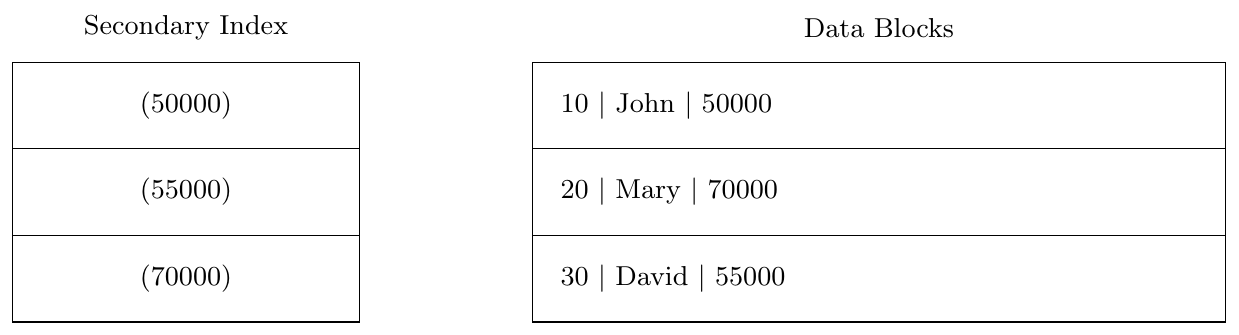
A Secondary Index is an index built on an attribute that is not used for physical ordering of the file.
Because the file is not ordered on that attribute, the index must contain an entry for every record.
Hence secondary indexes are usually dense.
Characteristics
Data file not sorted by index attribute
Multiple secondary indexes allowed
Usually dense
Uses
Enables fast search on non-key attributes
Supports queries on attributes other than the primary key
Useful for attributes frequently used in WHERE conditions
Limitations
Requires extra storage for index entries
Insert and delete operations require index updates
May require accessing multiple data blocks when duplicates exist
Example
Index built on Salary.
Question
A file contains 5000 employee records.
Record size $R = 200$ bytes
Block size $B = 1000$ bytes
Index entry size = 20 bytes
A Secondary Index is created on attribute Name.
Find the block accesses required to search for a record.
Solution
Blocking factor
\[ bfr = \left\lfloor \frac{1000}{200} \right\rfloor = 5 \]
Number of data blocks
\[ b = \left\lceil \frac{5000}{5} \right\rceil = 1000 \]
Secondary index is a dense index
\[ \text{Index entries} = 5000 \]
Index blocking factor
\[ bfr_i = \left\lfloor \frac{1000}{20} \right\rfloor = 50 \]
Number of index blocks
\[ b_i = \left\lceil \frac{5000}{50} \right\rceil = 100 \]
Binary search on index
\[ \log_2 100 \approx 7 \]
Access data block
\[ +1 \]
\[ \textbf{Total block accesses} = 8 \]
Question
A file contains 12,000 records.
Record size $R = 120$ bytes
Block size $B = 1200$ bytes
Index entry size $= 24$ bytes
Find:
Number of index entries for dense index
Number of index entries for sparse index
Number of index blocks for both cases
Solution
Blocking factor
\[ bfr = \left\lfloor \frac{1200}{120} \right\rfloor = 10 \]
Number of data blocks
\[ b = \frac{12000}{10} = 1200 \]
Dense index entries
\[ 12000 \]
Sparse index entries
\[ 1200 \]
Index blocking factor
\[ bfr_i = \left\lfloor \frac{1200}{24} \right\rfloor = 50 \]
Dense index blocks
\[ \left\lceil \frac{12000}{50} \right\rceil = 240 \]
Sparse index blocks
\[ \left\lceil \frac{1200}{50} \right\rceil = 24 \]
Sparse index requires significantly fewer index blocks.
Question
A file contains 40,000 records.
Record size $R = 200$ bytes
Block size $B = 2000$ bytes
Index entry size $= 40$ bytes
Compute block accesses required using:
Sequential search
Primary index
Secondary index
Solution
Blocking factor
\[ bfr = \frac{2000}{200} = 10 \]
Number of data blocks
\[ b = \frac{40000}{10} = 4000 \]
Sequential search (average)
\[ \frac{4000}{2} = 2000 \text{ block accesses} \]
Primary index
\[ \text{Index entries} = 4000 \]
Index blocking factor
\[ bfr_i = \frac{2000}{40} = 50 \]
Index blocks
\[ b_i = \frac{4000}{50} = 80 \]
Binary search
\[ \log_2 80 \approx 7 \]
Total
\[ 7 + 1 = 8 \text{ block accesses} \]
Secondary index
\[ \text{Index entries} = 40000 \]
Index blocks
\[ b_i = \frac{40000}{50} = 800 \]
Binary search
\[ \log_2 800 \approx 10 \]
Total
\[ 10 + 1 = 11 \text{ block accesses} \]
Multilevel Indexing
When a file becomes very large, even the index itself may occupy many disk blocks. Searching a large index may require several block accesses. To reduce this cost, we build an index on the index. This technique is called Multilevel Indexing.
The idea is similar to a hierarchical search structure. Instead of scanning a large index, we create multiple levels of indexes:
Level 1 Index — built on the data file.
Level 2 Index — built on the Level 1 index.
Higher levels may be added if necessary.
Each higher level index contains fewer entries than the level below it. Eventually, the highest level index becomes small enough to fit into a single block.
Searching then proceeds top-down:
Search the highest level index.
Follow the pointer to the lower level index block.
Continue until the data block is located.
This greatly reduces the number of block accesses required for search operations.
Large indexes may span hundreds or thousands of disk blocks.
Sequential or binary search on such large indexes would still require multiple disk accesses.
Multilevel indexing reduces the search space at every level.
The number of block accesses becomes proportional to the height of the index tree rather than the total number of records.
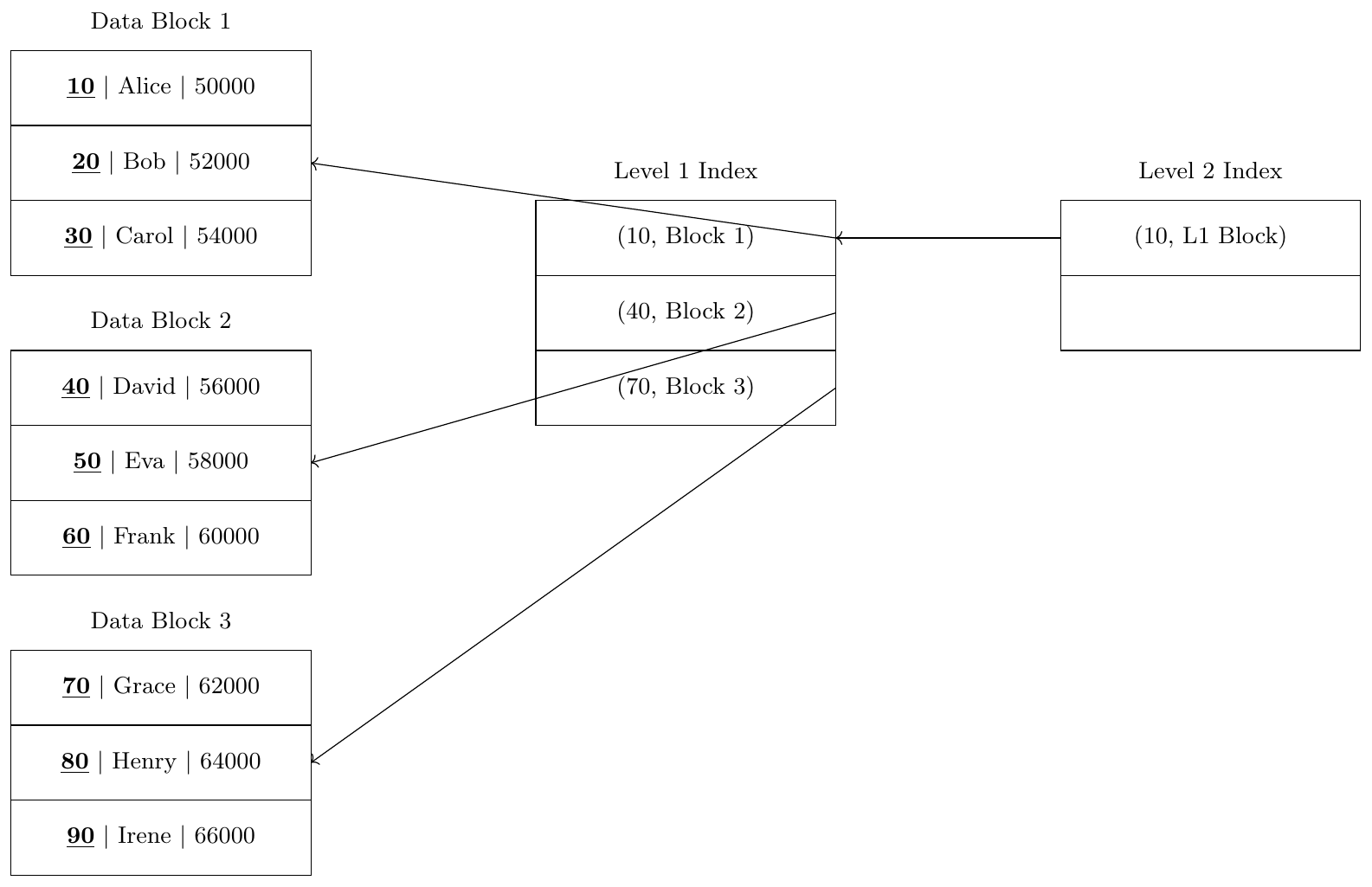
Suppose a file contains employee records ordered by Employee ID.
Block size = 3 records per block
Total records = 9
The records are stored in three data blocks.
Search Example
Suppose we want to find record with ID = 50.
Access Level 2 index block.
Follow pointer to Level 1 index.
Level 1 index indicates Block 2.
Access Data Block 2 and retrieve record.
Block Accesses
Level 2 index = 1 block access
Level 1 index = 1 block access
Data block = 1 block access
\[ \textbf{Total block accesses } = 3 \]
Without indexing, sequential search may require scanning many blocks.
Dynamic Multilevel Indexing
In large databases, the number of records continuously changes due to insertions and deletions. If we use static multilevel indexing, the index structure may become inefficient over time because block overflows and underflows occur.
To address this problem, Dynamic Multilevel Indexing structures are used. These indexing structures automatically reorganize themselves whenever records are inserted or deleted. The structure grows or shrinks dynamically while maintaining balanced search paths.
The most widely used dynamic multilevel index structures are:
B-Tree
B+ Tree
These structures ensure that:
The index remains balanced.
All search paths from root to leaf have the same length.
Insertions and deletions do not degrade search performance.
Dynamic multilevel indexing is widely used in modern database systems because it supports efficient search, insertion, and deletion operations even when the database grows very large.
The index is organized as a balanced tree.
Each node corresponds to a disk block.
All records are accessed by traversing the tree from the root node to leaf nodes.
Insertions may cause node splitting when a node becomes full.
Deletions may cause node merging when a node becomes too empty.
The height of the tree remains small, ensuring fast search.
B Trees: Structure, Properties and Formulas
Structure
A B-Tree is a balanced multiway search tree used in database indexing where each node corresponds to a disk block.
Let
\[ n = \text{order of the B-tree} \]
Each node of the B-tree contains
Search keys $K_i$
Record pointers $Pr_i$ (pointer to the record in the data file)
Block pointers $Pb_i$ (pointer to child blocks)
The keys in every node are stored in sorted order.
For a B-tree of order $n$,
\[ \text{Maximum number of keys} = n-1 \]
\[ \text{Maximum number of block pointers} = n \]
Thus a node may contain
\[ Pb_1,\; (K_1,Pr_1),\; Pb_2,\; (K_2,Pr_2),\; Pb_3,\; \dots ,\; (K_{n-1},Pr_{n-1}),\; Pb_{n} \]

$Pr_i$
Points to the actual record in the data file whose search key is $K_i$.
$Pb_i$
Points to a child block (subtree).
Each block pointer leads to another disk block containing more keys.
Since each node is stored in a disk block, following a pointer means one block access.
The keys inside a B-tree node satisfy the following ordering condition
\[ K_1 < K_2 < K_3 < \dots < K_{n-1} \]
The block pointers divide the key space into ranges.
\[ Pb_1 \rightarrow \text{keys } < K_1 \]
\[ Pb_1 \rightarrow K_1 < \text{keys} < K_2 \]
\[ Pb_2 \rightarrow K_2 < \text{keys} < K_3 \]
\[ Pb_{n} \rightarrow \text{keys } > K_{n-1} \]
Thus each pointer represents a range of search keys.
All leaf nodes appear at the same level.
Keys in each node are stored in sorted order.
Maximum children per node = $n$ Maximum keys = $n-1$.
Every non-root node has at least $\lceil n/2 \rceil$ children.
Therefore every non-root node has at least $\lceil n/2 \rceil - 1$ keys.
A node with $k$ keys always has $k+1$ children.
A B-tree node is designed so that the entire node fits inside a single disk block.
Let
\[ n = \text{order of the B-tree} \]
Each B-tree node contains
\[ (n-1) \text{ keys} \]
\[ (n-1) \text{ record pointers} \]
\[ n \text{ block pointers} \]
Let
$K$ = size of a key
$Pr$ = size of a record pointer
$Pb$ = size of a block pointer
$B$ = block size
Total space required for one B-tree node is
\[ (n-1)K + (n-1)Pr + nPb \]
Since a node must fit inside a disk block of size $B$,
\[ \boxed{ (n-1)[K + Pr] + nPb \le B } \]
This constraint determines the maximum possible order $n$ of the B-tree.
Insertion
Insertion in a B-tree always happens at the leaf level. The tree automatically maintains balance by splitting nodes when they become full.
Goal: Maintain B-tree properties
All leaves remain at the same level.
Keys in every node remain sorted.
Number of keys in each node stays within allowed limits.
Basic Procedure
Search the correct leaf node
Starting from the root, compare the key to be inserted with the keys in the node and follow the appropriate pointer until a leaf node is reached.
Insert the key in sorted order
If the leaf node has space, simply insert the new key in the correct sorted position.
Handle Overflow
If the node becomes full after insertion:
Split the node into two nodes.
Move the middle key to the parent node.
Left node contains smaller keys.
Right node contains larger keys.
Propagate Split Upward
If the parent node also becomes full after receiving the promoted key:
Split the parent node as well.
Continue this process upward.
Root Split
If the root becomes full:
Create a new root.
Middle key becomes the new root.
Tree height increases by 1.
Key Idea
Insertion never breaks tree balance. Whenever overflow occurs, nodes split and the middle key moves upward.
Assume a B-tree of order $n = 3$.
Maximum keys in a node = $n-1 = 2$
Maximum children = $n = 3$
Insert the keys in order:
\[ 10,\;20,\;5,\;6,\;12,\;30 \]
Step 1: Insert 10
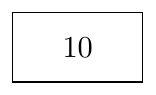
The tree contains only the root.
—
Step 2: Insert 20
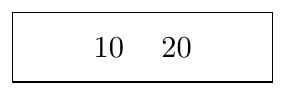
The root still has space.
—
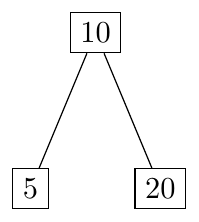
Step 3: Insert 5
After insertion:
\[ 5 \quad 10 \quad 20 \]
Overflow occurs because the node can store only 2 keys.
Split the node.
Middle key $10$ moves to the root.
—
Step 4: Insert 6
Search path:
\[ 6 < 10 \]
Insert into left child.
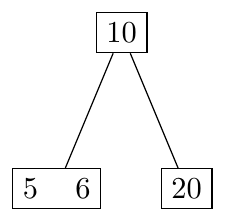
No overflow occurs.
—
Step 5: Insert 12
Search path:
\[ 12 > 10 \]
Insert into right child.
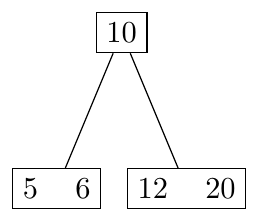
Still no overflow.
—
Step 6: Insert 30
Insert into right child.
\[ 12 \quad 20 \quad 30 \]
Overflow occurs.
Split node and promote middle key $20$.
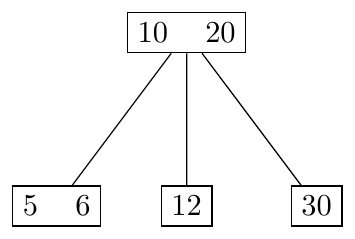
—
Final B-tree
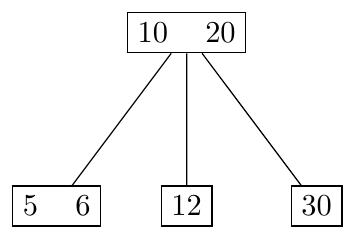
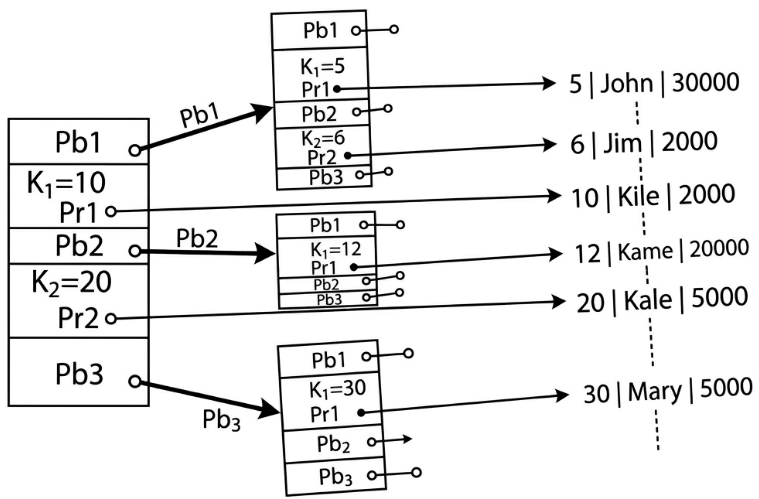
Insertion of 15, 25, 5, 10, 20, 30 in B-Tree of order $n=3$ Maximum keys per node = $n-1 = 2$
Insert 15

Insert 25
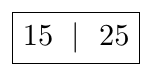
Insert 5
Overflow occurs.
Split the node and promote middle key.
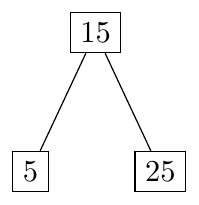
Insert 10
10 goes to left child.
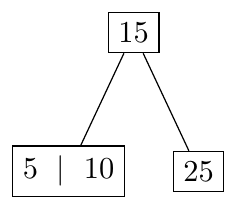
Insert 20
20 goes to right child.
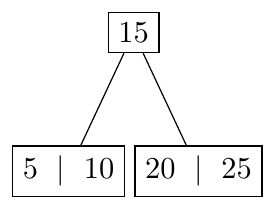
Insert 30
Overflow occurs in right child.
Split node and promote 25.
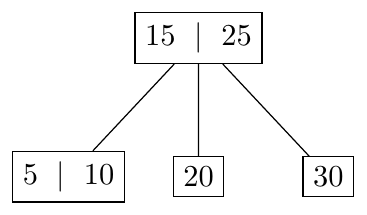
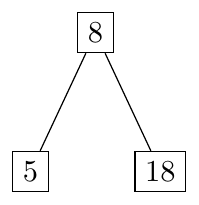
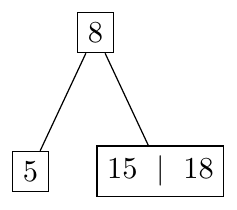
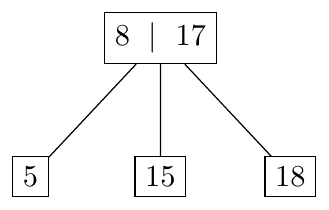
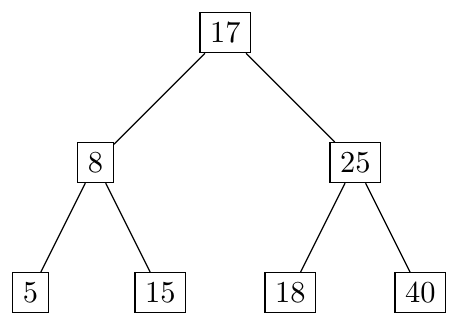
Insertion of 8, 18, 5, 15, 17, 25, 40 in B-Tree of order $n=3$ Maximum keys per node = $2$
Insert 8

Insert 18
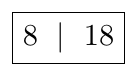
Insert 5
Overflow occurs.
Split and promote 8.
Insert 15
Insert in right child.
Insert 17
Overflow occurs in right child.
Split and promote 17.
Insert 25
Insert in right child.
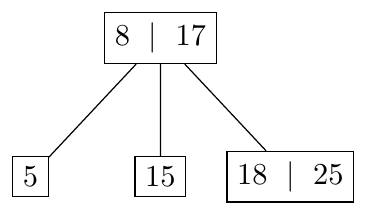
Insert 40
Overflow occurs in right child. Split and promote 25. Root (8 | 17 | 25) also overflows. Split and promote 17.
A B-tree node must fit in one disk block.
Given:
Block size $B = 1024$ bytes
Key size $K = 12$ bytes
Record pointer size $Pr = 8$ bytes
Block pointer size $Pb = 6$ bytes
Find the maximum order $n$ of the B-tree.
Solution
B-tree node size condition
\[ (n-1)K + (n-1)Pr + nPb \le B \]
Substitute values
\[ (n-1)(12) + (n-1)(8) + 6n \le 1024 \]
\[ 20(n-1) + 6n \le 1024 \]
\[ 20n - 20 + 6n \le 1024 \]
\[ 26n \le 1044 \]
\[ n \le 40.15 \]
\[ \boxed{n = 40} \]
Hence the maximum order of the B-tree is $40$.
A B-tree is used to index employee records.
Given
Block size $B = 2048$ bytes
Key size $K = 16$ bytes
Record pointer size $Pr = 8$ bytes
Block pointer size $Pb = 8$ bytes
Find
Maximum order $n$
Maximum number of keys in a node
Solution
Node size condition
\[ (n-1)K + (n-1)Pr + nPb \le B \]
Substitute values
\[ (n-1)(16) + (n-1)(8) + 8n \le 2048 \]
\[ 24(n-1) + 8n \le 2048 \]
\[ 24n - 24 + 8n \le 2048 \]
\[ 32n \le 2072 \]
\[ n \le 64.75 \]
\[ n = 64 \]
Maximum keys in node
\[ n-1 = 63 \]
\[ \boxed{\text{Maximum keys per node} = 63} \]
Consider a B-tree node storing
$15$ keys
$15$ record pointers
$16$ block pointers
Given
Key size $K = 10$ bytes
Record pointer $Pr = 6$ bytes
Block pointer $Pb = 8$ bytes
Block size $B = 512$ bytes
Check whether the node fits in a block.
Solution
Total node size
\[ 15K + 15Pr + 16Pb \]
Substitute values
\[ 15(10) + 15(6) + 16(8) \]
\[ 150 + 90 + 128 \]
\[ = 368 \text{ bytes} \]
Since
\[ 368 < 512 \]
\[ \boxed{\text{Node fits within one block}} \]
A B-tree index is created on a large database.
Given
Block size $B = 4096$ bytes
Key size $K = 20$ bytes
Record pointer $Pr = 8$ bytes
Block pointer $Pb = 8$ bytes
Find the order $n$ of the B-tree.
Solution
Node size condition
\[ (n-1)K + (n-1)Pr + nPb \le B \]
Substitute values
\[ (n-1)(20) + (n-1)(8) + 8n \le 4096 \]
\[ 28(n-1) + 8n \le 4096 \]
\[ 28n - 28 + 8n \le 4096 \]
\[ 36n \le 4124 \]
\[ n \le 114.55 \]
\[ \boxed{n = 114} \]
Hence the B-tree node can have at most $114$ child pointers.
Maximum keys
\[ n-1 = 113 \]
B+ Trees: Structure, Properties and Formulas
Structure of B+ Trees
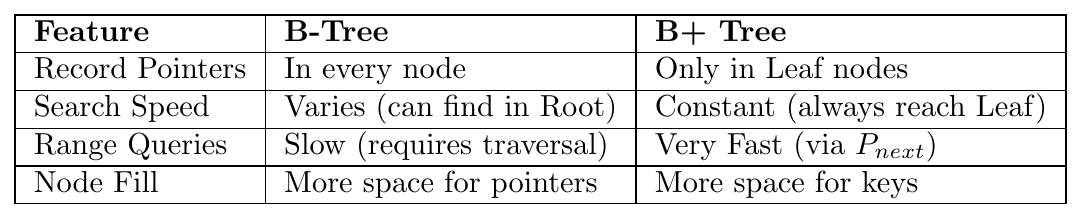
A B+ Tree is a variation of the B-Tree where internal nodes only store keys and child pointers, while all actual data (record pointers) are stored exclusively in the leaf nodes.
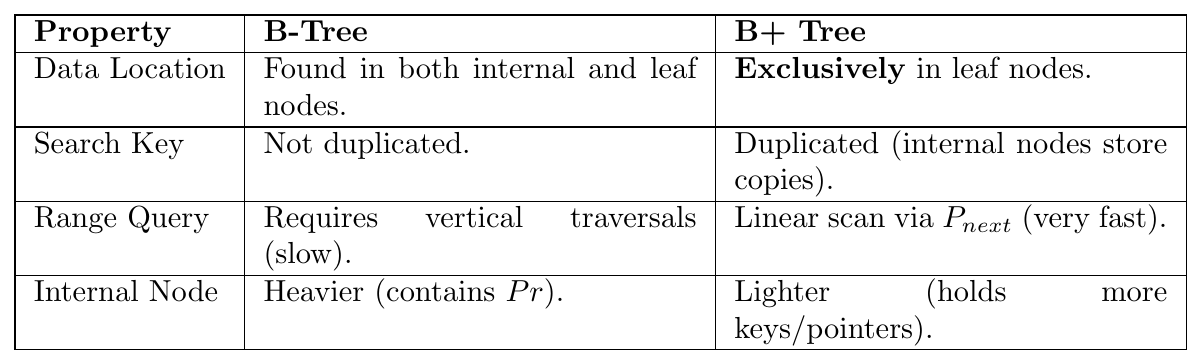
Key Differences from B-Trees:
Internal nodes do not contain record pointers.
Leaf nodes are linked sequentially using a next-leaf pointer (Pnext) to support efficient range queries.
All search keys are present in the leaf nodes; some are duplicated in internal nodes for routing.
For an internal node of order $n$, it contains only search keys and block pointers.
\[ \text{Max Keys} = n-1, \quad \text{Max Block Pointers} = n \]
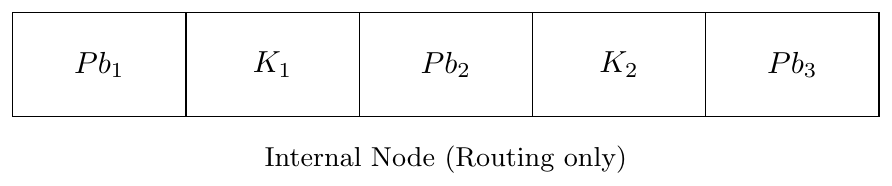
Constraint: $(n \cdot Pb) + (n-1)K \le B$
The leaf node stores the actual record pointers $Pr_i$ and a Next-Leaf Pointer ($P_{next}$) to allow sequential access. Let $m$ be the order of the leaf node.

Constraint: $m(K + Pr) + P_{next} \le B$
The search keys in a B+ Tree follow a strict order: \[ K_1 < K_2 < K_3 < \dots < K_{n-1} \]
$Pb_1$ points to a subtree where all keys $K < K_1$.
$Pb_i$ points to a subtree where $K_{i-1} \le K < K_i$.
$Pb_n$ points to a subtree where keys $K \ge K_{n-1}$.
Because internal nodes are smaller (no $Pr$ pointers), the fan-out ($n$) is much higher than in B-Trees, leading to a shallower tree and fewer disk I/Os.
Insertion in B+ Trees
Insertion in a B+ tree always starts at the leaf level. The tree maintains balance by splitting nodes, but unlike B-Trees, the data storage logic differs between Leaf and Internal nodes.
Basic Procedure
Search the correct leaf node Follow the pointers from the root to the leaf where the key should reside.
Insert the key in the leaf If the leaf has space, insert the key and record pointer in sorted order.
Handle Leaf Overflow (Copy-Up Rule) If the leaf becomes full ($n$ keys):
Split leaf into $L$ and $R$; keep $\lfloor n/2 \rfloor$ keys in $L$, move $\lceil n/2 \rceil$ keys to $R$.
Copy smallest key of $R$ up to the parent.
Link $L \rightarrow R$ via $P_{next}$.
Handle Internal Overflow (Move-Up Rule) If an internal node becomes full:
Split the node.
Move the middle key to the parent (standard B-tree logic).
The middle key is not kept in the original node.
Key Idea: Every key must exist in the leaf level. Internal nodes only act as a "roadmap."
Assume a B+ tree of order $n = 3$ Maximum keys per node = 2
Insert the keys: $10,20,5,15,30$
\tikzstyle{internal}=[draw, rectangle, minimum width=2.5cm, minimum height=8mm] \tikzstyle{leaf}=[draw, rectangle, minimum width=2.8cm, minimum height=8mm]
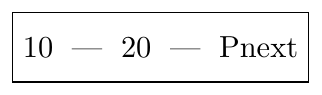
Step 1: Insert 10, 20
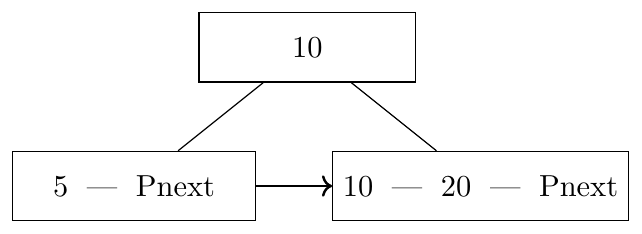
Step 2: Insert 5 (Leaf split)
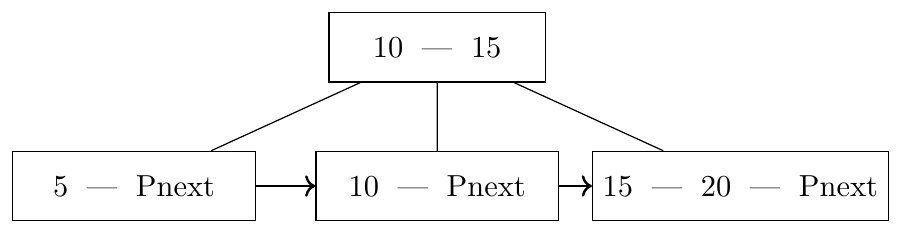
Step 3: Insert 15 (Leaf split)
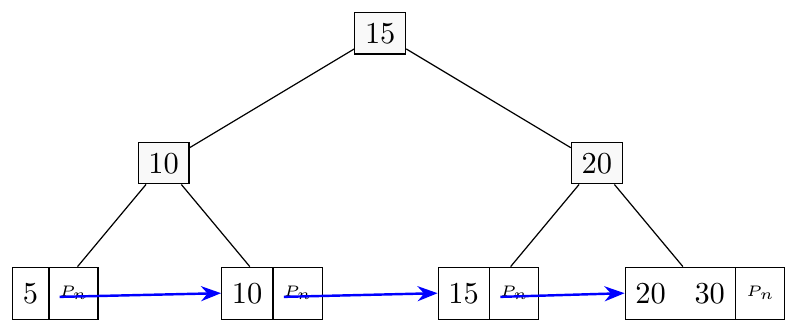
Step 4: Insert 30
Leaf split occurs and parent overflows $\rightarrow$ new root created.
Assume a B+ tree of order $n = 3$.
Internal nodes: Max keys = 2
Leaf nodes: Max keys = 2
Insert keys: $5,10,15,20,25,30$
\tikzstyle{internal}=[draw, rectangle, minimum width=2.2cm, minimum height=8mm] \tikzstyle{leaf}=[draw, rectangle, minimum width=2.4cm, minimum height=8mm]
Step 1: Insert 5, 10
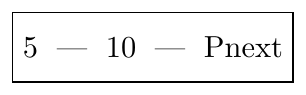
Step 2: Insert 15 (Leaf Split)
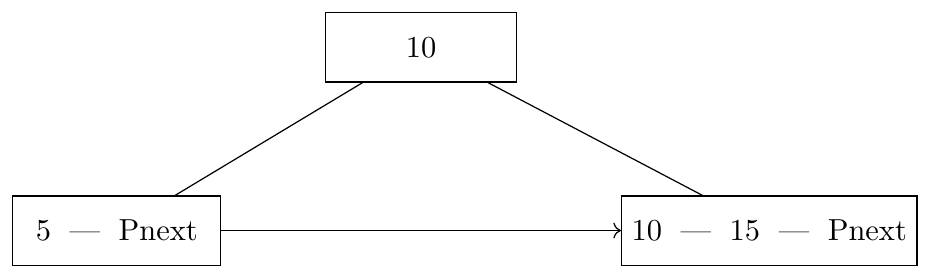
Step 3: Insert 20
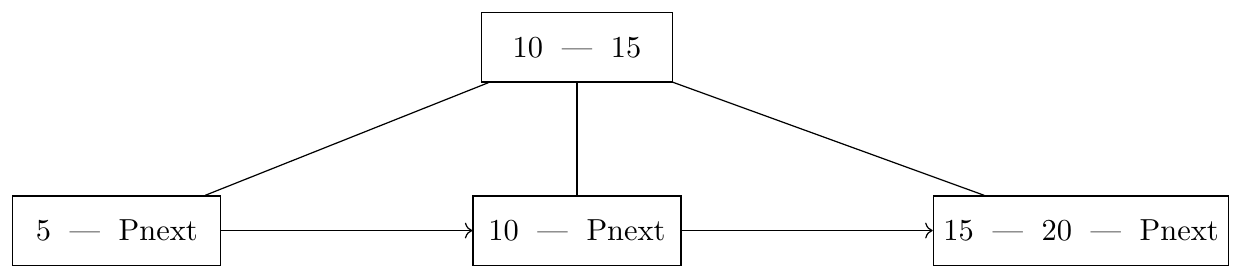
Step 4: Insert 25
Leaf split occurs and parent overflows.

Internal node splits. Key 15 moves to new root.
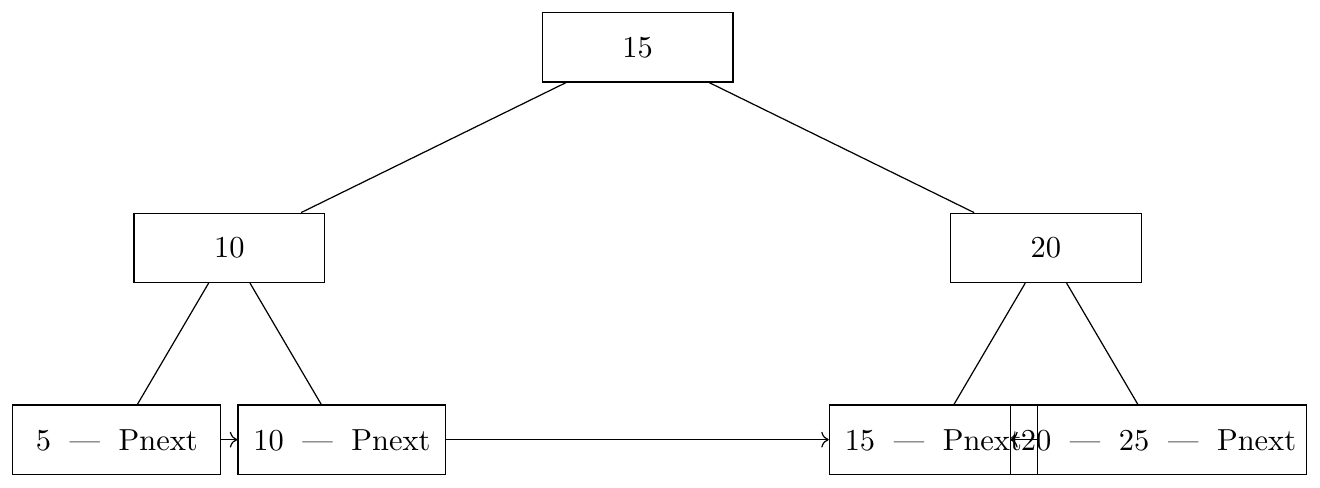
Step 5: Insert 30
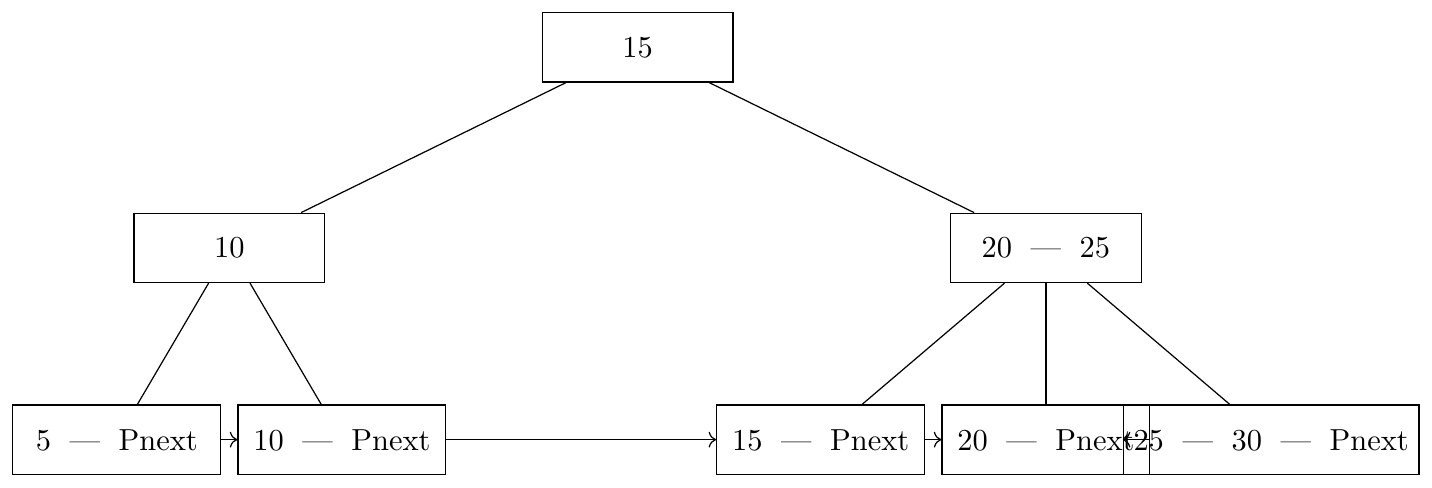
Final Leaf Sequence
\[ 5 \rightarrow 10 \rightarrow 15 \rightarrow 20 \rightarrow 25 \rightarrow 30 \]
A B+ tree separates navigation from data storage. Because of this, the order $n$ of an internal node and the order $m$ of a leaf node are calculated using different formulas.
1. Internal Node Constraint (Order $n$) An internal node contains $n$ child pointers ($P_i$) and $n-1$ search keys ($K$). \[ \boxed{ (n \cdot P_i) + (n-1)K \le B } \]
2. Leaf Node Constraint (Order $m$) A leaf node contains $m$ search keys ($K$), $m$ record pointers ($P_l$), and one pointer to the next leaf block ($P_{next}$). \[ \boxed{ m(K + P_l) + P_{next} \le B }
\]
Where:
$B$ = Block Size
$K$ = Search Key size
$P_i$ = Internal Child Pointer (Block Pointer)
$P_l$ = Leaf Record Pointer (Data Pointer)
$P_{next}$ = Next-leaf pointer (Sibling Pointer)
Given the following parameters:
Block Size $B = 4096$ bytes
Search Key $K = 16$ bytes
Internal Block Pointer $P_i = 8$ bytes
Leaf Record Pointer $P_l = 10$ bytes
Next-leaf Pointer $P_{next} = 8$ bytes
1. Max Order of Internal Node ($n$) Condition: $(n \cdot P_i) + (n-1)K \le B$ \[ (n \cdot 8) + (n-1)16 \le 4096 \] \[ 8n + 16n - 16 \le 4096 \] \[ 24n \le 4112 \implies n \le 171.33 \] \[ \boxed{n = 171} \]
2. Max Order of Leaf Node ($m$) Condition: $m(K + P_l) + P_{next} \le B$ \[ m(16 + 10) + 8 \le 4096 \] \[ 26m \le 4088 \implies m \le 157.23 \] \[ \boxed{m = 157} \]
Determine the "Fan-out" (number of children) for a B-Tree vs. a B+ Tree.
Parameters: $B=512$, $K=8$, $P_i=8$, $P_l=8$, $P_{next}=8$.
For B-Tree: Formula: $(n-1)K + (n-1)P_l + nP_i \le B$ \[ (n-1)8 + (n-1)8 + 8n \le 512 \] \[ 8n - 8 + 8n - 8 + 8n \le 512 \] \[ 24n \le 528 \implies \boxed{n = 22} \]
For B+ Tree (Internal Order $n$): Formula: $(n-1)K + nP_i \le B$ \[ (n-1)8 + 8n \le 512 \] \[ 8n - 8 + 8n \le 512 \implies 16n \le 520 \] \[ n \le 32.5 \implies \boxed{n = 32} \]
Conclusion: In the same block size, a B+ Tree supports more pointers (32 vs 22), making the tree flatter and reducing disk accesses.
A system requires a B+ Tree with an internal order of $n=100$. The key size $K = 20$ bytes and the internal pointer $P_i = 10$ bytes. Find the minimum block size $B$ required.
Solution: Using the internal node constraint: \[ (n \cdot P_i) + (n-1)K \le B \] \[ (100 \cdot 10) + (99 \cdot 20) \le B \] \[ 1000 + 1980 \le B \] \[ \boxed{B \ge 2980 \text{ bytes}} \]
If the question implies standard block sizes (powers of 2), the minimum required would be 4096 bytes.