Relational Model
Structure of Relational Databases
A Relational Model is fundamentally a collection of tables, where each table is assigned a unique name. In the formal mathematical world, these tables are known as Relations. The power of the relational model lies in its simplicity: data is represented as a set of related values organized into rows and columns.
To understand the relational model, we must bridge the gap between common database language and formal mathematical terms:
Relation / Table: A structure consisting of rows and columns.
Tuple / Row: A single record representing a relationship among a set of values.
Attribute / Column: A specific header defining a type of data within the relation.
Relation Instance: A specific set of data (rows) present in a table at a given moment.
Consider a table used to store information about faculty. Each row represents a specific instructor identified by a unique ID.
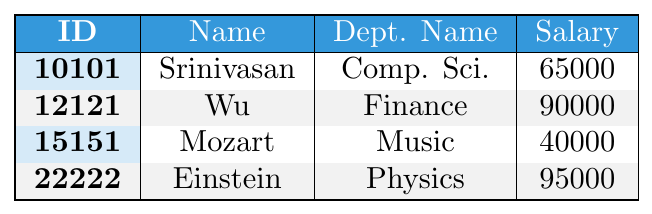
This table defines the academic offerings. Note that the attribute dept_name appears here as well, creating a logical link between instructors and courses via their departments.

In mathematics, a tuple is a sequence of $n$ values. A relationship between $n$ values is represented as an $n$-tuple. Because a table is essentially a set of these tuples, the order in which they appear is completely irrelevant. A relation instance containing tuples $\{A, B, C\}$ is mathematically identical to an instance containing $\{C, A, B\}$. Database engines do not guarantee a specific order of rows unless an explicit sort command is issued.
In a relational database, degree is the number of attributes (columns) in a relation, whereas cardinality is the number of tuples (rows) stored in it. For example, if a table has four columns — ID, Name, Age, and Dept — its degree is 4. If the table contains 100 records, then its cardinality is 100.
Attribute Domains, Atomicity & NULL values
For every attribute, there is a set of permitted values called its Domain. For instance, the domain of the Salary attribute is the set of all non-negative currency values.
A critical requirement of the relational model is that domains must be Atomic.
Definition: A domain is atomic if its elements are considered indivisible units.
Non-Atomic Example: If a
phone_numberattribute stores a set of three numbers, it is non-atomic because it has subparts (the individual numbers).Atomic Example: If we treat a phone number "555-0102" as a single string that we never split, it is atomic. If we attempt to query based on just the "Area Code" sub-part, we are treating it as non-atomic.
When a value for an attribute is unknown or simply does not exist for a specific tuple, we use a special marker called Null.
Unknown: The value exists (e.g., an instructor has a phone), but we do not know it.
Does Not Exist: The value is not applicable (e.g., an instructor does not own a phone).
Note: Null values complicate database operations and should be minimized through proper design.
Database Schema
In database systems, we must distinguish between the Database Schema, which is the logical design or structural blueprint of the database, and the Database Instance, which is a snapshot of the actual data at a specific moment in time.
To use a programming analogy:
A Relation Schema is equivalent to a Type Definition (like a
structorclass). It defines the attributes and their domains but contains no data.A Relation Instance is equivalent to the Value of a Variable. Just as a variable's value changes as a program executes, the instance changes as data is inserted or deleted.
The Schema of a relation generally remains static, while the Instance is dynamic.
Consider the Department relation. Its Schema is defined as:
department (dept_name, building, budget)
An Instance of this relation might look like the following:
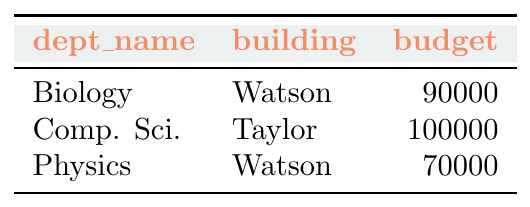
A crucial aspect of relational design is the use of overlapping attributes. Notice that dept_name appears in both the Instructor schema and the Department schema. This duplication is intentional; it allows us to link data across distinct relations. For instance, to find instructors working in the 'Watson' building, we first identify departments located in 'Watson' via the Department table, then match those department names in the Instructor table.
This pattern extends to complex university operations. A Course may be offered multiple times (different semesters or years). We represent these specific offerings as a Section. The Section Schema is:
section (course_id, sec_id, semester, year, building, room_number, time_slot_id)
To connect faculty to these sections, we use the Teaches relation. An Instance of Teaches acts as a bridge, mapping an ID to a specific class section:
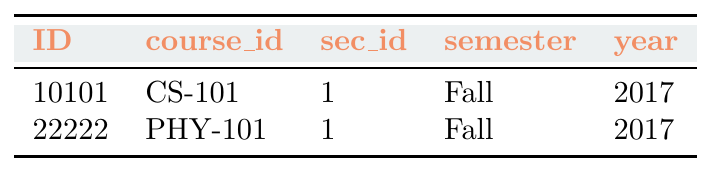
By combining various schemas—such as student, advisor, takes, and classroom—a university builds a cohesive relational web.
Keys
A key, in Database Management Systems, is either a single attribute (or column) or a set of attributes that can uniquely identify rows (or tuples) in a table. We also use keys to set up relations amongst various columns and tables of a relational database.
Composite Key
Candidate Key
Primary Key
Unique Key
Super Key
Foreign Key
Alternate Key
A Composite Key is a key formed using two or more attributes together to uniquely identify a tuple in a relation. No single attribute alone can uniquely identify the tuple.
ENROLL Table:
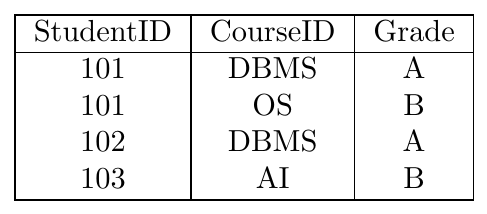
Here StudentID is repeated and CourseID is also repeated. But the combination (StudentID, CourseID) is unique for every row. Hence (StudentID, CourseID) is the Composite Key.
A Candidate Key is a minimal set of attributes that can uniquely identify each tuple in a relation. A relation can have multiple candidate keys.
STUDENT Table:
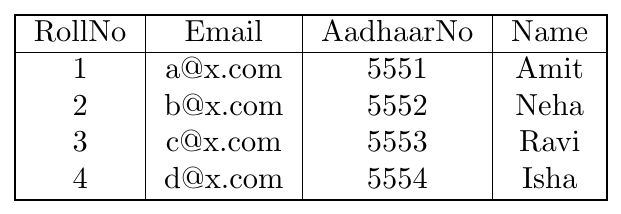
RollNo, Email, and AadhaarNo are each unique. Each of them can uniquely identify tuples. So all three are Candidate Keys.
A Primary Key is one candidate key selected to uniquely identify tuples in a relation. It must be unique and cannot be NULL.
STUDENT Table (Primary Key = RollNo):
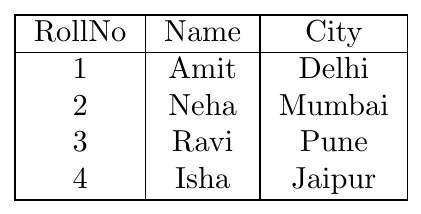
RollNo values are unique and not NULL. Hence RollNo is chosen as the Primary Key.
A Unique Key is a column or a set of columns that ensures all values in a column are distinct. Unlike a Primary Key, a Unique Key can accept a NULL value (depending on the database system, usually one NULL is allowed), but it still prevents duplicate entries for non-null data.
EMPLOYEE Table (Unique Key = EmailID):
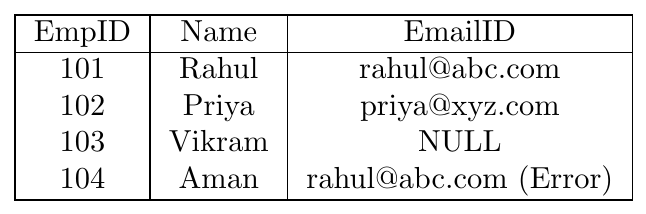
The EmailID column must be unique. Since rahul@abc.com is already assigned to EmpID 101, the system will reject the attempt to assign the same email to EmpID 104.
A Super Key is any set of attributes that can uniquely identify a tuple. It may contain extra attributes along with a candidate key.
STUDENT Table:
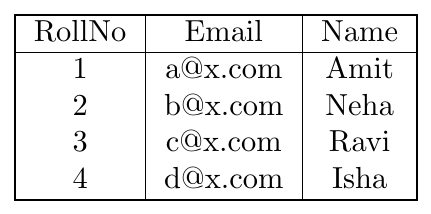
RollNo is unique → {RollNo} is a Super Key. (RollNo, Name) is also unique → another Super Key. (RollNo, Email) is also unique → another Super Key.
Super keys can include extra attributes.
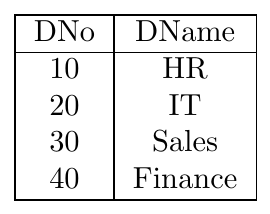
A Foreign Key is an attribute in one table that refers to the Primary Key of another table. It maintains referential integrity.
DEPARTMENT Table (Primary Key = DNo):
EMPLOYEE Table (Foreign Key = DNo):
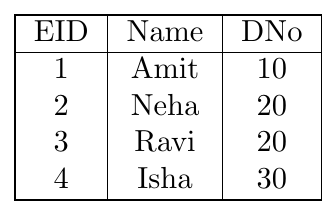
DNo in EMPLOYEE refers to DNo in DEPARTMENT. So DNo in EMPLOYEE is a Foreign Key.
An Alternate Key is a candidate key that is not selected as the primary key.
STUDENT Table:
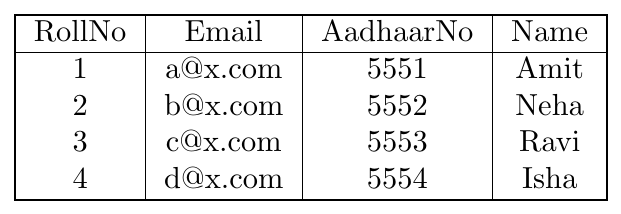
Candidate Keys = RollNo, Email, AadhaarNo. If RollNo is selected as Primary Key, then Email and AadhaarNo become Alternate Keys.
Integrity Constraints
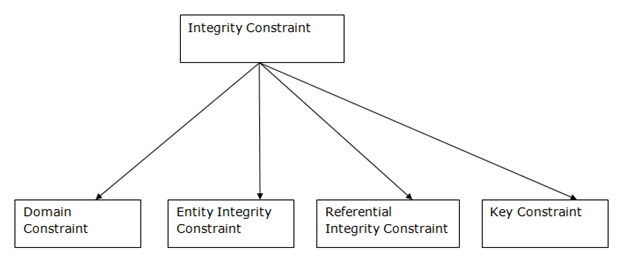
In modeling the design of the relational database we can put some restrictions like what values are allowed to be inserted in the relation, and what kind of modifications and deletions are allowed in the relation. These are the restrictions we impose on the relational database.
Every domain must contain atomic values(smallest indivisible units) which means composite and multi-valued attributes are not allowed.
We perform a datatype check here, which means when we assign a data type to a column we limit the values that it can contain.
If we assign the datatype of attribute age as int, we can’t give it values other than int datatype.

Employee Information
In the above relation, Name is a composite attribute and Phone is a multi-values attribute, so it is violating domain constraint.
These are called uniqueness constraints since it ensures that every tuple in the relation should be unique.
A relation can have multiple keys or candidate keys (minimal superkey), out of which we choose one of the keys as the primary key, we don’t have any restriction on choosing the primary key out of candidate keys, but it is suggested to go with the candidate key with less number of attributes.
Null values are not allowed in the primary key, hence Not Null constraint is also part of the key constraint.
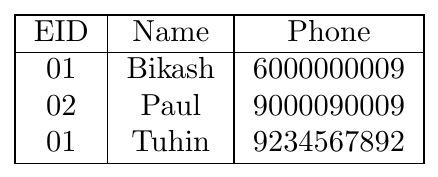
Employee Information
In the above table, EID is the primary key, and the first and the last tuple have the same value in EID ie 01, so it is violating the key constraint.
Entity Integrity constraints say that no primary key can take a NULL value, since using the primary key we identify each tuple uniquely in a relation.

Employee Information
In the above relation, EID is made the primary key, and the primary key can’t take NULL values but in the third tuple, the primary key is null, so it is violating Entity Integrity constraints.
The Referential integrity constraint is specified between two relations or tables and used to maintain the consistency among the tuples in two relations.
This constraint is enforced through a foreign key, when an attribute in the foreign key of relation R1 has the same domain(s) as the primary key of relation R2, then the foreign key of R1 is said to reference or refer to the primary key of relation R2.
The values of the foreign key in a tuple of relation R1 can either take the values of the primary key for some tuple in relation R2, or can take NULL values, but can’t be empty.
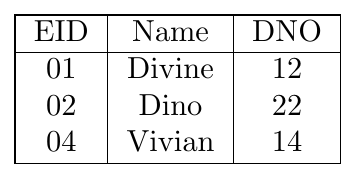
Employee Information
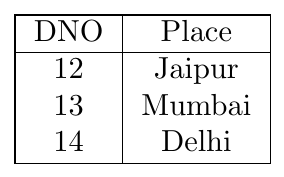
Department Information
In the above tables, the DNO of Table Employee Information is the foreign key, and DNO in Table Department Information is the primary key. DNO = 22 in the foreign key of Employee Information table is not allowed because DNO = 22 is not defined in the primary key of table Department Information. Therefore, Referential integrity constraints are violated here.
The ON DELETE SET NULL strategy is used when a record in the referenced (parent) relation is deleted. To maintain referential integrity, the system automatically sets the foreign key values in the referencing (child) relation to NULL for all tuples that were linked to the deleted record.
This approach is typically used when the child record should continue to exist even if its association with the parent is removed.
Suppose we delete the record for DNO = 14 (Delhi) from the Department table. With on-delete set null enabled, the Employee Information table is updated as follows:
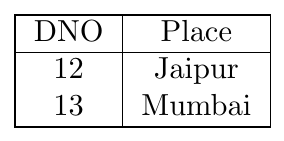
Department Information (After Deletion of DNO 14)
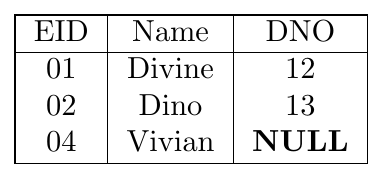
Employee Information (DNO for Vivian set to NULL)
Here, Vivian is still a valid employee in the database, but she is currently not assigned to any department since DNO 14 no longer exists.
The ON UPDATE CASCADE strategy ensures that any modification made to a Primary Key value in the referenced relation is automatically "cascaded" to all corresponding Foreign Key values in the referencing relation.
This maintains the logical link between tables without requiring manual updates to multiple records across the database.
If the DNO for the Jaipur branch is changed from 12 to 50 in the Department table, the Employee Information table will reflect this change automatically:
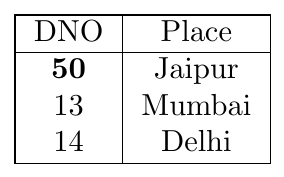
Department Information (Primary Key Updated)
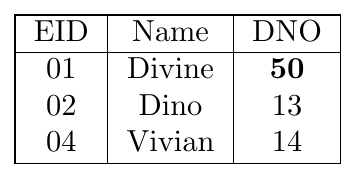
Employee Information (Foreign Key Cascaded)
The DNO for Divine was automatically updated from 12 to 50, ensuring the referential integrity constraint is preserved.
Schema Diagrams
In a schema diagram, each table is depicted as a box. The Relation Name sits at the top, and the Primary Key—the unique identifier for every record—is underlined.
Consider a simple Food Delivery database with three relations:
Restaurant: Stores details of eateries like "Haldiram's" or "Empire Restaurant".
Partner: Details of the person delivering the order.
Order: The bridge that connects a customer, a restaurant, and a delivery partner.
Primary Key: The unique field (underlined), e.g., rest_id.
Foreign Key (FK): A link (green arrow) ensuring that a restaurant ID in the Order table actually exists in the Restaurant table.
Referential Integrity: Ensures that the overall data across different tables (like Restaurant and Partner) remains consistent.
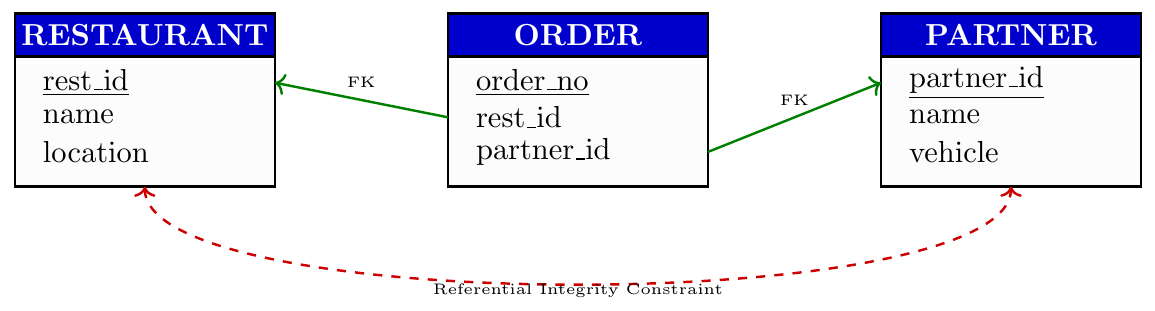
Reducing E-R Diagrams to Relational Schema
Both the Entity–Relationship (E–R) model and the relational database model provide abstract, logical frameworks for modeling real-world enterprises at the schema level. Because these models are based on compatible structural and semantic design principles, an E–R schema can be formally mapped into an equivalent relational schema. Under this mapping, each entity set and each relationship set in the E–R design is transformed into a separate relation schema, with the relation name conventionally derived from the corresponding entity or relationship set.
Rules for Reducing E-R Diagrams to Relational Schema
A strong entity set has its own primary key and does not depend on any other entity set for identification.
If all attributes are simple and single-valued, the entity set maps to exactly one relational table.
Each attribute of the entity set becomes one column in the table.
The key attribute(s) of the entity set become the primary key of the table.
If the ER key is composite, the relational primary key is also composite.
Only stored attributes are mapped — derived attributes are not included in the table.
ER Diagram
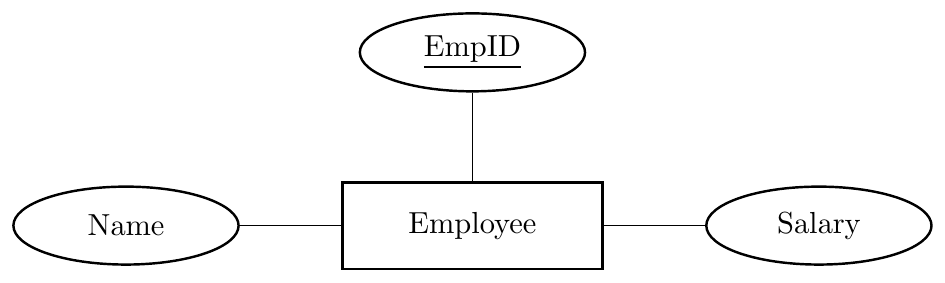
Relational Mapping
\[ Employee(\underline{EmpID},\ Name,\ Salary) \]
Conversion rule used: One strong entity with simple attributes → one table; key becomes primary key.
ER Diagram
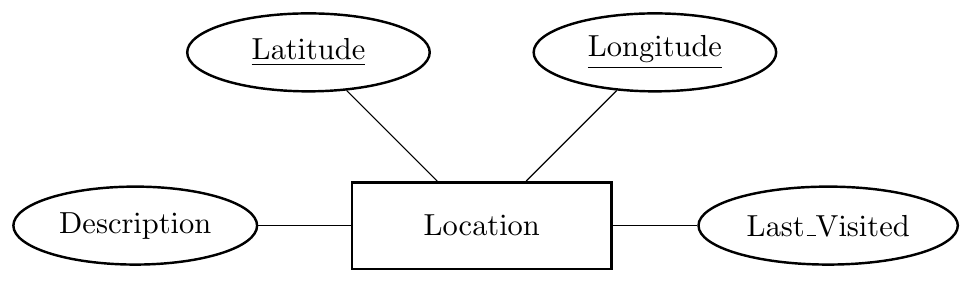
Relational Mapping
\[ Location(\underline{Latitude, Longitude},\ Description,\ Last\_Visited) \]
Conversion rule used: Composite key in ER → composite primary key in relation.
ER Diagram
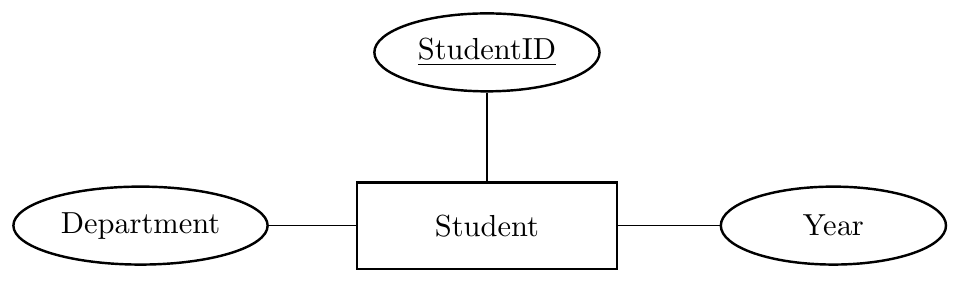
Relational Mapping with Arrow View
\[ \text{Student entity} \;\;\Longrightarrow\;\; Student(\underline{StudentID},\ Department,\ Year) \]
Conversion rule used: All simple attributes map directly to columns.
A strong entity set may contain composite attributes (attributes that can be divided into sub-attributes).
Even if composite attributes exist, only one relational table is created for the entity set.
During ER → relational mapping, the composite attribute itself is not stored as a column.
Only the simple (atomic) components of each composite attribute are included as table columns.
The primary key of the entity set remains the primary key of the table.
This rule applies only when composite attributes are single-valued (not multivalued).
If a composite attribute contains derived parts, derived components are not stored.
ER Diagram
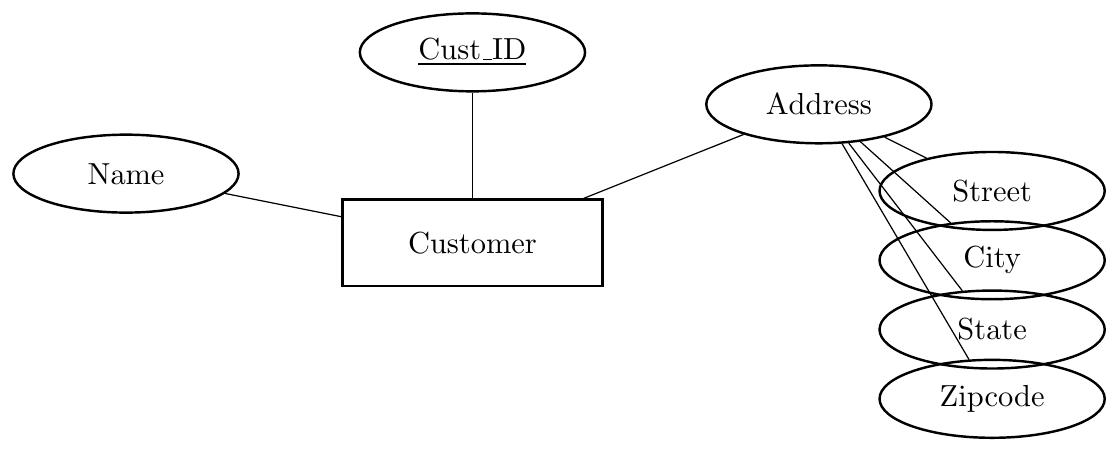
Relational Mapping
\[ \text{Customer entity with composite Address} \;\;\Longrightarrow\;\; Customer(\underline{cust\_id},\ name,\ street,\ city,\ state,\ zipcode) \]
Rule used: Composite attribute → store only its simple components.
ER Diagram
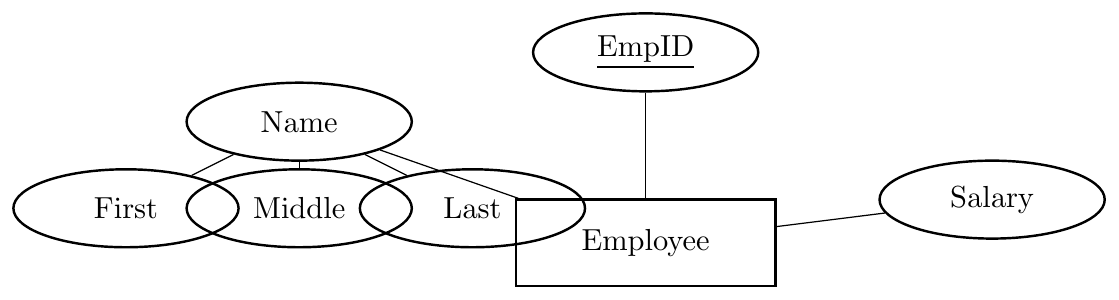
Relational Mapping
\[ \text{Employee with composite Name} \;\;\Longrightarrow\;\; Employee(\underline{EmpID},\ first,\ middle,\ last,\ salary) \]
Rule used: Composite attribute is flattened into atomic columns.
A multi-valued attribute can store multiple values for a single entity instance.
A strong entity set having one or more multi-valued attributes cannot be mapped to a single table without redundancy.
One main table is created for the entity set containing all simple, single-valued attributes and the primary key.
For each multi-valued attribute, a separate relation (table) is created.
The new relation contains:
the multi-valued attribute (atomic form only),
the primary key of the owner entity set.
The primary key of the new relation is a composite key: (primary key of entity set + multi-valued attribute value).
The primary key of the entity set appears as a foreign key in the new relation.
If there are multiple multi-valued attributes, create one separate table per attribute.
If a multi-valued attribute is composite, include all its simple components in the new table.
ER Diagram
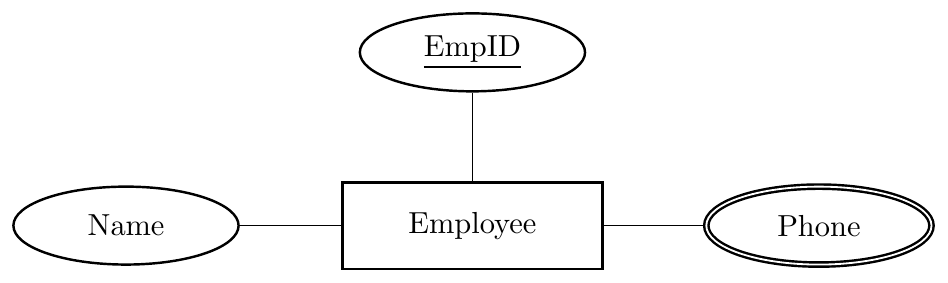
Relational Mapping
\[ \text{Employee entity} \;\Longrightarrow\; Employee(\underline{EmpID},\ Name) \]
\[ \text{Multi-valued attribute Phone} \;\Longrightarrow\; Employee\_Phone(\underline{EmpID, Phone}) \]
Rule used: Multi-valued attribute → separate table with (PK + attribute) as composite key.
ER Diagram
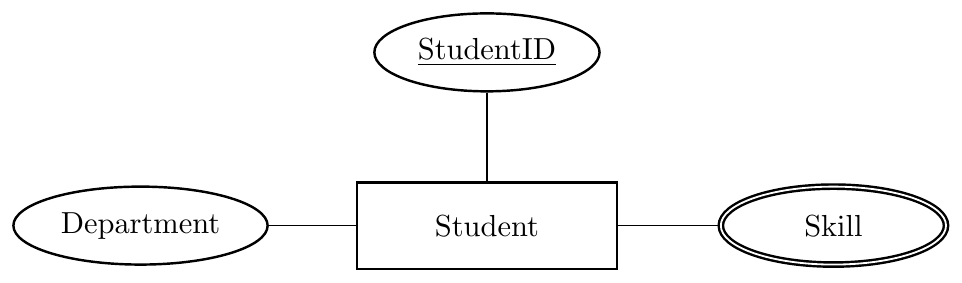
Relational Mapping
\[ Student(\underline{StudentID},\ Department) \]
\[ Student\_Skill(\underline{StudentID, Skill}) \]
Rule used: Each multi-valued attribute gets its own relation.
ER Diagram
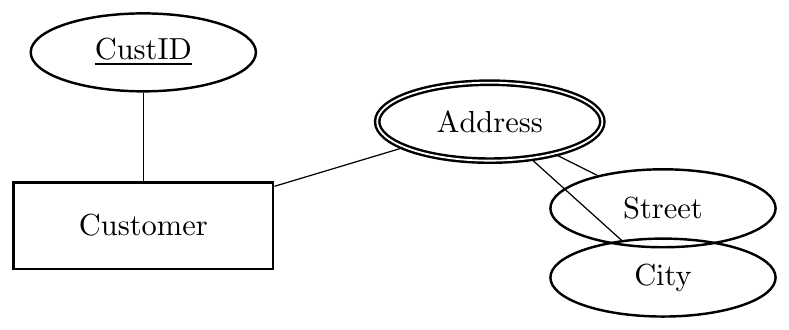
Relational Mapping
\[ Customer(\underline{CustID}) \]
\[ Customer\_Address(\underline{CustID, Street, City}) \]
Rule used: Composite multi-valued attribute → new table with all simple components + entity PK.
A relationship set can be mapped to a separate relational table.
One table is created for the relationship set itself.
The columns of the relationship table include:
Primary key attributes of all participating entity sets
Descriptive attributes of the relationship set (if any)
Primary key attributes of participating entities appear as foreign keys in the relationship table.
The relationship table stores only key attributes from entities — not their non-key attributes.
The primary key of the relationship table is formed from the set of participating entity primary keys (combined key).
Descriptive attributes are included in the table but are not part of the primary key unless explicitly specified.
This rule describes only the basic relationship-to-table mapping; cardinality-based optimizations are handled separately.
ER Diagram
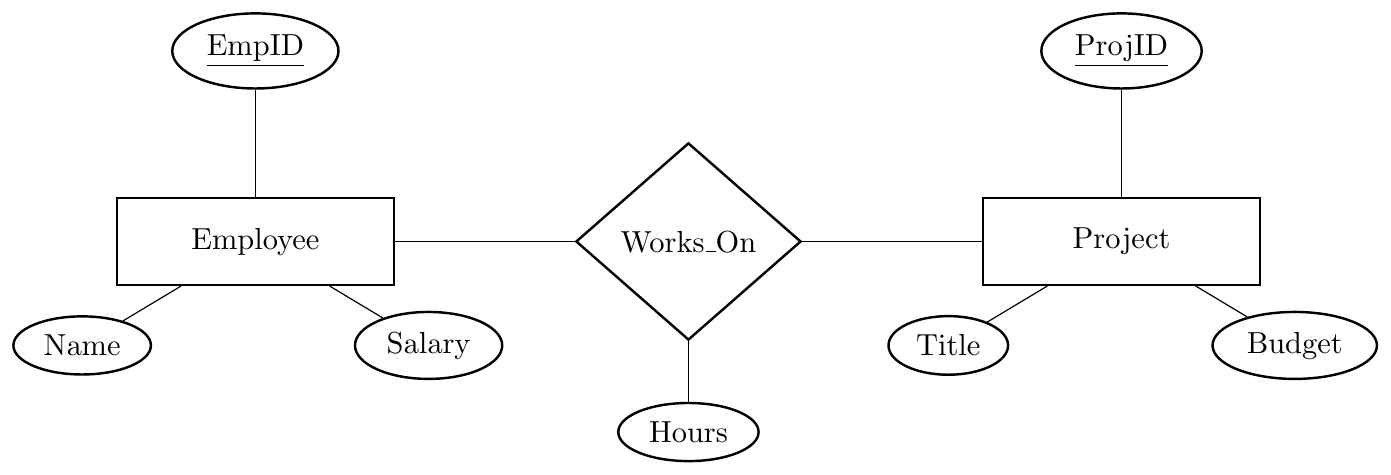
Relational Mapping
\[ Employee(\underline{EmpID}, Name, Salary) \]
\[ Project(\underline{ProjID}, Title, Budget) \]
\[ \text{Works\_On relationship} \;\Longrightarrow\; Works\_On(\underline{EmpID, ProjID}, Hours) \]
Rule used: Relationship table contains only participating PKs + relationship attributes.
ER Diagram
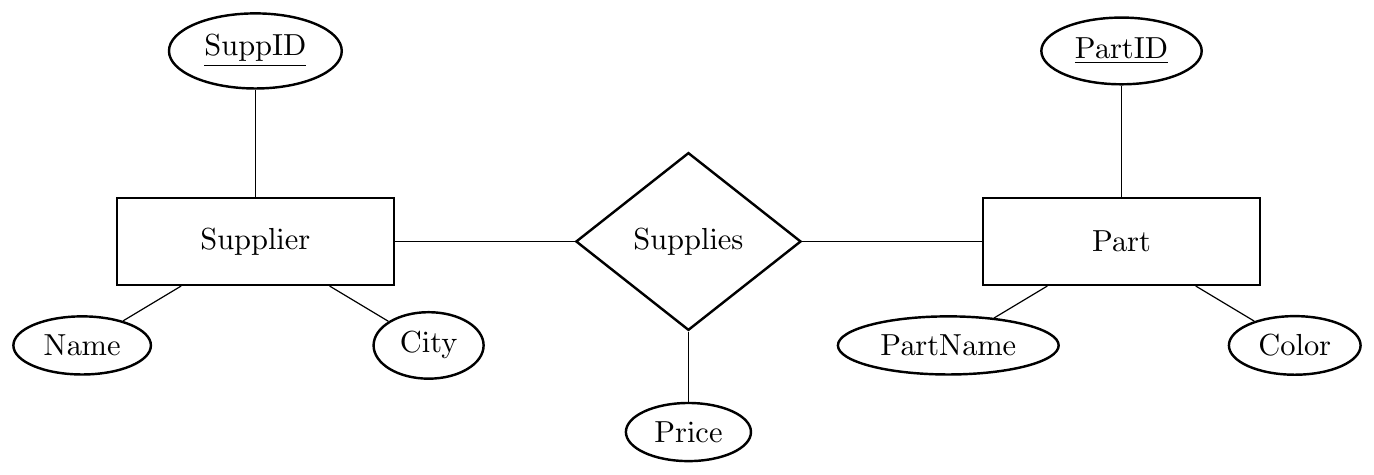
Relational Mapping
\[ Supplier(\underline{SuppID}, Name, City) \]
\[ Part(\underline{PartID}, PartName, Color) \]
\[ Supplies(\underline{SuppID, PartID}, Price) \]
Rule used: Only entity keys propagate into the relationship table, not other attributes.
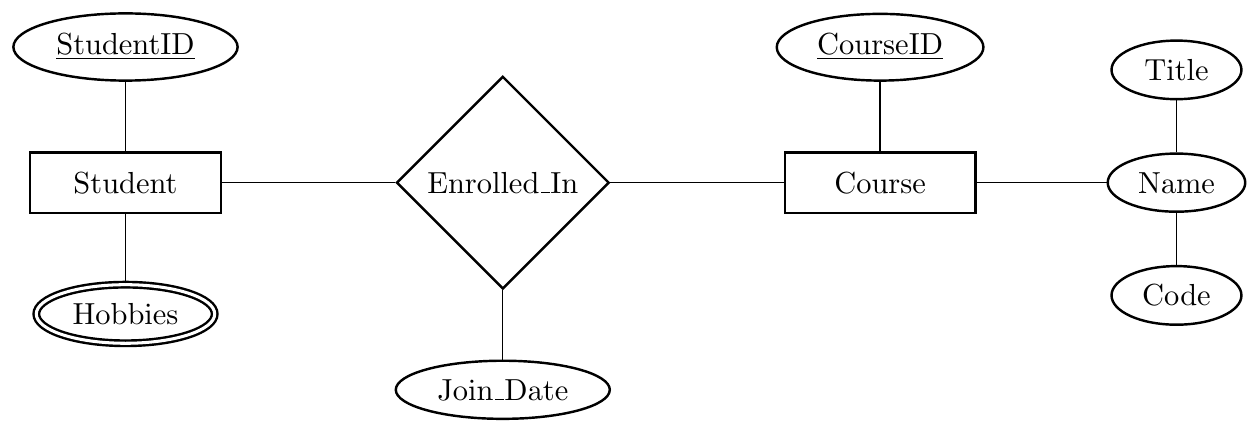
Relational Mapping
\[ \color{black} Student(\underline{StudentID}) \] \[ \color{black} Student\_Hobbies(\underline{StudentID, Hobby}) \] \[ \color{black} Course(\underline{CourseID}, Title, Code) \] \[ \color{black} Enrollment(\underline{StudentID, CourseID}, Join\_Date) \]
Conversion Summary:
Multivalued → separate relation.
Composite → decomposed.
Descriptive → stored in relationship.
Cardinality: Determines FK placement or if a new table is needed.
Participation: Determines nullability (NULL vs. NOT NULL).
Descriptive Attributes: Follow the FK.
Goal: Minimize tables to reduce join overhead.

Separate tables are created for each entity; a relationship table is not required.
The PK of one entity is added as a Foreign Key (FK) in the other.
The FK column must be UNIQUE to maintain the 1:1 ratio.
Store relationship attributes in the table receiving the Foreign Key.
Participation Mapping Strategy

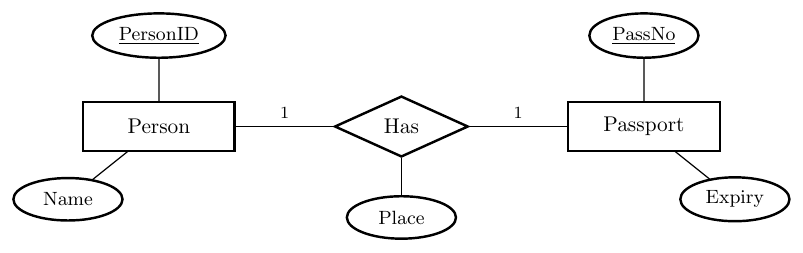
Relational Tables:
Person (PersonID, Name)
Passport (PassNo, Expiry, PersonID, Place)
(PersonID is a Foreign Key. We merge the relationship into the side that is most likely to have a passport to avoid nulls.)
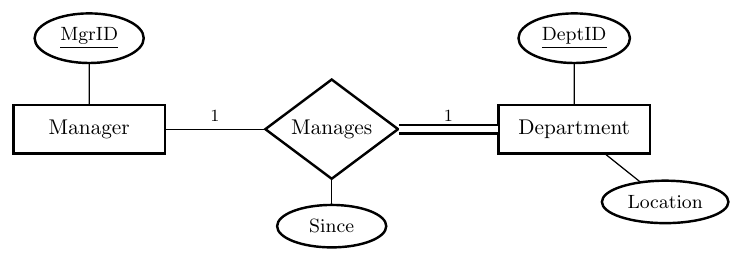
Relational Tables:
Manager (MgrID)
Department (DeptID, Location, MgrID, Since)
(MgrID is a Foreign Key. Foreign Key is placed in the 'Total Participation' side to ensure every Department has a Manager.)
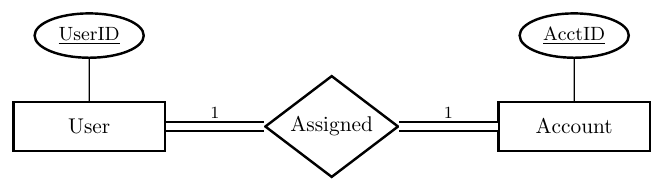
Relational Tables:
User_Account (UserID, AcctID)
(Since participation is total on both sides, the two entities can be merged into a single table to improve efficiency and eliminate joins.)
The PK of the 1-side is added as a Foreign Key (FK) in the N-side relation.
This direction is mandatory to maintain functional dependency.
Relationship attributes are stored in the N-side relation.
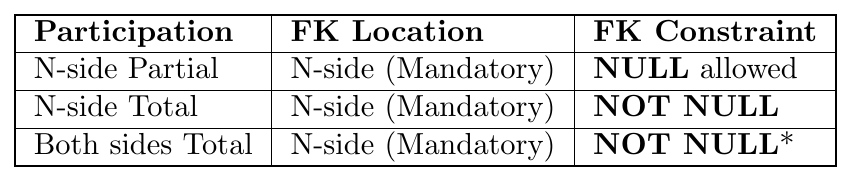
*Note: Total participation on the 1-side requires additional triggers/assertions.
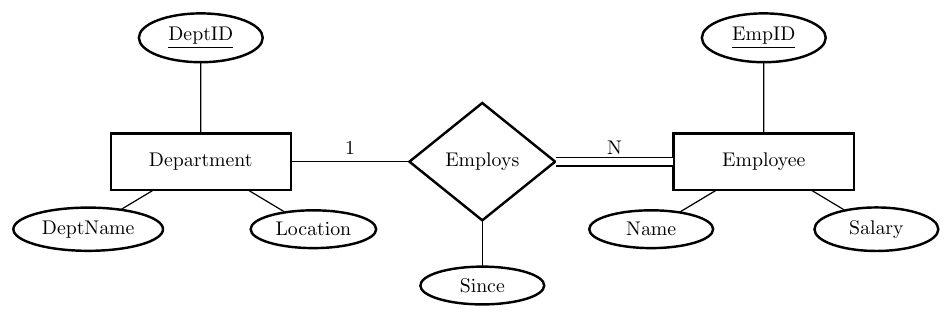
Relational Tables:
Department (DeptID, DeptName, Location)
Employee (EmpID, Name, Salary, DeptID, Since)
(The Primary Key of the 1-side (DeptID) is added to the N-side (Employee) as a Foreign Key. Relationship attributes like 'Since' also move to the N-side table.)
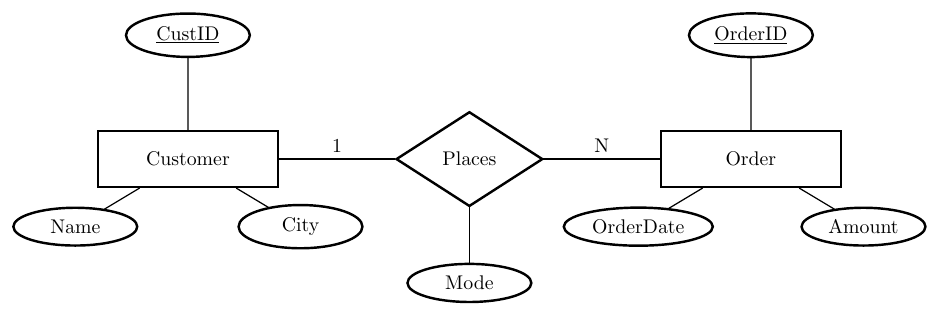
Relational Tables:
Customer (CustID, Name, City)
Order (OrderID, OrderDate, Amount, CustID, Mode)
(Even with partial participation, the standard 1:N rule applies: the Foreign Key goes to the N-side. If an Order doesn't have a Customer, the CustID field will simply be NULL.)
A separate relationship table is mandatory to avoid data redundancy.
The table contains the PKs of both entities as Foreign Keys (FKs).
The Primary Key is a composite key of both participating FKs.
Relationship attributes are stored exclusively in this new table.
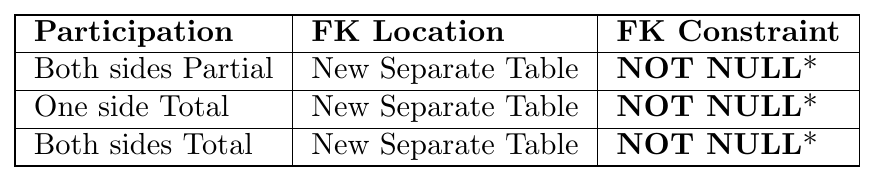
*Note: In an M:N bridge table, FKs are always NOT NULL. Total participation is enforced by ensuring every record in the entity table has at least one entry in this relationship table via application logic.
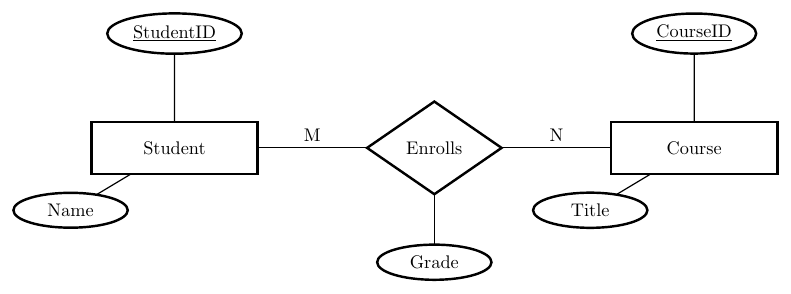
Relational Tables:
Student (StudentID, Name)
Course (CourseID, Title)
Enrolls (StudentID, CourseID, Grade)
(A new table is created. The Primary Key is the combination of both Foreign Keys.)
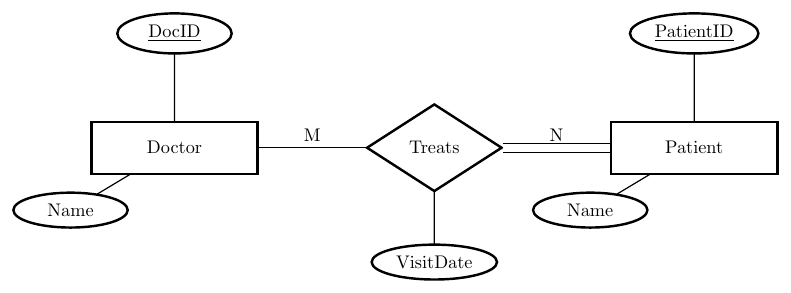
Relational Tables:
Doctor (DocID, Name)
Patient (PatientID, Name)
Treats (DocID, PatientID, VisitDate)
(Total participation on the Patient side means every PatientID must appear at least once in the 'Treats' table.)
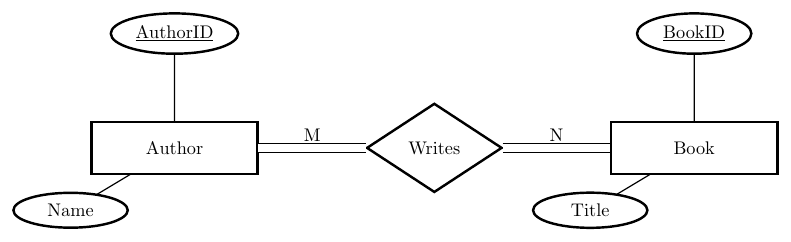
Relational Tables:
Author (AuthorID, Name)
Book (BookID, Title)
Writes (AuthorID, BookID)
(Total participation on both sides is enforced at the application/database constraint level, ensuring no ID exists in Author or Book without a corresponding entry in Writes.)
A recursive (unary) relationship occurs when an entity set is related to itself.
Only one entity set participates — but with different roles.
Mapping depends on the cardinality ratio.
Role names must be used to distinguish participation.
Mapping summary
Recursive 1:1 → Add a self-referencing foreign key in the entity table (or separate relation if relationship has attributes).
Recursive 1:N → Add a self-referencing foreign key on the N-side (same table).
Recursive M:N → Create a separate relationship table with two foreign keys referencing the same entity table.
ER Diagram
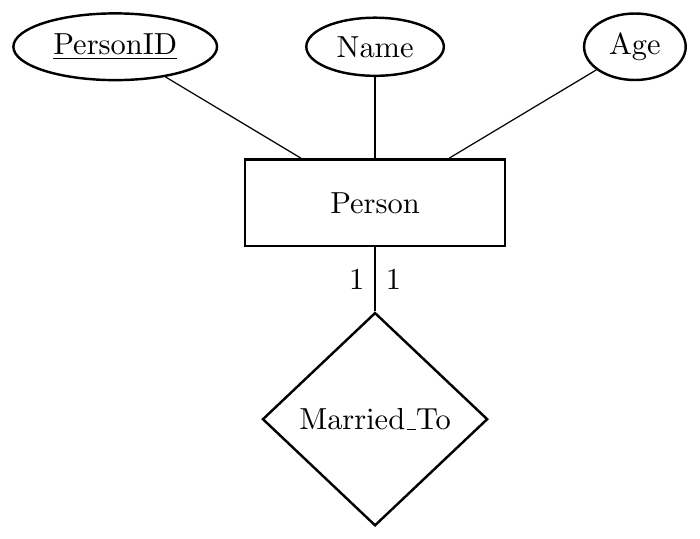
Relational Mapping
\[ Person(\underline{PersonID}, Name, Age, SpouseID) \]
SpouseID → FK referencing Person(PersonID), UNIQUE.
Rule used: Recursive 1:1 → self foreign key.
ER Diagram
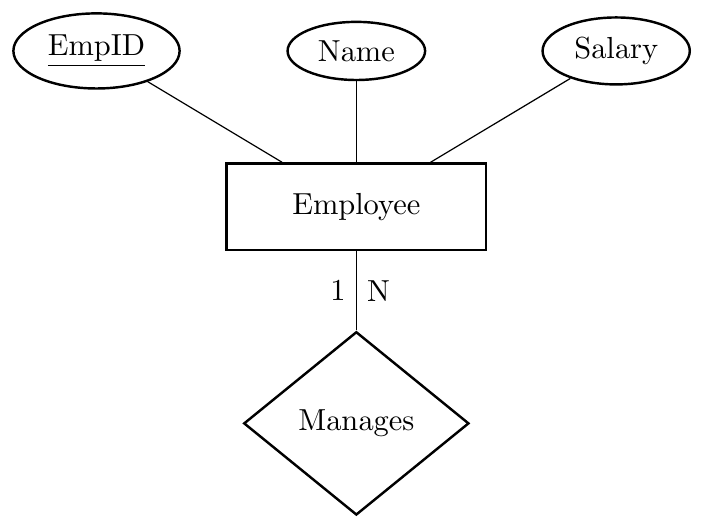
Relational Mapping
\[ Employee(\underline{EmpID}, Name, Salary, ManagerID) \]
ManagerID → FK referencing Employee(EmpID).
Rule used: Recursive 1:N → FK stored on N-side (same table).
ER Diagram
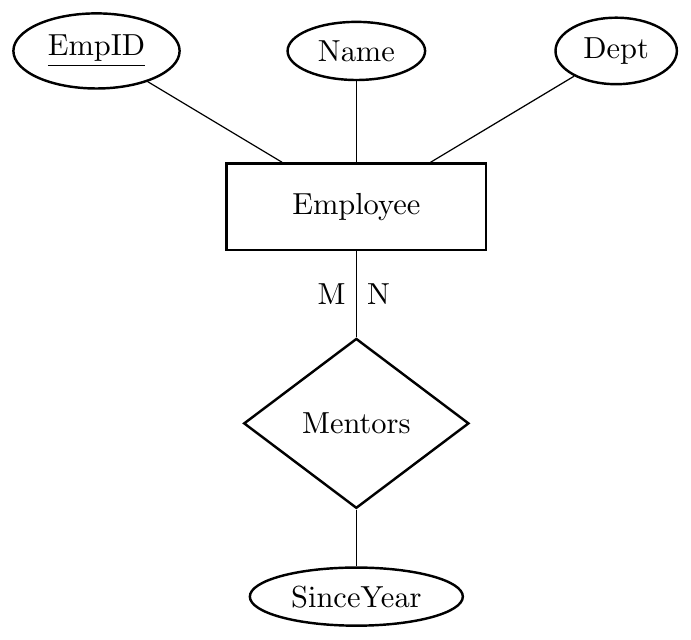
Relational Mapping
\[ Employee(\underline{EmpID}, Name, Dept) \]
\[ Mentors(\underline{MentorID, MenteeID}, SinceYear) \]
MentorID → FK to Employee(EmpID) MenteeID → FK to Employee(EmpID)
Rule used: Recursive M:N → separate relation with two FKs to same table.
A weak entity set does not have a full primary key of its own.
It depends on an identifying (owner) entity through an identifying relationship.
Weak entity has:
Owner entity key
Partial key (discriminator)
Participation of weak entity in identifying relationship is always total.
Identifying relationship is not mapped as a separate table (unless it has its own attributes).
Mapping procedure
For each weak entity set $W$ with owner entity $E$:
Create a relation for the owner entity $E$ as usual.
Create a relation for weak entity $W$.
Include all simple attributes of $W$.
Add the primary key of owner entity $E$ into $W$ as a foreign key.
Primary key of weak entity table = (Owner primary key + Weak entity partial key).
Add foreign key constraint from weak table to owner table.
Each Employee can have many Dependents. Dependent is a weak entity identified by Employee + DepName.
ER Diagram
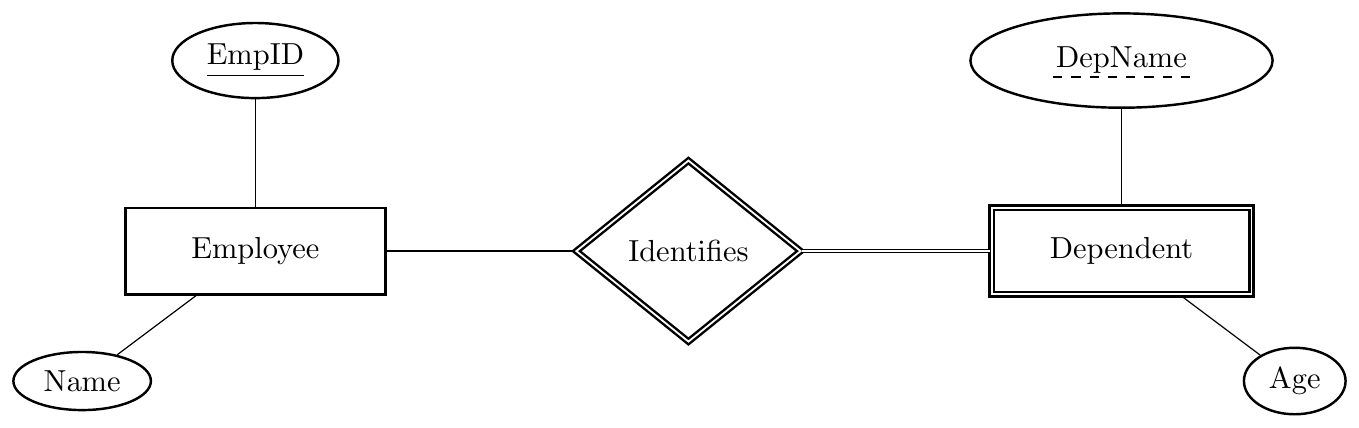
Relational Mapping
\[ Employee(\underline{EmpID}, Name) \]
\[ Dependent(\underline{EmpID, DepName}, Age) \]
EmpID → FK referencing Employee(EmpID)
Primary Key Rule: Owner PK + Partial Key
Converting n-ary Relationships
Used when a relationship involves three or more entity sets (e.g., Ternary).
Mandatory Table: Unlike 1:1 or 1:N, these always require a separate relationship table.
Attributes: All relationship attributes are stored in this new table.
Step-by-Step Reduction:
Create standard tables for all participating entity sets (e.g., $E_1, E_2, E_3$).
Create a new relationship table ($R$).
Add the Primary Keys of all participating entities into table $R$ as Foreign Keys.
Define the Primary Key of $R$ as the combination (composite) of all those Foreign Keys.

*Note: When an entity has a "1" constraint, it becomes functionally dependent on the others, so its key is excluded from the composite PK.
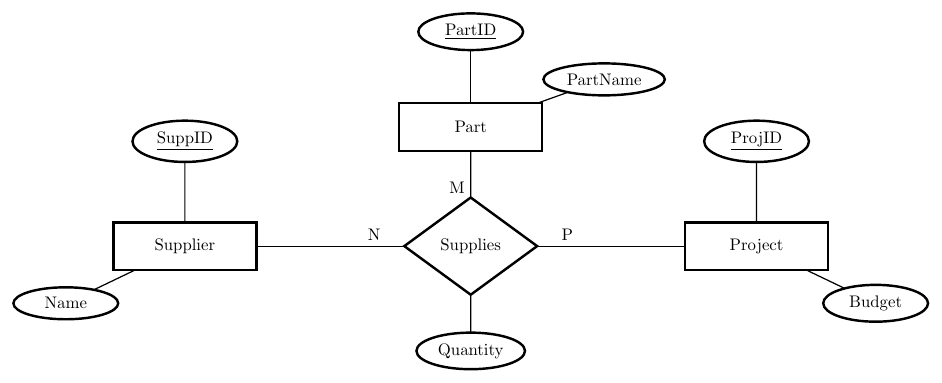
Relational Mapping (N:M:P):
Supplier(SuppID, Name)
Part(PartID, PartName)
Project(ProjID, Budget)
Supplies(SuppID, PartID, ProjID, Quantity) $\rightarrow$ All 3 are FKs
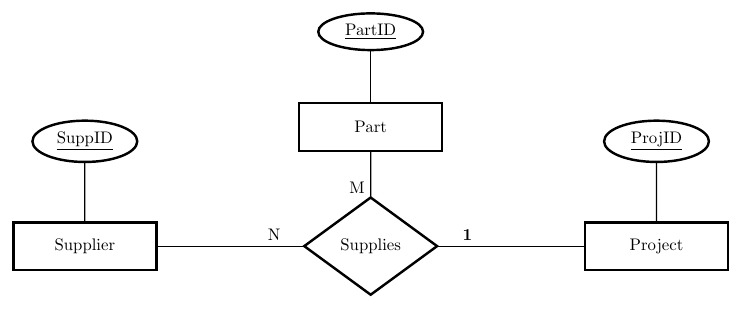
Relational Mapping (1:N:M):
Supplies(SuppID, PartID, ProjID, Quantity)
The ProjectID is a Foreign Key but not part of the Primary Key because of the "1" constraint.
Summary
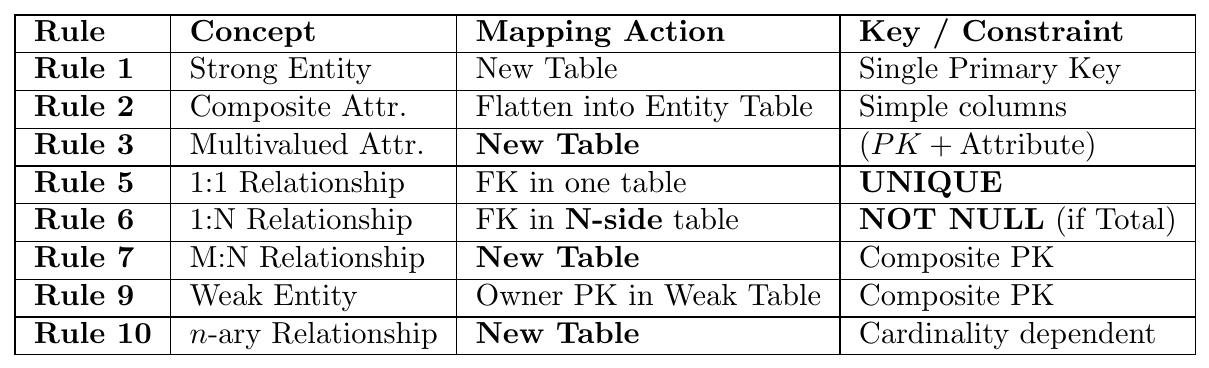
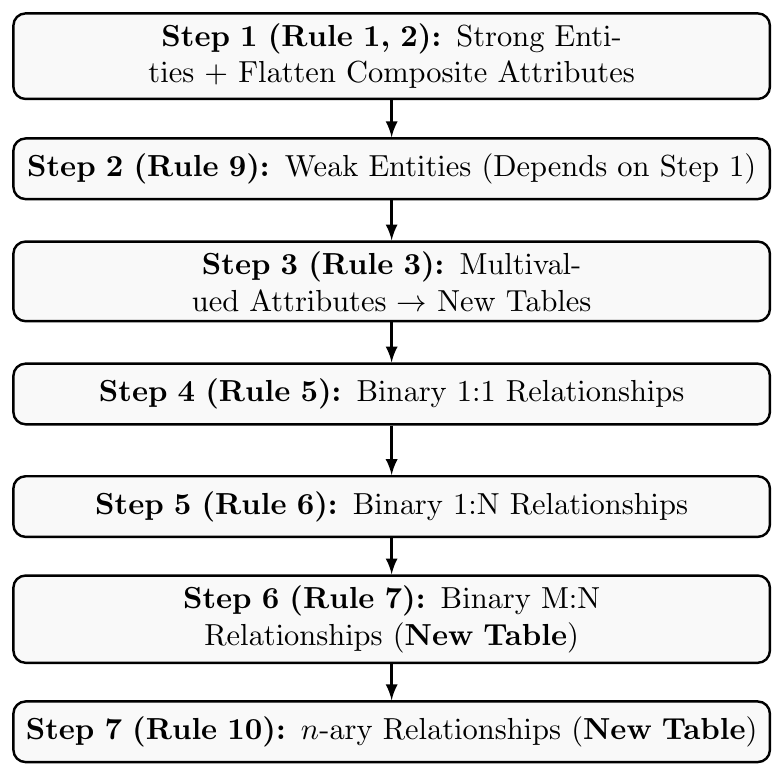
Rule 4 Note: Basic binary relationships are mapped by establishing Foreign Key (FK) links based on the specific cardinality (Rules 5, 6, 7).
Participation Impact: Only affects Rules 5 and 6 regarding FK location and NULL/NOT NULL constraints.
Solved Examples
A University stores Students and Departments.
Student has composite Name (Fname, Lname) and multivalued Phone. Each Student must belong to exactly one Department (total participation). A Department may have many Students.
ER Diagram
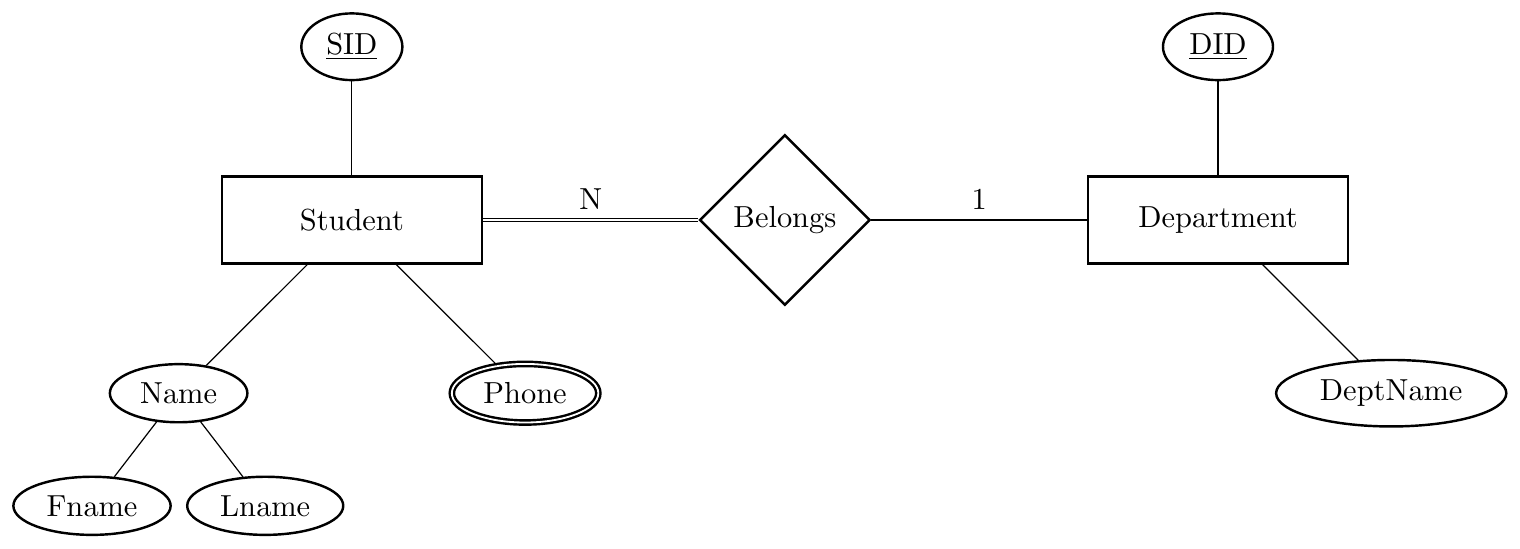
Find: Minimum number of tables
Solution
Student → strong entity with composite + multivalued Composite expands, multivalued separate table 1:N → FK on N side with NOT NULL
\[ Department(\underline{DID}, DeptName) \]
\[ Student(\underline{SID}, Fname, Lname, DID\; \text{NOT NULL}) \]
\[ StudentPhone(\underline{SID, Phone}) \]
Minimum tables = 3
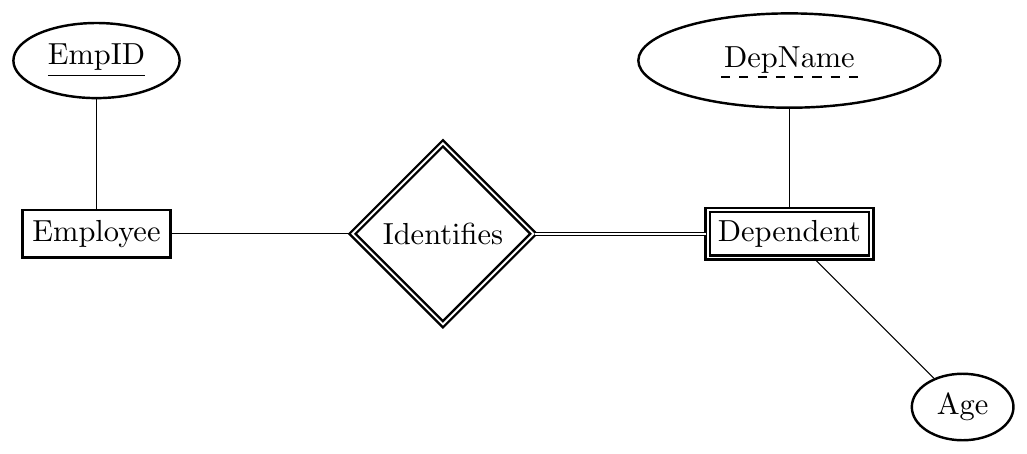
Dependent is weak, identified by Employee and DepName. Employee has total identifying relationship.
ER Diagram
Solution
Weak entity absorbs identifying relationship.
\[ Employee(\underline{EmpID}) \]
\[ Dependent(\underline{EmpID, DepName}, Age) \]
Minimum tables = 2
ER Diagram
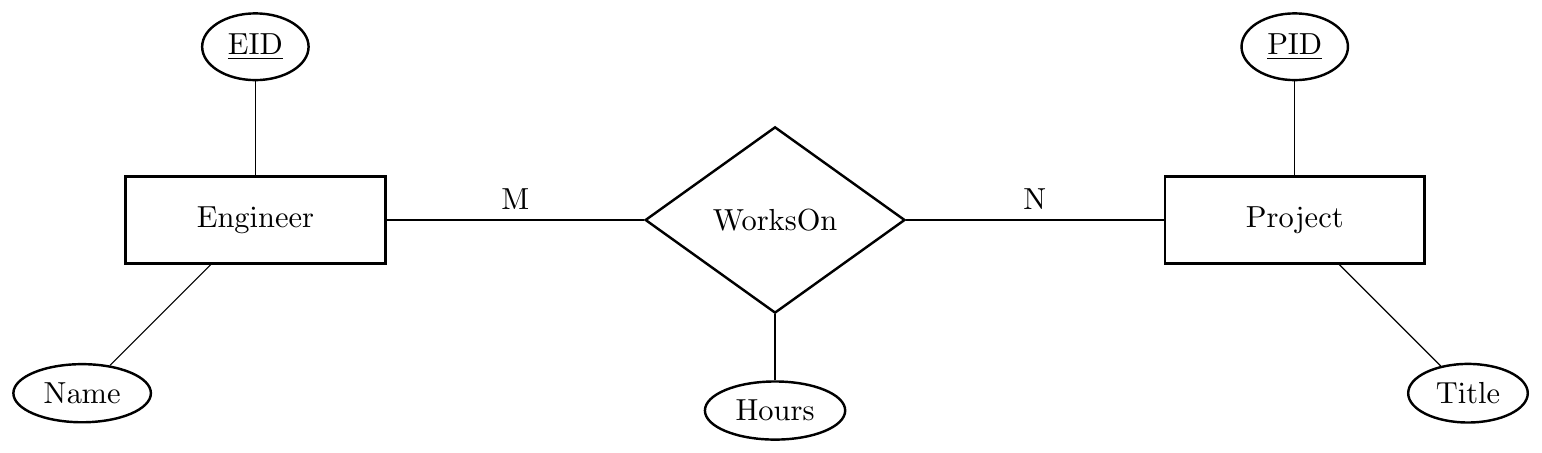
Find the minimum number of tables required after ER-to-Relational mapping.
Solution
M:N relationship with descriptive attribute $\implies$ separate relation required.
\[ Engineer(\underline{EID}, Name) \] \[ Project(\underline{PID}, Title) \] \[ WorksOn(\underline{EID, PID}, Hours) \]
Minimum tables = 3
ER Diagram
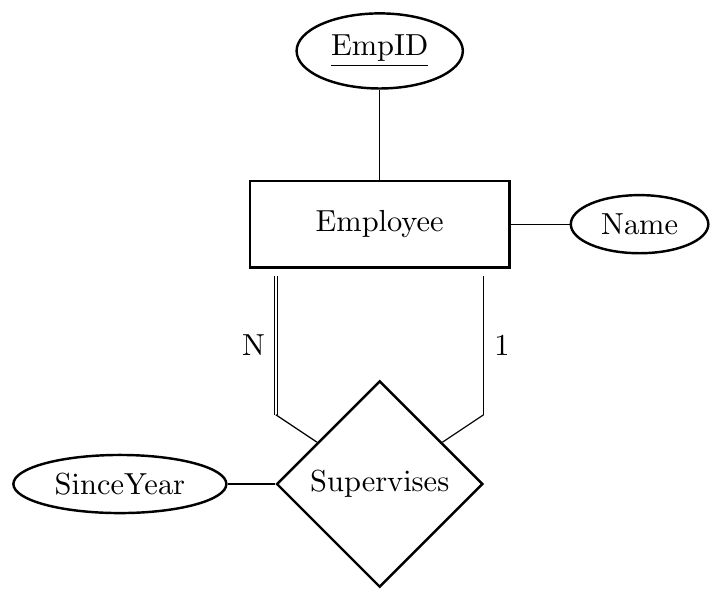
Find the minimum number of tables required after ER-to-Relational mapping.
Solution
Recursive 1:N $\implies$ no separate relation. Add self foreign key and relationship attributes to N-side.
\[ Employee(\underline{EmpID}, Name, SupervisorID, SinceYear) \]
SupervisorID → FK referencing Employee.EmpID (NOT NULL due to total participation on N-side)
Minimum tables = 1
ER Diagram
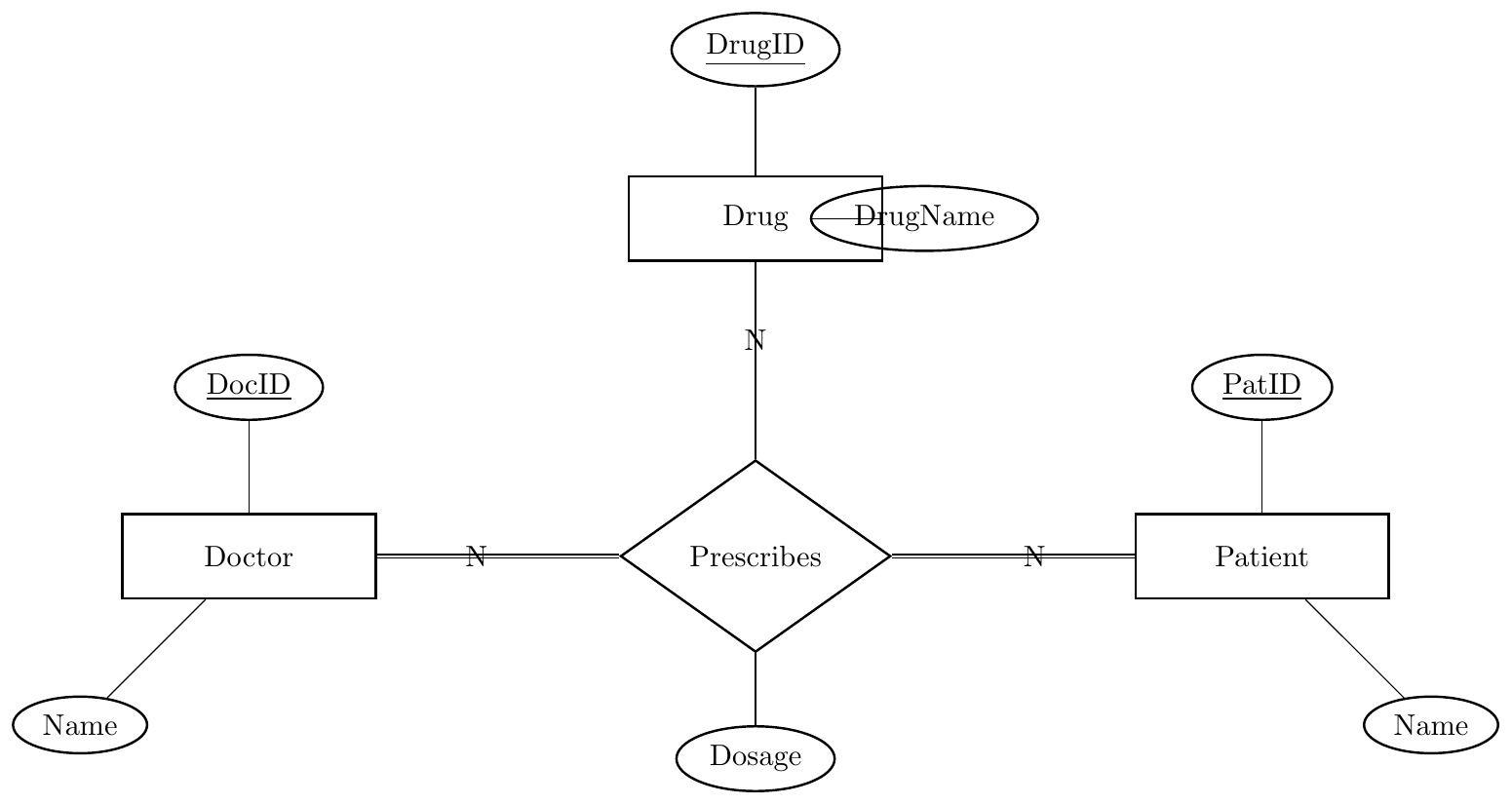
Find the minimum number of tables required after ER-to-Relational mapping.
Solution
Ternary (n-ary) relationship $\implies$ always separate relation.
\[ Doctor(\underline{DocID}, Name) \] \[ Patient(\underline{PatID}, Name) \] \[ Drug(\underline{DrugID}, DrugName) \] \[ Prescribes(\underline{DocID, PatID, DrugID}, Dosage) \]
DocID, PatID → NOT NULL FKs (total participation)
Minimum tables = 4
1. ER Diagram
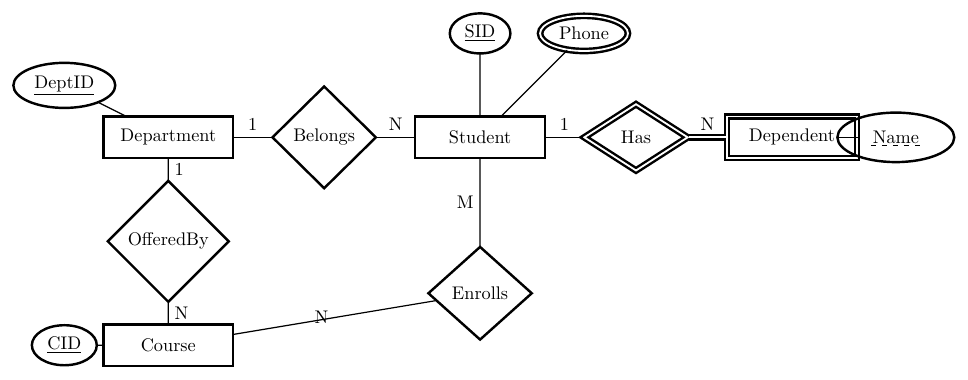
2. Step-by-Step Relational Reduction
Step 1 & 2 (Strong Entities):
$Department(\underline{DeptID}, Name)$
$Student(\underline{SID}, Name, Age)$
$Course(\underline{CID}, Title)$
Step 3 (Weak Entity - Rule 9):
$Dependent(\underline{\textbf{SID}, Name}, Relationship)$ (SID is FK)
Step 4 (Multivalued - Rule 3):
$Student\_Phone(\underline{\textbf{SID}, Phone})$ (SID is FK)
Step 5 (1:N - Rule 6):
Add $DeptID$ to $Student$ table: $Student(\dots, \textbf{DeptID})$
Add $DeptID$ to $Course$ table: $Course(\dots, \textbf{DeptID})$
Step 6 (M:N - Rule 7):
$Enrollment(\underline{\textbf{SID, CID}}, Grade)$ (Both are FKs)
1. ER Diagram
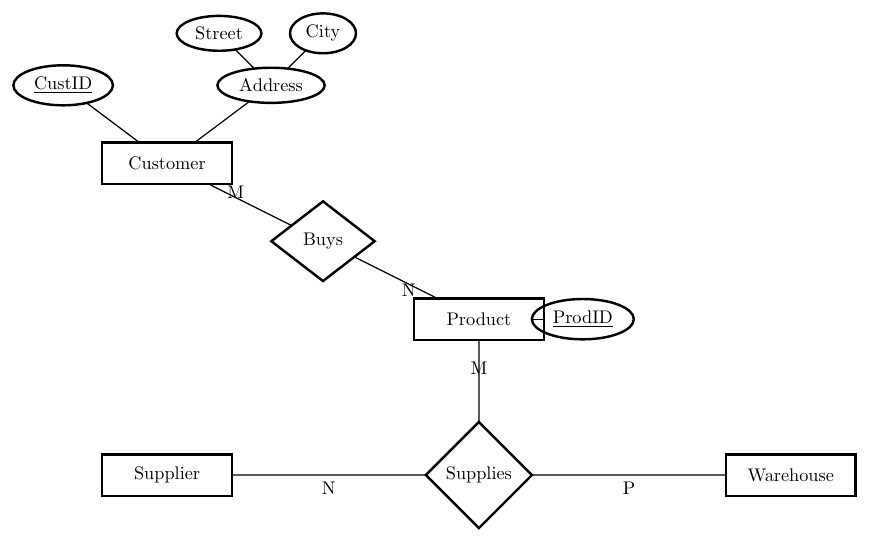
2. Relational Solution
Customer(CustID, Name, Street, City) (Rule 2: Flattened)
Product(ProdID, Description) (Rule 1: Strong)
Supplier(SuppID, SName) | Warehouse(WhID, Location)
Buys(CustID, ProdID, Date) (Rule 7: Binary M:N)
Supplies(ProdID, SuppID, WhID, Qty) (Rule 10: Ternary N:M:P)
1. ER Diagram
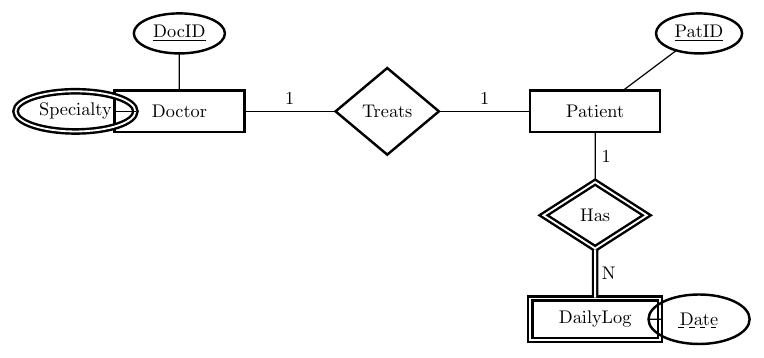
2. Relational Solution
Doctor(DocID, Name)
Doctor_Specialty(DocID, Specialty) (Rule 3: Multivalued)
Patient(PatID, Name, DocID) (Rule 5: 1:1, FK in Patient)
DailyLog(PatID, Date, Observation) (Rule 9: Weak Entity)